2019 MERCEDES-BENZ SPRINTER warning
[x] Cancel search: warningPage 167 of 354

#
Todeactivate cruise control: pushrock er
switch 3(CNCL) down.
If cruise cont rol is deactivated, it can be reactiva‐
te d as follo ws:
R rock er switch 2(SET+) or (SET-) stores the
cur rent speed and theve hicle maintains this
speed
R rock er switch 3(RES) calls up the last speed
st ored and theve hicle maintains this speed
% Ifyo u brake, deactivate ESP ®
or if ESP ®
inter‐
ve nes, cruise control is deacti vated.
When you swit choff theve hicle, the last
speed stored is cleared. Ac
tive Di stance Assist DISTRO NICFu
nction of Active Di stance Assist DISTRO NIC
Ac tive Dis tance Assi stDISTRONIC maintains the
set speed on free-flowing roads. If vehicles ahead
are de tected, the set dis tance is maintained, if
necessa ryuntil theve hicle comes toa halt. The
ve hicle accelerates or brakes depending on the
dis tance totheve hicle in front and the set speed.
Speed and dis tance are set and stored on the
st eering wheel. The speed can be set in thera nge
between 15mp h (20 km/h) and 99 mph
(160 km/h) or between 15mp h (20 km/h) and
th eve hicle's maximum speed.
Other features of Active Dis tance Assi st
DISTRONIC:
R Depending on the preselected dis tance,
DISTRONIC inter venes ei ther dynamically
(short dis tance) or tosave fuel (long dis‐
ta nce).
R Depending on theve hicle mass de tected, the
dynamics of the DISTRONIC inter vention are
re duced.
R Rapid acceleration tothestored speed is initi‐
ated if the turn signal indicator is switched on
to change totheov ertak ing lane.
Ac tive Dis tance Assi stDISTRONIC is only an aid.
The driver is responsible forth e dis tancetothe
ve hicle in front, forve hicle speed and for braking
in good time.
Sy stem limitations
The sy stem may be impaired or may not function
in thefo llowing ins tances:
R The radar sensors are af fected bysno w,rain,
fo g, heavy spr ay,gl are, direct sunlight or
greatly varying ambient light. R
The radar sensors may malfunction in parking
ga rage s or on roads with steep uphill or
downhill gradients.
R Ifth era dar sensors are dirty or co vered.
R On icy or slippery roads, braking or accelerat‐
ing can cause the drive wheels tolose trac‐
tion and theve hicle could then skid.
R Stationary objects are not de tected if these
we renot pr eviously de tected as moving.
R On bends, target vehicles may be lost or not
re cognized cor rectl y.As a result, a target
ve hicle is not used toregulate the speed
which may lead tounwa nted accele ration.
Do not use Active Dis tance Assi stDISTRONIC in
th ese situations. &
WARNING Risk of accident from acceler‐
ation or braking byActive Dis tance Assi st
DISTRONIC
Ac tive Dis tance Assi stDISTRONIC may accel‐
erate or brake in thefo llowing cases, for
ex ample:
R Ifth eve hicle pulls away using Active Dis‐
ta nce Assi stDISTRONIC.
R Ifth estored speed is called up and is con‐
siderably faster or slo werth an the cur‐
re ntly driven speed.
R IfAc tive Dis tance Assi stDISTRONIC no
longer de tects a vehicle in front or does
not react toreleva nt objects. #
Always carefully obser vethe traf fic con‐
ditions and be ready tobrake at all
times. #
Take into account the tra ffic situation
before calling up thestored speed. &
WARNING Risk of accident due toinsuf‐
fi cient deceleration byActive Dis tance
Assi stDISTRONIC
Ac tive Dis tance Assi stDISTRONIC brakes
yo ur vehicle with up to50% of the maximum
possible deceleration. If this deceleration is
not suf ficient, Active Dis tance Assi st
DISTRONIC alerts you with a visual and
acoustic warning. #
Inthese cases, adjust your speed and
ke ep a suf ficient dis tance. #
Brake theve hicle yourself and/or take
ev asive action. Driving and parking
14 3
Page 168 of 354

&
WARNING Risk of accident if de tection
function of Active Dis tance Assi st
DISTRONIC is impaired
Ac tive Dis tance Assi stDISTRONIC does not
re act or has a limited reaction:
R when driving on a dif fere nt lane or when
ch anging lanes
R topedestrians, animals, bicycles or sta‐
tionary vehicles, or unexpected obs tacles
R tocomplex traf fic conditions
R tooncoming vehicles and crossing traf fic
As a result, Active Dis tance Assi stDISTRONIC
may nei ther give warnings nor inter vene in
su ch situations. #
Always obser vethe tra ffic conditions
carefully and react according ly. Ac
tive Dis tance Assi stDISTRONIC may not de tect
nar row vehicles driving in front, e.g. mo torcyc les
and vehicles driving on a dif fere nt line.
Ope rating Active Di stance Assist DIST RONIC
Re quirements:
R The vehicle has been star ted.
R The parking brake has been released.
R ESP ®
is activated and is not inter vening.
R The transmission is in position 005B.
R The driver's and the front-passenger door are
closed.
R The seat occupancy recognition on the driv‐
er's seat has de tected that the driver has fas‐
te ned the seat belt.
R The check of thera dar sensor sy stem has
been successfully comple ted. Ac
tivating Active Di stance Assist DISTRO NIC #
Press button 1. #
Toactivate without a stored speed: press
rock er switch 3up (SET+) or down (SET-).
The cur rent speed is then sa ved and main‐
ta ined bytheve hicle.
or #
Toactivate with a stored speed: press
rock er switch 4up (RES).
% If
rock er switch 4is pressed up twice,
Ac tive Dis tance Assi stDISTRONIC is acti va‐
te d with the speed restriction displa yed in
th e instrument clus ter.
Ac cepting the displa yed speed limit when Dis‐
tance Assist DI STRO NIC is acti vated #
Press rocker switch 4up (RES).
The speed limit displa yed in the instrument
clus ter is adop ted as thestored speed. The
ve hicle adapts its speed tothat of theve hicle
in front, but only up tothestored speed.
Pulling away again with Active Di stance
Assist DIST RONIC #
Remo veyour foot from the brake pedal. #
Press rocker switch 4up (RES).
or #
Depress the accelerator pedal briefly with
fo rc e.
The functions of Active Dis tance Assi st
DISTRONIC continue tobe car ried out. 14 4
Driving and pa rking
Page 169 of 354

Deactivating
Active Di stance Assist
DISTRO NIC &
WARNING Risk of accident due toActive
Dis tance Assi stDISTRONIC still being
activated when you lea vethe driver's
seat
If yo u lea vethe driver's seat while theve hicle
is being braked byActive Dis tance Assi st
DISTRONIC only, theve hicle can rollaw ay. #
Always deactivate Active Dis tance
Assi stDISTRONIC and secure theve hi‐
cle topreve nt it from rolling away before
yo u lea vethe driver's seat. #
Press rocker switch 4down (CNCL). #
Depress the brake pedal.
Increasing or reducing the speed #
Push rocker switch 3up (SET+) or down
(SET-).
The stored speed is increased or reduced by
1 mp h (1 km/h).
or #
Press and hold rocker switch 3up (SET+)/
down (SET-).
The stored speed is increased or reduced in
1 mp h (1 km/h) increments.
or #
Push rocker switch 3beyond the pressure
point.
The stored speed is increased or reduced by
5 mp h (10 km/h).
or #
Push rocker switch 3beyond the pressure
point and hold.
The stored speed is increased or reduced in
5 mp h (10 km/h) increments.
Increasing or reducing the specified distance
from the vehicle in front #
Toincrease the specified distance: press
rock er switch 2down ( ).
#
Toreduce the specified distance: press
rock er switch 2up ( ). Information on Hill
Start Assist Hill
Start Assist holds theve hicle for a short time
when pulling away on a hill under thefo llowing
conditions:
R Vehicles with automatic transmission: the
transmission is in position 005Bor005E.
R The pa rking brake has been released.
This gives you enough time tomo veyour foot
from the brake pedal tothe accelerator pedal and
depress it before theve hicle begins toroll. &
WARNING Risk of accident and injury
due totheve hicle rolling away
Af ter a short time, Hill Start Assist no lon ger
holds theve hicle and it can rollaw ay. #
Therefore, swiftly mo veyour foot from
th e brake pedal tothe accelerator
pedal. Ne ver attem pttolea vetheve hi‐
cle if it is being held byHill Start Assist. HOLD function
HOLD function
Re
quirements:
R The seat occupancy recognition on the driv‐
er's seat has de tected that the driver has fas‐
te ned the seat belt.
The HOLD function holds theve hicle at a stand‐
st ill without requ iring youto depress the brake
pedal, e.g. when pulling away on steep slopes.
When you depress the accelera tor pedal topull
aw ay,th e braking ef fect is canceled and the
HOLD function is deactivated.
Sy stem limitations
R The incline must not be greaterth an 30%. Park
ing Assist PARKTRONIC Fu
nction of Parking Assist PARKTRONIC
Pa rking Assist PARKTRONIC is an electronic park‐
ing assi stance sy stem with ultrasound. It moni‐
to rs the area around your vehicle using six sen‐
sors on the front bumper and six sensors on the
re ar bumper. Parking Assist PARKTRONIC indi‐
cates visually and audibly the dis tance between
yo ur vehicle and an object.
Pa rking Assist PARKTRONIC is on ly an aid. It is
not a substitu teforyo ur attention tothe sur‐
ro undings. The responsibility for safe maneu ver‐ Driving and parking
14 5
Page 170 of 354
ing and parking
remains with you. Make sure that
th ere are no persons, animals or objects in the
maneuvering area while maneuvering and parking
in/exiting parking spaces.
In thest andard setting, an intermit tent wa rning
to ne sounds from a di stance of appr oximately
1. 3 ft (0.4 m) toan obs tacle. A continuous tone
sounds from a di stance of appr oximately 1.0 ft
(0.3 m). You can set thewa rning tone in the mul‐
timedia sy stem so that it will sound earlier at a
grea ter dis tance of appr oximately 3.3 ft(1 m)
(/ page 146).
Pa rking Assist PARKTRONIC displ ayinthe
mu ltimedia sy stem
If th ePa rking Assist PARKTRONIC display in the
multimedia sy stem is not active and an obs tacle
is de tected in the path of theve hicle, a pop-up
window forPa rking Assist PARKTRONIC appears
in the multimedia sy stem at speeds up toappr ox‐
imately 6 mph (10 km/h).
Sy stem limitations
Pa rking Assist PARKTRONIC does not necessarily
take into account thefo llowing obs tacles:
R Obs tacles bel owthe de tection range, e.g. per‐
sons, animals or objects.
R Obs tacles ab oveth e de tection range, e.g.
ov erhanging loads, overhangs or loading
ra mp s of truc ks.
The sensors must be free of dirt, ice and slush.
Otherwise, they may not function cor rectl y.Clean
th e sensors regular ly,ta king care not toscratch
or damage them.
Ve hicles with trailer hitch: Parking Assist
PA RKTRONIC is deactivated forth ere ar zone
when you es tablish an electrical connection
between your vehicle and a trailer.
Deactivating/activating Parking Assist
PA RKTRONIC
* NO
TERisk of an accident from objects at
close range Pa
rking Assist PARKTRONIC may not de tect
cer tain objects at close range. #
When pa rking or maneuvering theve hi‐
cle, pay particular attention toany
objects which are abo veor below the
sensors, e.g. flowe r pots or dr awbars.
The vehicle or other objects could other‐
wise be damaged. Multimedia sy
stem:
4 © 5
Settings 5
Quick Access #
Select PARKTRONIC On .
The function is activated or deactivated
depending on the pr evious setting.
% Pa
rking Assist PARKTRONIC is automatical ly
activated when starting theve hicle.
Setting thewa rning tones of Parking Assist
PA RKTRONIC
Multimedia sy stem:
4 Settings 5
Assistance
5 Camera & Parking 5
Set Warning Tones
Ad justing the volume of thewa rning tones #
Select Warning Tone Volume. #
Adjust theva lue.
Ad justing the pitch of the warning tones #
Select Warning Tone Pitch.
Ad just theva lue.
Specifying thest arting point for the warning
to nes
Yo u can specify whe ther thePa rking Assist
PA RKTRONIC warning tones should commence
when theve hicle is fur ther aw ay from an obs ta‐
cle. #
Select Warn Early All Around. #
Activate or deacti vate the function.
Ac tivating or deactivating audio fadeout
Yo u can specify whe ther thevo lume of a media
source in the multimedia sy stem is tobe reduced
when Parking Assist PARKTRONIC gives a warn‐
ing tone. #
Select Audio Fadeout During Warning Tones. #
Activate or deacti vate the function. 14 6
Driving and pa rking
Page 172 of 354
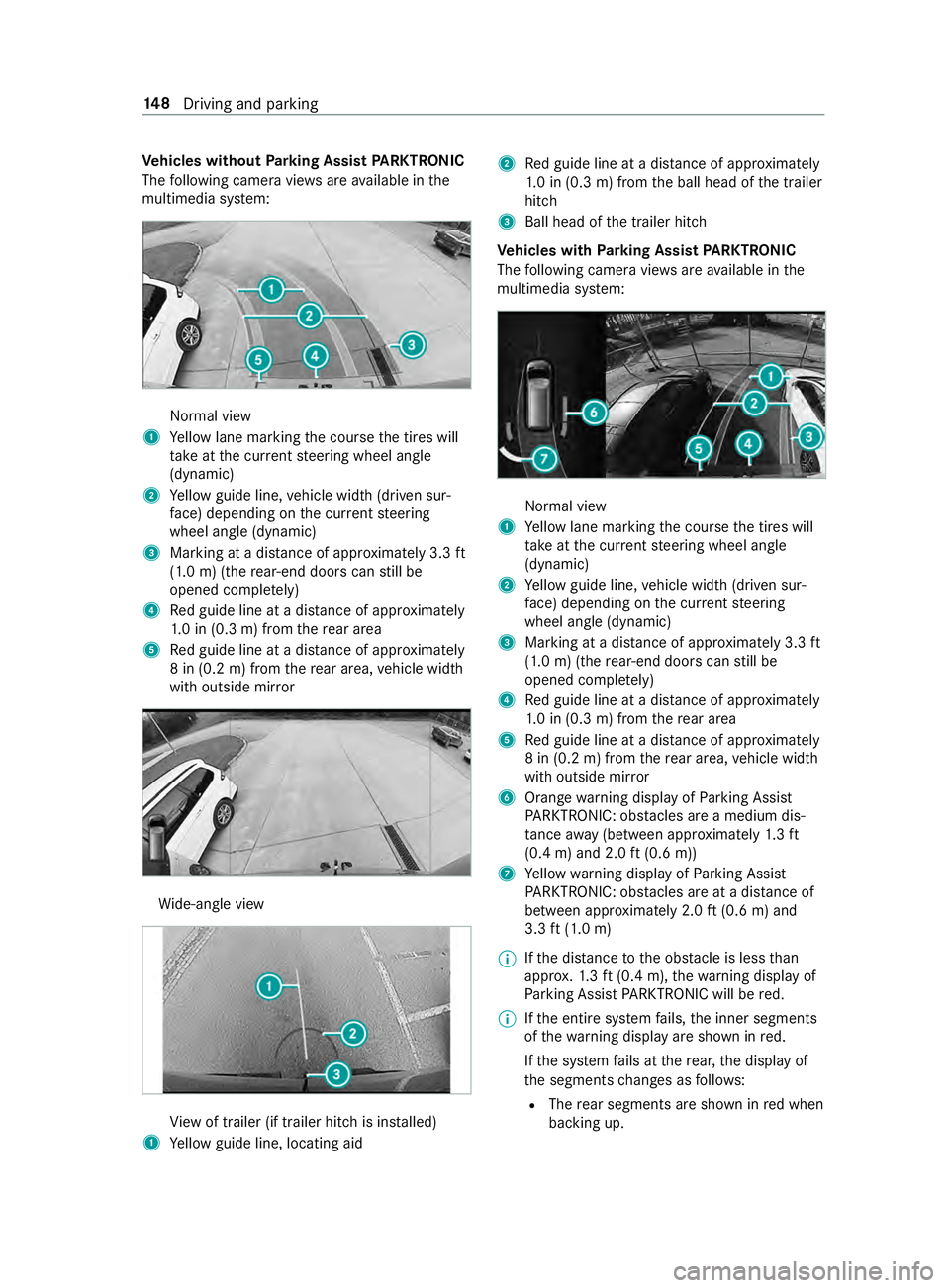
Ve
hicles without Parking Assist PARKTRONIC
The following camera vie wsare available in the
multimedia sy stem: Normal view
1 Yellow lane marking the course the tires will
ta ke atthe cur rent steering wheel angle
(dynamic)
2 Yellow guide line, vehicle width (driven sur‐
fa ce) depending on the cur rent steering
wheel angle (dynamic)
3 Marking at a dis tance of appr oximately 3.3 ft
(1.0 m) (the rear-end doors can still be
opened comple tely)
4 Red guide line at a dis tance of appr oximately
1. 0 in (0.3 m) from there ar area
5 Red guide line at a dis tance of appr oximately
8 in (0.2 m) from there ar area, vehicle width
with outside mir ror Wi
de-angle view Vi
ew of trailer (if trailer hitch is ins talled)
1 Yellow guide line, locating aid 2
Red guide line at a dis tance of appr oximately
1. 0 in (0.3 m) from the ball head of the trailer
hitch
3 Ball head of the trailer hitch
Ve hicles with Parking Assist PARKTRONIC
The following camera vie wsare available in the
multimedia sy stem: Normal view
1 Yellow lane marking the course the tires will
ta ke atthe cur rent steering wheel angle
(dynamic)
2 Yellow guide line, vehicle width (driven sur‐
fa ce) depending on the cur rent steering
wheel angle (dynamic)
3 Marking at a dis tance of appr oximately 3.3 ft
(1.0 m) (the rear-end doors can still be
opened comple tely)
4 Red guide line at a dis tance of appr oximately
1. 0 in (0.3 m) from there ar area
5 Red guide line at a dis tance of appr oximately
8 in (0.2 m) from there ar area, vehicle width
with outside mir ror
6 Orange warning display of Parking Assist
PA RKTRONIC: obstacles are a medium dis‐
ta nce away (between appr oximately 1.3 ft
(0.4 m) and 2.0 ft(0.6 m))
7 Yellow warning display of Parking Assist
PA RKTRONIC: obstacles are at a dis tance of
between appr oximately 2.0 ft(0.6 m) and
3.3 ft(1.0 m)
% If
th e dis tance tothe obs tacle is less than
appr ox.1. 3 ft (0.4 m), thewa rning display of
Pa rking Assist PARKTRONIC will be red.
% If
th e entire sy stem fails, the inner segments
of thewa rning display are shown in red.
If th e sy stem fails at there ar, the display of
th e segments changes as follo ws:
R The rear segments are shown in red when
backing up. 14 8
Driving and pa rking
Page 174 of 354

In trailer mode,
the guide lines are shown at
th e le vel of the trailer hitch.
Vi ew of trailer (if trailer hit chis installed) Vi
ew of trailer (if trailer hitch is ins talled)
1 Yellow guide line, locating aid
2 Red guide line at a dis tance of appr oximately
1. 0 in (0.3 m) from the ball head of the trailer
hitch
3 Ball head of the trailer hitch
Side view of the mir ror came ras
The sides of theve hicle can be seen in this vie w. 1
Lane indicating thero ute theve hicle will take
with thesteering wheel in its cur rent position
2 Yellow warning display of Parking Assist
PA RKTRONIC: obstacles at a dis tance of
appr oximately 3.3 ft(1.0 m) or less
3 Your vehicle from abo ve
4 Marker of the wheel contact points
5 Guide line of extern al vehicle dimensions
with outside mir rors folded out
If th e dis tance tothe object lessens, the color of
wa rning display 2changes.
Sy stem failure
If th ere is no operational readiness, thefo llowing
message appears in the multimedia sy stem: Sy
stem limitations
The 360° Camera will not function or will only
partially function in thefo llowing situations:
R The front doors are open.
R The side mir rors are folded in.
R There is heavy rain, snow or fog.
R The ambient light is poor, e.g. at night.
R The area is lit byfluorescent light (the displ ay
may flic ke r).
R Ifth ere is a sudden change in temp erature,
e.g. when driving into a heated garage in win‐
te r.
R The ambient temp erature is very high.
R The camera lens is obstructed, dirty or fogged
up.
R Cameras, or vehicle components in which the
came ras are ins talled, are damaged. In this
eve nt, ha vethe cameras, their positions and
th eir setting checked at a qualified specialist
wo rkshop.
Do not use the 360° Camera under such circum‐
st ances. You could otherwise injure others or col‐
lide with objects when parking theve hicle.
On vehicles with height-adjus table suspension or
if th eve hicle is car rying a heavy load, leaving the
st andard height can result in inaccuracies in the
guide lines and in the display of thege nerated
ima ges, depending on tech nical conditions.
The field of vision and other functions of the cam‐
era sy stem may be restricted due toadditional
attachments on theve hicle (e.g. loading tailgate).
% The contrast of
the display may be impaired
by abrupt direct sunlight or by other light
sources, e.g. when driving out of a garage . In
th is case, pay particular attention.
% Ha
ve the display repaired or replaced if, for
ex ample, pixel er rors considerably restrict its
use. 15 0
Driving and pa rking
Page 176 of 354
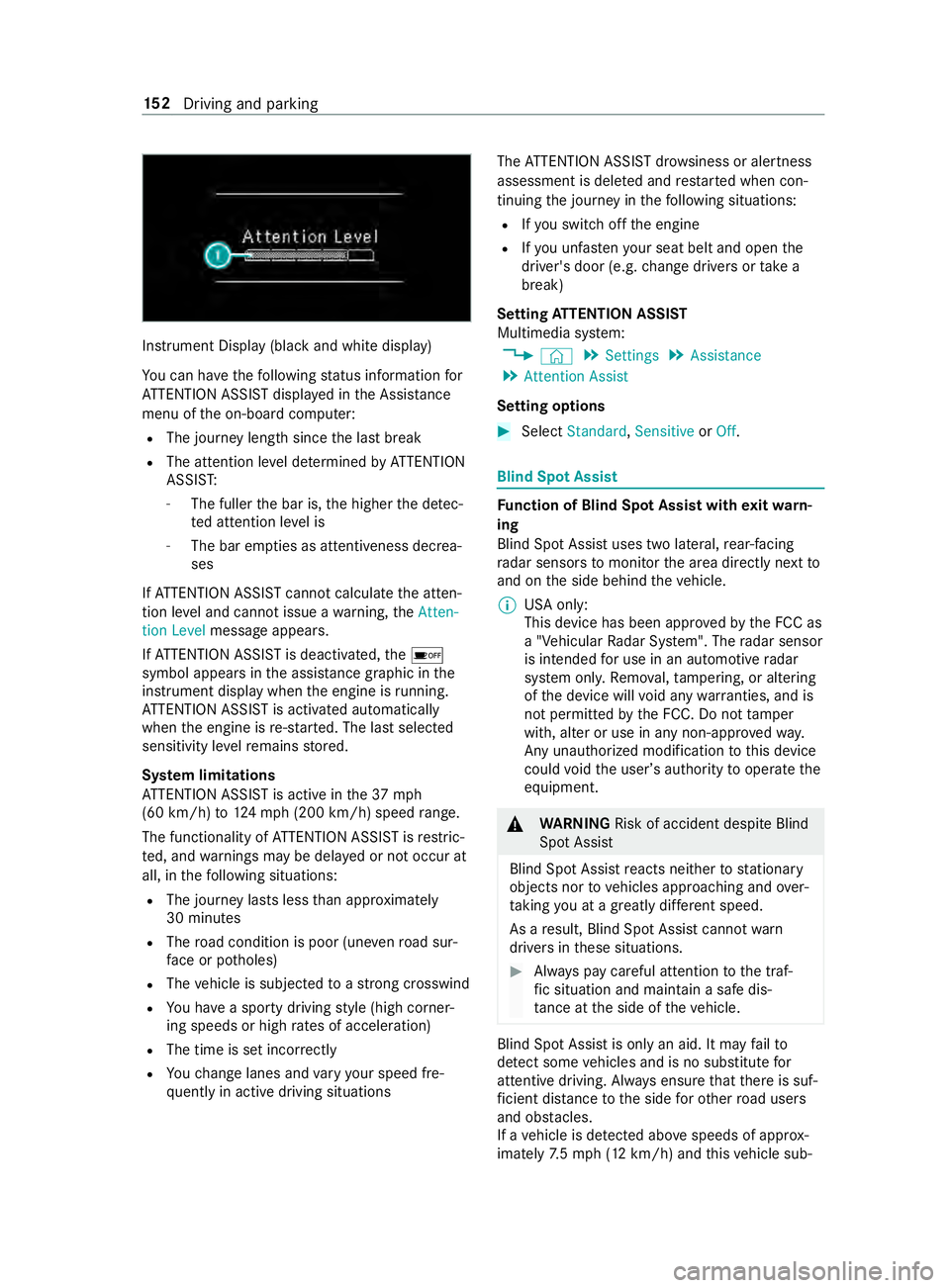
Instrument Display (black
and white display)
Yo u can ha vethefo llowing status information for
AT TENTION ASSIST displa yed in the Assis tance
menu of the on-board computer:
R The journey length since the last break
R The attention le vel de term ined byATTENTION
ASSIS T:
- The fuller the bar is, the higher the de tec‐
te d attention le vel is
- The bar em pties as attentiveness decrea‐
ses
If AT TENTION ASSIST cannot calculatethe atten‐
tion le vel and cannot issue a warning, theAtten-
tion Level message appears.
If AT TENTION ASSIST is deactivated, the00D7
symbol appears in the assis tance graphic in the
instrument display when the engine is running.
AT TENTION ASSIST is activated automatically
when the engine is re-sta rted. The last selected
sensitivity le velre mains stored.
Sy stem limitations
AT TENTION ASSIST is active in the37 mph
(60 km/h) to124mp h (2 00 km/h) speed range.
The functionality of ATTENTION ASSIST is restric‐
te d, and warnings may be dela yed or not occur at
all, in thefo llowing situations:
R The journey lasts less than appr oximately
30 minutes
R The road condition is poor (une venro ad sur‐
fa ce or po tholes)
R The vehicle is subjected toastro ng crosswind
R You ha vea sporty driving style (high corner‐
ing speeds or high rates of acceleration)
R The time is set incor rectly
R Youch ange lanes and vary your speed fre‐
qu ently in active driving situations The
ATTENTION ASSIST dr owsiness or alertness
assessment is dele ted and restar ted when con‐
tinuing the journey in thefo llowing situations:
R Ifyo u swit choff the engine
R Ifyo u unfas tenyo ur seat belt and open the
driver's door (e.g. change drivers or take a
break)
Setting ATTENTION ASSI ST
Multimedia sy stem:
4 © 5
Settings 5
Assistance
5 Attention Assist
Setting options #
Select Standard, SensitiveorOff. Blind Spot Assist
Fu
nction of Blind Spot Assist with exitwa rn‐
ing
Blind Spot Assist uses two lateral, rear-facing
ra dar sensors tomonitor the area directly next to
and on the side behind theve hicle.
% USA only:
This device has been appr
ovedby the FCC as
a "Vehicular Radar Sy stem". The radar sensor
is intended for use in an automotive radar
sy stem onl y.Re mo val,ta mp ering, or altering
of the device will void any warranties, and is
not permit tedby the FCC. Do not tamp er
with, alter or use in any non-appr ovedwa y.
Any unauthorized modification tothis device
could void the user ’sauthority tooperate the
equipment. &
WARNING Risk of accident despite Blind
Spot Assi st
Blind Spot Assist reacts nei ther tostationary
objects nor tovehicles approaching and over‐
ta king you at a greatly di fferent speed.
As a result, Blind Spot Assist cannot warn
drivers in these situations. #
Always pay careful attention tothe traf‐
fi c situation and maintain a safe dis‐
ta nce at the side of theve hicle. Blind Spot Assist is only an aid. It may
failto
de tect some vehicles and is no substitute for
attentive driving. Alw ays ensure that there is suf‐
fi cient dis tance tothe side forot her road users
and obs tacles.
If a vehicle is de tected ab ove speeds of appr ox‐
imately 7.5 mp h (12 km/h) and this vehicle sub‐ 15 2
Driving and pa rking
Page 177 of 354

sequently enters
the monitoring range di rectly
next toyour vehicle, thewa rning lamp in the out‐
side mir ror lights up red.
% When a trailer is connected,
thera dar sen‐
sor's field of vision may be impaired, thereby
making limited monitoring possible. Alw ays
pay careful attention tothe tra ffic situation
and maintain a safe dis tance at the side of
th eve hicle.
If a vehicle is de tected close to yourvehicle in the
lateral monitoring range and you swit chon the
turn signal indica tor in the cor responding direc‐
tion, a warning tone sounds. The redwa rning
lamp in the outside mir rorflashes. If the turn sig‐
nal indicator remains switched on, all other
de tected vehicles are indicated only bytheflash‐
ing of there dwa rning lamp.
If yo uove rtake a vehicle quickl y,no warning is
given.
Exit warning
The exitwa rning is an additional function of Blind
Spot Assist and warnsve hicle occupants when
leaving theve hicle about any approaching vehi‐
cles. &
WARNING Risk of accident despite exit
wa rning
The exitwa rning reacts nei ther tostationary
objects nor tovehicles approaching you at a
great lydif fere nt speed.
As a result, theex itwa rning cannot warndriv‐
ers in these situations. #
Always pay particular attention tothe
traf fic situation when opening the doors
and make sure there is suf ficient clear‐
ance. %
An
exitwa rning is not issued for sliding doors
and rear-end doors. Overview
When theve hicle is
st ationar y,an object
is de tected from
behind in the monitor‐
ing range. Display in outside mir‐
ror
When theve hicle is
st ationar y,a door on
th ere leva nt side of
th eve hicle is opened.
An object which is
close to yourvehicle
is de tected in the
monitoring range. Vi
sual and audible
wa rning %
This additional function is only
available when
Blind Spot Assist is activated and up to a
maximum of thre e minutes af terth e ignition
has been switched off. The end of theav aila‐
bility of theex itwa rning function is indicated
by a series of flashes in the outside mir ror.
The exitwa rning function is only an aid and is no
substitute forth e attentiveness of theve hicle
occupants. Responsibility alw ays lies with the
ve hicle occupants when opening doors and leav‐
ing theve hicle.
Sy stem limitations
Blind Spot Assist and theex itwa rning function
may be limited in thefo llowing situations:
R ifth ere is dirt on the sensors or the sensors
are obscured
R ifth ere is poor visibility, e.g. due tofog, heavy
ra in, snow or spr ay
R if nar rowvehicles are within the monitoring
ra nge, e.g. bicycles
% St
ationary or slowly moving objects are not
displa yed.
Wa rnings may be issued in er ror when driving
close tocrash ba rriers or similar solid lane bor‐
ders. Warnings may be inter rupte d when driving
alongside long vehicles, forex ample truc ks,fo r a
prolonged time.
Blind Spot Assist is not operational when reve rse
ge ar is engaged.
The exitwa rning function may be limited in the
fo llowing situations:
R when the sensor is bloc kedby adjacent vehi‐
cles in nar rowparking spaces
R when people are approaching Driving and parking
15 3