2019 MERCEDES-BENZ S CLASS ESP
[x] Cancel search: ESPPage 228 of 578

Activating/deactivating audiofadeoutYou can specify whetherthevolume of a mediasource inthe multimedia system istobereduced whenParking AssistPARKTRONIC givesan audiblewarning.
#SelectAudio Fadeout During Warning Tones.
#Activatesor deactivateSthe function.
Reversing camera
Function oftherear view camera
Whenyou engagereversegear,the image fromrear view camera1is shown inthe multimediasystem. Dynamic guide lines showthe paththevehicle willtakewiththesteering wheel in itscurrent position. This helpsyoutoorientyour‐self andtoavoid obstacles when backing up.
Therear view camera is onlyan aid. It is not asubstituteforyour attentiontothe surroundings.Theresponsibilityfor safe maneuvering andparkingremains withyou. Make surethatthereare no persons, animals or objectsetc., inthemaneuvering area while maneuvering and park‐ing.
You can select fromthefollowing views:
RNormal view
RWide-angle view
The area behindthevehicle is displayed as amirror image, as inthe insiderearview mirror.
226Driving and parking
Page 230 of 578

System limitations
Therear view camera will not function or willonly partially function inthefollowing situations:
RThe trunk lid is open.
RThere is heavyrain, snow orfog.
RThe ambient light conditions are poor, e.g. atnight.
RThe camera lens is obstructed, dirty orfog‐ged up. Observethe notes on cleaningtherear view camera (→page 409).
RThe camera orrear ofyourvehicle is dam‐aged. Inthis case, havethe camera and itsposition and settingchecked at aqualifiedspecialistworkshop.
Thefield of vision andother functions oftherearview camera may berestricted duetoadditionalaccessories ontherear ofthevehicle (e.g.license plate bracket or bicyclerack).
%The contrast ofthe display may be impairedbydirect sunlight orby other light sources,e.g. when driving out of agarage. Inthiscase, pay particular attention.
%Havethe displayrepaired orreplaced if,forexample, pixel errorsconsiderablyrestrict itsuse.
Observethe notes on cleaningtherear viewcamera (→page 409).
360° camera
Function ofthe 360° CameraThe 360° Camera is a systemthat consists offour cameras. The cameras coverthe immediatevehicle surroundings. The system assistsyou,e.g. when parking or atexits withreduced visibil‐ity.
The 360° Camera is only an aid. It is not a sub‐stituteforyour attentiontothe surroundings.Theresponsibilityfor safe maneuvering andparkingremains withyou. Make surethatthereare no persons, animals or objectsetc., inthemaneuvering area while maneuvering and park‐ing.
The systemevaluates images fromthefollowingcameras:
RRear view camera
RFront camera
RTwo side cameras inthe outside mirrors
Views ofthe 360° CameraYou can select from different views:
1Wide-angle view,front
2Top view with image fromthe front camera
3Top view with images fromthe side camerasinthe outside mirrors
4Wide-angle view,rear
5Top view with image fromtherear view cam‐era
6Top view with trailer view (if trailer hitch isinstalled)
228Driving and parking
Page 236 of 578
tem display: selectthe corresponding trans‐mission position.Thevehicle drives intothe selected parkingspace.
On completion ofthe parking procedure,theParking Assist Finished, Take Control of Vehicledisplay message appears.Further maneuveringmaystill be necessary.
#After completion ofthe parking procedure,safeguardthevehicle againstrollingaway.Whenrequiredbylegalrequirements or localconditions: turnthe wheelstowardsthe curb.
%You canstopthevehicle andchangethetransmission position duringthe parking pro‐cedure. The systemthen calculates a newvehicle path. The parking procedure canthen be continued. If no newvehicle path isavailable,the transmission position will bechanged again. Ifthevehicle has notyetreachedthe parking space,the parking pro‐cedure will be canceled, should agear bechanged.
Exiting a parking space withActiveParkingAssist
RequirementsYou can onlyexit a parking space withActiveParking Assist ifyou havepreviously parkedthevehicle withActiveParking Assist.
Please notethatyou areresponsibleforthevehi‐cle and surroundings duringthe entire parkingprocedure.
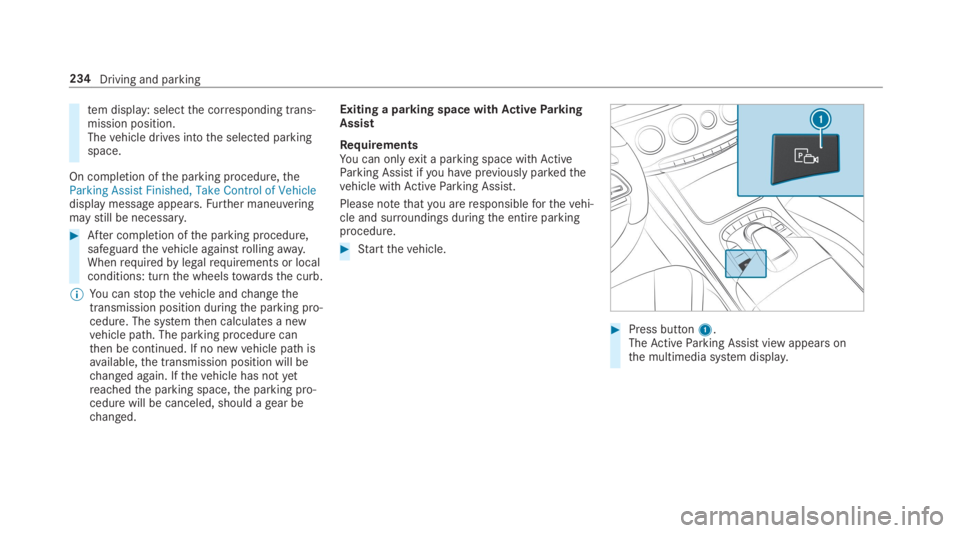
#Startthevehicle.
#Press button1.TheActiveParking Assist view appears onthe multimedia system display.
234Driving and parking
Page 237 of 578
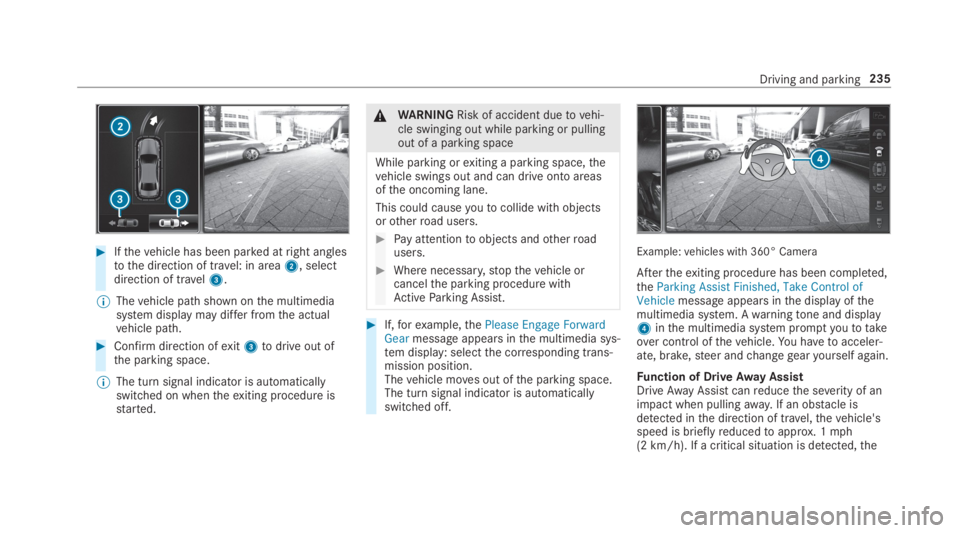
#Ifthevehicle has been parked atright anglestothe direction of travel: in area2, selectdirection of travel3.
%Thevehicle path shown onthe multimediasystem display may differ fromthe actualvehicle path.
#Confirm direction ofexit3todrive out ofthe parking space.
%The turn signal indicator is automaticallyswitched on whentheexiting procedure isstarted.
&WARNINGRisk of accident duetovehi‐cle swinging out while parking or pullingout of a parking space
While parking orexiting a parking space,thevehicle swings out and can drive onto areasofthe oncoming lane.
This could causeyoutocollide withobjectsorotherroad users.
#Pay attentiontoobjects andotherroadusers.
#Where necessary,stopthevehicle orcancelthe parking procedure withActiveParking Assist.
#If,forexample,thePlease Engage ForwardGearmessage appears inthe multimedia sys‐tem display: selectthe corresponding trans‐mission position.Thevehicle moves out ofthe parking space.The turn signal indicator is automaticallyswitched off.
Example:vehicles with 360° Camera
Aftertheexiting procedure has been completed,theParking Assist Finished, Take Control ofVehiclemessage appears inthe display ofthemultimedia system. Awarningtone and display4inthe multimedia system promptyoutotakeover control ofthevehicle.You havetoacceler‐ate, brake,steer andchangegearyourself again.
Function of DriveAway AssistDriveAwayAssistcanreducethe severity of animpact when pullingaway. If an obstacle isdetected inthe direction of travel,thevehicle'sspeed is brieflyreducedtoapprox. 1mph(2 km/h). If a critical situation is detected,the
Driving and parking235
Page 241 of 578

Traffic Sign Assist
Function ofTraffic Sign Assist
SinceTraffic Sign Assistalso usesthe datastored inthe navigation system, it can updatethe display inthefollowing situations withoutdetecting traffic signs:
RWhenthevehiclechangesroads, e.g. a free‐way entry orexitroad.
RWhen a village or city boundary which isstored inthe digital map is passed.
The camera also detects traffic signs with arestriction indicatedbyan additional sign (e.g. inwet conditions).
Traffic Sign Assistis only an aid. The driver isresponsibleforkeeping a safe distancetothevehicle in front,forvehicle speed andfor brakingin good time. The maximum permissible speedalso depends onfactors suchastheroad sur‐face and traffic conditions.
Warning whenthe maximum permissiblespeed isexceededThe system canwarnyou ifyou unintentionallyexceedthe maximum permissible speed.Todothis,you can specify inthe multimedia systembyhow muchthe maximum permissible speedcan beexceeded before awarning is issued.Yo ucan specify whetherthewarning istobe just avisualwarning or an acoustic one aswell.
Display inthe Instrument DisplayTraffic Sign Assistis notavailable in all coun‐tries. If it is unavailable, display1is shown inthe speedometer.
System limitations
The system may be impaired or may not functioninthefollowing situations:
RIfthere is poor visibility, e.g. duetoinsuffi‐cient illumination oftheroad, ifthere arehighlyvariable shade conditions or inrain,snow,fog or heavy spray.
RIfthere isglare, e.g. from oncoming traffic,direct sunlight orreflections.
RIfthe windshield inthe area ofthe multifunc‐tion camera is dirty, or ifthe camera isfog‐ged up, damaged or covered.
RIfthe traffic signs are hardtodetect, e.g. duetodirt or snow,or becausetheyare coveredor duetoinsufficient lighting.
RIfthe information inthe navigation system'sdigital map is incorrect or out-of-date.
RIfthe signs are ambiguous, e.g. traffic signson construction sites or in adjacent lanes.
RIfyou turn sharply when traffic signs are out‐sidethe camera'sfield of vision.
Driving and parking239
Page 243 of 578

camera1helps detect pedestrians and ani‐mals.
NightViewAssistis only an aid. The driver isresponsibleforthe distancetothevehicle infront,forvehicle speed,for braking in good timeandforstaying in lane.
%As infrared light is not visibletothe humaneye, NightViewAssistcanremain activatedwhenthere is oncoming traffic.The infrared headlamps switch on inthedark from speeds of approximately 5mph(10 km/h). This meansthat, whilestation‐ary,you do not havethe full visualrange andcannotcheck whether NightViewAssistisworking.
System limitationsNightViewAssistcannot displayobjects directlyin front of or directly nexttothevehicle. It maybethe casethat objects are highlighted aswellas pedestrians or animals.
The system may be impaired or may not functioninthefollowing instances:
Rin poor visibility, e.g. snow,rain,fog or heavyspray.
Rthe windshield is dirty inthe vicinity ofthecamera.
Rthe camera isfogged up, damaged or cov‐ered.
Rthe infrared camera intheradiator grill isdamaged, dirty,fogged up or covered.
Ron bends, on hilltops or in dips.
Rat high ambienttemperatures.
Function of pedestrian and animal detectionof NightViewAssistNightViewAssistcan detect pedestrians usingtypicalcharacteristics, e.g.the body contoursand posture of a personstanding upright.
Largeanimals, e.g. deer, cowsor horses, canalso be detected. Smaller animals, e.g. dogs orcats, are not detected.
Pedestrian and animal detection is automaticallyswitched on whenthefollowingrequirementsare fulfilled:
RNightViewAssistis activated.
RThe driving speed is at least 5mph(10 km/h).
RIt is dark.
1NightViewAssistdisplay
2Standby symbolfor active pedestrian detec‐tion
3Highlighting
4Pedestrian detected
If pedestrian detection is active,standby symbol2appears. There is no separate symbolfor ani‐mals. Detected pedestrians or animals are high‐lightedbya color frame.
Driving and parking241
Page 245 of 578

Display inthe assistancegraphic
1Spotlight function switched on but not oper‐ating
2Spotlight function switched on and operating
The pedestrian symbol inthe assistance graphicindicatesthestatus ofthe spotlight function. Ifthe pedestrian symbol is displayed dark1,thefunction is switched on. Ifthe symbol is dis‐
played bright2,the conditionsforthe Spotlightfunction are also fulfilled.
System limitationsThe spotlight function does notflash at animals.
The spotlight function is not active or is activeonlytoa limitedextent if:
RYou are driving in city traffic.
RThe pedestrians are located inthe area of anoncomingvehicle or avehicle in front.
Activating/deactivating the spotlight func‐tion
Requirements:RPedestrian detection is active (→page241).
RTheroadwayis not lit.
RThe speed is at least37mph (60 km/h).
RAdaptive Highbeam Assist Plus is switchedon.
If alltherequirements are fulfilled,the headlampflashesfour shortpulses at a pedestrian detec‐ted on or neartotheroadway.
Multimedia system:
,Vehicle.÷.Light Set-
tings.Spotlight
#Activatesor deactivateSthe function.
Blind Spot Assist andActive Blind SpotAssistwithexitwarning
Function of Blind Spot Assist andActiveBlind Spot AssistwithexitwarningBlind Spot Assist andActive Blind Spot Assistuse two lateral,rear-facingradar sensorstomonitorthe area upto130ft(40 m) behindyourvehicle and10ft(3 m) directly nexttoyourvehi‐cle.
If avehicle is detected at speeds above approx‐imately 8mph (12 km/h) andthisvehicle subse‐quentlyentersthe monitoringrange directly nextto yourvehicle,thewarning lamp inthe outsidemirror lights upred.
If avehicle is detected closetothe side ofyourvehicle,theredwarning lamp inthe outside mir‐rorflashes. Ifyou switchonthe turn signal indi‐cator inthe corresponding direction, awarning
Driving and parking243
Page 246 of 578
tone sounds once. Ifthe turn signal indicatorremains switched on, allother detectedvehiclesare indicated onlybytheflashing oftheredwarning lamp.
Ifyouovertake avehiclequickly,nowarning isgiven.
&WARNINGRisk of accident despiteBlindSpot Assist
Blind Spot Assistdoes notreacttovehiclesapproaching andovertakingyou at agreatlydifferent speed.
As aresult, Blind Spot Assist cannotwarndrivers inthis situation.
#Always pay careful attentiontothe traf‐fic situation and maintain a safe dis‐tance atthe side ofthevehicle.
Blind Spot Assist andActive Blind Spot Assistare onlyaids. They mayfailtodetect somevehi‐cles and are no substitutefor attentive driving.Always ensurethatthere is sufficient distancetothe sideforotherroad users and obstacles.
ExitwarningTheexitwarning is an additional function ofBlind Spot Assist and canwarnvehicle occu‐pants about approachingvehicles when leavingthevehicle whenstationary.
&WARNINGRisk of accident despiteexitwarning
Theexitwarningreacts neithertostationaryobjects nortovehicles approachingyou at agreatlydifferent speed.
As aresult,theexitwarning cannotwarndrivers inthese situations.
#Always pay particular attentiontothetraffic situation when openingthe doorsand make surethere is sufficient clear‐ance.
Ifthere is avehicle inthe monitoringrange,thisis indicated inthe outside mirror.If avehicleoccupant opensthe door onthe side withthewarning, awarningtone sounds andthewarninglamp inthe outside mirrorstartstoflash.
This additional function is onlyavailable whenBlind Spot Assist is activated and uptoa maxi‐mum ofthree minutes afterthe ignition hasbeen switched off. Theexitwarning is no longeravailable oncethewarning lamp inthe outsidemirrorflashesthree times.
Theexitwarning is only an aid and not a substi‐tuteforthe attention ofvehicle occupants. Theresponsibilityfor opening and closingthe doorsandfor leavingthevehicleremains withthevehi‐cle occupants.
System limitations
Blind Spot Assist andActive Blind Spot Assistmay be limited inthefollowing situations:
Rifthere is dirt onthe sensors orthe sensorsare obscured
Rin poor visibility, e.g. duetofog, heavyrain orsnow
Rifthere are narrowvehicles, e.g. bicycles ormotorbikes
Riftheroad hasverywide or narrowlanes
Rifvehicles are not driving inthe middle oftheir lane
244Driving and parking