2019 MERCEDES-BENZ S CLASS ESP
[x] Cancel search: ESPPage 372 of 578

#SelectMove Highlighted Station.
#Select a memorypreset.
Deletingstations:
#Highlight a preset entry and navigatetotheleft.
#SelectDelete Highlighted Station.
#SelectYes.
Tagging music tracks
Multimedia system:
,Radio
Ifradiostations providetherelevant information,this function allowsyoutotransfer informationonthe music track currently playingtoan
Apple®device.You canthen purchasethe audio
file fromtheiTunesStore®.
#Select♫→ Tag This Song.The track information is saved.
Activating/deactivatingradiotext
Multimedia system:
,Radio.ZOptions.Display Radio
Text Information
#Activatesor deactivateSthe function.
Satelliteradio
Information onthe satelliteradio
SIRIUS XM®satelliteradio offersmorethan175digital-qualityradiochannels providing100%commercial-free music, sports, newsand enter‐tainment,forexample. SIRIUS XM satelliteradioemploysafleet of high-performance satellitestobroadcast aroundthe clockthroughoutthe USAand Canada. The satelliteradio program isavail‐ablefor a monthlyfee. Information aboutthis
can be obtained from a Sirius XM®Service Cen‐ter and at http://www.siriusxm.com (USA) orhttp://www.siriusxm.ca (Canada).
%Sirius, XM and allrelated marksand logosare trademarksof Sirius XMRadio Inc. andits subsidiaries. Allother marks,channel
names and logos arethe property oftheirrespectiveowners. Allrightsreserved.
SatelliteradiorestrictionsSatelliteradio mode may betemporarily unavail‐able or interruptedfor avariety ofreasons.These include environmental ortopographicalconditions beyondthe control of Mercedes-BenzUSA,LLC. Thus, operation at certain locationsmay not be possible.
Registering satelliteradio
Requirements:RSatelliteradio equipment
RRegistration with a satelliteradio provider
RIfregistration is not included when purchas‐ingthe system,your credit card details willberequiredtoactivateyour account
37 0Multimedia system
Page 380 of 578

#Alwaysstowthese items or similarobjects carefully sothattheycannot beflung around,forexample in a lockablevehiclestowage compartment.
Observethe notes on loadingthevehicle.
Replacing batteries (Rear Seat Entertain‐ment System)Batteries arerequiredfortheremotecontrol andthe cordless headphones.
&DANGERSerious damagetohealthcausedbyswallowing batteries
Batteries containtoxic and corrosive sub‐stances. Swallowing batteries may causeserious damagetohealth.
There is arisk offatal injury.
#Keep batteries out ofthereach ofchil‐dren.
#If batteries are swallowed, seek medicalattention immediately.
+ENVIRONMENTALNOTEEnvironmentaldamagecausedbyimproper disposal ofbatteries
Batteries contain pollutants. It isillegaltodispose ofthem withthe householdrubbish.
#
Dispose of batteries in anenvironmentallyresponsible manner.Takedischarged batteriestoaqualifiedspecialistworkshop ortoa collectionpointfor used batteries.
Rear Seat Entertainment Systemoverview
TheRear Seat Entertainment System includes:
RTworear displays
RTworemotecontrols
RUptotwo cordless headphones
RBlu-raydrive
RPortsfor USB (two) and HDMI
%The function oftheremotecontrol andthecordless headphones can be impairedbyotherradio-based electronic devices, e.g.mobile phones.
378Multimedia system
Page 392 of 578
ForDTSPatents, see http://patents.dts.com.Manufactured under license fromDTS LicensingLimited.DTS,DTS-HD,the Symbol, &DTS andthe Symboltogether areregistered trademarks
ofDTS, Inc.©DTS, Inc. Allrightsreserved.
"Madefor iPod", and "Madefor iPhone," meanthat an electronic accessoryhas been designedtoconnect specificallytoiPod, or iPhone,respectively,and has been certifiedbythe devel‐opertomeet Apple performancestandards.Apple is notresponsibleforthe operation ofthisdevice or its compliance with safety andregula‐torystandards. Please notethatthe use ofthisaccessory with iPod, or iPhone may affect wire‐less performance.
For the USA:iPhone®, iPod®, iPod classic®,
iPod nano®, and iPodtouch®are trademarksofApple Inc.,registered intheU.S. andother coun‐tries. Lightning™ is a trademark of Apple Inc.
For Canada:iPhone, iPod, iPod classic, iPodnano, and iPodtouch are trademarksof AppleInc.,registered intheU.S. andother countries.Lightning is a trademark of Apple Inc.
Cinavia notice:this product uses Cinaviatech‐nologytolimitthe use of unauthorized copies ofsome commercially-producedfilm and videosandtheir soundtracks. When a prohibited use ofan unauthorized copy is detected, a message willbe displayed and playback or copying will be
interrupted. More information about Cinaviatechnology is provided at Cinavia Online Con‐sumer Information Center at http://www.cinavia.com.Torequest additional informa‐tion about Cinaviabymail, send a postcard withyour mailing addressto: Cinavia Consumer Infor‐mation Center, Box 86851,San Diego,CA,92138, USA.
This product incorporates proprietarytechnologyunder license fromVerance Corporation and isprotectedbyU.S.Patent7,369,677andotherU.S. andworldwide patents issued and pendingaswell as copyright and trade secretprotectionfor certain aspects of suchtechnology. Cinavia isa trademarkofVerance Corporation. Copyright2004-2012Verance Corporation. AllrightsreservedbyVerance.Reverse Engineering or dis‐assembly is prohibited.
Inserting a disc
&WARNINGRisk of injuryfrom laserradi‐ation fromthe Blu-ray drive
The Blu-ray drive is a class 1 laser product. Ifyou openthe housing ofthe Blu-ray drive,
390Multimedia system
Page 397 of 578
ASSYST PLUS service interval display
Function ofthe ASSYST PLUS service intervaldisplay
The ASSYST PLUS service interval display ontheInstrument Display provides information ontheremaining time or distance beforethe nextservice due date.
You can hidethis service message usingtheback button onthe left-hand side ofthesteeringwheel.
Depending on howthevehicle is used,theASSYST PLUS service interval display mayshortenthe service interval, e.g. inthefollowingcases:
RMainly short-distance driving
RWhenthe engine is often leftidlingfor longperiods
RIntheevent of frequent coldstart phases
Mercedes-Benzrecommendsavoiding suchoperating conditions.
You can obtain further information concerningthe servicing ofyourvehicle from aqualified
specialistworkshop, e.g. an authorizedMercedes-Benz Center.
Displayingthe service due date
On-board computer:
,Service.ASSYST PLUS
The next service due date is displayed.
#Toexitthe display:pressthe back buttononthe left-hand side ofthesteering wheel.
Make suretoobservethefollowing furtherrela‐ted subject:
ROperatingthe on-board computer(→page 252).
Information onregular maintenancework
*NOTEPrematurewearthroughfailuretoobserveservice due dates
Serviceworkwhich is not carried out attheright time or incompletelycan leadtoincreasedwear and damagetothevehicle.
#Always observethe prescribed serviceintervals.
#Always havethe prescribed serviceworkcarried out at aqualified specialistworkshop.
Special servicerequirements
The prescribed service interval is based on nor‐mal operation ofthevehicle. Maintenanceworkwill needtobe performed more often ifthevehi‐cle is operated under arduous conditions orincreased loads.
The ASSYST PLUS service interval display is onlyan aid. The driver ofthevehicle bearsresponsi‐bility asregardstowhether maintenanceworkneedstobe performed more oftenthan speci‐fied based onthe actual operating conditionsand/or loads.
Examples of arduous operating conditions:
Rregular city driving with frequent intermedi‐atestops
Rmainly short-distance driving
Maintenance and care395
Page 402 of 578

RParkthevehicle on a level surface.
RLeavethe enginerunning at idle speed.
On-board computer:
,Service.Engine Oil Level
You will see one ofthefollowing messages inthe multifunction display:
#Measuring Engine Oil Level...: measurementofthe oil level is notyet possible.Repeattherequest after a maximum of 30 minutes' driv‐ing.
#Engine Oil Level OKandthe bar displayforindicatingthe oil level inthe multifunctiondisplay is green and is between "min" and"max":the oil level is correct.
#Engine Oil Level Add 1.0 landthe bar displayfor indicatingthe oil level inthe multifunctiondisplay is orange and is below "min": add1.1 US qt (1 liter) of engine oil.
#Reduce Engine Oil Levelandthe bar displayfor indicatingthe oil level inthe multifunctiondisplay is orange and is above"max": drain
offtheexcess engine oil. Consult aqualifiedspecialistworkshop.
#For Engine Oil Level Switch Ignition On:switch onthe ignitiontocheckthe engine oillevel.
#Engine Oil Level System Inoperative: sensordefective or not inserted. Consult aqualifiedspecialistworkshop.
#Engine Oil Level System Currently Unavail.:closethe hood.
Adding engine oil
&WARNINGRisk of burns from hot com‐ponent parts inthe engine compartment
Certain components inthe engine compart‐ment can beveryhot, e.g.the engine,theradiator and parts oftheexhaust system.
#Allowthe enginetocool down and onlytouch component parts described inthefollowing.
&WARNINGRisk offireand injury fromengine oil
If engine oil comes into contact withhotcomponent parts inthe engine compart‐ment, it may ignite.
#Make surethat no engine oil is spillednexttothefiller opening.
#Allowthe enginetocool off andthor‐oughly cleanthe engine oil from compo‐nent parts beforestartingthevehicle.
*NOTEEngine damagecausedbyanincorrect oilfilter, incorrect oil or addi‐tives
#Do not use engine oils or oilfilterswhich do not correspondtothe specifi‐cationsexplicitly prescribedfortheservice intervals.
#Do not alterthe engine oil or oilfilter inordertoachievelongerchange intervalsthan prescribed.
#Do not use additives.
400Maintenance and care
Page 408 of 578
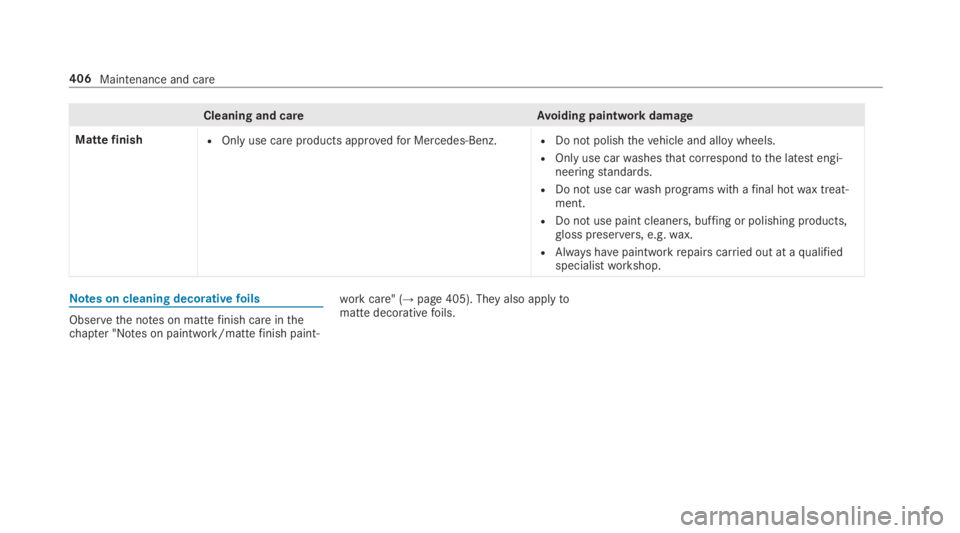
Cleaning and careAvoiding paintwork damage
MattefinishROnly use care products approvedfor Mercedes-Benz.RDo not polishthevehicle and alloy wheels.
ROnly use carwashesthat correspondtothe latest engi‐neeringstandards.
RDo not use carwash programs with afinal hotwax treat‐ment.
RDo not use paint cleaners, buffing or polishing products,gloss preservers, e.g.wax.
RAlways havepaintworkrepairs carried out at aqualifiedspecialistworkshop.
Notes on cleaning decorativefoils
Observethe notes on mattefinish care inthechapter "Notes on paintwork/mattefinish paint‐
workcare" (→page405). They also applytomatte decorativefoils.
406Maintenance and care
Page 415 of 578

Emergency
Removing the safetyvest
The safetyvests are located instowage spacesinthe front door.
#Takethe safetyvestbag out ofstowagespace1.
#Openthe safetyvestbag and pull outthesafetyvest.
%Safetyvests can also bestored inthereardoorstowage spaces.
1Maximum number ofwashes
2Maximumwashtemperature
3Do not bleach
4Do not iron
5Do not tumble dry
6Do not dry clean
7This is a class 2vest
Therequirements definedbythe legalstandardare only fulfilled inthefollowing cases:
Rifthe safetyvestisthe correct size
Rthe safetyvestis fully closed whilst beingworn
Replacethe safetyvestinthefollowing cases:
Rthereflectivestrips are damaged or dirt onthereflectivestrips can no longer beremoved
Rthe maximum number ofwashes isexceeded
Rthefluorescence hasfaded
Flat tire
Notes on flat tires
&WARNINGRisk of accident duetoaflattire
Aflat tire severelyaffectsthe drivingcharac‐teristics aswell asthesteering and brakingofthevehicle.
Tires withoutrun-flatcharacteristics:
#Do not drive on with aflat tire.
#Changetheflat tire immediately with anemergency sparewheel or spare wheel.Alternatively,consult aqualified spe‐cialistworkshop.
Breakdown assistance413
Page 416 of 578

Tires withrun-flatcharacteristics:
#Observethe information andwarningnotes on MOExtended tires (run-flattires).
Intheevent of aflat tire,thefollowing optionsareavailable depending onyourvehicle's equip‐ment:
RVehicles with MOExtended tires:it is pos‐sibletocontinuethe journeyfor a shortperiod of time. Make sureyou observethenotes on MOExtended tires (run-flat tire)(→page414).
RVehicles with a TIREFIT kit:you canrepairthe tires sothat it is possibletocontinuethejourneyfor a short period of time.Todothis,usethe TIREFIT kit (→page415).
RVehicles with Mercedes me connect:youcan make a callforRoadside Assistance viatheoverhead control panel inthe case of abreakdown (→page 344).
RAllvehicles:changethe wheel(→page 458).
Notes on MOExtended tires (run-flat tire)
&WARNINGRisk of accident when drivingin emergency mode
When driving in emergency mode,the han‐dlingcharacteristics are impaired. e.g. whencornering, when acceleratingstronglyandwhen braking.
#Do notexceedthe permissible maxi‐mum speedfor MOExtended tires.
#Avoid any abruptsteering and drivingmaneuvers aswell as drivingoverobstacles (curbs, pot holes, off-road).This applies, in particular,toa loadedvehicle.
#Stop driving inthe emergency mode ifyou notice:
Rbanging noise
Rvehicle vibration
Rsmoke which smells likerubber
Rcontinuous ESP®intervention
Rcracksin tire sidewalls
#After driving in emergency mode havetherimscheckedbyaqualified special‐istworkshop withregardtotheir furtheruse.
#The defective tire must bereplaced ineverycase.
WithMOExtended tires (run-flat tire),you cancontinuetodriveyourvehicleeven ifthere is atotal loss of pressure in one or more tires. How‐ever,the tire affected must not show any clearlyvisible damage.
You canrecognize MOExtended tiresbytheMOExtended marking which appearsonthe sidewall ofthe tire.
Vehicles with tire pressure monitoring sys‐tem:MOExtended tires may only be used in con‐junction withan activated tire pressure monitor‐ing system.
If a pressure losswarning message appears inthe multifunction display,proceed asfollows:
RCheckthe tirefor damage.
RIf driving on, observethefollowing notes.
414Breakdown assistance