Page 162 of 629

The component parts in
theve hicle's high-
vo ltage on-board elect rical sy stem may be
damaged in an accident, although the dam‐
age is not visible. #
Never car ryout changes on the high-
vo ltage on-board elect rical sy stem. #
Neverto uch co mponent parts in the
high-voltage on-board electrical sy stem. #
After an accident, do not touch any
high-voltage co mponents. #
After an accident, ha vetheve hicle
transpor tedaw ay. #
Have the high-voltage on-board electri‐
cal sy stem checked at a qualified spe‐
cialist workshop. Re
quirements:
R The 6 restra int sy stem warning lamp
lights up in the instrument clus ter,e.g. af ter
an accident.
R The vehicle is badly damaged, e.g. af ter an
accident, and there stra int sy stem compo‐
nents ha venot been trig gered. Operating
the high-voltage disconnect
device
On lydisconnect the drive sy stem manually in
th e abo ve-mentioned situations. #
Switch off the ignition. #
Shift the transmission toposition j. #
Apply the electric parking brake. #
Secure theve hicle against rolling away. #
Open the bonn et. 1
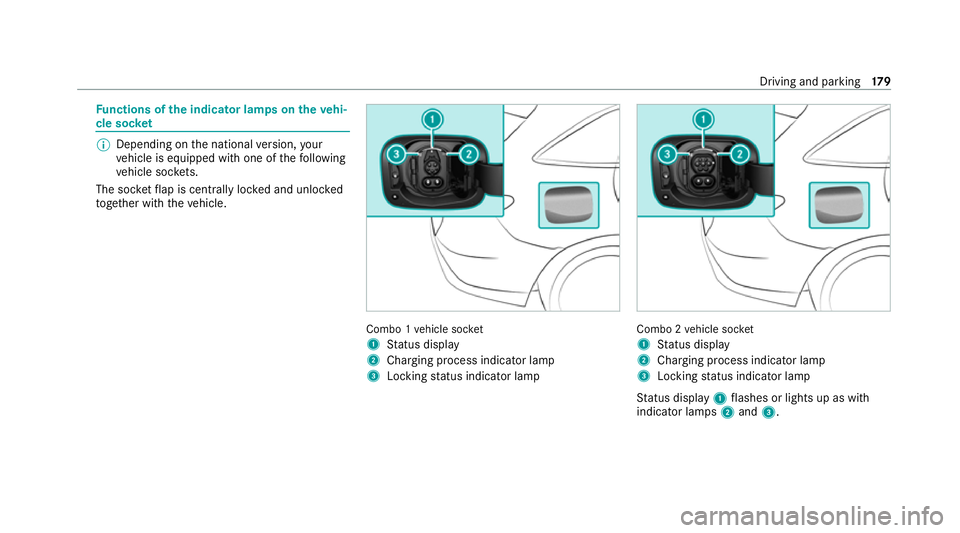
High-voltage disconnect device label on the
engine compartment co ver #
Using bo thhands, reach into there cesses of
th e engine compartment co ver. #
Lift the engine compartment co ver and pull it
out of the engine compartment in the direc‐
tion of the ar row. #
Place the engine compartment co verto one
side. Driving and parking
15 9
Page 170 of 629
Yo
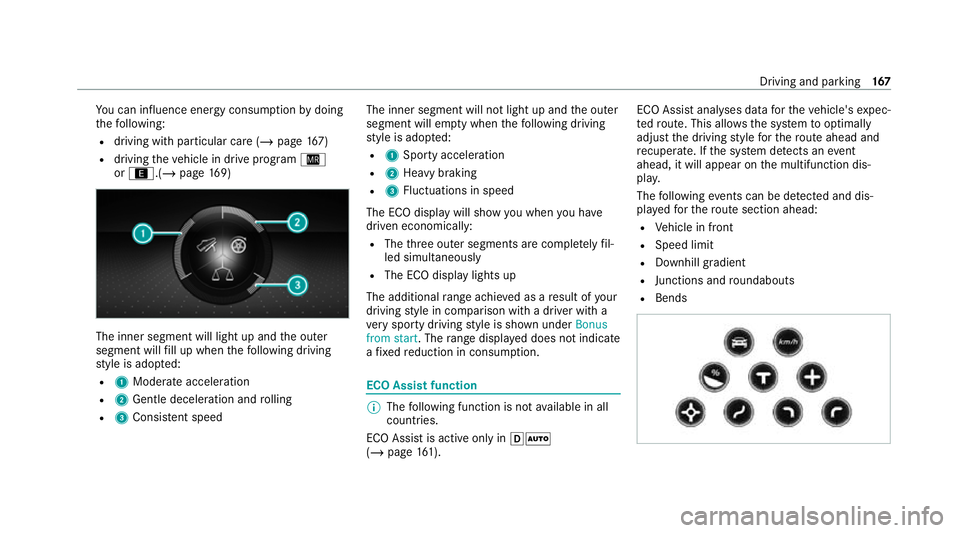
u can influence energy consum ption bydoing
th efo llowing:
R driving with particular care (/ page167)
R driving theve hicle in drive program Í
or ;.(/ page169) The in
ner segment will light up and the outer
segment will fill up when thefo llowing driving
st yle is adop ted:
R 1 Moderate acceleration
R 2 Gentle deceleration and rolling
R 3 Consis tent speed The inner segment will not light up and
the outer
segment will em pty when thefo llowing driving
st yle is adop ted:
R 1 Sporty acceleration
R 2 Heavy braking
R 3 Fluctuations in speed
The ECO display will show you when you ha ve
driven economically:
R The thre e outer segments are comple tely fil‐
led simultaneously
R The ECO display lights up
The additional range achi eved as a result of your
driving style in comparison with a driver with a
ve ry sporty driving style is shown under Bonus
from start. The range displ ayed does not indicate
a fixe dre duction in consum ption. ECO Assist function
%
The following function is not available in all
countries.
ECO Assist is active on lyin hÃ
(/ page 161). ECO Assi
stanal yses data forth eve hicle's expec‐
te dro ute. This allo wsthe sy stem tooptimally
adjust the driving style fo rth ero ute ahead and
re cuperate. If the sy stem de tects an event
ahead, it will appear on the multifunction dis‐
pla y.
The following events can be de tected and dis‐
pl ay ed forth ero ute section ahead:
R Vehicle in front
R Speed limit
R Downhill gradient
R Junctions and roundabouts
R Bends Driving and parking
167
Page 182 of 629
Fu
nctions of the indica tor lamps on the vehi‐
cle soc ket %
Depending on the national version, your
ve hicle is equipped with one of thefo llowing
ve hicle soc kets.
The soc ketflap is centrally loc ked and unloc ked
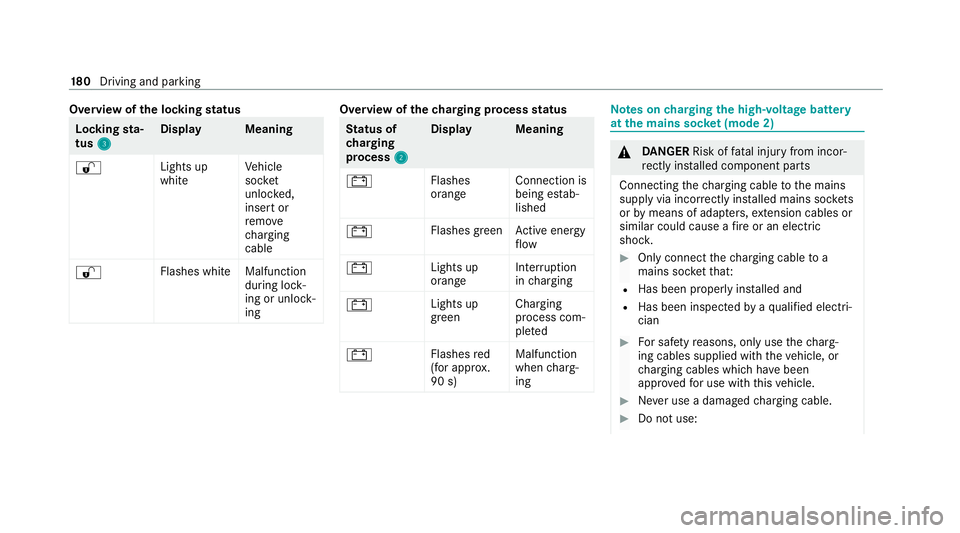
to ge ther with theve hicle. Combo 1
vehicle soc ket
1 Status display
2 Charging process indicator lamp
3 Locking status indicator lamp Combo 2
vehicle soc ket
1 Status display
2 Charging process indicator lamp
3 Locking status indicator lamp
St atus display 1flashes or lights up as with
indicator lamps 2and 3. Driving and parking
17 9
Page 183 of 629
Overview of
the locking status Lock
ingsta‐
tus 3 3 Displa
yM eaning
% Lights up
whiteVe
hicle
soc ket
unlo cked,
insert or
re mo ve
ch arging
cable
% Flashes whit
eMalfunction
during lock‐
ing or unlo ck‐
ing Overview of
thech arging process status St
atus of
ch arging
process 2 2Displa
yM eaning
# Flashes
orangeConnection is
being es
tab‐
lished
# Flashes green
Active energy
fl ow
# Lights up
orangeInter
ruption
in charging
# Lights up
greenCharging
process com‐
ple
ted
# Flashes
red
(for appr ox.
90 s) Malfunction
when
charg‐
ing Note
s oncharging the high-voltage bat tery
at the mains soc ket (mode 2) &
DANG ER Risk of fata l injury from incor‐
re ctly ins talled component parts
Connecting thech arging cable tothe mains
supply via incor rectly ins talled mains soc kets
or by means of adapte rs,ex tension cables or
similar could cause a fire or an electric
shoc k. #
Only connect thech arging cable to a
mains soc ketth at:
R Has been proper lyins talled and
R Has been inspected byaqu alified electri‐
cian #
For saf etyre asons, on lyuse thech arg‐
ing cables supplied with theve hicle, or
ch arging cables which ha vebeen
appr ovedfo r use with this vehicle. #
Never use a dama gedch arging cable. #
Do not use: 18 0
Driving and pa rking
Page 184 of 629
R
Extension cables
R Extension reels
R Multiple soc kets #
Never use soc ket adap ters to connect
th ech arging cable tothe mains soc ket.
The only exception being if the adap ter
has been tested and appr oved bythe
manufacturer forch arging the high-volt‐
age battery of an electric vehicle. #
Obser vethe saf ety no tes in the operat‐
ing instructions forth e soc ket adap ter. Only
thefo llowing charging cables may be used:
R The charging cable supplied with theve hicle.
R Ach arging cable that has been appr oved for
th eve hicle.
The charging process can vary depending on the
po we r supp lyequipment.
Shor terch arging times can be achie ved in the
fo llowing ways:
R Charging at a wallbox.
R Charging at a charging station. When doing so, alw
ays obser vethe local infor‐
mation.
Do not lea vethech arging cable controls hanging
loose from a mains soc ket.
Do not li ftthe controls bythefo llowing compo‐
nent parts:
R The charging cable connec tor.
R The mains plug.
The charging cable should be stowed and held in
place in the bag pr ovided in the boot of theve hi‐
cle. Overview of
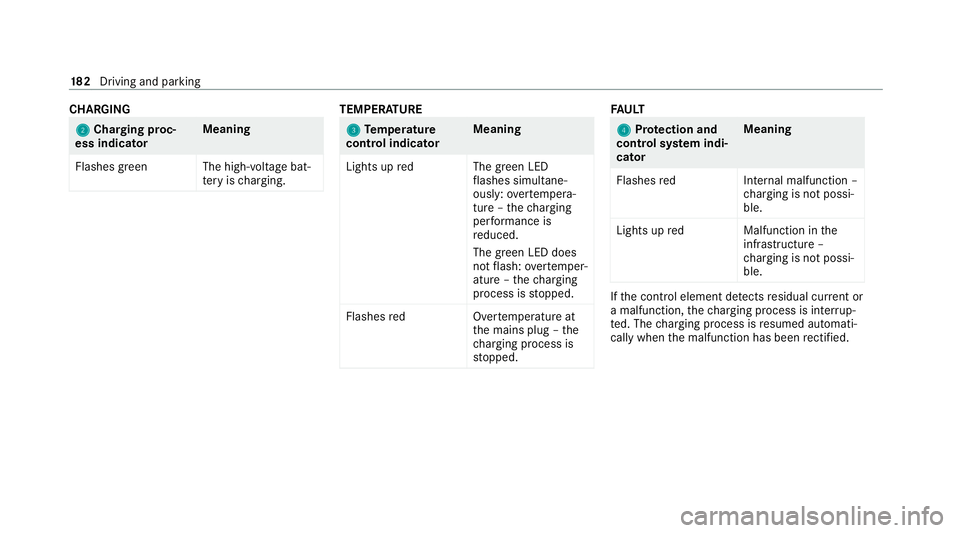
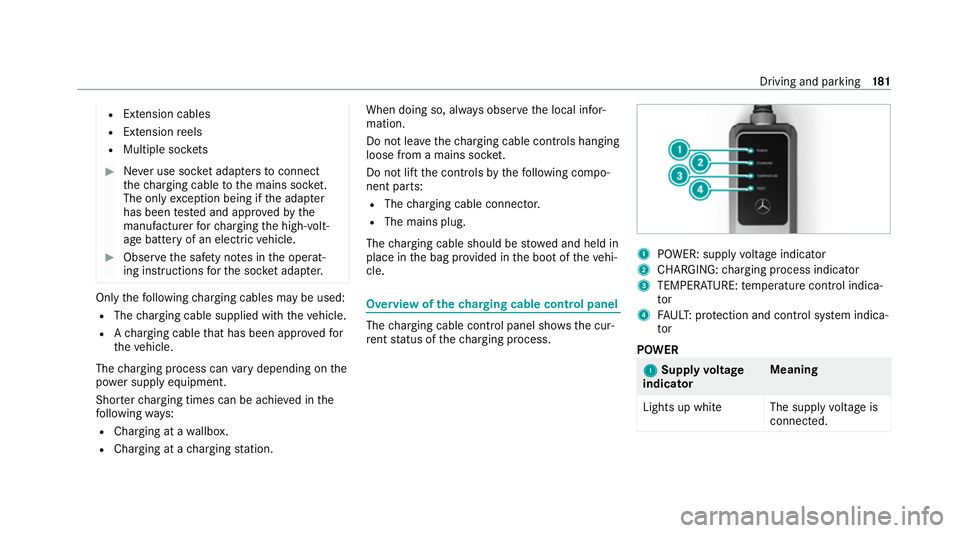
thech arging cable control panel The
charging cable control panel sho wsthe cur‐
re nt status of thech arging process. 1
POWER: supply voltage indicator
2 CHARGING: charging process indicator
3 TEMPERATURE: temp erature control indica‐
tor
4 FAUL T:protection and control sy stem indica‐
tor
POWER 1 1
Supply voltage
indicator Meaning
Lights up whit eThe supplyvoltage is
connec ted. Driving and parking
181
Page 185 of 629
CHA
RGING 2 2
Cha rging proc‐
ess indicator Meaning
Flashes green The high- voltage bat‐
te ry isch arging. TEMPER
ATURE 3
3
Temp erature
control indica torMeaning
Lights up redT he green LED
fl ashes simul tane‐
ously: overtemp era‐
ture – thech arging
per form ance is
re duced.
The green LED does
not flash: overtemp er‐
ature – thech arging
process is stopped.
Flashes redO vertemperature at
th e mains plug – the
ch arging process is
st opped. FA
ULT 4 4
Protection and
control sy stem indi‐
cator Meaning
Flashes redI nternal malfunction –
ch arging is not possi‐
ble.
Lights up redM alfunction inthe
inf rastru cture –
ch arging is not possi‐
ble. If
th e control element de tects residual cur rent or
a malfunction, thech arging process is inter rup‐
te d. The charging process is resumed automati‐
cally when the malfunction has been rectified. 18 2
Driving and pa rking
Page 191 of 629
#
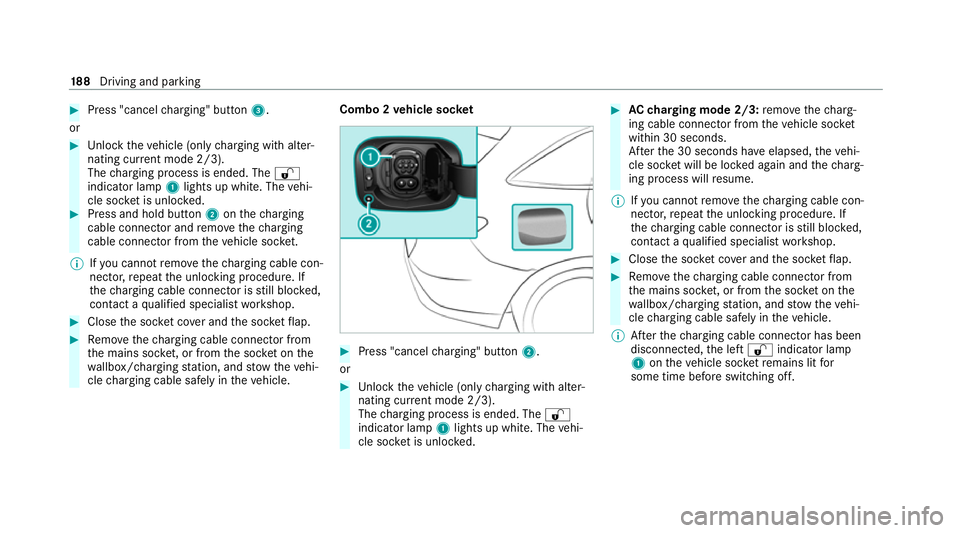
Press "cancel charging" button 3.
or #
Unlock theve hicle (only charging with alter‐
nating cur rent mode 2/3).
The charging process is ended. The %
indicator lamp 1lights up white. The vehi‐
cle soc ket is unloc ked. #
Press and hold button 2onthech arging
cable connec tor and remo vethech arging
cable connec tor from theve hicle soc ket.
% Ifyo u cannot remo vethech arging cable con‐
nec tor,re peat the unlocking procedure. If
th ech arging cable connec tor is still bloc ked,
con tact a qualified specialist workshop. #
Close the soc ket co ver and the soc ketflap. #
Remo vethech arging cable connec tor from
th e mains soc ket, or from the soc ket on the
wa llbox/ charging station, and stow theve hi‐
cle charging cable safely in theve hicle. Combo 2
vehicle soc ket #
Press "cancel charging" button 2.
or #
Unlock theve hicle (only charging with alter‐
nating cur rent mode 2/3).
The charging process is ended. The %
indicator lamp 1lights up white. The vehi‐
cle soc ket is unloc ked. #
AC charging mode 2/3: remo vethech arg‐
ing cable connec tor from theve hicle soc ket
within 30 seconds.
Af terth e 30 seconds ha veelapsed, theve hi‐
cle soc ket will be lo cked again and thech arg‐
ing process will resume.
% Ifyo u cannot remo vethech arging cable con‐
nec tor,re peat the unlocking procedure. If
th ech arging cable connec tor is still bloc ked,
con tact a qualified specialist workshop. #
Close the soc ket co ver and the soc ketflap. #
Remo vethech arging cable connec tor from
th e mains soc ket, or from the soc ket on the
wa llbox/ charging station, and stow theve hi‐
cle charging cable safely in theve hicle.
% Afterth ech arging cable connec tor has been
disconnected, the left % indicator lamp
1 ontheve hicle soc ketre mains lit for
some time before switching off. 18 8
Driving and pa rking
Page 194 of 629
#
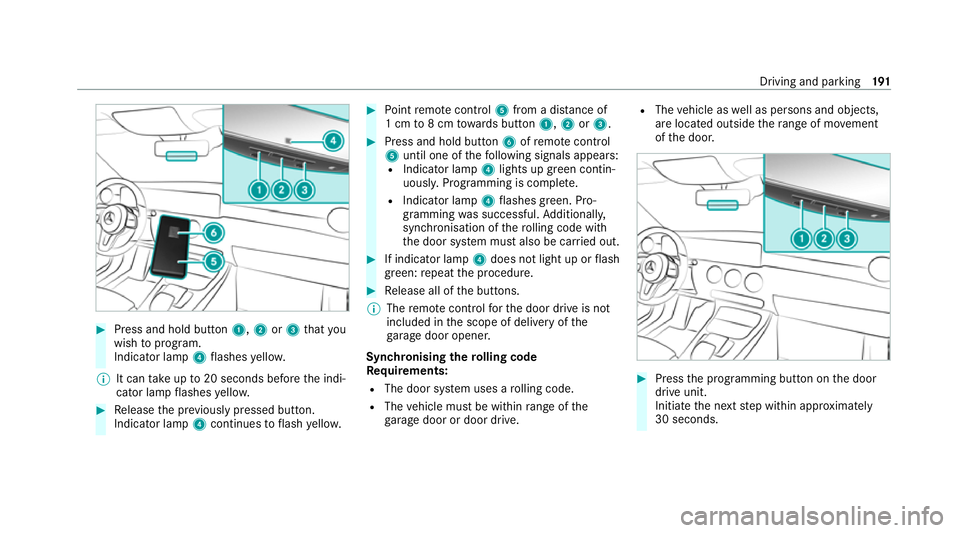
Press and hold button 1,2or3 that you
wish toprog ram.
Indicator lamp 4flashes yello w.
% It can take up to20 seconds before the indi‐
cator lamp flashes yello w. #
Release the pr eviously pressed button.
Indicator lamp 4continues toflash yello w. #
Point remo tecontrol 5from a di stance of
1 cm to8 cm towa rds button 1,2or3. #
Press and hold button 6ofremo tecontrol
5 until one of thefo llowing signals appears:
R Indicator lamp 4lights up green contin‐
uousl y.Programming is comple te.
R Indicator lamp 4flashes green. Pro‐
gramming was successful. Additionall y,
synchronisation of thero lling code with
th e door sy stem must also be car ried out. #
If indicator lamp 4does not light up or flash
green: repeat the procedure. #
Release all of the buttons.
% The remo tecontrol forth e door drive is not
included in the scope of delivery of the
ga rage door opener.
Synchronising thero lling code
Re quirements:
R The door sy stem uses a rolling code.
R The vehicle must be within range of the
ga rage door or door drive. R
The vehicle as well as persons and objects,
are located outside thera nge of mo vement
of the door. #
Press the programming button on the door
drive unit.
Initiate the next step within appr oximately
30 seconds. Driving and parking
191