2019 MERCEDES-BENZ AMG GT ROADSTER oil
[x] Cancel search: oilPage 40 of 298
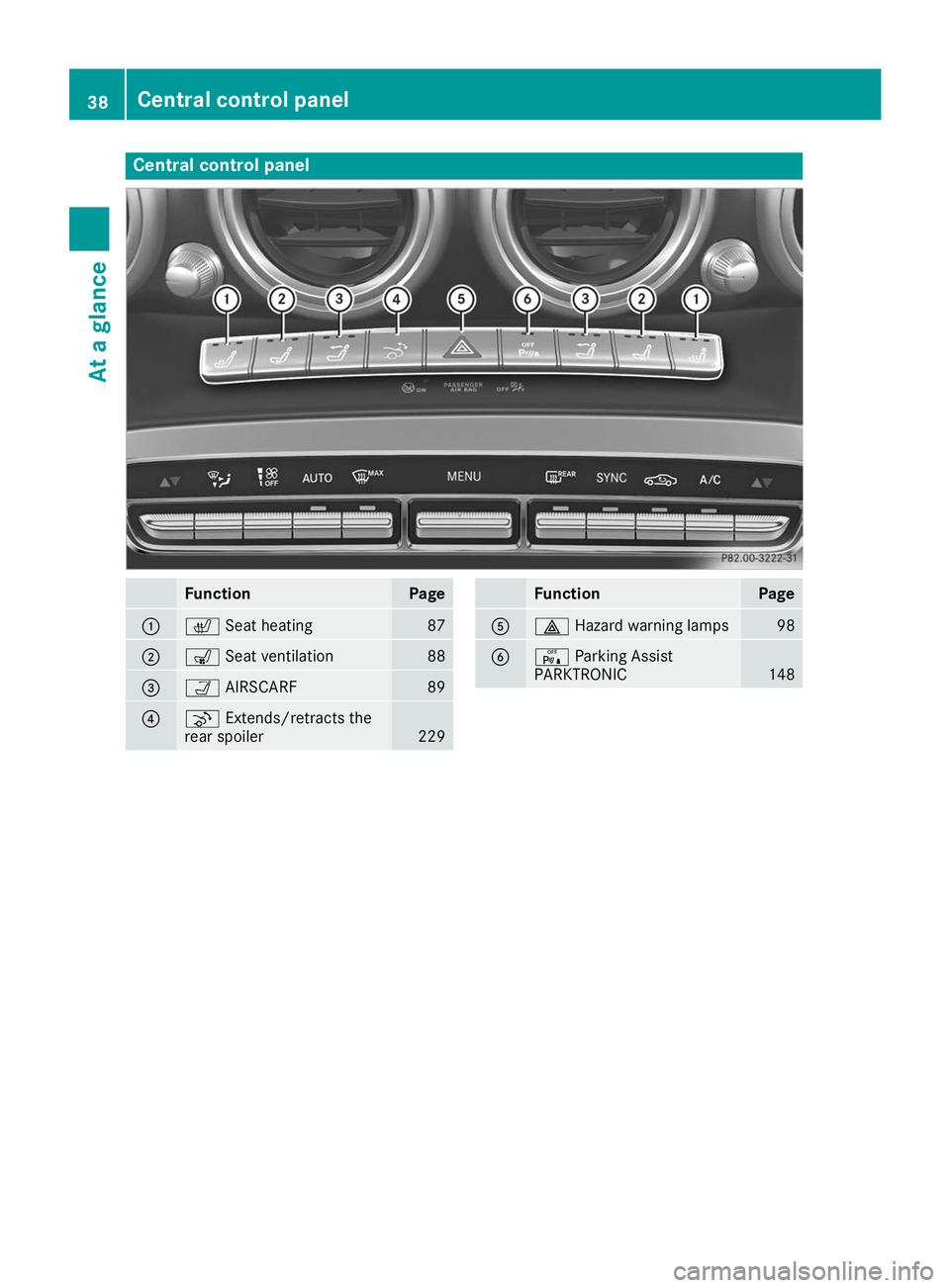
Central control panel
Function Page
0043
0072
Seat heating 87
0044
008E
Seat ventilation 88
0087
00CE
AIRSCARF 89
0085
¬
Extends/retracts the
rear spoiler 229 Function Page
0083
002F
Hazard warning lamps 98
0084
008F
Parking Assist
PARKTRONIC 14838
Central control panelAt a glance
Page 68 of 298
SmartKey
Important safety notes
G
WARNING
If children are left unsupervised in the vehicle, they could:
R open the doors, thus endangering other
people or road users.
R get out and disrupt traffic.
R operate the vehicle's equipment.
Additionally, children could set the vehicle in
motion if, for example, they:
R release the parking brake.
R shifting the automatic transmission out of
park position P
R Start the engine.
There is a risk of an accident and injury.
When leaving the vehicle, always take the
SmartKey with you and lock the vehicle. Never
leave children or animals unattended in the
vehicle. Always keep the SmartKey out of
reach of children. G
WARNING
If you attach heavy or large objects to the
SmartKey, the SmartKey could be uninten-
tionally turned in the ignition lock. This could
cause the engine to be switched off. There is a risk of an accident.
Do not attach any heavy or large objects to the
SmartKey. Remove any bulky key rings before
inserting the SmartKey into the ignition lock.
! Keep the SmartKey away from strong mag-
netic fields. Otherwise, the remote control
function could be affected.
Strong magnetic fields can occur in the vicin- ity of powerful electrical installations.
Do not keep the SmartKey: R with electronic devices, e.g. a mobile phone
or another SmartKey
R with metallic objects, e.g. coins or metal foil
R inside metallic objects, e.g. a metal case
This can affect the functionality of the Smart-
Key. Vehicles with KEYLESS-GO start function:
do
not keep the SmartKey in the trunk. Otherwise, the SmartKey may not be detected, e.g. when
starting the engine using the Start/Stop button.
A brief radio connection between the vehicle
and the SmartKey determines whether a valid
SmartKey is in, or in the direct vicinity of, the
vehicle.
This occurs, for example:
R when starting the engine
R while driving
R when using the trunk lid unlocking sensor
R when the external door handles are touched
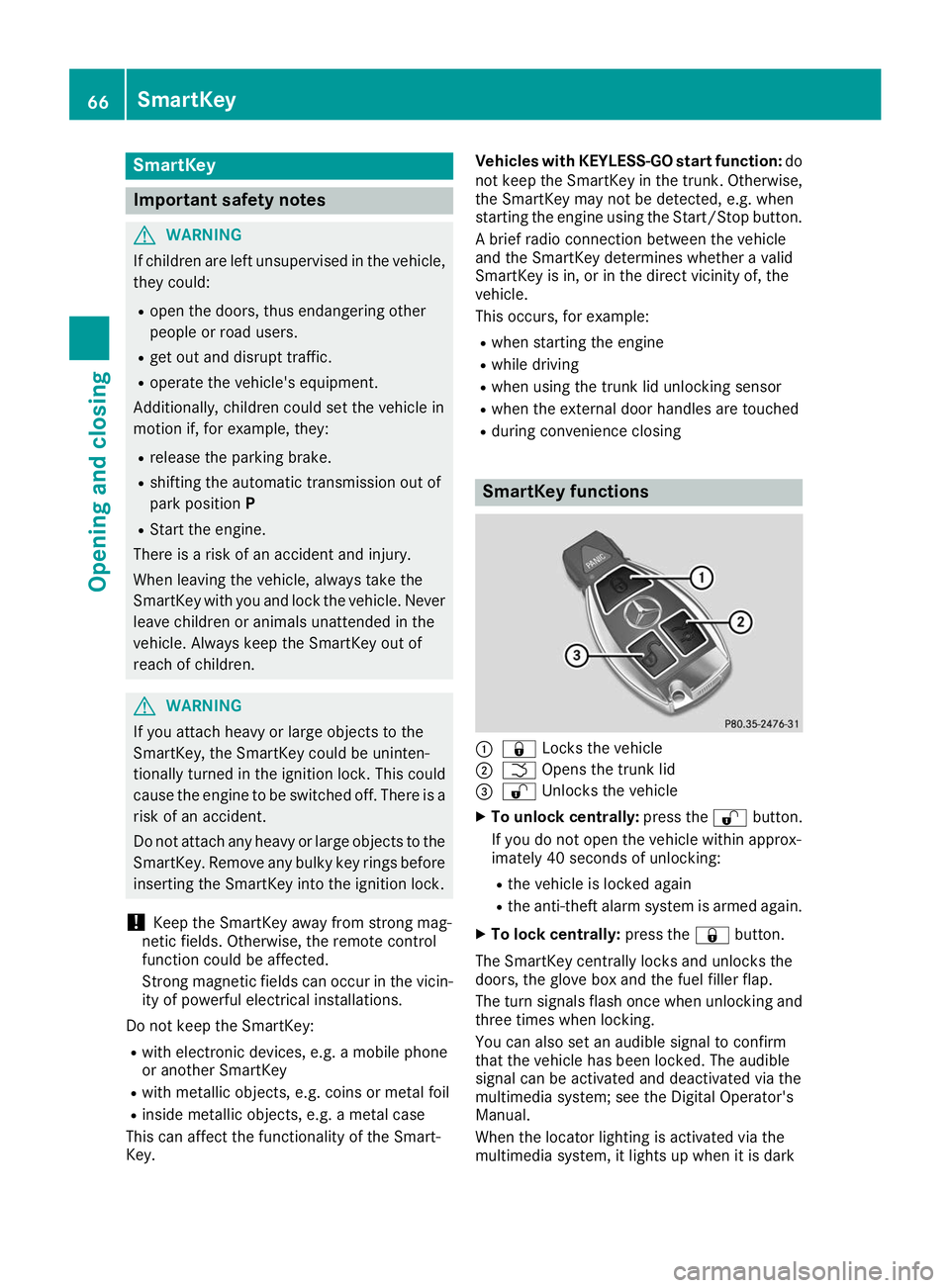
R during convenience closing SmartKey functions
0043
0037 Locks the vehicle
0044 0054 Opens the trunk lid
0087 0036 Unlocks the vehicle
X To unlock centrally: press the0036button.
If you do not open the vehicle within approx-
imately 40 seconds of unlocking:
R the vehicle is locked again
R the anti-theft alarm system is armed again.
X To lock centrally: press the0037button.
The SmartKey centrally locks and unlocks the
doors, the glove box and the fuel filler flap.
The turn signals flash once when unlocking and three times when locking.
You can also set an audible signal to confirm
that the vehicle has been locked. The audible
signal can be activated and deactivated via the
multimedia system; see the Digital Operator's
Manual.
When the locator lighting is activated via the
multimedia system, it lights up when it is dark 66
SmartKeyOpening and closing
Page 76 of 298
tem will be triggered. Switch off the alarm
(Y page 64). Trunk
Important safety notes
G
DANGER
Combustion engines emit poisonous exhaust
gases such as carbon monoxide. Exhaust
gases can enter the vehicle interior if the
trunk lid is open while the engine is running,
especially if the vehicle is in motion. There is a risk of poisoning.
Always switch off the engine before opening
the trunk lid. Never drive with the trunk lid
open. G
WARNING
If objects, luggage or loads are not secured or not secured sufficiently, they could slip, tip
over or be flung around and thereby hit vehicle
occupants. There is a risk of injury, particu-
larly in the event of sudden braking or a sud-
den change in direction.
Always store objects so that they cannot be
flung around. Secure objects, luggage or
loads against slipping or tipping before the
journey.
! The trunk lid swings upwards when opened.
Therefore, make sure that there is sufficient
clearance above the trunk lid.
The opening dimensions of the trunk lid can be
found in the "Vehicle data" section
(Y page 293).
If the rear spoiler has been extended manually,
the height when opened is higher by this
amount. If in doubt, retract the rear spoiler again manually before opening the trunk lid
(Y page 229).
Do not leave the SmartKey in the trunk. You
could otherwise lock yourself out.
You should preferably place luggage or loads in the trunk. Observe the loading guidelines
(Y page 218). Opening/closing from outside
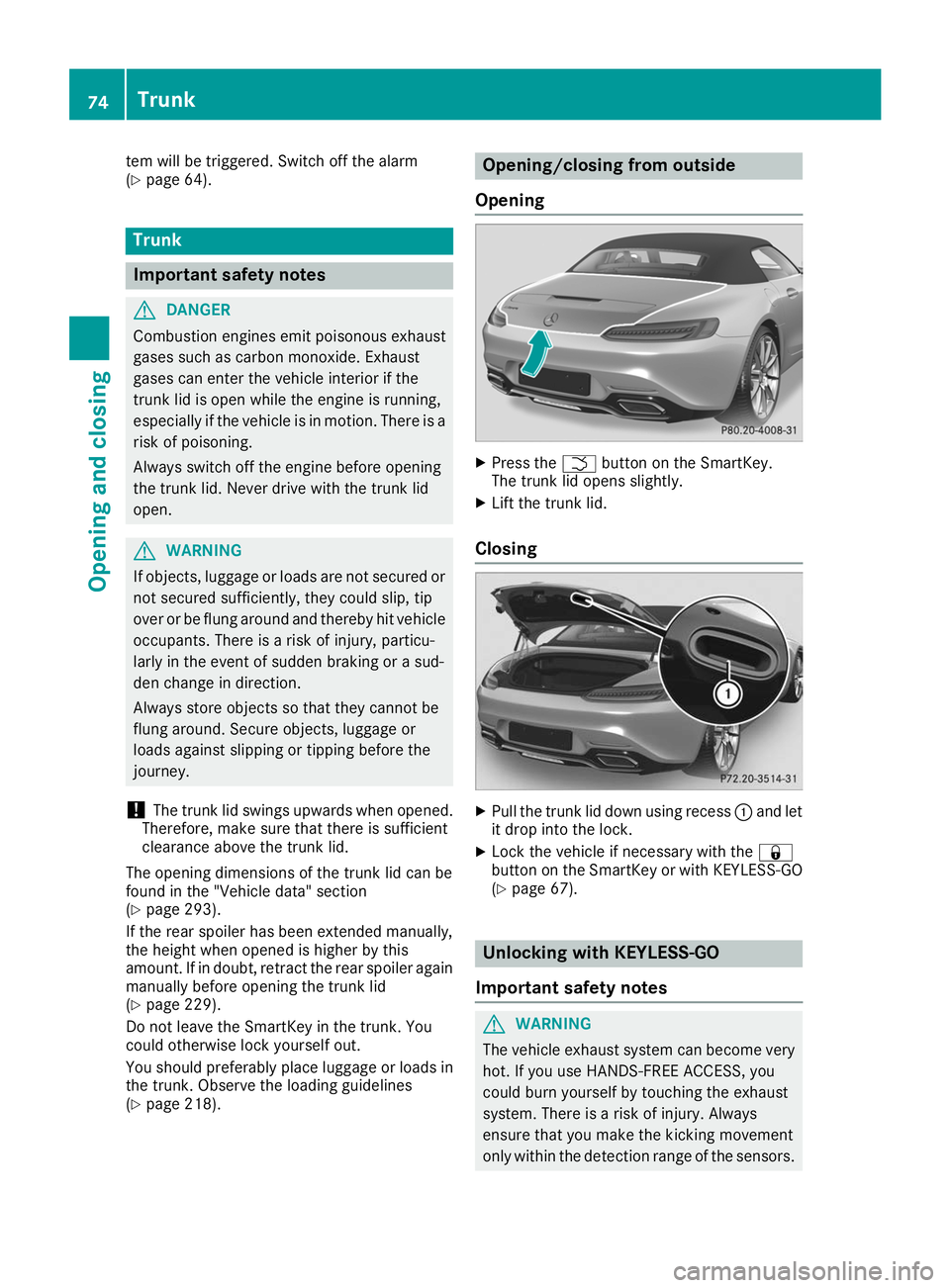
Opening X
Press the 0054button on the SmartKey.
The trunk lid opens slightly.
X Lift the trunk lid.
Closing X
Pull the trunk lid down using recess 0043and let
it drop into the lock.
X Lock the vehicle if necessary with the 0037
button on the SmartKey or with KEYLESS-GO
(Y page 67). Unlocking with KEYLESS-GO
Important safety notes G
WARNING
The vehicle exhaust system can become very
hot. If you use HANDS-FREE ACCESS, you
could burn yourself by touching the exhaust
system. There is a risk of injury. Always
ensure that you make the kicking movement
only within the detection range of the sensors. 74
TrunkOpening and closing
Page 112 of 298
!
Do not warm up the engine while stationary.
Pull away immediately. Avoid high engine
speeds and full throttle until the engine has
reached its operating temperature.
In vehicles with automatic transmission,
engage positions P and R only when the vehi-
cle is stationary.
Where possible, avoid spinning the drive
wheels when pulling away on slippery roads.
You could otherwise damage the drive train.
! During a cold start with low engine oil tem-
peratures (below 32 ‡) (0 †), the maximum
engine speed is restricted in order to protect
the engine. To protect the engine and main-
tain smooth engine operation, avoid driving at full throttle when the engine is cold. Key positions
Start/Stop button General notes
All vehicles are equipped with a Start/Stop but-
ton.
The Start/Stop button is located in the center
console and is illuminated when the vehicle is
unlocked.
The SmartKey must be in the vehicle.
Pressing the Start/Stop button several times in succession corresponds to the different Smart-
Key positions in the ignition lock. This is only the
case if you are not depressing the brake pedal.
If you depress the brake pedal and press the
Start/Stop button, the engine starts immedi-
ately.
A check which periodically establishes a radio
connection between the vehicle and the Smart-
Key determines whether a valid SmartKey is in
the vehicle. This occurs, for example, when
starting the engine.
If there is a SmartKey in the ignition lock, this
takes precedence over the KEYLESS-GO start
function.
To start the vehicle without actively using the
SmartKey:
R the SmartKey must be in the vehicle
R the vehicle must not be locked with the
SmartKey or KEYLESS-GO (Y page 67)Do not keep the SmartKey:
R with electronic devices, e.g. a mobile phone
or another SmartKey
R with metallic objects, e.g. coins or metal foil
R inside metallic objects, e.g. a metal case
This can affect the functionality of the Smart-
Key.
If you lock the vehicle with the SmartKey remote control or with KEYLESS-GO, after a short time:
R you will not be able to switch on the ignition
with the Start/Stop button
R you will no longer be able to start the engine
with the Start/Stop button until the vehicle is
unlocked again
If you lock the vehicle centrally using the button
on the driver's door (Y page 72), you can con-
tinue to start the engine with the Start/Stop
button.
The engine can be switched off while the vehicle
is in motion by pressing and holding the Start/
Stop button for three seconds. This function
operates independently of the ECO start/stop
automatic engine switch-off function.
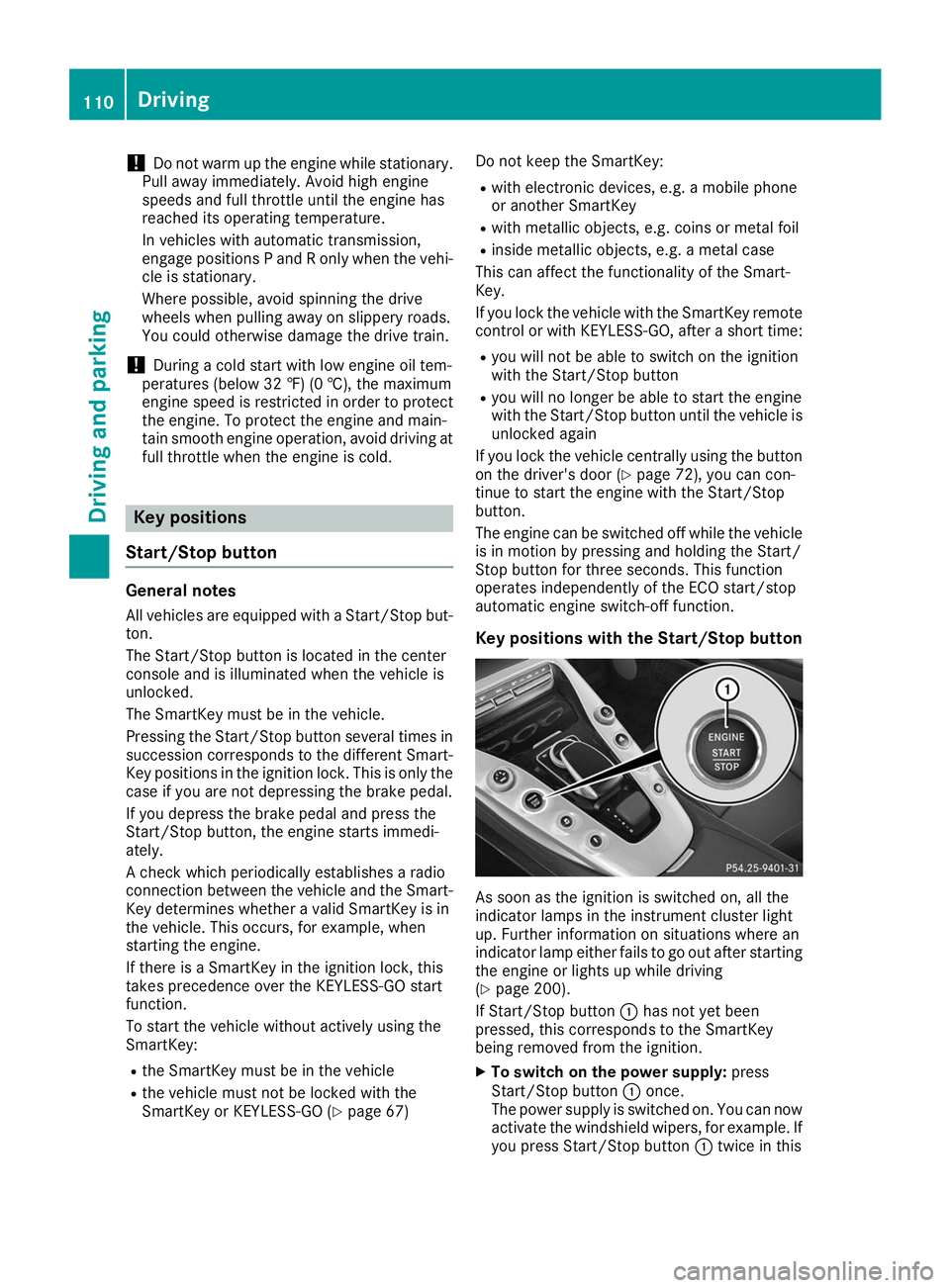
Key positions with the Start/Stop button As soon as the ignition is switched on, all the
indicator lamps in the instrument cluster light
up. Further information on situations where an
indicator lamp either fails to go out after starting the engine or lights up while driving
(Y page 200).
If Start/Stop button 0043has not yet been
pressed, this corresponds to the SmartKey
being removed from the ignition.
X To switch on the power supply: press
Start/Stop button 0043once.
The power supply is switched on. You can now
activate the windshield wipers, for example. If you press Start/Stop button 0043twice in this 110
DrivingDriving and parking
Page 148 of 298
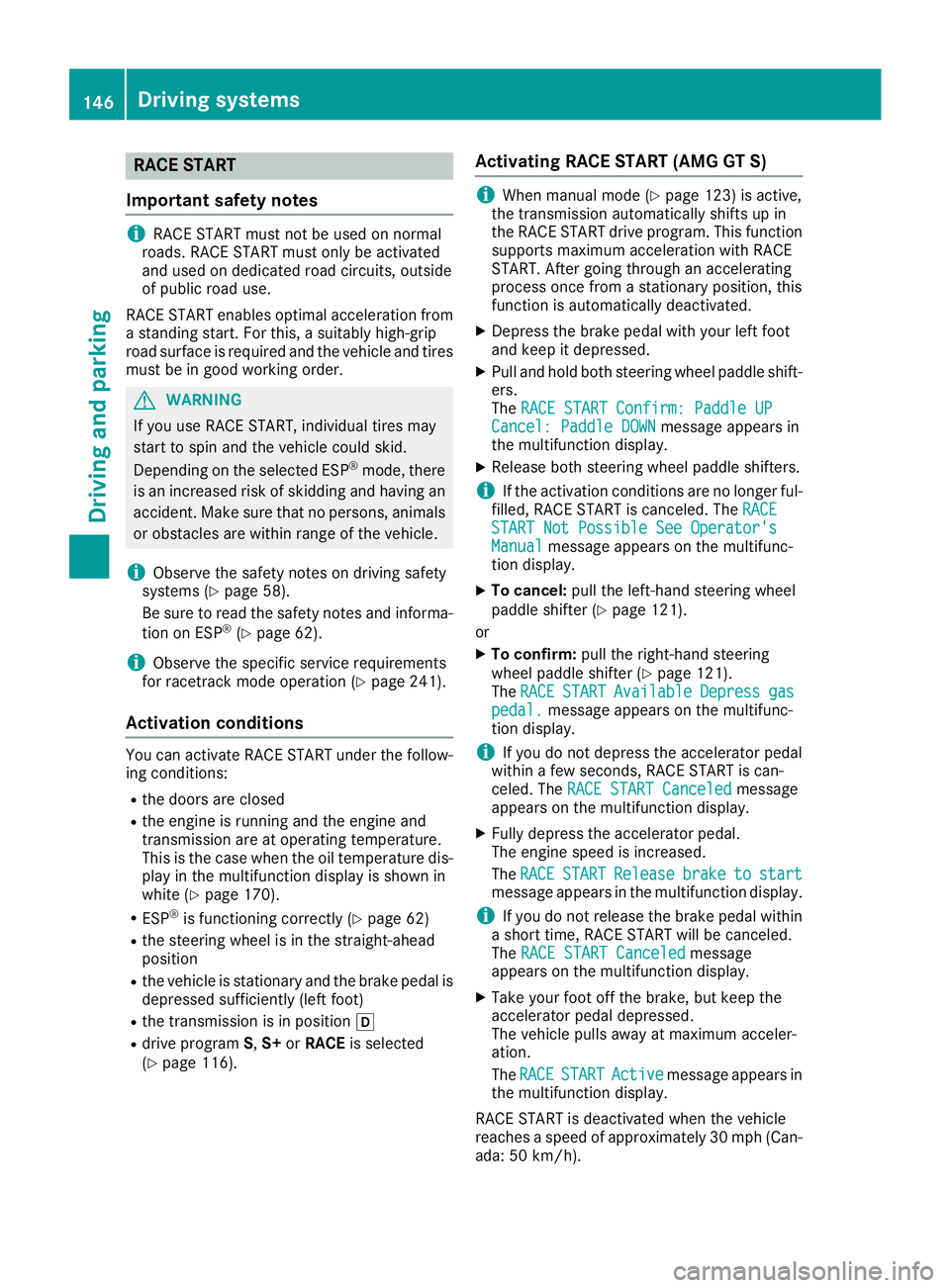
RACE START
Important safety notes i
RACE START must not be used on normal
roads. RACE START must only be activated
and used on dedicated road circuits, outside
of public road use.
RACE START enables optimal acceleration from
a standing start. For this, a suitably high-grip
road surface is required and the vehicle and tires must be in good working order. G
WARNING
If you use RACE START, individual tires may
start to spin and the vehicle could skid.
Depending on the selected ESP ®
mode, there
is an increased risk of skidding and having an accident. Make sure that no persons, animals
or obstacles are within range of the vehicle.
i Observe the safety notes on driving safety
systems (Y page 58).
Be sure to read the safety notes and informa-
tion on ESP ®
(Y page 62).
i Observe the specific service requirements
for racetrack mode operation (Y page 241).
Activation conditions You can activate RACE START under the follow-
ing conditions:
R the doors are closed
R the engine is running and the engine and
transmission are at operating temperature.
This is the case when the oil temperature dis- play in the multifunction display is shown in
white (Y page 170).
R ESP ®
is functioning correctly (Y page 62)
R the steering wheel is in the straight-ahead
position
R the vehicle is stationary and the brake pedal is
depressed sufficiently (left foot)
R the transmission is in position 005B
R drive program S,S+ orRACE is selected
(Y page 116). Activating RACE START (AMG GT S) i
When manual mode (Y
page 123) is active,
the transmission automatically shifts up in
the RACE START drive program. This function supports maximum acceleration with RACE
START. After going through an accelerating
process once from a stationary position, this
function is automatically deactivated.
X Depress the brake pedal with your left foot
and keep it depressed.
X Pull and hold both steering wheel paddle shift-
ers.
The RACE START Confirm: Paddle UP RACE START Confirm: Paddle UP
Cancel: Paddle DOWN
Cancel: Paddle DOWN message appears in
the multifunction display.
X Release both steering wheel paddle shifters.
i If the activation conditions are no longer ful-
filled, RACE START is canceled. The RACE
RACE
START Not Possible See Operator's
START Not Possible See Operator's
Manual Manual message appears on the multifunc-
tion display.
X To cancel: pull the left-hand steering wheel
paddle shifter (Y page 121).
or
X To confirm: pull the right-hand steering
wheel paddle shifter (Y page 121).
The RACE
RACE START
START Available
Available Depress
Depressgas
gas
pedal.
pedal. message appears on the multifunc-
tion display.
i If you do not depress the accelerator pedal
within a few seconds, RACE START is can-
celed. The RACE START Canceled
RACE START Canceled message
appears on the multifunction display.
X Fully depress the accelerator pedal.
The engine speed is increased.
The RACE RACE START
START Release
Release brake
braketo
tostart
start
message appears in the multifunction display.
i If you do not release the brake pedal within
a short time, RACE START will be canceled.
The RACE START Canceled RACE START Canceled message
appears on the multifunction display.
X Take your foot off the brake, but keep the
accelerator pedal depressed.
The vehicle pulls away at maximum acceler-
ation.
The RACE
RACE START START Active
Active message appears in
the multifunction display.
RACE START is deactivated when the vehicle
reaches a speed of approximately 30 mph (Can-
ada: 50 km/h). 146
Driving systemsDriving and parking
Page 170 of 298
R
Active Distance Assist DISTRONIC
(Y page 136)
R Distance warning function of Active Brake
Assist (Y page 59)
R Blind Spot Assist (Y page 155)
R ATTENTION ASSIST (Y page 154)
R Lane Keeping Assist (Y page 157)
X Press 0064to display the ATTENTION ASSIST
assessment. Service menu
Depending on the equipment installed in the
vehicle, you have the following options in the
Service
Service menu:
R calling up display messages in message mem-
ory (Y page 174)
R checking the tire pressure electronically
(Y page 270).
R calling up the service due date (Y page 241).
R checking the engine oil level using the on-
board computer (Y page 237).Settings menu
Introduction Depending on the equipment installed in the
vehicle, you have the following options in the
Settings Settings menu:
R changing assistance settings (Y page 168).
R changing the light settings (Y page 169).
R changing the instrument cluster settings
(Y page 169).
R restoring the factory settings (Y page 170).
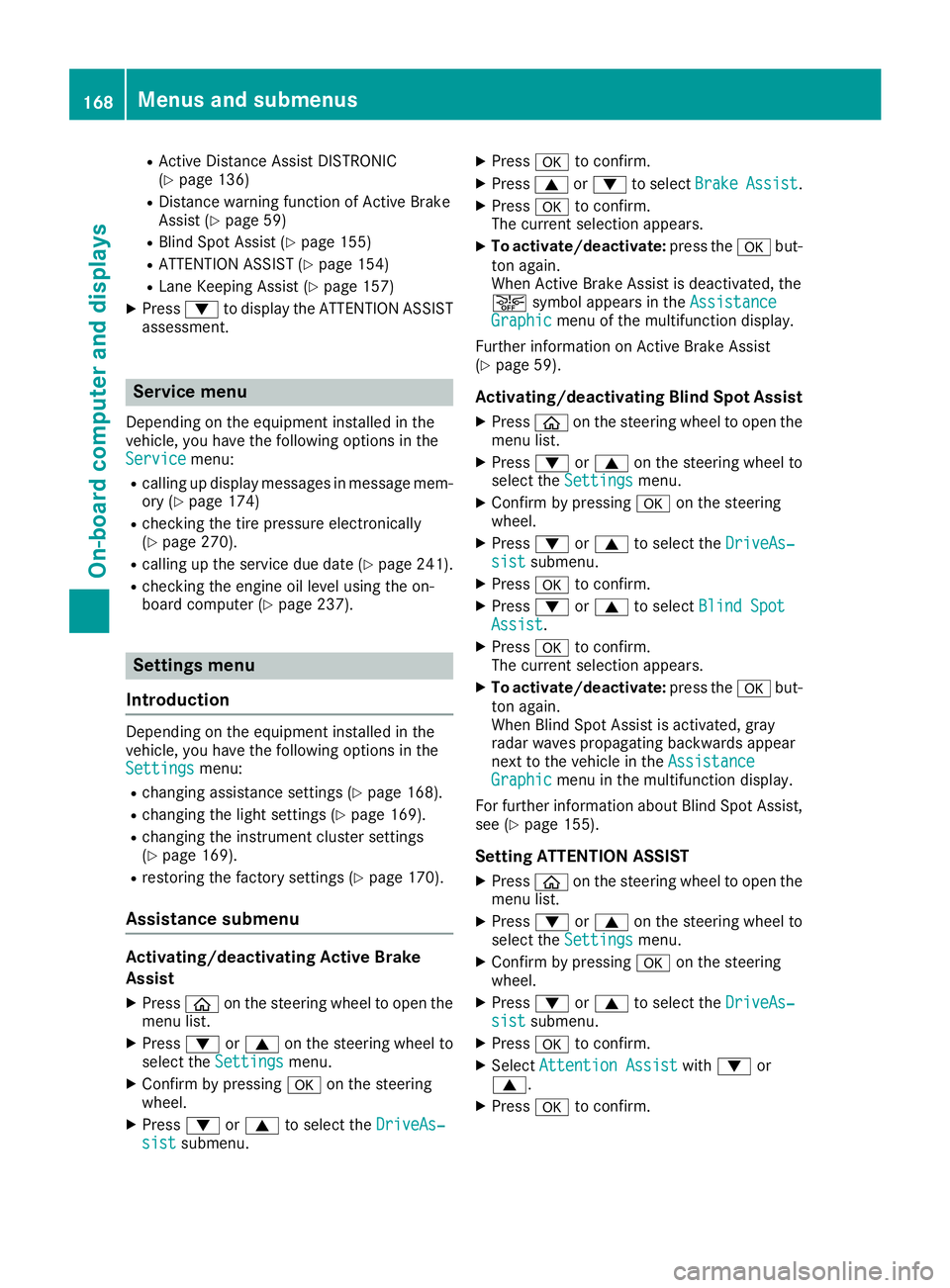
Assistance submenu Activating/deactivating Active Brake
Assist
X Press 00E2on the steering wheel to open the
menu list.
X Press 0064or0063 on the steering wheel to
select the Settings
Settings menu.
X Confirm by pressing 0076on the steering
wheel.
X Press 0064or0063 to select the DriveAs‐ DriveAs‐
sist
sist submenu. X
Press 0076to confirm.
X Press 0063or0064 to select Brake BrakeAssist Assist.
X Press 0076to confirm.
The current selection appears.
X To activate/deactivate: press the0076but-
ton again.
When Active Brake Assist is deactivated, the
00D4 symbol appears in the Assistance Assistance
Graphic
Graphic menu of the multifunction display.
Further information on Active Brake Assist
(Y page 59).
Activating/deactivating Blind Spot Assist
X Press 00E2on the steering wheel to open the
menu list.
X Press 0064or0063 on the steering wheel to
select the Settings
Settings menu.
X Confirm by pressing 0076on the steering
wheel.
X Press 0064or0063 to select the DriveAs‐
DriveAs‐
sist
sist submenu.
X Press 0076to confirm.
X Press 0064or0063 to select Blind Spot
Blind Spot
Assist
Assist .
X Press 0076to confirm.
The current selection appears.
X To activate/deactivate: press the0076but-
ton again.
When Blind Spot Assist is activated, gray
radar waves propagating backwards appear
next to the vehicle in the Assistance
Assistance
Graphic Graphic menu in the multifunction display.
For further information about Blind Spot Assist,
see (Y page 155).
Setting ATTENTION ASSIST X Press 00E2on the steering wheel to open the
menu list.
X Press 0064or0063 on the steering wheel to
select the Settings
Settings menu.
X Confirm by pressing 0076on the steering
wheel.
X Press 0064or0063 to select the DriveAs‐
DriveAs‐
sist
sist submenu.
X Press 0076to confirm.
X Select Attention Assist
Attention Assist with0064 or
0063.
X Press 0076to confirm. 168
Menus and submenusOn-board computer and displays
Page 172 of 298
The selected unit of measurement for distance
applies to:
R Digital speedometer in the Trip
Trip menu
R Odometer and the trip odometer
R Trip computer
R Range
R Navigation instructions in the Navi
Navi menu
R Cruise control
R Active Distance Assist DISTRONIC
R ASSYST PLUS service interval display
Switching the additional speedometer
on/off
If the additional speedometer is switched on,
the speed is shown in the status bar in the mul- tifunction display instead of the outside tem-
perature.
The additional speedometer displays the speed
in the respective unit that is not shown in the
multifunction display.
X Press 00E2on the steering wheel to open the
main menu.
X Press 0064or0063 on the steering wheel to
select the Settings Settings menu.
X Confirm by pressing 0076on the steering
wheel.
X Press 0064or0063 to select the Instru‐
Instru‐
ment Cluster
ment Cluster submenu.
X Press 0076to confirm.
X Press 0064or0063 to select the Addi‐
Addi‐
tional Speedometer [km/h]
tional Speedometer [km/h] function.
The current selection appears.
X To switch on/off: press0076again.
Restoring the factory settings X
Press 00E2on the steering wheel to open the
menu list.
X Press 0064or0063 on the steering wheel to
select the Settings
Settings menu.
X Confirm by pressing 0076on the steering
wheel.
X Press 0064or0063 to select the Factory
Factory
Settings
Settings submenu.
X Press 0076to confirm.
The Reset All Settings?
Reset All Settings? function
appears. X
Press 0064or0063 to select No
No orYes
Yes.
X Press 0076to confirm the selection.
If you have selected Yes
Yes, the multifunction
display shows a confirmation message.
For safety reasons, the Daytime Running
Daytime Running
Lights
Lights function in the Lights
Lightssubmenu is only
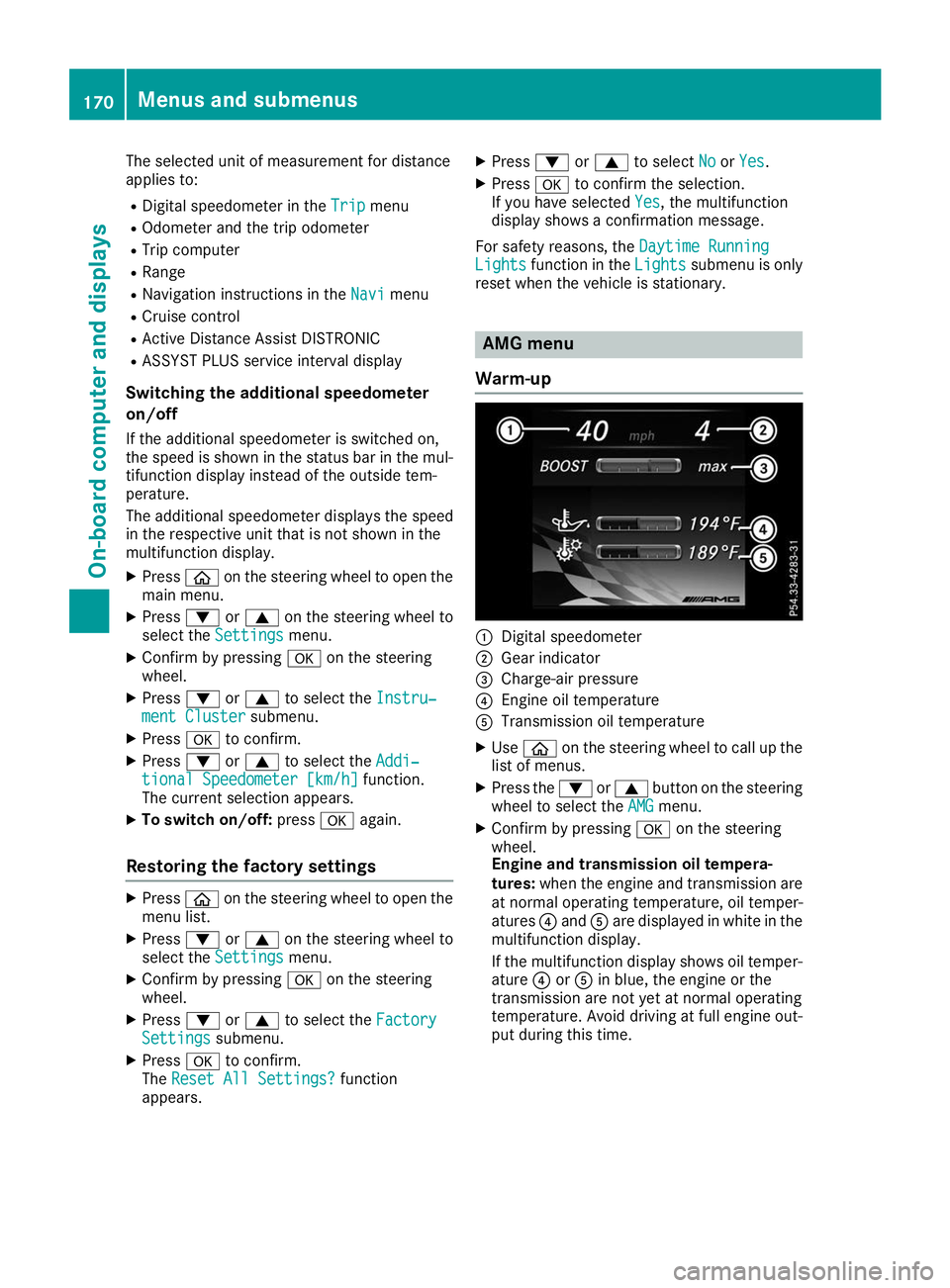
reset when the vehicle is stationary. AMG menu
Warm-up 0043
Digital speedometer
0044 Gear indicator
0087 Charge-air pressure
0085 Engine oil temperature
0083 Transmission oil temperature
X Use 00E2 on the steering wheel to call up the
list of menus.
X Press the 0064or0063 button on the steering
wheel to select the AMG AMGmenu.
X Confirm by pressing 0076on the steering
wheel.
Engine and transmission oil tempera-
tures: when the engine and transmission are
at normal operating temperature, oil temper-
atures 0085and 0083are displayed in white in the
multifunction display.
If the multifunction display shows oil temper- ature 0085or0083 in blue, the engine or the
transmission are not yet at normal operating
temperature. Avoid driving at full engine out-
put during this time. 170
Menus and submenusOn-board computer and displays
Page 190 of 298
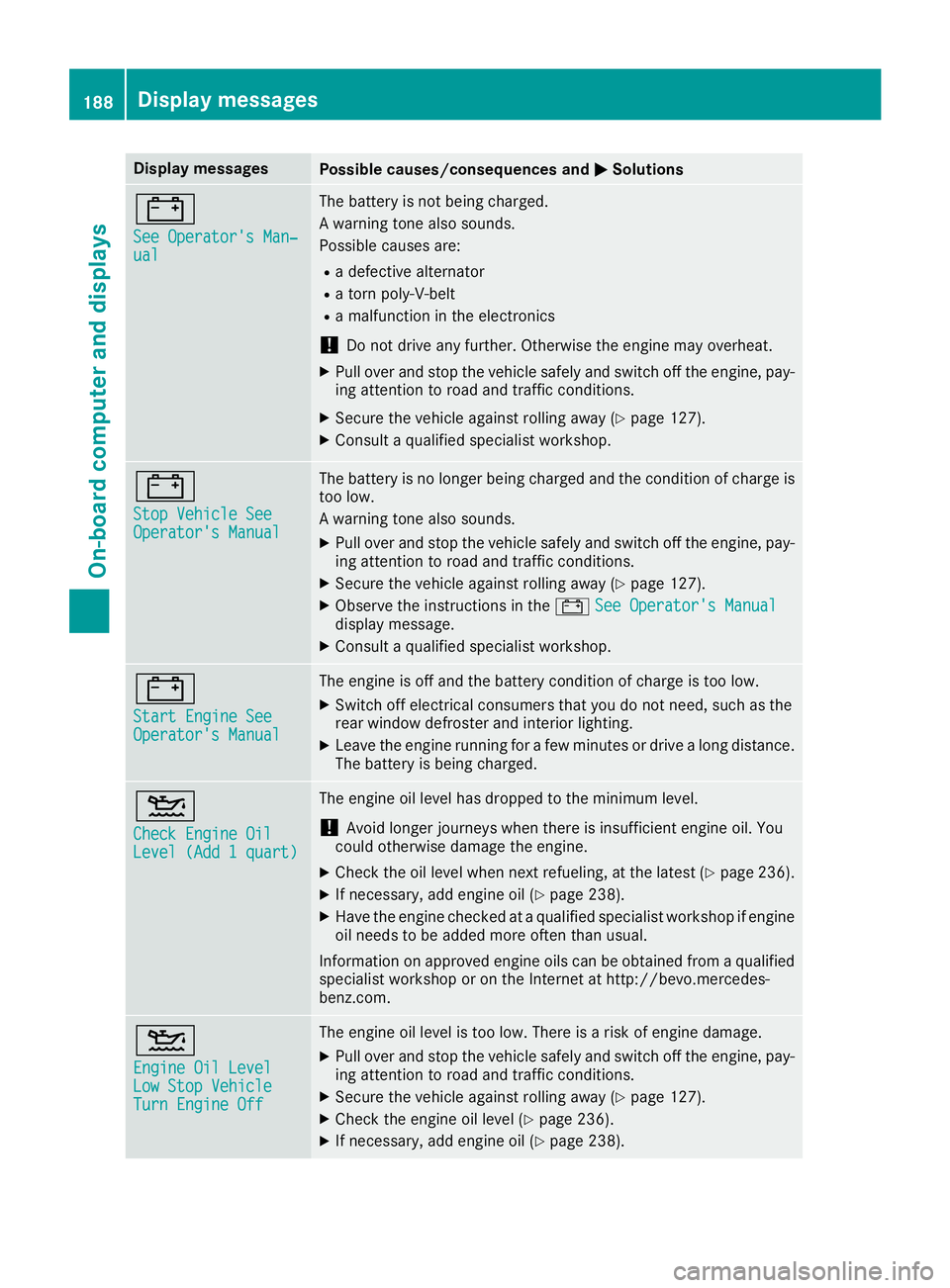
Display messages
Possible causes/consequences and
0050
0050Solutions 003D
See Operator's Man‐ See Operator's Man‐
ual ual The battery is not being charged.
A warning tone also sounds.
Possible causes are:
R a defective alternator
R a torn poly-V-belt
R a malfunction in the electronics
! Do not drive any further. Otherwise the engine may overheat.
X Pull over and stop the vehicle safely and switch off the engine, pay-
ing attention to road and traffic conditions.
X Secure the vehicle against rolling away (Y page 127).
X Consult a qualified specialist workshop. 003D
Stop Vehicle See Stop Vehicle See
Operator's Manual Operator's Manual The battery is no longer being charged and the condition of charge is
too low.
A warning tone also sounds.
X Pull over and stop the vehicle safely and switch off the engine, pay-
ing attention to road and traffic conditions.
X Secure the vehicle against rolling away (Y page 127).
X Observe the instructions in the 003DSee Operator's Manual
See Operator's Manual
display message.
X Consult a qualified specialist workshop. 003D
Start Engine See Start Engine See
Operator's Manual Operator's Manual The engine is off and the battery condition of charge is too low.
X
Switch off electrical consumers that you do not need, such as the
rear window defroster and interior lighting.
X Leave the engine running for a few minutes or drive a long distance.
The battery is being charged. 00B2
Check Engine Oil Check Engine Oil
Level (Add 1 quart) Level (Add 1 quart) The engine oil level has dropped to the minimum level.
! Avoid longer journeys when there is insufficient engine oil. You
could otherwise damage the engine.
X Check the oil level when next refueling, at the latest (Y page 236).
X If necessary, add engine oil (Y page 238).
X Have the engine checked at a qualified specialist workshop if engine
oil needs to be added more often than usual.
Information on approved engine oils can be obtained from a qualified
specialist workshop or on the Internet at http://bevo.mercedes-
benz.co m. 00B2
Engine Oil Level Engine Oil Level
Low Stop Vehicle Low Stop Vehicle
Turn Engine Off Turn Engine Off The engine oil level is too low. There is a risk of engine damage.
X Pull over and stop the vehicle safely and switch off the engine, pay-
ing attention to road and traffic conditions.
X Secure the vehicle against rolling away (Y page 127).
X Check the engine oil level (Y page 236).
X If necessary, add engine oil (Y page 238).188
Display messagesOn-board computer and displays