2019 MERCEDES-BENZ AMG GT ROADSTER oil
[x] Cancel search: oilPage 191 of 298
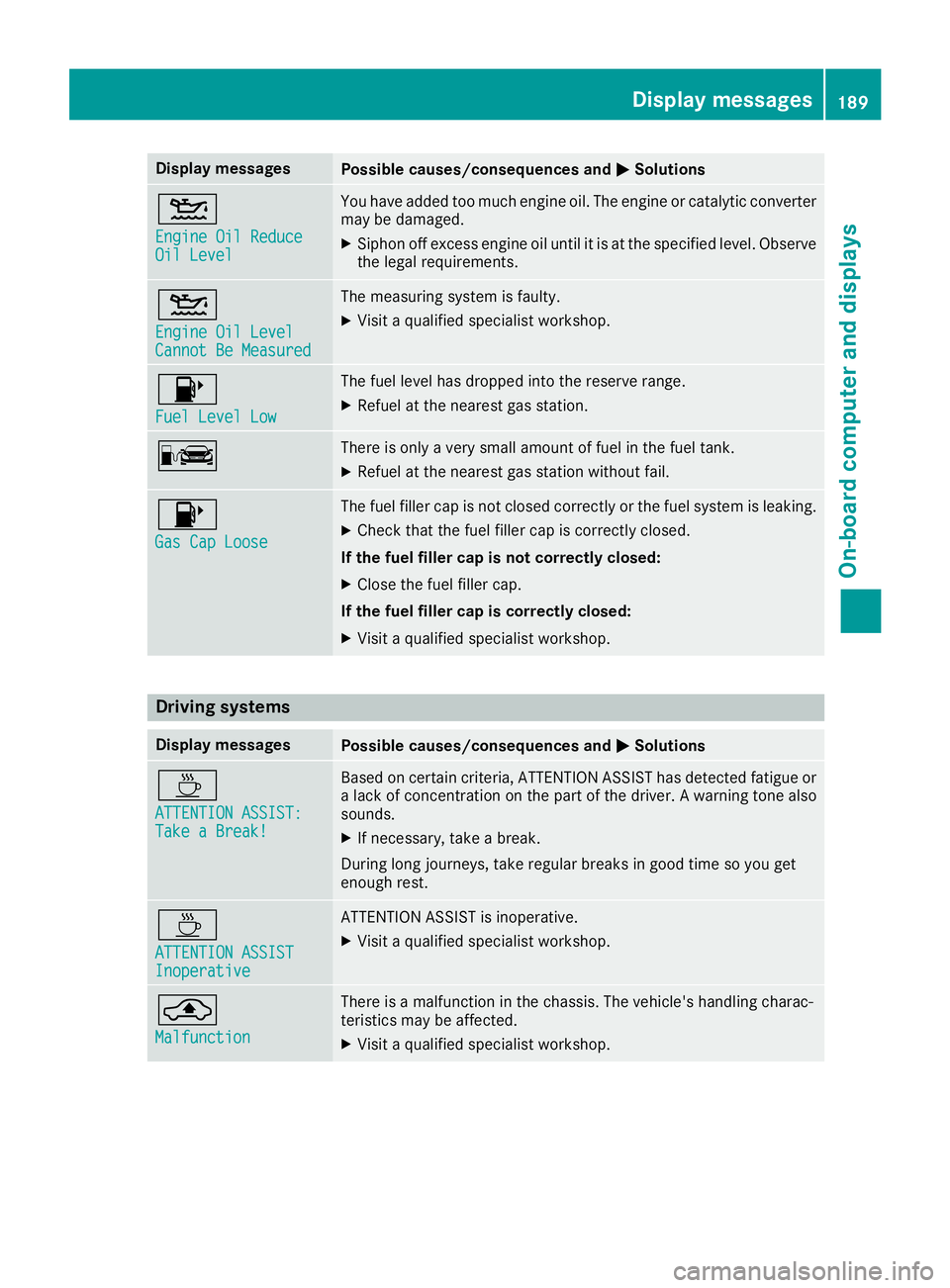
Display messages
Possible causes/consequences and
0050
0050Solutions 00B2
Engine Oil Reduce Engine Oil Reduce
Oil Level Oil Level You have added too much engine oil. The engine or catalytic converter
may be damaged.
X Siphon off excess engine oil until it is at the specified level. Observe
the legal requirements. 00B2
Engine Oil Level Engine Oil Level
Cannot Be Measured Cannot Be Measured The measuring system is faulty.
X
Visit a qualified specialist workshop. 00B6
Fuel Level Low Fuel Level Low The fuel level has dropped into the reserve range.
X Refuel at the nearest gas station. 00A8 There is only a very small amount of fuel in the fuel tank.
X Refuel at the nearest gas station without fail. 00B6
Gas Cap Loose Gas Cap Loose The fuel filler cap is not closed correctly or the fuel system is leaking.
X Check that the fuel filler cap is correctly closed.
If the fuel filler cap is not correctly closed:
X Close the fuel filler cap.
If the fuel filler cap is correctly closed:
X Visit a qualified specialist workshop. Driving systems
Display messages
Possible causes/consequences and
0050 0050Solutions 00AD
ATTENTION ASSIST: ATTENTION ASSIST:
Take a Break! Take a Break! Based on certain criteria, ATTENTION ASSIST has detected fatigue or
a lack of concentration on the part of the driver. A warning tone also
sounds.
X If necessary, take a break.
During long journeys, take regular breaks in good time so you get
enough rest. 00AD
ATTENTION ASSIST ATTENTION ASSIST
Inoperative Inoperative ATTENTION ASSIST is inoperative.
X Visit a qualified specialist workshop. 00AB
Malfunction Malfunction There is a malfunction in the chassis. The vehicle's handling charac-
teristics may be affected.
X Visit a qualified specialist workshop. Display
messages
189On-board computer and displays Z
Page 197 of 298
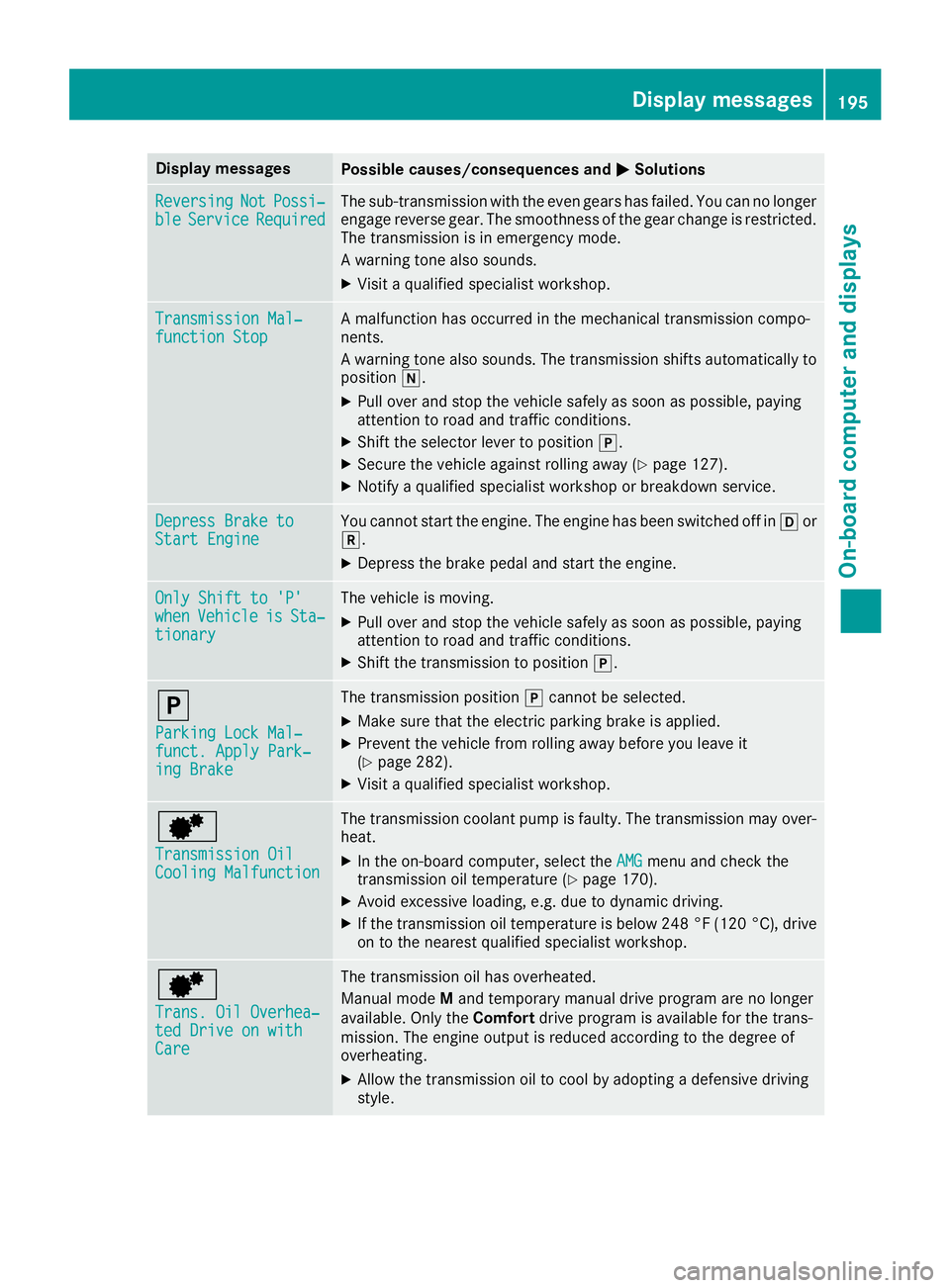
Display messages
Possible causes/consequences and
0050
0050Solutions Reversing
Reversing
Not
NotPossi‐
Possi‐
ble
ble Service
Service Required
Required The sub-transmission with the even gears has failed. You can no longer
engage reverse gear. The smoothness of the gear change is restricted.
The transmission is in emergency mode.
A warning tone also sounds.
X Visit a qualified specialist workshop. Transmission Mal‐ Transmission Mal‐
function Stop function Stop A malfunction has occurred in the mechanical transmission compo-
nents.
A warning tone also sounds. The transmission shifts automatically to position 005C.
X Pull over and stop the vehicle safely as soon as possible, paying
attention to road and traffic conditions.
X Shift the selector lever to position 005D.
X Secure the vehicle against rolling away (Y page 127).
X Notify a qualified specialist workshop or breakdown service. Depress Brake to Depress Brake to
Start Engine Start Engine You cannot start the engine. The engine has been switched off in
005Bor
005E.
X Depress the brake pedal and start the engine. Only Shift to 'P'
Only Shift to 'P'
when when
Vehicle
Vehicle is
isSta‐
Sta‐
tionary
tionary The vehicle is moving.
X
Pull over and stop the vehicle safely as soon as possible, paying
attention to road and traffic conditions.
X Shift the transmission to position 005D.005D
Parking Lock Mal‐ Parking Lock Mal‐
funct. Apply Park‐ funct. Apply Park‐
ing Brake ing Brake The transmission position
005Dcannot be selected.
X Make sure that the electric parking brake is applied.
X Prevent the vehicle from rolling away before you leave it
(Y page 282).
X Visit a qualified specialist workshop. 0080
Transmission Oil Transmission Oil
Cooling Malfunction Cooling Malfunction The transmission coolant pump is faulty. The transmission may over-
heat.
X In the on-board computer, select the AMG
AMGmenu and check the
transmission oil temperature (Y page 170).
X Avoid excessive loading, e.g. due to dynamic driving.
X If the transmission oil temperature is below 248 °F (120 °C), drive
on to the nearest qualified specialist workshop. 0080
Trans. Oil Overhea‐ Trans. Oil Overhea‐
ted Drive on with ted Drive on with
Care Care The transmission oil has overheated.
Manual mode
Mand temporary manual drive program are no longer
available. Only the Comfortdrive program is available for the trans-
mission. The engine output is reduced according to the degree of
overheating.
X Allow the transmission oil to cool by adopting a defensive driving
style. Display
messages
195On-board computer and displays Z
Page 198 of 298
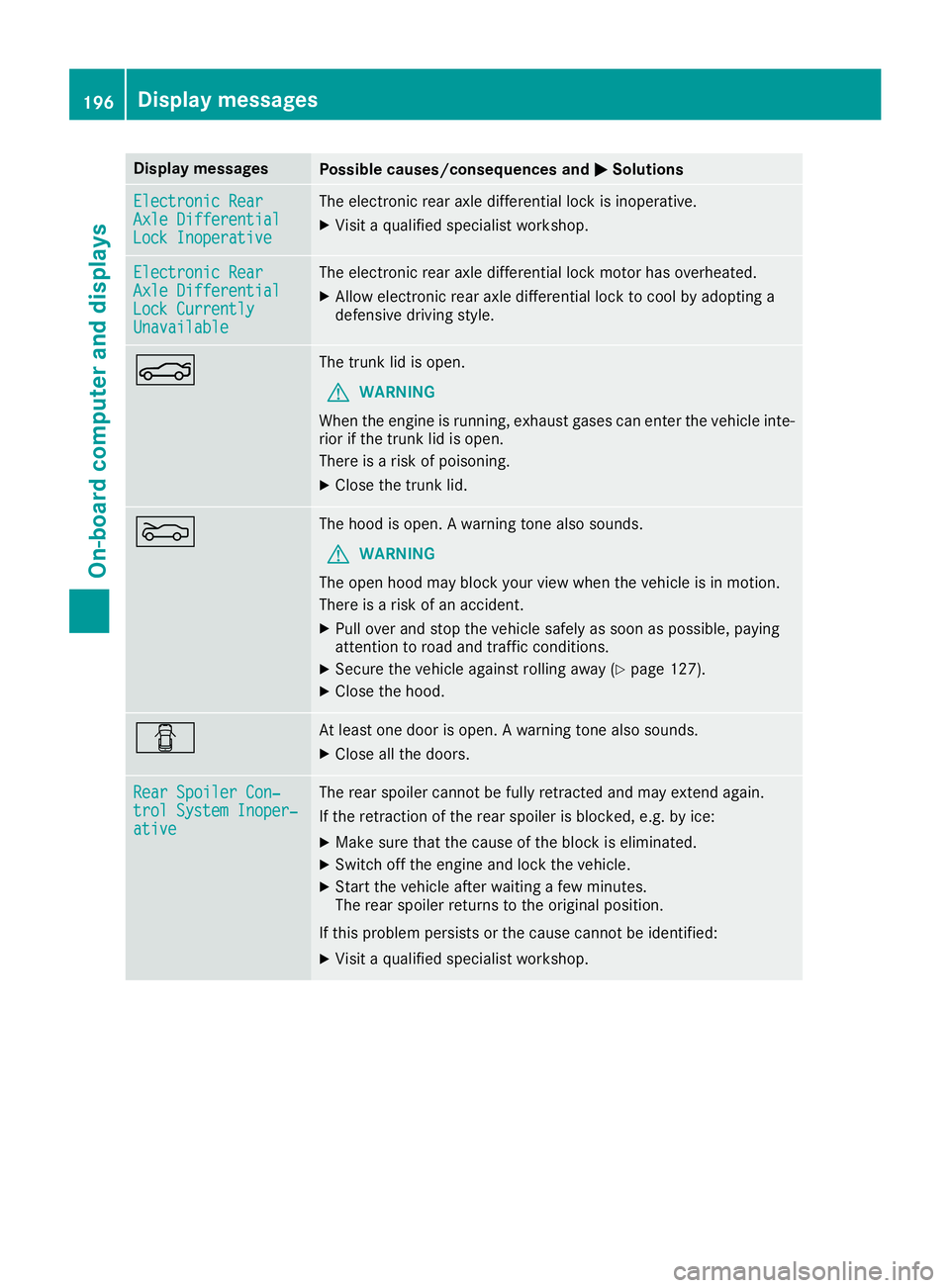
Display messages
Possible causes/consequences and
0050
0050Solutions Electronic Rear
Electronic Rear
Axle Differential Axle Differential
Lock Inoperative Lock Inoperative The electronic rear axle differential lock is inoperative.
X Visit a qualified specialist workshop. Electronic Rear
Electronic Rear
Axle Differential Axle Differential
Lock Currently Lock Currently
Unavailable Unavailable The electronic rear axle differential lock motor has overheated.
X Allow electronic rear axle differential lock to cool by adopting a
defensive driving style. 0084 The trunk lid is open.
G WARNING
When the engine is running, exhaust gases can enter the vehicle inte- rior if the trunk lid is open.
There is a risk of poisoning.
X Close the trunk lid. 0083 The hood is open. A warning tone also sounds.
G WARNING
The open hood may block your view when the vehicle is in motion.
There is a risk of an accident.
X Pull over and stop the vehicle safely as soon as possible, paying
attention to road and traffic conditions.
X Secure the vehicle against rolling away (Y page 127).
X Close the hood. 0051 At least one door is open. A warning tone also sounds.
X Close all the doors. Rear Spoiler Con‐ Rear Spoiler Con‐
trol System Inoper‐ trol System Inoper‐
ative ative The rear spoiler cannot be fully retracted and may extend again.
If the retraction of the rear spoiler is blocked, e.g. by ice:
X Make sure that the cause of the block is eliminated.
X Switch off the engine and lock the vehicle.
X Start the vehicle after waiting a few minutes.
The rear spoiler returns to the original position.
If this problem persists or the cause cannot be identified:
X Visit a qualified specialist workshop. 196
Display
messagesOn-board computer and displays
Page 199 of 298
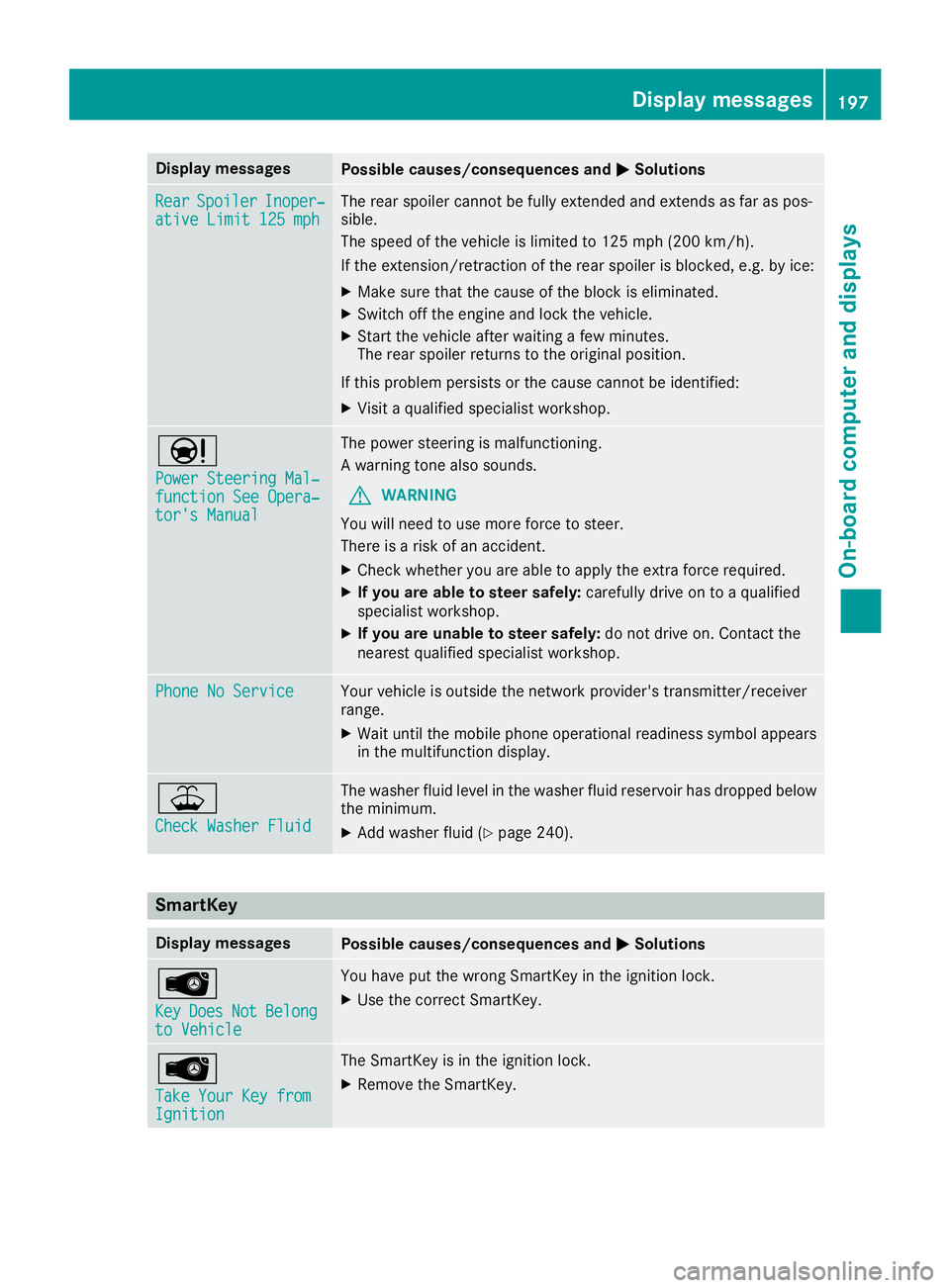
Display messages
Possible causes/consequences and
0050
0050Solutions Rear
Rear
Spoiler
Spoiler Inoper‐
Inoper‐
ative Limit 125 mph
ative Limit 125 mph The rear spoiler cannot be fully extended and extends as far as pos-
sible.
The speed of the vehicle is limited to 125 mph (200 km/h ).
If the extension/retraction of the rear spoiler is blocked, e.g. by ice:
X Make sure that the cause of the block is eliminated.
X Switch off the engine and lock the vehicle.
X Start the vehicle after waiting a few minutes.
The rear spoiler returns to the original position.
If this problem persists or the cause cannot be identified: X Visit a qualified specialist workshop. 00CC
Power Steering Mal‐ Power Steering Mal‐
function See Opera‐ function See Opera‐
tor's Manual tor's Manual The power steering is malfunctioning.
A warning tone also sounds.
G WARNING
You will need to use more force to steer.
There is a risk of an accident.
X Check whether you are able to apply the extra force required.
X If you are able to steer safely: carefully drive on to a qualified
specialist workshop.
X If you are unable to steer safely: do not drive on. Contact the
nearest qualified specialist workshop. Phone No Service Phone No Service Your vehicle is outside the network provider's transmitter/receiver
range.
X Wait until the mobile phone operational readiness symbol appears
in the multifunction display. 00B2
Check Washer Fluid Check Washer Fluid The washer fluid level in the washer fluid reservoir has dropped below
the minimum.
X Add washer fluid (Y page 240). SmartKey
Display messages
Possible causes/consequences and
0050
0050Solutions 00AF
Key Key
Does
Does Not
NotBelong
Belong
to Vehicle
to Vehicle You have put the wrong SmartKey in the ignition lock.
X Use the correct SmartKey. 00AF
Take Your Key from Take Your Key from
Ignition Ignition The SmartKey is in the ignition lock.
X Remove the SmartKey. Display messages
197On-board computer and displays Z
Page 231 of 298
Information on Roadside Assistance
(Y
page 26).
Downloading routes Downloading routes allows you to transfer and
save predefined routes in the navigation sys-
tem.
A route can be prepared and sent either by a
customer service representative or under "Own- ers Online" at http://www.mbusa.com.
Each route can include up to four way points.
Once a route has been received by the naviga-
tion system, you will see the Do
Do you you want
want to
to
start route guidance? Destination
start route guidance? Destination
Received destination has been saved Received destination has been saved
in "Previous destinations".
in "Previous destinations". message on
the multimedia system display.
The route is saved.
X To start route guidance: selectYes
Yes.
An overview of the route is shown in the dis-
play.
If you select No
No, the saved route can be called
up later in the navigation menu.
X Select Start
Start.
Route guidance starts.
Downloaded and saved routes can be called up again.
Speed alert You can define the upper speed limit, which
must not be exceeded by the vehicle.
If the vehicle exceeds the set speed, a message
is sent to the Customer Assistance Center. The
Customer Assistance Center then forwards this
information to you.
You can select the way in which you receive this information beforehand. Possible options
include text message, e-mail or an automated
call.
The data you receive contains the following
information:
R the location where the speed limit was excee-
ded
R the time at which the speed limit was excee-
ded
R the selected speed limit which was exceeded Geo fencing Geo fencing allows you to select areas which the
vehicle should not enter or leave. You will be
informed if the vehicle crosses the boundaries
of the selected areas. You can select the way in
which you receive this information beforehand.
Possible options include text message, e-mail or an automated call.
The area can be determined as either a circle or
a polygon with a maximum of ten corners. You
can specify up to ten areas simultaneously. Dif- ferent settings are possible for each area.
These settings can be called up under "Owners
Online" at http://www.mbusa.com.
Alternatively, you can also trigger an Info call
and notify the customer service representative
that you wish to activate geo-fencing.
Currently inactive areas can be activated by text message.
Triggering the vehicle alarm With this function, you can trigger the vehicle's
panic alarm via text message. An alarm sounds
and the exterior lighting flashes. Depending on
the setting, the panic alarm lasts five or ten sec-
onds. Afterwards, the alarm switches off. Rear spoiler
Overview The rear spoiler improves the handling of the
vehicle. It adapts the vehicle's aerodynamics to
the operating conditions, dependent on the
speed of the vehicle.
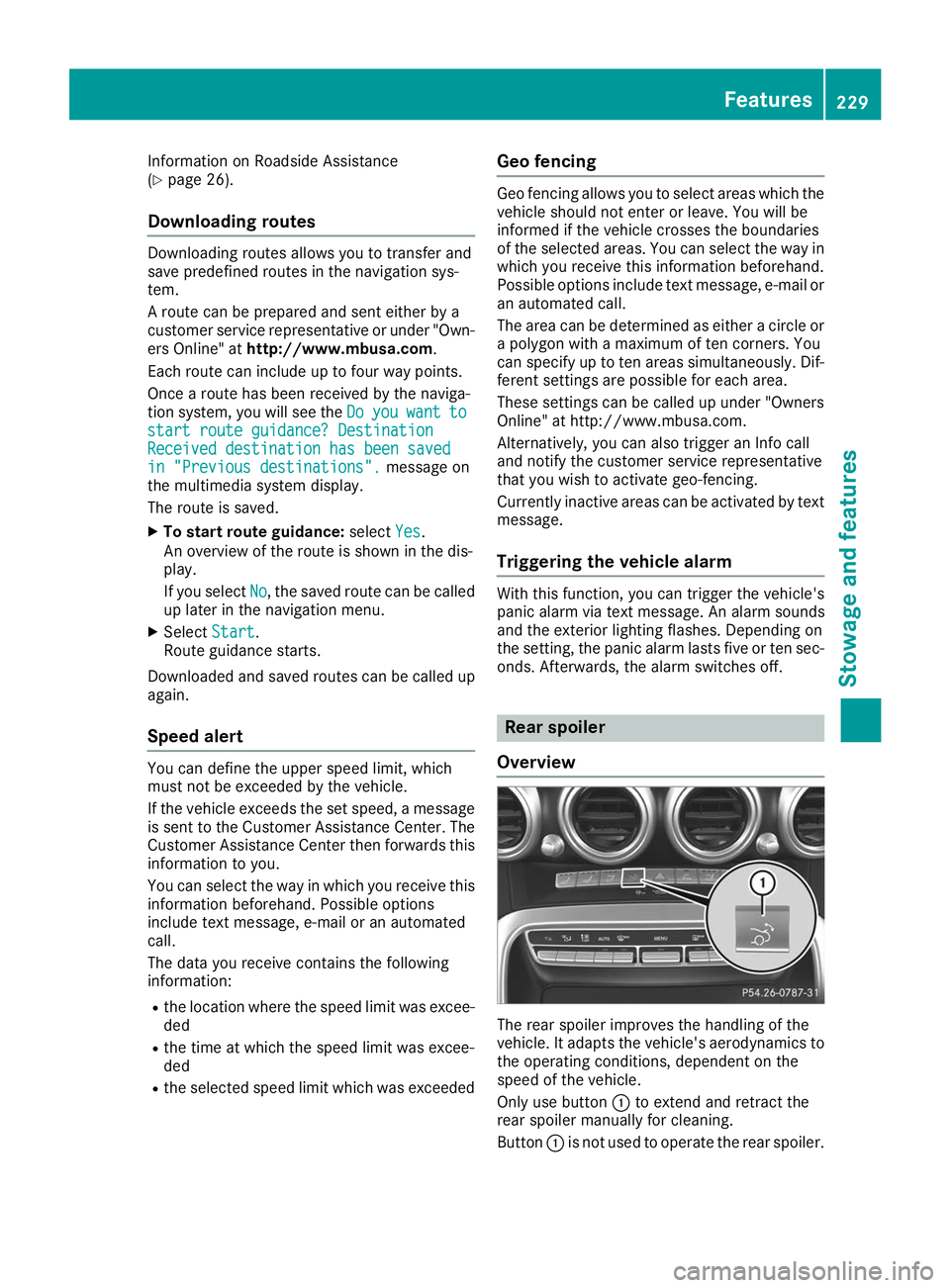
Only use button 0043to extend and retract the
rear spoiler manually for cleaning.
Button 0043is not used to operate the rear spoiler. Features
229Stowage and features Z
Page 232 of 298
The rear spoiler is extended automatically if you
drive faster than:
R 75 mph (120 km/h) in drive programs C,S
and S+
R 44 mph (70 km/h) in drive program RACE
Button 0043flashes until the rear spoiler has
extended and then lights up in red.
The rear spoiler is retracted automatically when
you drive slower than:
R 50 mph (80 km/h) in drive programs C,Sand
S+
R 19 mph (30 km/h) in drive program RACE
Button 0043flashes until the rear spoiler has
retracted and then goes out.
Extending and retracting the rear
spoiler manually G
WARNING
Body parts could become trapped if you man- ually extend/retract the rear spoiler. There is a risk of injury.
Make sure that nobody is within the range of
movement of the rear spoiler.
If someone becomes trapped during retrac-
tion of the rear spoiler, release the button
immediately. The rear spoiler then extends
again. When leaving the vehicle, always take the
SmartKey with you and lock the vehicle. Never
leave children unsupervised in the vehicle.
! Do not enter an automatic car wash with the
rear spoiler extended. Otherwise, the rear
spoiler may be damaged.
Only extend the rear spoiler in order to clean
it by hand. Retract it again when you have fin-
ished cleaning it.
You can extend and retract the rear spoiler man- ually for cleaning.
X Close the trunk lid.
X Select key position 0048with the Start/Stop
button (Y page 111).
X To extend: press button 0043.
The rear spoiler is extended.
Button 0043flashes until the rear spoiler has
extended and then lights up in red.
X To retract: press and hold button 0043until the
rear spoiler is completely retracted.
Button 0043flashes until the rear spoiler has
retracted and then goes out.
Rear Spoiler Retracts Manually Rear Spoiler Retracts Manually
appears in the display.
If you release button 0043while retracting the rear
spoiler, it extends again automatically.
Problems with the rear spoiler Problem
Possible causes/consequences and
0050 0050Solutions The rear spoiler stops
before reaching the end
position when retracting
manually. You have opened the trunk lid while manually retracting the rear
spoiler.
X Close the trunk lid.
The rear spoiler extends or, if you press and hold the ¬button,
continues retracting. The rear spoiler stops
before reaching the end
position when retract-
ing/extending manually. You have switched off the ignition.
X Switch the ignition back on.
X Press the ¬button.
The rear spoiler extends/retracts. 230
FeaturesStowage and features
Page 233 of 298
Problem
Possible causes/consequences and
0050
0050Solutions The rear spoiler cannot
be retracted again after
manually extending it. You have opened the trunk lid while manually extending the rear
spoiler.
X Close the trunk lid. The rear spoiler does not
extend or retract auto-
matically. The rear spoiler's movement is blocked, e.g. by an object jammed
between the body and the rear spoiler.
X Remove the object. Garage door opener
General notes The HomeLink
®
garage door opener integrated
in the rear-view mirror allows you to operate up
to three different door and gate systems.
Use the integrated garage door opener only on
garage doors that:
R they are equipped with a safety stop and
reverse feature
R they conform to the current U.S. safety stand-
ards
When it has been programmed, the integrated
garage door opener in the rear-view mirror will
assume the function of the garage door sys-
tem's remote control. Please also read the oper-
ating instructions for the garage door system.
When programming a garage door opener, park the vehicle outside the garage. Do not leave the
engine running while programming it.
Certain garage door drives are incompatible
with the integrated garage door opener. If you
have difficulty programing the integrated garage
door opener, contact a Mercedes-Benz Service
Center.
Alternatively, you can call the following tele-
phone assistance services:
R USA: Mercedes-Benz Customer Assistance
Center at 1-800-FOR-MERCedes
R Canada: Customer Service at
1-800-387-0100
R HomeLink ®
hotline 1-800-355-3515 (free of
charge)
More information on HomeLink ®
and/or com-
patible products is also available on the Internet
at http://www.homelink.com.
Notes on the declaration of conformity
(Y page 27).
USA: FCC ID: CB2HMIHL4 Canada: IC: 279B-HMIHL4
Important safety notes G
WARNING
When you operate or program the door with
the integrated garage door opener, persons in the range of movement of the door may
become trapped or be struck by the door.
There is a risk of injury.
When using the integrated garage door
opener, always make sure that nobody is
within the range of movement of the door. G
DANGER
Combustion engines emit poisonous exhaust
gases such as carbon monoxide. Inhaling
these exhaust gases is hazardous to health
and can result in poisoning. There is a risk of
fatal injury. Therefore, never leave the engine running an enclosed space without adequate
ventilation.
Programming Programming the buttons
Pay attention to the "Important safety notes"
(Y page 231). Features
231Stowage and features Z
Page 238 of 298
X
Make sure that the windshield wipers are
turned off.
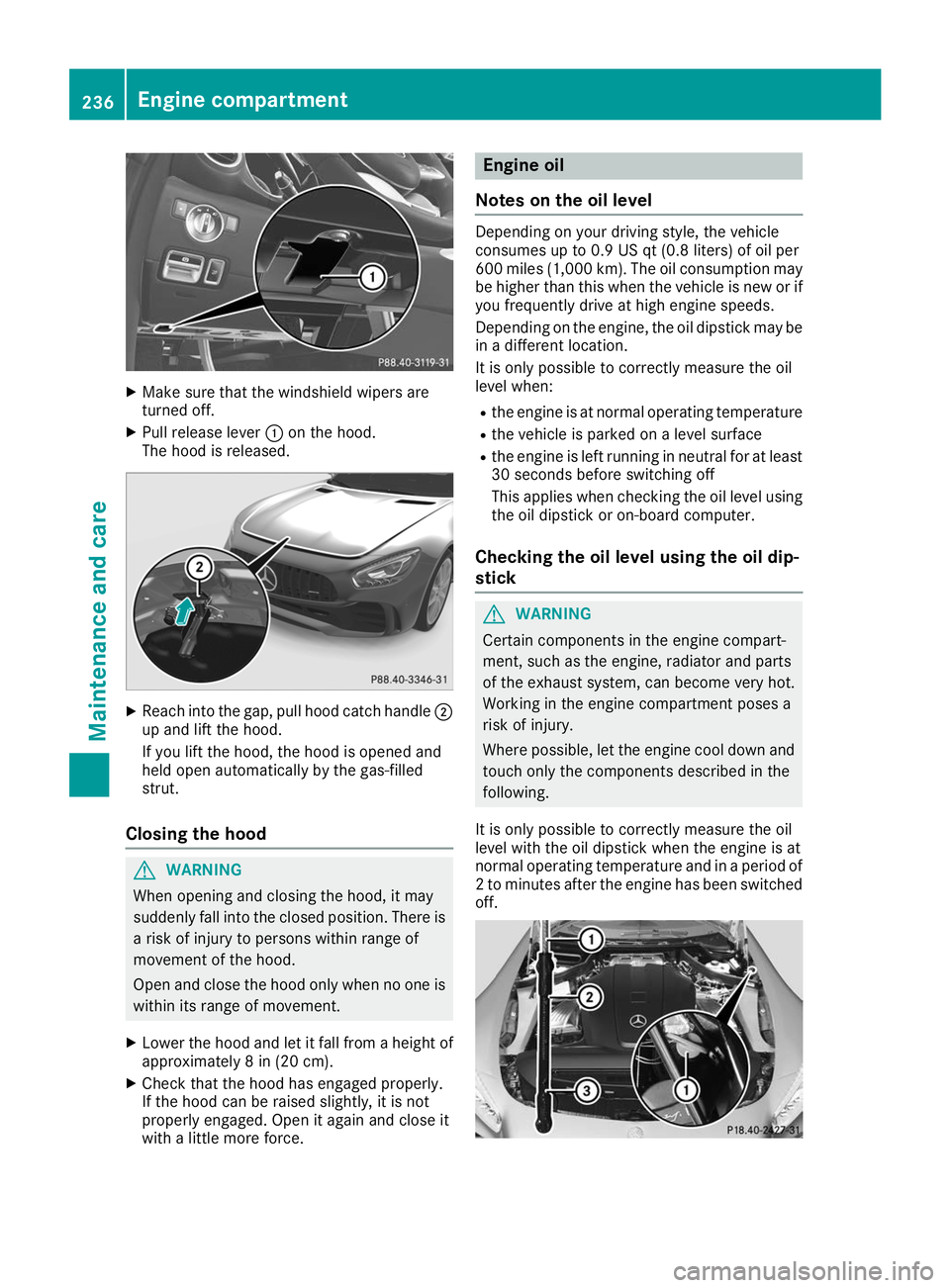
X Pull release lever 0043on the hood.
The hood is released. X
Reach into the gap, pull hood catch handle 0044
up and lift the hood.
If you lift the hood, the hood is opened and
held open automatically by the gas-filled
strut.
Closing the hood G
WARNING
When opening and closing the hood, it may
suddenly fall into the closed position. There is a risk of injury to persons within range of
movement of the hood.
Open and close the hood only when no one is
within its range of movement.
X Lower the hood and let it fall from a height of
approximately 8 in (20 cm).
X Check that the hood has engaged properly.
If the hood can be raised slightly, it is not
properly engaged. Open it again and close it
with a little more force. Engine oil
Notes on the oil level Depending on your driving style, the vehicle
consumes up to 0.9 US qt (0.8 liters) of oil per
600 miles (1,000 km). The oil consumption may
be higher than this when the vehicle is new or if
you frequently drive at high engine speeds.
Depending on the engine, the oil dipstick may be in a different location.
It is only possible to correctly measure the oil
level when:
R the engine is at normal operating temperature
R the vehicle is parked on a level surface
R the engine is left running in neutral for at least
30 seconds before switching off
This applies when checking the oil level using
the oil dipstick or on-board computer.
Checking the oil level using the oil dip-
stick G
WARNING
Certain components in the engine compart-
ment, such as the engine, radiator and parts
of the exhaust system, can become very hot.
Working in the engine compartment poses a
risk of injury.
Where possible, let the engine cool down and touch only the components described in the
following.
It is only possible to correctly measure the oil
level with the oil dipstick when the engine is at
normal operating temperature and in a period of 2 to minutes after the engine has been switchedoff. 236
Engine compartmentMaintenance and care