2019 LEXUS RX350 warning
[x] Cancel search: warningPage 317 of 777

316 4-5. Using the driving support systems
RX350/RX350L_U ■
Customization
Some functions can be customized. ( P. 325, 722)
WARNING ■
Handling the radar sensor
Blind Spot Monitor sensors ar e installed behind the left and right sides of the rear
bumper respectively. Observe the following to ensure the Blind Spot Monitor can
function correctly.
●
Do not subject a sensor or its surrounding area on the rear bumper to a strong
impact.
If a sensor is moved even slightly off po sition, the system may malfunction and vehi-
cles may not be detected correctly.
In the following situations , have your vehicle inspected by your Lexus dealer.
• A sensor or its surrounding area is subject to a strong impact.
• If the surrounding area of a sensor is sc ratched or dented, or part of them has
become disconnected. ●
Do not disassemble the sensor. ●
Do not attach stickers to the sensor or surrounding area on the rear bumper.●
Do not modify the sensor or surro unding area on the rear bumper.●
Do not paint the rear bumper any colo r other than an official Lexus color.●
Keep the sensors and the surrounding areas
on the rear bumper clean at all times.
If a sensor or its surrounding area on the rear
bumper is dirty or covered with snow, the
Blind Spot Monitor may not operate and a
warning message ( P. 661) will be displayed.
In this situation, clear off the dirt or snow and
drive the vehicle with the operation condi-
tions of the BSM function ( P. 319) satisfied
for approximately 10 minutes. If the warning
message does not disappear, have the vehicle
inspected by your Lexus dealer.
Page 319 of 777
318 4-5. Using the driving support systems
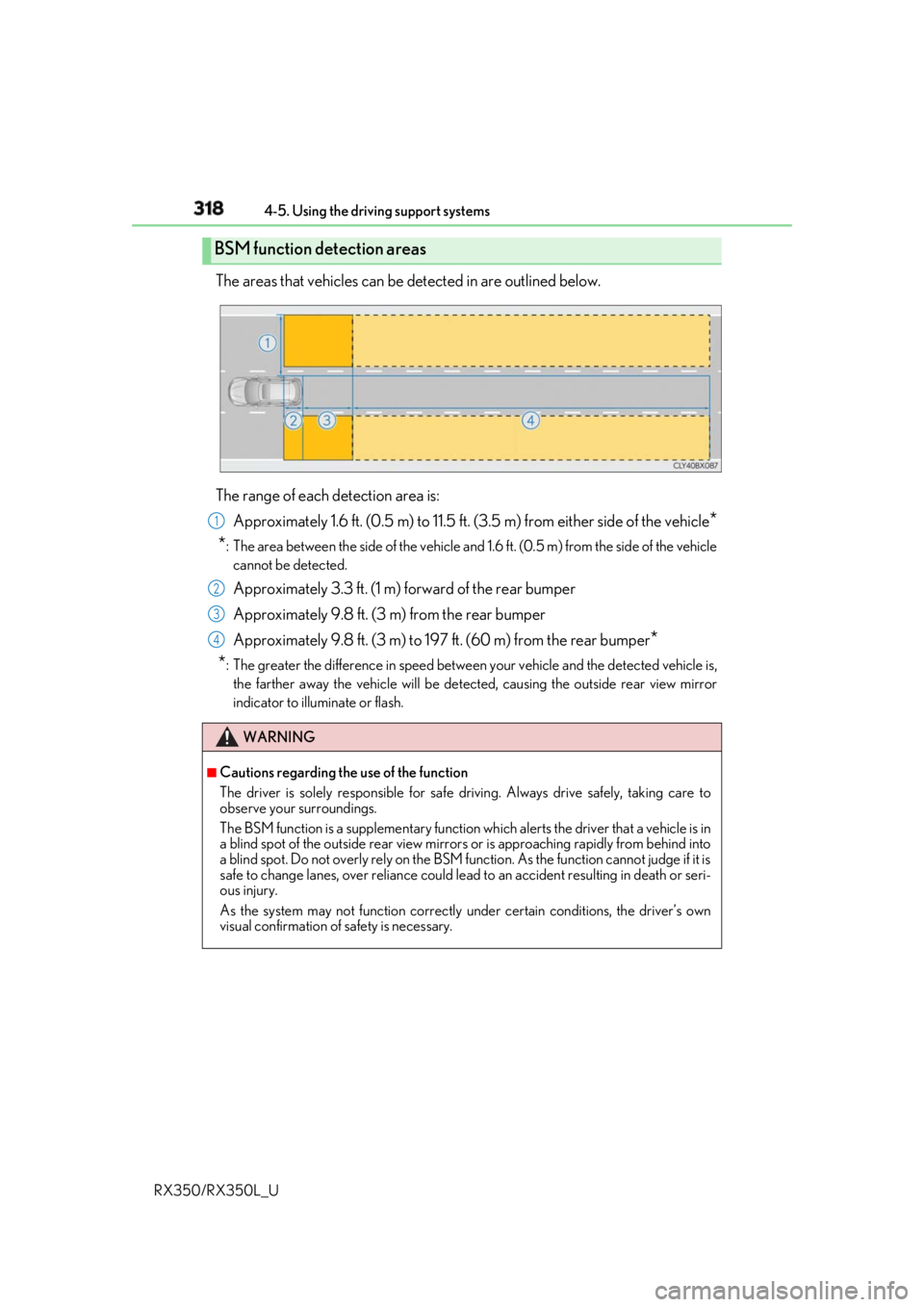
RX350/RX350L_U The areas that vehicles can be detected in are outlined below.
The range of each detection area is:
Approximately 1.6 ft. (0.5 m) to 11.5 ft. (3 .5 m) from either side of the vehicle
*
* : The area between the side of the vehicle and 1.6 ft. (0.5 m) from the side of the vehicle
cannot be detected.
Approximately 3.3 ft. (1 m) forward of the rear bumper
Approximately 9.8 ft. (3 m) from the rear bumper
Approximately 9.8 ft. (3 m) to 197 ft. (60 m) from the rear bumper
*
* : The greater the difference in speed betwee n your vehicle and the detected vehicle is,
the farther away the vehicle will be detect ed, causing the outside rear view mirror
indicator to illuminate or flash.BSM function detection areas
WARNING ■
Cautions regarding the use of the function
The driver is solely responsible for safe driving. Always drive safely, taking care to
observe your surroundings.
The BSM function is a supplementary function which alerts the driver that a vehicle is in
a blind spot of the outside rear view mirrors or is approaching rapidly from behind into
a blind spot. Do not overly rely on the BSM function. As the function cannot judge if it is
safe to change lanes, over reliance could lead to an accident resulting in death or seri-
ous injury.
As the system may not function correctly under certain conditions, the driver’s own
visual confirmation of safety is necessary. 1
2
3
4
Page 323 of 777
322 4-5. Using the driving support systems
RX350/RX350L_U ■
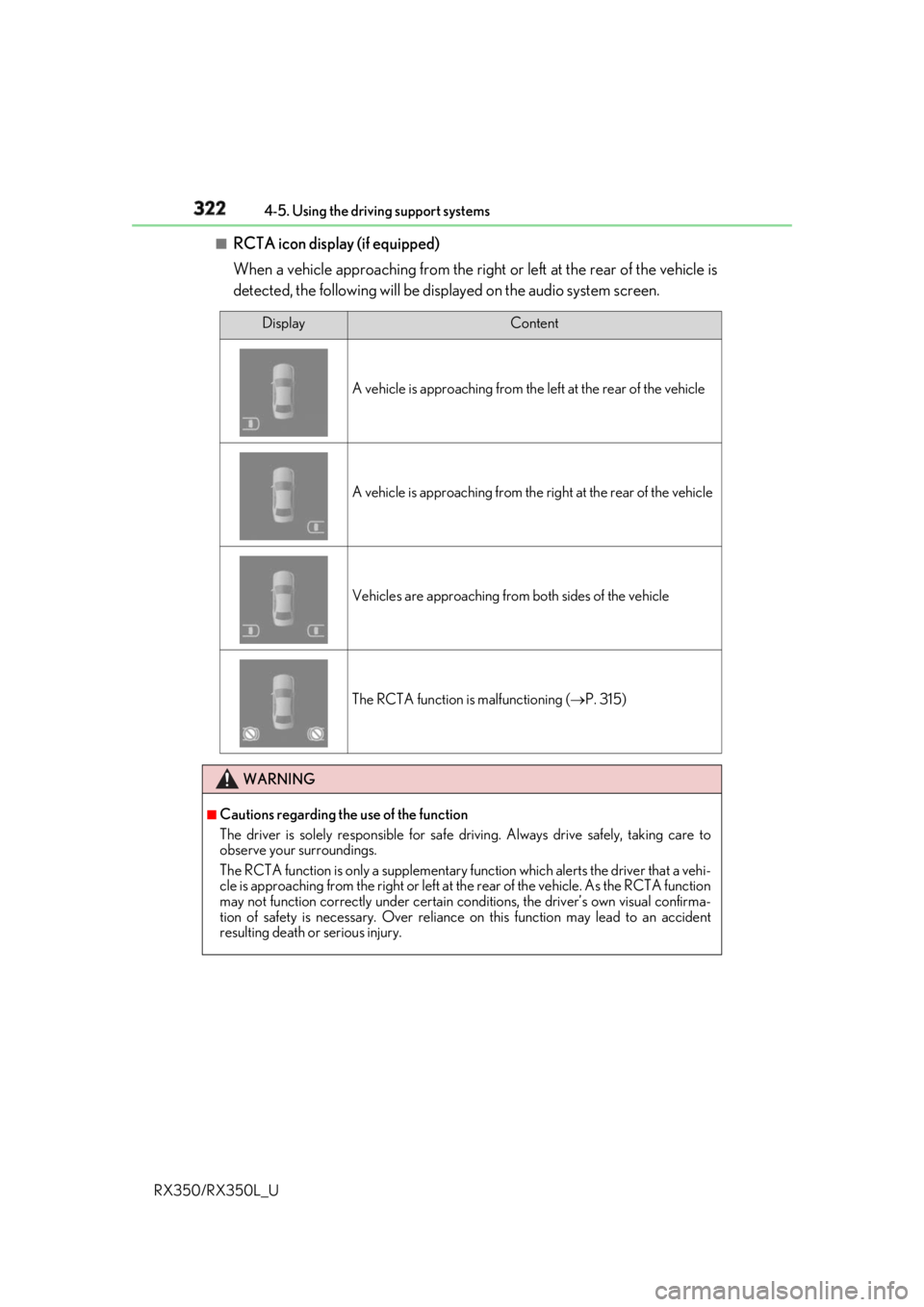
RCTA icon display (if equipped)
When a vehicle approaching from the right or left at the rear of the vehicle is
detected, the following will be displayed on the audio system screen. Display Content
A vehicle is approaching from the left at the rear of the vehicle
A vehicle is approaching from the right at the rear of the vehicle
Vehicles are approaching from both sides of the vehicle
The RCTA function is malfunctioning ( P. 315)
WARNING ■
Cautions regarding the use of the function
The driver is solely responsible for safe driving. Always drive safely, taking care to
observe your surroundings.
The RCTA function is only a supplementary function which alerts the driver that a vehi-
cle is approaching from the right or left at the rear of the vehicle. As the RCTA function
may not function correctly under certain cond itions, the driver’s own visual confirma-
tion of safety is necessary. Over reliance on this function may lead to an accident
resulting death or serious injury.
Page 334 of 777

3334-5. Using the driving support systems
4
Driving
RX350/RX350L_U ■
The intuitive parking assist can be operated when ●
Front corner sensors:
• The engine switch is in IGNITION ON mode.
• The shift lever is in other than P.
• The vehicle speed is less than about 6 mph (10 km/h).
(At any speed when the shift lever is in R) ●
Front center sensors:
• The engine switch is in IGNITION ON mode.
• The shift lever is in other than P or R.
• The vehicle speed is less than about 6 mph (10 km/h). ●
Rear corner and rear center sensors:
• The engine switch is in IGNITION ON mode.
• The shift lever is in R. ■
Intuitive parking assist display ●
Vehicles with a Lexus Display Audio system/navigation system (8-inch display): When
an object is detected while the Lexus parking assist monito r or panoramic view monitor
is in use, the warning indicator will appear in the up per part of the scre en even if the dis-
play setting has been set to off.●
Vehicles with a navigation system (12.3-inch display): If the intuit ive parking assist dis-
play is set to on, detected objects will also be displayed on the panoramic view monitor.
For details, refer to “NAVIGATION SYSTEM OWNER’S MANUAL”. ■
Sensor detectio n information●
The sensor’s detection areas are limited to the areas around the vehicle’s bumper. ●
Certain vehicle conditions and the surrounding environment may affect the ability of a
sensor to correctly detect an object. Particular instances where this may occur are
listed below.
• There is dirt, snow or ice on the sensor . (Wiping the sensors will resolve this prob-
lem.)
• The sensor is frozen. (Thawing th e area will resolve this problem.)
In especially cold weather, if a sensor is frozen the screen may show an abnormal
display, or obstacles may not be detected.
• The sensor is covered in any way.
• The vehicle is leaning considerably to one side.
• When a sensor or the area around a sensor is extremely hot or cold.
• On an extremely bumpy road, on an incline, on gravel, or on grass.
• The vicinity of the vehicle is noisy due to vehicle horns, motorcycle engines, air
brakes of large vehicles, or other loud noises producing ultrasonic waves.
• There is another vehicle equipped with parking assist sensors in the vicinity.
• The sensor is coated with a sheet of spray or heavy rain.
• The bumper or sensor re ceives a strong impact.
• If the vehicle is significantly tilted.
• The vehicle is approaching a tall or curved curb.
• In harsh sunlight or intense cold weather.
• The area directly under the bumpers is not detected.
• If objects draw too close to the sensor.
• People may not be detected if they are wearing certain types of clothing.
In addition to the examples above, there ar e instances in which, because of their shape,
signs and other objects may be judged by a sensor to be closer than they are.
Page 336 of 777

3354-5. Using the driving support systems
4
Driving
RX350/RX350L_U WARNING ■
When using the intuitive parking assist
Observe the following precautions.
Failing to do so may result in the vehicle be ing unable to be driv en safely and possibly
cause an accident. ●
Do not use the sensor at speeds in excess of 6 mph (10 km/h). ●
The sensors’ detection areas and reaction ti mes are limited. When moving forward or
reversing, check the areas surrounding the vehicle (especially th e sides of the vehi-
cle) for safety, and drive slowly, using the brake to control the vehicle’s speed. ●
Do not install accessories within the sensors’ detection areas.●
The vehicle is equipped with a fender pole or wireless antenna. ●
The front or rear bumper or a se nsor receives a strong impact.●
A non-genuine Lexus suspension (lower ed suspension, etc.) is installed.●
Towing eyelets are installed. ●
A backlit license plate is installed. ■
When using intuitive parking assist
In the following situations, the system may not function correctly due to a sensor mal-
function, etc. Have the vehicle checked by your Lexus dealer. ●
The intuitive parking assist operation disp lay flashes, and a buzzer sounds when no
obstacles are detected. ●
If the area around a sensor co llides with something, or is subjected to strong impact.●
If the bumper collides with something. ●
If the display shows continuously withou t beeping, except when the buzzer mute
switch has been turned on. ●
If a display error occurs , first check the sensor.
If the error occurs even if there is no ice, sn ow or mud on the sensor, it is likely that the
sensor is malfunctioning. ■
Notes when washing the vehicle
Do not apply intensive bursts of water or steam to the sensor area.
Doing so may result in th e sensor malfunctioning.●
When using a high pressure washer to wa sh the vehicle, do not spray the sensors
directly, as doing so may cause a sensor to malfunction. ●
When using steam to clean the vehicle, do not direct steam too close to the sensors
as doing so may cause a sensor to malfunction.
Page 344 of 777
3434-5. Using the driving support systems
4
Driving
RX350/RX350L_U ■
The Intelligent Clearance Sonar function will operate when
The function will operate when the ICS O FF indicator is not illuminated or flashing
( P. 339, 347) and all of the following conditions are met: ●
Engine output restriction control
• The Intelligent Clearance Sonar system is enabled.
• The vehicle speed is 10 mph (15 km/h) or less.
• There is a stationary object in the traveling direction of the vehicle and 6 to 13 ft. (2
to 4 m) away.
• The system determines that a stronger-t han-normal brake operation is necessary to
avoid a collision. ●
Brake control
• Engine output restriction control is operating.
• The system determines that an emergenc y brake operation is necessary to avoid a
collision.■
The Intelligent Clearance Sonar fu nction will stop operating when
The function will stop operating if an y of the following conditions are met:●
Engine output restriction control
• The Intelligent Clearance Son ar system is disabled.
• The collision becomes avoidable with normal brake operation.
• The stationary object is no lo nger 6 to 13 ft. (2 to 4 m) away in the traveling direction
of the vehicle. ●
Brake control
• The Intelligent Clearance Son ar system is disabled.
• Approximately 2 seconds elapse after the vehicle is stopped by brake control.
• The brake pedal is depressed after the vehicle is stopped by brake control.
• The stationary object is no lo nger 6 to 13 ft. (2 to 4 m) away in the traveling direction
of the vehicle.■
Detection range of the Intellig ent Clearance Sonar function
The detection range of the Intelligent Cleara nce Sonar function differs from the detec-
tion range of the intu itive parking assist. ( P. 331)
Therefore, even if the intuit ive parking assist detects an object and provides a warning,
the Intelligent Clearance Sonar function may not start operating. ■
If the Intelligent Clearance Sonar function has operated
If the vehicle is stopped due to operation of the Intelligent Clearance Sonar function, the
Intelligent Clearance Sonar system will be di sabled and the ICS OFF indicator will illumi-
nate.
Page 348 of 777

3474-5. Using the driving support systems
4
Driving
RX350/RX350L_U ■
If a battery terminal has been disconnected and reconnected
The system needs to be initialized.
To initialize the system, drive the vehicle stra ight ahead for 5 seconds or more at a speed
of approximately 22 mph (35 km/h) or more. ■
If “ICS Unavailable” is displayed on the mu lti-information display and the ICS OFF indi-
cator is flashing ●
A sensor may be covered with ice, snow, dirt, etc. Remove the ice, snow, dirt, etc., from
the sensor to return the system to normal.
Also, due to ice forming on a sensor at low temperatures, a warning message may be
displayed or the sensor may not be able to detect an object. Once the ice melts, the
system will return to normal. ●
If this message continues to be displayed even after cleaning the se nsor, or is displayed
even though the sensor is clean, have the vehicle inspected by your Lexus dealer. ●
Initialization may not have been performed after a battery terminal was disconnected
and reconnected. Init ialize the system. ( P. 347)■
If “ICS Malfunction Visit Your Dealer” is di splayed on the multi-in formation display and
the ICS OFF indicator is flashing
The system may be malfunctioning. Have th e vehicle inspected by your Lexus dealer.
Page 349 of 777

348 4-5. Using the driving support systems
RX350/RX350L_U WARNING ■
Limitations of the Intelligent Clearance Sonar system
Do not overly rely on the system, as doing so may lead to an accident.●
The driver is solely responsi ble for safe driving. Always drive carefully, taking care to
observe your surroundings. The Intelligent Clearance Sonar system is designed to
provide support to lessen the severity of collisions. However, it may not operate in
some situations. ●
The Intelligent Clearance Sonar system is not designed to stop the vehicle com-
pletely. Additionally, even if the system has stopped the vehicle, it is necessary to
depress the brake pedal immediately as brak e control will be canc eled after approxi-
mately 2 seconds. ■
To ensure the Intelligent Clearance Sonar system can operate properly
Observe the following precauti ons regarding the sensors ( P. 339). Failure to do so
may cause a sensor to not operate pr operly, and may cause an accident.●
Do not modify, disassemble or paint the sensors. ●
Do not replace a sensor with a part other than a genuine part. ●
Do not subject a sensor or its surro unding area to a strong impact.●
Do not damage the sensors, and always keep them clean.
Observe the following precautions regarding the radar sensors ( P. 316). Failure to
do so may cause a radar sensor to not op erate properly, and may cause an accident.●
Do not modify, disassemble or paint the sensors. ●
Do not replace a radar sensor with a part other than a genuine part.●
Do not subject a radar sensor or its surrounding area to a strong impact.●
Do not damage the radar sensors, and alwa ys keep the radar sensors and their sur-
rounding area on the bumper clean. ■
Handling the suspension
Do not modify the suspension, as changes to the height or inclinat ion of the vehicle may
prevent the sensors from detecting objects co rrectly or cause the system to not oper-
ate or operate unnecessarily.