2019 LEXUS RX350 warning
[x] Cancel search: warningPage 299 of 777
298 4-5. Using the driving support systems
RX350/RX350L_U ■
Temporary cancellation of functions
When operation conditions are no longer met, a function may be temporarily canceled.
However, when the operation co nditions are met again, operat ion of the function is auto-
matically restored. ( P. 297)■
Steering assist function/lane centering function
Depending on the vehicle speed, lane depart ure situation, road conditions, etc., the
operation of the functions may not be reco gnized or the functions may not operate.■
Lane departure alert function
The warning buzzer may be difficult to hear due to external noise, audio playback, etc.
Also, it may be difficult to f eel steering wheel vibrations due to the road conditions, etc.■
Hands off steering wheel alert
When the system determines that the driver has removed their hands from the steering
wheel while the steering assist function or lane centering function is operating, a warning
message is displayed on the multi-info rmation display and the buzzer sounds.■
White (yellow) lines are only on one side of road
The LKA system will not operate for the side on which white (yellow) lines could not be
recognized.
Page 300 of 777

2994-5. Using the driving support systems
4
Driving
RX350/RX350L_U ■
Conditions in which functions may not operate properly
In the following situations, the camera sensor may not detect white (yellow) lines and var-
ious functions may not operate normally. ●
There are shadows on the road that run parallel with, or cover, the white (yellow) lines. ●
The vehicle is driven in an ar ea without white (yellow) lines, such as in front of a tollgate
or checkpoint, or at an intersection, etc.●
The white (yellow) lines are cracked, “Botts ’ dots”, “Raised pavement marker” or stones
are present. ●
The white (yellow) lines cannot be seen or are difficult to see due to sand, etc. ●
The vehicle is driven on a road surface that is wet due to rain, puddles, etc. ●
The traffic lines are yellow (which may be more difficult to recognize than lines that are
white). ●
The white (yellow) lines cross over a curb, etc. ●
The vehicle is driven on a bright surface, such as concrete. ●
The vehicle is driven on a surface that is bright due to reflected light, etc. ●
The vehicle is driven in an area where the brightness changes suddenly, such as at the
entrances and exits of tunnels, etc.●
Light from the headlights of an oncoming vehicle, the sun, etc., enters the camera.●
The vehicle is driven where the road diverges, merges, etc. ●
The vehicle is driven on a slope. ●
The vehicle is driven on a road which t ilts left or right, or a winding road.●
The vehicle is driven on an unpaved or rough road. ●
The vehicle is driven around a sharp curve. ●
The traffic lane is excessively narrow or wide. ●
The vehicle is extremely tilted due to carry ing heavy luggage or having improper tire
pressure. ●
The distance to the preceding vehicle is extremely short. ●
The vehicle is moving up and down a large am ount due to road conditions during driv-
ing (poor roads or road seams). ●
The headlight lenses are dirty and emit a faint amount of light at night, or the beam axis
has deviated. ●
The vehicle is struck by a crosswind. ●
The vehicle has just changed lane s or crossed an intersection.●
Snow tires, etc., are equipped. ■
If the LKA indicator is illuminated in ambe r and a warning message is displayed on the
multi-information display
P. 654 ■
Customization
Some functions can be customized. ( P. 97)
Page 302 of 777

3014-5. Using the driving support systems
4
Driving
RX350/RX350L_U WARNING ■
Before using dynamic radar cruise control with full-speed range●
Driving safely is the sole responsibility of the driver. Do not rely solely on the system,
and drive safely by always paying ca reful attention to your surroundings.●
The dynamic radar cruise control with full- speed range provides driving assistance to
reduce the driver's burden. However, there are limitations to the assistance provided.
Read the following conditions carefully. Do not overly rely on this system and always
drive carefully.
• When the sensor may not be correctly detecting the vehicle ahead: P. 311
• Conditions under which the vehicle-to-vehicle distance control mode may not
function correctly: P. 312●
Set the speed appropriately depending on the speed limit, traffi c flow, road condi-
tions, weather conditions, etc. The driver is responsible for checking the set speed.●
Even when the system is functioning norma lly, the condition of the preceding vehicle
as detected by the system may differ from the condition observed by the driver.
Therefore, the driver must always remain alert, assess the danger of each situation
and drive safely. Relying on this system or assuming the system ensures safety while
driving can lead to an accident, resulting in death or serious injury. ●
Switch the dynamic radar cruise control with full-speed range off using the “ON/
OFF” button when not in use. ■
Cautions regarding the driving assist systems
Observe the following precautions, as there are limitations to the assistance provided
by the system.
Failure to do so may cause an accident resulting in death or serious injury.●
Assisting the driver to measure following distance
The dynamic radar cruise cont rol with full-speed range is only intended to help the
driver in determining the following distan ce between the driver’s own vehicle and a
designated vehicle traveling ahead. It is no t a mechanism that allows careless or inat-
tentive driving, and it is not a system that can assist the driver in low-visibility condi-
tions. It is still necessary for driver to pa y close attention to the vehicle’s surroundings.●
Assisting the driver to judg e proper following distance
The dynamic radar cruise control with full-speed range determines whether the fol-
lowing distance between the driver’s own vehicle and a designated vehicle traveling
ahead is within a set range. It is not capable of making any other type of judgement.
Therefore, it is absolutely necessary for the driver to remain vigilant and to determine
whether or not there is a possibility of danger in any given situation.●
Assisting the driver to operate the vehicle
The dynamic radar cruise control with full-speed range has limited capability to pre-
vent or avoid a collision with a vehicle trave ling ahead. Therefore, if there is ever any
danger, the driver must take immediate and direct control of the vehicle and act
appropriately in order to ensure the safety of all involved.
Page 303 of 777

302 4-5. Using the driving support systems
RX350/RX350L_U WARNING ■
Situations unsuitable for dynamic rada r cruise control with full-speed range
Do not use dynamic radar cruise control with full-speed range in any of the following
situations.
Doing so may result in inappropriate speed control and could cause an accident result-
ing in death or serious injury. ●
Roads where there are pedestrians, cyclers, etc. ●
In heavy traffic ●
On roads with sharp bends ●
On winding roads ●
On slippery roads, such as thos e covered with rain, ice or snow●
On steep downhills, or where there are sudden changes between sharp up and down
gradients
Vehicle speed may exceed the set speed when driving down a steep hill.●
At entrances to freeways and highways ●
When weather conditions are bad enough that they may prevent the sensors from
detecting correctly (fog, snow, sandstorm, heavy rain, etc.)●
When there is rain, snow, etc. on the fron t surface of the radar sensor or camera sen-
sor ●
In traffic conditions that require frequent repeated a cceleration and deceleration●
When your vehicle is towing a trailer or during emergency towing ●
When an approach warning buzzer is heard often
Page 304 of 777

3034-5. Using the driving support systems
4
Driving
RX350/RX350L_U This mode employs a radar sensor to detect the presence of vehicles up to
approximately 328 ft. (100 m) ahead, de termines the current vehicle-to-vehicle
following distance, and operates to main tain a suitable following distance from
the vehicle ahead. Note that vehicle-to-vehicle distance will cl ose in when traveling on downhill slopes.
Example of constant speed cruising
When there are no vehicles ahead The vehicle travels at the speed set by the driver. The desired vehicle-to-vehicle dis-
tance can also be set by operating the vehicle-to-vehicle distance switch.
Example of deceleration cruising and follow-up cruising
When a preceding vehicle driving sl ower than the set speed appearsWhen a vehicle is detected running ahead of you, the system automatically deceler-
ates your vehicle. When a greater reduction in vehicle speed is necessary, the system
applies the brakes (the stop lights will come on at this time). Th e system will respond to
changes in the speed of the vehicle ahead in order to maintain the vehicle-to-vehicle
distance set by the driver. Approach warning warns you when the system cannot
decelerate sufficie ntly to prevent your vehicle from closing in on the vehicle ahead.
When the vehicle ahead of you stops, your vehicle will also stop (vehicle is stopped by
system control). After the vehicle ahead starts off, pushing the cruise control lever up
or depressing the accelerator pedal will resume follow-up cruising.
Example of acceleration
When there are no longer any preceding vehicles driving slower than the set
speed The system accelerates until the set speed is reached. The system then returns to con-
stant speed cruising.Driving in vehicle-to-vehicle distance control mode
1
2
3
Page 309 of 777
308 4-5. Using the driving support systems
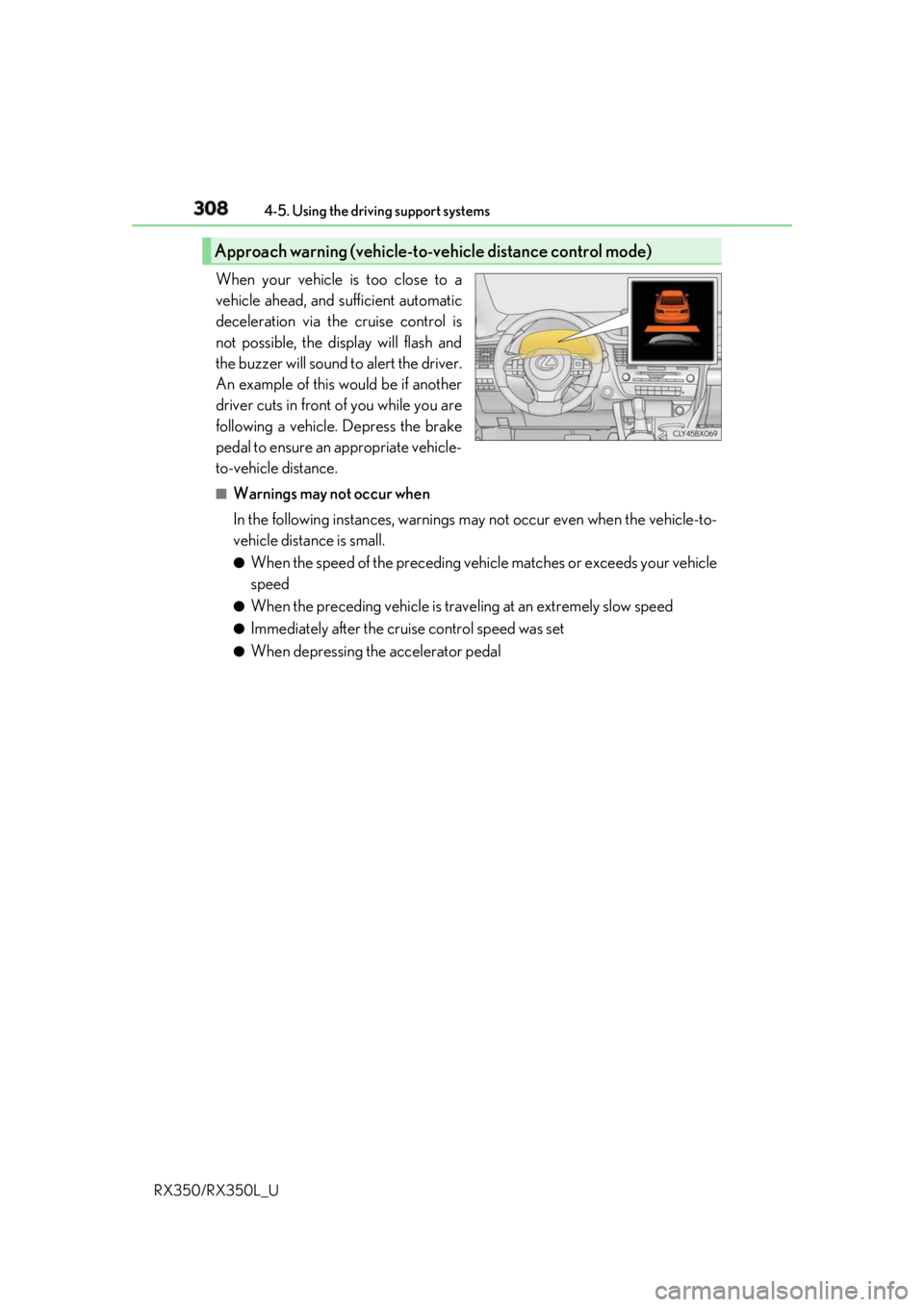
RX350/RX350L_U When your vehicle is too close to a
vehicle ahead, and sufficient automatic
deceleration via the cruise control is
not possible, the display will flash and
the buzzer will sound to alert the driver.
An example of this would be if another
driver cuts in front of you while you are
following a vehicle. Depress the brake
pedal to ensure an appropriate vehicle-
to-vehicle distance. ■
Warnings may not occur when
In the following instances, warnings ma y not occur even when the vehicle-to-
vehicle distance is small. ●
When the speed of the preceding vehicle matches or exceeds your vehicle
speed ●
When the preceding vehicle is traveling at an extremely slow speed ●
Immediately after the crui se control speed was set●
When depressing the accelerator pedalApproach warning (vehicle-to-vehicle distance control mode)
Page 312 of 777

3114-5. Using the driving support systems
4
Driving
RX350/RX350L_U ■
Automatic cancelation of co nstant speed control mode
Constant speed control mode is automatica lly canceled in the following situations:●
Actual vehicle speed is more than approxim ately 10 mph (16 km/h) below the set vehi-
cle speed. ●
Actual vehicle speed falls below approximately 25 mph (40 km/h).●
VSC is activated. ●
TRAC is activated for a period of time. ●
When the VSC or TRAC system is turned off. ●
Pre-collision braking is activated.
If constant speed control mode is automati cally canceled for any other reason, there may
be a malfunction in the system . Contact your Lexus dealer.■
Warning messages and buzzers for dynamic ra dar cruise control with full-speed range
Warning messages and buzzers are used to indicate a system malfunction or to inform
the driver of the need for ca ution while driving. If a warn ing message is shown on the
multi-information display, read the message and follow the instructions.■
When the sensor may not be correctly detecting the vehicle ahead
In the case of the following and depending on the conditions, operate the brake pedal
when deceleration of the system is insuff icient or operate the accelerator pedal when
acceleration is required.
As the sensor may not be able to correctly detect these types of vehicles, the approach
warning ( P. 308) may not be activated.●
Vehicles that cut in suddenly ●
Vehicles traveling at low speeds ●
Vehicles that are not moving in the same lane ●
Vehicles with small rear ends (traile rs with no load on board, etc.)
Page 316 of 777

3154-5. Using the driving support systems
4
Driving
RX350/RX350L_U Press “ ” or “ ” of the meter control switches, select .
Press “ ” or “ ” of the meter control switches, select “BSM”.
Press “ ” or “ ” of the meter control switch es, select “BSM” or “RCTA”.■
Outside rear view mirro r indicator visibility
In strong sunlight, the outside rear view mirror indicator may be difficult to see.■
Hearing the RCTA buzzer
The RCTA buzzer may be difficult to hear over loud noises, such as if the audio system
volume is high. ■
When there is a malfunction in the Blind Spot Monitor
If a system malfunction is detected due to any of the following, a warning message will be
displayed: ( P. 661)●
A sensor is malfunctioning ●
A sensor is dirty or covere d with snow or a sticker●
The outside temperature is extremely high or low ●
Sensor voltage is abnormal ●
A sensor is misaligned ■
Certification for the Blind Spot Monitor
For vehicles sold in the U.S.A.
For vehicles sold in CanadaTurning the BSM function/RCTA function on/off 1
2
3