Page 400 of 777

3995-1. Basic Operations
5
Lexus Display Audio system
RX350/RX350L_U ■
When using the screen ●
Under extremely cold conditions, the Lexus Display Audio controller may react slowly.●
If the screen is cold, the display may be da rk, or the system may seem to be operating
slightly slower than normal. ●
The screen may seem dark and hard to see when viewed through sunglasses. Change
your angle of viewing, adjust the display on the “Display” screen ( P. 411) or remove
your sunglasses. ■
Using cellular phones
Interference may be heard through the audi o system’s speakers if a cellular phone is
being used inside or close to the vehicle while the audio system is operating.
WARNING ■
Using the Lexus Display Audio controller
Be careful when touching the Lexus Display Audio controller in extreme temperatures
as it may become very hot or cold due to the temperature inside the vehicle. ■
Laser product ●
CAUTION
USE OF CONTROL OR ADJUSTMENT OR PERFORMANCE OF PROCE-
DURES OTHER THAN THOSE SPECIFIED HEREIN MAY RESULT IN HAZARD-
OUS RADIATION EXPOSURE. ●
CAUTION
THE USE OF OPTICAL INSTRUMENTS WITH THIS PRODUCT WILL
INCREASE EYE HAZARD.
NOTICE ■
To prevent Lexus Display Au dio controller malfunction●
Do not allow the Lexus Display Audio controll er to come into contact with food, liq-
uid, stickers or lit cigarettes as doing so may cause it to change color, emit a strange
odor or stop functioning. ●
Do not subject the Lexus Display Audio cont roller to excessive pressure or strong
impact as the controller may bend or break off.■
To prevent battery discharge
Do not leave the audio system on longer than necessary when the engine is off. ■
To avoid damaging the audio system
Take care not to spill drinks or other fluids on the audio system.
Page 401 of 777

400 5-1. Basic Operations
RX350/RX350L_U Volume switch
• Increases/decreases volume
• Press and hold: Continuously
increases/decreases volume
Radio mode:
• Press: Select a radio station
• Press and hold: Seek up/down
CD, MP3/WMA/AAC disc, Bluetooth ®
, iPod or USB mode:
• Press: Select a track/file/video
• Press and hold: Quickly move up/d own through tracks/files/videos.
“MODE” switch
• Turns the power on, selects audio source
• Press and hold this switch to mute or pause the current operation. To can-
cel the mute or pause, press and hold.Steering wheel audio switches Some audio features can be controlled using the switches on the steering
wheel.
Operation may differ depending on th e type of audio system or navigation
system. For details, refer to the manual provided with the audio system or nav-
igation system.
Operating the audio system us ing the steering wheel switches1
2
WARNING ■
To reduce the risk of an accident
Exercise care when operating the audio switches on the steering wheel. 3
Page 406 of 777
4055-1. Basic Operations
5
Lexus Display Audio system
RX350/RX350L_U ■
When using a 4-pole AUX cable
If a 4-pole AUX cable with a different layout is used, audio and/or video may not be out-
put properly. ■
When using the USB/AUX port
There is clearance between the lid and console
box to allow the cable ro uted to outside the con-
sole box.
WARNING ■
While driving
Do not connect a device or operate the device controls.
NOTICE ■
To prevent damage to the device or its terminals
Depending on the size and shape of the device that is connected to the system, the
console box/auxiliary box may not close fully. In this case, do not forcibly close the con-
sole box/auxiliary box as this may da mage the device or the terminal, etc.
Page 482 of 777

4815-11. Bluetooth ®
5
Lexus Display Audio system
RX350/RX350L_U WARNING ■
While driving
Do not operate the portable audio player, ce llular phone or connect a device to the
Bluetooth ®
system.■
Caution regarding interference with electronic devices●
Your audio unit is fitted with Bluetooth ®
antennas. People with implantable cardiac
pacemakers, cardiac resynchronization ther apy-pacemakers or implantable cardio-
verter defibrillators should maintain a re asonable distance between themselves and
the Bluetooth ®
antennas. The radio waves may affe ct the operation of such devices.●
Before using Bluetooth ®
devices, users of any electrical medical device other than
implantable cardiac pacemakers, cardiac resynchronization therapy-pacemakers or
implantable cardioverter defi brillators should consult the manufacturer of the device
for information about its operation under th e influence of radio waves. Radio waves
could have unexpected effects on the operation of such medical devices.
NOTICE ■
When leaving the vehicle
Do not leave your portable au dio player or cellular phone in the vehicle. The inside of
the vehicle may become hot, causing damage to the portable audio player or cellular
phone.
Page 499 of 777

498 6-1. Basic operation of the Remote Touch screen
RX350/RX350L_U ■
Screen display during low temperatures
When the ambient temperature is extremely low, screen response may be delayed even
if the Remote Touch is operated.
WARNING ■
When using the Remote Touch ●
Do not allow fingers, fingernails or hair to become caught in the Remote Touch as this
may cause an injury. ●
Be careful when selecting the Remote Touch in extreme temperatures as it may
become very hot or cold due to the temperature inside the vehicle.
NOTICE ■
To prevent damage to the Remote Touch ●
Do not allow the Remote Touch to come into contact with food, liquid, stickers or lit
cigarettes as doing so may cause it to change color, emit a strange odor or stop func-
tioning. ●
Do not subject the Remote Touch to excessive pressure or strong impact as the knob
may bend or break off. ●
Do not allow coins, contact lenses or ot her such items to be come caught in the
Remote Touch as this may cause it to stop functioning. ●
Items of clothing may rip if they become caught on the Remote Touch knob. ●
If your hand or any object is on the Remote Touch knob when the engine switch is in
ACCESSORY mode, the Remote Touch knob may not operate properly.
Page 518 of 777
5176-2. Using the air conditioning system and defogger
6
Interior features
RX350/RX350L_U ■
Ventilation and air conditioning odors ●
To let fresh air in, set the air conditioning system to the outside air mode. ●
During use, various odors from inside and outside the vehicle may enter into and accu-
mulate in the air conditioning system. This may then cause odor to be emitted from the
vents. ●
To reduce potential odors from occurring:
• It is recommended that the air conditioning system be set to outside air mode prior
to turning the vehicle off.
• The start timing of the blower may be dela yed for a short period of time immediately
after the air conditioning system is started in automatic mode.■
Air conditioning filter
P. 618 ■
Customization
Some functions can be customized. ( P. 722)
WARNING ■
To prevent the windshield from fogging up ●
Do not use during cool air operation in extremely humid weather. The differ-
ence between the temperature of the outside air and that of the windshield can cause
the outer surface of the windshield to fog up, blocking your vision.
■
To prevent burns ●
Do not touch the rear view mirror surfaces when the outside rear view mirror defog-
gers are on. ●
Do not touch the glass at lower part of the windshield or to the side of the front pillars
when the windshield wiper de-icer is on. (if equipped)
NOTICE ■
To prevent battery discharge
Do not leave the air conditioni ng system on longer than necessary when the engine is
off. ●
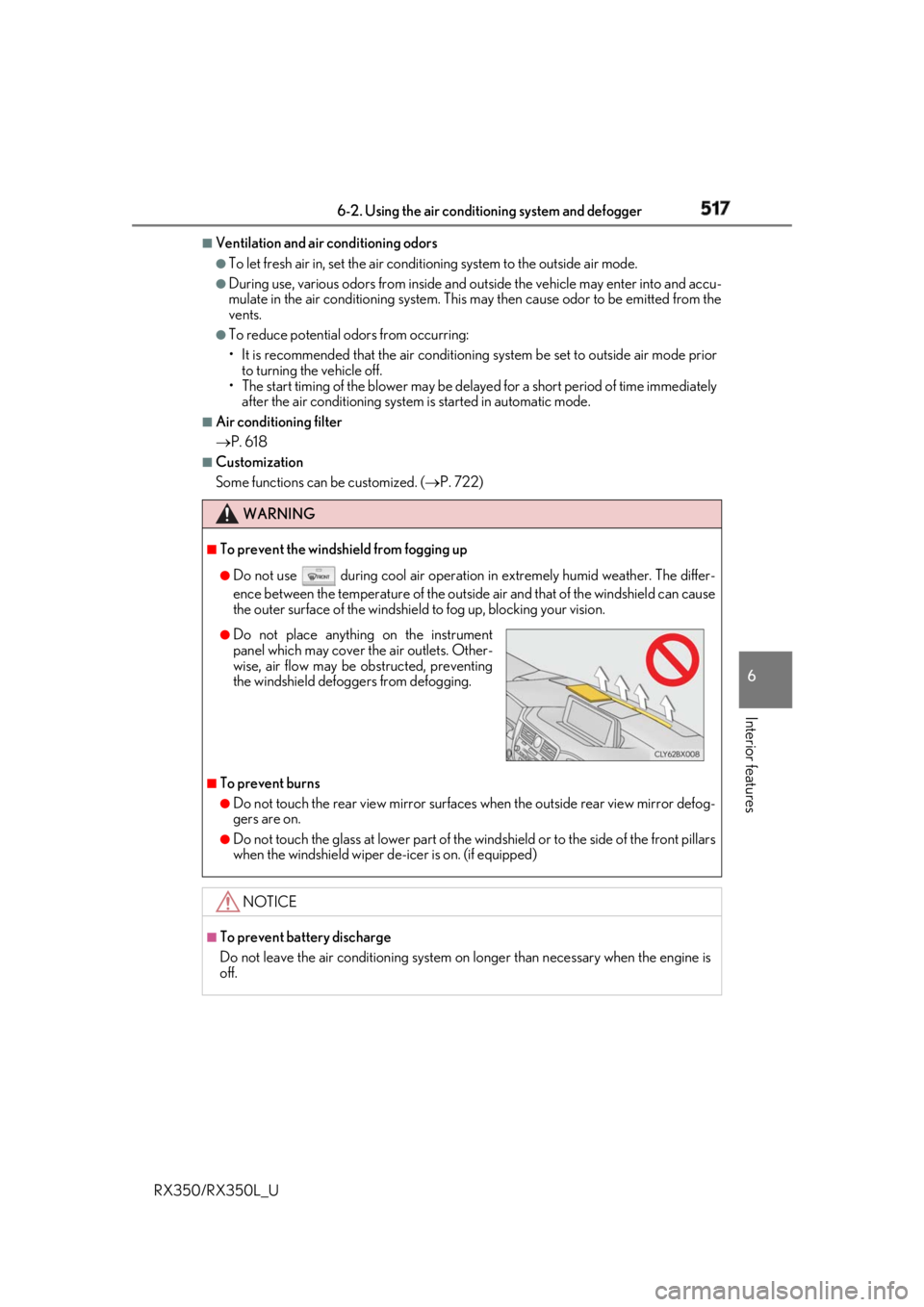
Do not place anything on the instrument
panel which may cover th e air outlets. Other-
wise, air flow may be obstructed, preventing
the windshield defoggers from defogging.
Page 522 of 777

5216-2. Using the air conditioning system and defogger
6
Interior features
RX350/RX350L_UHeated steering wheel
/seat heaters
/seat ventila-
tors
: If equippedHeated steering wheel and seat heaters heat the side grips of the steering
wheel and seats, respectively. Seat vent ilators maintain good ventilation using
a fan built into the seats. WARNING ●
Care should be taken to prevent injury if anyone in the following categories comes in
contact with the steering wheel and seats when the heater is on:
• Babies, small children, the elderly, the sick and the ph ysically challenged
• Persons with sensitive skin
• Persons who are fatigued
• Persons who have taken alcohol or drugs that induce sleep (sleeping drugs, cold
remedies, etc.) ●
Observe the following precautions to prevent minor burns or overheating:
• Do not cover the seat with a blanket or cushion when using the seat heater.
• Do not use seat heater more than necessary.
NOTICE ●
Do not put heavy objects that have an unev en surface on the seat and do not stick
sharp objects (needles, nails, etc.) into the seat. ●
To prevent battery discharge, do not us e the functions when the engine is off.
Page 530 of 777
5296-4. Using the storage features
6
Interior features
RX350/RX350L_U
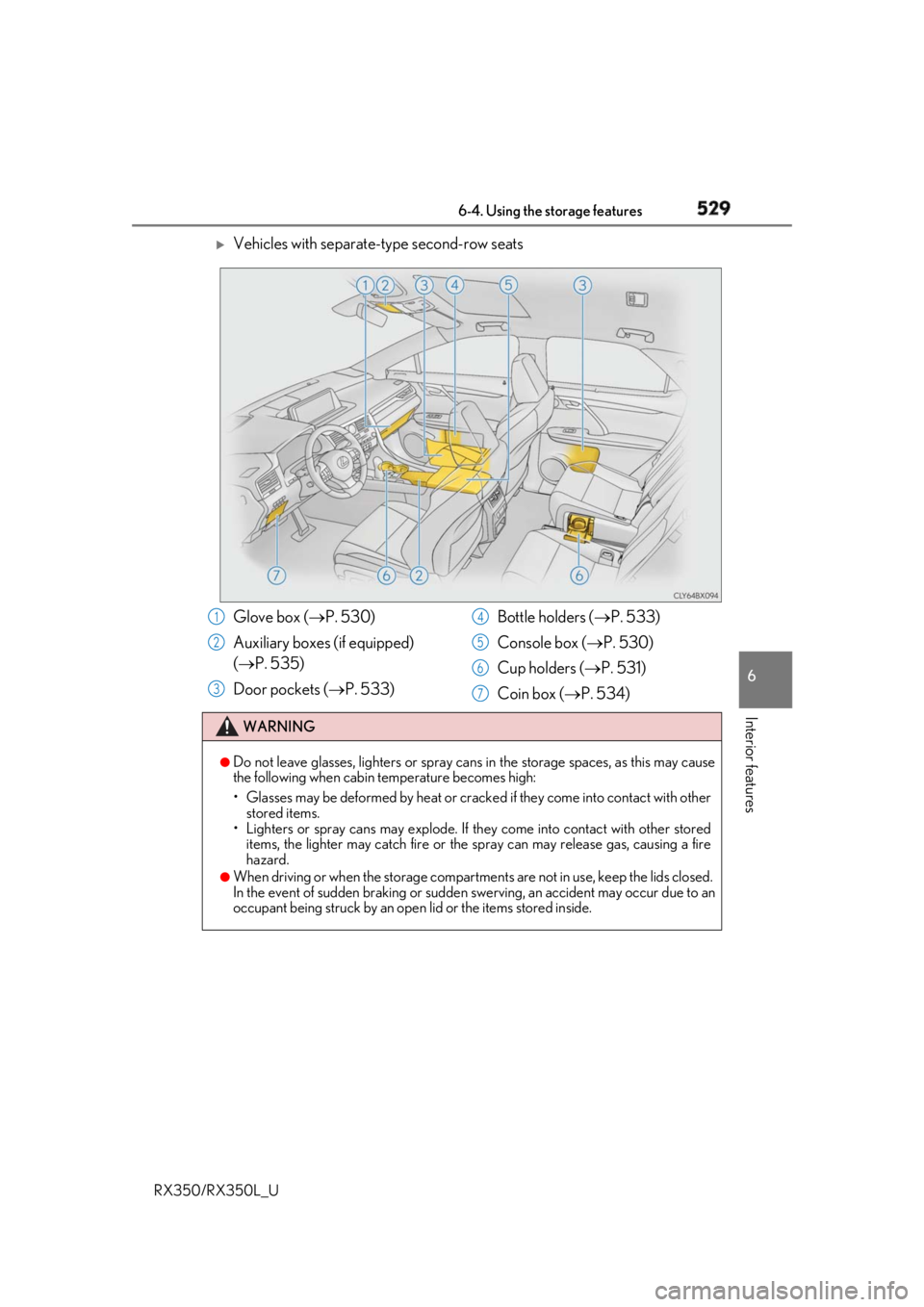
Vehicles with separate-type second-row seats
Glove box ( P. 530)
Auxiliary boxes (if equipped)
( P. 535)
Door pockets ( P. 533) Bottle holders ( P. 533)
Console box ( P. 530)
Cup holders ( P. 531)
Coin box ( P. 534)WARNING ●
Do not leave glasses, lighters or spray cans in the storage spaces, as this may cause
the following when cabin temperature becomes high:
• Glasses may be deformed by heat or cracke d if they come into contact with other
stored items.
• Lighters or spray cans may explode. If they come into contact with other stored
items, the lighter may catch fire or the spray can may release gas, causing a fire
hazard. ●
When driving or when the storage compartments are not in use, keep the lids closed.
In the event of sudden braking or sudden swerving, an accident may occur due to an
occupant being struck by an open lid or the items stored inside.1
2
3 4
5
6
7