Page 120 of 682
3-29
Convenient features of your vehicle
MIRRORS
3
Inside rearview mirror
Before you start driving, adjust the
rearview mirror to the centre on the
view through the rear window.When cleaning the mirror, use a
paper towel or similar material
dampened with glass cleaner. Do
not spray glass cleaner directly on
the mirror as that may cause the
liquid cleaner to enter the mirror
housing.
Day/night rearview mirror
(if equipped)
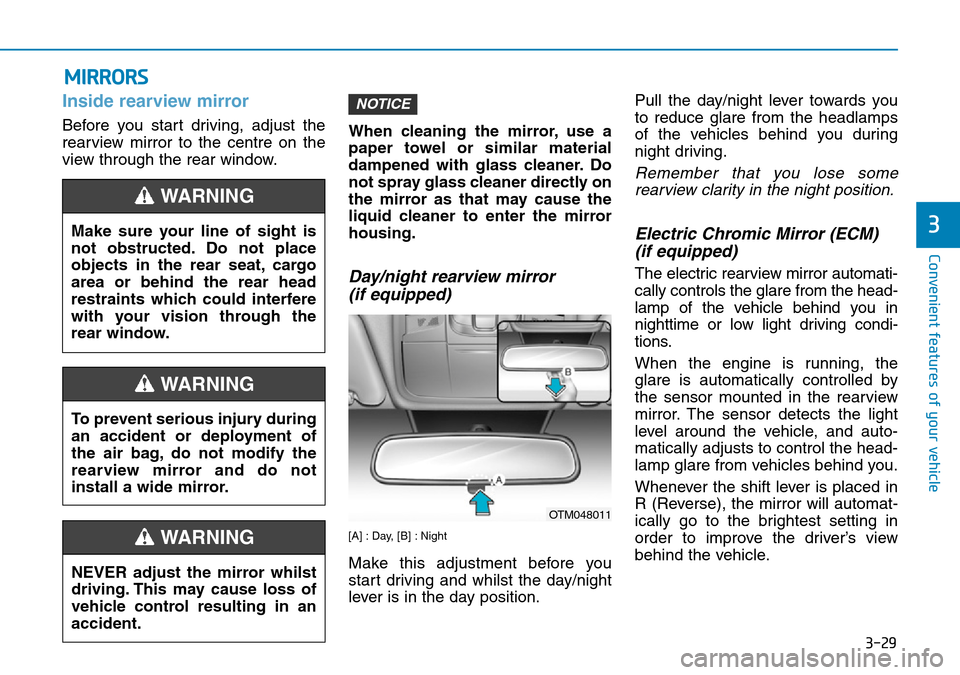
[A] : Day, [B] : Night
Make this adjustment before you
start driving and whilst the day/night
lever is in the day position.Pull the day/night lever towards you
to reduce glare from the headlamps
of the vehicles behind you during
night driving.
Remember that you lose some
rearview clarity in the night position.
Electric Chromic Mirror (ECM)
(if equipped)
The electric rearview mirror automati-
cally controls the glare from the head-
lamp of the vehicle behind you in
nighttime or low light driving condi-
tions.
When the engine is running, the
glare is automatically controlled by
the sensor mounted in the rearview
mirror. The sensor detects the light
level around the vehicle, and auto-
matically adjusts to control the head-
lamp glare from vehicles behind you.
Whenever the shift lever is placed in
R (Reverse), the mirror will automat-
ically go to the brightest setting in
order to improve the driver’s view
behind the vehicle.
NOTICE
NEVER adjust the mirror whilst
driving. This may cause loss of
vehicle control resulting in an
accident.
WARNING
Make sure your line of sight is
not obstructed. Do not place
objects in the rear seat, cargo
area or behind the rear head
restraints which could interfere
with your vision through the
rear window.
WARNING
To prevent serious injury during
an accident or deployment of
the air bag, do not modify the
rearview mirror and do not
install a wide mirror.
WARNING
OTM048011
Page 121 of 682
![Hyundai Santa Fe 2019 Owners Manual - RHD (UK, Australia) 3-30
Convenient features of your vehicle
[1] : Indicator, [2] : ON/OFF button, [3] : Sensor
To operate the electric rearview
mirror:
• Press the on/off button (1) to turn
the automatic dimming funct](/manual-img/35/16317/w960_16317-120.png "Hyundai Santa Fe 2019 Owners Manual - RHD (UK, Australia) 3-30
Convenient features of your vehicle
[1] : Indicator, [2] : ON/OFF button, [3] : Sensor
To operate the electric rearview
mirror:
• Press the on/off button (1) to turn
the automatic dimming funct")
3-30
Convenient features of your vehicle
[1] : Indicator, [2] : ON/OFF button, [3] : Sensor
To operate the electric rearview
mirror:
• Press the on/off button (1) to turn
the automatic dimming function on.
The mirror indicator light will illumi-
nate.
Press the on/off button to turn the
automatic dimming function off.
The mirror indicator light will turn
off.
• The mirror defaults to the ON posi-
tion whenever the ignition switch is
turned on.When cleaning the mirror, use a
paper towel or similar material
dampened with glass cleaner. Do
not spray glass cleaner directly on
the mirror as that may cause the
liquid cleaner to enter the mirror
housing.
Electric chromic mirror (ECM)
with compass
1. Rear light sensor
2. Status indicator LED
3. ECM ON/OFF button4. Compass button
5. Display window
Automatic dimming rear view mirror
controls automatically the glare of
headlights of the vehicle behind you
when it turned on by pressing the
ECM ON/OFF button. It is turned off
by pressing he ECM ON/OFF button
once more.
1. To operate Compass feature
Press and release the compass but-
ton, then the vehicle's directional
heading will be displayed. Pressing
and releasing the button again will
turn off the display.
Heading display
- E : East
- W : West
- S : South
- N : North
ex) NE : North East
NOTICE
OTM048428L
OTM048429L
Page 475 of 682
5-146
Driving your vehicle
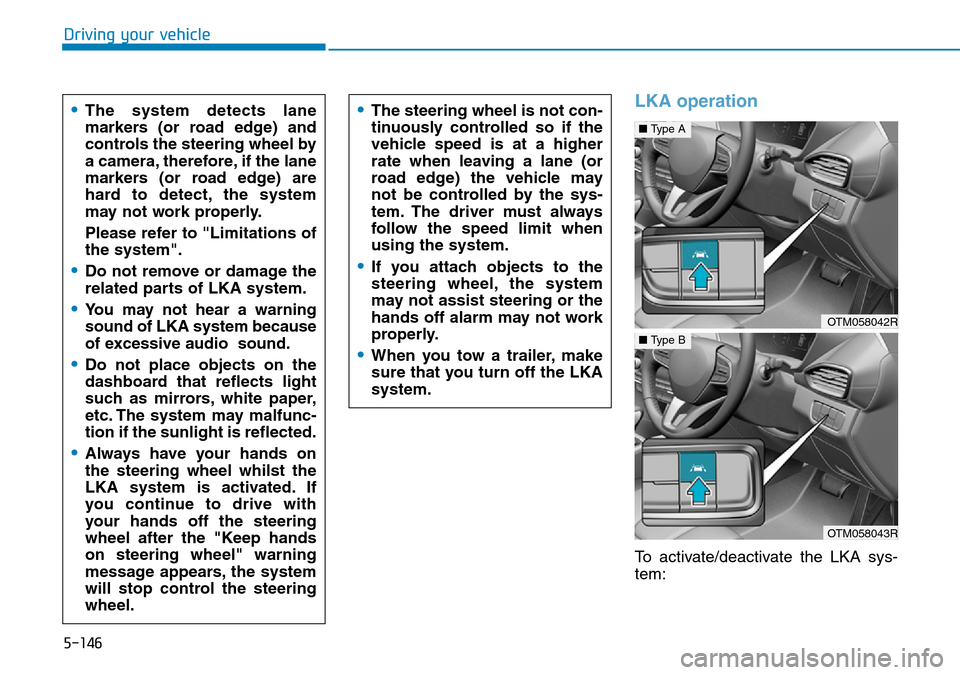
LKA operation
To activate/deactivate the LKA sys-
tem:
•The system detects lane
markers (or road edge) and
controls the steering wheel by
a camera, therefore, if the lane
markers (or road edge) are
hard to detect, the system
may not work properly.
Please refer to "Limitations of
the system".
•Do not remove or damage the
related parts of LKA system.
•You may not hear a warning
sound of LKA system because
of excessive audio sound.
•Do not place objects on the
dashboard that reflects light
such as mirrors, white paper,
etc. The system may malfunc-
tion if the sunlight is reflected.
•Always have your hands on
the steering wheel whilst the
LKA system is activated. If
you continue to drive with
your hands off the steering
wheel after the "Keep hands
on steering wheel" warning
message appears, the system
will stop control the steering
wheel.
•The steering wheel is not con-
tinuously controlled so if the
vehicle speed is at a higher
rate when leaving a lane (or
road edge) the vehicle may
not be controlled by the sys-
tem. The driver must always
follow the speed limit when
using the system.
•If you attach objects to the
steering wheel, the system
may not assist steering or the
hands off alarm may not work
properly.
•When you tow a trailer, make
sure that you turn off the LKA
system.
OTM058042R
■Type A
OTM058043R
■Type B
Page 482 of 682
5-153
Driving your vehicle
5
• There is not enough distance
between you and the vehicle in
front to be able to detect the lane
marker (or road edge) or the vehi-
cle ahead is driving on the lane
marker (or road edge).
• Road surface is not evenness.
• Driving on a steep grade, over a
hill, or when driving on a curved
road.
• The adverse road conditions cause
excessive vehicle vibrations whilst
driving.
• The surrounding of the inside rear
view mirror temperature is high
due to direct sunlight, etc.
When front visibility is poor
• The windscreen or the LKA cam-
era lens is blocked with dirt or
debris.
• The windscreen glass is fogged
up; a clear view of the road is
obstructed.
• Placing objects on the dashboard,
etc.
• The sensor cannot detect the lane
(or road edge) because of fog,
heavy rain or snow.LKA system function change
The driver can change LKA to the
Lane Departure Warning (LDW) sys-
tem or change the LKA system mode
from the LCD display. Go to the
"User Settings →Driver assistance
→Lane safety → LKA (Lane keeping
assist)/LDW (Lane departure warn-
ing)/Off".
The system is automatically set to
Lane Keeping Assist(LKA) if a func-
tion is not selected.
Lane Keeping Assist (LKA)
This mode guides the driver to help
keep the vehicle within the lanes. It
rarely controls the steering wheel,
when the vehicle drives well inside
the lanes. However, it starts to con-
trol the steering wheel, when the
vehicle is about to deviate out of the
lane.
Lane Departure Warning (LDW)
LDW system alerts the driver with a
visual warning and a warning alarm
when the system detects the vehicle
departing the lane. The steering
wheel will not be controlled.
Off
If you select "Off", the LKA system is
deactivated.