2019 Hyundai Santa Fe ECO mode
[x] Cancel search: ECO modePage 6 of 682
F6
Introduction
NOTICE indicates a situation
which, if not avoided, could result
in vehicle damage.
Fuel label
Petrol engine
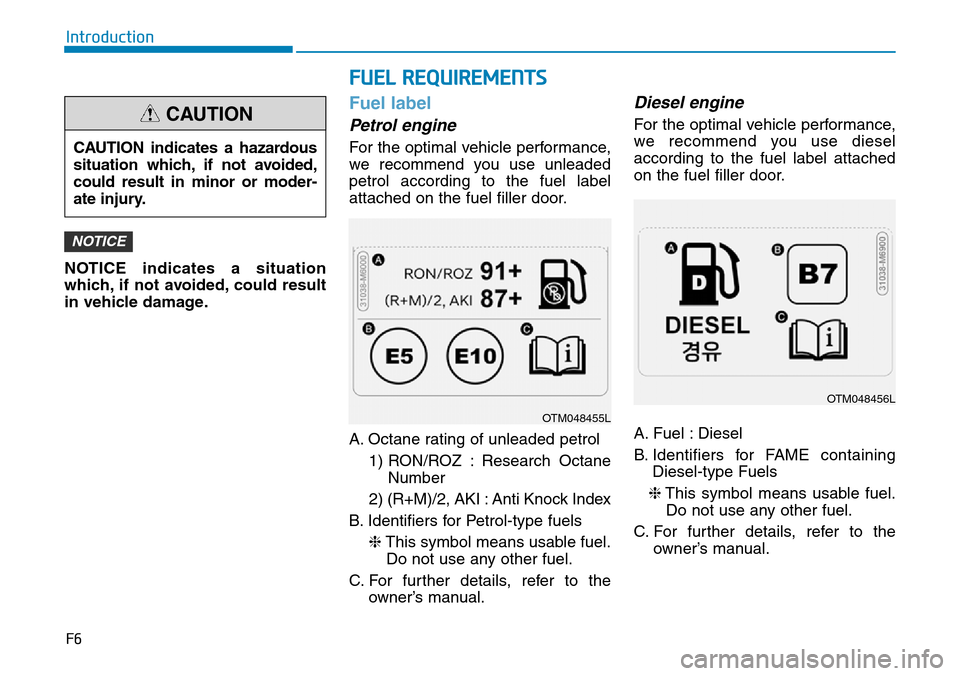
For the optimal vehicle performance,
we recommend you use unleaded
petrol according to the fuel label
attached on the fuel filler door.
A. Octane rating of unleaded petrol
1) RON/ROZ : Research Octane
Number
2) (R+M)/2, AKI : Anti Knock Index
B. Identifiers for Petrol-type fuels
❈This symbol means usable fuel.
Do not use any other fuel.
C. For further details, refer to the
owner’s manual.
Diesel engine
For the optimal vehicle performance,
we recommend you use diesel
according to the fuel label attached
on the fuel filler door.
A. Fuel : Diesel
B. Identifiers for FAME containing
Diesel-type Fuels
❈This symbol means usable fuel.
Do not use any other fuel.
C. For further details, refer to the
owner’s manual.
NOTICE
CAUTION indicates a hazardous
situation which, if not avoided,
could result in minor or moder-
ate injury.
CAUTION
FUEL REQUIREMENTS
OTM048455L
OTM048456L
Page 81 of 682
2-60
Safety system of your vehicle
During a moderate to severe frontal
collision, sensors will detect the vehi-
cle’s rapid deceleration. If the rate of
deceleration is high enough, the con-
trol unit will inflate the front air bags,
at the time and with the force needed.
The front air bags help protect the driv-
er and front passenger by responding
to frontal impacts in which seat belts
alone cannot provide adequate
restraint. When needed, the side air
bags help provide protection in the
event of a side impact or rollover by
supporting the side upper body area.
• Air bags are activated (able to inflate
if necessary) only when the ignition
switch is in the ON position.
• Air bags inflate in the event of certain
frontal or side collisions to help pro-
tect the occupants from serious
physical injury.
• There is no single speed at which the
air bags will inflate. Generally, air bags
are designed to inflate based upon
the severity of a collision and its direc-
tion. These two factors determine
whether the sensors produce an elec-
tronic deployment/inflation signal.• Air bag deployment depends on a
number of factors including vehicle
speed, angles of impact and the
density and stiffness of the vehicles
or objects which your vehicle
impacts during a collision. The
determining factors are not limited
to those mentioned above.
• The front air bags will completely
inflate and deflate in an instant. It is
virtually impossible for you to see
the air bags inflate during an acci-
dent. It is much more likely that you
will simply see the deflated air bags
hanging out of their storage com-
partments after the collision.
• In addition to inflating in serious
side collisions, vehicles equipped
with a rollover sensor, side and/or
curtain air bags will inflate if the
sensing system detects a rollover.
When a rollover is detected, curtain
air bags will remain inflated longer
to help provide protection from ejec-
tion, especially when used in con-
junction with the seat belts. If your SRS malfunctions, the
air bag may not inflate properly
during an accident increasing
the risk of serious injury or
death.
If any of the following condi-
tions occur, your SRS is mal-
functioning:
•The light does not turn on for
approximately six seconds
when the ignition switch is in
the ON position.
•The light stays on after illumi-
nating for approximately six
seconds.
•The light comes on whilst the
vehicle is in motion.
•The light blinks when the
engine is running.
We recommend that a HYUNDAI
authorised repairer inspect the
SRS as soon as possible if any
of these conditions occur.
WARNING
Page 95 of 682
3-4
Convenient features of your vehicle
Remote key (if equipped)
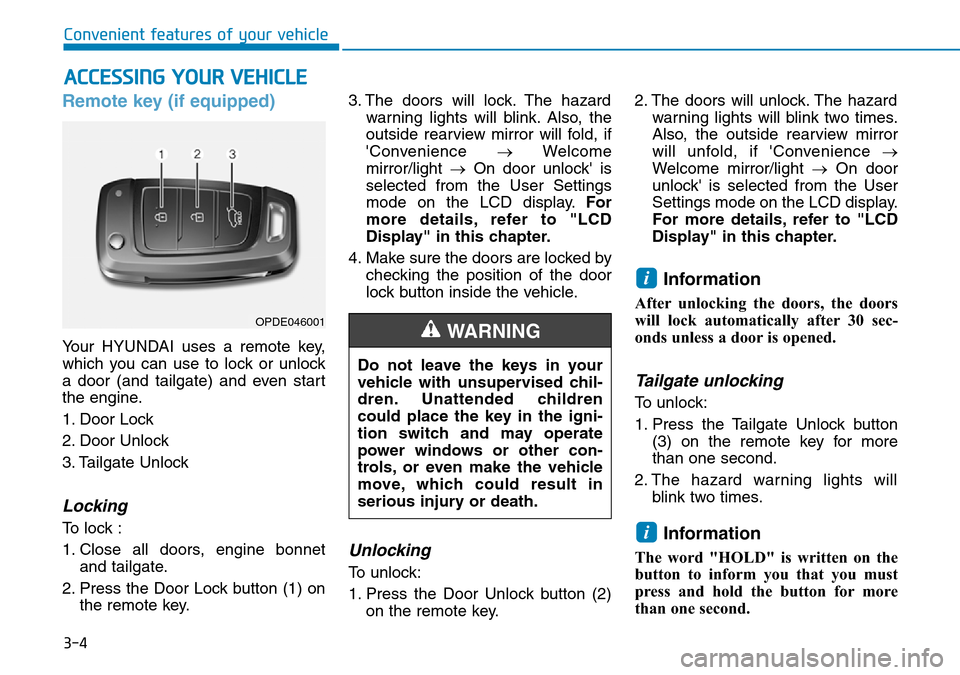
Your HYUNDAI uses a remote key,
which you can use to lock or unlock
a door (and tailgate) and even start
the engine.
1. Door Lock
2. Door Unlock
3. Tailgate Unlock
Locking
To lock :
1. Close all doors, engine bonnet
and tailgate.
2. Press the Door Lock button (1) on
the remote key.3. The doors will lock. The hazard
warning lights will blink. Also, the
outside rearview mirror will fold, if
'Convenience →Welcome
mirror/light →On door unlock' is
selected from the User Settings
mode on the LCD display.For
more details, refer to "LCD
Display" in this chapter.
4. Make sure the doors are locked by
checking the position of the door
lock button inside the vehicle.
Unlocking
To unlock:
1. Press the Door Unlock button (2)
on the remote key.2. The doors will unlock. The hazard
warning lights will blink two times.
Also, the outside rearview mirror
will unfold, if 'Convenience →
Welcome mirror/light →On door
unlock' is selected from the User
Settings mode on the LCD display.
For more details, refer to "LCD
Display" in this chapter.
Information
After unlocking the doors, the doors
will lock automatically after 30 sec-
onds unless a door is opened.
Tailgate unlocking
To unlock:
1. Press the Tailgate Unlock button
(3) on the remote key for more
than one second.
2. The hazard warning lights will
blink two times.
Information
The word "HOLD" is written on the
button to inform you that you must
press and hold the button for more
than one second.
i
i
ACCESSING YOUR VEHICLE
Do not leave the keys in your
vehicle with unsupervised chil-
dren. Unattended children
could place the key in the igni-
tion switch and may operate
power windows or other con-
trols, or even make the vehicle
move, which could result in
serious injury or death.
WARNINGOPDE046001
Page 98 of 682
3-7
Convenient features of your vehicle
3
Smart key (if equipped)
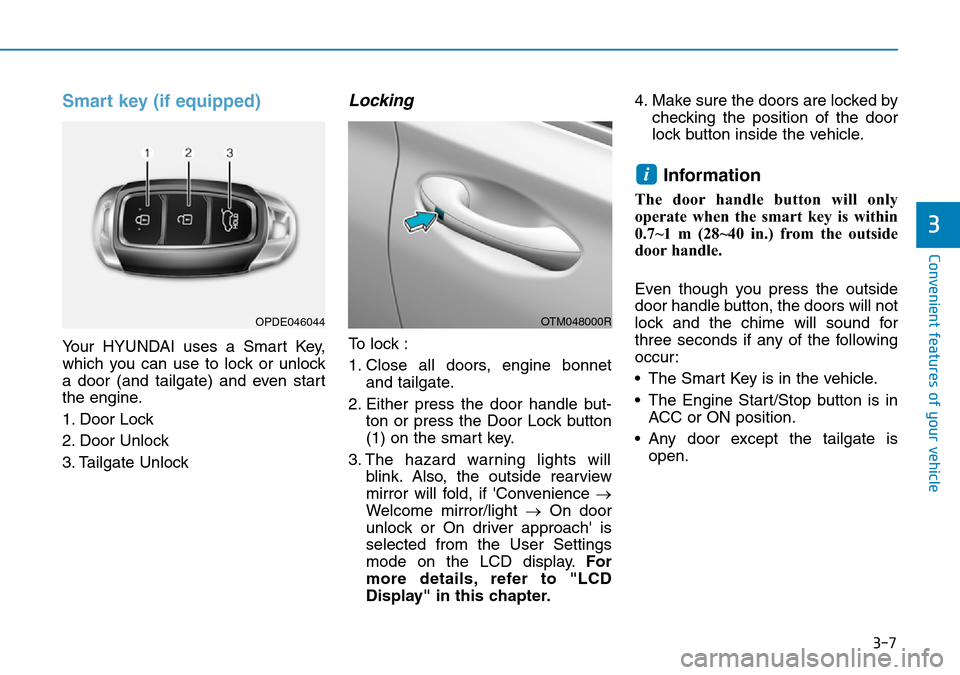
Your HYUNDAI uses a Smart Key,
which you can use to lock or unlock
a door (and tailgate) and even start
the engine.
1. Door Lock
2. Door Unlock
3. Tailgate Unlock
Locking
To lock :
1. Close all doors, engine bonnet
and tailgate.
2. Either press the door handle but-
ton or press the Door Lock button
(1) on the smart key.
3. The hazard warning lights will
blink. Also, the outside rearview
mirror will fold, if 'Convenience →
Welcome mirror/light →On door
unlock or On driver approach' is
selected from the User Settings
mode on the LCD display.For
more details, refer to "LCD
Display" in this chapter.4. Make sure the doors are locked by
checking the position of the door
lock button inside the vehicle.
Information
The door handle button will only
operate when the smart key is within
0.7~1 m (28~40 in.) from the outside
door handle.
Even though you press the outside
door handle button, the doors will not
lock and the chime will sound for
three seconds if any of the following
occur:
• The Smart Key is in the vehicle.
• The Engine Start/Stop button is in
ACC or ON position.
• Any door except the tailgate is
open.
i
OTM048000ROPDE046044
Page 99 of 682
3-8
Convenient features of your vehicle
Unlocking
To unlock:
1. Carry the Smart Key.
2. Either press the door handle but-
ton or press the Door Unlock but-
ton (2) on the smart key.
3. The doors will unlock. The hazard
warning lights will blink two times.
Also, the outside rearview mirror
will unfold, if 'Convenience →
Welcome mirror/light →On door
unlock or On driver approach' is
selected from the User Settings
mode on the LCD display.For
more details, refer to "LCD
Display" in this chapter.
Information
• The door handle button will only
operate when the smart key is with-
in 0.7~1 m (28~40 in.) from the out-
side door handle. Other people can
also open the doors without the
smart key in possession.
• After unlocking the doors, the doors
will lock automatically after 30 sec-
onds unless a door is opened.
Tailgate unlocking
To unlock:
1. Carry the smart key.
2. Either press the tailgate handle
button or press the Tailgate Unlock
button (3) on the smart key for
more than one second.
3. The hazard warning lights will
blink two times.
Information
• The Tailgate Unlock button (3) will
only unlock the tailgate. It will not
release the latch and open the tail-
gate automatically. If the Tailgate
Unlock button is used, someone
must still press the tailgate handle
button to open the tailgate.
• After unlocking the tailgate, the tail-
gate will lock automatically after 30
seconds unless the tailgate is
opened.
i
i
Do not leave the Smart Key in
your vehicle with unsupervised
children. Unattended children
could press the Engine Start/
Stop button and may operate
power windows or other con-
trols, or even make the vehicle
move, which could result in
serious injury or death.
WARNING
Page 110 of 682
3-19
Convenient features of your vehicle
However if you press the button
within 10 seconds after the warning
message appears (the indicator on
the button extinguishes) the sys-
tem judges that the driver unlocked
the door acknowledging the rear
status and the lock is released
regardless of the rear status.
3. When an approaching vehicle from
the rear is detected the moment the
door is opened, the “Watch for traf-
fic” warning message appears on
the cluster and a warning sounds.
- The above 2 and 3 functions are
activated when you select “Driver
assistance →Blind-spot safety →
SEA (Safe Exit Assist)” from the
User Settings mode on the cluster.
- The Electronic child safety lock
system will operate for approxi-
mately 10 minutes after the igni-
tion key is removed or turned to
the LOCK (or OFF) position. After
about 10 minutes, the indicator
on the button turns off and you
can not deactivate the Electronic
child safety lock system. To deac-
tivate the Electronic child safety
lock system, press the Electronic
child safety lock button again with
the ignition switch in the ON posi-
tion or after starting the engine.- When the power is supplied
again after removing the battery
or battery discharge whilst the
child safety lock in the lock posi-
tion, press the rear door lock but-
ton once again to match the state
of the indicator on the rear door
lock button and actual status of
the rear door child safe lock.
- If the airbag is activated whilst the
rear door lock button is ON (the
indicator on the button illuminates)
it automatically switches OFF and
the rear door is unlocked.
3
•The Safe Exit Assist (SEA)
system may not operate nor-
mally if there is any vehicle or
obstacle at the rear area of
your vehicle.
•The Safe Exit Assist (SEA)
system may not operate nor-
mally when a vehicle is com-
ing rapidly from the two lanes
next to your vehicle or a vehi-
cle is approaching fast to the
next lane from the rear of your
vehicle.
•The Safe Exit Assist (SEA)
system may be activated later
than normal or may not oper-
ate normally if a vehicle is
approaching fast from the rear
of your vehicle.
•The Safe Exit Assist (SEA)
system will not operate if
there is a malfunction with the
Blind-Spot Collision Warning
(BCW) system as follows:
- When the BCW warning
message appears
When the BCW sensor or the
sensor surrounding is pol-
luted or covered
- When the BCW does not
warn or warns wrongly
For more details, refer to cau-
tions and limitations in “Blind-
Spot Collision Warning (BCW)”
in chapter 5.
CAUTION
Page 111 of 682
3-20
Rear Occupant Alert (ROA)
system
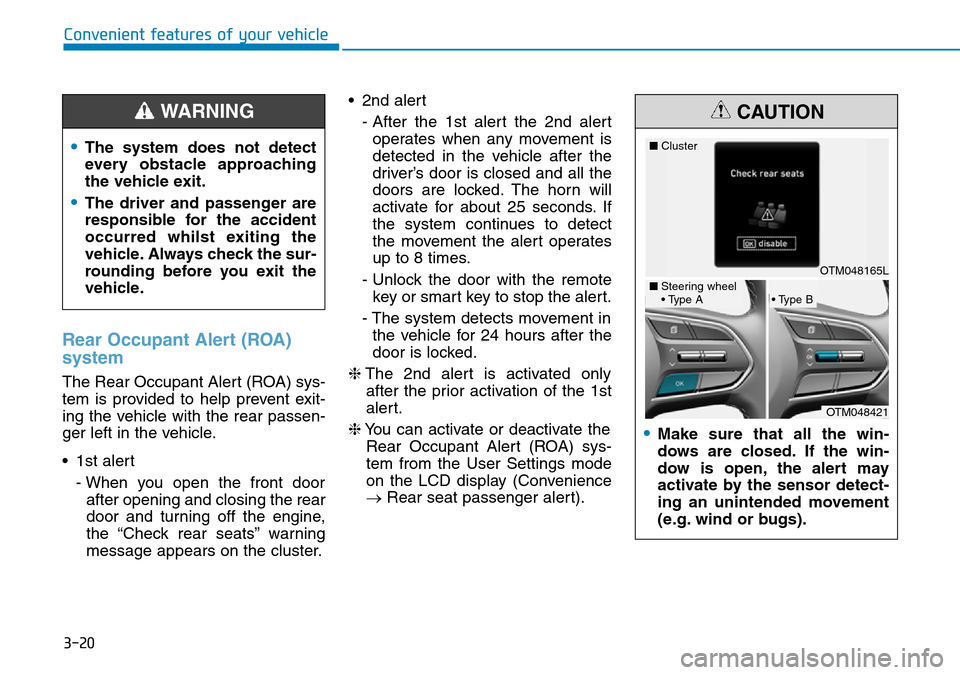
The Rear Occupant Alert (ROA) sys-
tem is provided to help prevent exit-
ing the vehicle with the rear passen-
ger left in the vehicle.
• 1st alert
- When you open the front door
after opening and closing the rear
door and turning off the engine,
the “Check rear seats” warning
message appears on the cluster.• 2nd alert
- After the 1st alert the 2nd alert
operates when any movement is
detected in the vehicle after the
driver’s door is closed and all the
doors are locked. The horn will
activate for about 25 seconds. If
the system continues to detect
the movement the alert operates
up to 8 times.
- Unlock the door with the remote
key or smart key to stop the alert.
- The system detects movement in
the vehicle for 24 hours after the
door is locked.
❈The 2nd alert is activated only
after the prior activation of the 1st
alert.
❈You can activate or deactivate the
Rear Occupant Alert (ROA) sys-
tem from the User Settings mode
on the LCD display (Convenience
→Rear seat passenger alert).
Convenient features of your vehicle
•The system does not detect
every obstacle approaching
the vehicle exit.
•The driver and passenger are
responsible for the accident
occurred whilst exiting the
vehicle. Always check the sur-
rounding before you exit the
vehicle.
WARNING
•Make sure that all the win-
dows are closed. If the win-
dow is open, the alert may
activate by the sensor detect-
ing an unintended movement
(e.g. wind or bugs).
CAUTION
OTM048165L ■Cluster
OTM048421
■Steering wheel
• Type A• Type B
Page 143 of 682
3-52
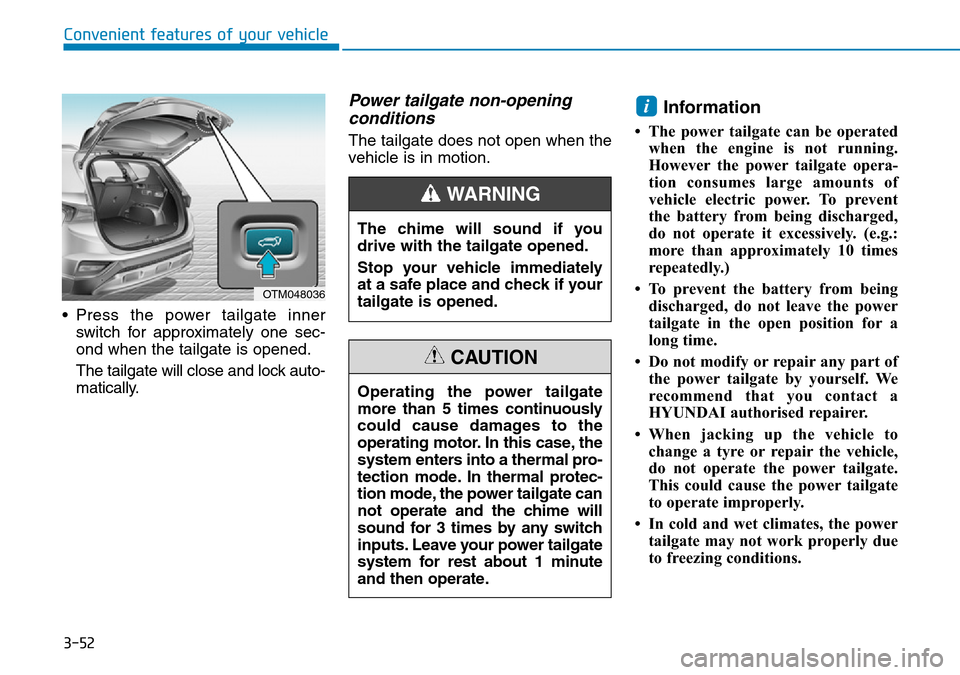
• Press the power tailgate inner
switch for approximately one sec-
ond when the tailgate is opened.
The tailgate will close and lock auto-
matically.
Power tailgate non-opening
conditions
The tailgate does not open when the
vehicle is in motion.
Information
• The power tailgate can be operated
when the engine is not running.
However the power tailgate opera-
tion consumes large amounts of
vehicle electric power. To prevent
the battery from being discharged,
do not operate it excessively. (e.g.:
more than approximately 10 times
repeatedly.)
• To prevent the battery from being
discharged, do not leave the power
tailgate in the open position for a
long time.
• Do not modify or repair any part of
the power tailgate by yourself. We
recommend that you contact a
HYUNDAI authorised repairer.
• When jacking up the vehicle to
change a tyre or repair the vehicle,
do not operate the power tailgate.
This could cause the power tailgate
to operate improperly.
• In cold and wet climates, the power
tailgate may not work properly due
to freezing conditions.
i
Convenient features of your vehicle
OTM048036
The chime will sound if you
drive with the tailgate opened.
Stop your vehicle immediately
at a safe place and check if your
tailgate is opened.
WARNING
Operating the power tailgate
more than 5 times continuously
could cause damages to the
operating motor. In this case, the
system enters into a thermal pro-
tection mode. In thermal protec-
tion mode, the power tailgate can
not operate and the chime will
sound for 3 times by any switch
inputs. Leave your power tailgate
system for rest about 1 minute
and then operate.
CAUTION