Page 183 of 682
3-92
Convenient features of your vehicle
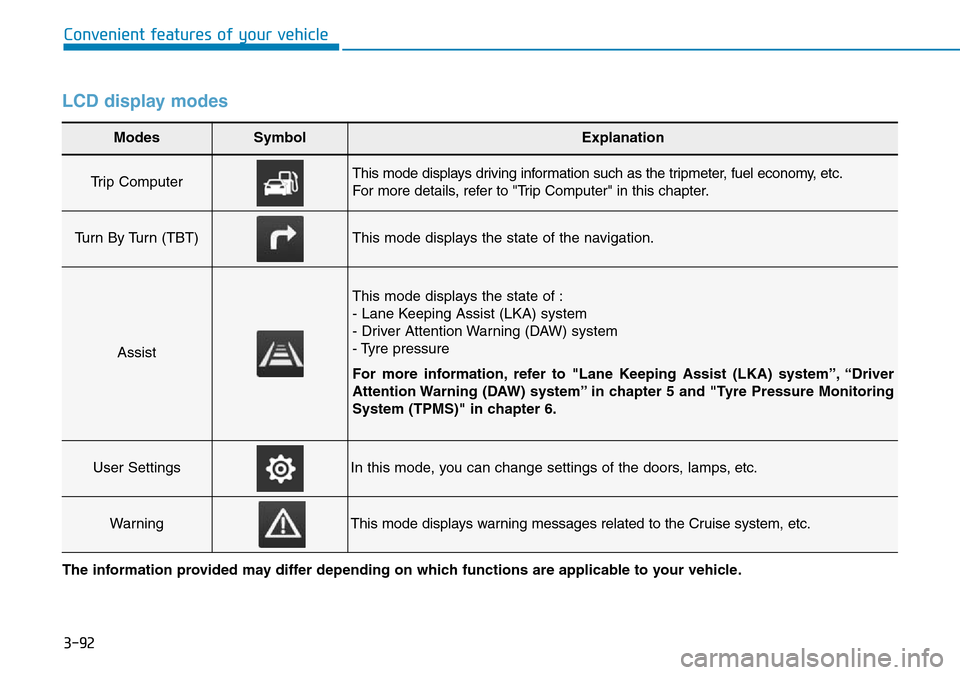
LCD display modes
Modes SymbolExplanation
Trip Computer This mode displays driving information such as the tripmeter, fuel economy, etc.
For more details, refer to "Trip Computer" in this chapter.
Turn By Turn (TBT)This mode displays the state of the navigation.
Assist
This mode displays the state of :
- Lane Keeping Assist (LKA) system
- Driver Attention Warning (DAW) system
- Tyre pressure
For more information, refer to "Lane Keeping Assist (LKA) system”, “Driver
Attention Warning (DAW) system” in chapter 5 and "Tyre Pressure Monitoring
System (TPMS)" in chapter 6.
User SettingsIn this mode, you can change settings of the doors, lamps, etc.
WarningThis mode displays warning messages related to the Cruise system, etc.
The information provided may differ depending on which functions are applicable to your vehicle.
Page 184 of 682
3-93
Convenient features of your vehicle
3
Shift to P to edit settings /
Engage parking brake to edit
settings
This warning message illuminates if
you try to select an item from the
User Settings mode whilst driving.
- Manual transmission
For your safety, change the User
Settings after engaging the parking
brake.
- Automatic transmission
For your safety, change the User
Settings after parking the vehicle,
applying the parking brake and
moving the shift lever to P (Park).
Quick guide (Help, if equipped)
This mode provides quick guides for
the systems in the User Settings
mode.
Select an item, press and hold the
OK button.
For more details about each sys-
tem, refer to this Owner’s Manual.
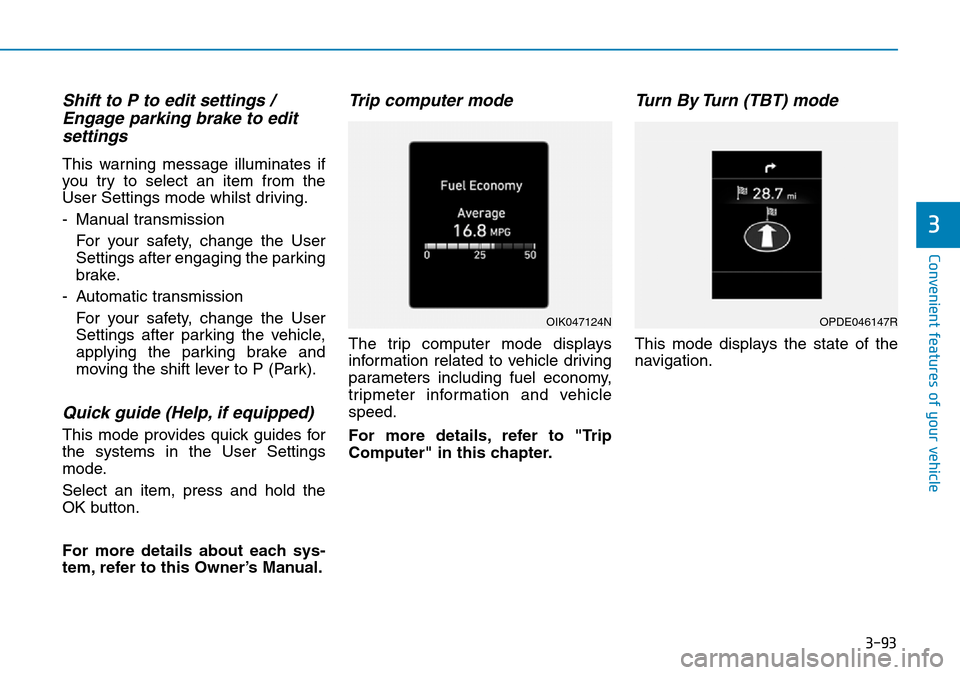
Trip computer mode
The trip computer mode displays
information related to vehicle driving
parameters including fuel economy,
tripmeter information and vehicle
speed.
For more details, refer to "Trip
Computer" in this chapter.
Turn By Turn (TBT) mode
This mode displays the state of the
navigation.
OIK047124NOPDE046147R
Page 186 of 682
3-95
Convenient features of your vehicle
3
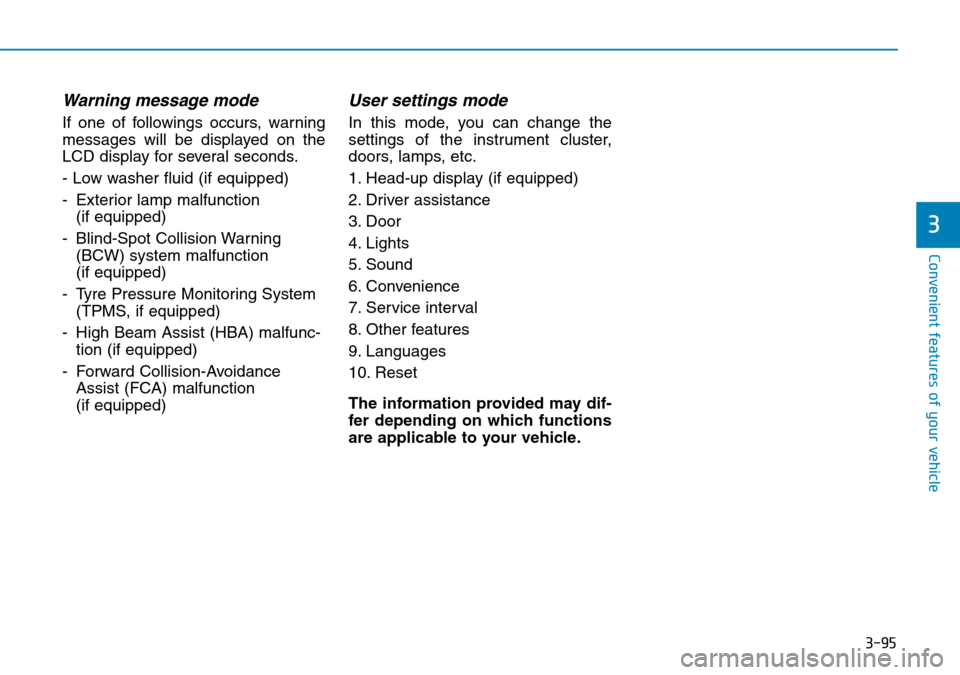
Warning message mode
If one of followings occurs, warning
messages will be displayed on the
LCD display for several seconds.
- Low washer fluid (if equipped)
- Exterior lamp malfunction
(if equipped)
- Blind-Spot Collision Warning
(BCW) system malfunction
(if equipped)
- Tyre Pressure Monitoring System
(TPMS, if equipped)
- High Beam Assist (HBA) malfunc-
tion (if equipped)
- Forward Collision-Avoidance
Assist (FCA) malfunction
(if equipped)
User settings mode
In this mode, you can change the
settings of the instrument cluster,
doors, lamps, etc.
1. Head-up display (if equipped)
2. Driver assistance
3. Door
4. Lights
5. Sound
6. Convenience
7. Service interval
8. Other features
9. Languages
10. Reset
The information provided may dif-
fer depending on which functions
are applicable to your vehicle.
Page 194 of 682
3-103
Convenient features of your vehicle
3
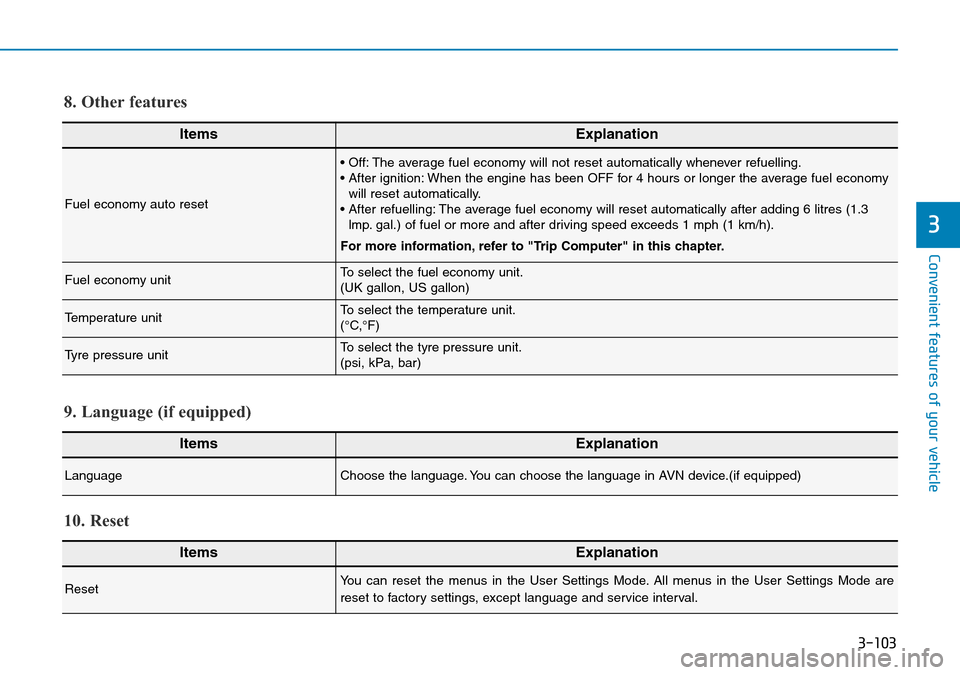
ItemsExplanation
Fuel economy auto reset
• Off: The average fuel economy will not reset automatically whenever refuelling.
• After ignition: When the engine has been OFF for 4 hours or longer the average fuel economy
will reset automatically.
• After refuelling: The average fuel economy will reset automatically after adding 6 litres (1.3
lmp. gal.) of fuel or more and after driving speed exceeds 1 mph (1 km/h).
For more information, refer to "Trip Computer" in this chapter.
Fuel economy unitTo select the fuel economy unit.
(UK gallon, US gallon)
Temperature unitTo select the temperature unit.
(°C,°F)
Tyre pressure unitTo select the tyre pressure unit.
(psi, kPa, bar)
8. Other features
ItemsExplanation
LanguageChoose the language. You can choose the language in AVN device.(if equipped)
9. Language (if equipped)
ItemsExplanation
ResetYou can reset the menus in the User Settings Mode. All menus in the User Settings Mode are
reset to factory settings, except language and service interval.
10. Reset
Page 195 of 682
3-104
Convenient features of your vehicle
The trip computer is a microcomput-
er-controlled driver information sys-
tem that displays information related
to driving.
Information
Some driving information stored in the
trip computer (for example Average
Vehicle Speed) resets if the battery is
disconnected.
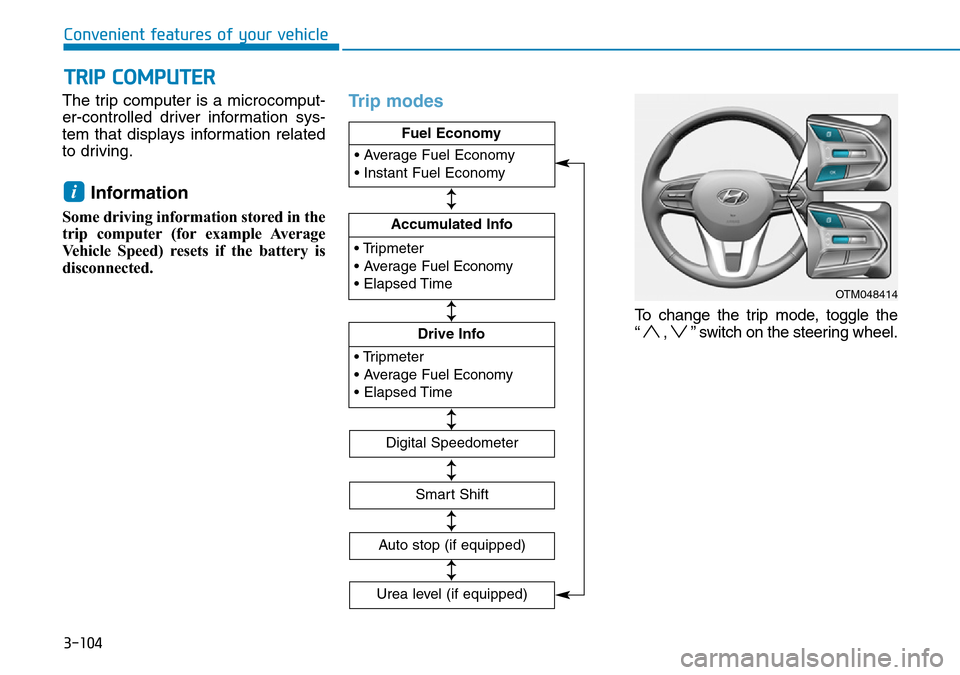
Trip modes
To change the trip mode, toggle the
“ , ” switch on the steering wheel.
i
TRIP COMPUTER
OTM048414
• Tripmeter
• Average Fuel Economy
• Elapsed Time
Accumulated Info
• Tripmeter
• Average Fuel Economy
• Elapsed Time
Drive Info • Average Fuel Economy
• Instant Fuel Economy
Fuel Economy
Digital Speedometer
Smart Shift
Auto stop (if equipped)
↕
↕
↕
↕
↕
Urea level (if equipped)
↕
Page 196 of 682
3-105
Convenient features of your vehicle
3
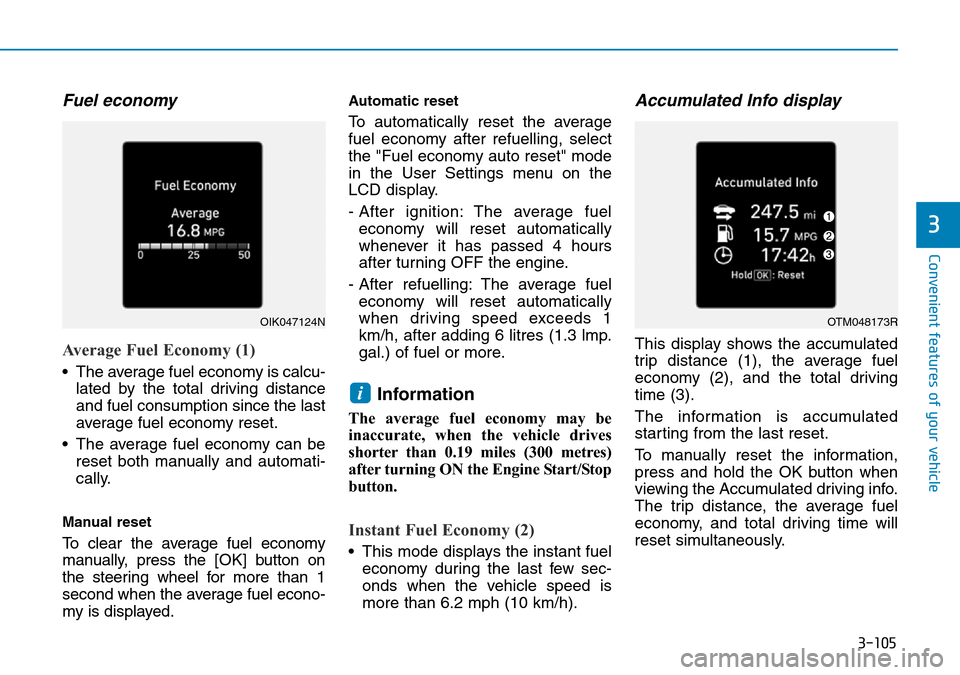
Fuel economy
Average Fuel Economy (1)
• The average fuel economy is calcu-
lated by the total driving distance
and fuel consumption since the last
average fuel economy reset.
• The average fuel economy can be
reset both manually and automati-
cally.
Manual reset
To clear the average fuel economy
manually, press the [OK] button on
the steering wheel for more than 1
second when the average fuel econo-
my is displayed.
Automatic reset
To automatically reset the average
fuel economy after refuelling, select
the "Fuel economy auto reset" mode
in the User Settings menu on the
LCD display.
- After ignition: The average fuel
economy will reset automatically
whenever it has passed 4 hours
after turning OFF the engine.
- After refuelling: The average fuel
economy will reset automatically
when driving speed exceeds 1
km/h, after adding 6 litres (1.3 lmp.
gal.) of fuel or more.
Information
The average fuel economy may be
inaccurate, when the vehicle drives
shorter than 0.19 miles (300 metres)
after turning ON the Engine Start/Stop
button.
Instant Fuel Economy (2)
• This mode displays the instant fuel
economy during the last few sec-
onds when the vehicle speed is
more than 6.2 mph (10 km/h).
Accumulated Info display
This display shows the accumulated
trip distance (1), the average fuel
economy (2), and the total driving
time (3).
The information is accumulated
starting from the last reset.
To manually reset the information,
press and hold the OK button when
viewing the Accumulated driving info.
The trip distance, the average fuel
economy, and total driving time will
reset simultaneously.
i
OIK047124NOTM048173R
Page 209 of 682
3-118
Convenient features of your vehicle
Battery saver function
The purpose of this feature is to pre-
vent the battery from being dis-
charged. The system automatically
turns off the position lamp when the
driver turns the engine off and opens
the driver-side door.
With this feature, the position lamps
will turn off automatically if the driver
parks on the side of the road at night.
If necessary, to keep the lamps on
when the engine is turned off, perform
the following:
1) Open the driver-side door.
2) Turn the position lamps OFF and
ON again using the light switch on
the steering column.
Headlamp delay function
(if equipped)
If you place the ignition switch to the
ACC or OFF position with the head-
lamps ON, the headlamps (and/or
position lamps) remain on for about 5
minutes. However, with the engine off if
the driver’s door is opened and closed,
the headlamps (and/or position lamps)
are turned off after 15 seconds.
The headlamps (and/or position
lamps) can be turned off by pressing
the lock button on the remote key or
smart key twice or turning the light
switch to the OFF or AUTO position.
However, if you turn the light switch
to the AUTO position when it is dark
outside, the headlamps will not be
turned off.
You can activate or deactivate the
Headlamp Delay function from the
User Settings mode on the LCD dis-
play.For more details, refer to
"LCD Display" in this chapter.If the driver gets out of the vehicle
through other doors (except dri-
ver's door), the battery saver func-
tion does not operate and the
headlamp delay function does not
turn off automatically. Therefore, It
causes the battery to be dis-
charged. In this case, make sure to
turn off the headlamps before get-
ting out of the vehicle.
Daytime running light (DRL)
(if equipped)
The Daytime Running Lights (DRL)
can make it easier for others to see
the front of your vehicle during the
day, especially after dawn and before
sunset.
The DRL system will turn the dedi-
cated lamps OFF when:
1. The headlamps or front fog lights
are in the ON position.
2. The position light switch is in the
ON position.
3. The engine is turned off.
NOTICE
Page 212 of 682
3-121
Convenient features of your vehicle
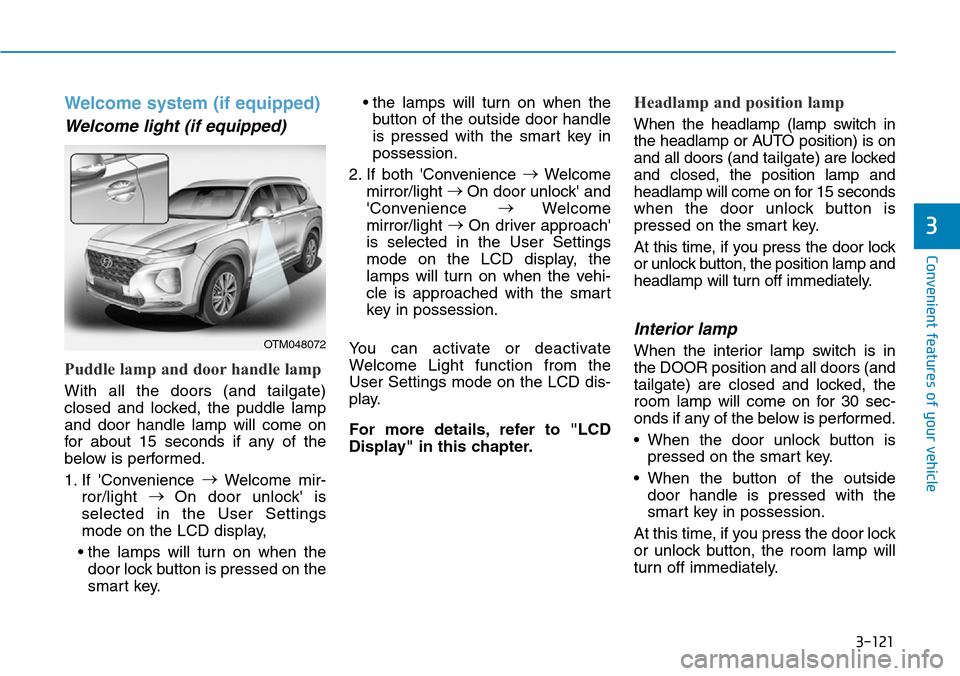
Welcome system (if equipped)
Welcome light (if equipped)
Puddle lamp and door handle lamp
With all the doors (and tailgate)
closed and locked, the puddle lamp
and door handle lamp will come on
for about 15 seconds if any of the
below is performed.
1. If 'Convenience →
Welcome mir-
ror/light →
On door unlock' is
selected in the User Settings
mode on the LCD display,
• the lamps will turn on when the
door lock button is pressed on the
smart key.• the lamps will turn on when the
button of the outside door handle
is pressed with the smart key in
possession.
2. If both 'Convenience →
Welcome
mirror/light →
On door unlock' and
'Convenience →
Welcome
mirror/light →
On driver approach'
is selected in the User Settings
mode on the LCD display, the
lamps will turn on when the vehi-
cle is approached with the smart
key in possession.
You can activate or deactivate
Welcome Light function from the
User Settings mode on the LCD dis-
play.
For more details, refer to "LCD
Display" in this chapter.
Headlamp and position lamp
When the headlamp (lamp switch in
the headlamp or AUTO position) is on
and all doors (and tailgate) are locked
and closed, the position lamp and
headlamp will come on for 15 seconds
when the door unlock button is
pressed on the smart key.
At this time, if you press the door lock
or unlock button, the position lamp and
headlamp will turn off immediately.
Interior lamp
When the interior lamp switch is in
the DOOR position and all doors (and
tailgate) are closed and locked, the
room lamp will come on for 30 sec-
onds if any of the below is performed.
• When the door unlock button is
pressed on the smart key.
• When the button of the outside
door handle is pressed with the
smart key in possession.
At this time, if you press the door lock
or unlock button, the room lamp will
turn off immediately.
3
OTM048072