2019 Hyundai Santa Fe engine light
[x] Cancel search: engine lightPage 178 of 682
3-87
Convenient features of your vehicle
3
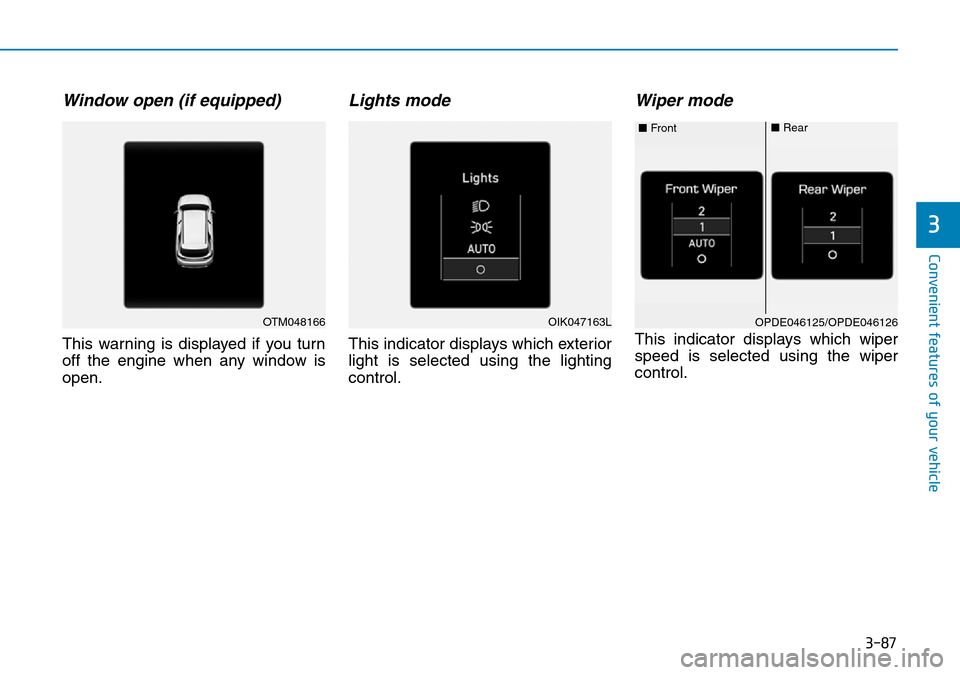
Window open (if equipped)
This warning is displayed if you turn
off the engine when any window is
open.
Lights mode
This indicator displays which exterior
light is selected using the lighting
control.
Wiper mode
This indicator displays which wiper
speed is selected using the wiper
control.
OTM048166OPDE046125/OPDE046126 ■Front■RearOIK047163L
Page 179 of 682
3-88
Convenient features of your vehicle
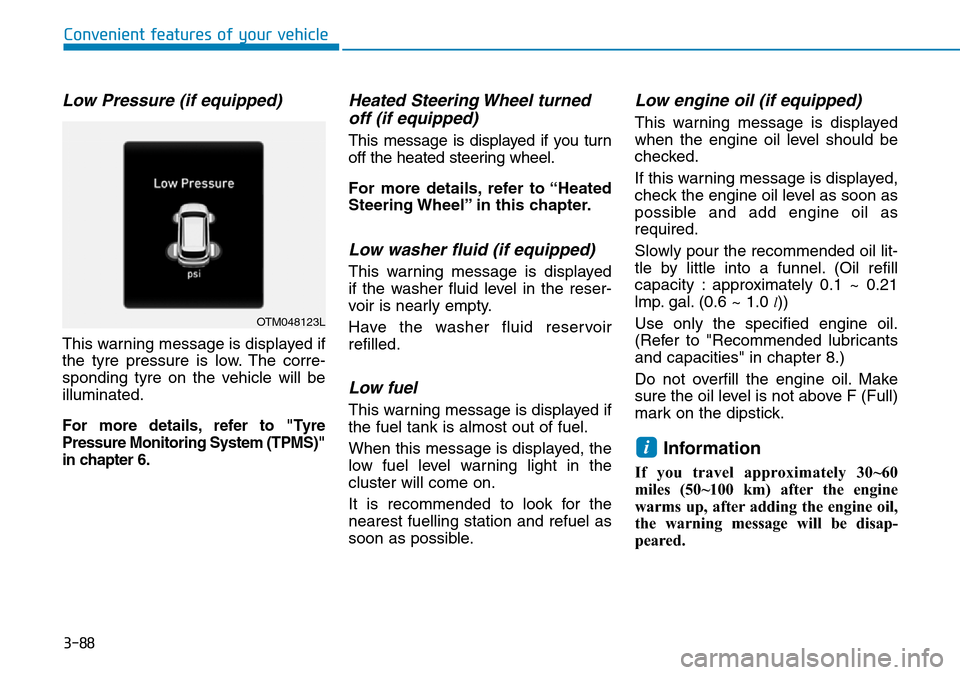
Low Pressure (if equipped)
This warning message is displayed if
the tyre pressure is low. The corre-
sponding tyre on the vehicle will be
illuminated.
For more details, refer to "Tyre
Pressure Monitoring System (TPMS)"
in chapter 6.
Heated Steering Wheel turned
off (if equipped)
This message is displayed if you turn
off the heated steering wheel.
For more details, refer to “Heated
Steering Wheel” in this chapter.
Low washer fluid (if equipped)
This warning message is displayed
if the washer fluid level in the reser-
voir is nearly empty.
Have the washer fluid reservoir
refilled.
Low fuel
This warning message is displayed if
the fuel tank is almost out of fuel.
When this message is displayed, the
low fuel level warning light in the
cluster will come on.
It is recommended to look for the
nearest fuelling station and refuel as
soon as possible.
Low engine oil (if equipped)
This warning message is displayed
when the engine oil level should be
checked.
If this warning message is displayed,
check the engine oil level as soon as
possible and add engine oil as
required.
Slowly pour the recommended oil lit-
tle by little into a funnel. (Oil refill
capacity : approximately 0.1 ~ 0.21
lmp. gal. (0.6 ~ 1.0
l))
Use only the specified engine oil.
(Refer to "Recommended lubricants
and capacities" in chapter 8.)
Do not overfill the engine oil. Make
sure the oil level is not above F (Full)
mark on the dipstick.
Information
If you travel approximately 30~60
miles (50~100 km) after the engine
warms up, after adding the engine oil,
the warning message will be disap-
peared.
i
OTM048123L
Page 180 of 682
3-89
Convenient features of your vehicle
3
If the message is displayed contin-
uously after adding the engine oil
and travelling approximately 30~60
miles (50~100 km) after the engine
warms up, we recommend that the
system be checked by a HYUNDAI
authorised repairer.
Even if this message is not dis-
played after the engine has started,
the engine oil level should be peri-
odically checked and topped up if
required.
Engine has overheated
(if equipped)
This warning message is displayed
when the engine coolant tempera-
ture is above 120°C (248°F). This
means that the engine is overheated
and may be damaged.
If your vehicle is overheated, refer
to "Overheating" in chapter 6.
Check headlight (if equipped)
This warning message is displayed if
the headlamps are not operating
properly.
In addition, if a specific lamp(turn
signal lamp etc.) is not operating
properly, the warning message
according to a specific lamp (turn
signal lamp etc.) is displayed. A cor-
responding bulb may need to be
replaced.
Information
Make sure to replace the burned out
bulb with a new one of the same
wattage rating.
Check HBA (High Beam Assist)
system (if equipped)
This warning message is displayed if
there is a problem with the High
Beam Assist (HBA) System. We rec-
ommend that you have the vehicle
inspected by a HYUNDAI authorised
repairer.
For more information, refer to
“High Beam Assist (HBA) System”
in chapter 3.
Check FCA (Forward Collision
Avoidance Asst.) (if equipped)
This warning message is displayed if
there is a malfunction with the
Forward Collision-Avoidance Assist
(FCA) system. We recommend that
you have the vehicle inspected by a
HYUNDAI authorised repairer.
For more details, refer to "Forward
Collision-Avoidance Assist (FCA)
system" in chapter 5.
i
NOTICE
Page 181 of 682
3-90
Convenient features of your vehicle
Check DAW (Driver Attention
Warning) system (if equipped)
This warning message is displayed if
there is a problem with the Driver
Attention Warning (DAW) system. We
recommend that you have the vehicle
inspected by a HYUNDAI authorised
repairer.
For more information, refer to
"Driver Attention Warning (DAW)
system" in chapter 5.
Check FCW (Forward Collision
Warning) system (if equipped)
This warning message is displayed if
there is a problem with the Forward
Collision Warning (FCW) system. We
recommend that you have the vehicle
inspected by a HYUNDAI authorised
repairer.
For more information, refer to
"Forward Collision Warning (FCW)
System" in chapter 5.
Check LKA (Lane Keeping
Assist) system (if equipped)
This warning message is displayed if
there is a problem with the Lane
Keeping Assist (LKA) system. We
recommend that you have the vehicle
inspected by a HYUNDAI authorised
repairer.
For more information, refer to
"Lane Keeping Assist (LKA) sys-
tem" in chapter 5.
Check exhaust system
(if equipped)
This warning message illuminates if
the DPF or GPF system has a mal-
function. at this time, DPF or GPF
warning light also blinks.
In this case, we recommend that you
have the DPF or GPF system checked
by a HYUNDAI authorised repairer.
DPF : Diesel Particulate Filter
GPF : Gasoline (Petrol) Particulate
Filter
For more details, refer to "Warning
lights" in this chapter.
Low urea (for diesel engine)
This warning message illuminates if
the urea solution level in the urea
solution tank is nearly empty.
- When the SCR warning light is illu-
minates.
Refill urea solution as soon as possi-
ble.
For more details, refer to "Low
urea solution warning message"
in the chapter 7.
Check urea system
(for diesel engine)
This warning message illuminates if
the urea system has a malfunction.
In this case, we recommend that you
have the urea system checked by a
HYUNDAI authorised repairer.
For more details, refer to "Low
urea solution warning message"
in the chapter 7.
Page 192 of 682
3-101
Convenient features of your vehicle
3
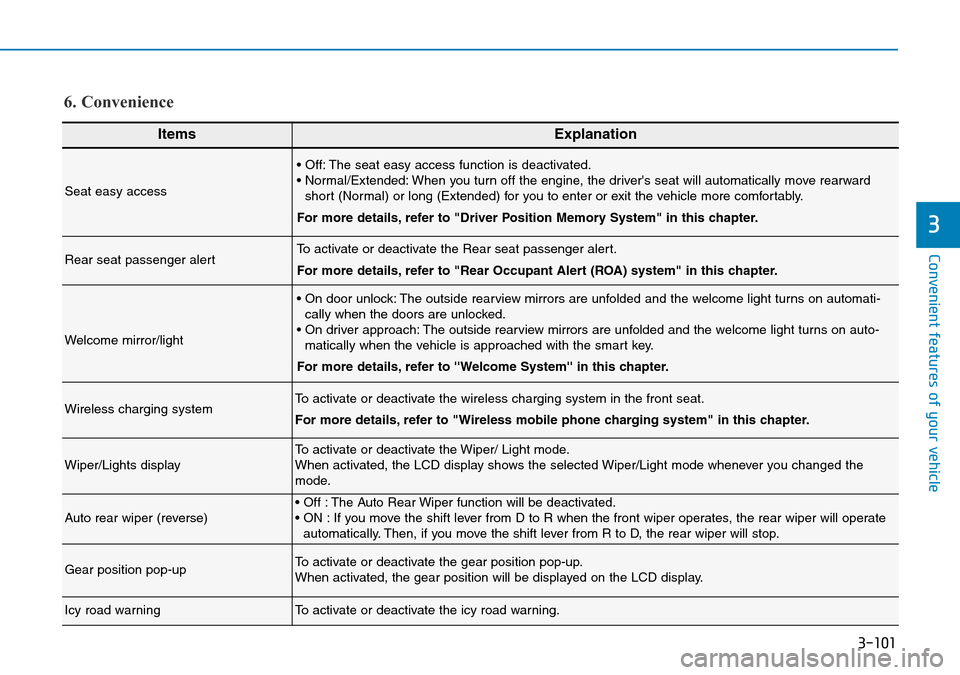
ItemsExplanation
Seat easy access
• Off: The seat easy access function is deactivated.
• Normal/Extended: When you turn off the engine, the driver's seat will automatically move rearward
short (Normal) or long (Extended) for you to enter or exit the vehicle more comfortably.
For more details, refer to "Driver Position Memory System" in this chapter.
Rear seat passenger alertTo activate or deactivate the Rear seat passenger alert.
For more details, refer to "Rear Occupant Alert (ROA) system" in this chapter.
Welcome mirror/light
• On door unlock: The outside rearview mirrors are unfolded and the welcome light turns on automati-
cally when the doors are unlocked.
• On driver approach: The outside rearview mirrors are unfolded and the welcome light turns on auto-
matically when the vehicle is approached with the smart key.
For more details, refer to ''Welcome System'' in this chapter.
Wireless charging systemTo activate or deactivate the wireless charging system in the front seat.
For more details, refer to "Wireless mobile phone charging system" in this chapter.
Wiper/Lights displayTo activate or deactivate the Wiper/ Light mode.
When activated, the LCD display shows the selected Wiper/Light mode whenever you changed the
mode.
Auto rear wiper (reverse)• Off : The Auto Rear Wiper function will be deactivated.
• ON : If you move the shift lever from D to R when the front wiper operates, the rear wiper will operate
automatically. Then, if you move the shift lever from R to D, the rear wiper will stop.
Gear position pop-upTo activate or deactivate the gear position pop-up.
When activated, the gear position will be displayed on the LCD display.
Icy road warningTo activate or deactivate the icy road warning.
6. Convenience
Page 197 of 682
3-106
Convenient features of your vehicle
The accumulated driving information
will continue to be counted whilst the
engine is still running (for example,
when the vehicle is in traffic or
stopped at a stop light).
Information
The vehicle must be driven for a min-
imum of 0.19 miles (300 metres) since
the last ignition key cycle before the
average fuel economy will be recalcu-
lated.
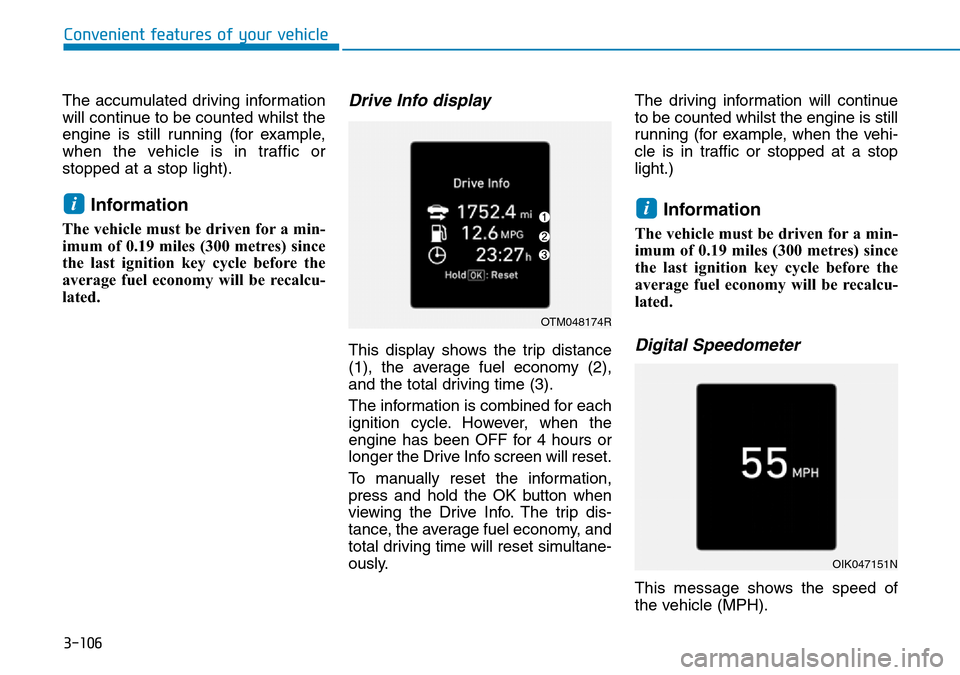
Drive Info display
This display shows the trip distance
(1), the average fuel economy (2),
and the total driving time (3).
The information is combined for each
ignition cycle. However, when the
engine has been OFF for 4 hours or
longer the Drive Info screen will reset.
To manually reset the information,
press and hold the OK button when
viewing the Drive Info. The trip dis-
tance, the average fuel economy, and
total driving time will reset simultane-
ously.The driving information will continue
to be counted whilst the engine is still
running (for example, when the vehi-
cle is in traffic or stopped at a stop
light.)
Information
The vehicle must be driven for a min-
imum of 0.19 miles (300 metres) since
the last ignition key cycle before the
average fuel economy will be recalcu-
lated.
Digital Speedometer
This message shows the speed of
the vehicle (MPH).
ii
OTM048174R
OIK047151N
Page 209 of 682
3-118
Convenient features of your vehicle
Battery saver function
The purpose of this feature is to pre-
vent the battery from being dis-
charged. The system automatically
turns off the position lamp when the
driver turns the engine off and opens
the driver-side door.
With this feature, the position lamps
will turn off automatically if the driver
parks on the side of the road at night.
If necessary, to keep the lamps on
when the engine is turned off, perform
the following:
1) Open the driver-side door.
2) Turn the position lamps OFF and
ON again using the light switch on
the steering column.
Headlamp delay function
(if equipped)
If you place the ignition switch to the
ACC or OFF position with the head-
lamps ON, the headlamps (and/or
position lamps) remain on for about 5
minutes. However, with the engine off if
the driver’s door is opened and closed,
the headlamps (and/or position lamps)
are turned off after 15 seconds.
The headlamps (and/or position
lamps) can be turned off by pressing
the lock button on the remote key or
smart key twice or turning the light
switch to the OFF or AUTO position.
However, if you turn the light switch
to the AUTO position when it is dark
outside, the headlamps will not be
turned off.
You can activate or deactivate the
Headlamp Delay function from the
User Settings mode on the LCD dis-
play.For more details, refer to
"LCD Display" in this chapter.If the driver gets out of the vehicle
through other doors (except dri-
ver's door), the battery saver func-
tion does not operate and the
headlamp delay function does not
turn off automatically. Therefore, It
causes the battery to be dis-
charged. In this case, make sure to
turn off the headlamps before get-
ting out of the vehicle.
Daytime running light (DRL)
(if equipped)
The Daytime Running Lights (DRL)
can make it easier for others to see
the front of your vehicle during the
day, especially after dawn and before
sunset.
The DRL system will turn the dedi-
cated lamps OFF when:
1. The headlamps or front fog lights
are in the ON position.
2. The position light switch is in the
ON position.
3. The engine is turned off.
NOTICE
Page 211 of 682
3-120
Automatic type
It automatically adjusts the head-
lamp beam level according to the
number of passengers and loading
weight in the luggage area.
It also adjusts to the appropriate head-
lamp beam level for various situations.
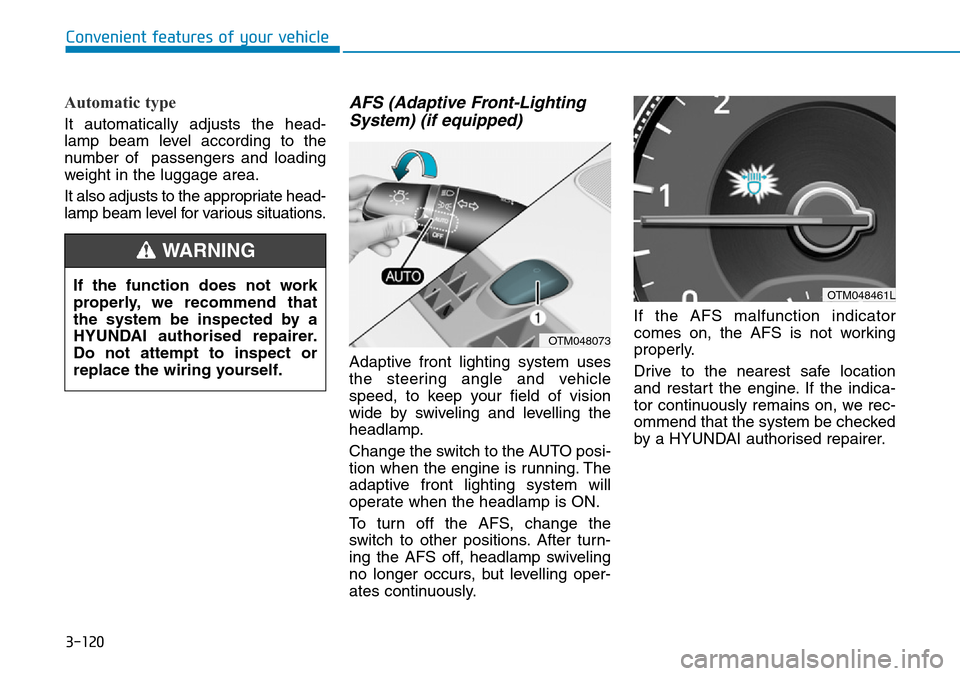
AFS (Adaptive Front-Lighting
System) (if equipped)
Adaptive front lighting system uses
the steering angle and vehicle
speed, to keep your field of vision
wide by swiveling and levelling the
headlamp.
Change the switch to the AUTO posi-
tion when the engine is running. The
adaptive front lighting system will
operate when the headlamp is ON.
To turn off the AFS, change the
switch to other positions. After turn-
ing the AFS off, headlamp swiveling
no longer occurs, but levelling oper-
ates continuously.If the AFS malfunction indicator
comes on, the AFS is not working
properly.
Drive to the nearest safe location
and restart the engine. If the indica-
tor continuously remains on, we rec-
ommend that the system be checked
by a HYUNDAI authorised repairer.
Convenient features of your vehicle
If the function does not work
properly, we recommend that
the system be inspected by a
HYUNDAI authorised repairer.
Do not attempt to inspect or
replace the wiring yourself.
WARNING
OTM048073
OTM048461L