Page 300 of 682
4-9
Multimedia System
4
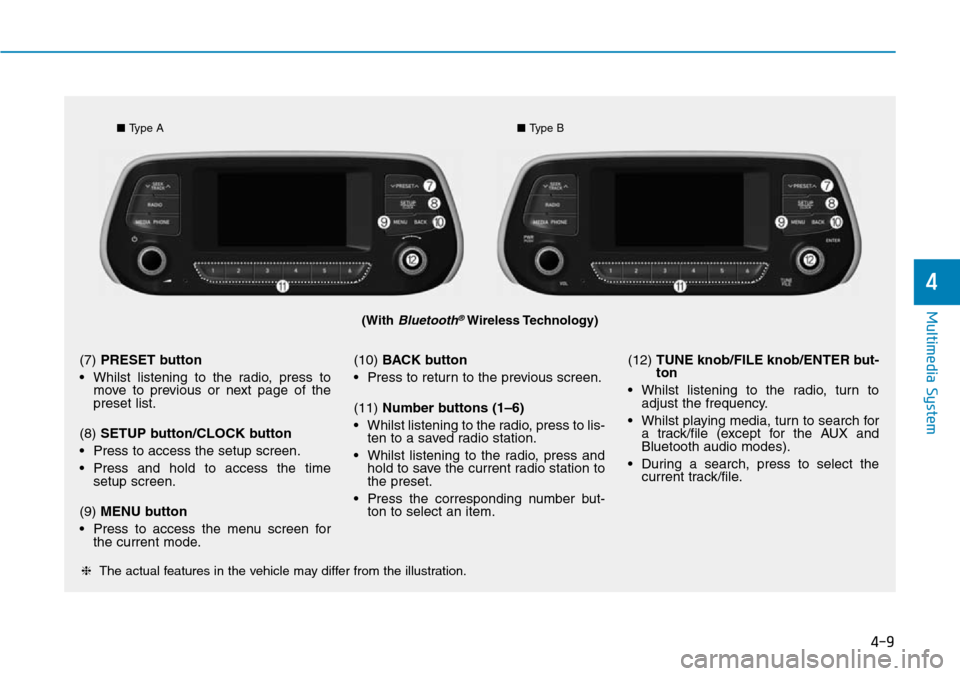
(With Bluetooth®Wireless Technology)
■Type A■Type B
❈The actual features in the vehicle may differ from the illustration.
(7) PRESET button
• Whilst listening to the radio, press to
move to previous or next page of the
preset list.
(8) SETUP button/CLOCK button
• Press to access the setup screen.
• Press and hold to access the time
setup screen.
(9) MENU button
• Press to access the menu screen for
the current mode.(10) BACK button
• Press to return to the previous screen.
(11) Number buttons (1–6)
• Whilst listening to the radio, press to lis-
ten to a saved radio station.
• Whilst listening to the radio, press and
hold to save the current radio station to
the preset.
• Press the corresponding number but-
ton to select an item.(12) TUNE knob/FILE knob/ENTER but-
ton
• Whilst listening to the radio, turn to
adjust the frequency.
• Whilst playing media, turn to search for
a track/file (except for the AUX and
Bluetooth audio modes).
• During a search, press to select the
current track/file.
Page 325 of 682
![Hyundai Santa Fe 2019 Owners Manual - RHD (UK, Australia) 4-34
Multimedia System
Date/Time
You can change the date and time
that are shown on the system dis-
play.
On the control panel, press the
[SETUP/CLOCK]�[3] buttons to
select Date/Time.
•Set date: Se](/manual-img/35/16317/w960_16317-324.png "Hyundai Santa Fe 2019 Owners Manual - RHD (UK, Australia) 4-34
Multimedia System
Date/Time
You can change the date and time
that are shown on the system dis-
play.
On the control panel, press the
[SETUP/CLOCK]�[3] buttons to
select Date/Time.
•Set date: Se")
4-34
Multimedia System
Date/Time
You can change the date and time
that are shown on the system dis-
play.
On the control panel, press the
[SETUP/CLOCK]�[3] buttons to
select Date/Time.
•Set date: Set date to display on the
system display.
•Set time: Set time to display on the
system display.
•Time format: Select to display
time in the 12 hour format or the 24
hour format.
Bluetooth
You can change the settings for
Bluetooth connections.
On the control panel, press the
[SETUP/CLOCK]�[4] buttons to
select Bluetooth.
•Connections: Pair new Bluetooth
devices with your system, or con-
nect or disconnect a paired device.
You can also delete paired devices.
•Auto connection priority: Select
a paired device to connect to your
system automatically when it turns
on.
•Update contacts(Download
Contacts): Download the contacts
list from the connected mobile
phone.
•Bluetooth voice guidance(if
equipped): Turn on or off the voice
guidance for Bluetooth pairing,
connection, and errors.• If no Bluetooth device is con-
nected, the Update contatcts
(Download Contacts) menu is
disabled.
• If the system language is select-
ed to Slovakian or Hungarian,
Bluetooth voice guidance menu
is disabled.
System
You can change the display lan-
guage or initialise system settings.
On the control panel, press the
[SETUP/CLOCK]�[5] buttons to
select System.
•Language: Change the display
language.
•Default: Reset your system set-
tings to the default values. All user
data stored in the system will also
be deleted.
NOTICE
Page 606 of 682
7-31
7
Maintenance
By jump starting
After a jump start from a good bat-
tery, drive the vehicle for 20-30 min-
utes before it is shutoff. The vehicle
may not restart if you shut it off
before the battery had a chance to
adequately recharge. See “Jump
Starting” in chapter 6 for more infor-
mation on jump starting procedures.
Information
An inappropriately disposed
of battery can be harmful to
the environment and human
health.
Dispose of the battery according to
your local law(s) or regulations.
Reset items
The following items may need to be
reset after the battery has been dis-
charged or the battery has been dis-
connected.
• Auto up/down window
• Sunroof
• Trip computer
• Climate control system
• Driver position memory system
• Clock
• Audio system
i
AGM battery (if equipped)
•Absorbent Glass Matt (AGM)
batteries are maintenance-
free and we recommend that
the AGM battery be serviced
by a HYUNDAI authorised
repairer. For charging your
AGM battery, use only fully
automatic battery chargers
that are specially developed
for AGM batteries.
•When replacing the AGM bat-
tery, we recommend that you
use parts for replacement
from a HYUNDAI authorised
repairer.
•Do not open or remove the
cap on top of the battery. This
may cause leaks of internal
electrolyte that could result in
severe injury.
CAUTION