2019 Hyundai Santa Fe automatic transmission
[x] Cancel search: automatic transmissionPage 184 of 682
3-93
Convenient features of your vehicle
3
Shift to P to edit settings /
Engage parking brake to edit
settings
This warning message illuminates if
you try to select an item from the
User Settings mode whilst driving.
- Manual transmission
For your safety, change the User
Settings after engaging the parking
brake.
- Automatic transmission
For your safety, change the User
Settings after parking the vehicle,
applying the parking brake and
moving the shift lever to P (Park).
Quick guide (Help, if equipped)
This mode provides quick guides for
the systems in the User Settings
mode.
Select an item, press and hold the
OK button.
For more details about each sys-
tem, refer to this Owner’s Manual.
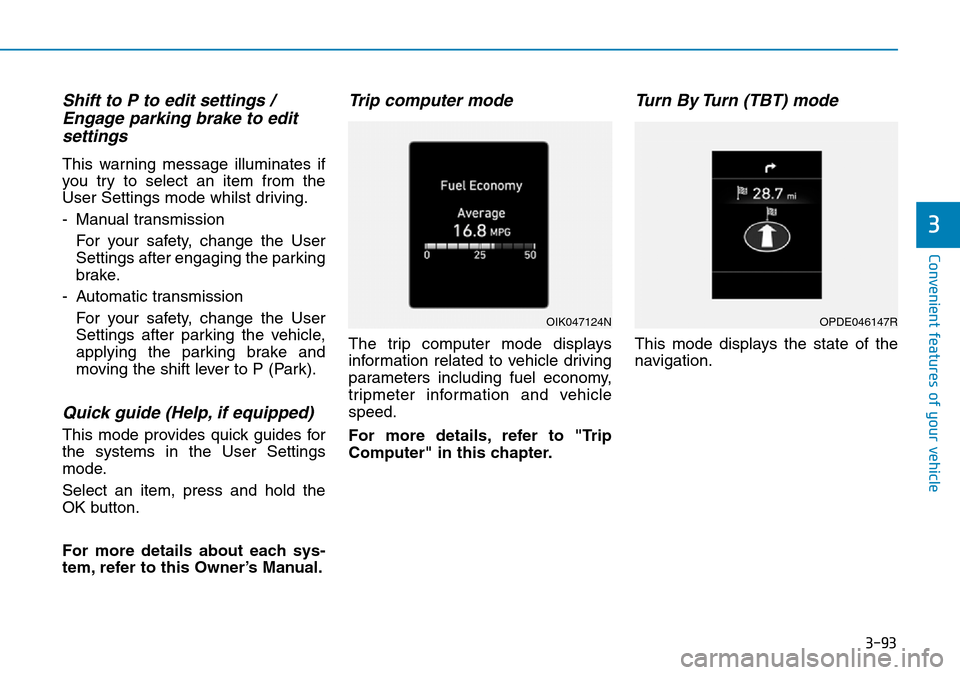
Trip computer mode
The trip computer mode displays
information related to vehicle driving
parameters including fuel economy,
tripmeter information and vehicle
speed.
For more details, refer to "Trip
Computer" in this chapter.
Turn By Turn (TBT) mode
This mode displays the state of the
navigation.
OIK047124NOPDE046147R
Page 190 of 682
3-99
Convenient features of your vehicle
3
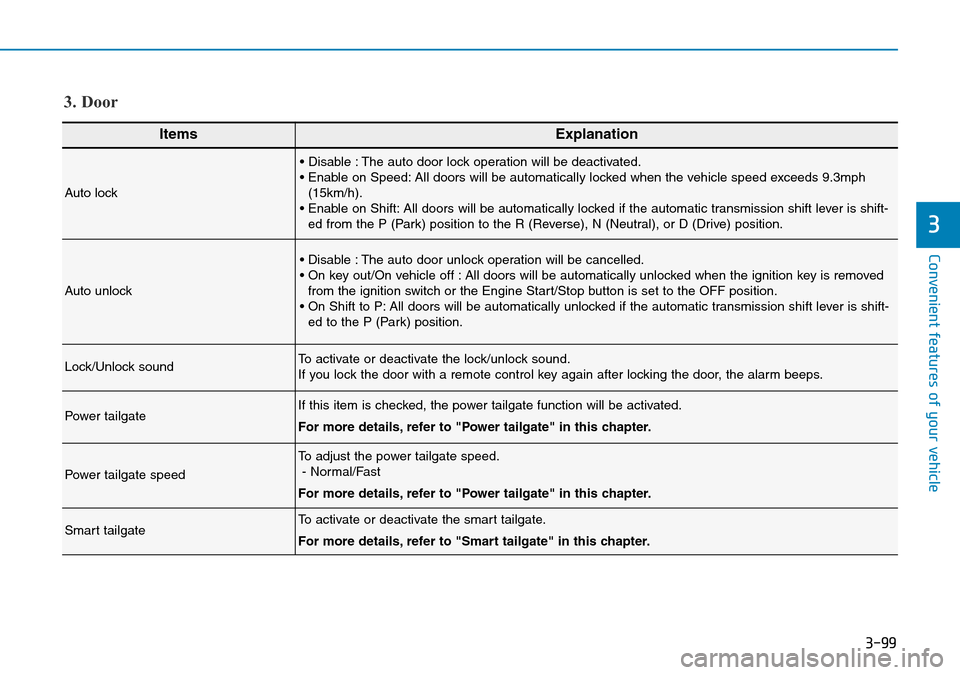
ItemsExplanation
Auto lock
• Disable : The auto door lock operation will be deactivated.
• Enable on Speed: All doors will be automatically locked when the vehicle speed exceeds 9.3mph
(15km/h).
• Enable on Shift: All doors will be automatically locked if the automatic transmission shift lever is shift-
ed from the P (Park) position to the R (Reverse), N (Neutral), or D (Drive) position.
Auto unlock
• Disable : The auto door unlock operation will be cancelled.
• On key out/On vehicle off : All doors will be automatically unlocked when the ignition key is removed
from the ignition switch or the Engine Start/Stop button is set to the OFF position.
• On Shift to P: All doors will be automatically unlocked if the automatic transmission shift lever is shift-
ed to the P (Park) position.
Lock/Unlock soundTo activate or deactivate the lock/unlock sound.
If you lock the door with a remote control key again after locking the door, the alarm beeps.
Power tailgateIf this item is checked, the power tailgate function will be activated.
For more details, refer to "Power tailgate" in this chapter.
Power tailgate speed
To adjust the power tailgate speed.
- Normal/Fast
For more details, refer to "Power tailgate" in this chapter.
Smart tailgateTo activate or deactivate the smart tailgate.
For more details, refer to "Smart tailgate" in this chapter.
3. Door
Page 231 of 682
3-140
Convenient features of your vehicle
• Do not spray the sensors or its sur-
rounding area directly with a high
pressure washer. Shock applied
from high pressure water may
cause the device to not operate
normally.
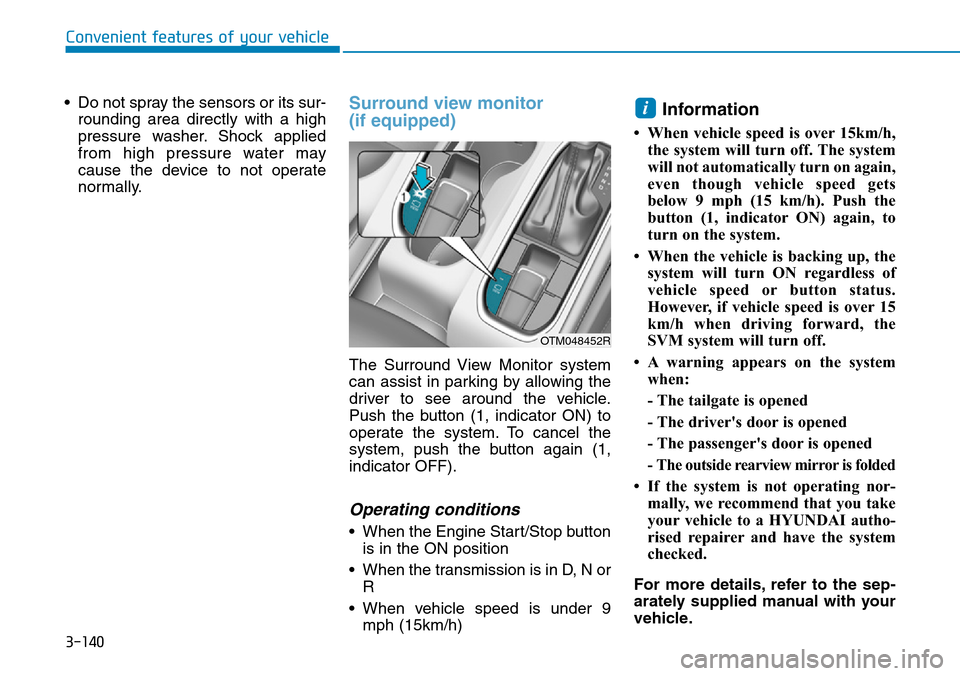
Surround view monitor
(if equipped)
The Surround View Monitor system
can assist in parking by allowing the
driver to see around the vehicle.
Push the button (1, indicator ON) to
operate the system. To cancel the
system, push the button again (1,
indicator OFF).
Operating conditions
• When the Engine Start/Stop button
is in the ON position
• When the transmission is in D, N or
R
• When vehicle speed is under 9
mph (15km/h)
Information
• When vehicle speed is over 15km/h,
the system will turn off. The system
will not automatically turn on again,
even though vehicle speed gets
below 9 mph (15 km/h). Push the
button (1, indicator ON) again, to
turn on the system.
• When the vehicle is backing up, the
system will turn ON regardless of
vehicle speed or button status.
However, if vehicle speed is over 15
km/h when driving forward, the
SVM system will turn off.
• A warning appears on the system
when:
- The tailgate is opened
- The driver's door is opened
- The passenger's door is opened
- The outside rearview mirror is folded
• If the system is not operating nor-
mally, we recommend that you take
your vehicle to a HYUNDAI autho-
rised repairer and have the system
checked.
For more details, refer to the sep-
arately supplied manual with your
vehicle.
i
OTM048452R
Page 245 of 682
3-154
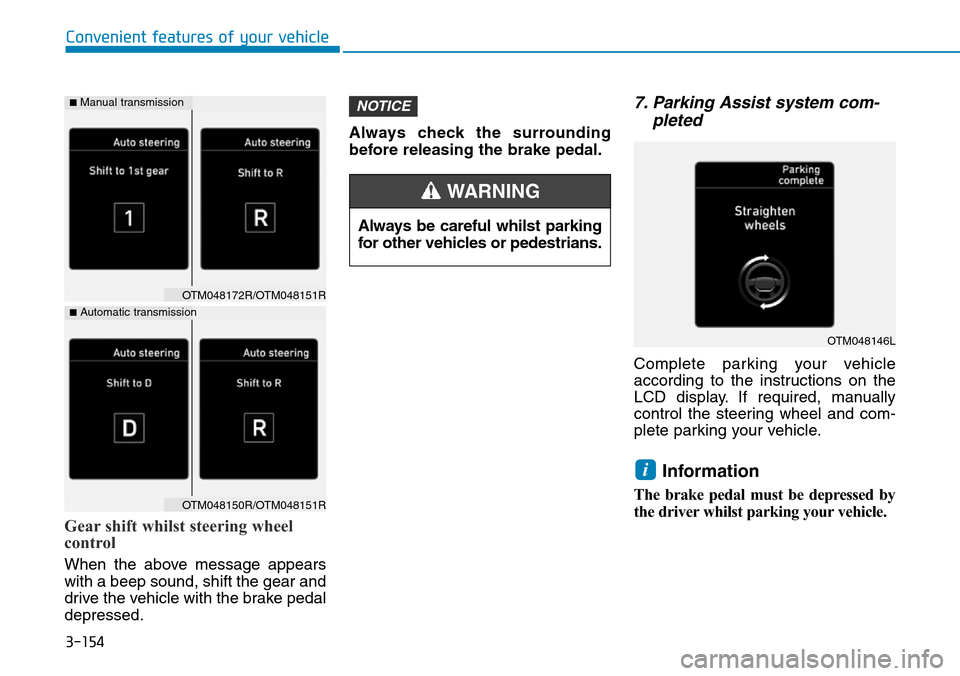
Gear shift whilst steering wheel
control
When the above message appears
with a beep sound, shift the gear and
drive the vehicle with the brake pedal
depressed.Always check the surrounding
before releasing the brake pedal.
7. Parking Assist system com-
pleted
Complete parking your vehicle
according to the instructions on the
LCD display. If required, manually
control the steering wheel and com-
plete parking your vehicle.
Information
The brake pedal must be depressed by
the driver whilst parking your vehicle.
i
NOTICE
Convenient features of your vehicle
Always be careful whilst parking
for other vehicles or pedestrians.
WARNING
OTM048146L
OTM048172R/OTM048151R
OTM048150R/OTM048151R
■Automatic transmission
■Manual transmission
Page 248 of 682
3-157
Convenient features of your vehicle
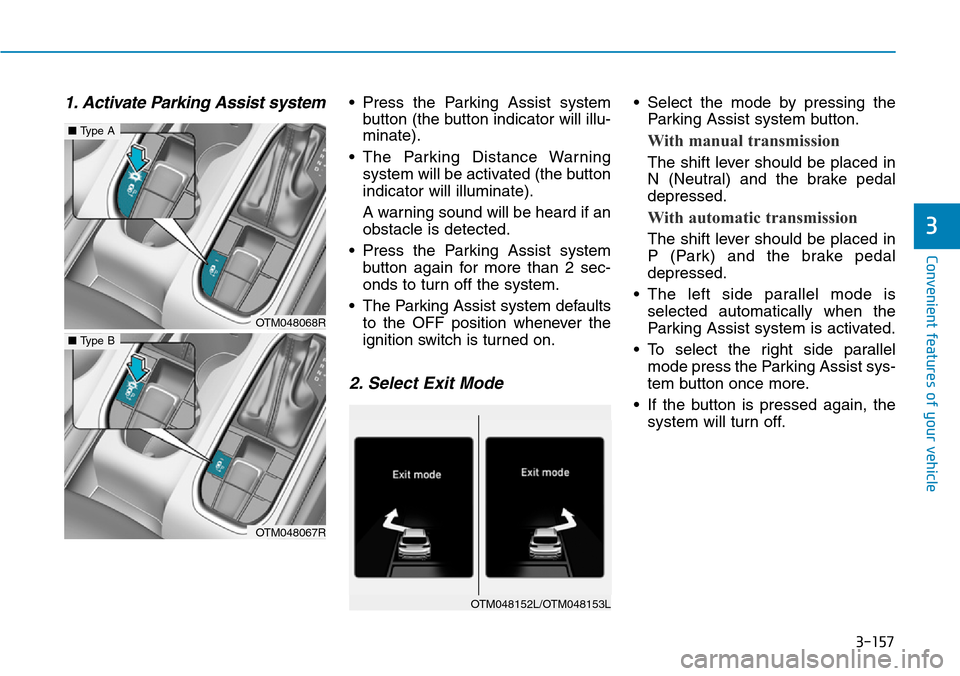
1. Activate Parking Assist system• Press the Parking Assist system
button (the button indicator will illu-
minate).
• The Parking Distance Warning
system will be activated (the button
indicator will illuminate).
A warning sound will be heard if an
obstacle is detected.
• Press the Parking Assist system
button again for more than 2 sec-
onds to turn off the system.
• The Parking Assist system defaults
to the OFF position whenever the
ignition switch is turned on.
2. Select Exit Mode
• Select the mode by pressing the
Parking Assist system button.
With manual transmission
The shift lever should be placed in
N (Neutral) and the brake pedal
depressed.
With automatic transmission
The shift lever should be placed in
P (Park) and the brake pedal
depressed.
• The left side parallel mode is
selected automatically when the
Parking Assist system is activated.
• To select the right side parallel
mode press the Parking Assist sys-
tem button once more.
• If the button is pressed again, the
system will turn off.3
OTM048068R
■Type A
OTM048067R
■Type B
OTM048152L/OTM048153L
Page 250 of 682
3-159
Convenient features of your vehicle
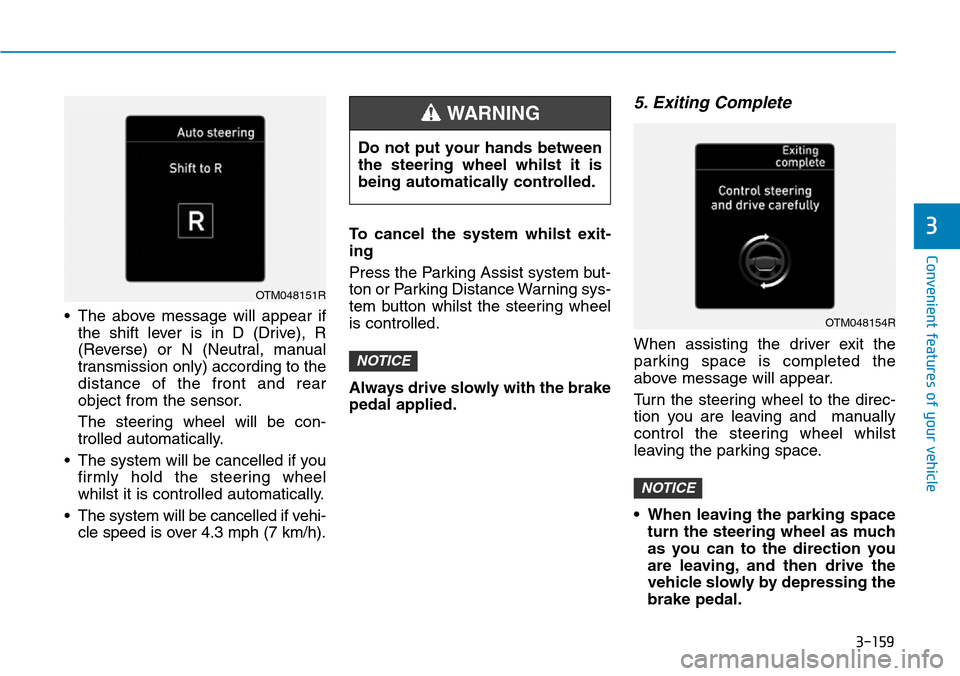
• The above message will appear if
the shift lever is in D (Drive), R
(Reverse) or N (Neutral, manual
transmission only) according to the
distance of the front and rear
object from the sensor.
The steering wheel will be con-
trolled automatically.
• The system will be cancelled if you
firmly hold the steering wheel
whilst it is controlled automatically.
• The system will be cancelled if vehi-
cle speed is over 4.3 mph (7 km/h).To cancel the system whilst exit-
ing
Press the Parking Assist system but-
ton or Parking Distance Warning sys-
tem button whilst the steering wheel
is controlled.
Always drive slowly with the brake
pedal applied.
5. Exiting Complete
When assisting the driver exit the
parking space is completed the
above message will appear.
Turn the steering wheel to the direc-
tion you are leaving and manually
control the steering wheel whilst
leaving the parking space.
• When leaving the parking space
turn the steering wheel as much
as you can to the direction you
are leaving, and then drive the
vehicle slowly by depressing the
brake pedal.
NOTICE
NOTICE
3
OTM048151R
Do not put your hands between
the steering wheel whilst it is
being automatically controlled.
WARNING
OTM048154R
Page 330 of 682
Driving your vehicle
Before driving.........................................................5-5
Before entering the vehicle ...........................................5-5
Before starting...................................................................5-5
Key ignition switch ............................................................5-7
Ignition switch ........................................................5-7
Engine Start/Stop button ..............................................5-12
Manual transmission............................................5-20
Manual transmission operation ...................................5-20
Good driving practices ...................................................5-22
Automatic transmission .......................................5-23
Automatic transmission operation ..............................5-23
Parking ...............................................................................5-28
Good driving practices ...................................................5-28
Braking system.....................................................5-31
Power brakes ...................................................................5-31
Disc brakes wear indicator ...........................................5-32
Parking brake ...................................................................5-32
Electronic Parking Brake (EPB)...................................5-34
AUTO HOLD ......................................................................5-40
Anti-lock Brake System (ABS) ....................................5-44
Electronic Stability Control (ESC)................................5-46
Vehicle Stability Management (VSM).........................5-49
Trailer stability assist (TSA)..........................................5-50
Hill-Start Assist Control (HAC) ....................................5-51
Emergency Stop Signal (ESS) ......................................5-51
Downhill Brake Control (DBC) ......................................5-52
Good braking practices..................................................5-54
Four wheel drive (4WD) ......................................5-55
4WD operation .................................................................5-57
Emergency precautions .................................................5-60
Reducing the risk of a rollover ...................................5-61
ISG (Idle Stop and Go) system ...........................5-63
To activate the ISG system ...........................................5-63
To deactivate the ISG system ......................................5-67
ISG system malfunction .................................................5-67
The battery sensor deactivation .................................5-68
Flex steering wheel .............................................5-69
Drive mode integrated control system .............5-71
SMART mode....................................................................5-71
SPORT mode.....................................................................5-74
ECO mode ............................................................................574
Forward collision-avoidance assist (FCA)
system - camera type .........................................5-76
System setting and activation......................................5-76
FCA warning message and system control ..............5-78
FCA sensor........................................................................5-80
System malfunction ........................................................5-82
Limitations of the system .............................................5-83
5
Page 336 of 682
5-7
Driving your vehicle
5
IGNITION SWITCH
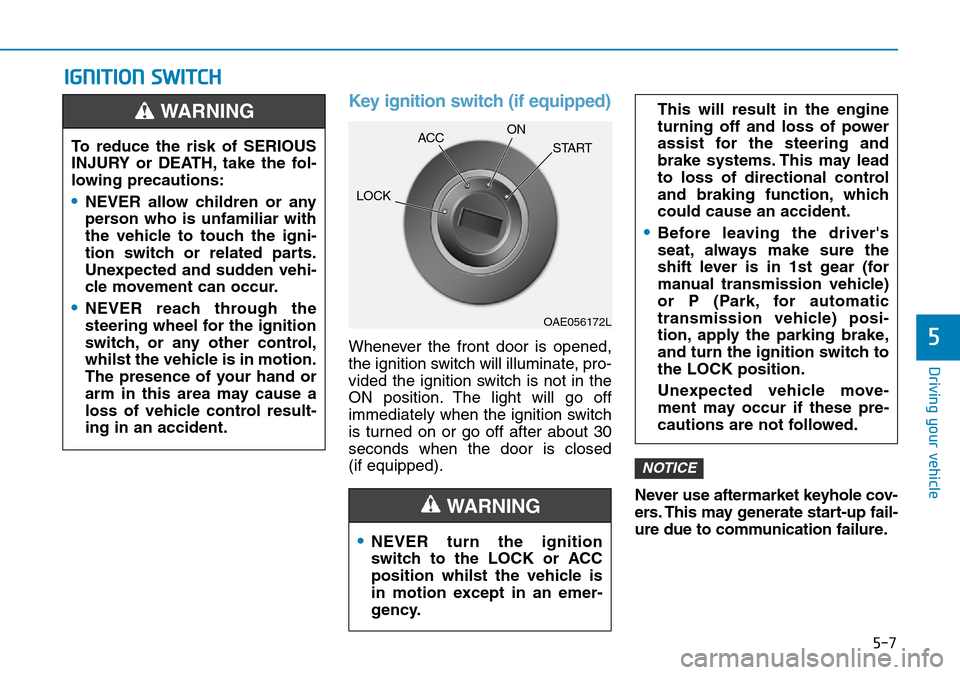
Key ignition switch (if equipped)
Whenever the front door is opened,
the ignition switch will illuminate, pro-
vided the ignition switch is not in the
ON position. The light will go off
immediately when the ignition switch
is turned on or go off after about 30
seconds when the door is closed
(if equipped).
Never use aftermarket keyhole cov-
ers. This may generate start-up fail-
ure due to communication failure.
NOTICE
•NEVER turn the ignition
switch to the LOCK or ACC
position whilst the vehicle is
in motion except in an emer-
gency.
This will result in the engine
turning off and loss of power
assist for the steering and
brake systems. This may lead
to loss of directional control
and braking function, which
could cause an accident.
•Before leaving the driver's
seat, always make sure the
shift lever is in 1st gear (for
manual transmission vehicle)
or P (Park, for automatic
transmission vehicle) posi-
tion, apply the parking brake,
and turn the ignition switch to
the LOCK position.
Unexpected vehicle move-
ment may occur if these pre-
cautions are not followed.
WARNING
To reduce the risk of SERIOUS
INJURY or DEATH, take the fol-
lowing precautions:
•NEVER allow children or any
person who is unfamiliar with
the vehicle to touch the igni-
tion switch or related parts.
Unexpected and sudden vehi-
cle movement can occur.
•NEVER reach through the
steering wheel for the ignition
switch, or any other control,
whilst the vehicle is in motion.
The presence of your hand or
arm in this area may cause a
loss of vehicle control result-
ing in an accident.
WARNING
OAE056172L
LOCKACCON
START