2019 Hyundai Ioniq Electric change time
[x] Cancel search: change timePage 208 of 555
3-123
Convenient features of your vehicle
3
Air conditioning system operation
tips
If the vehicle has been parked indirect sunlight during hot weather,
open the windows for a short time
to let the hot air inside the vehicle
escape.
After sufficient cooling has been achieved, switch back from the
recirculated air to the fresh outside
air position.
To help reduce moisture inside of the windows on rainy or humid
days, decrease the humidity inside
the vehicle by operating the air
conditioning system with the win-
dows and sunroof closed.
Use the air conditioning system every month only for a few minutes
to ensure maximum system per-
formance. If you operate air conditioner
excessively, the difference between
the temperature of the outside air
and that of the windshield could
cause the outer surface of the
windshield to fog up, causing loss
of visibility. In this case, set the
mode selection knob or button to
the position and fan speed
control to the lower speed.
System Maintenance
Climate control air filter
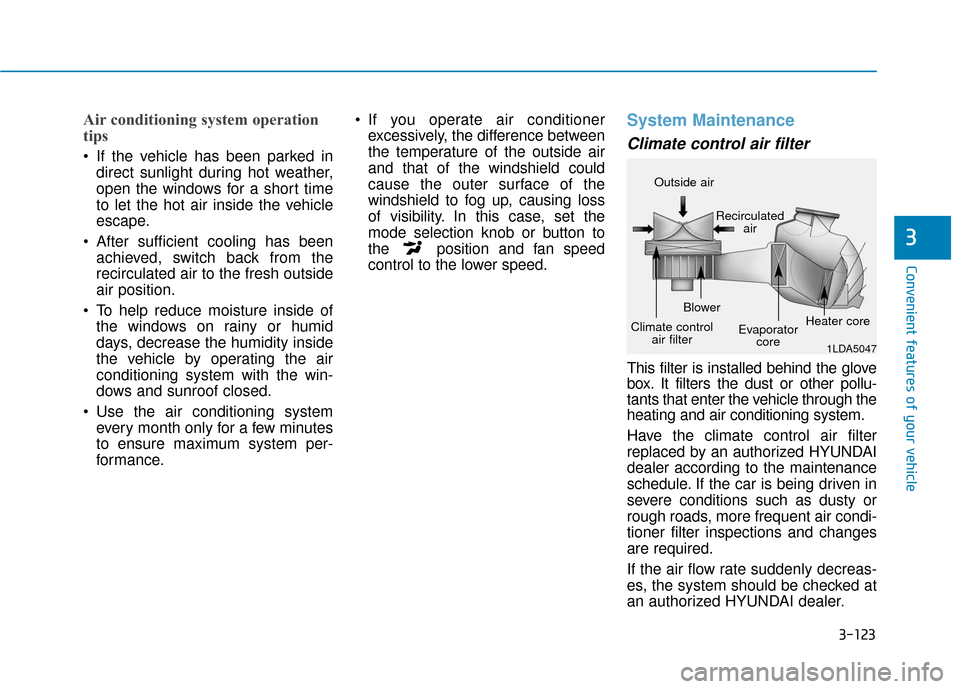
This filter is installed behind the glove
box. It filters the dust or other pollu-
tants that enter the vehicle through the
heating and air conditioning system.
Have the climate control air filter
replaced by an authorized HYUNDAI
dealer according to the maintenance
schedule. If the car is being driven in
severe conditions such as dusty or
rough roads, more frequent air condi-
tioner filter inspections and changes
are required.
If the air flow rate suddenly decreas-
es, the system should be checked at
an authorized HYUNDAI dealer.
1LDA5047
Outside air
Recirculatedair
Climate control air filter Blower
Evaporatorcore Heater core
Page 234 of 555
4-11
Multimedia System
4
Feature of Your Audio
Head unit
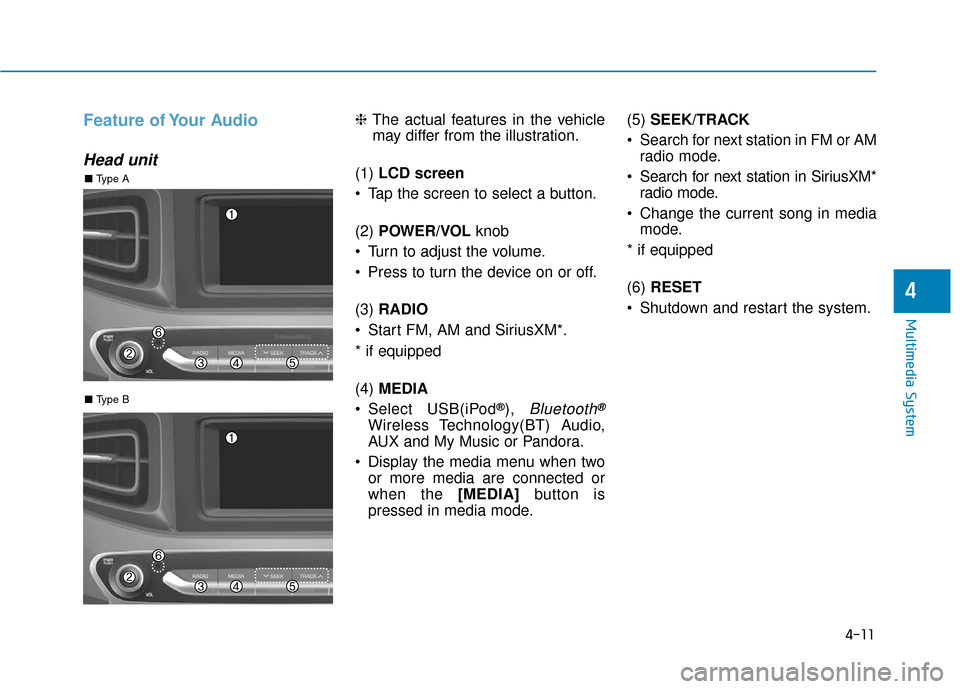
❈The actual features in the vehicle
may differ from the illustration.
(1) LCD screen
Tap the screen to select a button.
(2) POWER/VOL knob
Turn to adjust the volume.
Press to turn the device on or off.
(3) RADIO
Start FM, AM and SiriusXM*.
* if equipped
(4) MEDIA
Select USB(iPod
®), Bluetooth®
Wireless Technology(BT) Audio,
AUX and My Music or Pandora.
Display the media menu when two or more media are connected or
when the [MEDIA] button is
pressed in media mode. (5)
SEEK/TRACK
Search for next station in FM or AM radio mode.
Search for next station in SiriusXM* radio mode.
Change the current song in media mode.
* if equipped
(6) RESET
Shutdown and restart the system.
■ Type B
■ Type A
Page 236 of 555
4-13
Multimedia System
4
Multimedia System
Steering wheel remote control
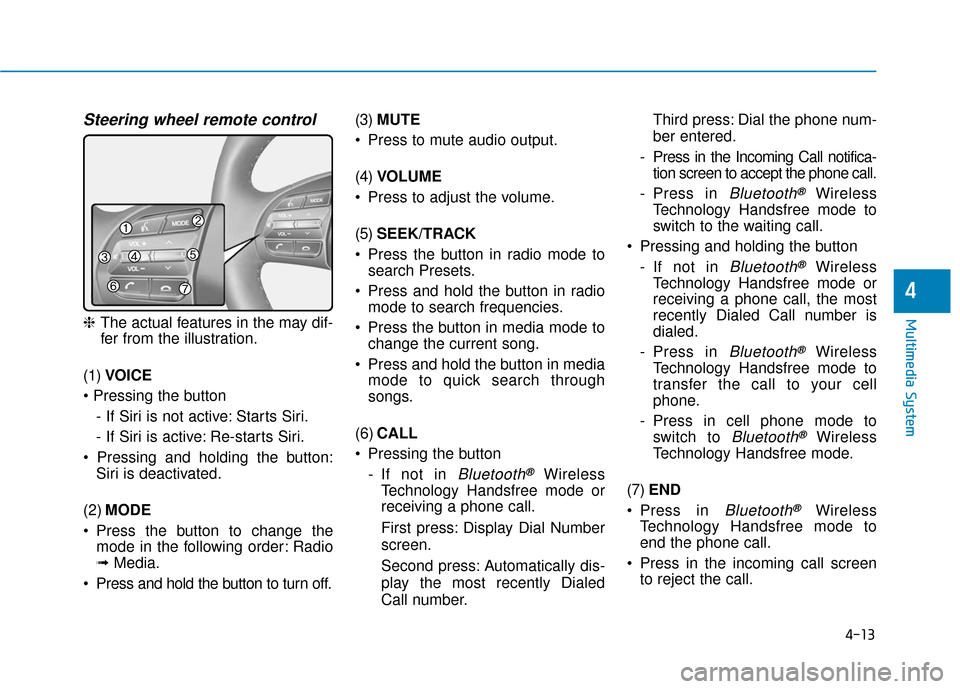
❈The actual features in the may dif-
fer from the illustration.
(1) VOICE
- If Siri is not active: Starts Siri.
- If Siri is active: Re-starts Siri.
Siri is deactivated.
(2) MODE
Press the button to change the mode in the following order: Radio
➟ Media.
Press and hold the button to turn off. (3)
MUTE
Press to mute audio output.
(4) VOLUME
Press to adjust the volume.
(5) SEEK/TRACK
Press the button in radio mode to search Presets.
Press and hold the button in radio mode to search frequencies.
Press the button in media mode to change the current song.
Press and hold the button in media mode to quick search through
songs.
(6) CALL
Pressing the button - If not in
Bluetooth®Wireless
Technology Handsfree mode or
receiving a phone call.
First press: Display Dial Number
screen.
Second press: Automatically dis-
play the most recently Dialed
Call number. Third press: Dial the phone num-
ber entered.
- Press in the Incoming Call notifica- tion screen to accept the phone call.
- Press in
Bluetooth®Wireless
Technology Handsfree mode to
switch to the waiting call.
Pressing and holding the button - If not in
Bluetooth®Wireless
Technology Handsfree mode or
receiving a phone call, the most
recently Dialed Call number is
dialed.
- Press in
Bluetooth®Wireless
Technology Handsfree mode to
transfer the call to your cell
phone.
- Press in cell phone mode to switch to
Bluetooth®Wireless
Technology Handsfree mode.
(7) END
Press in
Bluetooth®Wireless
Technology Handsfree mode to
end the phone call.
Press in the incoming call screen to reject the call.
Page 238 of 555
4-15
Multimedia System
4
Information
• If you want to change the position ofdevice installation, please inquire
with your place of purchase or serv-
ice maintenance center. Technical
expertise is required to install or dis-
assemble the device.
• Turn on the car ignition before using this device. Do not operate the
audio system for long periods of
time with the ignition turned off as
such operations may lead to battery
discharge. Do not subject the device to
severe shock or impact. Direct
pressure onto the front side of
the monitor may cause damage
to the LCD or touch screen.
When cleaning the device, make sure to turn off the device and
use a dry and smooth cloth.
Never use tough materials,
chemical cloths, or solvents
(alcohol, benzene, thinners, etc.)
As such materials may damage
the device panel or cause
color/quality deterioration.
Do not place beverages close to the audio system. Spilling bever-
ages may lead to system mal-
function.
Placing the audio system within an electromagnetic environment
may result in noise interference.
Information
In this case of product malfunction,
please contact your dealer or vehicle
service center.
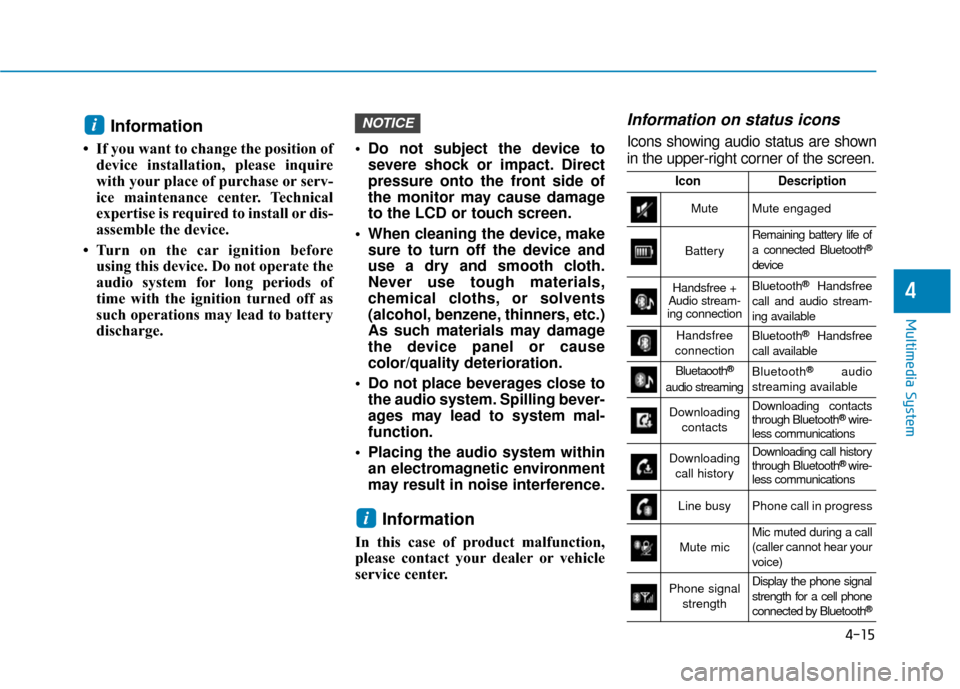
Information on status icons
Icons showing audio status are shown
in the upper-right corner of the screen.
i
NOTICEi
IconDescription
MuteMute engaged
Battery
Remaining battery life of
a connected Bluetooth®
device
Handsfree +
Audio stream-
ing connectionBluetooth®Handsfree
call and audio stream-
ing available
Handsfree
connectionBluetooth®Handsfree
call available
Bluetaooth®
audio streaming
Bluetooth®audio
streaming available
Downloading contactsDownloading contacts
through Bluetooth®wire-
less communications
Downloading
call historyDownloading call history
through Bluetooth® wire-
less communications
Line busyPhone call in progress
Mute micMic muted during a call
(caller cannot hear your
voice)
Phone signal
strengthDisplay the phone signal
strength for a cell phone
connected by Bluetooth
®
Page 239 of 555
4-16
Multimedia System
Radio
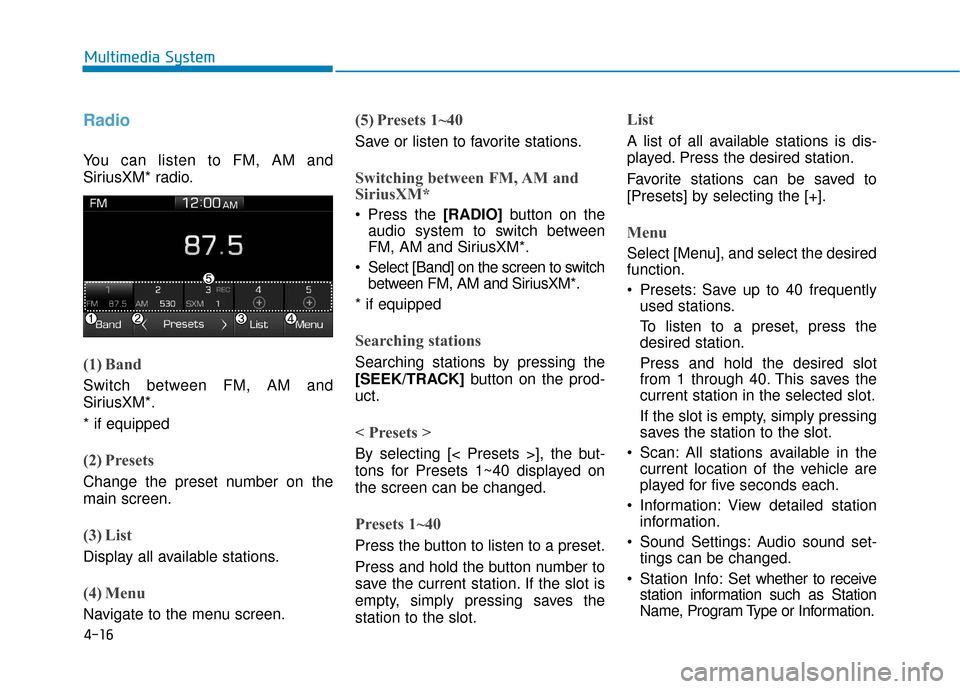
You can listen to FM, AM and
SiriusXM* radio.
(1) Band
Switch between FM, AM and
SiriusXM*.
* if equipped
(2) Presets
Change the preset number on the
main screen.
(3) List
Display all available stations.
(4) Menu
Navigate to the menu screen.
(5) Presets 1~40
Save or listen to favorite stations.
Switching between FM, AM and
SiriusXM*
Press the [RADIO]button on the
audio system to switch between
FM, AM and SiriusXM*.
Select [Band] on the screen to switch between FM, AM and SiriusXM*.
* if equipped
Searching stations
Searching stations by pressing the
[SEEK/TRACK] button on the prod-
uct.
< Presets >
By selecting [< Presets >], the but-
tons for Presets 1~40 displayed on
the screen can be changed.
Presets 1~40
Press the button to listen to a preset.
Press and hold the button number to
save the current station. If the slot is
empty, simply pressing saves the
station to the slot.
List
A list of all available stations is dis-
played. Press the desired station.
Favorite stations can be saved to
[Presets] by selecting the [+].
Menu
Select [Menu], and select the desired
function.
Presets: Save up to 40 frequently used stations.
To listen to a preset, press the
desired station.
Press and hold the desired slot
from 1 through 40. This saves the
current station in the selected slot.
If the slot is empty, simply pressing
saves the station to the slot.
Scan: All stations available in the current location of the vehicle are
played for five seconds each.
Information: View detailed station information.
Sound Settings: Audio sound set- tings can be changed.
Station Info: Set whether to receive
station information such as Station
Name, Program Type or Information.
Page 240 of 555
4-17
Multimedia System
4
Information- SiriusXM®
Satellite Radio
information
(if equipped)
• Satellite Radio channels: Enjoy SiriusXM Satellite Radio with a
3-month trial subscription to the
Sirius Select package. You’ll get over
variable channels, including commer-
cial free music, plus all your favorite
sports, exclusive talk, entertainment,
and a selection of premium program-
ming. For more information and a
complete list of SiriusXM channels,
visit siriusxm.com in the United States,
siriusxm.ca in Canada, or call
SiriusXM at 1-888-539-7474.
• Satellite Radio reception factors: To receive the satellite signal, your
vehicle has been equipped with a
satellite radio antenna located on
the roof of your vehicle. The vehicle
roof provides the best location for
an unobstructed, open view of the
sky, a requirement of a satellite
radio system. Like AM/FM, there
are several factors that can affect
satellite radio reception perform-
ance: (Continued)(Continued)
- Antenna obstructions: For opti-mal reception performance, keep
the antenna clear of snow and ice
build-up and keep luggage and
other material as far away from
the antenna as possible.
• SiriusXM Satellite Radio service: SiriusXM is a subscription-based satel-
lite radio service that broadcasts music,
sports, news and entertainment pro-
gramming to radio receivers, which are
available for installation in motor vehi-
cles or factory installed, as well as for
the home, portable and wireless devices,
and through an Internet connection on
a personal computer.
Vehicles that are equipped with a
factory installed SiriusXM Satellite
Radio system include:
- Hardware and an introductorytrial subscription term, which
begins on the date of sale or lease
of the vehicle.
- For a small upgrade fee, access to SiriusXM music channels, and
other select channels over the
Internet using any computer con-
nected to the Internet (U.S. cus-
tomers only).
(Continued)(Continued)
• SiriusXM services require a sub-
scription sold separately, or as a
package, by Sirius XM Radio Inc. If
you decide to continue service after
your trial, the subscription plan you
choose will automatically renew
thereafter and you will be charged
according to your chosen payment
method at then-current rates. Fees
and taxes apply. To cancel you must
call SiriusXM at 1-866-635-2349.
See SiriusXM Customer Agreement
for complete terms at www.sir-
iusxm.com. SiriusXM U.S. satellite
and data services are available only
in the 48 contiguous states, DC and
Puerto Rico (with coverage limita-
tions). SiriusXM satellite service is
also available in Canada; see
www.siriusxm.ca. All fees and pro-
gramming subject to change. Sirius,
XM and all related marks and logos
are trademarks of Sirius XM Radio
Inc.
i
Page 241 of 555
4-18
Multimedia System
SiriusXM
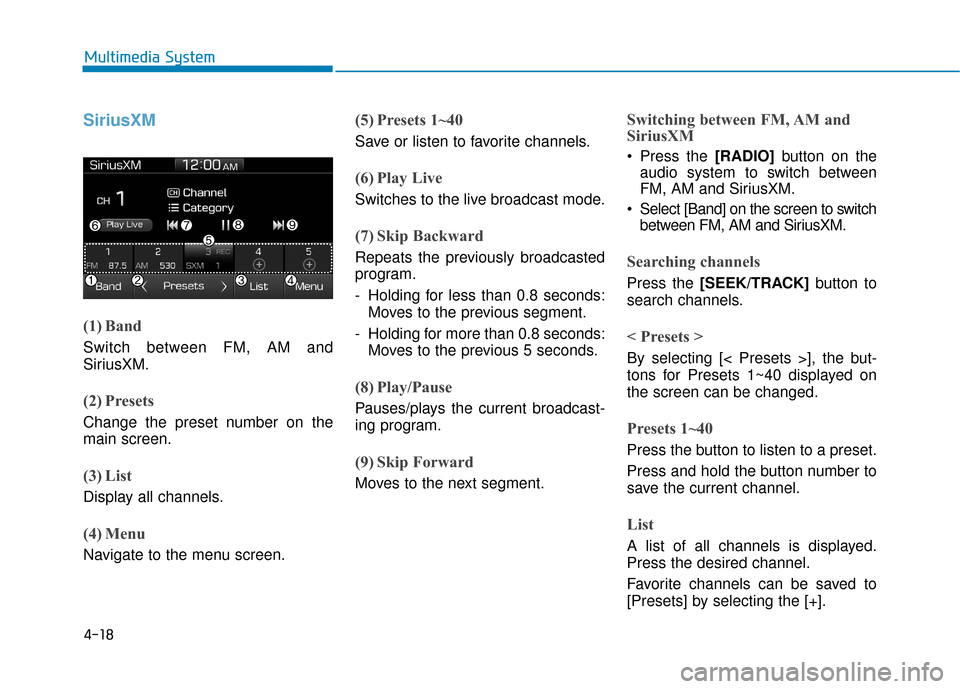
(1) Band
Switch between FM, AM and
SiriusXM.
(2) Presets
Change the preset number on the
main screen.
(3) List
Display all channels.
(4) Menu
Navigate to the menu screen.
(5) Presets 1~40
Save or listen to favorite channels.
(6) Play Live
Switches to the live broadcast mode.
(7) Skip Backward
Repeats the previously broadcasted
program.
- Holding for less than 0.8 seconds:Moves to the previous segment.
- Holding for more than 0.8 seconds: Moves to the previous 5 seconds.
(8) Play/Pause
Pauses/plays the current broadcast-
ing program.
(9) Skip Forward
Moves to the next segment.
Switching between FM, AM and
SiriusXM
Press the [RADIO] button on the
audio system to switch between
FM, AM and SiriusXM.
Select [Band] on the screen to switch between FM, AM and SiriusXM.
Searching channels
Press the [SEEK/TRACK] button to
search channels.
< Presets >
By selecting [< Presets >], the but-
tons for Presets 1~40 displayed on
the screen can be changed.
Presets 1~40
Press the button to listen to a preset.
Press and hold the button number to
save the current channel.
List
A list of all channels is displayed.
Press the desired channel.
Favorite channels can be saved to
[Presets] by selecting the [+].
Page 242 of 555
![Hyundai Ioniq Electric 2019 Owners Manual 4-19
Multimedia System
4
Menu
Select [Menu], and select the desired
function.
Presets: Save up to 40 frequentlyused channels.
To listen to a preset, press the
desired channel.
Press and hold the desi](/manual-img/35/14897/w960_14897-241.png "Hyundai Ioniq Electric 2019 Owners Manual 4-19
Multimedia System
4
Menu
Select [Menu], and select the desired
function.
Presets: Save up to 40 frequentlyused channels.
To listen to a preset, press the
desired channel.
Press and hold the desi")
4-19
Multimedia System
4
Menu
Select [Menu], and select the desired
function.
Presets: Save up to 40 frequentlyused channels.
To listen to a preset, press the
desired channel.
Press and hold the desired slot
from 1 through 40. This saves the
current channel in the selected
slot.
If the slot is empty, simply pressing
saves the channel to the slot.
Categories: Channels can be searched by category.
Direct Tune: The desired channel can be selected by entering num-
bers.
Sound Settings: Audio sound set- tings can be changed.
Tag Song: Tag the current song information.
When an Apple device (iPhone
®,
iPod®) is connected, tagged song
information is sent automatically to
the connected device.
Information
Up to 50 songs can be tagged.
Scan: All channels available in the vehicle's current location are
played for ten seconds each.
Program Schedule: View the Program schedule.
Featured Favorites: The Featured Favorites feature allows SiriusXM™
to broadcast additional presets.
- Example 1: During holidays,"Holiday Music" might include all
SiriusXM™ channels that are
playing holiday music for easy
access by users.
Multiple sets of Featured Favorites
data can be broadcast by SiriusXM™
and can change from time to time.
Information: View detailed channel information.
Category Lock: Search or scan channels in the current category
only.
Media
Information -
Using MP3
Supported audio formats
File formats other than the formats
above may not be recognized or
playable. Information such as file
name may not be displayed.
i
i
Compressed
audio formats
MPEG1 Audio Layer3
MPEG2 Audio Layer3
MPEG2.5 Audio Layer3
Windows Media Audio Ver 7.X
& 8.X