8S58012721BA
Media
ONT ale)
Applies to: vehicles with Audi music interface
Connect your mobile devices to the Audi music
interface in order to operate them through the
MMI and charge the battery.
put © on the Audi music interface and then to
the mobile device @) (such as an MP3 player or
smartphone).
— Disconnecting a mobile device from the AUX
input: remove the cable G) > fig. 136 from the
Audi music interface.
— Operation: select and confirm the External au-
dio player source G) > page 160, fig. 137. The
media are started and operated through the
mobile device @) fig. 136.
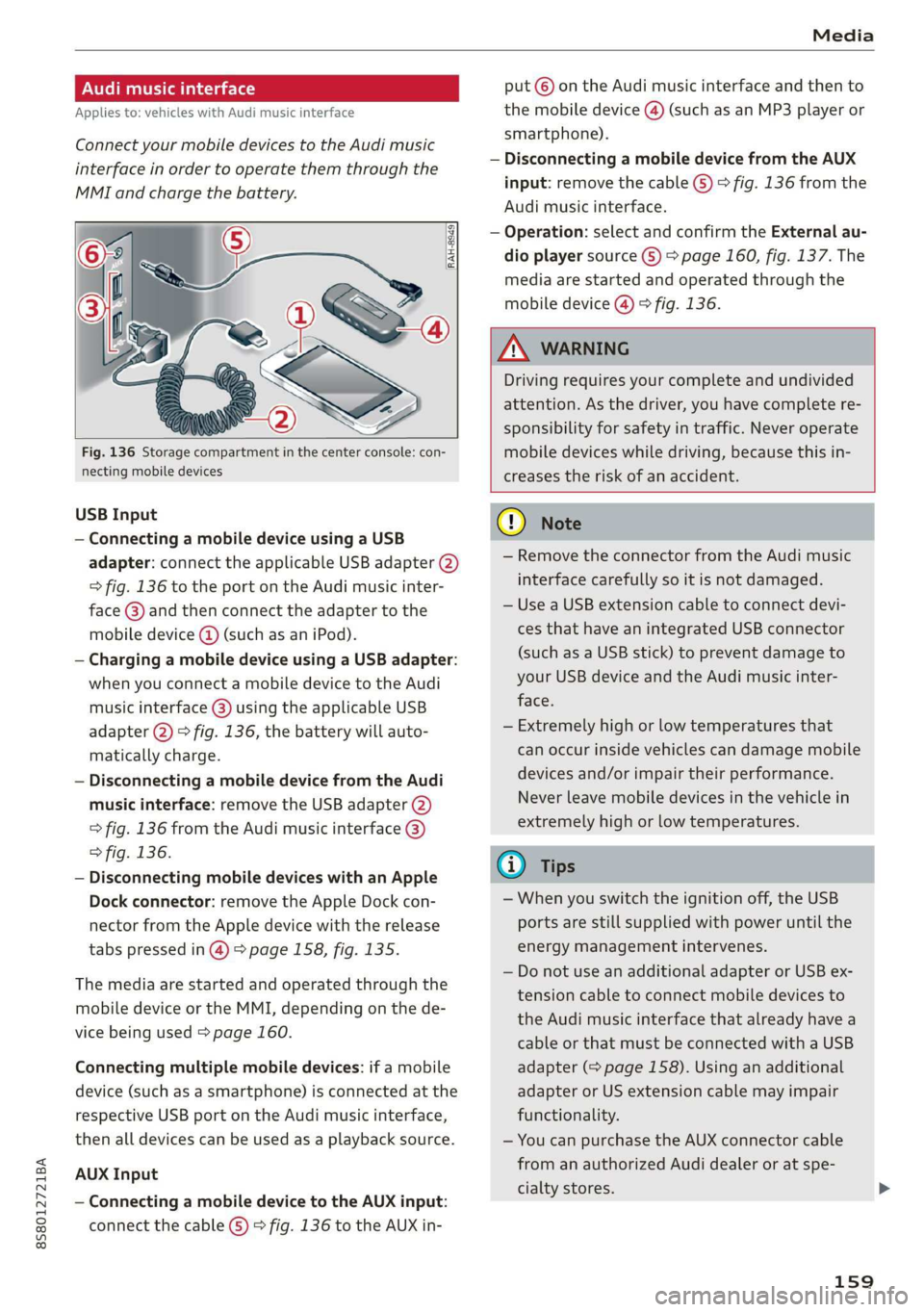
Fig. 136 Storage compartment in the center console: con-
necting mobile devices
USB Input
— Connecting a mobile device using a USB
adapter: connect the applicable USB adapter (2)
=> fig. 136 to the port on the Audi music inter-
face @) and then connect the adapter to the
mobile device @ (such as an iPod).
— Charging a mobile device using a USB adapter:
when you connect a mobile device to the Audi
music interface @) using the applicable USB
adapter @) > fig. 136, the battery will auto-
matically charge.
— Disconnecting a mobile device from the Audi
music interface: remove the USB adapter (2)
> fig. 136 from the Audi music interface @)
> fig. 136.
— Disconnecting mobile devices with an Apple
Dock connector: remove the Apple Dock con-
nector from the Apple device with the release
tabs pressed in @) > page 158, fig. 135.
The media are started and operated through the
mobile device or the MMI, depending on the de-
vice being used > page 160.
Connecting multiple mobile devices: if a mobile
device (such as a smartphone) is connected at the
respective USB port on the Audi music interface,
then all devices can be used as a playback source.
AUX Input
— Connecting a mobile device to the AUX input:
connect the cable (G) > fig. 136 to the AUX in-
Z\ WARNING
Driving requires your complete and undivided
attention. As the driver, you have complete re-
sponsibility for safety in traffic. Never operate
mobile devices while driving, because this in-
creases the risk of an accident.
G) Note
— Remove the connector from the Audi music
interface carefully so it is not damaged.
— Use a USB extension cable to connect devi-
ces that have an integrated USB connector
(such as a USB stick) to prevent damage to
your USB device and the Audi music inter-
face.
— Extremely high or low temperatures that
can occur inside vehicles can damage mobile
devices and/or impair their performance.
Never leave mobile devices in the vehicle in
extremely high or low temperatures.
@ Tips
—When you switch the ignition off, the USB
ports are still supplied with power until the
energy management intervenes.
— Do not use an additional adapter or USB ex-
tension cable to connect mobile devices to
the Audi music interface that already have a
cable or that must be connected with a USB
adapter (> page 158). Using an additional
adapter or US extension cable may impair
functionality.
— You can purchase the AUX connector cable
from an authorized Audi dealer or at spe-
cialty stores.
159
8S58012721BA
Index
A
A/C (climate control system) .............. 53
ACCESSOFIES . 6... ee eee 48, 282
Active lane assist... . owes. ss sesmen «oes ee ave 72
Activating vibration warning............. 74
Adjusting steering time................. 74
Cleaning the camera area.............. 263
Indicator light........... 0.00 eee ee eee 73
MO@SSAQGS wees 2 2 wars 5 ¥ sees & ¥ BOS & Eo 73
Switching on/off. « ccsiss «season o 6 wasn e 6 enaew 73
Adaptive UIght seiics 6 eva oo nears os was ¥ wee 78
Adaptive light (indicator light)............ 20
Adjusting the additional display........... 14
Adjusting the air distribution. ............ 53
Adjusting the center console lighting....... 41
Adjusting the sound..............-..00- 175
Adjusting the temperature............... 53
Adjusting the vents............. 0. eee ee 54
Advanced Airbag System
Children... 0.2... eee eee ee 212
GOMPONENUS’. ¢ wees » o eae 4 e eee a vee 196
Frontsairbagse. « ser + 2 ccesn vous eo recon x 194
How the components work together... .. 197
UEDA Gin 1 « sunsce « o vsiscete 0 0 siete ao anmene © exettome 189
Indicator light...........-...0--00 000: 18
Airbag system... 2... eee eee 208
Advanced Airbag System............... 193
CaRC bcs ow averiue 6 ¥ wxicend wo tandeDe Bo ewexare wa aie 203
Child restraints..................000. 212
Components (front airbags)............ 196
Danger of fitting a child safety seat on the
front passenger seat..............00.. 190
Disposal zee: ¢ ¢ ees 2 x seen ¢ » eews 2 2 ees 203
Frontiairbagss. « wee oo wae 6 wamen 6 3 saxon 193
How do the front airbags work?......... 198
How many airbags does my vehicle have?. 196
Important information................ 189
Important safety instructions on the knee
airbagisySteM« « aces s ¢ eaiae & x eae 5 x Bee 206
Kneeiairbagsias = 2 saw 2s cin sue es wo 204
MON
ILOFING weenie 5 ceerese a 6 sonnets a 8 ene © 0! oe 200
PASSENGER AIR BAG light............- 200
Repairs’: = seses + & seine & eeoreys « ¥ caves vo Hare 203
Safety instructions................00- 202
Side airbags .......... 00. sce e eee 206
Warning/Indicator lights.............. 200
When must the system be inspected?.... 200
Alarm system
refer to Anti-theft alarm system.......... 27
Alignment pin (tire change) .............. 268
All-weather lights.................00000. 38
AlUSeaSON tiN@Sbercis ss sce ee ers oo mene ve 254
All wheelidrive wes. 2 ose0 22 cee oe even so 89
Alternative routes........... 0... e eee 139
Ambient lighting'ss « esex + eee 3 s eames so oe 40
AMI
refer to Audi music interface....... 158,159
Android Auto
refer to Audi smartphone interface...... 169
Announcements (settings)
refer to Voice guidance..............-. 139
Anti-freeze
Windshield washer system............. 238
Anti-lock braking system (ABS) ............ 86
Anti-Slip Regulation.................0005 86
Anti-theft alarm system .............0000- 27
Anti-theft wheel bolts..............564. 271
Apple CarPlay
refer to Audi smartphone interface...... 169
ARIINCSE:. cxsusne » 5 swsuins 9 0 snamens oo saree % ¥ omeeete @ » 47
ASAE AY": & esware © & enmee @ a eaves ao esecuae a @ eoasare 48
Aspect ratio (Vid@0) wisi si ieee s aaa see 163
ASR
refer to Anti-Slip Regulation............. 86
Audi connect
refer toconnect....... 0.0 e eee eee eee 125
Audi connect Infotainment
Personal hotspot...............000055 126
Services:overview o.. 6 ci sb ee es ees 127
Audi magnetic ride
refer to Suspension control.............. 78
Audi music interface..............0000- 158
Audi music stream
refer to Wi-Fi... 0.2... cee eee eee eee 156
AUdIO FILS resis «6 arene xe cancers xo wrecene ao eenane & 160
Audio player
Bluetooth audio player................ 155
Wi-Fi audio players. « s was ss sees se ees 156
Audio track. ...... cece eee eee
Audi phone box
Audi smartphone interface.......... 169, 173
Audi virtual cockpit
refer to Instrument cluster.............. 10
287