2019 AUDI TT ROADSTER center console
[x] Cancel search: center consolePage 61 of 304

8S58012721BA
Driving
authorized Audi Service Facility immediately to
have the malfunction corrected. To start the en-
gine, press and hold the [START ENGINE STOP
button.
Remote control key: hold back of key
against the designated area. See owner's man-
ual
This message appears if there is no convenience
key inside the vehicle or if the system does not
recognize the key. The convenience key may not
be recognized, for example, if it is covered by an
object that disrupts the signal (such as a brief-
case), or if the key battery is weak. Electronic de-
vices such as cell phones can also interfere with
the signal.
To still be able to start or stop the engine, see
= page 59, Starting the engine when there is a
malfunction.
B Remote control key: key not detected. Is the
key still in the vehicle?
The BSB indicator light turns on and this message
appears if the convenience key was removed from
the vehicle when the engine was running. If the
convenience key is no longer in the vehicle, you
cannot switch the ignition on or start the engine
once you stop it. You also cannot lock the vehicle
from the outside.
Please press the brake pedal
This message appears if you do not press the
brake pedal when starting the engine.
Please select N or P
This message appears when starting or stopping
the engine if the selector lever is not in the "N" or
"P" position. The engine will not start/stop.
Starting the engine when there is a
Tare iira dea)
It may not be possible to start the engine under
certain circumstances, for example, if the bat-
tery
in the vehicle key is drained, if interference is
affecting the key or if there is a system malfunc-
tion.
Fig. 66 Steering column/remote control key: starting the
engine if there is a malfunction
As long as the message ?) Remote control key:
hold back of key against the designated area.
See owner's manual is displayed, you can emer-
gency start your vehicle.
> Press the brake pedal.
> Press the [START ENGINE STOP] button.
> Hold the master key in the location indicated in
the illustration ?) © fig. 66. The engine will
start.
> If the engine does not automatically start,
press the [START ENGINE STOP] button again.
(i) Tips
You can view the message again by pressing
the [START ENGINE STOP] button.
Electromechanical
parking brake
The ©) switch is located under the selector lever
in the center console.
Your vehicle is equipped with an electromechani-
cal parking brake. The parking brake is designed
to prevent the vehicle from rolling unintentional-
ly and replaces the hand brake.
59
Page 66 of 304

Driving
— If the vehicle does not move in the desired
direction, the system may not have engaged
the drive position correctly. Press the brake
pedal and select the drive position again.
— If the vehicle still does not move in the de-
sired direction, there is a system malfunc-
tion. See an authorized Audi dealer or au-
thorized Audi Service Facility for assistance
to have the system checked.
The transmission shifts up and down automati-
cally when in the driving gears.
Fig. 69 Section of the center console: selector lever with
interlock button
Starting the engine
> The selector lever must be in the P or the N po-
sition. At low temperatures (below 14 °F
(-10 °C)), the engine can only be started when
the selector lever is in the P position.
Starting from a stop
> Press and hold the brake pedal.
> Press and hold the interlock button in the selec-
tor lever handle, select the desired selector lev-
er position such as "D" > page 62 and release
the lock button.
> Wait a moment until the transmission shifts.
You will notice a slight movement when the
gear engages.
> Release the brake pedal and press the accelera-
tor pedal > A\.
Various convenience functions are available for
starting on hills > page 61.
64
Stopping temporarily
> Keep the vehicle stationary using the braking
pedal, for example at traffic lights.
> Do not press the accelerator pedal when doing
this.
> To prevent the vehicle from rolling when you
start driving, set the parking brake when stop-
ping on steep hills > A\ and >@.
> The parking brake will release automatically
and the vehicle will start moving once you press
the accelerator pedal.
Stopping/parking
If the selector lever is not in the "P" position
when you open the driver’s door, the vehicle
could roll. In vehicles with a convenience key*,
the message Shift to P, otherwise vehicle can
roll away. Doors do not lock if gearshift is not in
P appears. A warning tone will also sound.
> Press and hold the brake pedal > A\.
>» Set the parking brake.
> Select the "P" selector lever position.
Under certain circumstances, such as driving in
the mountains, it may be useful to switch tempo-
rarily to the manual shift program in order to
manually adjust the gears to the driving condi-
tions > page 66.
When parking ona level surface, simply place the
selector lever in the "P" position. On inclines, ac-
tivate the parking brake first and then move the
selector lever to the "P" position > page 59. This
prevents the locking mechanism from being load-
ed too heavily and will make it easier to move the
selector lever out of the "P" position.
ZA WARNING
— The vehicle can roll even when the engine is
switched off.
— Unintended vehicle movement can lead to
serious injuries.
— Never leave your vehicle with the engine
running while in gear. If you must leave your
vehicle when the engine is running, set the
parking brake and move the selector lever to
the P position. >
Page 79 of 304

8S8012721BA
Assist systems
If the system is activated, the displays in the ex-
terior mirrors will turn on briefly when the igni-
tion is switched on.
Adjusting the display brightness
Applies to: vehicles with Audi side assist
The display brightness can be adjusted in the In-
fotainment system.
> Select in the Infotainment system: [MENU] but-
ton > Vehicle > left control button >Driver as-
sistance > Audi side assist
The display brightness adjusts automatically to
the brightness of the surroundings, both in the
information and in the warning stage. In very
dark or very bright surroundings, the automatic
adjustment will set the display to the minimum
or maximum level. In such cases, you may notice
no change when adjusting the brightness, or the
change may only be noticeable once the sur-
roundings change.
Adjust the brightness to a level where the display
in the information stage will not disrupt your
view ahead. If you change the brightness, the dis-
play in the exterior mirror will briefly show the
brightness level in the information stage. The
brightness of the warning stage is linked to the
brightness in the information stage and is adjust-
ed along with the information stage.
G@) Tips
— Side assist is not active while you are mak-
ing the adjustment.
— Your settings are automatically stored and
assigned to the remote control key being
used.
Messages
Applies to: vehicles with Audi side assist
If the side assist switches off automatically, a
message appears in the Infotainment system dis-
play.
Audi side assist: currently unavailable.
Sensor vision restricted due to surroundings.
See owner's manual
The radar sensor vision is impaired. Do not cover
the area in front of the sensors with bike wheels,
stickers, dirt or other objects. Clean the area cov-
ering the sensors, if necessary > page 75, fig. 81.
Audi side assist: currently unavailable.
See owner's manual
Side assist cannot be switched on at this time be-
cause there is a malfunction (for example, the
battery charge level may be too low).
Audi side assist: malfunction! Please
contact Service
The system cannot guarantee that it will detect
vehicles correctly and it has switched off. The
sensors have been moved or are faulty. Have the
system checked by an authorized Audi dealer or
authorized Audi Service Facility soon.
Audi drive select (drive
settings)
Introduction
Applies to: vehicles with Audi drive select
Drive select makes it possible to experience dif-
ferent types of vehicle characteristics in one vehi-
cle. The driver can select from three modes,
Comfort,
Auto, and Dynamic, using the sist but-
ton in the center console or by using the Infotain-
ment system. This allows you to switch between
a sporty and a comfortable driving mode, for ex-
ample. In the Individual mode, the settings can
be adjusted to your personal preferences. This
makes it possible to combine settings such as a
sporty engine setting with light steering.
Z\ WARNING
Using Audi drive select incorrectly can lead to
collisions, other accidents and serious inju-
ries.
77
Page 80 of 304

Assist systems
Applies to: vehicles with Audi drive select
The vehicle setup in each mode depends on the
vehicle's features.
Engine and automatic transmission
Depending on the mode, the engine and auto-
matic transmission respond more quickly or ina
more balanced manner to accelerator pedal
movements.
Suspension control (Audi magnetic ride)*
The suspension control uses sensors to record in-
formation regarding steering movements, brak-
ing and acceleration operations by the driver, as
well as information about the road surface, driv-
ing speed, and load. With drive select, you can
adjust the suspension control to sporty (dynam-
ic), comfortable (comfort) or balanced (auto).
Steering
The power steering adapts. Indirect steering that
moves easily as in comfort mode is especially
suited to long drives on a highway. The dynamic
mode provides sporty, direct steering.
Engine sound*
The engine sound adapts to the current mode
and can be subtle to sporty.
@ Tips
In some models, the maximum vehicle speed
can only be reached in the auto and dynamic
modes.
Selecting the driving mode
Applies to: vehicles with Audi drive select
You can choose between comfort, auto, dynamic
and individual.
5 S 2
gz > c oo
Fig. 82 Center console: drive select button
> Press the ssis@ button repeatedly until the de-
sired drive mode is displayed in the instrument
cluster/Infotainment system display. Or
> Select in the Infotainment system: [MENU] but-
ton > Vehicle > left control button >Audi drive
select.
> Select and confirm the desired setting.
You can change the driving mode when the vehi-
cle is stationary or while driving. If traffic per-
mits, after changing modes, briefly remove your
foot from the accelerator pedal so that the re-
cently selected mode is also activated for the en-
gine.
Comfort - results in a comfort-oriented vehicle
calibration
Auto - provides an overall comfortable yet dy-
namic driving feel and is suited for everyday use.
Dynamic - gives the driver a sporty driving feel
and is suited to a sporty driving style.
Individual - > page 78.
Adjusting the Individual mode
Applies to: vehicles with Audi drive select
You can adjust the vehicle settings to your personal preferences.
> Press the sia button > Individual > right con-
trol button, or
> Select in the Infotainment system: [MENU] but-
ton > Vehicle > left control button>Audi drive
select > Individual > right control button
78
After you have closed the settings, you will auto-
matically drive in the Individual* mode.
Page 84 of 304

Parking aid
Switching on and off
Applies to: vehicles with parking system plus
a 3 q a >
z oO
Fig. 84 Center console: parking aid button
Fig. 85 Optical distance display
Switching on
> Shift into reverse, or
> Press the Pv button in the center console
> fig. 84. A short confirmation tone sounds and
the LED in the button turns on.
Switching off
> Drive faster than 6 mph (10 km/h), or
> Press the P button, or
> Switch the ignition off.
Activating automatically
The parking aid is activated automatically at
speeds less than 6 mph (10 km/h) and when ap-
proaching an obstacle from approximately
3.1 feet (95 cm) away. There are audible signals
when approximately 1.6 ft (50 cm) away from the
obstacle. If you press the P” button to switch the
parking aid off, it can only be reactivated auto-
matically when one of the following conditions is
met:
— The vehicle speed exceeds 6 mph (10 km/h)
— The ignition is switched off and back on again
— The parking brake is set and then released
82
— The selector lever must be in the "P" position.
Segments in the visual display
The segments in front of and behind the vehicle
(vehicles with parking system plus”) > fig. 85
help you to determine the distance between your
vehicle and an obstacle. The red lines mark the
expected direction of travel according to the
steering angle. A white segment indicates an
identified obstacle that is outside of the vehicle's
path. Red segments show identified obstacles
that are in your vehicle's path. As your vehicle
comes closer to the obstacle, the segments move
closer to the vehicle. The collision area has been
reached when the next to last segment is dis-
played. Obstacles in the collision area, including
those outside of the vehicle's path, are shown in
red. Do not continue driving forward or in reverse
= A in Introduction on page 80, >@ in Intro-
duction on page 80!
Rearview camera
Introduction
Applies to: vehicles with rearview camera
B8V-0629
Fig. 86 Diagram: lines to aid in parking
The rearview camera helps you to park or maneu-
ver using the orientation lines.
Page 85 of 304

8S8012721BA
Parking aid
General information
Applies to: vehicles with rearview camera
oO m q
2 > z
oO
Fig. 87 Diagram: area covered @) and area not covered (2)
by the rearview camera.
BFV-0087
the image may be affected by the sun shin-
ing into the lens, dirt on the lens, or if there
is a malfunction.
— Use the rearview camera only if the luggage
compartment lid is completely closed. Make
sure any objects you may have mounted on
the luggage compartment lid do not block
the rearview camera.
— The camera lens enlarges and distorts the
field of vision. The object appears both al-
tered and inaccurate on the screen.
—Incertain situations, people or objects in
the display appear closer or farther away:
— For objects that do not touch the ground,
such as the bumper of a parked vehicle, a
trailer hitch or the rear of a truck. Do not
use the
orientation lines in this case.
—If driven from a level surface onto an in-
cline, or a downward slope.
— If driven toward protruding objects.
— If the vehicle is carrying too much load in
Fig. 88 Luggage compartment lid: location of the rear-view
camera
The rearview camera is located above the rear li-
cense plate bracket. Make sure that the lens for
the parking system > fig. 88 is not covered by de-
posits or any other obstructions because this can
impair the function of the parking system. For in-
formation on cleaning, see > page 262.
The rearview camera coverage area includes (4)
=> fig. 87. Only this area is shown in the Infotain-
ment display. Objects that are in area (2), which is
not covered, are not displayed.
ZA\ WARNING
— Always read and follow the applicable warn-
ings > A\ in Introduction on page 80.
— If the position and the installation angle of
the rearview camera was changed, for exam-
ple after a collision, do not continue to use
the system for safety reasons. Have it
checked by an authorized Audi dealer or au-
thorized Audi Service Facility.
— Only use the rearview camera to assist you if
it shows a good, clear picture. For example,
the rear.
CG) Note
— Always read and follow the applicable warn-
ings >@ in Introduction on page 80.
— The orange-colored orientation lines in the
Infotainment display show the vehicle path
based on the steering wheel angle. The
front
of the vehicle swings out more than
the rear of the vehicle. Maintain plenty of
distance so that an exterior mirror or a cor-
ner of the vehicle does not collide with any
obstacles.
Scale Le molal
Applies to: vehicles with rearview camera
Switching on
> Shift into reverse, or
> Press the P™ button in the center console
=> page 82, fig. 84. A short confirmation tone
sounds and the LED in the button turns on.
Switching off
>» Drive faster than 6 mph (10 km/h), or
> Press the Pv button, or
>» Switch the ignition off.
83
Page 89 of 304
8S58012721BA
Intelligent Technology
— Accelerate carefully when driving on condition. Different tire sizes can lead toa
smooth, slippery surfaces such as ice and reduction in engine power.
snow. The drive wheels can spin even when — You may hear noises when the systems de-
these control systems are installed and this scribed are working.
can affect driving stability and increase the
risk of a collision.
G@) Tips
— The ABS and ASR only function correctly
when all four wheels have a similar wear
Sic melal
The ESC is automatically switched on when the ignition is switched on.
function is limited or switched off. The amount of
stabilization control will differ depending on the
level.
eS
gS s
= o
The following examples are unusual situations
where it may make sense to switch sport mode
on in order to allow the wheels to spin:
— Rocking the vehicle to free it when it is stuck
— Driving in deep snow or on loose ground
— Driving with snow chains
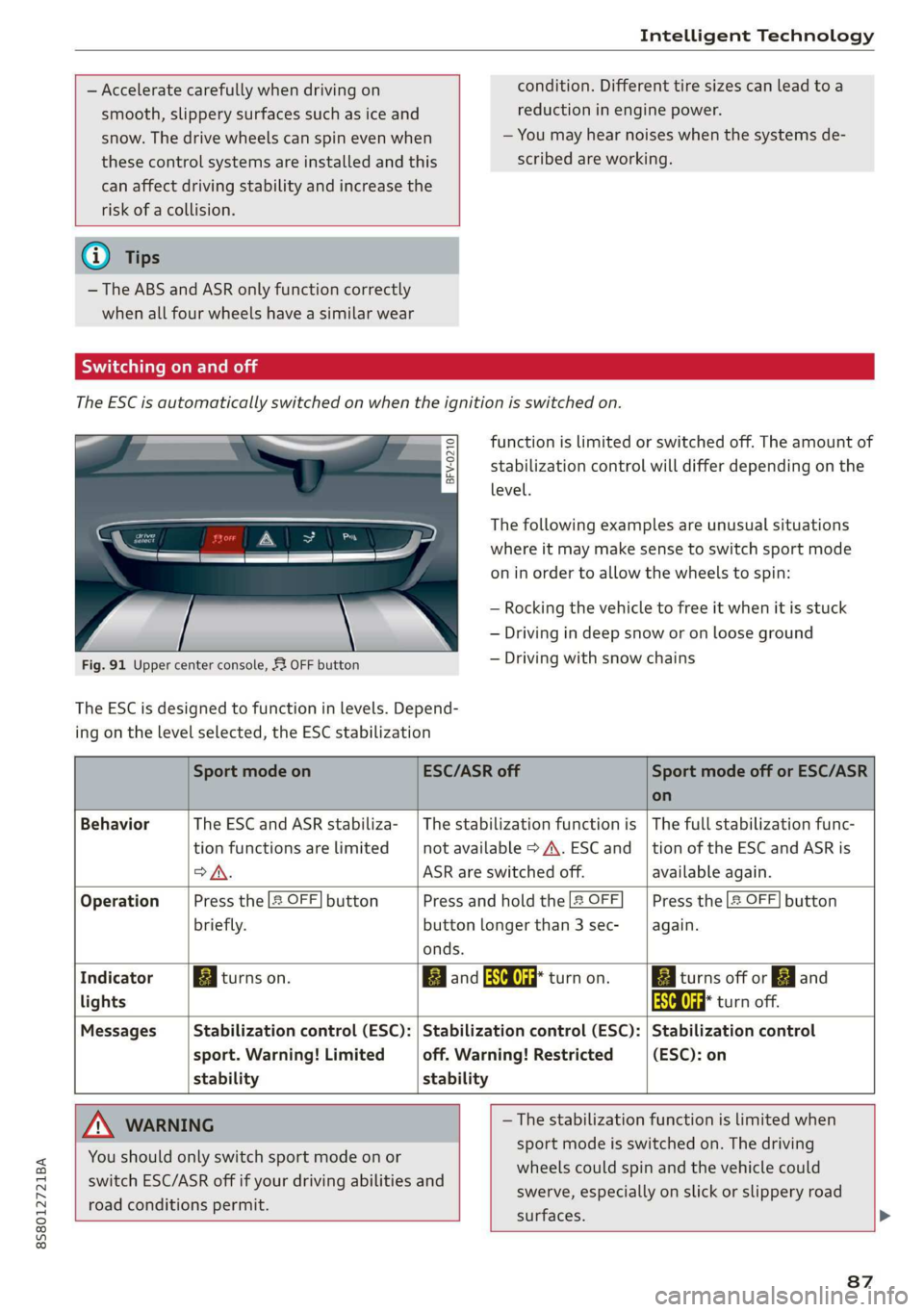
Fig. 91 Upper center console, 52 OFF button
The ESC is designed to function in levels. Depend-
ing on the level selected, the ESC stabilization
Sport mode on ESC/ASR off Sport mode off or ESC/ASR
on
Behavior The ESC and ASR stabiliza- | The stabilization function is | The full stabilization func-
tion functions are limited not available > A\. ESC and _|tion of the ESC and ASR is
>A. ASR are switched off. available again.
Operation Press the 2 OFF] button Press and hold the |2 OFF Press the [2 OFF] button
briefly. button longer than 3 sec- again.
onds.
Indicator Biturns on. Band aa turn on. Biturns off or EJ and
lights aa turn off.
Messages Stabilization control (ESC): | Stabilization control (ESC): | Stabilization control
sport. Warning! Limited off. Warning! Restricted (ESC): on
stability stability
A WARNING —The stabilization function is limited when
sport mode is switched on. The driving
wheels could spin and the vehicle could
swerve, especially on slick or slippery road
surfaces.
You
should only switch sport mode on or
switch ESC/ASR off if your driving abilities and
road conditions permit.
87
Page 92 of 304
Intelligent Technology
Is this an offroad vehicle?
Your Audi is not an offroad vehicle - there is not
enough ground clearance. For this reason, avoid
difficult terrain.
ZA\ WARNING
— Also, in vehicles with all wheel drive, adapt
your driving style to the current road and
traffic conditions. Do not let the increased
safety provided tempt you into taking risks,
because this increases the risk of an acci-
dent.
— The braking ability of your vehicle is limited
to the traction of the wheels. In this way, it
is not different from a two wheel drive vehi-
cle. Do not be tempted to accelerate to a
high speed when the road is slippery, be-
cause this increases the risk of an accident.
— Note that on wet streets, the front wheels
can “hydroplane’” if driving at speeds that
are too high. Unlike front wheel drive vehi-
cles, the engine RPM does not increase sud-
denly when the vehicle begins hydroplaning.
For this reason, adapt your speed to the
road conditions to reduce the risk of an acci-
dent.
Rear spoiler
Applies to: vehicles with retractable rear spoiler
The extendable rear spoiler increases driving sta-
bility.
a
g| = z
a.
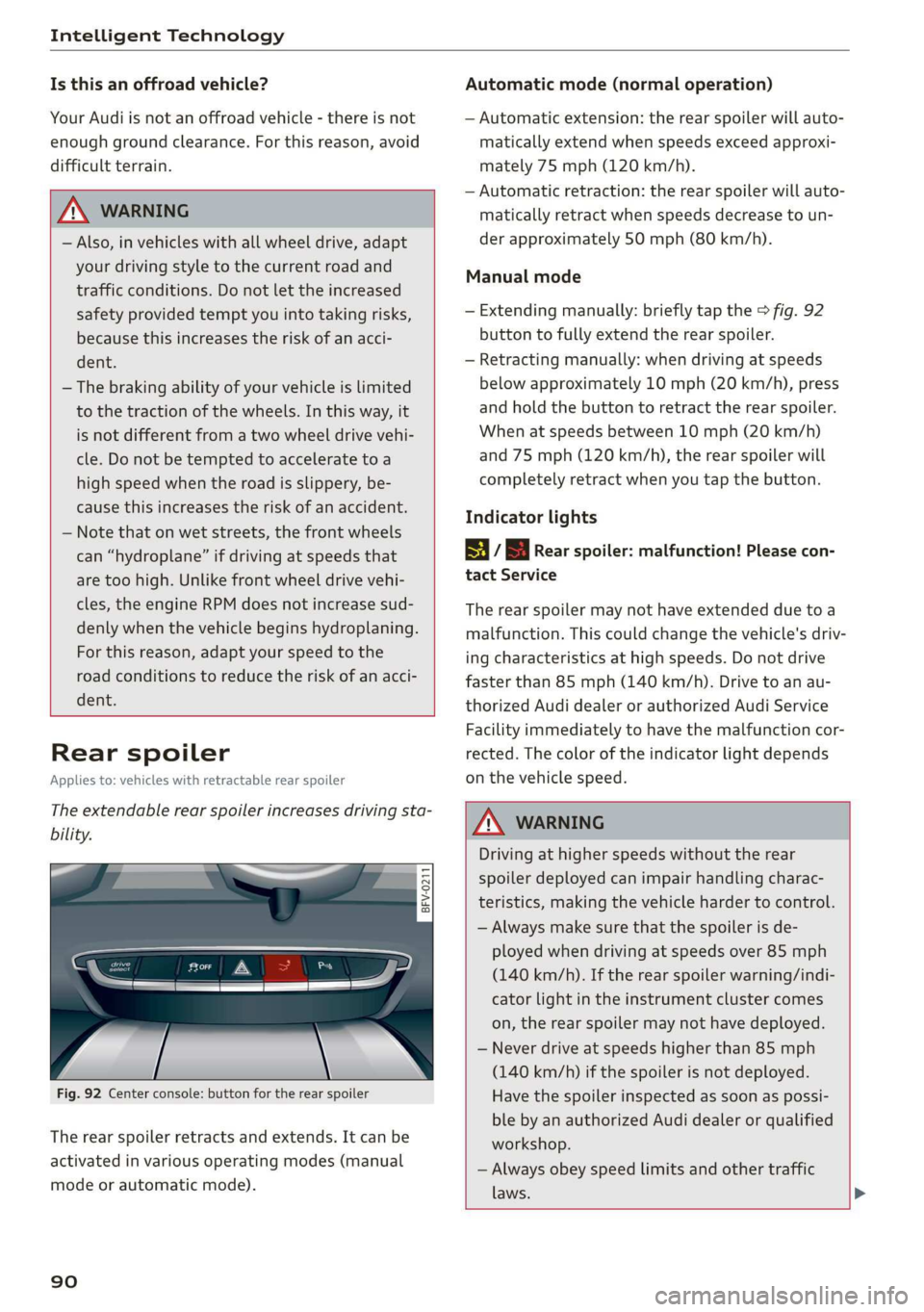
Fig. 92 Center console: button for the rear spoiler
The rear spoiler retracts and extends. It can be
activated in various operating modes (manual
mode or automatic mode).
90
Automatic mode (normal operation)
— Automatic extension: the rear spoiler will auto-
matically extend when speeds exceed approxi-
mately 75 mph (120 km/h).
— Automatic retraction: the rear spoiler will auto-
matically retract when speeds decrease to un-
der approximately 50 mph (80 km/h).
Manual mode
— Extending manually: briefly tap the > fig. 92
button to fully extend the rear spoiler.
— Retracting manually: when driving at speeds
below approximately 10 mph (20 km/h), press
and hold the button to retract the rear spoiler.
When at speeds between 10 mph (20 km/h)
and 75 mph (120 km/h), the rear spoiler will
completely retract when you tap the button.
Indicator lights
8 / | Rear spoiler: malfunction! Please con-
tact Service
The rear spoiler may not have extended due toa
malfunction. This could change the vehicle's driv-
ing characteristics at high speeds. Do not drive
faster than 85 mph (140 km/h). Drive to an au-
thorized Audi dealer or authorized Audi Service
Facility immediately to have the malfunction cor-
rected. The color of the indicator light depends
on the vehicle speed.
ZA WARNING
Driving at higher speeds without the rear
spoiler deployed can impair handling charac-
teristics, making the vehicle harder to control.
— Always make sure that the spoiler is de-
ployed when driving at speeds over 85 mph
(140 km/h). If the rear spoiler warning/indi-
cator light in the instrument cluster comes
on, the rear spoiler may not have deployed.
— Never drive at speeds higher than 85 mph
(140 km/h) if the spoiler is not deployed.
Have the spoiler inspected as soon as possi-
ble by an authorized Audi dealer or qualified
workshop.
— Always obey speed limits and other traffic
laws.