2019 AUDI TT ROADSTER clock
[x] Cancel search: clockPage 39 of 304
8S58012721BA
Power top
>» Remove the cover in the center of the power
top using a screwdriver > fig. 35.
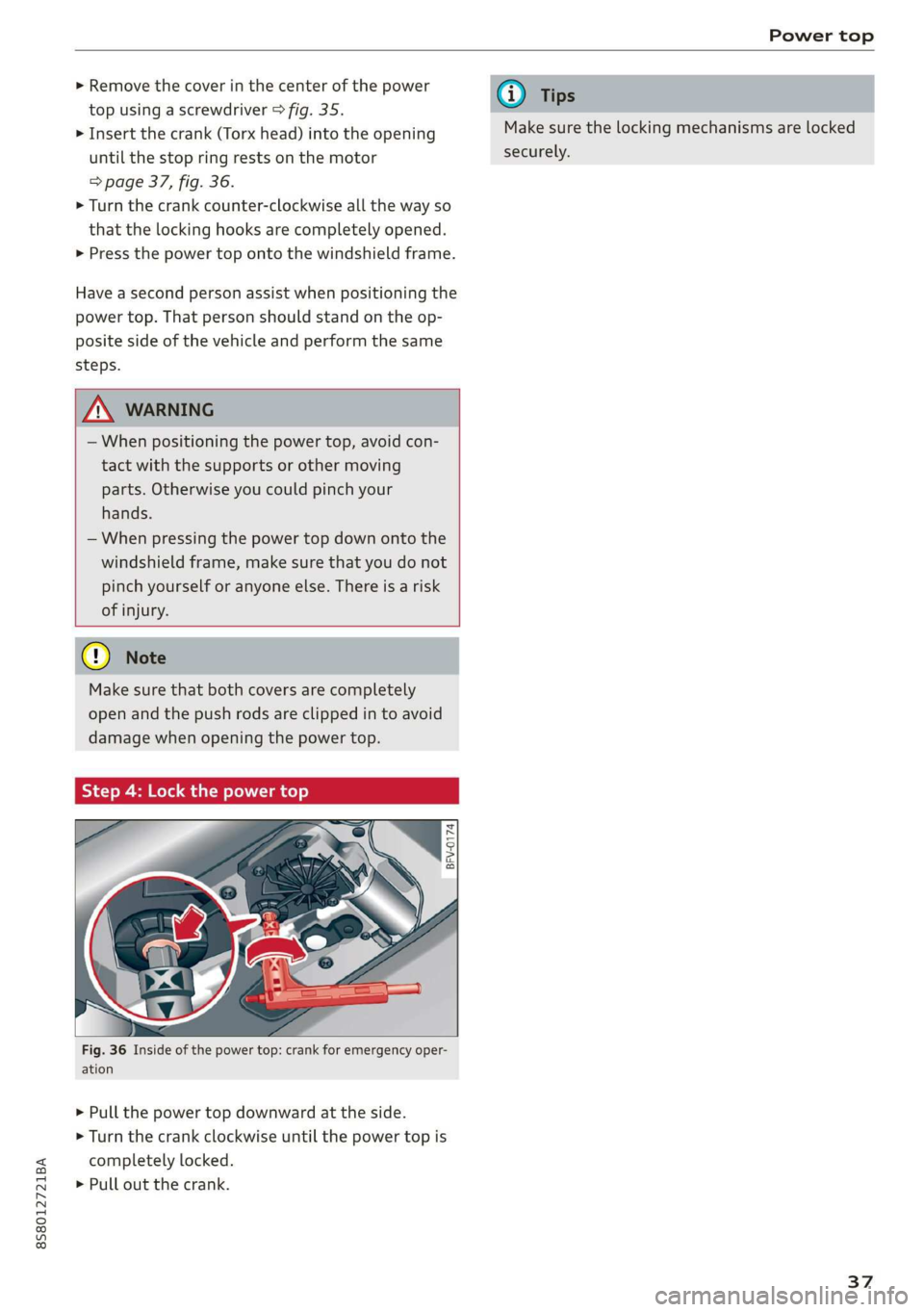
> Insert the crank (Torx head) into the opening
until the stop ring rests on the motor
=> page 37, fig. 36.
> Turn the crank counter-clockwise all the way so
that the locking hooks are completely opened.
> Press the power top onto the windshield frame.
Have a second person assist when positioning the
power top. That person should stand on the op-
posite side of the vehicle and perform the same
steps.
Z\ WARNING
— When positioning the power top, avoid con-
tact with the supports or other moving
parts. Otherwise you could pinch your
hands.
— When pressing the power top down onto the
windshield frame, make sure that you do not
pinch yourself or anyone else. There is a risk
of injury.
Cy Note
Make sure that both covers are completely
open and the push rods are clipped in to avoid
damage when opening the power top.
Step 4: Lock the power top
BFV-0174
ig. 36 Inside of the power top: crank for emergency oper-
ation
> Pull the power top downward at the side.
> Turn the crank clockwise until the power top is
completely locked.
> Pull out the crank.
@) Tips
Make sure the locking mechanisms are locked
securely.
37
Page 53 of 304
8S58012721BA
Stowing and using
Loading
> Open the storage compartment cover between
the seat backrests.
> Open the luggage compartment lid.
> Press the release button and fold the cover for
the pass-through towards the luggage com-
partment © fig. 54.
> Slide the bag from the luggage compartment
into the vehicle interior with the zipper facing
toward the rear > /\.
> Load the ski bag.
Securing
> Secure the carabiner hooks on both straps in
the corresponding rear tie-downs > fig. 55.
Z\ WARNING
After loading the bag, it must be tied down
with both straps.
@) Tips
— Only fold the ski bag up if it is dry.
— Lay skis in the bag with the points facing
forward and ski pole points facing the rear.
Fig. 56 Luggage compartment: location of the tie-downs
There are tie-downs in the luggage compartment
to secure pieces of luggage and objects.
Follow the safety precautions > page 50.
> Use the tie-downs to secure the cargo.
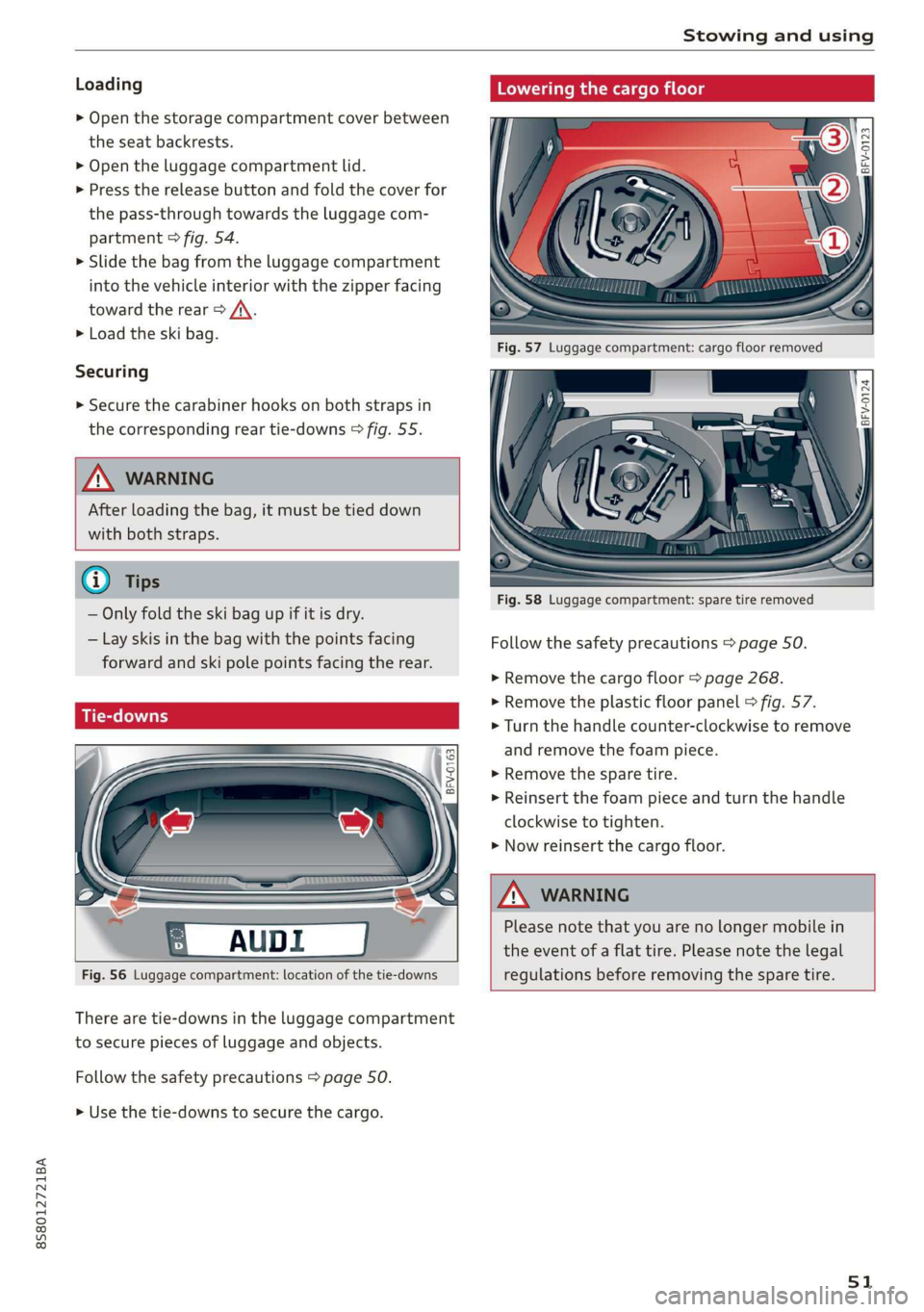
Lowering the cargo floor
BFV-0124
Fig. 58 Luggage compartment: spare tire removed
Follow the safety precautions > page 50.
> Remove the cargo floor > page 268.
> Remove the plastic floor panel > fig. 57.
> Turn the handle counter-clockwise to remove
and remove the foam piece.
> Remove the spare tire.
> Reinsert the foam piece and turn the handle
clockwise to tighten.
> Now reinsert the cargo floor.
ZA WARNING
Please note that you are no longer mobile in
the event of a flat tire. Please note the legal
regulations before removing the spare tire.
51
Page 59 of 304

8S8012721BA
Driving
sporty style. Show respect to others around
you and the environment with the way you op-
erate your vehicle, especially at night.
Steering
Adjusting the steering wheel position
The steering wheel position is fully adjustable up
and down and forward and back.
2 s g
> gc oa
Fig. 64 Lever on the steering column
> Tilt the lever = fig. 64 downward > A\.
> Bring the steering wheel into the desired posi-
tion.
> Push the lever against the steering column un-
tilit is secure.
tion during a collision. Always make sure
that the steering wheel is level with your
chest.
— Always hold the steering wheel with your
hands in the 9 o'clock and 3 o'clock posi-
tions to reduce the risk of injury if the airbag
deploys.
— Never hold the steering wheel in the 12
o'clock position or with both hands on the
rim or the center of the steering wheel.
Holding the steering wheel incorrectly sig-
nificantly increases the risk of injury to the
hands, arms and head if the airbag deploys.
ZA WARNING
Incorrect use of the steering wheel adjust-
ment and an incorrect seating position can
cause serious injuries.
— Only adjust the steering column when the
vehicle is stationary so that you do not lose
control of the vehicle.
— Adjust the driver's seat or steering wheel so
that there is at least a 10 in (25 cm) dis-
tance between your chest and the steering
wheel. If you do not maintain this distance,
you will not be properly protected by the air-
bag system.
— If your physical characteristics prevent you
from sitting at least 10 in (25 cm) or more
away from the steering wheel, see if an au-
thorized Audi dealer or authorized Audi
Service Facility can provide adapters that
will help.
— If your face is level with the steering wheel,
the airbag does not provide as much protec-
Starting and stopping
the engine
Tatars ma eae tn
The [START ENGINE STOP] button switches the
ignition on and starts the engine.
a
Sg
x >
i o
Fig. 65 Center console: START ENGINE STOP button
Switching the ignition on or off
If you would like to switch the ignition on with-
out starting the engine, follow these steps:
> Press the [START ENGINE STOP] button without
pressing the brake pedal.
Starting the engine
> Automatic transmission: press the brake pedal
and move the selector lever into the P or N po-
sition > A\.
> Press the [START ENGINE STOP] button. The
engine will start.
If the engine does not start immediately, the
starting procedure stops automatically after a
57
>
Page 173 of 304
![AUDI TT ROADSTER 2019 Owners Manual 8S8012721BA
System settings
System settings
Setting the date and
time
You can set the clock time manually or using the
GPS.
> Select: [MENU] button > Settings > left control
button](/manual-img/6/57667/w960_57667-172.png "AUDI TT ROADSTER 2019 Owners Manual 8S8012721BA
System settings
System settings
Setting the date and
time
You can set the clock time manually or using the
GPS.
> Select: [MENU] button > Settings > left control
button")
8S8012721BA
System settings
System settings
Setting the date and
time
You can set the clock time manually or using the
GPS.
> Select: [MENU] button > Settings > left control
button > MMI settings > Date & time.
> Or: select: [MENU] button > Vehicle > left con-
trol button > Vehicle settings > Date & time.
Automatic setting
When this function is switched on ¥, the time
and date are automatically set.
Time
Requirement: the Automatic setting must be
switched off.
Press the control knob. You can set the Time
manually by turning and pressing the control
knob.
Date
Requirement: the Automatic setting must be
switched off.
Press the control knob. You can set the Date
manually by turning and pressing the control
knob.
Time zone
When selecting the appropriate time zone, a
sampling of countries in this zone will be listed.
Automatic time zone*
When this function is switched on @, the time
will automatically adjust to the corresponding
time zone.
Time format
If you select 24h, the clock will display, for exam-
ple, 13:00. If you select AM/PM, the clock will
display, for example, 1:00 PM.
D_ The Qi standard makes it possible to charge your mobile
device wirelessly.
Date format
If you select DD.MM.YYYY, the date display will
show, for example, 31.08.2017. If you select
MM/DD/YYVY, the date display will show, for ex-
ample, 08/31/2017. If you select YYYY-MM-DD,
the date display will show, for example,
2017-08-31.
MMI settings
> Select: [MENU] button > Settings > left control
button > MMI settings.
Language
You can change the display language as well as
the language for the voice guidance* and voice
recognition system*.
The number of languages available depends on
the market.
Measurement units
The following measurement units can be set de-
pending on availability: Speed, Distance, Tem-
perature, Fuel consumption, Volume, Pressure.
Mobile device reminder signal
Applies to: vehicles with Audi phone box
Requirement: your cell phone must be Qi-capa-
ble ) or connected to the Audi music interface @
with a USB adapter cable > page 113, fig. 110.
When the device reminder signal is switched on,
you will be notified that your mobile device is still
in the Audi phone box* when you leave the vehi-
cle. You can select between Spoken cue, Signal
tone
and Off.
Mobile device reminder signal volume: you can
adjust the reminder signal volume by turning the
control knob.
Switch off pop-up: when the function is switched
on [M, the messages in the Infotainment system
display regarding the charging status of your cell
phone in the Audi phone box* are hidden. The re-
minder not to forget your cell phone when leav-
ing the vehicle is likewise switched off.
171
Page 180 of 304
Safe driving
> Take frequent breaks on long trips. Do not drive
for more than two hours at a stretch.
> Do NOT drive when you are tired, under pres-
sure or when you are stressed.
Z\ WARNING
Impaired driving safety increases the risk of
serious personal injury and death whenever a
vehicle is being used.
> Grasp the top of the steering wheel with your
elbow(s) slightly bent.
> Fasten and wear safety belts correctly
=>page 185.
> Always keep both feet in the footwell so that
you
are in control of the vehicle at all times.
For detailed information on how to adjust the
driver's seat, see > page 46, Front seats.
Correct passenger
seating positions
Proper seating position for the driver
The proper driver seating position is important
for safe, relaxed driving.
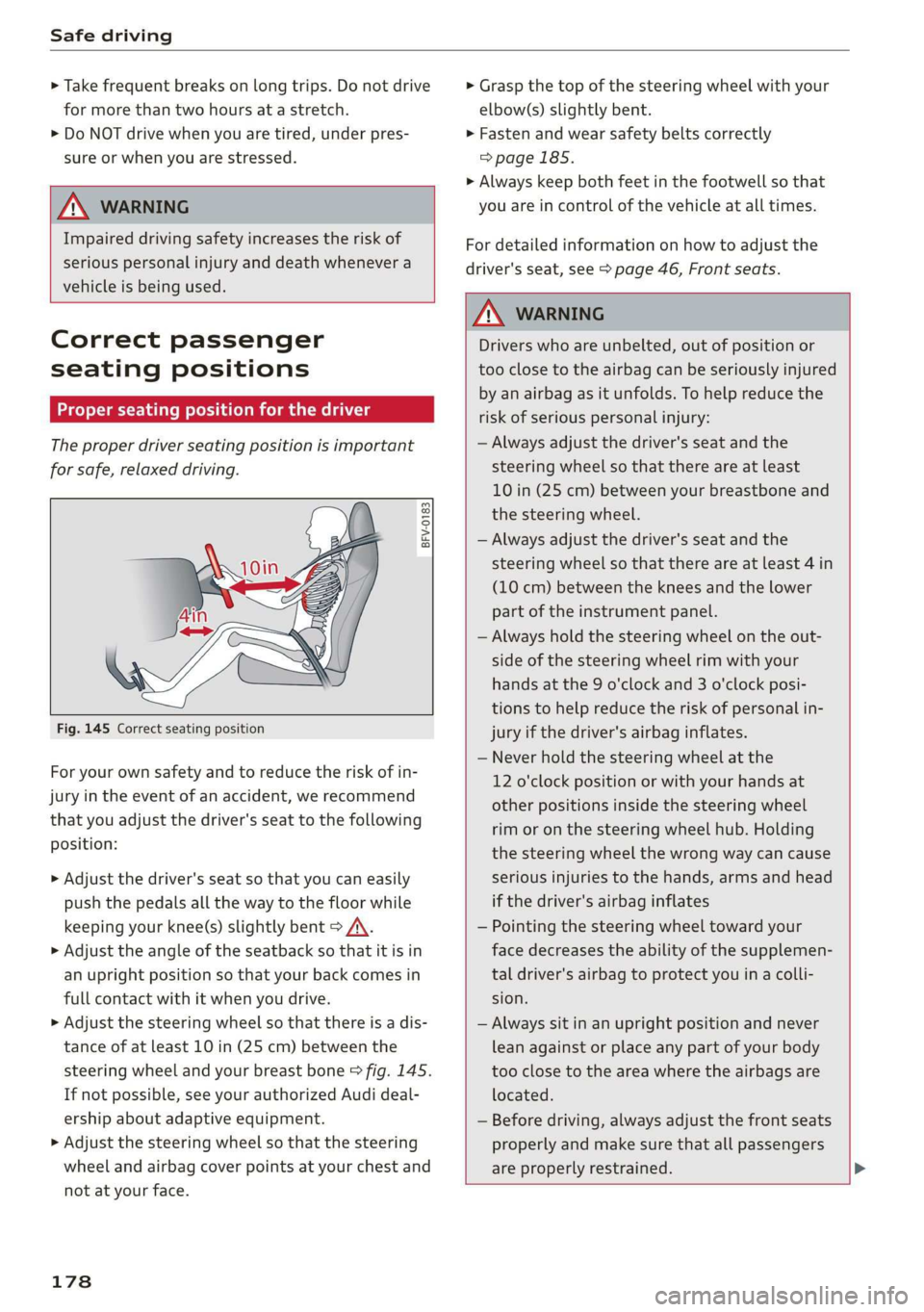
BFV-0183
Fig. 145 Correct seating position
For your own safety and to reduce the risk of in-
jury in the event of an accident, we recommend
that you adjust the driver's seat to the following
position:
> Adjust the driver's seat so that you can easily
push the pedals all the way to the floor while
keeping your knee(s) slightly bent > A\.
> Adjust the angle of the seatback so that it is in
an upright position so that your back comes in
full contact with it when you drive.
> Adjust the steering wheel so that there is a dis-
tance of at least 10 in (25 cm) between the
steering wheel and your breast bone > fig. 145.
If not possible, see your authorized Audi deal-
ership about adaptive equipment.
> Adjust the steering wheel so that the steering
wheel and airbag cover points at your chest and
not at your face.
178
Z\ WARNING
Drivers who are unbelted, out of position or
too close to the airbag can be seriously injured
by an airbag as it unfolds. To help reduce the
risk of serious personal injury:
— Always adjust the driver's seat and the
steering wheel so that there are at least
10 in (25 cm) between your breastbone and
the steering wheel.
— Always adjust the driver's seat and the
steering wheel so that there are at least 4 in
(10 cm) between the knees and the lower
part of the instrument panel.
— Always hold the steering wheel on the out-
side of the steering wheel rim with your
hands at the 9 o'clock and 3 o'clock posi-
tions to help reduce the risk of personal in-
jury if the driver's airbag inflates.
— Never hold the steering wheel at the
12 o'clock position or with your hands at
other positions inside the steering wheel
rim or on the steering wheel hub. Holding
the steering wheel the wrong way can cause
serious injuries to the hands, arms and head
if the driver's airbag inflates
— Pointing the steering wheel toward your
face decreases the ability of the supplemen-
tal driver's airbag to protect you in a colli-
sion.
— Always sit in an upright position and never
lean against or place any part of your body
too close to the area where the airbags are
located.
— Before driving, always adjust the front seats
properly and make sure that all passengers
are properly restrained.
Page 195 of 304
8S58012721BA
Airbag system
Front airbags
pyre al eee mice a TLeey-le (4
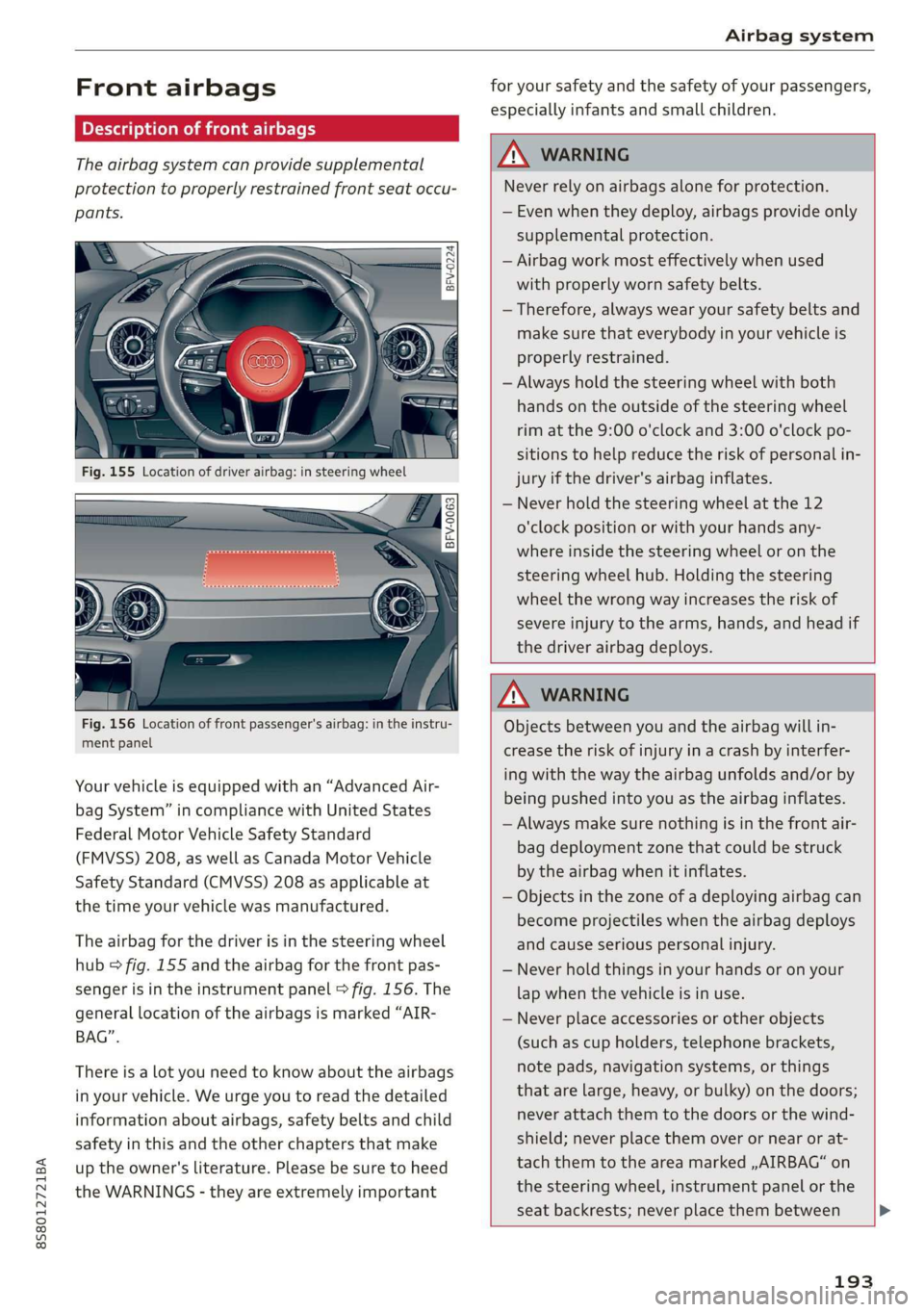
The airbag system can provide supplemental
protection to properly restrained front seat occu-
pants.
= x 2
z 6
BFV-0063
iff i
Fig. 156 Location of front passenger's airbag: in the instru-
ment panel
Your vehicle is equipped with an “Advanced Air-
bag System” in compliance with United States
Federal Motor Vehicle Safety Standard
(FMVSS) 208, as well as Canada Motor Vehicle
Safety Standard (CMVSS) 208 as applicable at
the time your vehicle was manufactured.
The airbag for the driver is in the steering wheel
hub > fig. 155 and the airbag for the front pas-
senger is in the instrument panel © fig. 156. The
general location of the airbags is marked “AIR-
BAG”.
There is a lot you need to know about the airbags
in your vehicle. We urge you to read the detailed
information about airbags, safety belts and child
safety in this and the other chapters that make
up the owner's literature. Please be sure to heed
the WARNINGS - they are extremely important
for your safety and the safety of your passengers,
especially infants and small children.
ZA\ WARNING
Never rely on airbags alone for protection.
— Even when they deploy, airbags provide only
supplemental protection.
— Airbag work most effectively when used
with properly worn safety belts.
— Therefore, always wear your safety belts and
make sure that everybody in your vehicle is
properly restrained.
— Always hold the steering wheel with both
hands on the outside of the steering wheel
rim at the 9:00 o'clock and 3:00 o'clock po-
sitions to help reduce the risk of personal in-
jury if the driver's airbag inflates.
— Never hold the steering wheel at the 12
o'clock position or with your hands any-
where inside the steering wheel or on the
steering wheel hub. Holding the steering
wheel the wrong way increases the risk of
severe injury to the arms, hands, and head if
the driver airbag deploys.
ZA\ WARNING
Objects between you and the airbag will in-
crease the risk of injury in a crash by interfer-
ing with the way the airbag unfolds and/or by
being pushed into you as the airbag inflates.
— Always make sure nothing is in the front air-
bag deployment zone that could be struck
by the airbag when it inflates.
— Objects in the zone of a deploying airbag can
become projectiles when the airbag deploys
and cause serious personal injury.
— Never hold things in your hands or on your
lap when the vehicle is in use.
— Never place accessories or other objects
(such as cup holders, telephone brackets,
note pads, navigation systems, or things
that are large, heavy, or bulky) on the doors;
never attach them to the doors or the wind-
shield; never place them over or near or at-
tach them to the area marked ,,AIRBAG“ on
the steering wheel, instrument panel or the
seat backrests; never place them between
193
Page 276 of 304

Emergency assistance
> The wheel bolt tightening specification must be
90 ft lbs (120 Nm). Have it checked as soon as
possible with a torque wrench. Drive carefully
until then.
> Have the faulty wheel replaced as quickly as
possible.
Spare tire
General information
Applies to: vehicles with space-saving spare tire (compact
spare tire)
—maa
BFV-0166
The spare tire is intended for short-term use only.
Have the damaged tire checked and replaced if
necessary by an authorized Audi dealer or author-
ized Audi Service Facility as soon as possible.
There are some restrictions on the use of the
compact spare tire. The compact spare tire has
been designed specifically for your type of vehi-
cle. Do not replace it with the spare tire from an-
other type of vehicle.
Removing the spare tire
> Turn the handle > fig. 197 @ counter-clock-
wise.
>» Remove the spare tire.
Removing the vehicle jack
> Lift up the cover on the right side of the lug-
gage compartment and remove the vehicle
jack.
Snow chains
For technical reasons, the use of snow chains on
the
compact spare tire is not permitted.
If you have to drive with snow chains and a front
tire fails, mount the spare tire in place of a rear
274
tire. Install the snow chains on the rear tire that
you removed, and install that in place of the
front tire that failed.
Z\ WARNING
— After installing a spare tire, the tire pressure
must be checked as soon as possible.
— Do not drive faster than SO mph (80 km/h)
with a compact spare tire. Driving faster
than that increases the risk of an accident.
— To reduce the risk of an accident, avoid hard
acceleration or braking and driving fast
around curves with the compact spare tire.
— To reduce the risk of an accident, never drive
with more than one compact spare tire.
— Normal summer or winter tires must not be
mounted on the compact spare wheel rim.
Towing
General information
You should only perform the steps that follow if
you have the necessary tools and technical ex-
pertise.
Towing requires a certain amount of practice. Au-
di recommends contacting a towing company to
have the vehicle transported.
You should only have your vehicle towed by an-
other vehicle when disabled in exceptional cir-
cumstances. Inexperienced drivers should not
tow.
Notes on towing
When the engine is stopped, the transmission
will not be sufficiently lubricated if traveling at
high speeds and long distances:
— The maximum permitted towing speed is 30
mph (50 km/h).
— The maximum permitted towing distance is 30
miles (50 km).
Additional information on towing with a tow
truck
The vehicle may only be towed with the front axle
raised. Do not wrap any chains or cables around
the brake lines.
Page 291 of 304
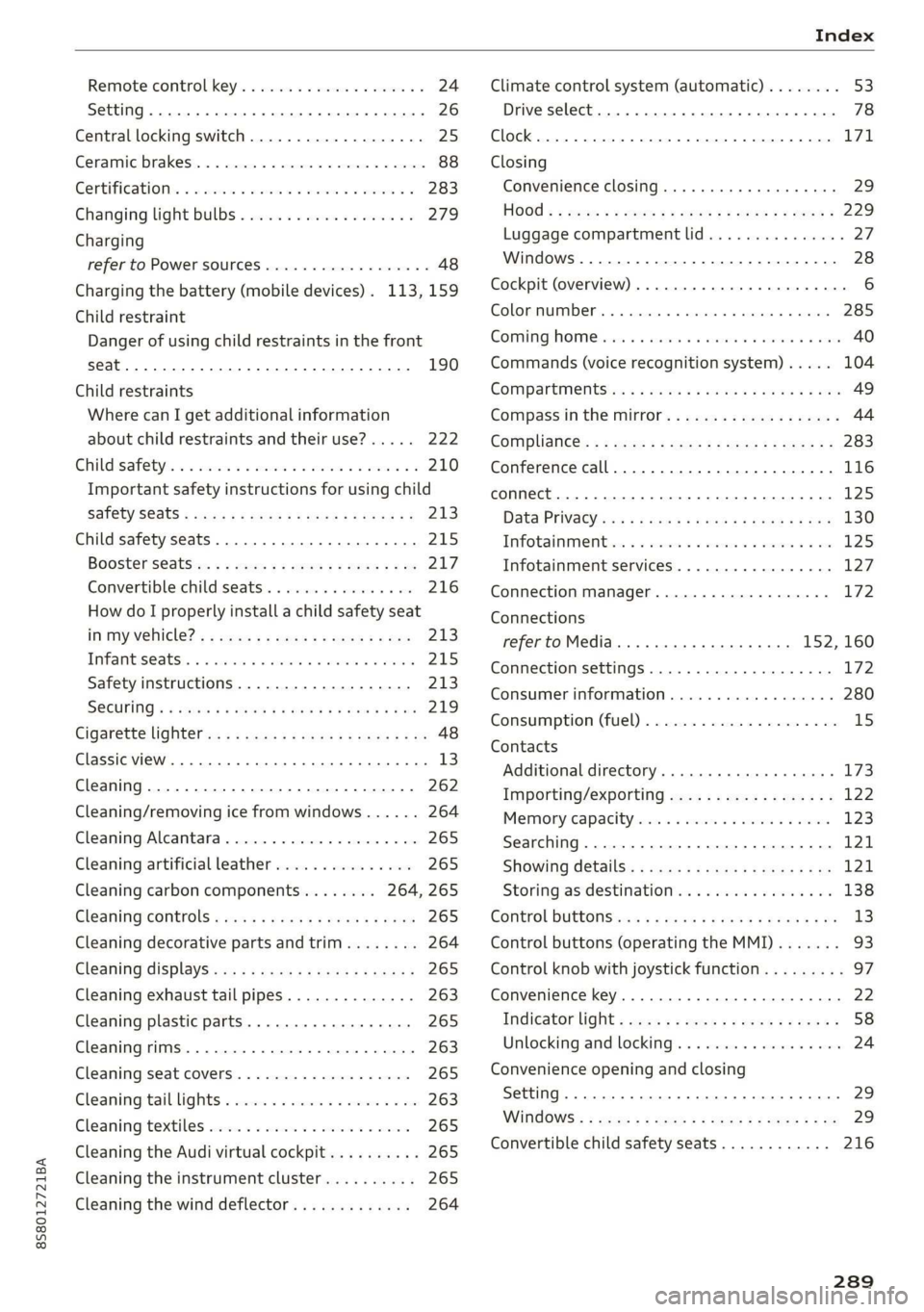
8S58012721BA
Remote control key............---0 eee 24
Setting... 2... cece eee 26
Central locking switch..............00-0. 25
Ceramic brakes......... 00020-00002 eae 88
Gertifications: = + ccs 2 waver « cece =o anesees 3 283
Changing light bulbs................... 279
Charging
refer to Power sourceS.........2--0000-- 48
Charging the battery (mobile devices). 113, 159
Child restraint
Danger of using child restraints in the front
Child restraints
Where can I get additional information
about child restraints and their use?..... 222
Child:safety:s + & scvis ss ows 2 2 reson oe vem vo 210
Important safety instructions for using child
SAfetySGats s wacas x x sees go eeeE so eR YY 213
Child safety seats... 0.00... cece eee eee 215
Booster Seats... + «isu ss ews ev paws soe 217
Convertible child seats.............0.0. 216
How do I properly install a child safety seat
in my vehicle? s = sees « ¢ sews so ees so es 213
Tinfantiseatsis i osseous a x cviaina a o canams ao xaos 215
Safety instructions.............-..00. 213
SOCUFING & exis x o ees xe eis xe dew ee oH 219
Cigarette lighter a: < s eens + 8 ees ose 5 oe 48
Classic view
Cleaning......... 02.
Cleaning/removing ice from windows...... 264
Cleaning Alcantara...............00000. 265
Cleaning artificial leather............... 265
Cleaning carbon components........ 264, 265
Cleaning controls ........0..scceeeeeees 265
Cleaning decorative parts andtrim........ 264
Cleaning displays «os i esas si eee ot ve ws 265
Cleaning exhaust tail pipes.............. 263
Cleaning plastic parts..............000. 265
Cleaning rims..............0 02.20 e ee eee 263
Cleaning seat covers.............000005 265
Cleaning taillights « ice <2 cece 6 a emacs xe oe 263
Cleaning textiles ove. ss sccan vs evn oe eves 265
Cleaning the Audi virtual cockpit.......... 265
Cleaning the instrument cluster.......... 265
Cleaning the wind deflector............. 264
Climate control system (automatic)........ 53
Drive select... 0... cece eee eee 78
Clock... eee eee eee eee L71
Closing
Convenience closing. ..........ese eres 29
HOG « 2 wey + y seus: 8 5 ees ¢ 9 eee es wR 229
Luggage compartment lid............... 27
Windows ..... 0.0.0.0 c cece eee eee eee 28
Cockpit (overview) ...... 6.0.0 c cece eee ee 6
GolommUMBer a. « siasnse sv cvavane ew ogsuwre + o oxesnse 285
GOMING HOME aici 2 6 sensi av eymree w H arwere a + anave 40
Commands (voice recognition system) ..... 104
Compartments: as ss ssw sv sews sv eaves y 6 eae 49
Compass inthe mirror...............0005 44
Complianicé:: = » eece x x sews 5 s wees 5 v eee os 283
Conference call...................20005 116
CONNECE. 2... eee eee 125
Data Privacy ews < ¢ ces se nes & ¢ pete 5 ¥ eee 130
Infotainmenticn 2 = ciao a 2 cxivaus « eoeseas 6 2 we 125
Infotainment services............00005 127
Connection manager................... 172
Connections
referto Media..............e eee 152, 160
Connection settings .................00. 172
Consumer information................55 280
Consumption (Fuel) . . srerice o ccasese wo yess « 6 ave 15
Contacts
Additional directory.......... 0.0 eevee 173
Importing/exporting.................. 122
Memiory:capacityisicca: asc ss sesese © evans 123
Searching.......... 02. see eee eee eee 121
SHOWiniG UStailS!: « aeas x 2 eames ¢ 5 seem Ee 121
Storing
as destination................. 138
Control BUTCONSio08 x s mews 2 x gow = qamey o 9 we 13
Control buttons (operating the MMI)....... 93
Control knob with joystick function......... 97
Convenience key...... 0.02.00 ee eee eee 22
Indicator light ; sacs se ceca ss pees ee reese 58
Unlocking and locking..............0005 24
Convenience opening and closing
Setting... 0.0... c eee 29
WIRKOWS% = zur: ¢ 2 were x x ces go ee sox 29
Convertible child safety seats............ 216
289