2019 AUDI Q5 wheel
[x] Cancel search: wheelPage 19 of 392

80A012721BG
Instrumentcluster
Appliesto:vehicleswithmultifunctionsteeringwheelplus
Appliesto:vehicleswithAudivirtualcockpit
Fig.9Defaultview:classic/sport*
Appliesto:vehicleswithAudivirtualcockpit
Fig.10Enhancedview
Changeview
Appliesto:vehicleswithAudivirtualcockpit
>Pressthe[VIEW]button @
t)>page15,fig.7to
switchfromthedefaultview>fig.9totheen-
hancedview>fig.10.Toreturntothedefault
view,pressthe[VIEW]buttonagain.
Settingthedefaultview
Appliesto:vehicleswithsportview
Depending
onthevehicleequipment,youcan
choosebetweentheclassicandthesportview.
>Openthefirstvehiclefunctionstabusingthe
aD buttononthemultifunctionsteering
wheel.
>Selectonthemultifunctionsteeringwheel:left
controlbutton>Layout>SportlayoutorClas-
siclayout.
Reducingthedisplay
Appliesto:vehicleswithanaloginstrumentcluster
>Pressthe[VIEW|buttontoswitchfromthe
classictothereduceddisplay.Toreturn tothe
classicview,pressthe|VIEW]buttonagain.
Adjustingtheadditionaldisplay
Appliesto:vehicleswithAudivirtualcockpit
Dependingonthevehicleequipment,theaddi-
tionaldisplaysthatcan beselectedmayvary.
>Openthefirstvehiclefunctionstabusingthe
<>]buttononthemultifunctionsteering
wheel.
>Selectonthemultifunctionsteeringwheel:
rightcontrolbutton>Additionaldisplay.
>Selectthedesiredadditionaldisplay.
G)Tips
Appliesto:vehicleswithsportview
Alwayssetthedesireddefaultviewbefore
driving,becausethedisplayfunctionswillnot
beavailableforseveralseconds.
Appliesto:vehicleswithmultifunctionsteeringwheelplus
Fig.11Rightsideofthe multifunctionsteeringwheel
@[eé]button
—Acceptingacall:pressthe|@]buttonwhen
thereisanincomingcall.
—Endingacall:pressthe|<]buttonduringa
phonecalltoendthecall.
iS
z
x| |
17
Page 20 of 392
![AUDI Q5 2019 Owners Manual Instrumentcluster
—Openingthecalllist:ifnophonecallisinprog-
ressandtherearenoincomingcalls,pressthe
[4]button.
@lx
—Switchingthevoicerecognitionsystemon:
brieflypressthe[2]button.Saythedesired](/manual-img/6/57631/w960_57631-19.png "AUDI Q5 2019 Owners Manual Instrumentcluster
—Openingthecalllist:ifnophonecallisinprog-
ressandtherearenoincomingcalls,pressthe
[4]button.
@lx
—Switchingthevoicerecognitionsystemon:
brieflypressthe[2]button.Saythedesired")
Instrumentcluster
—Openingthecalllist:ifnophonecallisinprog-
ressandtherearenoincomingcalls,pressthe
[4]button.
@lx
—Switchingthevoicerecognitionsystemon:
brieflypressthe[2]button.Saythedesired
commandaftertheBeep.
button
—Switchingthevoicerecognitionsystemoff:
pressandholdthe|%]button.Or:saythecom-
mandCancel.
Formoreinformationaboutthevoicerecognition
system,see>page170,Voicerecognitionsys-
temor>page246.
@Rightthumbwheel
Youcanadjustthevolumeofan audiosourceora
systemmessage(forexample,fromthevoice
recognitionsystem)whenthesoundisplaying.
—Increasingordecreasingthevolume:turnthe
rightthumbwheelupordown.
—Mutingorpausing:turntherightthumbwheel
down.Or:presstherightthumbwheel.
—Unmutingorresuming:turntherightthumb-
wheelup.Or:presstherightthumbwheel.
@®Ka][pot
—Selectingtheprevious/nexttrackorstation:
pressthebutton.
—Fastforwarding/rewindingaudiofiles:press
andholdthebuttonuntilthedesired
locationinthefileisreached.
®lk
—Steeringwheelheating”:youcanfindaddition-
alinformationin>page72.
—Programmablesteeringwheelbutton-open-
ing afunction:pressthe[+]buttononthemul-
tifunctionsteeringwheel.
—Programmablesteeringwheelbutton-re-
questingafunction:pressandholdthe[+]but-
ton.
—Programmablesteeringwheelbutton-chang-
ing afunction:pressandholdthe[+]button.
Selectandconfirmanentry.Or
button
I<]or[DDI
il]or[DDI
button/steeringwheelheating@
18
—SelectintheInfotainmentsystem:[MENU]but-
ton>Vehicle>leftcontrolbutton>Vehicle
settings>Steeringwheelbuttonassignment.
©nav
—Repeatingthelastnavigationprompt:press
the[s]buttonwhenrouteguidanceisactive.
—Changingthevoiceguidancevolume:when
routeguidanceisactive,turntherightthumb-
wheelupwardordownwardduringanavigation
prompt.
button
Multifunctionsteering
wheel
Appliesto:vehicleswithmultifunctionsteeringwheel
Withthemultifunctionsteeringwheel,youcan
operatethedriverinformationsystemaswellas
theMMIfunctionsandyoucanalsoadjust the
volume.
44,COE
N
Fig.13Rightsideofthemultifunctionsteeringwheel
Requirement:theignitionmustbeswitchedon.>
Page 21 of 392

80A012721BG
Instrumentcluster
@Operatingthedriverinformationsystem
Thedriverinformationsystemcontainsmultiple
tabs@>page15,fig.6thatdisplayvariousin-
formation2)>page15,fig.6.
Thefollowingtabsmaybeavailable,depending
onvehicleequipment:
FirsttabOn-boardcomputer>page19
SecondMessages
tab?)
ThirdtabRadio>page163
Media>page163
Fourthtab|Telephone>page164
a)Thistabisonlyvisiblewhenthereisat leastoneindicator
lightormessagedisplayed.
—Switchingtabs:pressthe[MODE]button
>fig.12onthemultifunctionsteeringwheel
repeatedlyuntilthedesiredtabisdisplayed.
—Selectingafunctioninthemenu/list:turnthe
leftthumbwheelonthemultifunctionsteering
wheeltothedesiredfunction.
—Confirmingaselection:presstheleftthumb-
wheelonthemultifunctionsteeringwheelto
confirmyourselection.
—Scrollingwithinthelists:turntheleftthumb-
wheelonthemultifunctionsteeringwheel
quicklytoscrollwithinthelists.
@[2Jbutton
—Switchingthevoicerecognitionsystemon:
brieflypressthe[2]button>fig.13.Saythe
desiredcommandaftertheBeep.
—Switchingthevoicerecognitionsystemoff:
pressandholdthe|]button.Or:saythecom-
mandCancel.
Formoreinformationaboutthevoicerecognition
system,see>page170,Voicerecognitionsys-
temor=page246.
@®Rightthumbwheel
The
volumeofanaudiosourceorasystemmes-
sage(suchastrafficannouncements)canbedi-
rectlyadjustedduringtheaudiooutput.
—Increasingordecreasingthevolume:turnthe
rightthumbwheel>fig.13upordown.
—Mutingorpausing:turntherightthumbwheel
down.Or:presstherightthumbwheel.
—Unmutingorresuming:turntherightthumb-
wheelupward.Or:presstherightthumbwheel.
Vehiclefunctions
LOTati
Thetripcomputerisdisplayedinthefirsttabof
thedriverinformationsystem.Additionalvehicle
functionscan beaccesseddependingonthevehi-
cleequipment.
>Presstheleftcontrolbutton.
—On-boardcomputer>page 19
—Laptimes>page97
—Statistics>page98
—Layout>page17
Mit)meeyuayLele
Fig.14Instrumentcluster:fuelconsumptiondisplay
Resettingvaluesto zero
Requirement:theFuelconsumption,Short-term
memory,orLong-termmemorydisplaymustbe
selected.
>Toresetthevaluesintherespectivememoryto
zero,pressandholdtheleftthumbwheelon
themultifunctionsteeringwheelforonesec-
ond.Or
>Onthemultifunctionsteeringwheel,select:
therightcontrolbutton>Resetvalues*.
Inthetripcomputer,youcancallupthefollow-
ingdisplaysoneaftertheotherbyturningthe
leftthumbwheelonthemultifunctionsteering
wheel:
19
Page 28 of 392

Instrumentcluster
mReAels
aAutomaticheadlights:malfunction!See
owner'smanual
BSAutomaticwipers:malfunction!Seeowner's
manual
Thelight/rainsensorismalfunctioning.
Thelowbeamsremainswitchedonatalltimes
forsafetyreasonswhenthelightswitchisinthe
AUTOposition.However,youcancontinueto
turnthelightsonandoffusingthelightswitch.
Youcanstillcontrolallfunctionsthatareinde-
pendentoftherainsensorthroughthewind-
shieldwiperlever.
DriveimmediatelytoanauthorizedAudidealer
orauthorizedAudiServiceFacilitytohavethe
malfunctionrepaired.
teyeerare)
Appliesto:vehicleswithsuspensioncontrol
|¢|Suspension:malfunction!Youmaycontinue
driving
Thereisamalfunction.SeeanauthorizedAudi
dealerorauthorizedAudiServiceFacilityforas-
sistance.
TeteleYedSolemlaced
Appliesto:vehicleswithallwheeldrive/sportdifferential
t3]All-wheeldrive:malfunction!Youmaycon-
tinuedriving.PleasecontactService
T-3|Sportdifferential:malfunction!Pleasecon-
tactService
DriveimmediatelytoanauthorizedAudidealer
orauthorizedAudiServiceFacilitytohavethe
malfunctionrepaired.
3]All-wheeldriveoverheating. Pleaseadapt
drivingstyle.Seeowner'smanual
3]Sportdifferential:temperaturetoohigh.
Pleaseadaptdrivingstyle
Thetransmissiontemperaturehasincreasedsig-
nificantlyduetothesportydrivingmanner.Drive
inalesssportymanneruntilthetemperaturere-
26
turnstothenormalrangeandtheindicatorlight
switchesof.
ZXWARNING
ContactanauthorizedAudidealerorauthor-
izedAudiServiceFacilityiftheallwheeldrive/
sportdifferentialisfaultyormalfunctioning.
Therepairmustbeperformedbytrainedper-
sonnelusingthecorrectoilinordertoensure
safety.
eraeel
IftheaorBindicatorlightblinks,aturnsig-
nalisturnedon.Ifbothindicatorlightsareblink-
ing,theemergencyflashersareon.
Ifanindicatorlightblinkstwiceasfast asusual,
aturnsignalbulbhasfailed.Carefullydrivetoan
authorizedAudidealerorauthorizedAudiService
Facilityimmediatelytohave the malfunctioncor-
rected.
eCCmesel
Appliesto:vehicleswithtrailerhitch
Theturnsignalsareactivatedintrailermodeif
the&indicatorlightblinks.
If aturnsignalonthetraileroronthevehicle
failswhileintrailermode,theindicatorlightwill
notblinktwiceasfasttoindicatethis.
Page 31 of 392

80A012721BG
Openingandclosing
itwillnotbepossibletolocktheluggage
compartmentandtheluggagecompart-
mentlidwillopen.Theturnsignalswill
flashseveraltimestoindicatethis.The
doorswilllock.Alwaystaketheconvenience
keywithyou,orunauthorizedpeoplemay
beabletoenterthevehicle.
G)Tips
—Donotleavevaluablesunattendedintheve-
hicle.Alockedvehicleisnota safe!
— TheLEDinthedriver's doorrailblinkswhen
youlockthevehicle.IftheLEDlightsupfor
approximately30secondsafterlocking,
thereisamalfunctioninthecentral locking
system.Havetheproblemcorrectedby an
authorizedAudidealerorauthorizedAudi
ServiceFacility.
7
Fig.17Yourvehiclekeyset
7
RAZ-062)
@Vehiclekey
Thevehiclekeyisaremotecontrolkeyorconven-
iencekey*.Theconveniencekey*isaremotecon-
trolkeywithspecialfunctions>page31 and
=page75.Youcanunlockorlockyourvehicle
withthevehiclekey.Amechanicalkeyisintegrat-
edinthevehiclekey>page30.
@Keytagwithvehiclecode
Appliesto:vehicleswithAudiconnectvehiclecontrol
Openthekey tagandscratch torevealthevehicle
code.YoucanunlocktheAudiconnectvehicle
controlservices*foryourvehiclewiththisvehicle
code.Foradditionalinformation,see
=>page195.Ifakeyfobislost,contactanau-
thorizedAudidealerorauthorizedAudiService
Facility.
Vehiclekeyreplacement
If akeyislost,seeanauthorizedAudidealeror
authorizedAudiServiceFacility.Havethisvehicle
keydeactivated.Itisimportanttobringallkeys
withyou.Ifakeyislost,youshouldreportitto
yourinsurancecompany.
Numberofkeys
Youcancheckthenumberofkeysprogrammed
toyourvehicleintheInfotainmentsystem.Todo
this,selectthe[MENU]button>Vehicle>left
controlbutton>Service&checks>Vehiclein-
formation.Thisway,youcanmakesurethatyou
haveallthekeyswhenpurchasingausedvehicle.
Electronicimmobilizer
Theimmobilizerpreventsunauthorizeduseof
thevehicle.
Insomecases,itmaynot bepossible tostartthe
vehicleifthereisavehiclekeyfromadifferent
vehiclemanufactureronthekeychain.
Datainthevehiclekey
Whendriving,serviceandmaintenance-relevant
dataiscontinuouslystoredinyourvehiclekey.
YourAudiserviceadvisorcanreadoutthisdata
andtellyouabouttheworkyourvehicleneeds.
This appliesalsotovehicleswithaconvenience
key”.
Personalconveniencesettings
Iftwopeopleuseonevehicle,itisrecommended
thateachpersonalwaysusestheirownvehicle
key.Whentheignitionisturnedofforwhenthe
vehicleislocked,personalconveniencesettings
forthefollowingsystemsarestoredandas-
signedtothevehiclekey:
—Climatecontrolsystem
—Steeringwheelheating*
—Centrallockingsystem
—Interiorlighting”
—Exteriorlighting
—Rainsensor
—Memoryfunction*
29
Page 57 of 392
80A012721BG
Seats
Seats
Generalinformation
ZAWARNING
See>page252,Drivingsafetyforimportant
information,tips,suggestionsandwarnings
thatyoushouldreadandfollowforyourown
safetyandthesafetyofyourpassengers.
Frontseats
Powerseatadjustment
=
Ss
£>imo
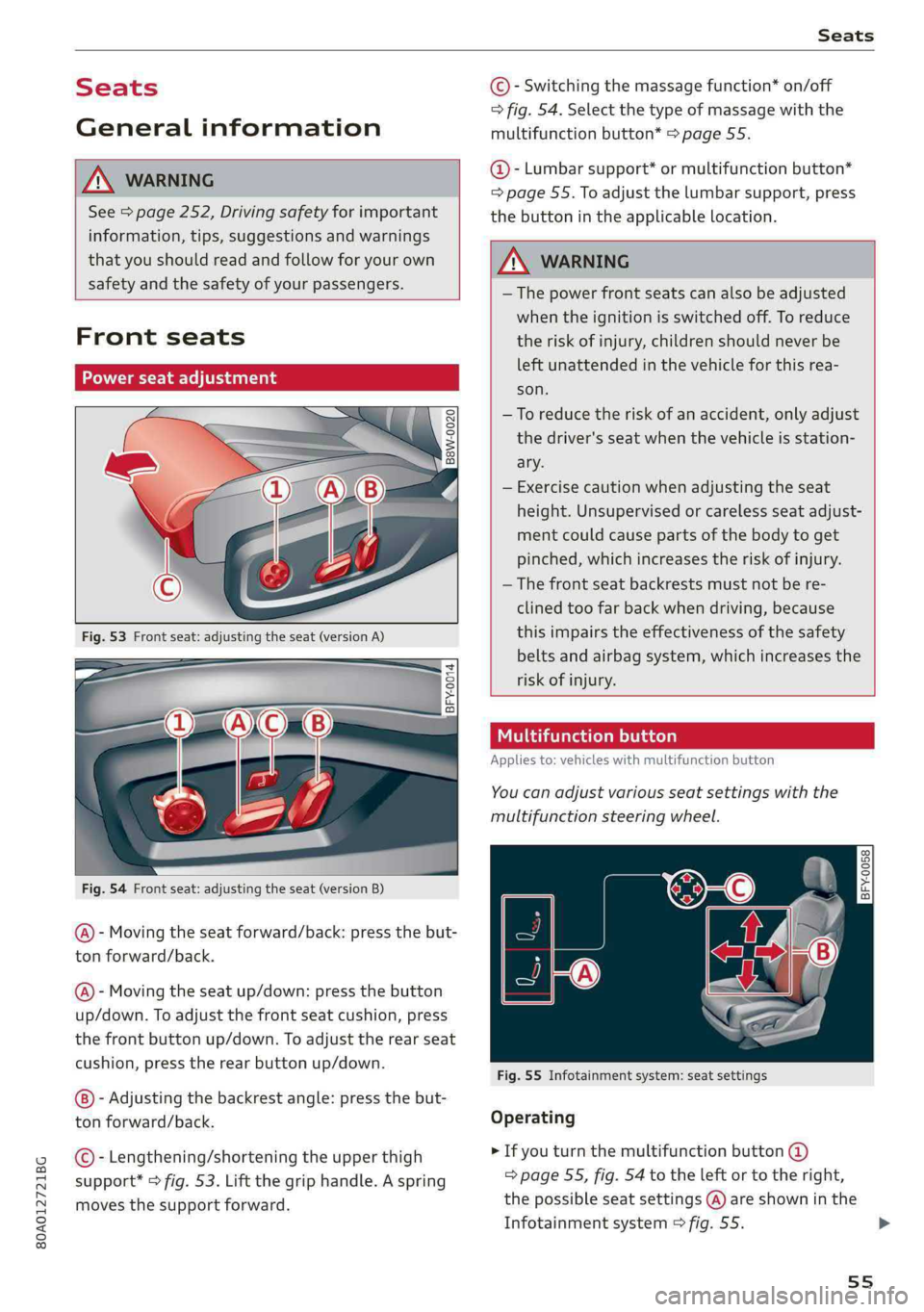
Fig.54Frontseat:adjustingtheseat(versionB)
@-Movingtheseatforward/back:pressthebut-
ton forward/back.
@)-Movingtheseatup/down:pressthe button
up/down.Toadjustthefrontseatcushion,press
thefrontbuttonup/down.Toadjusttherearseat
cushion,presstherearbuttonup/down.
-Adjustingthebackrestangle:pressthebut-
tonforward/back.
©-Lengthening/shorteningtheupperthigh
support*>fig.53.Liftthegriphandle.Aspring
movesthesupportforward.
©-Switchingthemassagefunction*on/off
>fig.54.Selectthetypeofmassagewiththe
multifunctionbutton*>page55.
@-Lumbarsupport*ormultifunctionbutton*
=page55.Toadjustthelumbarsupport,press
thebuttonintheapplicablelocation.
Z\WARNING
— Thepowerfrontseatscanalsobeadjusted
whentheignitionisswitchedoff.To reduce
theriskofinjury,childrenshouldneverbe
leftunattendedinthevehicleforthisrea-
son.
—Toreducetheriskofanaccident,onlyadjust
thedriver'sseatwhenthevehicleisstation-
ary.
—Exercisecautionwhenadjustingtheseat
height.Unsupervisedorcarelessseatadjust-
mentcouldcausepartsofthebodytoget
pinched,whichincreasestheriskofinjury.
—Thefrontseatbackrestsmustnotbere-
clinedtoofarbackwhendriving,because
thisimpairstheeffectivenessofthesafety
beltsandairbagsystem,whichincreasesthe
riskofinjury.
Tatomelhace)
Appliesto:vehicleswithmultifunctionbutton
You canadjustvariousseatsettingswiththe
multifunctionsteeringwheel.
BFY-0058Om
C
Fig.55Infotainmentsystem:seatsettings
Operating
>Ifyouturnthemultifunctionbutton@
=>page55,fig.54totheleftortotheright,
thepossibleseatsettings@)areshowninthe
Infotainmentsystem>fig.55.>
55
Page 74 of 392

Warmandcold
&Defrosting
Thewindshieldandsidewindowsaredefrosted
orcleared ofcondensationasquicklyaspossible.
Themaximumamountofairflowsmainlyfrom
theventsbelowthewindshield.Recirculation
modeswitchesoff. Thetemperatureshouldbe
setat+72°F(+22°C)orhigher.Thetemperature
iscontrolledautomatically.
Youcanswitchthedefrosteronoroffusingthe
®button.Youcanswitchthefunctionoffby
pressingaknob(4).
@Rearwindowdefogger
Youcanswitchtherearwindowdefoggeronby
pressingthe&button.Itonlyoperateswhenthe
engineisrunning.Itswitchesoffautomatically
after10to20minutes,dependingontheoutside
temperature.
Topreventtherearwindowdefoggerfrom
switchingoffautomatically,pressandholdthe
®buttonformorethanthreeseconds.Thisis
storeduntiltheignitionisswitchedoff.
Vents
Youcanopenorclosethecenterandrearventsin
thecockpitandtheventsintherearcenter con-
soleusingtheridgedthumbwheels.Thelevers
adjustthedirectionoftheairflowfromthevents.
Residualheat
Youcanactivatetheresidualheatfunctionwhen
theignitionisswitchedoffbypressingtheknob
©.Theresidualheatfromthecoolantisusedto
heatthevehicleinterior.Theresidualheatfunc-
tionswitchesoffautomaticallyafterabout15
minutes.
Z\WARNING
—Youshouldnotuse therecirculationmode
foranextendedperiodoftime,becauseno
freshairisdrawninandthewindowscan
fogwhencoolingmodeisswitchedoff.This
increasestheriskofanaccident.
—Individualswithreducedsensitivityto pain
ortemperaturecoulddevelopburnswhen
usingtheseatheating*function.To reduce
72
theriskofinjury,theseindividualsshould
notuseseatheating*.
()Note
To reducetheriskofdamagetotheseatheat-
ing*elements,donotkneelontheseatsor
placeheavypressureononeareaoftheseat.
Basicsettings
Appliesto:Vehicleswith3-zonedeluxeautomaticclimate
control
>Toadjustbasicsettingsfortheclimatecontrol
system,selectintheInfotainmentsystem:
MENU]button>Vehicle>leftcontrolbutton>
Airconditioning
Autorecirculation
Whenswitchedon,automaticrecirculationcon-
trolstherecirculationmodeautomatically.You
mustpressthe§&buttoniffogformsonthewin-
dows.
Steeringwheelheating
Appliesto:vehicleswithsteeringwheelheating
>Pressthe@>page17,fig.11buttononthe
multifunctionsteeringwheeltoswitchthe
steeringwheelheatingonandoff.Themessage
Steeringwheelheating:on/Steeringwheel
heating:offappearsintheinstrumentcluster
display.
Thesteeringwheelheatingsettings arestored
automaticallyandassignedtothevehiclekey
thatisinuse.
Page 76 of 392
Driving
G@)Tips
Theamountofnoiseproducedbythevehicle
canincreasesignificantlywhendrivingwitha
sportystyle.Showrespecttoothersaround
youandtheenvironmentwiththewayyouop-
erateyourvehicle,especiallyatnight.
Steering
Manualsteeringwheelpositionadjustment
Appliesto:vehicleswithmanualsteeringwheeladjustment
Thesteeringwheelpositionisadjustableupand
downandforwardandback.
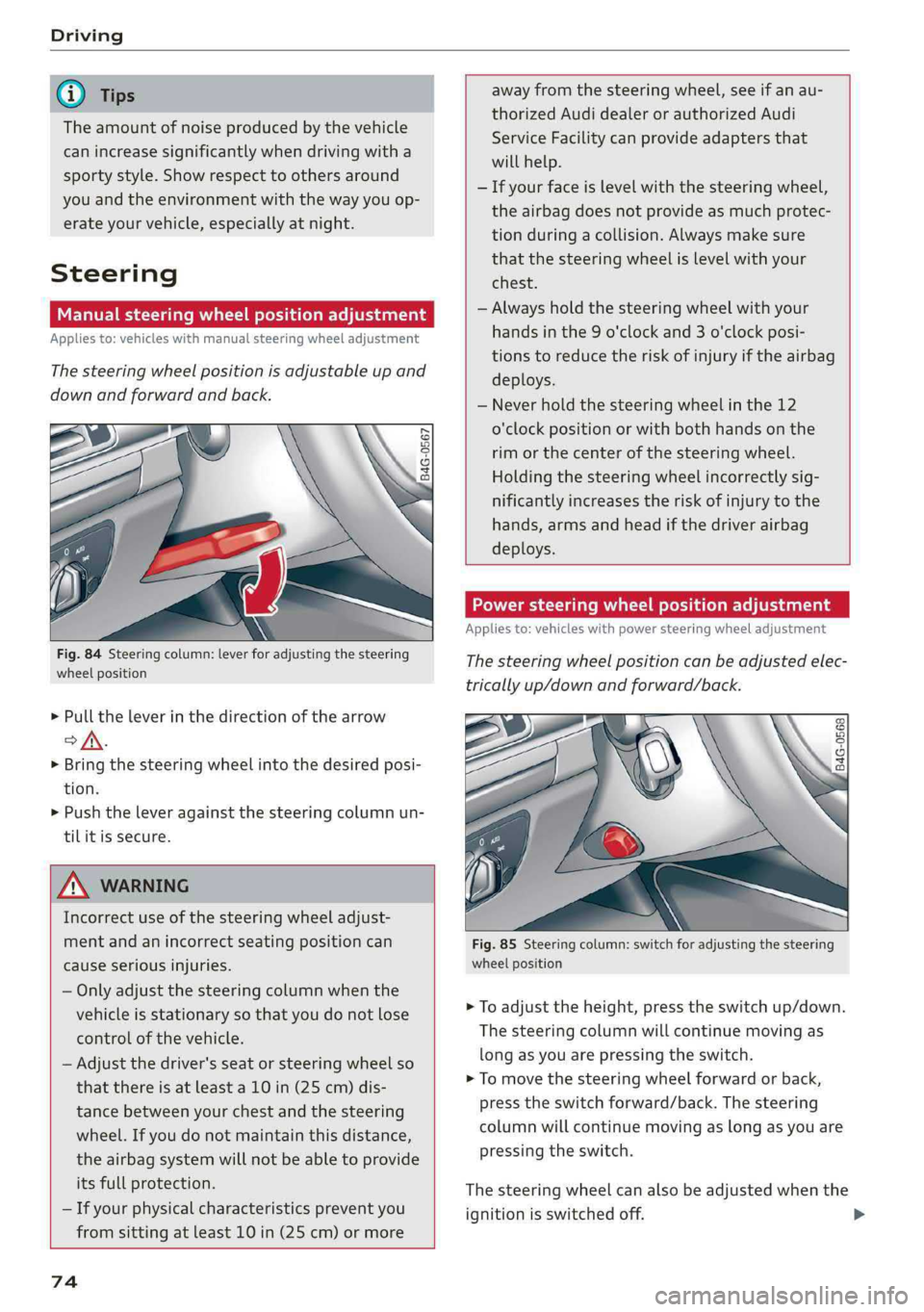
B4G-0567
Fig.84Steeringcolumn:leverforadjustingthesteering
wheelposition
>Pulltheleverinthedirectionofthearrow
of.
> Bringthesteeringwheelintothedesiredposi-
tion.
>Pushtheleveragainstthesteeringcolumnun-
tilitissecure.
Z\WARNING
Incorrectuseofthesteeringwheeladjust-
mentandanincorrectseatingpositioncan
causeseriousinjuries.
—Onlyadjustthesteeringcolumnwhenthe
vehicleisstationaryso thatyoudonotlose
controlofthevehicle.
—Adjustthedriver'sseatorsteeringwheelso
that
thereisatleasta10in(25cm)dis-
tancebetweenyourchestandthesteering
wheel.Ifyoudonotmaintainthisdistance,
theairbagsystemwillnot beabletoprovide
itsfullprotection.
—Ifyourphysicalcharacteristicspreventyou
fromsittingatleast10in(25cm)ormore
74
awayfromthesteeringwheel,seeifanau-
thorizedAudidealerorauthorizedAudi
ServiceFacilitycanprovideadaptersthat
willhelp.
—Ifyourfaceislevelwiththesteeringwheel,
theairbagdoesnotprovideasmuchprotec-
tionduringacollision.Alwaysmakesure
thatthesteeringwheelislevelwithyour
chest.
—Alwaysholdthesteeringwheelwithyour
handsinthe9o'clockand3o'clockposi-
tionstoreducetheriskofinjuryiftheairbag
deploys.
—Neverholdthesteeringwheelinthe12
o'clockpositionorwithbothhands onthe
rimorthecenterofthesteeringwheel.
Holding the
steeringwheelincorrectlysig-
nificantlyincreasestheriskofinjurytothe
hands,armsandheadifthedriverairbag
deploys.
Powersteeringwheelpositionadjustment
Appliesto:vehicleswithpowersteeringwheeladjustment
Thesteeringwheelpositioncanbeadjustedelec-
tricallyup/downandforward/back.
oo
B4G-0568
Fig.85Steering column:switchforadjustingthesteering
wheelposition
>Toadjusttheheight,presstheswitchup/down.
Thesteering columnwillcontinuemovingas
longasyouarepressingtheswitch.
>Tomovethesteeringwheelforwardor back,
presstheswitchforward/back.Thesteering
columnwillcontinuemovingaslongasyouare
pressingtheswitch.
Thesteeringwheelcanalsobeadjustedwhenthe
ignitionisswitchedoff.