2019 AUDI Q5 wheel
[x] Cancel search: wheelPage 131 of 392

80A012721BG
Parkingaid
Parkingaid
Generalinformation
Appliesto:vehicleswitharearparkingsystem/parkingsys-
templus/rearviewcamera/peripheralcameras/parkassist.
Dependingonyourvehicle'sequipment,various
parkingaidswillhelpyouwhenparkingandma-
neuvering.
Therearparkingsystemisanaudible parkingaid
thatwarnsyouofobstaclesbehindthevehicle
=>page130.
Theparkingsystemplusassistsyouwhilepark-
ingusingaudioandvisualsignalstowarnyou
aboutobjectsdetectedinfrontof,behind,andat
thesides*ofthevehicle>page130.
Therearviewcamerashowstheareabehindthe
vehicleintheInfotainmentsystemdisplay.The
linesintherearviewcameraimagehelpyouto
parkormaneuver>page132.
Theperipheralcamerasgivevariousviewsto
helpyouwhenparkingormaneuvering
=page134.Theparkingsystemplusfunctions
arealsoavailable>page130.
Parkassisthelpsyoutolocatesuitableparking
spaceswhenparallelorperpendicularparking,
andalsohelpswhenleavingaparallelparking
space>page137.
ingsystemmaybe impairedasaresult.
HaveanauthorizedAudidealerorauthor-
izedAudiServiceFacilitychecktheirfunc-
tion.
ZA\WARNING
—Alwayslookfortrafficandcheckthearea
aroundyourvehiclebylookingatitdirectly
aswell.Theparkingsystemcannotreplace
thedriver'sattention.Thedriverisalways
responsiblewhenenteringorexitingapark-
ingspaceandduringsimilarmaneuvers.
—Pleasenotethatsomesurfaces,suchas
clothing,arenotdetectedbythesystem.
—Sensorsandcamerashaveblindspotsin
whichpeopleandobjectscannotbedetect-
ed.Beespeciallycautiousofsmallchildren
andanimals.
—Alwayskeepyoureyesonthevehicle'ssur-
roundings,usingtherearviewmirroraswell.
— Thesensorscanbedisplacedbyimpactsor
damagetotheradiatorgrille,bumper,
wheelhousingandtheunderbody.Thepark-
@)Note
—Someobjectsarenotdetectedordisplayed
bythesystemundercertaincircumstances:
—objectssuchasbarrierchains,trailerdraw
bars,verticalpolesorfences
—objectsabovethesensorssuchaswallex-
tensions
—objectswithcertainsurfacesorstructures
suchaschainlinkfencesorpowdersnow
—Ifyoucontinuedrivingclosertoalowob-
ject,itmaydisappearfromthe sensor
range.NotethatyouwillnoLongerbe
warnedaboutthisobstacle.
—Maintainenoughdistancefromthecurbto
reducetheriskofdamagetotherims.
@)Tips
—Thesystemmayprovideawarningeven
thoughtherearenoobstaclesinthecover-
ageareainsomesituations,suchas:
—certainroadsurfacesor whenthereistall
grass
—externalultrasonicsourcessuchasfrom
cleaningvehicles
—inheavyrain,snow,orthickvehicleex-
haust
—Werecommendthatyoupracticeparkingin
atraffic-freelocationorparkinglottobe-
comefamiliarwiththesystem.Practice
parkingingoodlightand weathercondi-
tions.
—Youcanchangethevolumeofthesignals
andthedisplay>page142.
—Whatappearsintheinfotainmentdisplayis
somewhattime-delayed.
—Thesensorsmustbekeptcleanandfreeof
snowandicefortheparkingaidtooperate.
— Therearviewcameraiscleanedwhenclean-
ingtherearwindow©page50.
129
Page 135 of 392

80A012721BG
Parkingaid
—Onlyuse therearviewcameratoassistyouif
itshowsagood,clearpicture.Forexample,
theimagemaybeaffectedbythesunshin-
ingintothelens,dirtonthelens,orifthere
isamalfunction.
—Usetherearviewcameraonlyiftheluggage
compartmentlidiscompletelyclosed.Make
sureanyobjectsyoumayhavemountedon
theluggagecompartmentliddonotblock
therearviewcamera.
— Thecameralensenlargesanddistortsthe
fieldofvision.Theobjectappearsbothal-
teredandinaccurateonthescreen.
—Incertainsituations,peopleorobjectsin
thedisplayappearcloserorfartheraway:
—Forobjectsthatdonottouchtheground,
suchasthebumperofaparkedvehicle,a
trailerhitchortherearofatruck.Donot
use the
orientationlinesinthiscase.
—Ifdrivenfromalevelsurfaceontoanin-
cline,oradownwardslope.
—Ifdriventowardprotrudingobjects.
—Ifthevehicleiscarryingtoomuchloadin
therear.
—Appliesto:vehicleswithairsuspension:the
accuracyoftheorientationlinesandblue
surfacesdecreaseswhenthevehicleis
raised/lowered>page125.
@)Note
—Alwaysreadandfollowtheapplicablewarn-
ings>@inGeneralinformationon
page129.
— Theorange-coloredorientationlinesinthe
Infotainmentdisplayshowthevehiclepath
basedonthesteeringwheelangle.The
front ofthevehicleswingsoutmorethan
therearofthevehicle.Maintainplentyof
distanceso thatanexteriormirrororacor-
nerofthevehicledoesnotcollidewithany
obstacles.
@)Tips
Thereisnodistancewarningfortherearand
thesides*whentrailertowingmodeisdetect-
ed.Thefrontsensorsremainactivated.The
visualdisplayswitchestotrailermode.The
rearviewcameraimagewillnotshowtheori-
entationlinesandthebluesurfaces.Thereis
noguaranteethefunctionswillswitchoff
whenusingaretrofittedtrailerhitch.
SicaReRol
Appliesto:vehicleswithrearviewcamera
Switchingonandoff
Requirement:thevehiclespeedmustbeunder
approximately6mph(10km/h).
>PressthePvbuttoninthecenterconsole
=>page131,fig.130.Ashortconfirmation
tonesoundsandtheLEDinthebuttonturns
on.
Switchingonautomatically
Thesystemswitchesonautomaticallywhenre-
versegearisengagedwhiletheengineisrun-
ning.Abrieftonewillsound.
Switchingoffautomatically
Thesystemswitchesoffautomaticallywhendriv-
ingforwardfasterthan6mph(10km/h).
Perpendicularparking
Applies
to:vehicleswithrearviewcamera
Thisviewmaybeusedwhenparkinginagarage
orinaparkingspace.
Fig.135Infotainmentsystem:aligningthevehicle
133
Page 136 of 392
Parkingaid
>Turn theInfotainmentsystemonandshiftinto
reversegear.
>Theorangeorientationlines@showthevehi-
cle'sdirectionoftravel.Turn thesteeringwheel
untiltheorangeorientationlinesalignwiththe
parkingspace>fig.134.Usethemarkings@)
tohelpyouestimatethedistancetoanobsta-
cle.Eachmarkingrepresentsapproximately3
feet(1m).Thebluearearepresentsanexten-
sionofthevehicle'soutlinebyapproximately
16feet(5meters)totherear.
>Whiledrivinginreversegear,adjustthesteer-
ingwheelangletofittheparkingspaceusing
theorangeorientationlinesforassistance>A\
inGeneralinformationonpage132,>@)in
Generalinformationonpage133.Area@)rep-
resentstherearbumper.Attheverylatest,
stopthevehiclewhentheredorientationline
@bordersanobject.
NirliCimUCW
Appliesto:vehicleswith rearviewcamera/peripheralcameras
andtrailerhitch
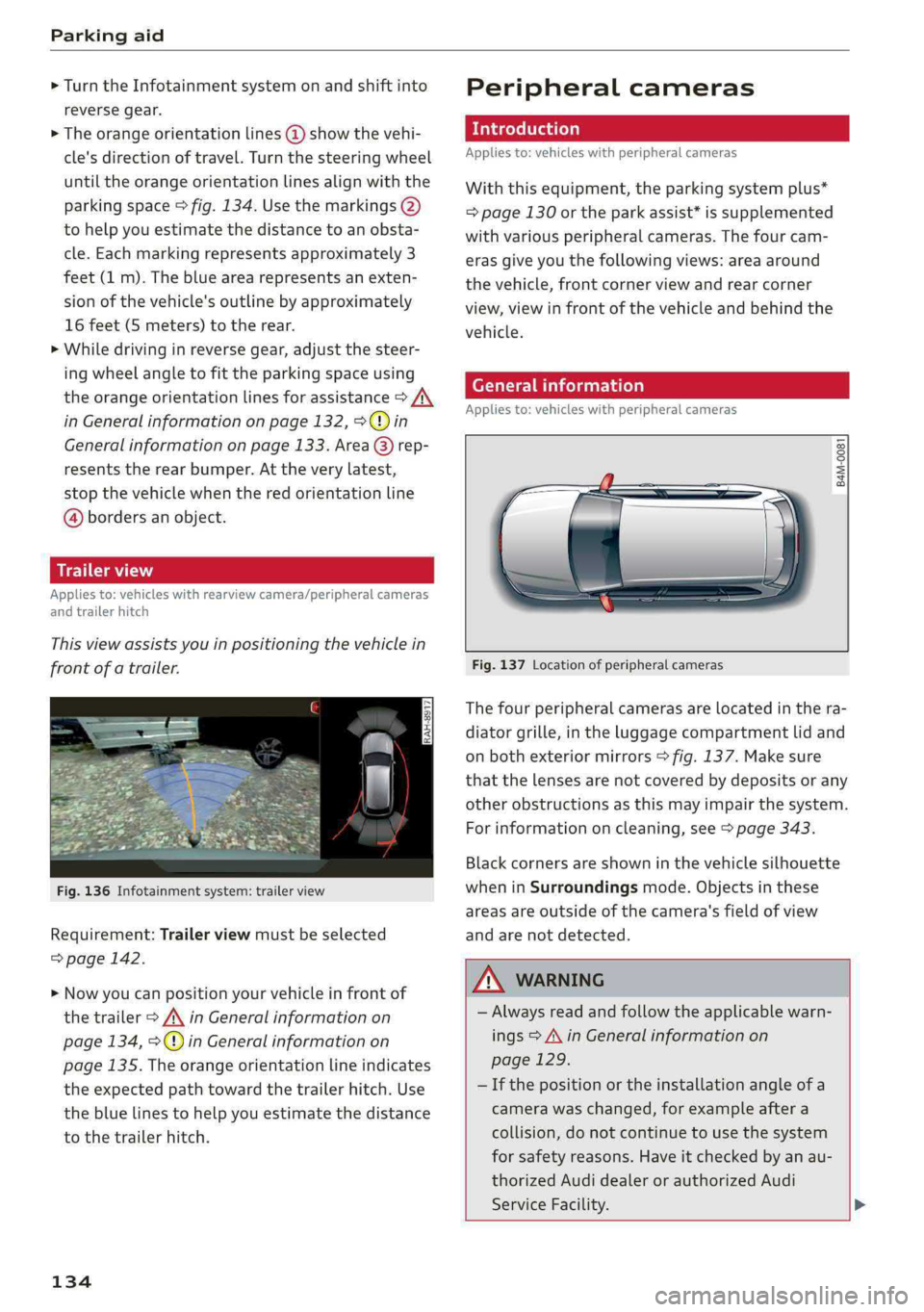
Thisviewassistsyouinpositioningthevehiclein
frontofatrailer.
Fig.136Infotainmentsystem:trailerview
Requirement:Trailerviewmustbeselected
=>page142.
>Nowyoucanpositionyourvehicleinfrontof
thetrailer>/\inGeneralinformationon
page134,>@)inGeneralinformationon
page135.Theorangeorientationlineindicates
theexpectedpathtowardthetrailerhitch.Use
thebluelinestohelpyouestimatethedistance
tothetrailerhitch.
134
Peripheralcameras
Introduction
Appliesto:vehicleswithperipheralcameras
Withthisequipment,theparkingsystemplus*
=page130ortheparkassist*issupplemented
withvariousperipheralcameras.Thefourcam-
erasgiveyouthefollowingviews:areaaround
thevehicle,frontcornerviewandrearcorner
view,viewinfrontofthevehicleandbehindthe
vehicle.
Generalinformation
Appliesto:vehicleswithperipheralcameras
B4M-0081
Fig.137Locationofperipheralcameras
Thefourperipheralcamerasarelocatedinthera-
diatorgrille,intheluggagecompartmentlidand
onbothexteriormirrors>fig.137.Makesure
thatthelensesarenotcoveredbydepositsorany
otherobstructionsasthismayimpairthesystem.
Forinformationoncleaning,see>page343.
Blackcornersareshowninthevehiclesilhouette
wheninSurroundingsmode.Objectsinthese
areasareoutsideofthecamera'sfieldofview
andarenotdetected.
Z\WARNING
—Alwaysreadandfollowtheapplicablewarn-
ings>A\inGeneralinformationon
page129.
—Ifthepositionortheinstallationangleofa
camerawaschanged,forexampleaftera
collision,donotcontinuetouse thesystem
forsafety reasons.Haveitcheckedby anau-
thorizedAudidealerorauthorizedAudi
ServiceFacility.>
Page 137 of 392

80A012721BG
Parkingaid
—Keepinmindthattheimageinthedisplayis
incorrectiftheexteriormirrorhousinghas
beenmovedoutofplace.
—Onlyuse theimagesprovidedby thecamera
ontherearofthevehiclewhentheluggage
compartmentlidiscompletelyclosed.Make
sureanyobjectsyoumayhavemountedon
theluggagecompartmentliddonotblock
therearviewcamera.
— Theareaaroundthevehicleisshownusing
thecameraimages.Thevehicleimageis
shownbythesystem.Objectsandobstacles
abovethecameraarenotdisplayed.
—Cameralensesenlargeanddistortthefield
ofvision.Theobjectsappearbothaltered
andinaccurateonthescreen.
—Appliesto:vehicleswithairsuspension:the
accuracyoftheorientationlinesandblue
surfacesdecreaseswhenthevehicleis
raised/lowered>page125.
@)Note
—Alwaysreadandfollowtheapplicablewarn-
ings>@inGeneralinformationon
page129.
— TheInfotainmentdisplayshowsthedirec-
tioninwhichtherearofthevehicleistravel-
ingbasedonthesteeringwheelangle.The
frontofthevehicleswings outmorethan
therearofthevehicle.Maintainplentyof
distanceso thatanexteriormirrororacor-
nerofthevehicledoesnotcollidewithany
obstacles.
G)Tips
—Ifthe2/&8/
grayedout,thenthepowerexteriormirrors
werefoldedinorthedriver'sdoor/front
passenger'sdoor/luggagecompartmentlid
wasopened.
—Thereisnodistancewarningfortherear
andthesides*whentrailertowingmodeis
detected.Thefrontsensorsremainactivat-
ed.Thevisualdisplayswitchestotrailer
mode.Therearviewcameraimagewillnot
showtheorientationlinesandthebluesur-
faces.Thereisnoguaranteethefunctions
willswitchoffwhenusingaretrofittedtrail-
erhitch.
ice
Appliesto:vehicleswithperipheralcameras
Fig.138Infotainmentsystem:selectthemode
Switchingonandoff
Requirement:thevehiclespeedmustbeunder
approximately6mph(10km/h).
>PressthePsbuttoninthecenterconsole
=>page131,fig.130.Ashortconfirmation
tonesoundsandtheLEDinthebuttonturns
on.
Switchingonautomatically
Thesystemswitchesonautomaticallywhenre-
versegearisengagedwhiletheengineisrun-
ning.Abrieftonewillsound.
Switchingoffautomatically
Thesystemswitchesoffautomaticallywhendriv-
ingforwardfasterthan6mph(10km/h).
Selectingthemode
>Turn thecontrolknobtothesymbolforthede-
siredmode(A)through©)>fig.138andpress
thecontrolknob.
Youmayselectfromthefollowingmodes:
@-Cornerview(front)>page136
-Front>page136
©-Area>page136
©-Rear>page136
@®-Cornerview(rear)>page136
Youcanalsoswitchtotrailerview>page134.
135
Page 139 of 392

80A012721BG
Parkingaid
j
Appliesto:vehicleswithperipheralcameras
Thisviewmaybe usedwhenparkinginagarage
orinaparkingspace.
Fig.145Infotainmentsystem:aligningthevehicle
>Turn theInfotainmentsystem onandshiftinto
reversegear.
>Theorangeorientationlines@showthevehi-
cle'sdirectionoftravel.Turn thesteeringwheel
untiltheorangeorientationlinesalignwiththe
parkingspace>fig.144.Usethemarkings@)
tohelpyouestimatethedistancetoanobsta-
cle.Eachmarkingrepresentsapproximately3
feet(1m).Thebluearearepresentsanexten-
sionofthevehicle'soutlinebyapproximately
16feet(5meters)totherear.
>Whiledrivinginreversegear,adjustthesteer-
ing
wheelangletofittheparkingspaceusing
theorangeorientationlinesforassistance>A\
inGeneralinformationonpage134,>@)in
Generalinformationonpage135.Area@)rep-
resentstherearbumper.Youshouldstopre-
versingatthelatestwhentheredorientation
line@bordersanobject>A\inGeneralinfor-
mationonpage132.
Parkassist
Fig.146Diagram:streetparkingoptions
Parkassisthelpsyoutolocatesuitableparking
spacesandtoparkinthem.Youcanbackinto
parallel(@)andperpendicular(2)parkingspaces
andalsodriveforwardoutofparallelparking
spaces.Youcanalsodriveforwardintoperpen-
dicularparkingspacesifyouhavealreadystarted
drivingandthefrontofthevehicleisinthespace
@,orifyouhavealreadydrivenpastit@).Insit-
uation@),thevehiclewillbackup,moveintothe
correctposition,andthenstarttodriveforward
intotheparkingspace.
Theparkingspacecanbebetweentwovehiclesor
behindavehicle.Thedriverparksasusualwith
park
assistcontrollingthesteering.
Theparkingsystemplusfunctions>page130
thatassistyouwhenparkingareacomponentof
theparkassist.
Theparkassistsensorsareonthesidesofthe
frontandrearbumper.Makesurethesensorsare
notcoveredbystickers,depositsoranyotherob-
structionsasitmayimpairthefunctionofthe
137
>
Page 140 of 392

Parkingaid
system.Forinformationoncleaning,see
=>page343.
Whenparkingspacesaresmall,theparkingsys-
temsignalsacontinuoustonewhenanobstacle
islessthanapproximately0.7feet(0.20m)
away.Donotcontinuedrivingfarther.
ZAWARNING
—Alwaysreadandfollowtheapplicablewarn-
ings>AinGeneralinformationon
page129.
—Pleasenotethat parkassistonlycontrols
thesteering.Thedriverisalwaysresponsi-
bleforbrakingandaccelerating.
— Thedrivermustdecideiftheparkingspace
displayedissuitableforthevehicle.
—Thevehiclewillchangepositionwhenpark-
ing.Makesureyoudonotendangeranyoth-
erdrivers.
—Whenusingparkassisttodriveintoorout
ofaparkingspace,thesteeringwheelturns
quicklyonitsown.Reachingintothesteer-
ing
wheelspokeswhilethisishappeningcan
resultininjury.
@)Note
—Alwaysreadandfollowtheapplicablewarn-
ings>@inGeneralinformationon
page129.
—Parkassistguidesthevehicleeitheraway
fromcurbsorontothemifothervehicles
areparkedonthecurb.Makesurethatyour
vehicle'stiresandrimsarenotdamaged.
Takeoversteeringattherighttime.
—Certainconditionsaroundtheparkingspace
mayresultinthevehiclenotbeingparked
asexpected.
—Objectssuchaspillarsorposts.
—Groundcoveringsuchasgravel,snowor
ice
G)Tips
— TheElectronicStabilizationControl(ESC)
mustnotbe switchedoffduringtheparking
process>page145.
—Parkingintightcurveswith parkassistis
notpossible.
138
—Youcannotparkwith parkassistwhenyou
aretowingatrailerorhavetheconnectorin-
sertedinthetrailersocket.
Sleemela
Appliesto:vehicleswithparkassist
3S
2 x a
oO
Fig.147Centerconsole:Parkassistbutton
Fig.148Infotainment:Searchingforparkingspaces
>Toswitchtheparkassiston,pressthePebut-
ton>fig.147.The LEDinthebuttonwillturn
onandthedisplayforfindingaparkingspace
willappearintheInfotainmentsystem
>fig.148.
>Toswitchparkassistoff,pressthePebutton.
TheLEDinthebuttonturnsoff.
G)Tips
Thesystempreselectsaspacefromtheavail-
ableparkingoptionsassoonasaspaceisde-
tected.Youcanchangethesuggestedloca-
tion.
Page 142 of 392

Parkingaid
Startingthe parkingprocess
Appliesto:vehicleswithparkassist
Theresponsibilityiswiththedriverwhenpark-
ing.
Requirement:asuitableparkingspacemustbe
foundandselected>page139.Thevehiclemust
initiallybestationary.
> Selectthereversegearafterstoppingbriefly.
>Removeyourhandsfromthesteeringwheel.
>Payattentiontothepathofthevehicle.When
thetrafficsituationallows,presstheaccelera-
torpedalaccordingly>A\inDescriptionon
page138,>@inDescriptiononpage138.
>FollowthevisualinstructionsintheInfotain-
mentsystemdisplayandinstrumentcluster
alongwiththewarningtonesuntiltheparking
processhasended.Thearrowsonthevehicle
indicatethenecessarydirectionoftravel.
Parkassistautomaticallysteersthevehicleinto
theparkingspacewhilethedriverpressesthe
pedals.Themaximumparkingspeedis4mph
(7km/h).
Interruptingtheparkassist
Ifthespeedistoohighand youtakeoversteer-
ing,parkassistswitchesoff.Tocontinueparking,
[email protected]
playswillappearagainintheInfotainmentsys-
temdisplayandtheinstrumentcluster.
G)Tips
Youcanalsocancelthedirectionoftravel
specifiedbythesystembyswitchingbetween
forwardandreversegears.Basedontheposi-
tionofthevehicle,thesystemthencalculates
theadditionalsteeringanddrivingdirections
formaneuvering.
Leavingaparallelparkingspace
Appliesto:vehicleswith parkassist
Theresponsibilityiswiththedriverwhenleaving
aparkingspace.
Ifyouparkedthevehicleinaparallelparking
space,parkassistcanhelpyoudriveoutofit.
140
>Starttheengine.
>PressthePebutton>page138,fig. 147.
>Waituntilamessageappearsthatrequeststhe
directiontotravelinforexitingtheparking
space.
>Activatetheappropriateturnsignal.Themes-
sageStartautomaticunparkingprocedureap-
pears.
>Removeyourhandsfromthesteeringwheel.
>Pressthecontrolknobtostarttheprocedure
forexitingtheparkingspace.
>Payattentiontothepathofthevehicle.When
thetrafficsituationallows,presstheaccelera-
torpedalaccordingly> A\inDescriptionon
page138,>@)inDescriptiononpage138.
>Followthevisualinstructions>page140and
thewarningtoneuntilthevehiclehasfinished
exitingtheparkingspace.
>Driveinthedirectionindicatedbythearrowson
thevehicle.
>Theprocedurehasendedwhenadditionalcor-
rectivemovementsarenolongernecessary.
Takeoversteering.
Parkassistautomaticallysteersthevehicleoutof
theparkingspacewhilethedriverpressesthe
pedals.Themaximumspeedforexitingaparking
spaceis3mph(5km/h).
Interruptingthe parkassist
Ifthespeedistoohighand youtakeoversteer-
ing,parkassistswitchesoff.Tocontinueexiting
theparkingspace,switchtheengineoffandon.
ThenpressthePebuttonagain.Otherwise,leave
theparkingspacewithoutusingparkassist.
Appliesto:vehicleswithparkassist
roo"Parkassist:canceled.Steeringinputbydriv-
er.Pleasetakeoversteering!
Parkassistwascanceledbecausethedrivertook
oversteering.Tocontinueparking, pressthePe
buttonagain.
Parkassist:timelimitexceeded
aor]Parkassist:canceled.Timelimitexceeded.
Pleasetakeoversteering!
Page 146 of 392

IntelligentTechnology
IntelligentTechnology
ElectronicStabilization
Control(ESC)
ElectronicStabilizationControl(ESC)supports
driversafety.Itreducestheriskofslippingand
improvesdrivingstability.ESCdetectscriticalsit-
uations,suchasifthevehicleisoversteeringor
understeering,orifthewheelsare spinning.The
brakesareappliedortheenginetorqueisre-
ducedinordertostabilizethevehicle.Whenthe
ESCengages,theBindicatorlightblinksinthe
instrumentcluster.
ThefollowingsystemsareintegratedintheESC:
Anti-lockbrakingsystem(ABS)
ABSpreventsthewheelsfromlockingwhenbrak-
ing.Thevehiclecanstillbesteeredevenduring
hardbraking.Applysteadypressuretothebrake
pedal.Donotpumpthepedal.Apulsinginthe
brakepedalindicatesthatthesystemisacting to
stabilizethevehicle.
Brakeassistsystem
Thebrakeassistsystemcandecreasebrakingdis-
tance.Itincreasesbrakingpowerwhenthe driver
pressesthebrakepedalquicklyinemergencysit-
uations.Youmustpressandholdthebrakepedal
untilthedangeroussituationisover.Invehicles
withadaptivecruisecontrol*,thebrakeassist
systemismoresensitiveifthedistancedetected
tothevehicledrivingaheadistoosmall.
Anti-SlipRegulation(ASR)
ASRreducesdrivepowerwhenthedrivewheels
beginspinningandadaptsthepowertotheroad
conditions.Thismakesiteasiertostart,acceler-
ateanddriveuphills.
ElectronicDifferentialLock(EDL)
TheEDLappliesthe brakestowheelsthatare
slippingandtransfersthedrivepowertotheoth-
erwheels.Thisfunctionisnotavailableathigher
speeds.
144
Inextremecases,EDLautomaticallyswitchesoff
tokeepthebrakeonthebrakedwheelfromover-
heating.Thevehicleisstillfunctioningcorrectly.
EDLwillswitchonagainautomaticallywhencon-
ditionshavereturnedtonormal.
Powersteering
The ESCcanalsosupportvehiclestability
throughsteering.
Selectivewheeltorquecontrol
Selectivewheeltorquecontrolisusedwhendriv-
ingoncurves.Brakingistargetedtowardthe
wheelsontheinsideofthecurveasneeded.This
allowsmoreprecisedrivingincurves.
Automaticpost-collisionbrakingsystem
Theautomaticpost-collisionbrakingsystemcan
helptoreducetheriskofslidingandofaddition-
alcollisionsafteranaccident.Iftheairbagcon-
trolmoduledetectsacollision,thevehicleis
braked bytheESC.
Thevehicledoesnotbrakeautomaticallyifoneof
thefollowingoccurs:
—Thedriverpressestheacceleratorpedal
—TheESC,thebrakesystem,orthevehicleelec-
tricalsystemisnotfunctioning
ZAWARNING
— The ESCanditsintegratedsystemscannot
overcomethelimitsimposedbynatural
physicallaws.Thisisespeciallyimportanton
slipperyorwetroads.Ifthesystemsbegin
actingtostabilizeyourvehicle,youshould
immediatelyalteryourspeedtomatchthe
roadandtrafficconditions.Donotletthein-
creasedsafetyprovidedtemptyouintotak-
ingrisks.Thiscouldincreaseyourriskofa
collision.
—Pleasenotetheriskofacollisionincreases
whendrivingfast,especiallythroughcurves
andonslipperyorwetroads,andwhendriv-
ingtooclosetoobjectsahead.The ESC and
itsintegratedsystemscannotalwayspre-
ventcollisions-thereisstillariskofacci-
dents!