2019 AUDI Q5 wheel
[x] Cancel search: wheelPage 168 of 392

Multifunctionsteeringwheel
@Abargraphappearswhenthereisanupcom-
ingturn.Thefewerthebarsthatareshown,the
shorterthedistanceisuntiltheturn.Ifthereis
not anupcomingturn,thedistancetothedesti-
nation/stopoverandthecalculatedarrivaltimeis
displayedintherightspeedometer.
@Nameofthestreetwhereyouarecurrently
driving
Mapviewwithrouteguidancestarted
Appliesto:vehicleswithnavigationsystemandmapview
Dependingonthevehicleequipment,youcanal-
sohavetheactiverouteguidancedisplayinthe
mapview*inthedriverinformationsystem.
eeele
Fig.173Diagram:mapwhenrouteguidancehasstarted
(analoginstrumentcluster)
Requirement:adestinationmustbeentered
=>page203,routeguidancemustbestartedand
thenavigationtabmustbedisplayed.
Dependingonvehicleequipment,thefollowing
informationmaybeshowninthedriverinforma-
tionsystem.
@Distancetothedestinationorstopover
@Distancetothenextmaneuver
@Display oftheroadthatiscurrentlybeingtrav-
eled ortheroad thatyouwillturnontoduring
thenextmaneuver
@Mapcontentsuchas pointsofinterestortraf-
ficinformation
Zoomingin/outonthemap(Zoom):whena
mapisdisplayed,turntheleftthumbwheel
down/uptozoomin/outonthemap.
Streetviewwithrouteguidancestarted
Appliesto:vehicleswithnavigationsystemandstreetview
Dependingonthevehicleequipment,theactiverouteguidancewillbedisplayedinthestreetview*in
thedriverinformationsystem.
uN
Fig.174Example:displayofaturninthestreetview(analoginstrumentcluster)
166
Page 169 of 392

80A012721BG
Multifunctionsteeringwheel
Requirement:adestinationmustbeentered
=>page203,routeguidancemustbestartedand
thenavigationtabmustbedisplayed.
Dependingonvehicleequipment,thefollowing
informationmaybeshowninthedriverinforma-
tionsystem>fig.174:
Distancetothedestinationorstopover
©oDisplayinganexpressway,highwayormain
roadaspreparationforanupcomingchange
indirection
Lanerecommendation
Calculatedarrivaltime
Distancetothenextmaneuver
Display oftheexpressway,highwayormain
roadontowhichyouwillbeturning
Directionarrowfortheupcomingmaneuver
©
O80
Abargraphappearswhenadirectionarrowis
displayed.Thefewerthebars thatareshown,
theshorterthedistanceisuntiltheturn.
Currentvehicleposition©
Additionalinformation(on-boardcomputer)
Thefollowingfunctionsarealsoavailablewhen
routeguidanceisactive:
—Adjustingthevoiceguidancevolume:turnthe
rightthumbwheelupordownwhileavoice
guidancemessageisplaying.
ZA\WARNING
Theroutecalculatedby thenavigationsystem
isarecommendationforreachingyourdesti-
nation.Obeytrafficlights,stoppingrestric-
tions,one-waystreets,lanechangerestric-
tions,etc.
(i)Tips
—Alsoseethechapter>page8,Cockpitover-
view.
— Anexclamationpoint“!”infront ofthe
streetnameindicatesthattheinformation
aboutthisstreetorthissectionoftheroute
isnotcompleteinthenavigationdatacon-
tainedintheMMI.Obeytrafficlawsinone-
waystreetsandpedestrianzones.
TAUAmelhmeereeitanle)
Appliesto:vehicleswithnavigationsystemandarrowview
Dependingonthevehicleequipment,theactiverouteguidancewillbedisplayedinthearrowview*in
thedriverinformationsystem.
om:
Fig.175Example:arrowview(monochromeinstrumentcluster)
Requirement:adestinationmustbeentered
=page203,routeguidancemustbestartedand
thenavigationtabmustbedisplayed.
Dependingonvehicleequipment,thefollowing
informationmaybeshowninthedriverinforma-
tionsystem>fig.175:
@Distancetothedestinationorstopover
167
Page 170 of 392

Multifunctionsteeringwheel
Distancetothenextmaneuver
Directionarrowfortheupcomingmaneuver
Abargraphappearswhen adirectionarrowis
displayed.Thefewerthebars thatareshown,
theshorterthedistanceisuntiltheturn.
®O®
Lanerecommendation
Additionalinformation(on-boardcomputer)
Calculatedarrivaltime
©0G®@Displayofthestreetcurrentlybeingdriven
onIfapointisdisplayedbeforethestreet,it
isindicatingthestreetyouwillbe onwiththe
nextmaneuver.
Thefollowingfunctionsarealsoavailablewhen
routeguidanceisactive:
—Adjustingthevoiceguidancevolume:turnthe
rightthumbwheelupordownwhileavoice
guidancemessageisplaying.
ZXWARNING
Theroutecalculatedby thenavigationsystem
isarecommendationforreachingyourdesti-
nation.Obeytrafficlights,stoppingrestric-
tions,one-waystreets,lanechangerestric-
tions,etc.
@Tips
—Alsosee thechapter>page8,Cockpitover-
view.
—Anexclamationpoint“!”infront ofthe
streetnameindicatesthattheinformation
aboutthisstreetorthissectionoftheroute
isnotcompleteinthenavigationdatacon-
tainedintheMMI.Obeytrafficlawsinone-
waystreetsandpedestrianzones.
168
Page 172 of 392

Voicerecognitionsystem
Voicerecognitionsystem
Operating
Appliesto:vehicleswithvoicerecognitionsystem
YoucanoperatemanyInfotainmentfunctions
convenientlybyspeaking.
Requirement:theignitionandtheMMImustbe
switched
on>page152.Asystemlanguagesup-
portedbythevoicerecognitionsystemmustbe
set.Theremustbenophonecallsinprogressand
theparkingaidmustnotbeactive.
>Switchingon:pressthe[%]button@
=>page17,fig.11or>page18,fig.13briefly
onthemultifunctionsteeringwheelandsay
thedesiredcommandaftertheBeep.
>Switchingoff:pressandholdthe|™]button.
Or:pressthe|5|button.
>Pausing:saythecommandPause.Toresume,
pressthe|]button.
>Correcting:saythecommandCorrection.Or:
simplysayanewcommandduringanan-
nouncement>page246.
Inputassistance
Thesystemguidesyouthroughtheinputwith
visualandaudiofeedback.
—Visualinputassistance:afterswitchingon
voicerecognition,adisplaywithaselectionof
possiblecommandsappears.Thiscommand
displaycanbe switchedonoroff.Select:
MENU]button>Settings>leftcontrolbutton
>MMIsettings>Speechdialogsystem.
—Audioinputassistance: tohavethepossible
commandsread,turnthevoicerecognitionsys-
temonandsayHelp.
Forthesystemtounderstandyou:
Speakclearlyanddistinctly atanormalvolume.
Speaklouderwhendrivingfaster.
Emphasizethewordsinthecommandsevenly
anddonotleavelongpauses.
Closethedoors,thewindows,andthesunroof*
toreducebackgroundnoise.Makesurethatpas-
sengersarenotspeakingwhenyouaregivinga
voicecommand.
170
Donotdirecttheventstowardthehands-freemi-
crophone,whichisintheroofheadlinernearthe
frontinteriorlights.
Onlyusethesystemfromthedriver'sseatbe-
causethehands-freemicrophoneisdirectedto-
wardthatseat.
Additionalsettings
See>page246,Speechdialogsystem.
ZAWARNING
—Directyourfullattentiontodriving.Asthe
driver,youhavecompleteresponsibilityfor
safetyintraffic.Onlyusethefunctionsin
suchawaythatyoualwaysmaintaincom-
pletecontroloveryourvehicleinalltraffic
situations.
—Donotuse thevoicerecognitionsystemin
emergenciesbecauseyourvoicemaychange
instressfulsituations.Thesystemmaytake
longertodialthenumberormaynotbe
abletodialitatall.Dialtheemergency
numbermanually.
Gi)Tips
— Thedialogpauseswhenthereisanincom-
ingphonecallandwillcontinueifyouig-
norethecall.Thedialogendsifyouanswer
thecall.
—Youcanselectan iteminthelistusingei-
therthevoicerecognitionsystemorthe
controlknob.
Commandoverview
information
Appliesto:vehicleswithvoicerecognitionsystem
Thefollowingoverviewsdescribethecommands
thatcan beusedtooperatetheMMIusingthe
voicerecognitionsystem.
Alternativecommandsareseparatedusinga“/”,
forexamplesay:Telephone/(or)Navigation/
(or)Radio.
Sequencesofcommandsusedtoperformanac-
tionareidentifiedwitha “>”,forexamplesay:
Enteraddress>(then)Entercountry/state.>
Page 178 of 392
Voicerecognitionsystem
>Switchingon:pressandholdthe[>|buttonon
themultifunctionsteeringwheel*andsaythe
desiredcommandaftertheexternalspeechdia-
logbegins.
>Continuing/resumingthedialog:thesystem
remainsreadytouseforashorttimeafterend-
ingthedialog.Youcanstartanewexternaldia-
logduringthistime. Pressthe|]buttonif
needed,andsayanewcommand.Or:select
andconfirmResumeontheMMIcontrolunit.
>Switchingoff:pressandholdthe|%|button.
Or:selectandconfirmCancelontheMMIcon-
trolunit.
@)Tips
—Therearenovoiceguidance*promptswhen
adialogisactive.
—Thisfunctiondependsonthecellphone
used.Youcanobtainmoreinformationfrom
yourmobiledeviceserviceproviderorfrom
yourmobiledeviceuserguide.
—AUDIAGsimplyprovidesaccesstocontrol
yourmobiledevicewithvoiceoperationand
doesnotassumeanyresponsibilityforthe
contentandcommandswithintheexternal
voicecontrol.
176
Page 215 of 392
![AUDI Q5 2019 Owners Manual 80A012721BG
Navigation
>Pressthe LNAV/MAP]buttonrepeatedlyuntil
themapisdisplayed>fig.194.
Zoomingin/outonthemap
—Turn thecontrolknobtotheleftortotheright.
Alternatively,youcanalsozoomin/out](/manual-img/6/57631/w960_57631-214.png "AUDI Q5 2019 Owners Manual 80A012721BG
Navigation
>Pressthe LNAV/MAP]buttonrepeatedlyuntil
themapisdisplayed>fig.194.
Zoomingin/outonthemap
—Turn thecontrolknobtotheleftortotheright.
Alternatively,youcanalsozoomin/out")
80A012721BG
Navigation
>Pressthe LNAV/MAP]buttonrepeatedlyuntil
themapisdisplayed>fig.194.
Zoomingin/outonthemap
—Turn thecontrolknobtotheleftortotheright.
Alternatively,youcanalsozoomin/outonthe
mapusingtheMMItouchcontrolpad*
=>page157,ifthecrosshairsareswitchedon.
Or:turntheleftthumbwheelonthemultifunc-
tionsteeringwheel*>page16.
Turningthecrosshairson/off
—Switchingthecrosshairson:pressthecontrol
knobinthemapview>fig.194.
—Switchingthecrosshairsoff:pressthe[BACK
button.
Whenthecrosshairsareswitchedoff>fig.194:
@)Direction.Foradditionalinformation,see
=>page214.
@)Thedistancetothedestinationincludesthe
calculatedarrivaltime.
@Whenthetrailermodefunctionisswitched
on,thecorrespondingsymbolisdisplayed
nexttothearrivaltime.
@Scale:turnthecontrolknobtotheleftor
righttodecreaseor increasethescale.When
theAutomaticzoomfunctionisswitchedon
,an“A”for“Automatic”isdisplayedinthe
magnifyingglass.
Altitude
Vehiclelocation
Routeinformation:variousinformationwill
bedisplayedduringactiverouteguidance
(forexample,theupcomingmaneuverin-
cludingcalculateddistanceandstreet
names).Thedisplayalsoprovidestrafficin-
formationorpointsofinterestonthecurrent
route.
Roadcurrentlybeingdrivenon
CO®@
Whenthecrosshairsareswitchedon>fig.195:
@)Thecrosshairs:movethecrosshairsinthede-
sireddirectionandsetapointonthemapus-
ingtheMMItouchcontrolpad”orthecontrol
D_Onlyappliestovehicleswithoutcamera-basedspeedlimit
display.
knob.Whenthecrosshairsareturnedoff,the
roadbeingcurrentlydrivenonisshown.
@Speeddisplay):Displaysthemaximumper-
mittedspeedonexpresswaysandonhigh-
ways.
@Entertainmentslidingmenu*:see
=>page157.
@®Additionalinformationonthecrosshairspo-
sition:ifyoumovethecrosshairstoa loca-
tiononthemap,availableinformationfor
thecurrentpositionisdisplayed.Tapbriefly
ontheMMItouchcontrolpad.Or:pressthe
controlknob.Inthedestinationdetails,you
canstartrouteguidancetothedisplayedlo-
cation.SelectandconfirmStartrouteguid-
ance.
@Mapcontents(pointsofinterest,favorites).
Whentherearemultiplepointsofinterestin
theimmediatevicinity,thesymbolsare
shownstackedonthemap.
Betterroute#3:ifabetterrouteisavailable
forthecurrentrouteguidance,itwillbeindi-
catedonthemapincludingthetimethat
wouldbesaved.Moreinformationcanbe
foundunder>page218.
Mapfunctions
Appliesto:vehicleswithnavigationsystem
>Pressthe [NAV/MAP]buttonrepeatedlyuntil
themapisdisplayed>page212,fig.194.
>Presstheleftcontrolbutton.
Thefollowingmapfunctionscan beselected:
Switchtodestinationinput
ThefreetextsearchintheEnterdestination
menuisdisplayed>page203,fig.187.
Trafficmessages
CurrenttrafficinformationisdisplayedintheIn-
fotainmentsystemdisplay.Youcanalsofindad-
ditionalinformationunder>page217.>
213
Page 255 of 392

80A012721BG
Drivingsafety
>ALWAYSadjustyourspeedtoroad,trafficand
weatherconditions.
>Take frequentbreaksonlongtrips.Donotdrive
formorethantwohoursatastretch.
>DoNOTdrivewhenyouaretired,underpres-
sureorwhenyouarestressed.
Z\WARNING
Impaireddrivingsafetyincreasestheriskof
seriouspersonalinjuryanddeathwhenevera
vehicleisbeingused.
Correctpassenger
seatingpositions
Properseatingpositionforthedriver
Theproperdriverseatingpositionisimportant
forsafe,relaxeddriving.
B4G-0374
Fig.218Correctseatingposition
Foryourownsafetyandtoreducetheriskofin-
juryinthe eventofanaccident,werecommend
thatyouadjustthedriver'sseattothefollowing
position:
>Adjustthedriver'sseatso thatyoucaneasily
pushthepedalsallthewaytothefloorwhile
keepingyourknee(s)slightlybent>A\.
>Adjusttheangleoftheseatbacksothatitisin
anuprightpositionsothatyourbackcomesin
fullcontactwithitwhenyoudrive.
>Adjustthesteeringwheelsothatthereisadis-
tanceofatleast10inches(25cm)betweenthe
steeringwheelandyourbreastbone&fig.218.
Ifnotpossible,seeyourauthorizedAudidealer
aboutadaptiveequipment.
>Adjust thesteeringwheelso thatthesteering
wheelandairbagcoverpointsatyourchestand
notatyourface.
>Graspthetopofthesteeringwheelwithyour
elbow(s)slightlybent.
>Adjusttheheadrestraintsotheupperedgeis
asevenas possiblewiththetopofyourhead.If
thatisnotpossible,trytoadjusttheheadre-
straintso thatitisasclosetothispositionas
possible.
>Fastenandwearsafetybeltscorrectly
=>page261.
>Alwayskeepbothfeetinthefootwell so that
youareincontrolofthevehicleatalltimes.
For detailedinformationonhowtoadjustthe
driver'sseat,see>page55.
ZAWARNING
Driverswhoareunbelted,outofpositionor
tooclosetotheairbagcanbeseriouslyinjured
by anairbagasitunfolds.Tohelpreduce the
riskofseriouspersonalinjury:
—Alwaysadjustthedriver'sseatandthe
steeringwheelsothatthereareatleast
10inches(25cm)betweenyourbreastbone
andthesteeringwheel.
—Alwaysholdthesteeringwheelontheout-
sideofthesteeringwheelrimwithyour
handsatthe9o'clockand3o'clockposi-
tionstohelpreducetheriskofpersonalin-
juryifthedriver'sairbaginflates.
—Neverholdthesteeringwheelatthe
12o'clockpositionorwithyourhandsat
otherpositionsinsidethesteeringwheel
rimoronthesteeringwheelhub.Holding
the
steeringwheelthewrongwaycancause
seriousinjuriestothehands,armsandhead
ifthedriver'sairbagdeploys.
—Pointingthesteeringwheeltowardyour
facedecreasestheabilityofthesupplemen-
taldriver'sairbagtoprotectyouinacolli-
sion.
—Alwayssitinanuprightpositionandnever
leanagainstor placeanypart ofyourbody
tooclosetotheareawheretheairbagsare
located.
253
Page 261 of 392
80A012721BG
Safetybelts
Whyusesafetybelts?
Frontalcollisionsandthelawofphysics
Frontalcrashescreateverystrongforcesforpeo-
pleridinginvehicles.
B4H-0465
B4H-0466
Fig.222Thevehiclecrashesintothewall
Thephysicalprinciplesaresimple.Boththevehi-
cleandthepassengerspossessenergywhichvar-
ieswithvehiclespeedandbodyweight.Engi-
neerscallthisenergy“kineticenergy.”
Thehigherthespeedofthevehicleandthe
greaterthevehicle'sweight,themoreenergy
thathastobe“absorbed”inthecrash.
Vehiclespeedisthemostsignificantfactor.Ifthe
speeddoublesfrom15to30mph(25to50
km/h),theenergyincreases4times!
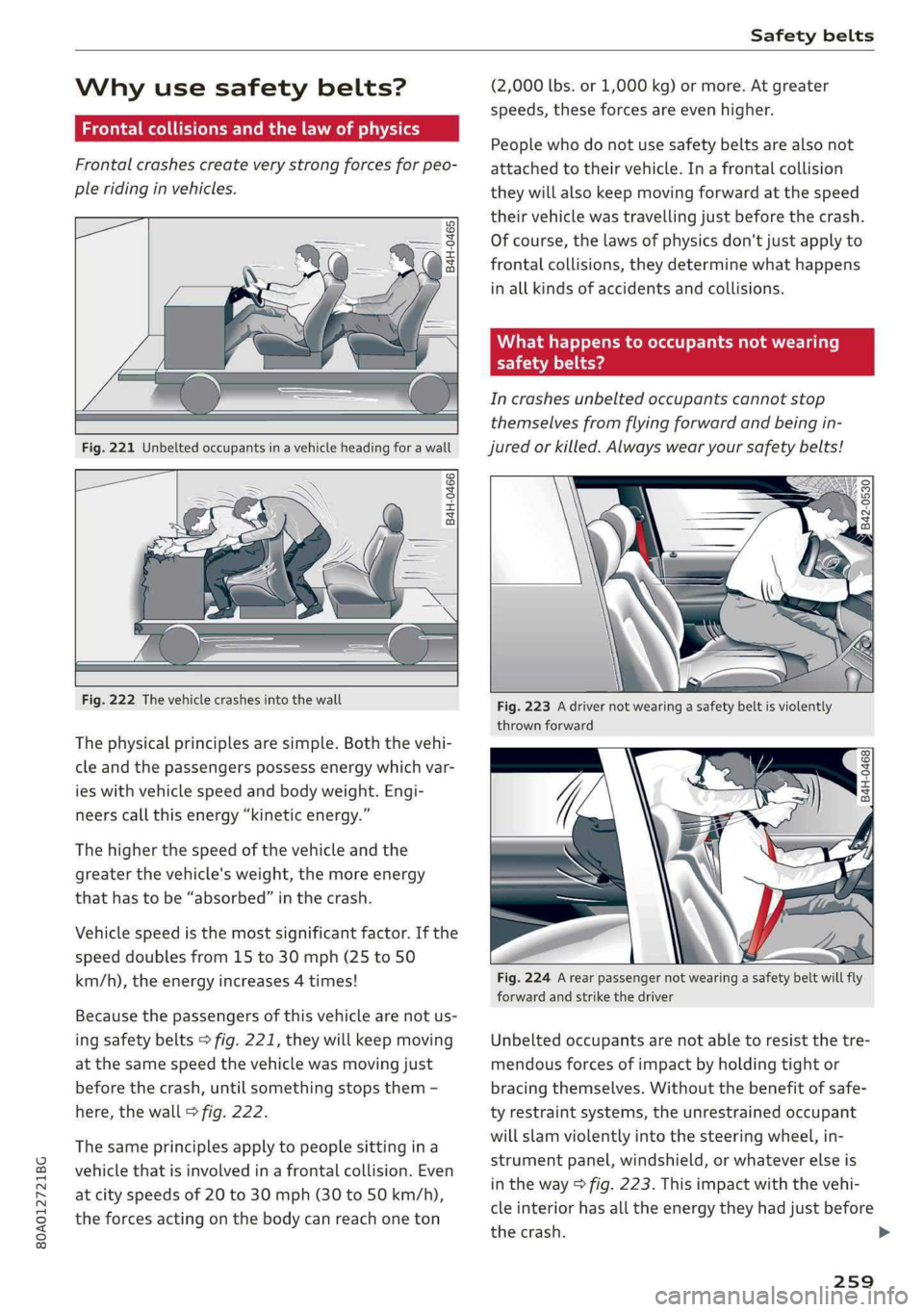
Becausethepassengersofthisvehiclearenotus-
ing
safetybelts>fig.221,theywillkeepmoving
atthesamespeedthevehiclewasmovingjust
beforethecrash,untilsomethingstopsthem-
here,thewall>fig.222.
Thesameprinciplesapplytopeoplesittingina
vehiclethatisinvolvedinafrontalcollision.Even
atcityspeedsof20to30mph(30to50km/h),
theforcesactingonthebodycanreachoneton
(2,000lbs.or1,000kg)ormore.Atgreater
speeds,theseforcesareevenhigher.
Peoplewhodonotusesafetybeltsarealsonot
attachedtotheirvehicle.Inafrontalcollision
theywillalsokeepmovingforwardatthespeed
theirvehiclewastravellingjustbeforethecrash.
Ofcourse,thelawsofphysicsdon'tjustapplyto
frontalcollisions,theydeterminewhathappens
inallkindsofaccidentsandcollisions.
Whathappenstooccupantsnotwearing
liamllieya
Incrashesunbeltedoccupantscannotstop
themselvesfromflyingforwardandbeingin-
juredorkilled.Alwayswearyoursafetybelts!
Fig.223Adrivernotwearingasafetybeltisviolently
thrownforward
Fig.224Arearpassengernotwearingasafetybeltwillfly
forwardandstrikethedriver
Unbeltedoccupantsarenotabletoresistthetre-
mendousforcesofimpactbyholdingtightor
bracingthemselves.Withoutthebenefitofsafe-
tyrestraintsystems,theunrestrainedoccupant
willslamviolentlyintothesteeringwheel,in-
strumentpanel,windshield,orwhateverelseis
intheway>fig.223.Thisimpactwiththevehi-
cleinteriorhasalltheenergytheyhadjustbefore
thecrash.
259
>