2019 AUDI E-TRON ECU
[x] Cancel search: ECUPage 98 of 310

Driving
ZA WARNING
— If you do not begin driving immediately af-
ter releasing the brake pedal, your vehicle
may begin to roll backward. Press the brake
pedal or set the parking brake immediately.
— The hill hold assist cannot hold the vehicle
on inclines in every scenario (for example,
on slippery or icy ground).
Messages
Take over!
If this message appears, press the brake pedal.
Special driving situations
Driving uphill and downhill
Please note the following when driving on in-
clines and hills:
— Drive slowly and carefully.
— Do not try to turn around if you cannot safely
drive on an incline or hill. Instead, drive in re-
verse.
— When driving down hills, use the recuperation
braking effect > page 90. This reduces the load
on the brakes.
— Use the hold assist if necessary > page 94
— Use the hill descent assist if necessary
=> page 97
ZA WARNING
— Only drive on inclines that your vehicle is de-
signed to handle. Do not exceed the hill
climbing ability of your vehicle. Your vehicle
could tip or slide.
— Do not drive at an angle on steep inclines
and hills. If your vehicle is about to tip, you
must immediately start steering in the di-
rection of the downward slope to reduce the
risk of an accident.
— Always be ready to brake when using the hill
descent control function.
96
Offroad driving
Your vehicle is not an offroad vehicle. Note the
following points when driving offroad:
— Drive slowly and carefully.
—To reduce the risk of underbody damage, pay
attention to the vehicle's ground clearance
= page 99 and drive across raised areas of the
ground with the wheels on one side of the vehi-
cle, instead of allowing the center of the vehi-
cle to pass over the raised areas.
—To reduce the risk of becoming stuck, drive
through sandy or swampy areas at a steady
speed and without stopping, if possible.
If necessary, use the following functions:
— Audi drive select* offroad mode > page 98
— Hill descent assist* > page 97
— Raising the vehicle > page 99
— Limit ESC > page 102
ZA\ WARNING
Only drive in terrain that is suitable for the ve-
hicle and your driving ability.
@) For the sake of the environment
Avoid actions that are damaging to the envi-
ronment. Show respect for the natural envi-
ronment and remain on marked routes.
(Gi) Tips
Clean your vehicle after driving offroad. Dirt
and stones falling off your vehicle can affect
other road users.
PUN Mele mules
If you must drive through water, follow these in-
structions:
— Check the stability of the ground, the current,
and the water depth. If the ground is unstable,
there is a strong current, or there are waves,
the water must only reach up to the lower edge
of the body at the most.
— Drive carefully and no faster than at walking
speeds to prevent the front of the vehicle from
creating waves, because they could splash >
Page 101 of 310

4KE012721BB
Driving dynamic
Suspension*
The suspension > page 99 adjusts to be tighter
or more comfort-oriented when it comes to
damping of uneven spots on the road.
The vehicle ground clearance is adjusted by the
air suspension* based on the setting.
Suspension
Adaptive dampers
Applies to: vehicles with suspension control
The adaptive dampers are an electronically-con-
trolled damping system. The firmness of the sus-
pension will adapt to the driving conditions and
the driving situation. The settings depend on the
selected Audi drive select* mode.
Air suspension
Applies to: vehicles with air suspension
The air suspension is an electronically-controlled
suspension and leveling system. The firmness of
the suspension will adapt to the driving condi-
tions and the driving situation. The system balan-
ces out changes in load. The vehicle level will also
adapt gradually to the vehicle speed in order to
reduce the wind resistance at high speeds and in-
crease the ground clearance at low speeds. The
settings depend on the selected Audi drive se-
lect* mode.
Displaying the vehicle level
> Applies to: MMI: Select on the home screen:
VEHICLE > Audi drive select.
The filled-in boxes represent the current vehicle
level. The more boxes that are filled in, the high-
er the ground clearance. The box that corre-
sponds with the current vehicle level will flash
while the vehicle is lifting or lowering. The target
level is indicated by a red outline.
Raising the vehicle
> Applies to: MMI: Select on the home screen:
VEHICLE > Audi drive select.
> Press Raise to reach the highest vehicle level
and thus the maximum ground clearance.
>» Press Lower to lower the vehicle down again.
The Audi drive select* mode will be changed if
necessary when the vehicle is raised.
The vehicle will lower when at speeds of approxi-
mately 22 mph (35 km/h) and lower. This func-
tion may only be used temporarily when in-
creased ground clearance is necessary. It is not
intended for long drives.
C) Note
When transporting the vehicle on a road carri-
er, rail carrier, ship carrier, or other carrier, it
may only be secured at the running surfaces
of the tires (circumference). Securing the ve-
hicle at the axle components, suspension
struts, or towing eyes is not permitted be-
cause the pressure in the air suspension
struts can change during transport. The vehi-
cle might not be secured sufficiently if this
happens.
Ground clearance
The vehicle height and clearance can be influ-
enced by the following factors:
— Change in temperature
— Change in load
— Change to the Audi drive select* mode
— Lifting and lowering via the air suspension*
Z\ WARNING
To reduce the risk of injury, make sure no one
gets pinched when the vehicle level is chang-
ing, for example when cleaning the under-
body or the wheel housings.
@) Note
Always make sure there is enough clearance
above and below the vehicle. This is especially
important for entrances with height restric-
tions, for example, before driving into under-
ground garages. You could also scrape the
ground when driving over the edges of curbs
or on steep ramps, which could damage your
vehicle.
99
Page 109 of 310

4KE012721BB
High-voltage system
— Installation and setup of the household con-
nection for Audi charging systems may only
be performed by a qualified electrician. The
qualified electrician is thereby responsible
for adhering to applicable standards and
regulations.
— Make sure that the selected charging port is
suitable for drawing the current specified on
the Audi charging system.
— Make sure that the household socket is
grounded and shielded from water.
— If Audi charging systems do not function ac-
cording to the specifications in the operat-
ing manual, they must not be used. Contact
an authorized Audi dealer or authorized Au-
di Service Facility.
— Audi charging systems are intended for use
in private and semi-private areas (for exam-
ple, private property and company parking
lots). Depending on the country, charging in
mode 2 may be forbidden in public areas
and public spaces. Contact an authorized
Audi dealer or authorized Audi Service Facili-
ty for more information.
— The Audi charging systems may only be used
with a power network that is grounded prop-
erly. It cannot be used with non-grounded
power networks (such as IT networks).
— When charging the high-voltage battery us-
ing household/industrial sockets, the elec-
trical installation is used at full capacity.
Having a qualified electrician regularly in-
spect the electrical installations that are
used for charging is recommended.
— Disconnect Audi charging systems from the
power network during a thunderstorm.
— Never submerge the Audi charging systems
or the connectors in water.
— Audi charging systems must only be cleaned
when the control unit is completely discon-
nected from the power supply and from the
vehicle. Use a dry towel to clean.
— Audi charging systems are only intended for
use on Audi vehicles and vehicles within the
Volkswagen Group. Using the devices on ve-
hicles made by another manufacturer is not
authorized.
CG) Note
— If the vehicle is not being used for long peri-
ods of time, the high-voltage battery must
be charged after four months at the latest
or the vehicle must be continuously con-
nected to a power source (for 50% charging
target > page 110). Otherwise, the high-
voltage battery could become damaged.
— Make sure that you always use the correct
charging equipment for the country in
which it is being used. Contact an author-
ized Audi dealer or authorized Audi Service
Facility for more information.
G) Tips
— Your vehicle can only be charged at charging
stations that meet the requirements in the
respective country and meet the following
standards, at a minimum:
— GB/T 18487.1 and GB/T 20234 (China)
— IEC 61851 and IEC 62196 (Europe)
— SAE J1772 (North America, Japan)
— You can use your Audi charging system if
there is a household or industrial connec-
tion available at the charging station.
@ Tips
Applies to: Audi charging systems
—For an uninterrupted charging process, we
recommend only charging using sockets
that are connected to a separately protected
circuit.
— It is recommended to use Audi charging sys-
tems in the wall mount clip* during opera-
tion. When this is not possible, always posi-
tion Audi charging systems on a secure sur-
face during the charging process.
—To reduce the risk of overheating during op-
eration, do not place Audi charging systems
in direct sunlight for long periods of time. If
the control unit is overheated, the charging
process is automatically paused until the
temperature has lowered back within the
normal range.
107
Page 111 of 310
4KE012721BB
High-voltage system
—If the battery has been charged to the desired
level, the charging unit cover will automatically
relock. Otherwise, the cover must be manually
locked. To do this, press the center of the but-
ton @,.
— Disconnect the charging cable from the power
supply if necessary or return it securely to the
charging station.
— Install the protective caps on the charging ca-
ble again.
— If you are transporting the charging cable in
the vehicle, store it securely > page 113.
If the charging connector cannot be removed,
you must unlock it manually > page 111.
ing, drive immediately to an authorized Audi
dealer or authorized Audi Service Facility
and have the malfunction corrected to re-
duce the risk of injury.
ZA WARNING
— When closing the cover on the charging
unit, make sure the area where the cover is
closing is clear to reduce the risk of injury.
— Do not disconnect the charging cable from
the socket or the vehicle charging port while
the vehicle is charging. End the charging
process before removing the charging cable
from the socket in order to reduce the risk of
damaging the connector contacts from
sparks.
— Never drive with the charging unit open. If
the cover on the charging unit is open, it
could hit other road users and potentially
cause injury.
— If a charging unit is damaged, the vehicle
must not be charged at the damaged charg-
ing port or at the charging port on the other
side* to reduce the risk of injury.
— If the charging unit is damaged or the
charging unit cover cannot close or is miss-
@) Note
— If you drive with an open charging unit, both
the cover and the electronics installed be-
hind it could be damaged. Check before ev-
ery drive after charging if the cover is
locked.
— Applies to: vehicles with charging ports on
the driver and front passenger’s side: Never
attempt to charge the vehicle using both
charging ports at the same time, because
this could damage the charging infrastruc-
ture.
(i) Tips
— Applies to: MMI: in addition to other set-
tings, you can also select if the charging
connector should be released automatically
after the immediate charging process is
complete. To do this, select on the home
screen: VEHICLE > Charging & Efficiency >
Charging > <3 > DC connector: unlock after
charging ends.
— The parking brake may make noises when
connecting the charging connector.
— Remove ice and snow in the charging unit
using a hand brush and solvent-free deicing
spray.
— The vehicle radio and TV systems may have
limited reception when charging the vehicle.
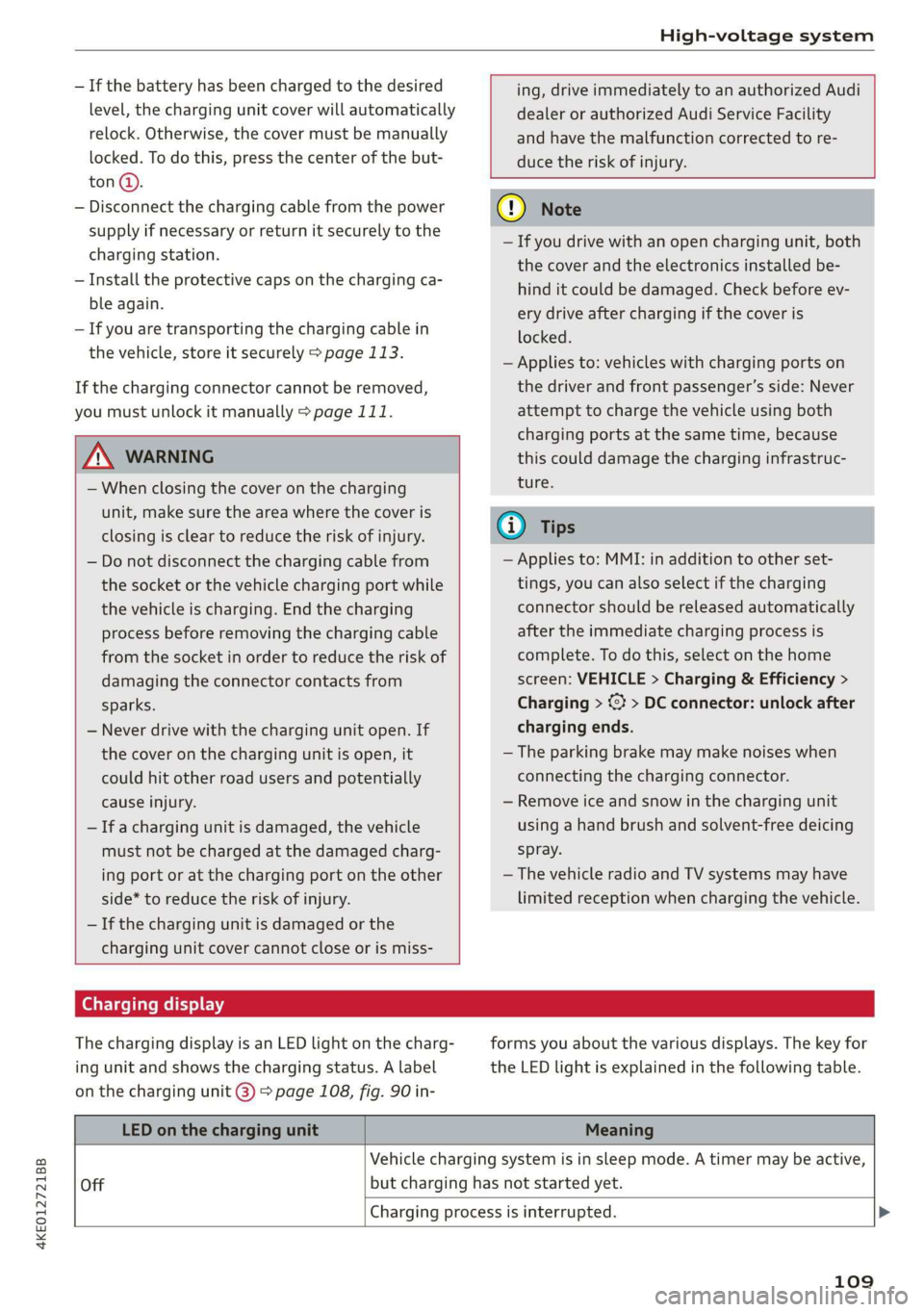
Charging display
The charging display is an LED light on the charg-
ing unit and shows the charging status. A label
on the charging unit @) > page 108, fig. 90 in-
forms you about the various displays. The key for
the LED light is explained in the following table.
LED on the charging unit Meaning
Vehicle charging system is in sleep mode. A timer may be active,
Off but charging has not started yet.
Charging process is interrupted. >
109
Page 112 of 310

High-voltage system
LED on the charging unit Meaning
White Pulsing
Connection between the power source and the vehicle is being
established.
Green
Pulsing The high-voltage battery is charging.
Flashing A timer is active, but charging has not started yet.
On High-voltage battery charging process is completed.
Yellow
On
No power supply was recognized even though the charging cable
is plugged in. Have the power supply or power supply system in-
spected. When using the Audi charging system, check the status
displays on the unit > table on page 115. See an authorized Au-
di dealer or authorized Audi Service Facility for assistance if nec-
essary.
Flashing
The vehicle is not secured from rolling away. Check if “P” is en-
gaged and the parking brake is set. If the LED continues to
flash, see an authorized Audi dealer or authorized Audi Service
Facility for assistance.
Red
On
The charging connector may not be able to lock correctly in the
vehicle charging port. Check if the charging connector is insert-
ed correctly. Remove the charging connector and plug it in the
charging port again, or use a different charging station. If the
LED stays turned on, there is a malfunction either in the vehicle
charging system or at the power source. See an authorized Audi
dealer or authorized Audi Service Facility for assistance if neces-
sary.
Both charging unit covers are open. Try to close one of the cov-
ers by hand. If the LED stays turned on, the high-voltage battery
may not be charging. See an authorized Audi dealer or author-
ized Audi Service Facility for assistance.
The outside temperature is too low or too high.
@ Tips
The operation status indicated by the LED on
> Applies to: MMI: Select on the home screen:
VEHICLE > Charging & Efficiency > Charging.
>» When the timer is displayed, swipe your finger
the charging unit are is displayed in the in-
strument cluster gy.
Setting the charging target
You can set the charging target, meaning you can
set the maximum charge level to which the high-
voltage battery should be charged. The charging
target can be set between 50% and 100%. For
daily usage, Audi recommends setting the charg-
ing target at 80%. This can extend the service life
of the high-voltage battery. Before long trips, Au-
di recommends setting the charging target at
100% for the highest possible range.
110
on the display toward the right.
> Press on the right section of the battery charge
level display.
> Set the desired charging target.
G) Tips
If you set the charging target lower than the
current battery charge level while charging,
then the charging process will be canceled. If
you set the charging target above the current
battery charge level again, then the charging
process will resume. This does not apply if you
are charging at a charging station, where you
have authenticated yourself manually. If this >
Page 114 of 310

High-voltage system
> Open the cover in the motor compartment on
the side of the applicable charging port.
> Loosen the yellow loop (2) from the retainer
and then pull on the loop carefully >@).
> Remove the charging connector.
> Drive to an authorized Audi dealer or author-
ized Audi Service Facility immediately to have
the malfunction corrected.
If the charging connector still cannot be removed
after using the emergency release, see an author-
ized Audi dealer or authorized Audi Service Facili-
ty for assistance.
After releasing manually, secure the loop(s) on
the retainer and close the cover in the motor
compartment.
() Note
Only pull on the loop until you feel resistance.
You
will not hear it release. If you continue to
pull, you could damage the emergency re-
lease mechanism.
Messages
If the or =] indicator light turns on, then the
range is low or very low. Charge the high-voltage
battery.
Esq Warning! Please check the charging unit
cover. See owner's manual
This message appears if the charging unit cover is
opened while driving. Stop the vehicle as soon as.
possible and try to close the cover using the but-
ton @ © page 108, fig. 89 or by hand. If the cov-
er cannot close and/or the message continues to
appear, drive to an authorized Audi dealer or au-
thorized Audi Service Facility immediately and
have the malfunction corrected > A\ in Charging
on page 109; >@ in Charging on page 109.
B AC charging system: malfunction! Please
contact Service
B DC charging system: malfunction! Please
contact Service
This message appears if there is a malfunction in
the charging system. Drive to an authorized Audi
112
dealer or authorized Audi Service Facility immedi-
ately.
Incompatible charging system. Please check
charging system
This message appears when the charging system
is incompatible. Only charge using the Audi
charging system that is designed for your vehicle.
EB charging system: malfunction
This message appears if there is a malfunction in
the vehicle charging infrastructure or the charg-
ing station. Use a different charging station. If
this message does not turn off, contact an au-
thorized Audi dealer or authorized Audi Service
Facility.
Charging equipment
Introduction
Depending on the vehicle equipment, the Audi e-
tron compact charging system may be available.
Using the charging equipment
Pay attention to the following information for
safe handling of the charging equipment:
— Secure the charging equipment against any
strain, such as being run over, falling, pulling,
bending, and crushing.
— Do not submerge the charging equipment in
water and do not cover it with snow or ice.
— Only pull at the plugs when removing the
charging cable from the vehicle and from the
power supply.
— Put the cap on after using the charging cable.
— Only operate the Audi charging system ina
power supply system with a frequency of
50 Hz/60 Hz.
— Only operate or store the Audi charging system
at a humidity level between 5% and 95% (no
condensation).
— The Audi charging system is protected against
dust and splashing water (IP55 (USA: Enclosure
3).
Depending on the country, different warnings
may be on the charging equipment.
Page 115 of 310

4KE012721BB
High-voltage system
Symbol Meaning Meaning
Operate or store the Audi charging
system at temperatures between
-22 °F (-30 °C) and +122 °F
(+50 °C).
Operate or store the Audi charging
system at a maximum elevation of
4000m_
13,000 ft (4,000 m) above sea lev-
el.
The Audi charging system is equip-
ped with a ground conductor that is
not connected.
©
The Audi charging system is equip-
ped with a connected ground con-
ductor.
&
Do not operate the Audi charging
system in power networks that are
not grounded (for example, IT net-
works). Only operate the Audi
charging system in grounded power
networks.
Surfaces can become very hot when
in direct sunlight.
Incorrect use increases the risk of
electric shock.
Pay attention to the applicable own-
er's manual, particularly the safety
precautions.
Pay attention to all applicable dis-
posal regulations when disposing.
Do not use any extensions cords or
cable reels.
Do not use any travel adapters.
y Do not use any charging cables with
oo, damage to the electronics or the
connecting wires.
Operate the Audi charging system
in single-phase power supplies.
Grounding instructions
Audi charging systems must be grounded. If it
should malfunction or break down, grounding
provides a path of least resistance for electric
current to reduce the risk of electric shock. Audi
charging systems are equipped with a cord hav-
ing an equipment grounding conductor and a
grounding plug. The plug must be plugged into
an appropriate outlet that is properly installed
and grounded in accordance with all local codes
and ordinances.
Z\ WARNING
Improper connection of the equipment-
grounding conductor is able to result in a risk
of electric shock. Check with a qualified elec-
trician or serviceman if you are in doubt as to
whether the product is properly grounded. Do
not modify the plug provided with the product
- if it will not fit the outlet, have a proper out-
let installed by a qualified electrician.
Always store the charging equipment securely
before transporting.
> Open the hood > page 236.
> Open the front storage compartment
=> page 76.
>» Stow the charging equipment in the front stor-
age compartment.
> Close the front storage compartment and the
hood.
Do not use any power strips.
Z\ WARNING
If the charging equipment is not secured or
positioned correctly, it can slide out of place
and endanger vehicle occupants when brak-
ing, when changing directions, or in a colli-
sion. >
113
Page 116 of 310

High-voltage system
— Only transport the charging equipment in
the front storage compartment and never
unsecured or in the passenger compart-
ment.
C@) Note
Always lift or carry the Audi charging system
as one unit and never by the cables.
Audi e-tron compact charging system
Applies to: vehicles with Audi e-tron compact charging system
o~ |
[RAZ-0605|
Fig. 92 Audi e-tron compact charging system: components
(example)
You can use the Audi e-tron compact charging
system to charge at a household or industrial
socket. Depending on the country and the vehicle
equipment, the following accessories may be
available:
@ Control unit
@ Vehicle cable with vehicle charging connector
@® Power cable with power plug for household
sockets
@ Power cable with power plug for industrial
sockets
The vehicle cable is securely connected to the
control unit. The power cable is plugged into the
upper end of the control unit and can be switched
=>page 118.
Control unit overview
® On/Off button, charging power level,
and LED
© _ |Status LED:
a Power supply/household
connection
Vehicle
Sa
0 Control panel
a Reset
114
Fig. 93 Audi e-tron compact charging system: control unit
Adjusting the charging power level
The control unit automatically recognizes the
voltage and the available current strength. You
can set whether you would like to charge with the
full or half of the charging power. With the
charging power level, you can reduce the risk of
the electrical installation becoming overheated.
—To set the charging power level, press the but-
ton©) & fig. 93.
— The charging power display appears. The set
value is displayed.