2018 PEUGEOT EXPERT buttons
[x] Cancel search: buttonsPage 61 of 416
59
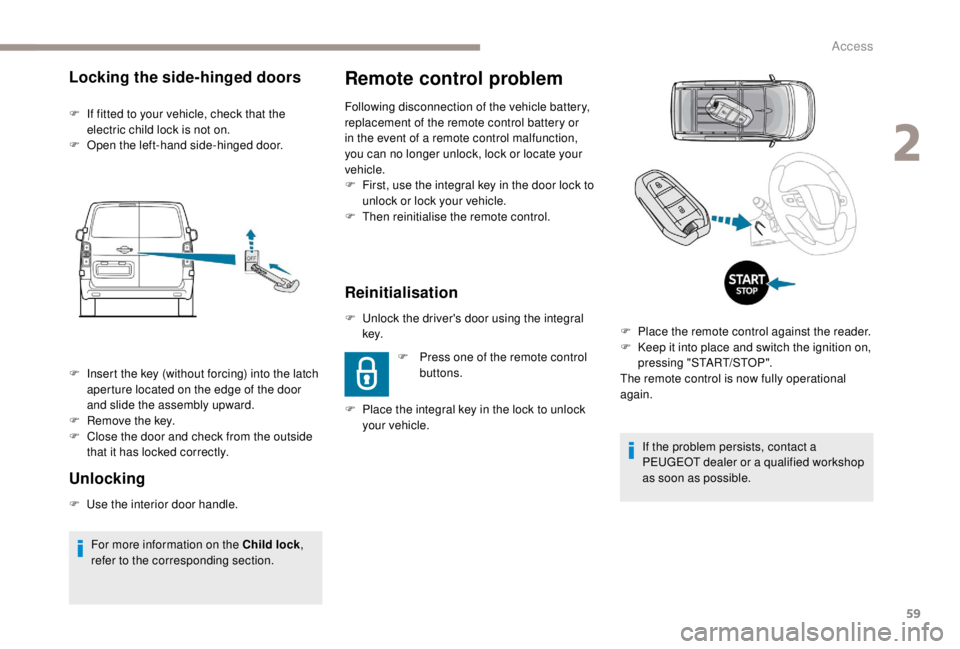
Remote control problem
Following disconnection of the vehicle battery,
replacement of the remote control battery or
in the event of a remote control malfunction,
you can no longer unlock, lock or locate your
vehicle.
F
F
irst, use the integral key in the door lock to
unlock or lock your vehicle.
F
T
hen reinitialise the remote control.
Reinitialisation
F Unlock the driver's door using the integral key.
F
P
lace the integral key in the lock to unlock
your vehicle. F
P
ress one of the remote control
buttons.
Locking the side-hinged doors
F If fitted to your vehicle, check that the electric child lock is not on.
F
O
pen the left-hand side-hinged door.
Unlocking
F Use the interior door handle.F
I
nsert the key (without forcing) into the latch
aperture located on the edge of the door
and slide the assembly upward.
F
R
emove the key.
F
C
lose the door and check from the outside
that it has locked correctly.
For more information on the Child lock ,
refer to the corresponding section. If the problem persists, contact a
PEUGEOT dealer or a qualified workshop
as soon as possible.
F
P
lace the remote control against the reader.
F
K
eep it into place and switch the ignition on,
pressing "START/STOP".
The remote control is now fully operational
again.
2
Access
Page 62 of 416
60
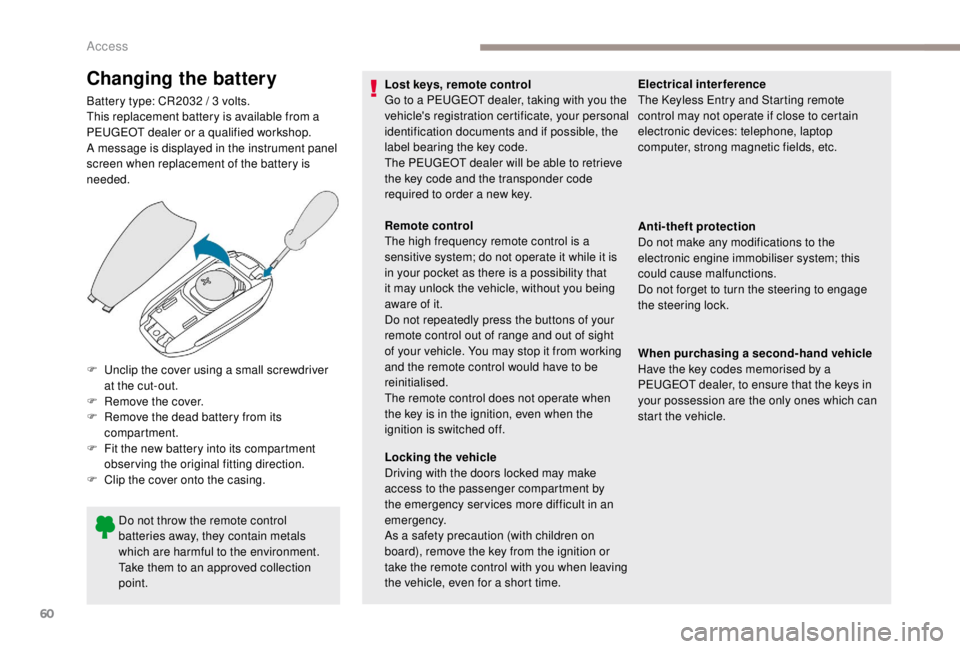
Changing the battery
Battery type: CR2032 / 3 volts.
T his replacement battery is available from a
PEUGEOT dealer or a qualified workshop.
A message is displayed in the instrument panel
screen when replacement of the battery is
needed.
Do not throw the remote control
batteries away, they contain metals
which are harmful to the environment.
Take them to an approved collection
point.
F
U
nclip the cover using a small screwdriver
at the cut-out.
F
R
emove the cover.
F
R
emove the dead battery from its
compartment.
F
F
it the new battery into its compartment
observing the original fitting direction.
F
C
lip the cover onto the casing. Lost keys, remote control
Go to a PEUGEOT dealer, taking with you the
vehicle's registration certificate, your personal
identification documents and if possible, the
label bearing the key code.
The PEUGEOT dealer will be able to retrieve
the key code and the transponder code
required to order a new key.
Remote control
The high frequency remote control is a
sensitive system; do not operate it while it is
in your pocket as there is a possibility that
it may unlock the vehicle, without you being
aware of it.
Do not repeatedly press the buttons of your
remote control out of range and out of sight
of your vehicle. You may stop it from working
and the remote control would have to be
reinitialised.
The remote control does not operate when
the key is in the ignition, even when the
ignition is switched off.
Locking the vehicle
Driving with the doors locked may make
access to the passenger compartment by
the emergency ser vices more difficult in an
emergency.
As a safety precaution (with children on
board), remove the key from the ignition or
take the remote control with you when leaving
the vehicle, even for a short time.Electrical interference
The
K eyless Entry and Starting remote
control may not operate if close to certain
electronic devices: telephone, laptop
computer, strong magnetic fields, etc.
Anti-theft protection
Do not make any modifications to the
electronic engine immobiliser system; this
could cause malfunctions.
Do not forget to turn the steering to engage
the steering lock.
When purchasing a second-hand vehicle
Have the key codes memorised by a
PEUGEOT dealer, to ensure that the keys in
your possession are the only ones which can
start the vehicle.
Access
Page 68 of 416

66
From inside
F Push the handle for ward to close the door, and, if necessary, lock the vehicle. For more information on the Key, Remote
control or
K
eyless Entr y and Star ting
,
and in particular unlocking the vehicle,
refer to the corresponding section.
If a sliding side door is not fully closed:
-
w
ith the vehicle stationary and the
engine running, this warning lamp
comes on, accompanied by an
alert message for a few seconds,
-
w
ith the vehicle moving (speed
above 6 mph (10 km/h)), this
warning lamp comes on,
accompanied by an audible signal
and an alert message for a few
seconds.
Electric sliding side
d o o r (s)
The exterior and interior door handles and the
interior buttons allow the electrically powered
movement of the door to be started.
Opening and closing of the doors is
accompanied by an audible signal.
Opening
From outside
Using the remote control
F With the door unlocked, press and hold this button until the
corresponding sliding side door
has opened.
Access
Page 69 of 416
67
F Press this button again to reverse the movement of the
d o o r.
The remote controls buttons are not active
with the ignition switched on.
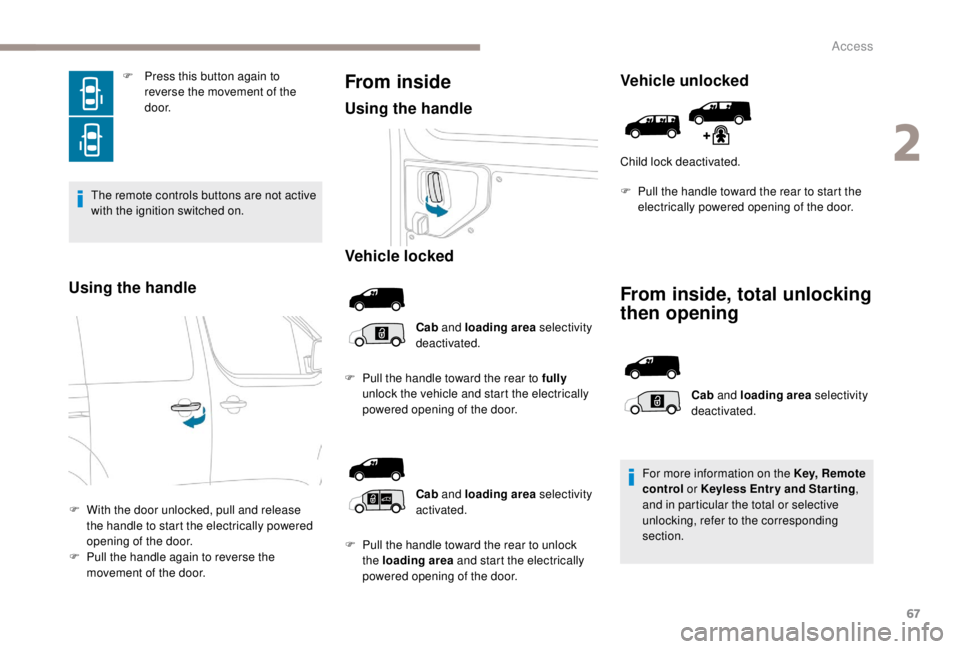
Using the handle
F With the door unlocked, pull and release the handle to start the electrically powered
opening of the door.
F
P
ull the handle again to reverse the
movement of the door.
From inside
Using the handle
Vehicle locked
Cab and loading area selectivity
deactivated.
F
P
ull the handle toward the rear to fully
unlock the vehicle and start the electrically
powered opening of the door.
Vehicle unlocked
Child lock deactivated.
From inside, total unlocking
then opening
Cab and loading area selectivity
activated.
F
P
ull the handle toward the rear to unlock
the loading area and start the electrically
powered opening of the door. Cab
and loading area selectivity
deactivated.
For more information on the Key, Remote
control or K eyless Entr y and Star ting
,
and in particular the total or selective
unlocking, refer to the corresponding
section.
F
P
ull the handle toward the rear to start the
electrically powered opening of the door.
2
Access
Page 71 of 416
69
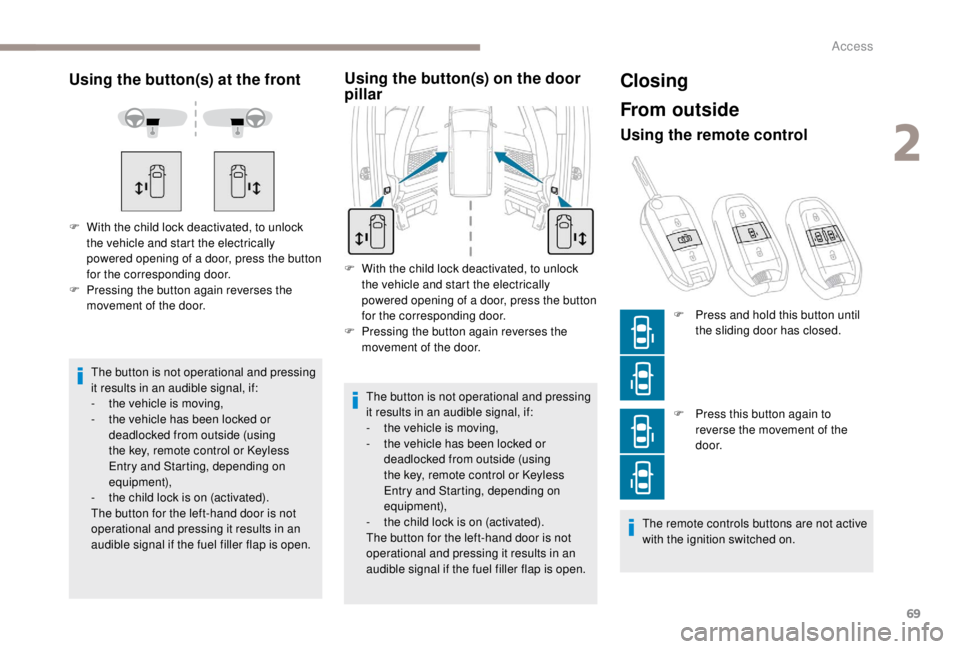
Using the button(s) at the front
The button is not operational and pressing
it results in an audible signal, if:
-
t
he vehicle is moving,
-
t
he vehicle has been locked or
deadlocked from outside (using
the key, remote control or Keyless
Entry and Starting, depending on
equipment),
-
t
he child lock is on (activated).
The button for the left-hand door is not
operational and pressing it results in an
audible signal if the fuel filler flap is open.
F
W
ith the child lock deactivated, to unlock
the vehicle and start the electrically
powered opening of a door, press the button
for the corresponding door.
F
P
ressing the button again reverses the
movement of the door.
Using the button(s) on the door
pillar
F With the child lock deactivated, to unlock the vehicle and start the electrically
powered opening of a door, press the button
for the corresponding door.
F
P
ressing the button again reverses the
movement of the door.
The button is not operational and pressing
it results in an audible signal, if:
-
t
he vehicle is moving,
-
t
he vehicle has been locked or
deadlocked from outside (using
the key, remote control or Keyless
Entry and Starting, depending on
equipment),
-
t
he child lock is on (activated).
The button for the left-hand door is not
operational and pressing it results in an
audible signal if the fuel filler flap is open.
Closing
From outside
Using the remote control
F Press this button again to reverse the movement of the
d o o r.
The remote controls buttons are not active
with the ignition switched on. F
P
ress and hold this button until
the sliding door has closed.
2
Access
Page 118 of 416
116
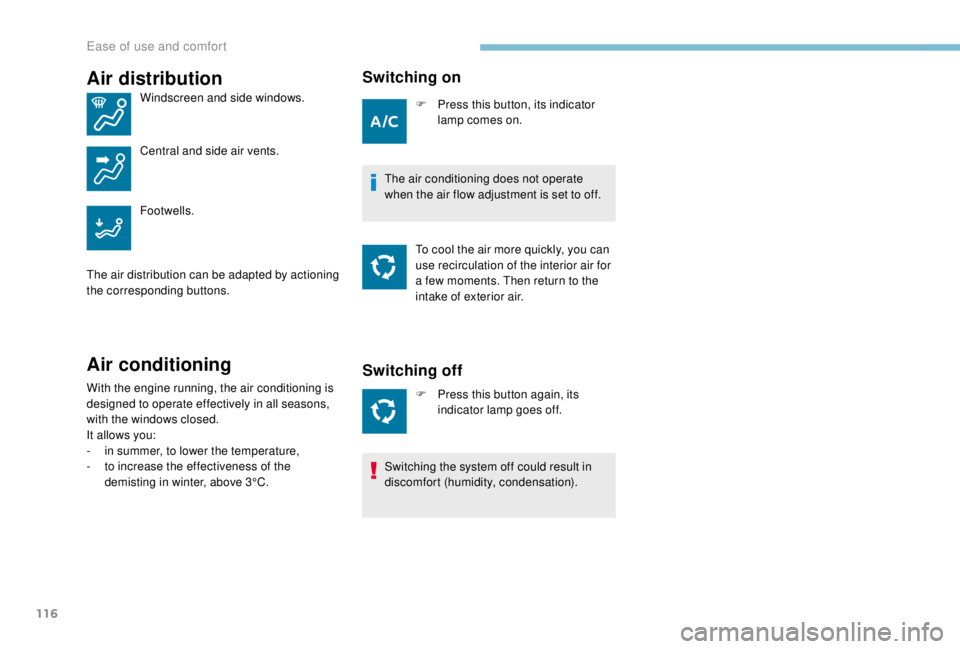
Air distribution
Windscreen and side windows.
Central and side air vents.
Footwells.
The air distribution can be adapted by actioning
the corresponding buttons.
Air conditioning
With the engine running, the air conditioning is
designed to operate effectively in all seasons,
with the windows closed.
It allows you:
-
i
n summer, to lower the temperature,
-
t
o increase the effectiveness of the
demisting in winter, above 3°C.
Switching on
F Press this button, its indicator lamp comes on.
The air conditioning does not operate
when the air flow adjustment is set to off. To cool the air more quickly, you can
use recirculation of the interior air for
a few moments. Then return to the
intake of exterior air.
Switching off
F Press this button again, its indicator lamp goes off.
Switching the system off could result in
discomfort (humidity, condensation).
Ease of use and comfort
Page 146 of 416

144
Geolocation
Press this button for more than
2 seconds to request assistance
if the vehicle breaks down.
A voice message confirms that the call has
been made**. Pressing this button again
immediately cancels the request.
The cancellation is confirmed by a voice
message.
If an impact is detected by the airbag
control unit, and independently of the
deployment of any airbags, an emergency
call is made automatically.Operation of the system
When the ignition is switched on,
the green indicator lamp comes
on for 3
seconds indicating that
the system is operating correctly.
For all countries except Russia, Belarus
and Kazakhstan. The red indicator lamp flashes
then goes off: there is a system
fault.
The red indicator lamp is on continuously:
replace the back-up battery.
For Russia, Belarus and Kazakhstan. The red indicator lamp is on
continuously: there is a system
fault.
The red indicator lamp flashes: replace the
back-up battery.
In either case, the emergency and assistance
calls may not function.
Contact a qualified repairer as soon as
possible. The fault with the system does not prevent
the vehicle from being driven.
Peugeot Connect
Assistance
** As per the geographic coverage of
"Peugeot Connect SOS", "Peugeot Connect
Assistance" and the official national
language chosen by the owner of the
vehicle.
T
he list of countries covered and PEUGEOT
CONNECT services is available from
dealers or on the website for your country. You can deactivate geolocation by
simultaneously pressing the "Peugeot Connect
SOS" and "Peugeot Connect Assistance"
buttons, followed by a press on "Peugeot
Connect Assistance" to confirm.
To reactivate geolocation, simultaneously press
the "Peugeot Connect SOS" and "Peugeot
Connect Assistance" buttons again, followed
by a press on "Peugeot Connect Assistance"
to confirm.
If you purchased your vehicle outside the
Brand network, we invite you to have a
dealer check
the configuration of these services and,
if desired, modify it to suit
your wishes. In a multilingual country,
configuration is possible in the official
national language of your choice.
Safety
Page 203 of 416
201
For more information on Navigation, refer
to the Audio equipment and telematics
section.
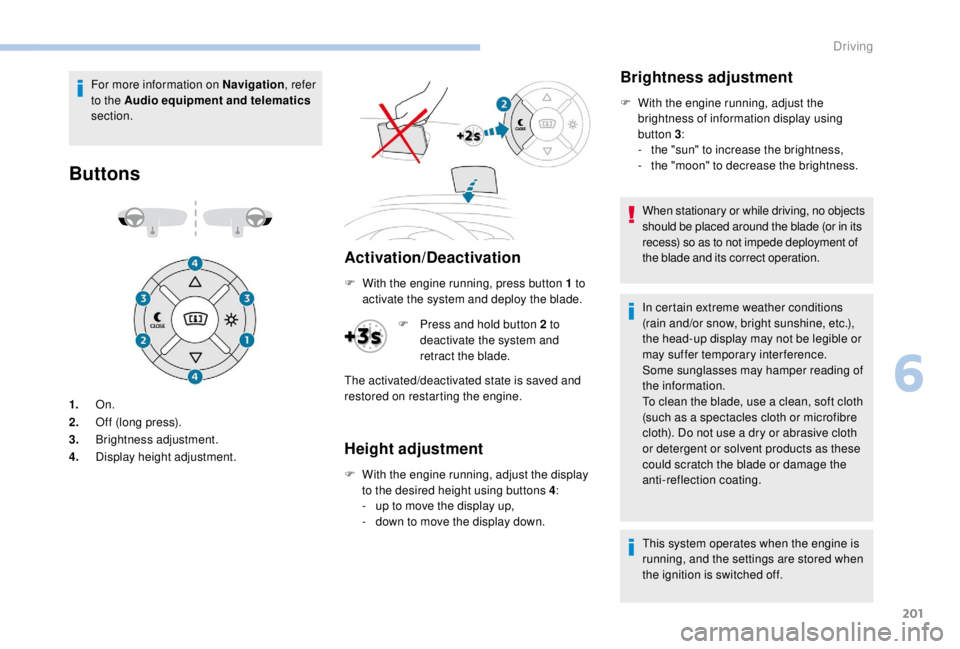
Buttons
Activation/Deactivation
1. On.
2. Off (long press).
3. Brightness adjustment.
4. Display height adjustment. F
W
ith the engine running, press button 1 to
activate the system and deploy the blade.
Height adjustment
F With the engine running, adjust the display to the desired height using buttons 4 :
-
u
p to move the display up,
-
d
own to move the display down.
Brightness adjustment
F With the engine running, adjust the brightness of information display using
button 3 :
-
t
he "sun" to increase the brightness,
-
t
he "moon" to decrease the brightness.
When stationary or while driving, no objects
should be placed around the blade (or in its
recess) so as to not impede deployment of
the blade and its correct operation.
In certain extreme weather conditions
(rain and/or snow, bright sunshine, etc.),
the head-up display may not be legible or
may suffer temporary interference.
Some sunglasses may hamper reading of
the information.
To clean the blade, use a clean, soft cloth
(such as a spectacles cloth or microfibre
cloth). Do not use a dry or abrasive cloth
or detergent or solvent products as these
could scratch the blade or damage the
anti-reflection coating.
This system operates when the engine is
running, and the settings are stored when
the ignition is switched off.
F
P
ress and hold button 2
to
deactivate the system and
retract the blade.
The activated/deactivated state is saved and
restored on restarting the engine.
6
Driving