Page 292 of 547

HOW TO USE THE AUTOMATIC
BRAKE HOLD FUNCTION
For additional information on using the au-
tomatic brake hold function, refer to the
instructions outlined in this section.
To maintain braking force
automatically
With the automatic brake hold function ac-
tivated and the automatic brake hold indi-
cator light (white) illuminated on the meter,
depress the braking pedal to stop the ve-
hicle. The brake force is automatically ap-
plied without your foot depressed on the
brake pedal. While the brake hold is main-
tained, the automatic brake hold indicator
light (green) illuminates on the meter.
To start the vehicle from a
standstill
With the shif t lever not in the P (Park) or N
(Neutral) position, depress the accelerator
pedal while the brake force is maintained.
The brake force will automatically be re-
leased to restart the vehicle.
The automatic brake hold indicator light
(white) on the meter illuminates and the
automatic brake hold returns to standby.
Parking
When the shif t lever is in the P (Park) posi-
tion with the brake force maintained by the
automatic brake hold function, the parking
brake will automatically be applied and the
brake force of the automatic brake hold will
be released. The automatic brake hold in-
dicator light turns off. When the parking
brake is applied with the brake force main-
tained by the automatic brake hold func-
tion, the brake force of the automatic brake
hold will be released. The automatic brake
hold indicator light turns off.
NOTE:∙ Under the following conditions, the
parking brake will automatically be
applied and the brake force of the au-
tomatic brake hold will be released:
– The braking force is applied by the
automatic brake hold function for
3 minutes or longer
– The driver’s seat belt is unfastened
– The ignition switch is placed in the
OFF position
– If a malfunction occurs in the au-
tomatic brake hold function ∙
When the vehicle stops, but the brake
force is not automatically applied, de-
press the brake pedal firmly until the
automatic brake hold indicator light
(green) illuminates.
Automatic brake hold function
display
The automatic brake hold function status
can be checked in the “Chassis Control”
mode in the vehicle information display.
For additional information, refer to “Vehicle
information display” in the “Instruments
and controls” section of this manual.
5-32Starting and driving
Page 293 of 547

The SPORT mode switch adjusts the en-
gine and transmission points to enhance
performance. Push the SPORT mode
switch on the instrument panel to activate.
The SPORT mode indicator appears in the
vehicle information display.
NOTE:
In the SPORT mode, fuel economy may
be reduced.The ECO mode helps to enhance the fuel
economy by controlling the throttle sensi-
tivity and transmission points.
To turn on the ECO mode, push the ECO
mode switch. The ECO mode indicator light
(on the meter) will remain lit while the
mode is active.
To turn off the ECO mode, push the ECO
mode switch again. The ECO mode indica-
tor light (on the meter) will turn off.The ECO mode cannot be turned off while
the accelerator pedal is depressed, even if
the ECO mode switch is pushed to OFF.
Release the accelerator pedal to turn off
the ECO mode.
The ECO mode will turn off automatically if
a malfunction occurs in the system.
Turn off the ECO mode or depress the ac-
celerator pedal fully when:
∙ Driving with a heavy load of passengers or cargo in the vehicle
∙ Driving on a steep uphill slope
∙ ECO mode may affect air conditioner performance
NOTE:
Selecting this drive mode will not neces-
sarily improve fuel economy as many
driving factors influence its effective-
ness.
LIC2417LIC2416
SPORT MODE SWITCH ECO MODE SWITCH
Starting and driving5-33
Page 301 of 547

Driving aid selection in vehicle infor-
mation displayEngine started
ProPILOT Assist switch pressed to the
ON position and the icon illuminates ProPILOT Assist set (Blue Cruise indi-
cator illuminated)
Lane Departure
Warning Intelligent Lane
Intervention Lane Departure
WarningIntelligent Lane
InterventionLane Departure
WarningIntelligent Lane
InterventionLane Departure
WarningIntelligent Lane
Intervention
No lane warnings No lane interven- tionNo lane warnings No lane interven-
tionLane warnings
activeLane intervention
active
x No lane warnings No lane interven-
tionLane warnings
activeLane intervention
activeLane warnings
activeLane intervention
active
x Lane warnings
activeNo lane interven-
tionLane warnings
activeNo lane interven-
tionLane warnings
activeLane intervention
active
x x Lane warnings
activeNo lane interven-
tionLane warnings
activeLane intervention
activeLane warnings
activeLane intervention
active
HOW TO ENABLE/DISABLE THE I-LI
SYSTEM
Perform the following steps to enable or
disable the I-LI system.
1. Press the
button until “Settings”
displays in the vehicle information dis-
play. Use the
button to select
“Driver Assistance.” Then press the OK
button.
2. Select “Driving Aids” and press the OK button.
3. To set the I-LI system to on or off, use the
buttons to navigate in the
menu and use the OK button to select
or change an item: ∙ Select “Lane” and press the OK but-
ton.
– To turn on the warning system, use the OK button to check the box for
“Prevention (LDP).”
NOTE:
Turning on the ProPILOT Assist system (if
so equipped) will turn on the I-LI system
at the same time. For additional infor-
mation, refer to “ProPILOT Assist” in this
section.
I-LI SYSTEM LIMITATIONS
WARNING
Listed below are the system limitations
for the I-LI system. Failure to follow the
warnings and instructions for proper
use of the I-LI system could result in
serious injury or death.
∙ The I-LI system may activate if you change lanes without first activating
your turn signal or, for example, if a
construction zone directs traffic to
cross an existing lane marker. If this
occurs you may need to apply correc-
tive steering to complete your lane
change.
Starting and driving5-41
Page 309 of 547

HOW TO ENABLE/DISABLE THE
BSW SYSTEM
Perform the following steps to enable or
disable the BSW system.1. Press the
button until “Settings”
displays in the vehicle information dis-
play. Use the
button to select
“Driver Assistance.” Then press the OK
button.
2. Select “Driving Aids” and press the OK button.
3. Select “Blind Spot” and press the OK button.
– To turn on the warning system, use the OK button to check the box for
“Warning (BSW).”
NOTE:
When enabling/disabling the system,
the system will retain current settings
even if the engine is restarted.
BSW SYSTEM LIMITATIONS
WARNING
Listed below are the system limitations
for the BSW system. Failure to operate
the vehicle in accordance with these
system limitations could result in seri-
ous injury or death.
∙ The BSW system cannot detect all ve- hicles under all conditions.
∙ The radar sensors may not be able to detect and activate BSW when certain
objects are present such as:
– Pedestrian, bicycles, animals.
– Vehicles such as motorcycles, low height vehicles, or high ground
clearance vehicles.
– Oncoming vehicles.
– Vehicles remaining in the detec- tion zone when you accelerate
from a stop.
– A vehicle merging into an adjacent lane at a speed approximately the
same as your vehicle.
– A vehicle approaching rapidly from behind. – A vehicle which your vehicle over-
takes rapidly.
– A vehicle that passes through the detection zone quickly.
– When overtaking several vehicles in a row, the vehicles af ter the first
vehicle may not be detected if they
are traveling close together.
∙ The radar sensor’s detection zone is designed based on a standard lane
width. When driving in a wider lane,
the radar sensors may not detect ve-
hicles in an adjacent lane. When driv-
ing in a narrow lane, the radar sensors
may detect vehicles driving two lanes
away.
∙ The radar sensors are designed to ig- nore most stationary objects; how-
ever, objects such as guardrails, walls,
foliage and parked vehicles may oc-
casionally be detected. This is a nor-
mal operation condition.
∙ The following conditions may reduce the ability of the radar to detect other
vehicles:
– Severe weather
– Road spray
Starting and driving5-49
Page 311 of 547
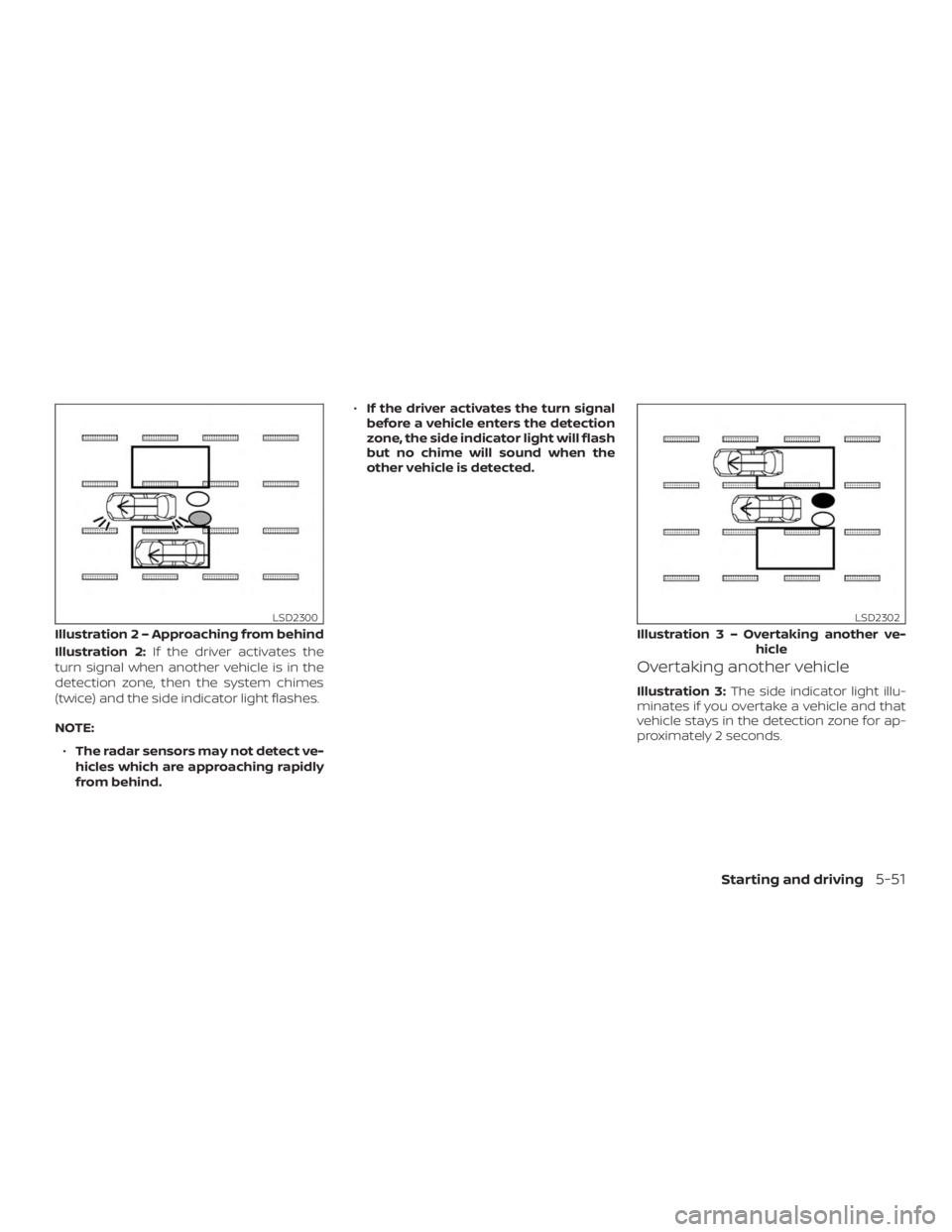
Illustration 2:If the driver activates the
turn signal when another vehicle is in the
detection zone, then the system chimes
(twice) and the side indicator light flashes.
NOTE:
∙ The radar sensors may not detect ve-
hicles which are approaching rapidly
from behind. ∙
If the driver activates the turn signal
before a vehicle enters the detection
zone, the side indicator light will flash
but no chime will sound when the
other vehicle is detected.
Overtaking another vehicle
Illustration 3: The side indicator light illu-
minates if you overtake a vehicle and that
vehicle stays in the detection zone for ap-
proximately 2 seconds.
Illustratio n 2 – Approaching from behind
LSD2300
Illustration3–Over taking another ve-
hicle
LSD2302
Starting and driving5-51
Page 312 of 547
Illustration 4:If the driver activates the
turn signal while another vehicle is in the
detection zone, then the system chimes
(twice) and the side indicator light flashes.
NOTE:
∙ When overtaking several vehicles in a
row, the vehicles af ter the first vehicle
may not be detected if they are trav-
eling close together.
∙ The radar sensors may not detect
slower moving vehicles if they are
passed quickly. ∙
If the driver activates the turn signal
before a vehicle enters the detection
zone, the side indicator light will flash
but no chime will sound when the
other vehicle is detected. .Entering from the side
Illustration 5:The side indicator light illu-
minates if a vehicle enters the detection
zone from either side.
Illustratio n4–Over taking another ve-
hicle
LSD2303
Illustratio n 5 – Entering from the side
LSD2305
5-52Starting and driving
Page 313 of 547
Illustration 6:If the driver activates the
turn signal while another vehicle is in the
detection zone, then the system chimes
(twice) and the side indicator light flashes.
NOTE:
∙ If the driver activates the turn signal
before a vehicle enters the detection
zone, the side indicator light will flash
but no chime will sound when the
other vehicle is detected. ∙
The radar sensors may not detect a
vehicle which is traveling at about the
same speed as your vehicle when it
enters the detection zone.
Illustratio n 6 – Entering from the side
LSD2308
Starting and driving5-53
Page 314 of 547
SYSTEM TEMPORARILY
UNAVAILABLE
When radar blockage is detected, the sys-
tem will be deactivated automatically. The
“Side Radar Obstruction” warning message
will appear in the vehicle information dis-
play.
The system is not available until the condi-
tions no longer exist.
The radar sensors may be blocked by tem-
porary ambient conditions such as splash-
ing water, mist or fog. The blocked condi-
tion may also be caused by objects such as
ice, frost or dirt obstructing the radar sen-
sors.
NOTE:
If the BSW system stops working, the
RCTA system will also stop working.
Action to take:
When the above conditions no longer exist,
the system will resume automatically.
LSD2735
5-54Starting and driving