2018 MERCEDES-BENZ SPRINTER reset
[x] Cancel search: resetPage 172 of 294

XPress theWorX button to select the
Clock/Datesubmenu.
XPress the 9button to select Set clockHoursorMinutes.
XPress the WorX button to set the val-
ues.
Selecting the time format
Using the steering wheel buttons
XPress the VorU button repeatedly
until the Settingsmenu appears in the dis-
play.
XPress the 9button to switch to the sub-
menu selection.
XPress the WorX button to select the
Clock/Datesubmenu.
XPress the 9button to select the 12/24 hfunction.
The selection marker is on the current setting.
XPress theWorX button to select the
12 hor 24 hclock format.
Lighting submenu
Activating/deactivating Highbeam Assist
Using the steering wheel buttons
XPress the VorU button repeatedly
until the Settingsmenu appears in the dis-
play.
XPress the 9button to switch to the sub-
menu selection.
XPress the WorX button to select the
Lightingsubmenu.
XPress the 9button to select the High‐beam Assistfunction.
The selection marker is on the current setting.
XPress the WorX button to switch
Highbeam Assist OnorOff.
iFor safety reasons, it is not possible to reset
the HighbeamAssistfunction to the factory
settings during a journey. You will see the fol-
lowing message in the display: Setting
only possible at standstill.
For further information about Highbeam Assist,
see (
Ypage 86).
Switching the daytime running lamps on/
off
If you switch the daytime running lamps to On,
the daytime running lamps will automatically
light up when the engine is running.
For safety reasons, it is only possible to change
this setting when the vehicle is stationary. The
factory setting is On
in countries in which day-
time running lamp mode or daytime running
lamps are mandatory.
Using the steering wheel buttons
XPress the VorU button repeatedly
until the Settingsmenu appears in the dis-
play.
XPress the 9button to switch to the sub-
menu selection.
XPress the WorX button to select the
Lightingsubmenu.
XPress the 9button to select the Daytimedriv. lightsfunction.
The selection marker is on the current setting.
XPress the WorX button to switch the
daytime running lamps OnorOff.
iIf you turn the light switch to TorL,
the corresponding lamp switches on. If you
turn the light switch to Ã, the daytime
running lamps remain switched on.
iFor safety reasons, it is not possible to reset
the Daytime driv. lightsfunction to the
factory setting while the vehicle is in motion.
170On-board computer (vehicles with steering wheel buttons)
On-board computer and displays
Page 175 of 294

Trip computer menu
General notes
You can call up or reset statistical data for the
vehicle in the Trip computer menu.
iWhen you call up the trip computer again, it
displays the last function called up.
The units of the statistical information dis-
played are set permanently for each specific
country, and are therefore independent of the
units selected in the Settings
menu.
Trip computer "From Start" or "From
Reset"
Example: "After start" trip computer
:
Distance
;Time
=Average speed
?Average fuel consumption
Using the steering wheel buttons
XPress the VorU button to select
After start.
or
XPress the 9or: button to select
After reset.
The values in the After
startsubmenu refer to
the start of the journey. The values in the After
resetsubmenu refer to the last reset of the trip
computer.
The After start
trip computer function is
automatically reset if:
Rthe ignition has been switched off for more
than 4 hours.
R999 hours have been exceeded.
R9,999 miles have been exceeded.
The After
resettrip computer is automatically
reset if the value exceeds 9,999 hours or
99,999 miles.
iIf you turn the key to position 0in the igni-
tion lock or remove it, all the values are reset
after approximately four hours.
The values will not be reset if you turn the key
back to position 1or 2during this time.
Calling up the range
Using the steering wheel buttons
XPress the VorU button to select
After start.
XPress the 9or: button to select
Range.
The approximate distance which can be cov-
ered with the tank's current contents and
your current style of driving is shown.
iIf there is only a small amount of fuel left in
the fuel tank, the 7Please refuelmes-
sage is shown instead of the range.
Resetting the trip computer
Using the steering wheel buttons
XPress the VorU button to select
After start.
XPress the 9or: button to select the
function you would like to reset.
XPress and hold the 9reset button until the
values are reset to "0".
Telephone menu
Introduction
GWARNING
If you operate information systems and com-
munication equipment integrated in the vehi-
cle while driving, you will be distracted from
traffic conditions. You could also lose control
of the vehicle. There is a risk of an accident.
Only operate the equipment when the traffic
situation permits. If you are not sure that this
is possible, park the vehicle paying attention
to traffic conditions and operate the equip-
ment when the vehicle is stationary.
You must observe the legal requirements of the
country in which you are currently driving when
operating a mobile phone in the vehicle. If it is
On-board computer (vehicles withsteering whee lbu ttons)173
On-board computer and displays
Z
Page 177 of 294
When a connection is established, the name
of the other person and/or the call duration
appear in the display.
or
XTo exit the redial memory: press the~
button.
Display messages
Notes on display messages
Important safety notes
GWARNING
If the instrument display fails or is malfunc-
tioning, you may not recognize limitations in
the functions of systems relevant to safety.
The operating safety of your vehicle could be
affected. There is a risk of an accident.
Drive on carefully. Have the vehicle checked
at a qualified specialist workshop immedi-
ately.
iIf you turn the key to position 2in the igni-
tion, a display check is performed. All warning
and indicator lamps (except the turn signal
indicator lamps) and the display are activa-
ted. Before starting the journey, check that
the warning and indicator lamps are operating
correctly.
Vehicles without steering wheel but-
tons
Warnings, malfunctions or additional informa-
tion may also be shown in the display. The fol-
lowing tables show all the display messages. A
warning tone sounds with certain display mes-
sages.
Vehicles with steering wheel buttons
The on-board computer shows warnings, mal-
functions or additional information in the dis- play. A warning tone sounds with certain display
messages. Display messages of a high priority
are shown in red.
Please respond in accordance with the display
messages and follow the additional notes in this
Operator's Manual.
You can hide low-priority display messages by
pressing the
V,U,9or: button
on the steering wheel or the 9reset button.
You cannot hide display messages of the highest
priority. These messages will continue to be
shown in the display until their cause has been
eliminated.
The on-board computer stores certain display
messages in the message memory
(
Ypage 175).
Message memory
The on-board computer only records and shows
malfunctions and warnings from certain sys-
tems. Therefore, make sure that your vehicle is
safe to use. You could otherwise cause an acci-
dent by driving an unsafe vehicle.
The on-board computer stores certain display
messages. In the Message memory menu, you
can call up stored display messages.
Using the steering wheel buttons
XPress the VorU button repeatedly
until the number of stored display messages,
e.g. 2 messages
, appears in the display.
If no malfunctions have occurred, the No
messagesmessage appears.
XScroll through the stored display messages
with the9or: button.
XTo exit the message memory menu: press
the V orU button.
When you switch off the ignition, all display mes-
sages are deleted from the message memory.
You can only remove the key when it is in the
basic position.
Display messages175
On-board computer and displays
Z
Page 233 of 294
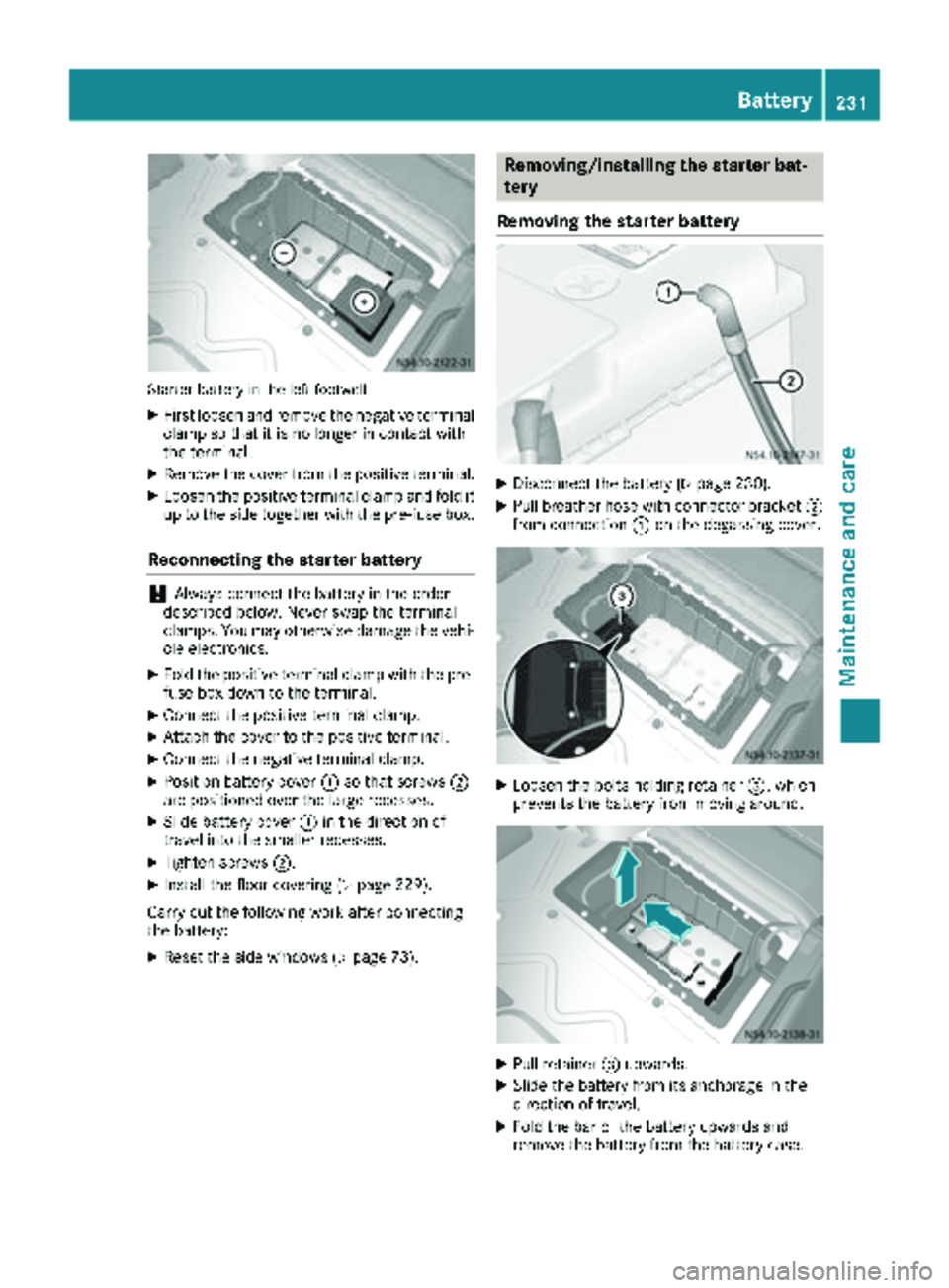
Starter battery in the left footwell
XFirst loosen and remove the negative terminal
clamp so that it is no longer in contact with
the terminal.
XRemove the cover from the positive terminal.
XLoosen the positive terminal clamp and fold it
up to the side together with the pre-fuse box.
Reconnecting the starter battery
!Always connect the battery in the order
described below. Never swap the terminal
clamps. You may otherwise damage the vehi-
cle electronics.
XFold the positive terminal clamp with the pre-
fuse box down to the terminal.
XConnect the positive terminal clamp.
XAttach the cover to the positive terminal.
XConnect the negative terminal clamp.
XPosition battery cover :so that screws ;
are positioned over the large recesses.
XSlide battery cover :in the direction of
travel into the smaller recesses.
XTighten screws ;.
XInstall the floor covering (Ypage 229).
Carry out the following work after connecting
the battery:
XReset the side windows (Ypage 73).
Removing/installing the starter bat-
tery
Removing the starter battery
XDisconnect the battery (Ypage 230).
XPull breather hose with connector bracket ;
from connection :on the degassing cover.
XLoosen the bolts holding retainer =, which
prevents the battery from moving around.
XPull retainer =upwards.
XSlide the battery from its anchorage in the
direction of travel.
XFold the bar of the battery upwards and
remove the battery from the battery case.
Battery231
Maintenance and care
Z
Page 234 of 294

Installing the starter battery
XInsertth ebattery int oth ebattery case.
XFold down th ebar of th ebattery.
XSlide th ebattery int oits anchorage in th e
opposit edirection to th edirection of travel .
XInsertretainer =.
XTightenth ebolt son retainer =whic hhold s
th ebattery in place.
XAttac hbreather hos ewit hconnecto r
bracke t; to connection :of th eventilation
cover .
XConnect th ebattery (Ypage 230).
Disconnecting and connecting the
additional battery (engine compart-
ment)
Important safety notes
GWARNIN G
During th echarging process, abattery produ-
ce shydrogen gas. If ashort circuit occur sor
sparks are created, th ehydrogen gas can
ignite. Ther eis aris kof an explosion .
RMakesur ethat th epositive termina lof a
connecte dbattery does no tcome int ocon-
tac twit hvehicl eparts.
RNever plac emetal objects or tools on abat -
tery.
RIt is important that you observ eth edescri-
bed order of th ebattery terminals when
connecting and disconnecting abattery.
RWhen jump-starting ,mak esur ethat th e
battery pole swit hidentical polarit yare
connected.
RIt is particularly important to observ eth e
describe dorder when connecting and dis-
connecting th ejumper cables.
RNever connec tor disconnect th ebattery
terminals while th eengin eis running.
Disconnecting the additional battery
!Switc hoff th eengin eand remove th eke y
from th eignition lock. Firstly remove th ebat -
tery terminals. Otherwise, you could destroy electronic component
ssuc has th ealterna-
tor.
Always disconnect th estarter battery in th e
battery cas ein th eleft-han dside footwell
first .
!Always disconnect th ebattery in th eorder
describe dbelow. Never swap th etermina l
clamps. You may otherwise damag eth evehi-
cle electronics .
Additional battery in th eengin ecompartmen t
XSwitchoff all electrical consumers.
XSwitc hoff th eengin eand remove th eke y
from th eignition lock.
XOpen th ehoo d (Ypage 219).
XFirst loosen and remove th enegative termina l
clam pso that it is no longer in contact wit h
th eterminal.
XRemove th ecover from th epositive terminal.
XLoosen and remove th epositive termina l
clamp.
Connecting the additional battery
!Always connec tth ebattery in th eorder
describe dbelow. Never swap th etermina l
clamps. You may otherwise damag eth evehi-
cle electronics .
XConnect thepositive termina lclamp.
XAttac hth ecover to th epositive terminal.
XConnect th enegative termina lclamp.
XClose th ehood.
Carr yout th efollowin gwor kafter connecting
th ebattery:
XReset th eside windows (Ypage 73).
232Battery
Maintenance and care
Page 259 of 294

Restarting the tire pressure monitor (vehi-
cles with steering wheel buttons):
XTurn the key to position2in the ignition lock.
XPress the VorU button on the steering
wheel until the standard display (Ypage 166)
appears in the display.
XPress the 9or: button on the steering
wheel repeatedly until the current pressure of
the individual tires is displayed or the display
shows the following message:
Tire pres. displayed after driving
for several minutes
XPress the 9reset button on the instrument
cluster.
The display shows the following message: Monitor current tire pressure?
XPress the
Wbutton on the steering wheel.
The display shows the following message:
Tire pres. monitor reactivated
The tire pressure monitor activation process
has begun. The tire pressure measured for the individual wheels are stored as the new ref-
erence values, provided that the tire pressure
monitor considers them to be plausible.
If you wish to cancel the restart:
XPress the Xbutton on the steering wheel.
Tire pressure table
Front axle tire pressure values: the following tire pressure values only apply to vehicles with a
permissible front axle load of 3970 lb s(1801 kg), 4080 lbs (1851 kg), 4100 lbs (1860 kg) or 4410 lbs
(2000 kg).
Tires/disc wheelFront axle load
3970 lbs
(1801 kg) 4100 lbs
(1860 kg)4080 lbs
(1851 kg)4410 lbs
(2000 kg)
205/75 R 16 C 110/108R
6.5J x 16 ET 626—400 kPa
(4.0 bar/58 psi)420 kPa
(4.2 bar/61 psi)
LT 215/85 R 16 115/112N
5.5Jx16
Half distance between centers: 4.94 in
(125.5 mm)—380 kPa
(3.8 bar/55 psi)420 kPa
(4.2 bar/61 psi)
LT 215/85 R 16 115/112Q
5.5Jx16
Half distance between centers: 4.94 in
(125.5 mm)—380 kPa
(3.8 bar/55 psi)420 kPa
(4.2 bar/61 psi)
LT 245/75 R 16 120/116N
6.5J x 16
Wheel offset: 2.13 in (54 mm)340 kPa
(3.4 bar/49 psi)——
6Vehicles with Super Single tires.
Tire pressure257
Wheels and tires
Z