2018 MERCEDES-BENZ CLA COUPE manual transmission
[x] Cancel search: manual transmissionPage 10 of 326
Storing and maintaining current
speed ............................................. 150
Cup holder
Center console .............................. 243
Important safety notes .................. 242
Rear compartment ......................... 243
Custome rAssis tance Center
(CAC) ..................................................... 28
Custome rRelations Department ....... 28
D
Dashboard
see Instrument cluster
Data
see Technica ldata
Daytime runnin glamps
Displa ymessage ............................ 204
Function/note s............................. 100
Switching on/off( on-board com-
puter) ............................................. 187
Declarations of conformity ................. 27
Diagnostic sconnection ...................... 28
Digital Operator's Manual
Help. ................................................ 23
Introduction ..................................... 23
Digital speedometer ......................... 181
DIREC TSELECT lever
Automati ctransmissio n................. 130
Display messages
ASSYST PLUS. ............................... 261
Calling up (on-board computer) ..... 191
Driving systems ............................. 207
Engine ............................................ 205
Genera lnotes ................................ 190
Hiding (on-board computer) ........... 191
Lights ............................................. 202
Safety systems .............................. 192
SmartKey ....................................... 216
Tires ............................................... 211
Vehicl e........................................... 213
Distance Pilo tDISTRONIC
Activating ....................................... 152
Calling up aspeed ......................... 153
Cruise control lever ....................... 152
Displa yMessage ............................ 209
Displays in the instrument cluster .. 155
Driving tip s.................................... 156 Function/note
s............................. 151
Important safety notes .................. 151
Setting aspeed .............................. 154
Setting the specified minimum
distance ......................................... 154
Stopping ........................................ 154
Storing aspeed .............................. 153
Switching off .................................. 155
Distance recorder ............................. 180
Distance warnin g(wa rning lamp) .... 227
Distance warnin gfunction
Function/note s................................ 62
Warning lamp ................................. 227
Doors
Automati cloc king (on-board com-
puter) ............................................. 187
Automati cloc king (switch) ............... 77
Central locking/unlocking
(SmartKey). ...................................... 70
Control panel ................................... 38
Displa ymessage ............................ 216
Emergency locking ........................... 77
Emergency unlocking ....................... 77
Important safety notes .................... 76
Opening (fro minside ).
..................... 76
D
rinking and driving ......................... 144
Drive program
Automati ctransmission ................. 134
Displa y........................................... 132
Displa y(DIRECT SELECT lever) ...... 130
Driver's door
see Doors
Drivin gabroad
Mercedes-Benz Service ................. 262
Drivin gonfloodedroads .................. 148
Drivin gsafety system
Active Brake Assist .......................... 62
Braking assistance appropriate to
the situation ..................................... 63
Drivin gsafety systems
ABS (Anti-lock Braking System) ....... 61
ADAPTIVEB RAKE............................. 68
BAS (Brake Assist System) .............. 61
Distance warning function ............... 62
EBD (electronicb rake force distri-
bution) ............................................. 67
8Index
Page 17 of 326
Warning lamp ................................. 224
Parking lamps
Switching on/off ........................... 101
Parking Pilot
Canceling ....................................... 167
Detecting parking spaces .............. 164
Display Message ............................2 08
Exiting aparking space .................. 166
Function/notes .............................1 64
Important safety notes .................. 164
Parking .......................................... 165
PASSENGERA IRBAG
Display message ............................ 200
Indicator lamps ................................ 41
Problem (malfunction) ................... 200
Pets in the vehicle ............................... 60
Phoneb ook
see also Digita lOperator's Man-
ua l..................................................2 29
Plastic trim (cleaning instruc-
tions) ..................................................2 66
Power washers .................................. 263
Power windows
see Side windows
Protection against theft
ATA (Anti-Theft Alarm system) ......... 68
Immobilize r...................................... 68
Protection of the environment
General notes .................................. 24
Pulling away
Automatic transmission ................. 125
General notes ................................ 125
Hill start assist ............................... 125
Q
QR codeMercedes-Benz Guide App ................. 1
Rescue card ..................................... 29
Qualifieds pecialist workshop ........... 28
R
RACESTART
Important safety notes .................. 158
RACES TART (Mercedes-AMG vehi-
cles) .................................................... 158 RACET
IMER (on-board computer,
Mercedes-AMG vehicles) .................. 189
Radio
Selecting astatio n......................... 182
see separate operating instructions
Radio mode
see also Digita lOperator's Man-
ua l..................................................2 29
Radio-wave reception/transmis-
sionint he vehicle
Declaratio nofconformity ................ 27
Rain closing feature (panorama
roof with power tilt/sliding panel) .... 87
Readingl amp..................................... 103
Rear compartment
Setting the ai rvents ......................1 20
Rear fog lamp
Display message ............................ 203
Replacing bulbs .............................1 06
Switching on/off ........................... 101
Rear lamps
see Lights
Rear seats
Folding the backres tforwards/
back ............................................... 240
Rear viewc amera
"Reverse parking" function ............ 169
Cleaning instructions ..................... 265
Display in the multimedias ystem .. 168
Function/notes .............................1 67
General notes ................................ 167
Switching on/off ........................... 168
Rear window defroster
Problem (malfunction) ................... 119
Switching on/off ........................... 119
Rear-vie wmirror
Anti-glare (manual ).......................... 96
Dipping (automatic) ......................... 97
Reflectiv esafety jacket .................... 269
Refrigerant (air-conditioning sys-
tem)
Important safety notes .................. 319
Refueling
Fuel gauge ....................................... 33
Important safety notes .................. 138
Refueling process. ......................... 139
see Fuel
Index15
Page 20 of 326

Start-off assistActivating ....................................... 158
Important safety notes .................. 158
Start/Stop button
Removing ....................................... 123
Starting the engine ........................ 124
Start/stop function
see ECO start/stop function
Starting (engine) ................................ 123
STEER CONTROL ..................................6 8
Steering
Display message ............................2 16
Steering assistant STEE RCON-
TROL
see STEER CONTROL
Steering wheel
Adjusting (manually). ....................... 95
Butto noverview ............................... 34
Buttons (on-board computer) ......... 177
Cleaning ......................................... 267
Important safety notes .................... 95
Paddle shifters ............................... 136
Steering whee lpaddle shifters ........ 136
Stopwatch (RACETIMER) ................... 189
Stowag ecom partments
Armrest (front) ............................... 238
Armrest (under )............................. 239
Center console .............................. 238
Center console (rear) ..................... 239
Cu ph olders ................................... 242
Eyeglasses compartment ............... 238
Glove box ....................................... 238
Important safety information ......... 237
Mapp ockets .................................. 239
Stowag enet ................................... 239
Stowag enet....................................... 239
Stowag ewellb enea th the trunk
floor .................................................... 241
Summert ires..................................... 289
Sun visor ............................................ 243
Suspension setting
AMG adaptive sport suspension
system ........................................... 159
Switchin gair-recirculatio nmode
on/off ................................................. 119
Switchin gonmediam ode
Via the device list .......................... 235T
Tachometer ........................................ 176
Tail lamps
Displa ymessage ............................ 203
see Lights
Tank
see Fue ltank
Tank content
Fuelgauge ....................................... 33
Technical data
Capacities ...................................... 315
Information .................................... 313
Tires/wheels ................................. 312
Vehicl edata. .................................. 320
Telephone
Accepting acall( multifunction
steering wheel) .............................. 184
Authorizing amobilephone (con-
necting) ......................................... 233
Authorizing amobil ephone via the
device manager (connecting) ......... 234
Connecting amobilephone
(device manager )........................... 234
Connecting amobilephone (gen-
erali nformation) ............................ 233
Displa ymessage ............................ 216
Introduction ................................... 183
Menu (on-board computer) ............ 183
Numbe rfrom the phone boo k........ 184
Redialing ........................................ 184
Rejecting/ending acall. ................ 184
see also Digital Operator's Man-
ua l.................................................. 229
Temperature
Coolant .......................................... 177
Coolant (on-board computer,
Mercedes-AMGv ehicles) ............... 188
Engine oil( on-board computer,
Mercedes-AMGv ehicles) ............... 188
Outsid etemperature ...................... 176
Setting (climate control )................ 116
Transmission oil( on-board com-
puter, Mercedes-AMGv ehicles) ..... 188
Through-loadin gfeature ................... 239
Timing (RACETIMER) ......................... 189
Tire pressure
Calling up (on-board computer) ..... 294
18Index
Page 22 of 326
Traction (definition)....................... 307
Tread wear .....................................3 01
Uniform Tire Quality Grading
Standard s...................................... 301
Uniform Tire Quality Grading
Standard s(definition) .................... 306
Weari ndicator (definition) ............. 307
Wheelr im (definition) .................... 306
see Flat tire
Top Tether ............................................ 57
Tow-starting
Emergency engine starting ............ 284
Important safety notes .................. 281
Installing the towing eye. ............... 282
Removing the towing eye. ..............282
Towing atrailer
ESP
®(ElectronicS tability Pro-
gram) ............................................... 67
Towing away
Important safety guidelines ........... 281
Installing the towing eye. ............... 282
Notes for 4MATIC vehicles ............ 284
Removing the towing eye. ..............282
Transporting the vehicle ................ 283
With both axle sonthe ground ....... 283
With front axle raised ..................... 282
Towing eye ......................................... 270
Traffic reports
see also Digita lOperator's Man-
ua l..................................................2 29
Transmission
see Automatic transmission
Transmission position display
(DIRECT SELEC Tlever) ......................1 30
Transporting the vehicle .................. 283
Trim pieces (cleaning instruc-
tions) ..................................................2 67
Trip computer (on-board com-
puter) ..................................................1 80
Trip odometer
Calling up ....................................... 180
Resetting (on-board computer) ...... 181
Trunk
Emergency release .......................... 81
Emergency release button ...............8 1
Important safety notes .................... 78 Opening (automaticall
yfrom out-
side) .................................................7 9
Opening (from outside the vehi-
cle, HANDS-F REE ACCESS) ...
........... 79
Opening automaticallyf rom
inside ............................................... 80
Opening/closing (manually from
outside) ............................................ 78
Trunk lid
Display message ............................2 15
Opening dimensions ......................3 20
Trunk load (maximum) ......................320
Turn signals
Display message ............................ 202
Replacing bulbs (front) ................... 106
Switching on/off ........................... 101
Two-way radio
Frequencies ................................... 313
Installatio n..................................... 313
Transmissiono utput (maximum ).... 313
Type identification plate
see Vehicle identification plate
U
UnlockingEmergency unlocking ....................... 77
From insid ethe vehicle (central
unlocking button) .............................7 6
Upshifti ndicator (on-boardc om-
puter, Mercedes-AMG vehicles) .......188
USB devices
Connecting to the MediaI nter-
face ............................................... 236
V
Vanity mirror (in the sun visor) ........244
Vehicle
Correct use ...................................... 28
Data acquisition ............................... 29
Display message ............................ 213
Equipment ....................................... 25
Individua lsettings .......................... 186
Limited Warranty .............................2 9
Loading .......................................... 298
Locking (in an emergency) ............... 77
Locking (SmartKey) .......................... 70
20Index
Page 26 of 326
Protecting the environment
General notes
HEnvironmental note
Daimler's declared policy is one of compre-
hensive environmental protection.
The objectives are for the natural resources
that form the basis of our existence on this
planet to be used sparingly and in amanner
that takes the requirements of both nature
and humanity into account.
You too can help to protect the environment
by operating your vehicle in an environmen-
tally responsible manner.
Fuel consumption and the rate of engine,
transmission, brake and tire wear are affected by these factors:
Roperating conditionsofy our vehicle
Ryour personal driving style
You can influence both factors. You should
bear the following in mind:
Operating conditions:
Ravoid short trips as these increase fuel con-
sumption.
Ralways make sure that the tire pressures
are correct.
Rdo not carry any unnecessary weight.
Rremove roof racks once you no longer need
them.
Rar egularly serviced vehicle will contribute
to environmental protection. You should
therefore adhere to the service intervals.
Ralways have service work carried out at a
qualified specialist workshop.
Personal driving style:
Rdo not depress the accelerator pedal when
startin gthe engine.
Rdo not warm up the engine when the vehicle
is stationary.
Rdrive carefully and maintain asafe distance
from the vehicle in front.
Ravoid frequent, sudden acceleration and
braking.
Rchange gear in good time and use each gear
only up to Ôof its maximum engine speed.
Rswitch off the engine in stationary traffic.
Rkeep an eye on the vehicle's fuel consump-
tion.
Environmental concerns and recom-
mendations
Wherever the Operator's Manual requires you to
dispose of materials, first try to regenerate or re-
use them. Observe the relevant environmental
rules and regulations when disposing of materi-
als. In this way you will help to protect the envi-
ronment.
Genuine Mercedes-Benz parts
HEnvironmental note
Daimler AG also suppliesr econditioned major
assemblies and parts which are of the same
quality as new parts. They are covered by the
same Limited Warranty entitlements as new
parts.
!Air bags and Emergency Tensioning Devi-
ces, as well as control units and sensors for
these restraint systems, may be installed in
the following areas of your vehicle:
Rdoors
Rdoor pillars
Rdoor sills
Rseats
Rcockpit
Rinstrumentc luster
Rcenter console
Do not install accessories such as audio sys-
tems in these areas. Do not carry out repairs or welding. You could impair the operating
efficiency of the restraint systems.
Have aftermarket accessories installed at a
qualified specialist workshop.
You could jeopardize the operating safety of
your vehicle if you use parts, tires and wheels as
well as accessories relevant to safety which
have not been approved by Mercedes-Benz. This
could lead to malfunction sinsafety-relevant
24Genuine Mercedes-Benz parts
Introduction
Page 136 of 326
Holding the vehicle stationary on uphill
gradients
GWARNING
If the clutch overheats, the electronic man-
agement system is automatically deactivated. This interrupts the power transmission. The
vehiclem ay,for example, roll backwards on
gradients. There is arisk of an accident.
Never hold the vehicles tationary on uphill
gradients by depressing the accelerator.
The clutch may overheat if you hold the vehicle
stationary on uphill gradients by depressing the
accelerator pedal. If the clutch overheats, a
warning tone sounds.
All vehicle s(except Mercedes-AMG vehi-
cles): theStop Vehicle Shift to 'P'
Leave Engine Runningdisplay message
appears in the multifunction display .You will
only be abl etocontinue you rjourney once the
clutch has cooledd ownand the display mes-
sage in the multifunction display has disap-
peared.
Mercedes-AMG vehicles: theTrans. Oil
Overheated Drive on with Caredisplay
message appears in the multifunction display.
Do not hold the vehicles tationary on uphill gra-
dients by depressing the accelerator pedal.
Instead, only ever hold the vehicles tationary on
uphill gradients by:
Rdepressing the brake pedal
Ractivating the HOLD function
Rengaging the electric parking brake
Kickdown
Use kickdown for maximu macceleration.
XDepress the accelerator pedalb eyond the
pressure point.
The automatic transmission shifts to alower
geard epending on the engine speed.
XEase off the accelerator pedalo nce the
desired speedisr eached.
The automatic transmission shifts back up.
Mercedes-AMG vehicles: it is only possible to
use kickdown in the automatic drive program
and the temporary manua ldrive program M.
When manua ldrive program Mis permanently
activated, kickdown is not possible. For further information on kickdown in manual
drive program
M(
Ypag e138).
Rocking the vehicle free
Shifting back and forth between transmission
positions hand kcan help to free up the
vehicleifitg ets stuck in mud or snow. The vehi-
cle's engine management system limits the
speedtoam aximumof5m ph (9 km/h) when
shifting back and forth. To shift repeatedly
between transmission positions hand k,
move the DIRECT SELECT leverupa nd down
pastt he point of resistance.
Drive programs
Al lv ehicle s(except Mercedes-AMG
vehicles)
Drive program C(Comfort)
Drive program Cis characterized by the follow-
ing:
Rthe vehicled elivers comfortable, economical
handling characteristics.
Rthe vehiclep ulls awaymore gently in forward
and reverse gears, unless the accelerator
pedalisd epressed fully.
Rthe vehicleh as improved driving stability,f or
exampl eonslippery road surfaces.
Roptimalf uel consumption resulting from the
automatic transmission shifting up sooner.
The vehicleisd riveninthe low engine speed
range and the wheels are less likelytos pin.
Drive programS(Sport)
Drive program Sis characterized by the follow-
ing:
Rsporty engine settings.
Rthe automatic transmission shifts up later.
The fuel consumption possibly being higher
as aresult of the later automatic transmission
shift points.
134Automatic transmission
Driving and parking
Page 137 of 326
Drive programI(Individual)
In drive progra mIth ef ollowing properties of th e
drive progra mcan be selected:
Rthed rive (engin eand transmissio nmanage-
ment)
Rth es uspensio n(vehicles wit hdampin gsys-
te morA MGadaptive sport suspensio nsys-
tem)
Rth es teerin g
Rthea vailabilit yoftheECO start/sto pfunction
Rthec limat econtro l
Information about configurin gdrive progra mI
wit hthe multimedia system can be found in th e
Digital Operator' sManual.
iTo permanentl yselect th egear sind rive
progra mIusin gthe steerin gwhee lpaddl e
shifters ,select th eM (manual) setting fo rthe
drive.
Drive program E(Economy)
Drive progra mEis characterized by th efollow-
ing:
Rcomfort-oriented engin esettings.
Roptimal fue lconsum ption resultin gfromt he
automati ctransmissio nshiftin gups ooner.
Rthev ehicl epulls away mor egentl yinf orwar d
and revers egears, unless th eaccelerato r
peda lisdepressed fully.
Rthev ehicl ehas improved drivin gstability, fo r
exampl eonslipperyroads urfaces.
Rthea utomati ctransmissio nshiftin gup
sooner. This result sinthevehicl ebein gdriven
at lowe rengines peeds and th ewheel
s bein
g
less likely to spin .
Rglidingmodeisa ctivated automatically when
engine-internal condition sare fulfilled and
th ea ccelerato risnotdepressed. At th esam e
time th etransmission’s clutc hopens and th e
vehicl erolls freely usin gits kineti cenergy. As
ar esult great distances can be completed
without th eengineb rak eand fue lconsum p-
tion reduced.
iThe availabilit yofglidingmoded epend son
various factors ,inc ludin gthe following :
Rthee nginea nd transmissio ntem perature
Rthed ownhill gradien t
Rthev ehicl espeed
Rperformin gregular adaptation function sWhe
nyou depress th ebrak epedal, glidin g
mod eisd eactivated, dependin gonpedal
pressure.
Whe nyou activat ecruise control or Distanc e
Pilo tDISTR ONIC, glidin gmodeisn otavaila-
ble.
Mercedes-AMG vehicles
Drive program I(Individual)
In drive progra mIth ef ollowing properties of th e
drive progra mcan be selected:
Rthed rive (engin emanagement)
Rthet ransmissio nmanagemen t
Rthes uspensio n(vehicles wit hAMG adaptive
sport suspensio nsystem)
RESP®
Information about configurin gdrive progra mI
wit hthe multimedia system can be found in th e
Digital Operator' sManual.
Drive program C(Comfort)
Drive progra mCis characterized by th efollow-
ing:
Rth ev ehicl edeliver scomfo rtable, economical
handlin gcharacteristics .
Rthev ehicl epulls away mor egentl yinf orwar d
and revers egears, unless th eaccelerato r
peda lisdepressed fully.
Rthev ehicl ehas improved drivin gstability, fo r
exampl eonslipperyroads urfaces.
Roptimal fue lconsum ption resultin gfromt he
automati ctransmissio nshiftin gups ooner.
The vehicl eisdriven in th elow engin espeed
range and th ewheels are less likely to spin .
Rglidingmodeisa vailable.
RtheE CO start/sto pfunction is available.
Drive program S(Sport)
Drive progra mSis characterized by th efollow-
ing:
Rth ev ehicl eexhibits sport ydrivin gcharacter-
istics .
Rthea utomati ctransmissio nshift supl ater.
The fue lconsum ption possibl ybein gh igher
as aresult of th elater automati ctransmissio n
shift points .
Rthes uspensio nexhibits stiff springin gand
dampin gsetting s(vehicles wit hAIRadaptive
sport suspensio nsystem) .
Automatic transmission135
Driving an dpark ing
Z
Page 138 of 326
Rgliding mode is not available.
Rthe ECO start/stop function is not available.
Drive program S+ (Sport Plus)
Drive programS+is characterized by the fol-
lowing:
Rthe vehicle exhibits particularly sporty driving
characteristics.
Rthe automatic transmission shifts up later.
Rthe fuel consumption possibly being higher as
ar esult of the later automatic transmission
shift points.
Rthe suspension exhibits particularly stiff
springing and damping settings (vehicles with
AMG adaptive sport suspension system).
Rgliding mode is not available.
Rthe ECO start/stop function is not available.
Drive program RACE (vehiclesw ith AMG
adaptive sport suspension system)
The RACE drive program is characterized by the
following:
Rthe vehicle exhibits driving characteristics
suitable for the racetrack.
Rall vehicle systems are set for maximum
sportiness.
Rthe automatic transmission shifts up later.
Rthe fuel consumption possibly being higher as
ar esult of the later automatic transmission
shift points.
Rthe suspension exhibits particularly hard
springing and damping settings.
Rgliding mode is not available.
Rthe ECO start/stop function is not available.
Manual gear shifting
General notes
You can change gear yourself using the steering wheel paddle shifters. The transmission must be
in position hto do this.
Depending on which steering wheel paddle
shifter is pulled, the automatic transmission
immediately shifts into the next gear down or
up, if permitted. Mercedes-AMG vehicles:
to use manual shift-
ing, you have two options:
Rtemporary setting
Rpermanent setting
If you activate manual gearshifting, the multi-
function display will show the current gear
instead of transmission position h.
If manual gearshifting is deactivated, the gears
will be selected automatically.
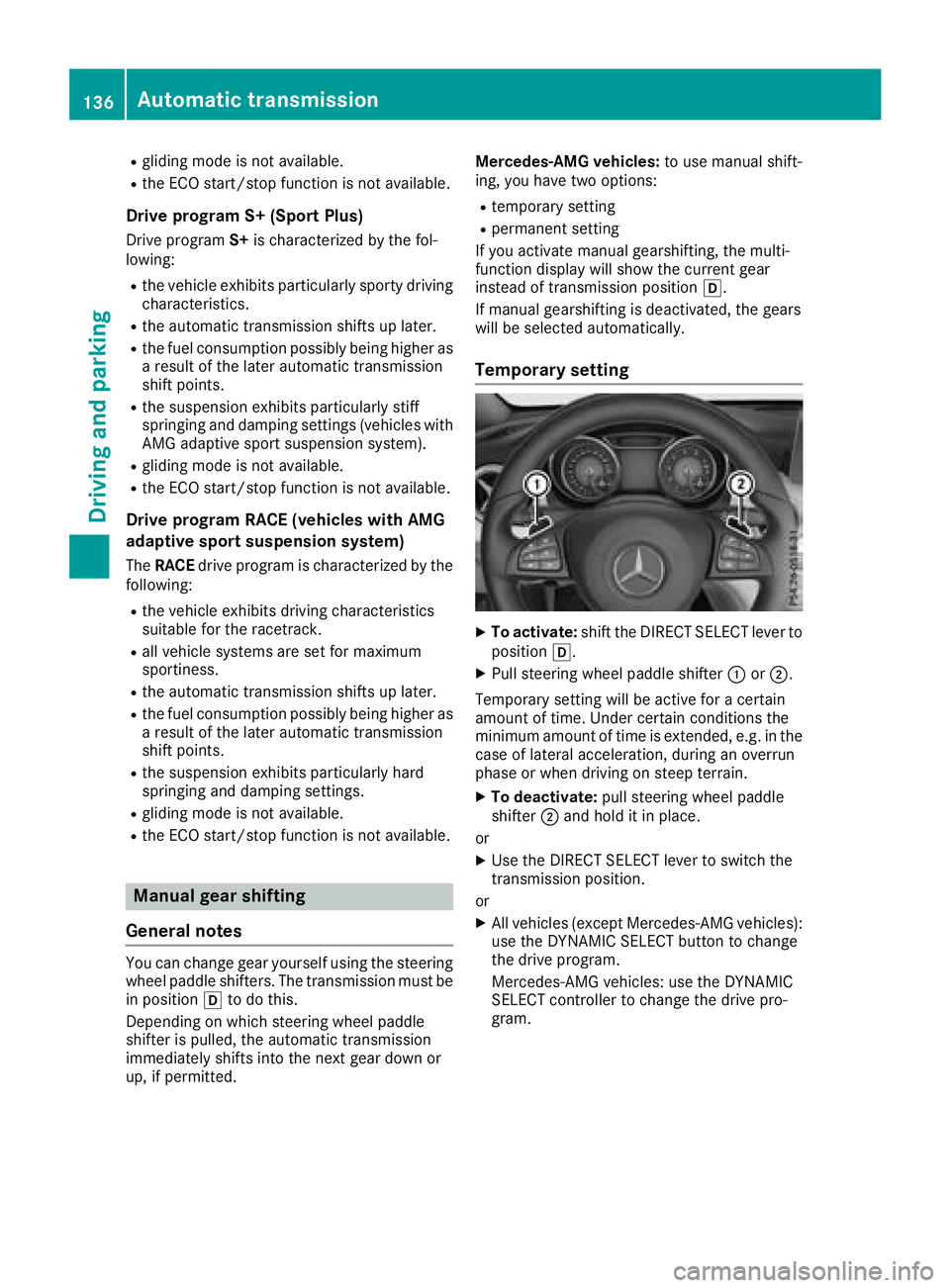
Temporar ysetting
XTo activate: shift the DIRECT SELECT lever to
position h.
XPull steering wheel paddle shifter :or;.
Temporary setting will be active for acertain
amount of time. Under certain conditions the
minimum amount of time is extended, e.g. in the case of lateral acceleration, during an overrun
phase or when driving on steep terrain.
XTo deactivate: pull steering wheel paddle
shifter ;and hold it in place.
or
XUse the DIRECT SELECT lever to switch the
transmission position.
or
XAll vehicles (except Mercedes-AMG vehicles):
use the DYNAMI CSELECT button to change
the drive program.
Mercedes-AMG vehicles: use the DYNAMIC
SELECT controller to change the drive pro-
gram.
136Automatic transmission
Driving and parking