2018 MERCEDES-BENZ CLA COUPE center console
[x] Cancel search: center consolePage 10 of 326
Storing and maintaining current
speed ............................................. 150
Cup holder
Center console .............................. 243
Important safety notes .................. 242
Rear compartment ......................... 243
Custome rAssis tance Center
(CAC) ..................................................... 28
Custome rRelations Department ....... 28
D
Dashboard
see Instrument cluster
Data
see Technica ldata
Daytime runnin glamps
Displa ymessage ............................ 204
Function/note s............................. 100
Switching on/off( on-board com-
puter) ............................................. 187
Declarations of conformity ................. 27
Diagnostic sconnection ...................... 28
Digital Operator's Manual
Help. ................................................ 23
Introduction ..................................... 23
Digital speedometer ......................... 181
DIREC TSELECT lever
Automati ctransmissio n................. 130
Display messages
ASSYST PLUS. ............................... 261
Calling up (on-board computer) ..... 191
Driving systems ............................. 207
Engine ............................................ 205
Genera lnotes ................................ 190
Hiding (on-board computer) ........... 191
Lights ............................................. 202
Safety systems .............................. 192
SmartKey ....................................... 216
Tires ............................................... 211
Vehicl e........................................... 213
Distance Pilo tDISTRONIC
Activating ....................................... 152
Calling up aspeed ......................... 153
Cruise control lever ....................... 152
Displa yMessage ............................ 209
Displays in the instrument cluster .. 155
Driving tip s.................................... 156 Function/note
s............................. 151
Important safety notes .................. 151
Setting aspeed .............................. 154
Setting the specified minimum
distance ......................................... 154
Stopping ........................................ 154
Storing aspeed .............................. 153
Switching off .................................. 155
Distance recorder ............................. 180
Distance warnin g(wa rning lamp) .... 227
Distance warnin gfunction
Function/note s................................ 62
Warning lamp ................................. 227
Doors
Automati cloc king (on-board com-
puter) ............................................. 187
Automati cloc king (switch) ............... 77
Central locking/unlocking
(SmartKey). ...................................... 70
Control panel ................................... 38
Displa ymessage ............................ 216
Emergency locking ........................... 77
Emergency unlocking ....................... 77
Important safety notes .................... 76
Opening (fro minside ).
..................... 76
D
rinking and driving ......................... 144
Drive program
Automati ctransmission ................. 134
Displa y........................................... 132
Displa y(DIRECT SELECT lever) ...... 130
Driver's door
see Doors
Drivin gabroad
Mercedes-Benz Service ................. 262
Drivin gonfloodedroads .................. 148
Drivin gsafety system
Active Brake Assist .......................... 62
Braking assistance appropriate to
the situation ..................................... 63
Drivin gsafety systems
ABS (Anti-lock Braking System) ....... 61
ADAPTIVEB RAKE............................. 68
BAS (Brake Assist System) .............. 61
Distance warning function ............... 62
EBD (electronicb rake force distri-
bution) ............................................. 67
8Index
Page 20 of 326

Start-off assistActivating ....................................... 158
Important safety notes .................. 158
Start/Stop button
Removing ....................................... 123
Starting the engine ........................ 124
Start/stop function
see ECO start/stop function
Starting (engine) ................................ 123
STEER CONTROL ..................................6 8
Steering
Display message ............................2 16
Steering assistant STEE RCON-
TROL
see STEER CONTROL
Steering wheel
Adjusting (manually). ....................... 95
Butto noverview ............................... 34
Buttons (on-board computer) ......... 177
Cleaning ......................................... 267
Important safety notes .................... 95
Paddle shifters ............................... 136
Steering whee lpaddle shifters ........ 136
Stopwatch (RACETIMER) ................... 189
Stowag ecom partments
Armrest (front) ............................... 238
Armrest (under )............................. 239
Center console .............................. 238
Center console (rear) ..................... 239
Cu ph olders ................................... 242
Eyeglasses compartment ............... 238
Glove box ....................................... 238
Important safety information ......... 237
Mapp ockets .................................. 239
Stowag enet ................................... 239
Stowag enet....................................... 239
Stowag ewellb enea th the trunk
floor .................................................... 241
Summert ires..................................... 289
Sun visor ............................................ 243
Suspension setting
AMG adaptive sport suspension
system ........................................... 159
Switchin gair-recirculatio nmode
on/off ................................................. 119
Switchin gonmediam ode
Via the device list .......................... 235T
Tachometer ........................................ 176
Tail lamps
Displa ymessage ............................ 203
see Lights
Tank
see Fue ltank
Tank content
Fuelgauge ....................................... 33
Technical data
Capacities ...................................... 315
Information .................................... 313
Tires/wheels ................................. 312
Vehicl edata. .................................. 320
Telephone
Accepting acall( multifunction
steering wheel) .............................. 184
Authorizing amobilephone (con-
necting) ......................................... 233
Authorizing amobil ephone via the
device manager (connecting) ......... 234
Connecting amobilephone
(device manager )........................... 234
Connecting amobilephone (gen-
erali nformation) ............................ 233
Displa ymessage ............................ 216
Introduction ................................... 183
Menu (on-board computer) ............ 183
Numbe rfrom the phone boo k........ 184
Redialing ........................................ 184
Rejecting/ending acall. ................ 184
see also Digital Operator's Man-
ua l.................................................. 229
Temperature
Coolant .......................................... 177
Coolant (on-board computer,
Mercedes-AMGv ehicles) ............... 188
Engine oil( on-board computer,
Mercedes-AMGv ehicles) ............... 188
Outsid etemperature ...................... 176
Setting (climate control )................ 116
Transmission oil( on-board com-
puter, Mercedes-AMGv ehicles) ..... 188
Through-loadin gfeature ................... 239
Timing (RACETIMER) ......................... 189
Tire pressure
Calling up (on-board computer) ..... 294
18Index
Page 25 of 326
Introduction
The printedOperator's Manual provide sinfor-
mation about th esafeo peration of your vehicle.
The Digital Operator's Manual provide scom pre-
hensiv eand specifically adapted information on
your vehicle's equipmen tand multimedia sys-
tem. You can call up th eDigital Operator's Man -
ual via th emultimedia system.
iYou will no tincur any cost swhen calling up
th eD igital Operator's Manual. The Digital
Operator's Manual works without connecting
to th eInternet.
Ther eare three ways to access th etop icsoft he
Digital Operator's Manual:
RVisua lsearch
The visual search allows you to explor eyour
vehicl e"virtually". Starting from either th e
vehicl eexter iorv iewori nterio rview, you can
access man yofthedifferen ttop icsc overed
by th eDigital Operator's Manual. To access
th ev ehicl einterio rsection ,select th e"Vehi-
cle interior" view.
RKeywor dsearch
The keyword search allows you to search for a
keyword by enterin gcharacters.
RContent s
You can select individual section sinthecon-
tents.
iThe Digital Operator's Manual is deactiva-
te df or safet yreason swhile driving .
Operation
Calling up th eDigital Operator's Man-
ual
XPress th eØ buttoninthecenter console.
The overview relating to th evehicl eappears.
XSelec tthe "Operator's Manual" men uitemb y
turnin g3 or pressin g7 thec ontroll er.
XConfirm7 them essage about th ewarning
and safet ynotes .
The basic men ufor th eDigital Operator's
Manual appears.
Operating th eDigital Operator's Man-
ual
General notes
Pleas eobserv ethe information about th eoper -
ation of th econtroll er(Ypage 230).
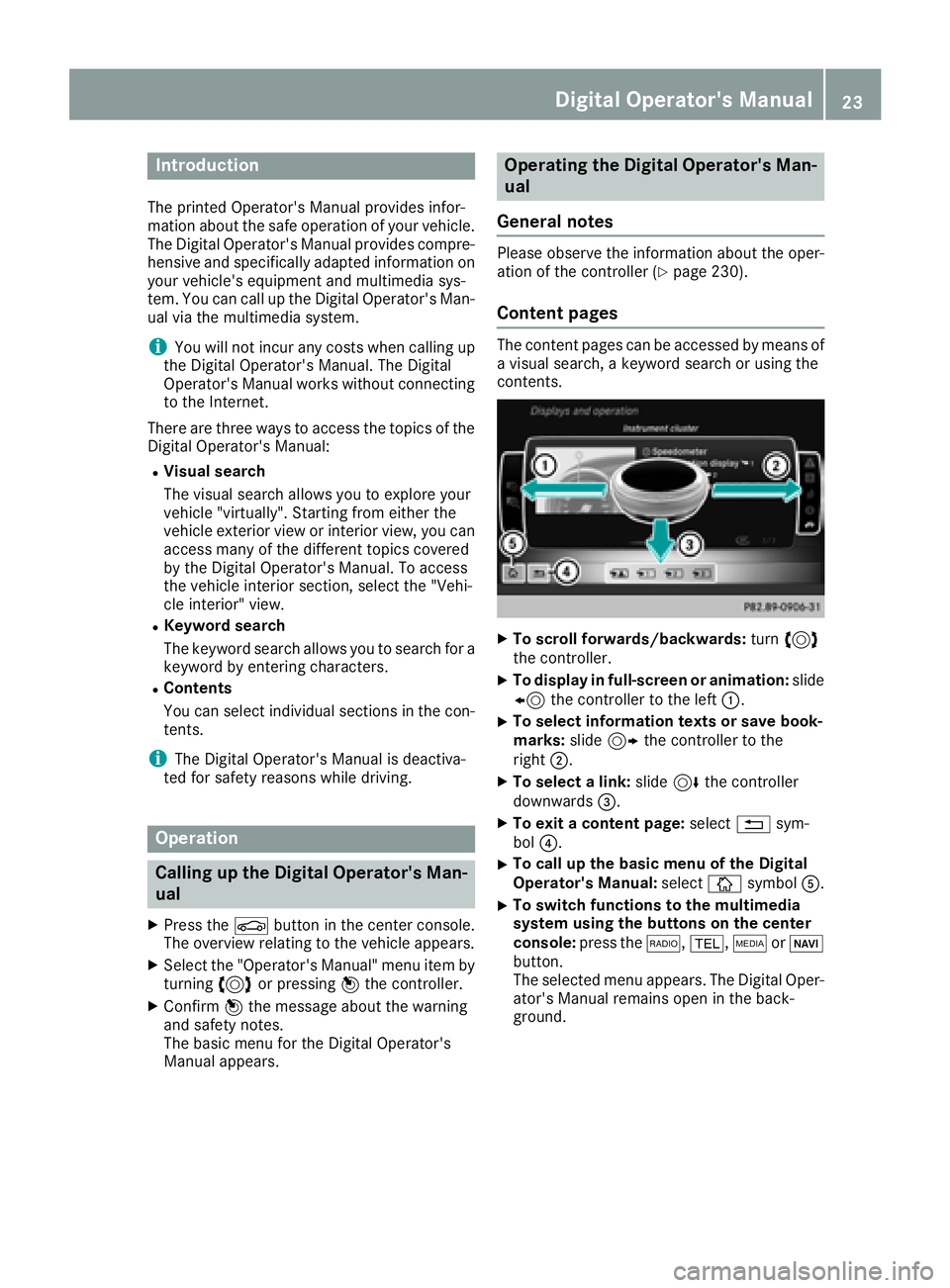
Content pages
The conten tpages can be accessed by mean sof
av isual search ,akeyword search or usin gthe
contents .
XTo scroll forwards/backwards: turn3
th ec ontroll er.
XTo displa yinfull-screen or animation: slide
8 thec ontroll er to th eleft:.
XTo select information texts or sav ebook -
marks: slide9 thec ontroll er to th e
right ;.
XTo select alink :slide 6thec ontroll er
downwards =.
XTo exitacontent page: select%sym-
bol ?.
XTo call up th ebasic men uoftheDigital
Operator's Manual: selectÞsymbol A.
XTo switch functions to th emultime dia
system using th ebutton sont hecenter
console: press the$, %,ÕorØ
button.
The selected men uappears. The Digital Oper -
ator's Manual remain sopen in th eback-
ground .
Digital Operator's Manual23
Page 26 of 326
Protecting the environment
General notes
HEnvironmental note
Daimler's declared policy is one of compre-
hensive environmental protection.
The objectives are for the natural resources
that form the basis of our existence on this
planet to be used sparingly and in amanner
that takes the requirements of both nature
and humanity into account.
You too can help to protect the environment
by operating your vehicle in an environmen-
tally responsible manner.
Fuel consumption and the rate of engine,
transmission, brake and tire wear are affected by these factors:
Roperating conditionsofy our vehicle
Ryour personal driving style
You can influence both factors. You should
bear the following in mind:
Operating conditions:
Ravoid short trips as these increase fuel con-
sumption.
Ralways make sure that the tire pressures
are correct.
Rdo not carry any unnecessary weight.
Rremove roof racks once you no longer need
them.
Rar egularly serviced vehicle will contribute
to environmental protection. You should
therefore adhere to the service intervals.
Ralways have service work carried out at a
qualified specialist workshop.
Personal driving style:
Rdo not depress the accelerator pedal when
startin gthe engine.
Rdo not warm up the engine when the vehicle
is stationary.
Rdrive carefully and maintain asafe distance
from the vehicle in front.
Ravoid frequent, sudden acceleration and
braking.
Rchange gear in good time and use each gear
only up to Ôof its maximum engine speed.
Rswitch off the engine in stationary traffic.
Rkeep an eye on the vehicle's fuel consump-
tion.
Environmental concerns and recom-
mendations
Wherever the Operator's Manual requires you to
dispose of materials, first try to regenerate or re-
use them. Observe the relevant environmental
rules and regulations when disposing of materi-
als. In this way you will help to protect the envi-
ronment.
Genuine Mercedes-Benz parts
HEnvironmental note
Daimler AG also suppliesr econditioned major
assemblies and parts which are of the same
quality as new parts. They are covered by the
same Limited Warranty entitlements as new
parts.
!Air bags and Emergency Tensioning Devi-
ces, as well as control units and sensors for
these restraint systems, may be installed in
the following areas of your vehicle:
Rdoors
Rdoor pillars
Rdoor sills
Rseats
Rcockpit
Rinstrumentc luster
Rcenter console
Do not install accessories such as audio sys-
tems in these areas. Do not carry out repairs or welding. You could impair the operating
efficiency of the restraint systems.
Have aftermarket accessories installed at a
qualified specialist workshop.
You could jeopardize the operating safety of
your vehicle if you use parts, tires and wheels as
well as accessories relevant to safety which
have not been approved by Mercedes-Benz. This
could lead to malfunction sinsafety-relevant
24Genuine Mercedes-Benz parts
Introduction
Page 37 of 326
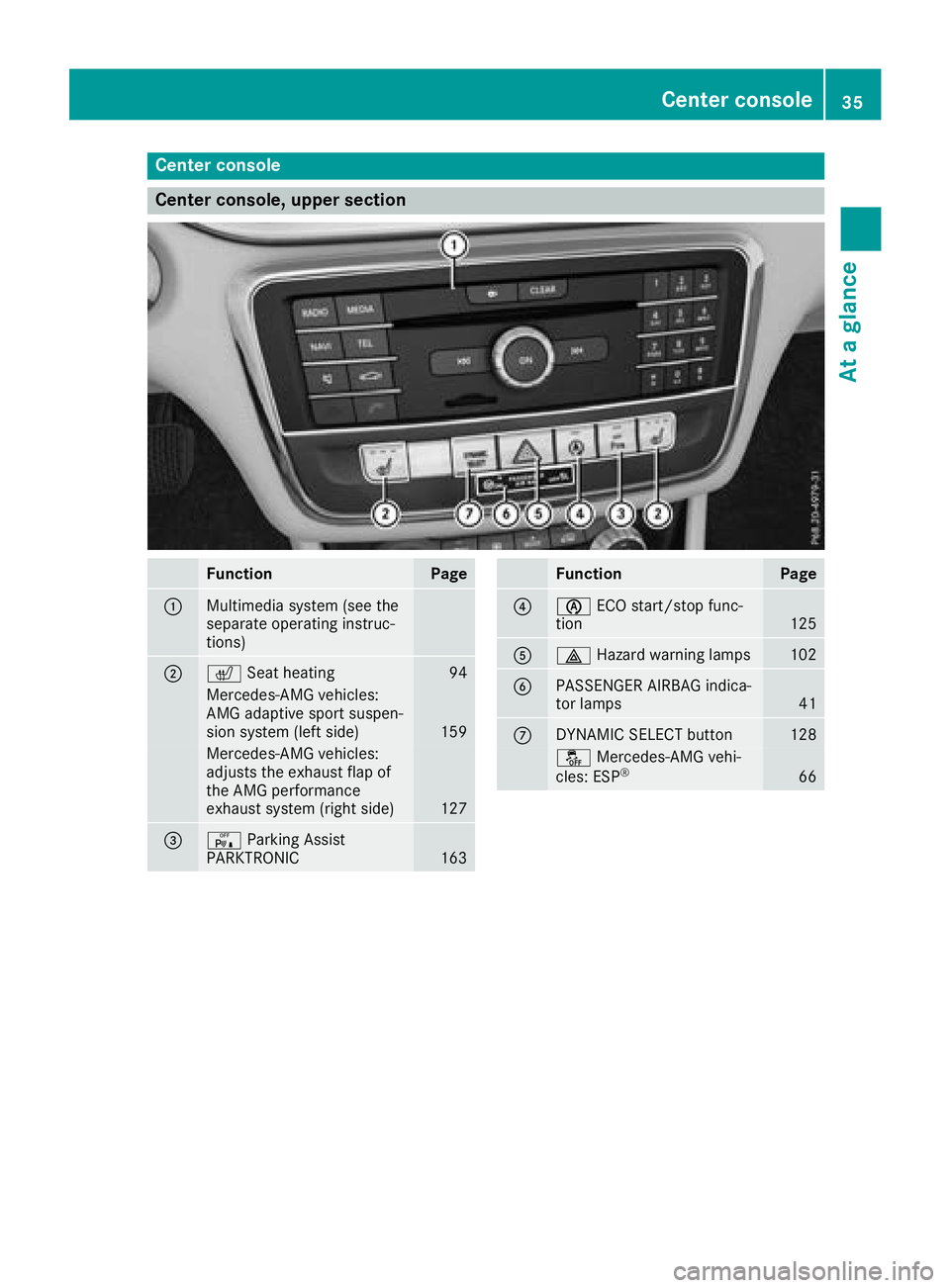
Center console
Center console, upper section
FunctionPage
:Multimedia system (see the
separate operatinginstruc-
tions)
;c Seat heating94
Mercedes-AM Gvehicles:
AM Ga daptive sports uspen-
sion system (lefts ide)
159
Mercedes-AMGvehicles:
adjustst heexhaust flap of
th eA MG performance
exhaust system (right side)
127
=c Parking Assist
PARKTRONIC163
FunctionPage
?è ECO start/sto pfunc-
tion125
A£ Hazard warning lamps102
BPASSENGER AIRBA Gindica-
to rlamps41
CDYNAMIC SELECT button128
å Mercedes-AM Gvehi-
cles: ESP®66
Center console35
At ag lance
Page 38 of 326
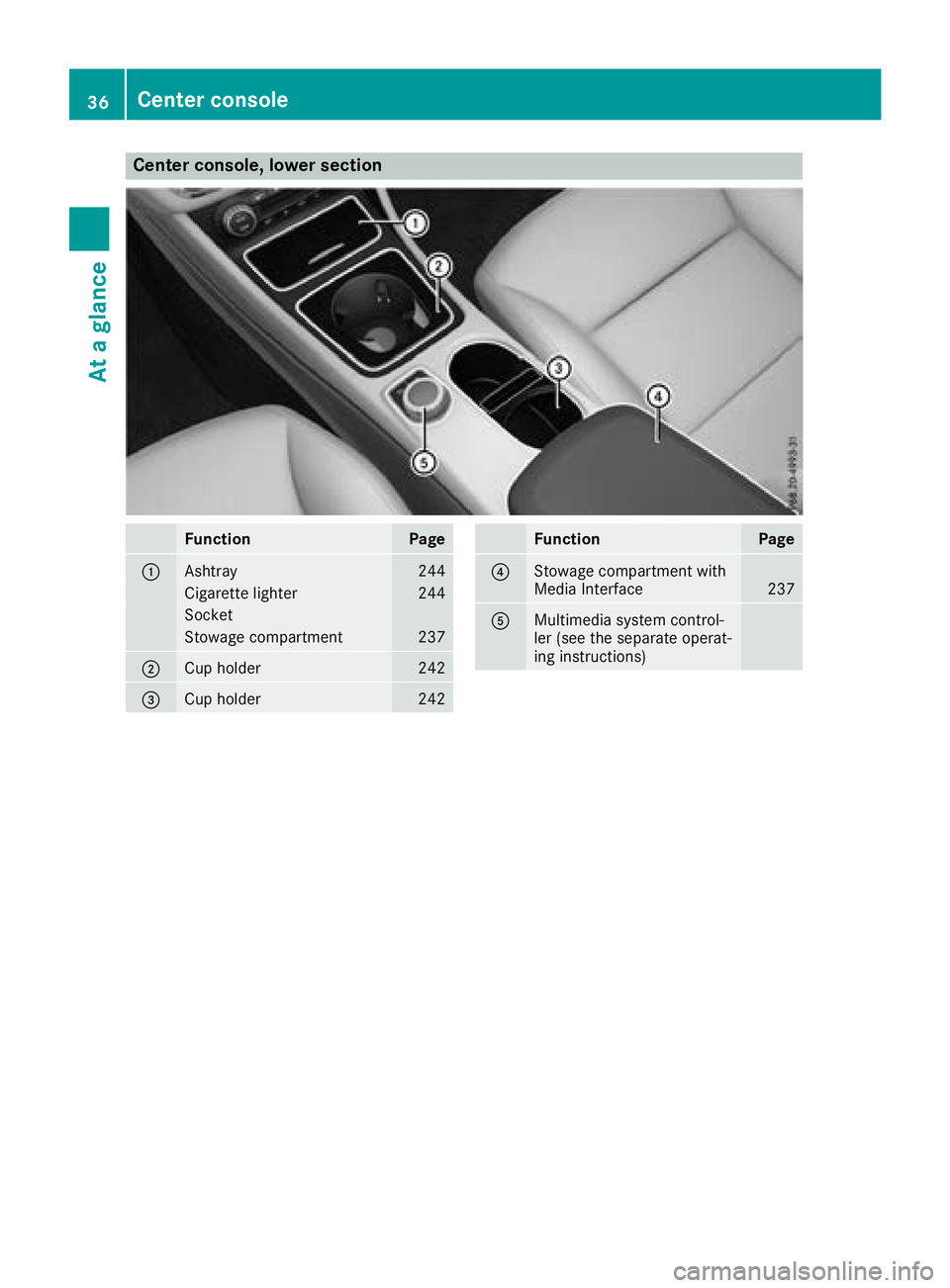
Center console, lower section
FunctionPage
:Ashtray244
Cigarettelighter244
Socket
Stowage compartment237
;Cup holder242
=Cup holder242
FunctionPage
?Stowage compartmen twith
Media Interface237
AMultimedia system control-
ler (see th eseparate operat-
ing instructions)
36Center console
At ag lance
Page 39 of 326
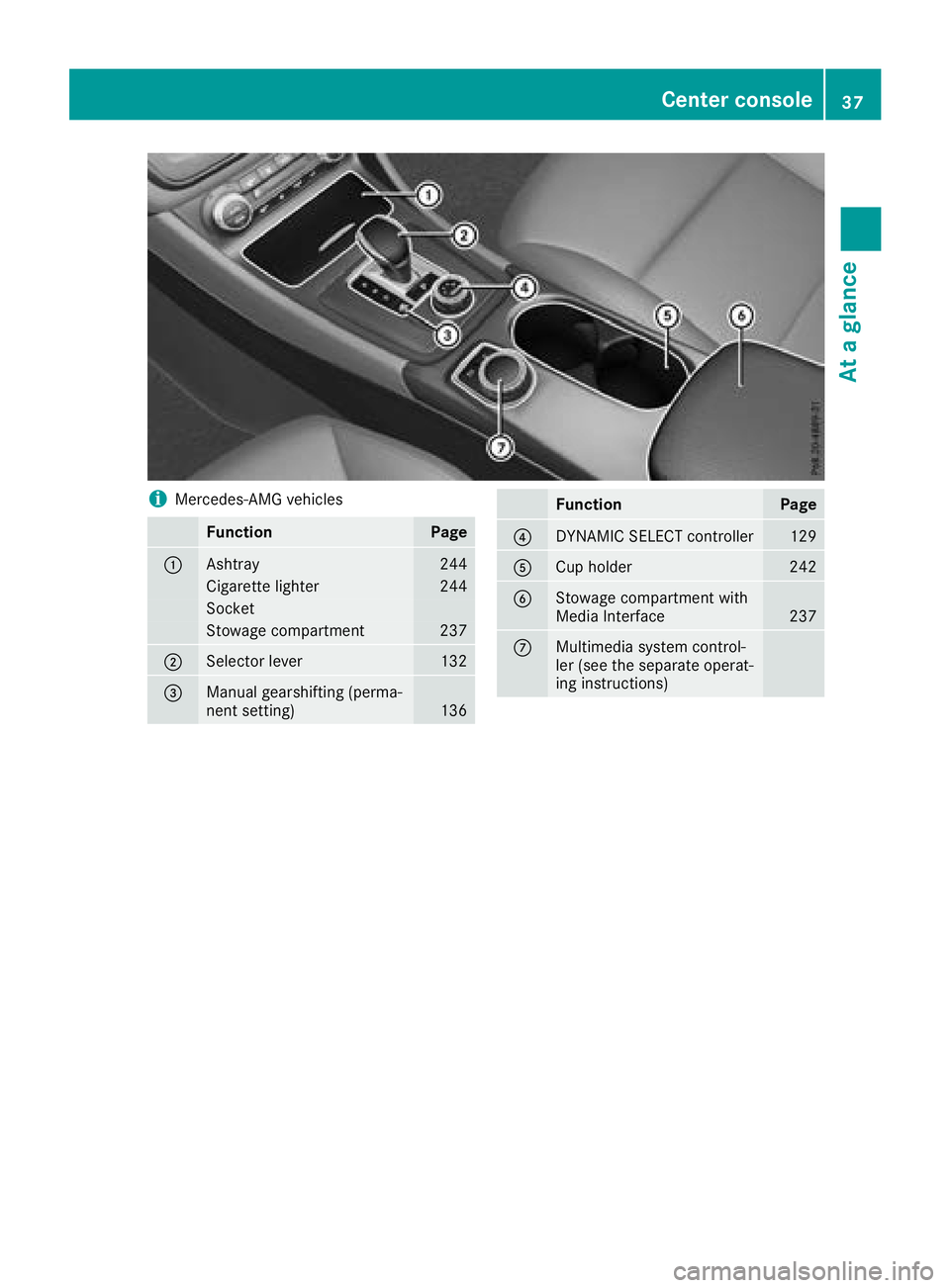
iMercedes-AMG vehicles
FunctionPage
:Ashtray244
Cigarette lighter244
Socket
Stowage compartment237
;Selector lever132
=Manual gearshifting (perma-
nent setting)136
FunctionPage
?DYNAMIC SELECT controller129
ACup holder242
BStowage compartmentwith
Media Interface237
CMultimedia system control-
ler (see the separate operat-
ing instructions)
Center console37
At ag lance
Page 202 of 326
Display messagesPossible causes/consequences andMSolutions
FrontPassengerAir‐bag Disabled SeeOperator' sManual
The front-passenger air bag and front-passenger knee bag are deac -
tivated during th ejou rney, although:
Ran adult
or
Rap erson of th ecorre spondin gstatur eisont hefront-passenger seat
If additional force sare applie dtotheseat ,the system may interpret
th eo ccupant's weigh taslower than it actually is.
GWARNIN G
The front-passenger fron tair bag and fron tpassenger knee bag may
no tbet riggered in th eevent of an accident.
There is an increased ris kofinjury.
XPull ove rand stop th evehicl esafely as soo naspossible, payin g
attention to roa dand traffic conditions.
XSecur ethe vehicl eagainst rollin gaway (Ypage 141).
XSwitc hthe ignition off .
XHavethe occupant on th efront-pa ssenger seat get out of th evehi-
cle .
XKee pthe seat unoccupied ,close th efront-pa ssenger door and
switch on th eignition .
XObserv ethe PASSENGER AI RBAG indicator lamp sinthecenter
console and th emultifunction display and chec kthe following:
Seat unoccupied and ignition switched on :
Raself-diagnosis is carrie dout.T he PASSENGER AI RBAG OFFa nd
PASSENGER AI RBAG ON indicator lamp smustligh tups imulta-
neousl yfor approximately six seconds
RtheP ASSENG ER AIRBAG OF Findicator lamp mus tthe nligh tup
and remain lit after th eself-diagnosis .Iftheindicator lamp is on ,
OCS (Occupant Classification System) has deactivated th efront -
passenger fron tair bag and front-passenger knee bag
(
Ypage 48)
Rth eFront Passenger Airbag Enable dSee Operator' sManualorFront Passenger Airbag Disabled See Opera‐tor's Manualdisplay message smustn otbe shown in th emul-
tifunction display
XWait for aperiod of at least 60 seconds until th eneces sarysystem
checks hav ebeen completed.
XMak esuret hatthe display message sdonotappear in th emulti-
function display.
If these condition sare fulfilled ,the front-passenger seat can be occu-
pied again .Whether th ePASSENG ER AIRBAG OFForONi ndicator
lamp remain slit or goe sout depend sonhow OCS classifies th eoccu-
pant.
If th econditi onsa re no tfulfilled ,the system is no toperating correctly.
XVisit aqualified specialist workshop immediately.
Fo rfurther information about th eOccupant Classification System, see
(
Ypage 48) .
200Display messages
On-boardc omputer andd isplays