2018 LINCOLN CONTINENTAL ECO mode
[x] Cancel search: ECO modePage 167 of 615
You can save up to three preset memorypositions. You can save a memory preset atany time.
Recalling a Preset Position
Press and release the preset buttonassociated with your desired driving position.The memory features move to the positionstored for that preset.
Note:You can only recall a preset memoryposition when the ignition is off, or when thetransmission is in park (P) or neutral (N) (andyour vehicle is not moving) if the ignition ison.
You can also recall a preset memory positionby:
•Pressing the unlock button on yourintelligent access key fob if it is linked toa preset position.
•Unlocking the intelligent driver doorhandle if a linked key fob is present.
Note:Using a linked key fob to recall yourmemory position when the ignition is offmoves the seat to the Easy Entry position.
Note:Pressing any active memory featureadjustment control, or any memory buttonduring a memory recall, cancels theoperation.
Linking a Preset Position to yourRemote Control or Intelligent AccessKey Fob
You can save preset memory positions forup to three remote controls or intelligentaccess (IA) keys.
1. With the ignition on, move the memoryfeatures to the desired positions.
2. Press and hold the preset button youdesire for about five seconds. A tonesounds after a few seconds. Continueholding until you hear a second tone.
3. Within three seconds, press the lockbutton on the remote control you arelinking.
To unlink a remote control, follow the sameprocedure – except in step 3, press theunlock button on the remote control.
Note:If more than one linked remote controlor intelligent access key is in range, thememory function moves to the settings ofthe first key to initiate a memory recall.
Easy Entry and Exit Feature
If you enable the easy entry and exit feature,it moves the driver seat position rearward upto 2 in (5 cm) when you switch the ignitionoff.
The driver seat returns to its previousposition when you switch the ignition on.
Note:If you press any adjustment or memorybutton when in easy exit mode, the systemcancels the operation.
You can enable or disable this featurethrough the information display. See GeneralInformation (page 115).
164
Continental (CPL) Canada/United States of America, enUSA, Edition date: 201706, Second-Printing
Seats
Page 171 of 615

Press the heated seat symbol to cyclethrough the various heat settings and off.More indicator lights indicate warmersettings.
The heated seat module resets at everyignition run cycle. While the ignition is on,press the high or low heated seat switch toenable heating mode. When activated, theywill turn off automatically when you turn theengine off.
CLIMATE CONTROLLED SEATS (If
Equipped)
Heated Seats
WARNING: People who are unable tofeel pain to their skin because of advancedage, chronic illness, diabetes, spinal cordinjury, medication, alcohol use, exhaustionor other physical conditions, must usecaution when using the heated seat. Theheated seat may cause burns even at lowtemperatures, especially if used for longperiods of time. Do not place anything on
the seat that may block the heat, such as ablanket or cushion. This can cause theheated seat to overheat. Do not puncturethe seat with pins, needles or other pointedobjects. This damages the heating elementand can cause the heated seat to overheat.An overheated seat may cause seriouspersonal injury.
Note:The heated seats switch on during aremote start if they are enabled through theinformation displays. See GeneralInformation (page 115).
Note:The heated seats may also switch onwhen you start your vehicle if they were onwhen you previously switched your vehicleoff.
Note:Do not do the following:
•Place heavy objects on the seat.
•Operate the seat heater if water or anyother liquid spills on the seat. Allow theseat to dry thoroughly.
Press this symbol to cycle through thevarious heat settings and off. More indicatorlights indicate warmer settings.
Ventilated Seats
Note:The ventilated seats switch on duringa remote start if they are enabled throughthe information displays. See GeneralInformation (page 115).
Note:The ventilated seats may also switchon when you start your vehicle if they wereon when you previously switched yourvehicle off.
Note:Do not do the following:
168
Continental (CPL) Canada/United States of America, enUSA, Edition date: 201706, Second-Printing
SeatsE146322
Page 179 of 615
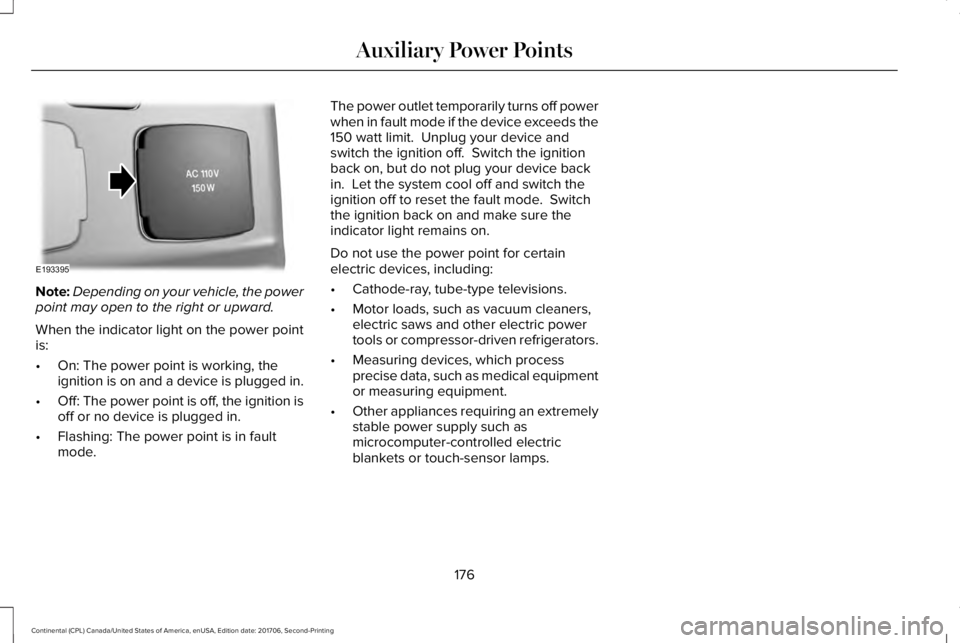
Note:Depending on your vehicle, the powerpoint may open to the right or upward.
When the indicator light on the power pointis:
•On: The power point is working, theignition is on and a device is plugged in.
•Off: The power point is off, the ignition isoff or no device is plugged in.
•Flashing: The power point is in faultmode.
The power outlet temporarily turns off powerwhen in fault mode if the device exceeds the150 watt limit. Unplug your device andswitch the ignition off. Switch the ignitionback on, but do not plug your device backin. Let the system cool off and switch theignition off to reset the fault mode. Switchthe ignition back on and make sure theindicator light remains on.
Do not use the power point for certainelectric devices, including:
•Cathode-ray, tube-type televisions.
•Motor loads, such as vacuum cleaners,electric saws and other electric powertools or compressor-driven refrigerators.
•Measuring devices, which processprecise data, such as medical equipmentor measuring equipment.
•Other appliances requiring an extremelystable power supply such asmicrocomputer-controlled electricblankets or touch-sensor lamps.
176
Continental (CPL) Canada/United States of America, enUSA, Edition date: 201706, Second-Printing
Auxiliary Power PointsE193395
Page 181 of 615

GENERAL INFORMATION
WARNING: Extended idling at highengine speeds can produce very hightemperatures in the engine and exhaustsystem, creating the risk of fire or otherdamage.
WARNING: Do not park, idle or driveyour vehicle on dry grass or other dry groundcover. The emission system heats up theengine compartment and exhaust system,creating the risk of fire.
WARNING: Do not start the engine ina closed garage or in other enclosed areas.Exhaust fumes can be toxic. Always openthe garage door before you start the engine.
WARNING: Exhaust leaks may resultin entry of harmful and potentially lethalfumes into the passenger compartment. Ifyou smell exhaust fumes inside your vehicle,have your vehicle inspected immediately. Donot drive if you smell exhaust fumes.
If you disconnect the battery, your vehiclemay exhibit some unusual drivingcharacteristics for approximately 5 mi (8 km)after you reconnect it. This is because theengine management system must realignitself with the engine. You can disregard anyunusual driving characteristics during thisperiod.
The powertrain control system meets allCanadian interference-causing equipmentstandard requirements regulating theimpulse electrical field or radio noise.
When you start the engine, avoid pressingthe accelerator pedal before and duringoperation. Only use the accelerator pedalwhen you have difficulty starting the engine.
KEYLESS STARTING
Note:The system may not function if theintelligent access key is close to metalobjects or electronic devices, for examplekeys or a cell phone.
Note:A valid intelligent access key must belocated inside your vehicle to switch theignition on and start your vehicle.
Ignition Modes
The keyless starting system has threemodes:
Off: Turns the ignition off.
•Without applying the brake pedal, pressand release the button once when theignition is in the on mode, or when yourvehicle is running but is not moving.
On: All electrical circuits are operational andthe warning lamps and indicators illuminate.
•Without applying the brake pedal, pressand release the button once.
178
Continental (CPL) Canada/United States of America, enUSA, Edition date: 201706, Second-Printing
Starting and Stopping the EngineE144447
Page 183 of 615

4. Press the push button ignition switch.
If the engine does not start after threeattempts, wait ten seconds and follow theflooded engine procedure.
1. Apply the parking brake.
2. Press the brake pedal.
3. Shift into park (P).
4. Fully press the accelerator pedal.
5. Briefly press the push button ignitionswitch.
Fast Restart
The fast restart feature allows you to restartyour vehicle within 20 seconds of switchingit off, even if it does not detect a validpassive key.
Within 20 seconds of switching the engineoff, press the brake pedal and press the pushbutton ignition switch. After 20 seconds, youcan no longer start your vehicle if it does notdetect a valid passive key.
Once your vehicle starts, it remains runninguntil you press the push button ignitionswitch, even if your vehicle does not detecta valid passive key. If you open and close adoor while your vehicle is running, thesystem searches for a valid passive key. After 20 seconds, you can no longer startyour vehicle if it does not detect a validpassive key.
Automatic Engine Shutdown
For vehicles with a keyless ignition, thisautomatically shuts down your vehicle if ithas been idling for an extended period. Theignition also turns off to save battery power. Before your vehicle shuts down, a messageappears in the information display showinga timer counting down. If you do notintervene within 30 seconds, your vehicleshuts down. Another message appears inthe information display to inform you thatyour vehicle has shut down to save fuel.
Start your vehicle as normal.
Automatic Engine Shutdown Override
Note: You cannot permanently switch offthe automatic shutdown. The systemdefaults to normal mode when you start yourvehicle.
You can stop the shutdown, or reset thetimer, at any point before the 30-secondcountdown has expired by doing any of thefollowing:
•Interacting with your vehicle, for examplepressing the brake or accelerator pedal.
•Disabling the shutdown using theinformation display. See InformationDisplays (page 115).
•Pressing the OK or RESET button duringthe 30-second countdown.
Stopping the Engine When YourVehicle is Stationary
Note:The ignition, all electrical circuits andall warning lamps and indicators will beturned off.
Note:If the engine is idling for 30 minutes,the ignition and engine automatically shutsdown.
180
Continental (CPL) Canada/United States of America, enUSA, Edition date: 201706, Second-Printing
Starting and Stopping the Engine
Page 198 of 615
Park (P)
With the transmission in park (P), your vehiclelocks the transmission and prevents thewheels from turning. Always come to acomplete stop before putting your vehicleinto and out of park (P). An audible chimesounds once you select park (P).
When the ignition is turned off, the vehiclewill automatically shift into park (P). If theignition is turned off while the vehicle ismoving, it will first shift into neutral (N) untila slow enough speed is reached. The vehiclewill then shift into park (P) automatically.
Automatic Return to Park
Note:This feature will not operate when yourvehicle is in Stay in Neutral mode or neutraltow.
Your vehicle has a safety feature that willautomatically shift your vehicle into park (P)when any of the following conditions occur:
•You turn the ignition off
•You open the driver's door with yoursafety belt unlatched
•Your safety belt is unlatched while thedriver's door is open
If you turn your vehicle off while moving, yourvehicle will first shift into neutral (N) until itslows down enough to shift into park (P)automatically.
Note:If you have waited an extended periodof time (2-15 minutes) before starting yourvehicle, unlatching your safety belt will causethis feature to activate, even with the driver'sdoor closed.
Note:This feature may not work properly ifthe door ajar switch is malfunctioning. If yourdoor ajar indicator does not illuminate whenyou open the driver’s door or the indicatorilluminates with the driver’s door closed, seeyour authorized dealer.
Reverse (R)
With the transmission in reverse (R), yourvehicle will move backward. Always cometo a complete stop before shifting into andout of reverse (R).
Neutral (N)
With the transmission in neutral (N), you canstart your vehicle and it is free to roll. Holdthe brake pedal down while in this position.
Stay in Neutral mode
Stay in Neutral mode allows your vehicle tostay in neutral (N) when you exit the vehicle.Your vehicle must be stationary to enter thismode.
To enter Stay in Neutral mode:
1. Press the neutral (N) button on yourshifter assembly.
2. A message will appear in yourinformation display screen prompting youto press the neutral (N) button again toenter Stay in Neutral mode.
3. Press the neutral (N) button again toenter Stay in Neutral mode.
195
Continental (CPL) Canada/United States of America, enUSA, Edition date: 201706, Second-Printing
Transmission
Page 199 of 615
A message will appear in your informationdisplay screen when your vehicle hasentered Stay in Neutral mode.
Note:During this mode the N button willflash continuously and your instrumentcluster will display N as the selected gear.
Exiting Stay in Neutral mode
To disable Stay in Neutral mode selectanother gear. See the Putting the Vehiclein Gear for instructions on how to do this.
Entering a Carwash
Note:Always put your vehicle in Stay inNeutral mode when entering an automaticcar wash. Failure to do this could result invehicle damage not covered by warranty.
Drive (D)
The normal driving position for the best fueleconomy.
Sport (S)
Putting the vehicle in sport (S):
•Provides additional engine braking andextends lower gear operation to enhanceperformance for uphill climbs, hilly terrainor mountainous areas. This will increaseengine RPM during engine braking.
•Provides additional lower gear operationthrough the automatic transmission shiftstrategy.
•Provides gear selection more quickly andat higher engine speeds.
SelectShift™ Automatic Transmission
Your vehicle is equipped with a SelectShiftAutomatic transmission gearshift lever. TheSelectShift Automatic transmission gives youthe ability to change gears up or down asdesired.
In order to prevent the engine from runningat too low an RPM, which may cause it tostall, SelectShift still automatically makessome downshifts if it has determined thatyou have not downshifted in time. AlthoughSelectShift makes some downshifts for you,it still allows you to downshift at any time aslong as the SelectShift determines thatdamage will not be caused to the enginefrom over-revving.
Note:Engine damage may occur if youmaintain excessive engine revving withoutshifting.
SelectShift does not automatically upshift,even if the engine is approaching the RPMlimit. It must be shifted manually by pressingthe + button. Notice should be taken of theshift indicator lamp, which alerts the driverwhen to shift to ensure the highest level ofefficiency and fuel economy.
Pull the + paddle on the steering wheel toactivate SelectShift.
•Pull the right paddle (+) to upshift.
•Pull the left paddle (–) to downshift.
196
Continental (CPL) Canada/United States of America, enUSA, Edition date: 201706, Second-Printing
Transmission
Page 200 of 615
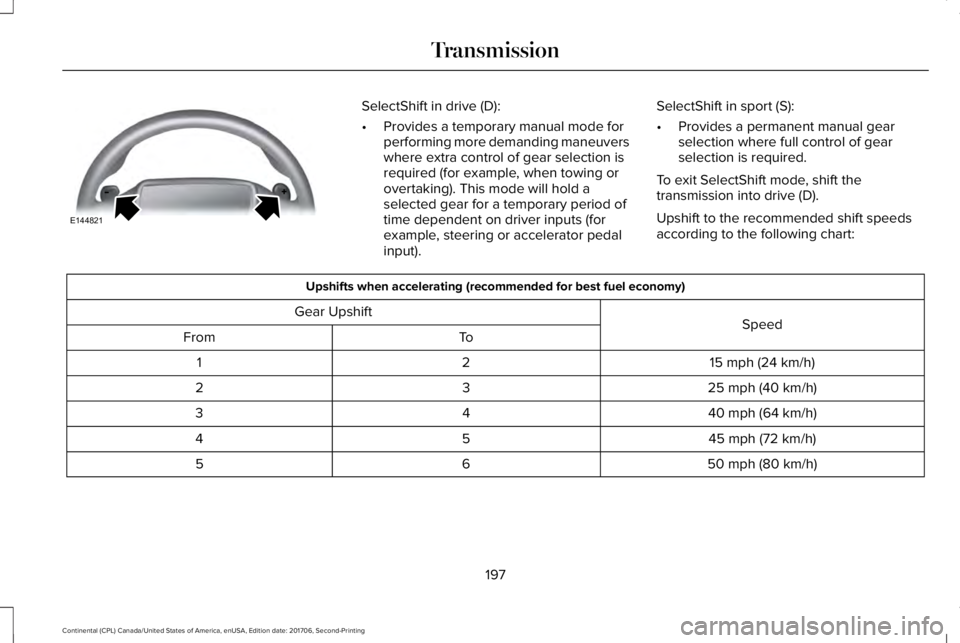
SelectShift in drive (D):
•Provides a temporary manual mode forperforming more demanding maneuverswhere extra control of gear selection isrequired (for example, when towing orovertaking). This mode will hold aselected gear for a temporary period oftime dependent on driver inputs (forexample, steering or accelerator pedalinput).
SelectShift in sport (S):
•Provides a permanent manual gearselection where full control of gearselection is required.
To exit SelectShift mode, shift thetransmission into drive (D).
Upshift to the recommended shift speedsaccording to the following chart:
Upshifts when accelerating (recommended for best fuel economy)
SpeedGear Upshift
ToFrom
15 mph (24 km/h)21
25 mph (40 km/h)32
40 mph (64 km/h)43
45 mph (72 km/h)54
50 mph (80 km/h)65
197
Continental (CPL) Canada/United States of America, enUSA, Edition date: 201706, Second-Printing
TransmissionE144821