2018 LINCOLN CONTINENTAL ECO mode
[x] Cancel search: ECO modePage 408 of 615
In track mode, the system displays and playsthe structure as if it were only one level deep(all MP3 and WMA files play, regardless ofbeing in a specific folder). In folder mode,the system only plays the MP3 and WMA filesin the current folder.
AUDIO UNIT
WARNING: Driving while distractedcan result in loss of vehicle control, crashand injury. We strongly recommend that youuse extreme caution when using any devicethat may take your focus off the road. Yourprimary responsibility is the safe operationof your vehicle. We recommend against the
use of any hand-held device while drivingand encourage the use of voice-operatedsystems when possible. Make sure you areaware of all applicable local laws that mayaffect the use of electronic devices whiledriving.
Note: The touchscreen system controls mostof the audio features. See your SYNCinformation.
Note:The CD player slot is in the frontstorage compartment. See Center Console(page 177).
405
Continental (CPL) Canada/United States of America, enUSA, Edition date: 201706, Second-Printing
Audio System
Page 410 of 615
Seek, Fast Forward and Reverse:In radio mode, select a frequencyband and press either button. Thesystem stops at the first station itfinds in that direction. In SIRIUSmode, press to select the next or
C
previous satellite radio station. Ifyou select a specific category(such as jazz, rock or news), press
to find the next or previous stationin the category you select. In CDmode, press to select the next orprevious track. Press and hold tomove quickly forward or backwardthrough the current track.
SOURCE: Press to access differentaudio modes, for example AM, FMand CD.
D
Eject: Eject a CD.E
TUNE: In radio mode, turn tosearch through the radio frequencyband. In SIRIUS mode, turn to findthe previous or next availablesatellite radio station.
F
407
Continental (CPL) Canada/United States of America, enUSA, Edition date: 201706, Second-Printing
Audio System
Page 412 of 615
DISPLAY: Press to switch thedisplay on and off.A
Seek, Fast Forward and Reverse:In radio mode, press either buttonto scroll through the presets fromthe front radio. To select a radiostation, press and hold to movequickly forward or backward
B
through the radio stations. In CDor USB mode, press to select thenext or previous track. Press andhold to move quickly forward orbackward through the selectedmedia source.
Volume: Turn to adjust the volume.C
SOURCE: Press to access differentmedia modes, for example AM, FM,CD, and USB.
D
SATELLITE RADIO
SiriusXM® Satellite Radio broadcasts avariety of music, news, sports, weather, trafficand entertainment satellite radio channels.For more information and a complete list ofSiriusXM satellite radio channels, visitwww.siriusxm.com in the United States,www.siriusxm.ca in Canada, or call SiriusXMat 1-888-539-7474.
Note:This receiver includes the eCosreal-time operating system. eCos ispublished under the eCos License.
409
Continental (CPL) Canada/United States of America, enUSA, Edition date: 201706, Second-Printing
Audio System
Page 414 of 615
For more information on extendedsubscription terms (a service fee is required),the online media player and a complete listof SiriusXM satellite radio channels, andother features, please visit www.siriusxm.com
in the United States, www.siriusxm.ca inCanada, or call SiriusXM at 1-888-539-7474.Satellite Radio Electronic SerialNumber (ESN)
You need your ESN to activate, modify ortrack your satellite radio account. When insatellite radio mode, tune to channel 0.
Troubleshooting
ActionConditionMessage
No action required. This message shoulddisappear shortly.Radio requires more than two seconds toproduce audio for the selected channel.Acquiring…
If this message does not clear shortly, or withan ignition key cycle, your receiver may havea fault. See an authorized dealer for service.
There is an internal module or system failurepresent.Satellite antenna fault
SIRIUS system failure
Tune to another channel or choose anotherpreset.The channel is no longer available.Invalid Channel
Contact SiriusXM at 1-888-539-7474 tosubscribe to the channel, or tune to anotherchannel.
Your subscription does not include thischannel.Unsubscribed Channel
The signal is blocked. When you move into anopen area, the signal should return.The signal is lost from the SiriusXM satelliteor SiriusXM tower to your vehicle antenna.No Signal
No action required. The process may take upto three minutes.Update of channel programming in progress.Updating…
411
Continental (CPL) Canada/United States of America, enUSA, Edition date: 201706, Second-Printing
Audio System
Page 422 of 615
Cleaning the Touchscreen
You can remove fingerprints with a dry,clean, soft cloth.
If dirt or fingerprints are still on the screen,apply a small amount of alcohol to the clothand try to clean it again.
Note: Do not use detergent or any type ofsolvent to clean the touchscreen.
Note:Do not pour or spray alcohol onto thetouchscreen.
Using Voice Recognition
Using voice commands allows you to keepyour hands on the wheel and focus on whatis in front of you. The system providesfeedback through audible tones, prompts,questions and spoken confirmationsdepending on the situation and the chosenlevel of interaction (voice settings).
The system also asks short questions(confirmation prompts) when it is not sure ofyour request or when there are multiplepossible responses to your request.
When using voice commands, words andicons may appear in the status bar indicatingthe status of the voice command session.See Using Voice Recognition (page 430).
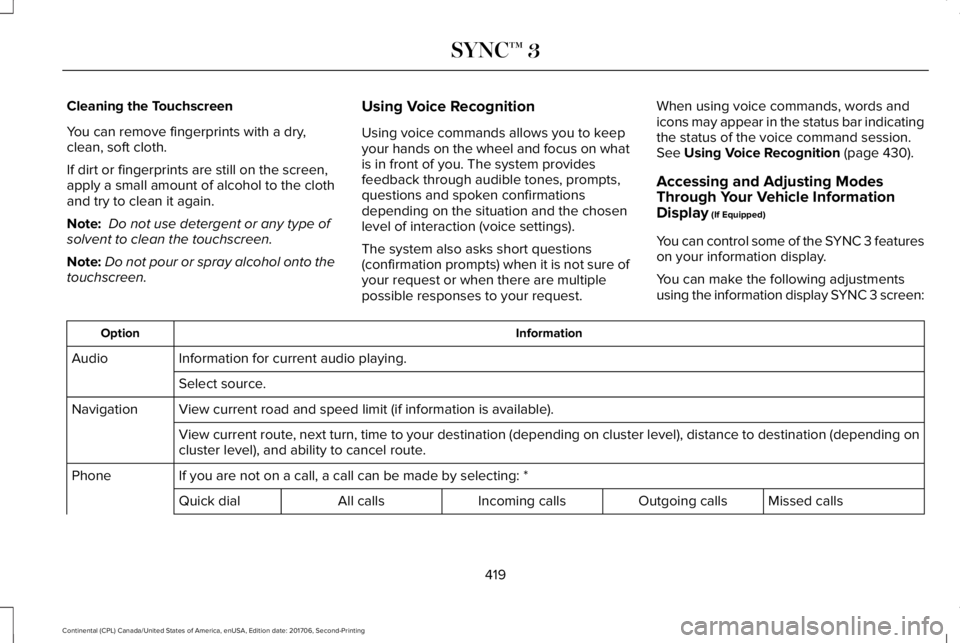
Accessing and Adjusting ModesThrough Your Vehicle InformationDisplay (If Equipped)
You can control some of the SYNC 3 featureson your information display.
You can make the following adjustmentsusing the information display SYNC 3 screen:
InformationOption
Information for current audio playing.Audio
Select source.
View current road and speed limit (if information is available).Navigation
View current route, next turn, time to your destination (depending on cluster level), distance to destination (depending oncluster level), and ability to cancel route.
If you are not on a call, a call can be made by selecting: *Phone
Missed callsOutgoing callsIncoming callsAll callsQuick dial
419
Continental (CPL) Canada/United States of America, enUSA, Edition date: 201706, Second-Printing
SYNC™ 3
Page 423 of 615
InformationOption
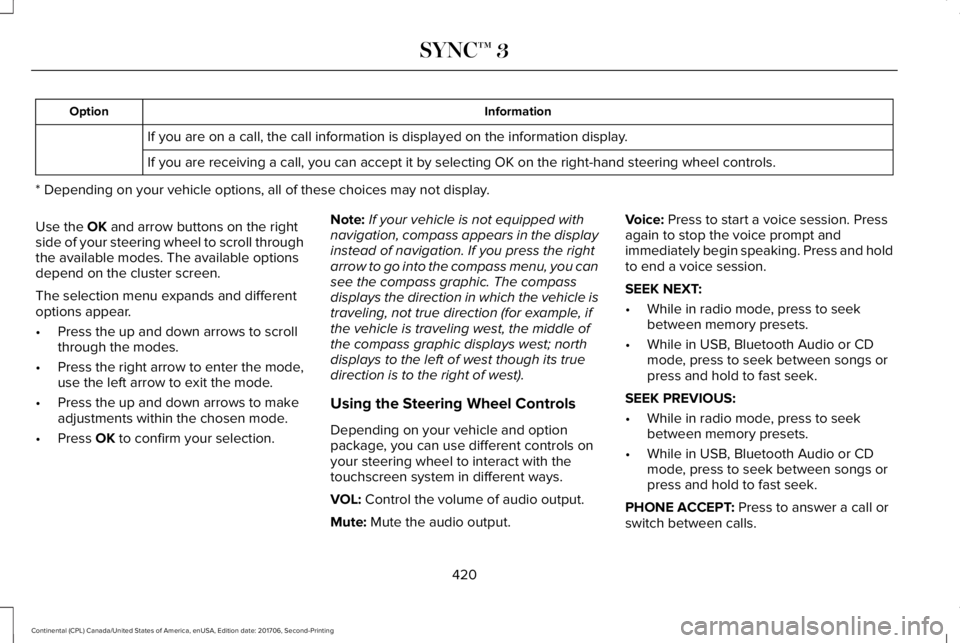
If you are on a call, the call information is displayed on the information display.
If you are receiving a call, you can accept it by selecting OK on the right-hand steering wheel controls.
* Depending on your vehicle options, all of these choices may not display.
Use the OK and arrow buttons on the rightside of your steering wheel to scroll throughthe available modes. The available optionsdepend on the cluster screen.
The selection menu expands and differentoptions appear.
•Press the up and down arrows to scrollthrough the modes.
•Press the right arrow to enter the mode,use the left arrow to exit the mode.
•Press the up and down arrows to makeadjustments within the chosen mode.
•Press OK to confirm your selection.
Note:If your vehicle is not equipped withnavigation, compass appears in the displayinstead of navigation. If you press the rightarrow to go into the compass menu, you cansee the compass graphic. The compassdisplays the direction in which the vehicle istraveling, not true direction (for example, ifthe vehicle is traveling west, the middle ofthe compass graphic displays west; northdisplays to the left of west though its truedirection is to the right of west).
Using the Steering Wheel Controls
Depending on your vehicle and optionpackage, you can use different controls onyour steering wheel to interact with thetouchscreen system in different ways.
VOL: Control the volume of audio output.
Mute: Mute the audio output.
Voice: Press to start a voice session. Pressagain to stop the voice prompt andimmediately begin speaking. Press and holdto end a voice session.
SEEK NEXT:
•While in radio mode, press to seekbetween memory presets.
•While in USB, Bluetooth Audio or CDmode, press to seek between songs orpress and hold to fast seek.
SEEK PREVIOUS:
•While in radio mode, press to seekbetween memory presets.
•While in USB, Bluetooth Audio or CDmode, press to seek between songs orpress and hold to fast seek.
PHONE ACCEPT: Press to answer a call orswitch between calls.
420
Continental (CPL) Canada/United States of America, enUSA, Edition date: 201706, Second-Printing
SYNC™ 3
Page 424 of 615
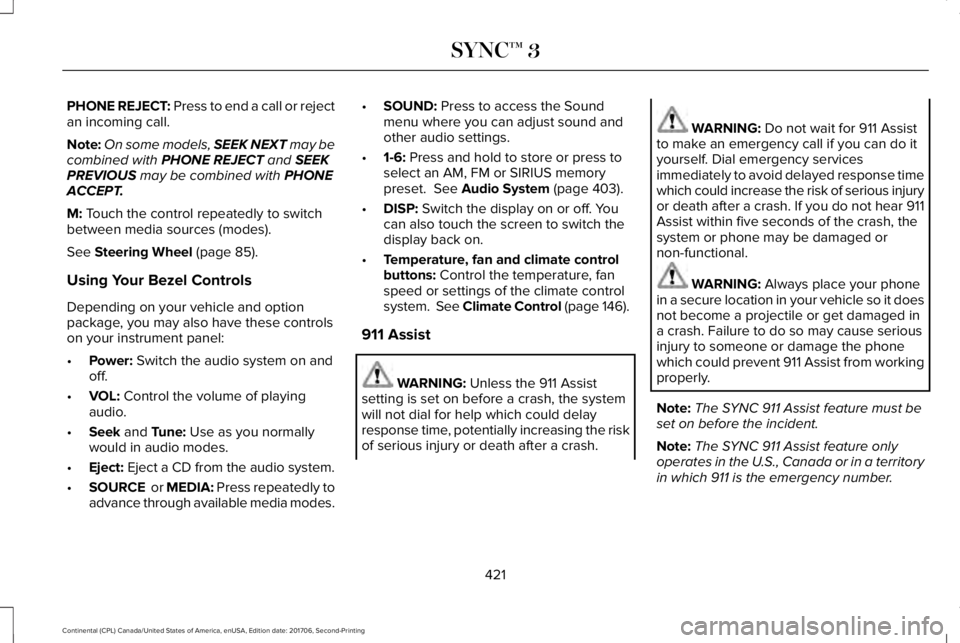
PHONE REJECT: Press to end a call or rejectan incoming call.
Note:On some models, SEEK NEXT may becombined with PHONE REJECT and SEEKPREVIOUS may be combined with PHONEACCEPT.
M: Touch the control repeatedly to switchbetween media sources (modes).
See Steering Wheel (page 85).
Using Your Bezel Controls
Depending on your vehicle and optionpackage, you may also have these controlson your instrument panel:
•Power: Switch the audio system on andoff.
•VOL: Control the volume of playingaudio.
•Seek and Tune: Use as you normallywould in audio modes.
•Eject: Eject a CD from the audio system.
•SOURCE or MEDIA: Press repeatedly toadvance through available media modes.
•SOUND: Press to access the Soundmenu where you can adjust sound andother audio settings.
•1-6: Press and hold to store or press toselect an AM, FM or SIRIUS memorypreset. See Audio System (page 403).
•DISP: Switch the display on or off. Youcan also touch the screen to switch thedisplay back on.
•Temperature, fan and climate controlbuttons: Control the temperature, fanspeed or settings of the climate controlsystem. See Climate Control (page 146).
911 Assist
WARNING: Unless the 911 Assistsetting is set on before a crash, the systemwill not dial for help which could delayresponse time, potentially increasing the riskof serious injury or death after a crash.
WARNING: Do not wait for 911 Assistto make an emergency call if you can do ityourself. Dial emergency servicesimmediately to avoid delayed response timewhich could increase the risk of serious injuryor death after a crash. If you do not hear 911Assist within five seconds of the crash, thesystem or phone may be damaged ornon-functional.
WARNING: Always place your phonein a secure location in your vehicle so it doesnot become a projectile or get damaged ina crash. Failure to do so may cause seriousinjury to someone or damage the phonewhich could prevent 911 Assist from workingproperly.
Note:The SYNC 911 Assist feature must beset on before the incident.
Note:The SYNC 911 Assist feature onlyoperates in the U.S., Canada or in a territoryin which 911 is the emergency number.
421
Continental (CPL) Canada/United States of America, enUSA, Edition date: 201706, Second-Printing
SYNC™ 3
Page 427 of 615
•Do not leave playing devices in yourvehicle during extreme conditions as itcould cause them damage. See yourdevice's user guide for furtherinformation.
•For your safety, some SYNC 3 functionsare speed-dependent. Their use is limitedto when your vehicle is traveling atspeeds under 3 mph (5 km/h). Make surethat you review your device's manualbefore using it with SYNC 3.
Speed-restricted Features
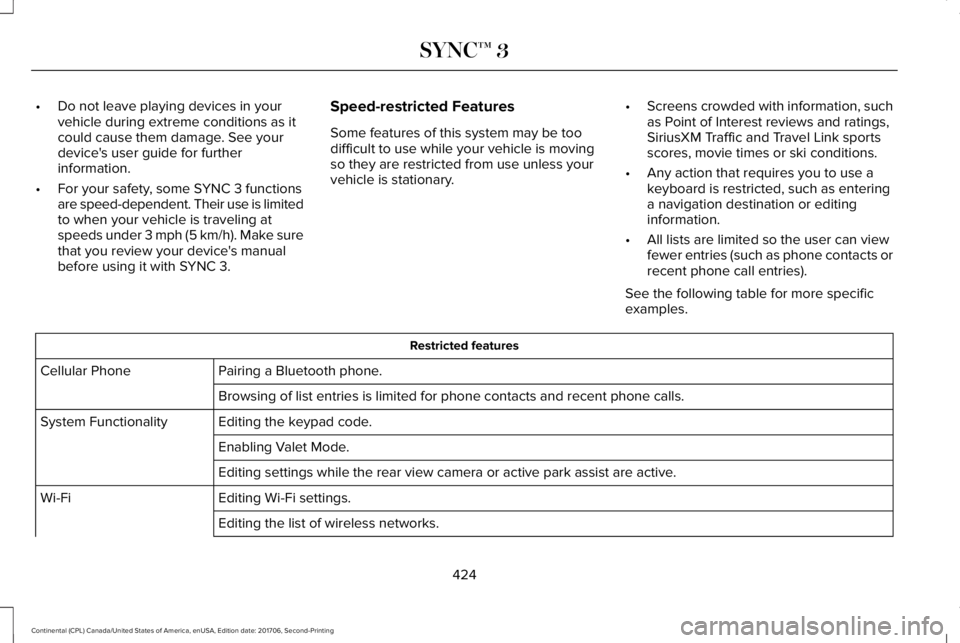
Some features of this system may be toodifficult to use while your vehicle is movingso they are restricted from use unless yourvehicle is stationary.
•Screens crowded with information, suchas Point of Interest reviews and ratings,SiriusXM Traffic and Travel Link sportsscores, movie times or ski conditions.
•Any action that requires you to use akeyboard is restricted, such as enteringa navigation destination or editinginformation.
•All lists are limited so the user can viewfewer entries (such as phone contacts orrecent phone call entries).
See the following table for more specificexamples.
Restricted features
Pairing a Bluetooth phone.Cellular Phone
Browsing of list entries is limited for phone contacts and recent phone calls.
Editing the keypad code.System Functionality
Enabling Valet Mode.
Editing settings while the rear view camera or active park assist are active.
Editing Wi-Fi settings.Wi-Fi
Editing the list of wireless networks.
424
Continental (CPL) Canada/United States of America, enUSA, Edition date: 201706, Second-Printing
SYNC™ 3