2018 LINCOLN CONTINENTAL ECO mode
[x] Cancel search: ECO modePage 47 of 615
Deactivating and Activating the Belt-MinderFeature
WARNING: While the system allowsyou to deactivate it, this system is designedto improve your chances of being safelybelted and surviving an accident. Werecommend you leave the system activatedfor yourself and others who may use thevehicle.
Note:The driver and front passengerwarnings switch on and off independently.When you perform this procedure for oneseating position, do not buckle the otherposition as this will terminate the process.
Read Steps 1 - 4 thoroughly beforeproceeding with the programmingprocedure.
Before following the procedure, make surethat:
•The parking brake is set.
•The transmission is in park (P) or neutral(N).
•The ignition is off.
•The driver and front passenger safetybelts are unbuckled.
1. Switch the ignition on. Do not start thevehicle.
2. Wait until the safety belt warning lightturns off (about one minute). After Step2, wait an additional 5 seconds beforeproceeding with Step 3. Once you startStep 3, you must complete the procedurewithin 30 seconds.
3.For the seating position you are switchingoff, buckle then unbuckle the safety beltthree times at a moderate speed, endingin the unbuckled state. After Step 3, thesafety belt warning light turns on.
4. While the safety belt warning light is on,buckle and then unbuckle the safety belt.After Step 4, the safety belt warning lightflashes for confirmation.
•This will switch the feature off for thatseating position if it is currently on.
•This will switch the feature on for thatseating position if it is currently off.
CHILD RESTRAINT AND SEATBELT
MAINTENANCE
Inspect the vehicle seatbelts and childrestraint systems periodically to make surethey work properly and are not damaged.Inspect the vehicle seatbelts to make surethere are no nicks, tears or cuts. Replace ifnecessary. All vehicle seatbelt assemblies,including retractors, buckles, front seatbeltbuckle assemblies, buckle supportassemblies (slide bar-if equipped), shoulderbelt height adjusters (if equipped), shoulderbelt guide on seatback (if equipped), rearinflatable seatbelts (if equipped), childrestraint LATCH and tether anchors, andattaching hardware, should be inspectedafter a crash. Read the child restraintmanufacturer's instructions for additionalinspection and maintenance informationspecific to the child restraint.
44
Continental (CPL) Canada/United States of America, enUSA, Edition date: 201706, Second-Printing
Seatbelts
Page 48 of 615
We recommend that all seatbelt assembliesin use in vehicles involved in a crash bereplaced. However, if the crash was minorand an authorized dealer finds that the beltsdo not show damage and continue tooperate properly, they do not need to bereplaced. Seatbelt assemblies not in useduring a crash should also be inspected andreplaced if either damage or improperoperation is noted.
Properly care for seatbelts. See Cleaningthe Interior (page 338).
SEATBELT EXTENSION
WARNING: Persons who fit into thevehicle's seatbelt should not use anextension. Unnecessary use could result inserious personal injury in the event of acrash.
WARNING: Only use extensionsprovided free of charge by Lincoln MotorCompany dealers. The dealer will providean extension designed specifically for thisvehicle, model year and seating position. Theuse of an extension intended for anothervehicle, model year or seating position maynot offer you the full protection of yourvehicle’s seatbelt restraint system.
WARNING: Never use seatbeltextensions to install child restraints.
WARNING: Do not use a seatbeltextension with an inflatable seatbelt.
WARNING: Do not use extensions tochange the fit of the belt across the torso,over the lap or to make the seatbelt buckleeasier to reach.
If, because of body size or driving position,it is not possible to properly fasten theseatbelt over your lap and shoulder, anextension that is compatible with theseatbelts is available free of charge fromLincoln Motor Company dealers. Only Lincolnseatbelt extensions made by the samecompany which made the original equipmentseatbelts, should be used with Lincolnseatbelts. Ask your authorized dealer if yourextension is compatible with your Lincolnvehicle restraint system.
45
Continental (CPL) Canada/United States of America, enUSA, Edition date: 201706, Second-Printing
Seatbelts
Page 65 of 615

PRINCIPLE OF OPERATION
MyKey allows you to program keys withrestricted driving modes to promote gooddriving habits. You can program therestrictions to all keys except one. Any keysthat you did not program are administratorkeys or admin keys.
You can use admin keys to:
•Create a MyKey with certain vehiclerestrictions.
•Program certain MyKey settings.
•Clear all MyKey restrictions.
After you program a MyKey, you can viewthe following information through theinformation display:
•The total number of admin keys andMyKeys for your vehicle.
•The total distance a MyKey drivertraveled with your vehicle.
Note:Every MyKey receives the samerestrictions and settings. You cannotprogram them individually.
Note:For vehicles equipped with apush-button start switch: When both a MyKeyand an admin key are present when youstart your vehicle, the system recognizes theadmin key only.
Standard Settings
Not every vehicle includes the features listedbelow. If your vehicle has this equipment,then you cannot change the followingsettings when using a MyKey:
•Seatbelt reminder or Belt-Minder™. MyKeymutes the audio system until drivers, andin some instances, passengers, fastentheir seatbelts. Note: If your vehicleincludes an AM/FM radio or a very basicaudio system, then the radio may notmute.
•Earlier low-fuel warning. The low-fuelwarning activates earlier for MyKeydrivers, giving them more time to refuel.
•Certain driver alerts, stability systems orparking aids turn on automatically whenyou use the MyKey system. For example,Blind Spot Information System (BLIS),cross traffic alert, lane departure warningor forward collision warning. Note: MyKeydrivers may be able to turn the lanedeparture warning feature off, but thisfeature turns back on automatically withevery new key cycle.
•Restricted touchscreen operation in somemarkets. For example, MyKey mayprevent manual navigation destinationinput while the vehicle is in any gearother than park (P) or when the vehiclereaches a certain rate of speed.
•Satellite radio adult content restrictions,if this feature is available in your market.
Optional Settings
You can configure certain vehicle featuresettings when you first create a MyKey. Youcan also change the settings afterward withan admin key.
62
Continental (CPL) Canada/United States of America, enUSA, Edition date: 201706, Second-Printing
MyKey™
Page 68 of 615

Number of Admin Keys
Indicates how many admin keys areprogrammed to your vehicle. Use this featureto determine how many admin keys you havefor your vehicle, and detect if an additionalMyKey has been programmed.
USING MYKEY WITH REMOTE
START SYSTEMS
MyKey is not compatible with nonFord-approved, aftermarket remote startsystems. If you choose to install a remotestart system, see an authorized dealer for aFord-approved remote start system.
MYKEY TROUBLESHOOTING
Potential causesCondition
· The key or transmitter used to start the vehicle does not have adminprivileges.I cannot create a MyKey.
· Vehicles with keyless start: Make sure you place the transmitter intothe backup slot. See Passive Anti-Theft System (page 82).· The key or transmitter used to start the vehicle is the only admin key.There always has to be at least one admin key.· SecuriLock passive anti-theft system is disabled or in unlimited mode.
· The key or transmitter used to start the vehicle does not have adminprivileges.I cannot program the configurable settings.
65
Continental (CPL) Canada/United States of America, enUSA, Edition date: 201706, Second-Printing
MyKey™
Page 72 of 615

At the Luggage Compartment
Press the exterior release button.
Remote Control
You can use the remote control at any time.When you press the lock button on theremote control, all exterior door handleswitches do not release the doors. When youpress the unlock button, all exterior doorhandle switches release the doors.
Unlocking the Doors
Press the button. The directionindicators flash. You can then usethe exterior door handle switch tounlock the door.
Press and hold both the lock and unlockbuttons on the remote control for threeseconds to change between driver door orall doors unlock mode. The directionindicators flash twice to confirm the change. Driver door mode only unlocks the driverdoor when you press the unlock buttononce. All door mode unlocks all doors when
you press the unlock button once. Theunlocking mode applies to the remotecontrol, keyless entry keypad and intelligentaccess. You can also change between theunlocking modes using the informationdisplay. See General Information (page 115).
Locking the Doors
Press the button. The directionindicators flash. You can no longeruse the exterior door handle switchto release the door.
Press the button again within three secondsto confirm that all the doors are closed. Atone sounds and the direction indicatorsflash if all the doors and the luggagecompartment are closed.
Mislock
If any door is open, or if the luggagecompartment or hood is open, a tone soundsand the direction indicators do not flash. Theexterior lock status display also flashes if anydoor does not lock. You can switch thisfeature on or off in the information display. See General Information (page 115).
69
Continental (CPL) Canada/United States of America, enUSA, Edition date: 201706, Second-Printing
Doors and LocksE222426 E138629 E138623
Page 82 of 615

Programming a Personal Entry Code
1. Enter the factory-set five-digit code.
2. Press 1·2 on the keypad within fiveseconds.
3. Enter your personal five-digit code. Youmust enter each number within fiveseconds of each other.
4.Press 1·2 on the keypad to save personalcode 1.
The doors lock then unlock to confirm thatprogramming was successful.
To program additional personal entry codes,repeat steps 1 through 3, then for step 4:
•Press 3·4 to save personal code 2.
•Press 5·6 to save personal code 3.
•Press 7·8 to save personal code 4.
•Press 9·0 to save personal code 5.
Hints:
•Do not set a code that uses five of thesame number.
•Do not use five numbers in sequentialorder.
•The factory-set code works even if youhave set your own personal code.
Erasing a Personal Code
1. Enter the factory-set five-digit code.
2. Press and release 1·2 on the keypadwithin five seconds.
3. Press and hold 1·2 for two seconds. Youmust do this within five seconds ofcompleting step 2.
All personal codes erase and only thefactory-set five-digit code works.
Anti-Scan Feature
The keypad goes into an anti-scan mode ifyou enter the wrong code seven times. Thismode turns off the keypad for one minuteand the keypad lamp flashes.
The anti-scan feature turns off after any ofthe following occur:
•One minute of keypad inactivity.
•You press the unlock button on theremote control.
•You switch your vehicle on.
•You unlock the vehicle using intelligentaccess.
Locking and Unlocking the Doors
Locking All Doors
Press and hold 7·8 and 9·0 on the keypadsimultaneously with the driver door closed.You do not need to enter a code first.
Unlocking All Doors
Enter the factory-set code or your personalcode, then press 3·4 on the keypad withinfive seconds.
Unlocking Only the Driver Door
Enter the factory-set or your personalfive-digit code. You must press each numberwithin five seconds of each other. Theinterior lamps illuminate.
79
Continental (CPL) Canada/United States of America, enUSA, Edition date: 201706, Second-Printing
Doors and Locks
Page 89 of 615
Note: If you press any adjustment ormemory button when in easy exit mode, thesystem cancels the operation.
Note:Depending on your vehicle, the columnmay move up and in.
AUDIO CONTROL
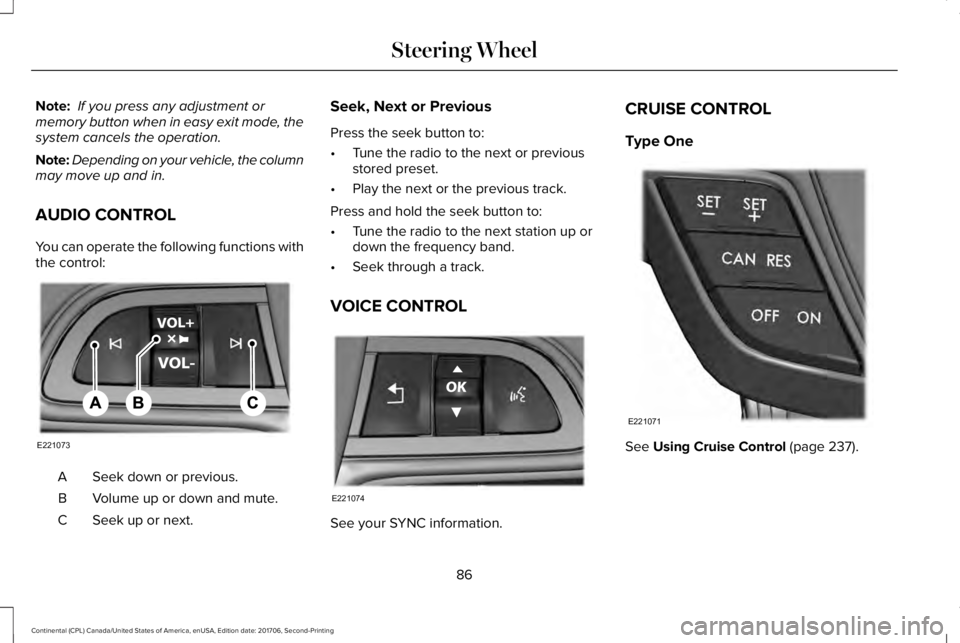
You can operate the following functions withthe control:
Seek down or previous.A
Volume up or down and mute.B
Seek up or next.C
Seek, Next or Previous
Press the seek button to:
•Tune the radio to the next or previousstored preset.
•Play the next or the previous track.
Press and hold the seek button to:
•Tune the radio to the next station up ordown the frequency band.
•Seek through a track.
VOICE CONTROL
See your SYNC information.
CRUISE CONTROL
Type One
See Using Cruise Control (page 237).
86
Continental (CPL) Canada/United States of America, enUSA, Edition date: 201706, Second-Printing
Steering WheelE221073 E221074 E221071
Page 93 of 615

Autowipers On.A
High sensitivity.B
Low sensitivity.C
Use the rotary control to adjust thesensitivity of the autowipers.
When you select low sensitivity, the wipersoperate when the sensor detects a largeamount of water on the windshield. Whenyou select high sensitivity, the wipersoperate when the sensor detects a smallamount of water on the windshield.
Keep the outside of the windshield clean. The rain sensor is very sensitive and thewipers may operate if dirt, mist or insects hitthe windshield.
In these conditions, you can do the following:
•Lower the sensitivity of the autowipersto reduce the amount of smearing on thewindshield.
•Switch to normal or high-speed wipe.
•Switch autowipers off.
Note:Fully defrost the windshield before youswitch the windshield wipers on.
Note:Make sure that you switch thewindshield wipers off before entering a carwash.
Note: If streaks or smears appear on thewindshield, clean the windshield and thewiper blades. If that does not resolve theissue, install new wiper blades.
Note:If you switch autolamps andautowipers on, the headlamps turn on whenthe windshield wipers continuously operate.
Autowipers Settings
This setting defaults to on and remains onuntil you switch it off in the informationdisplay.
When you switch off autowipers, the wipersoperate in intermittent mode.
Low Temperature Wipe Inhibit (If Equipped)
The rain sensing feature will not operateimmediately after starting your vehicle whenit is in park (P) and the outside temperatureis below 32°F (0°C). You can switch on thewipers by adjusting the rain sensor sensitivityor adjusting the wiper speed.
This prevents damage to the wiper bladesfrom ice and snow on the windshield.
WINDSHIELD WASHERS
Note: Do not operate the washers when thewasher reservoir is empty. This may causethe washer pump to overheat.
90
Continental (CPL) Canada/United States of America, enUSA, Edition date: 201706, Second-Printing
Wipers and WashersE269411 E270969