Page 260 of 551

57
Driving your vehicle
Illuminated engine start/stop
button
Whenever the front door is opened,
the engine start/stop button will illu-
minate for your convenience. The
light will go off after about 30 sec-
onds when the door is closed.
When all entrances are closed, if you
lock the vehicle by using the trans-
mitter or the smart key, the light will
go off immediately.
Engine start/stop button posi-
tion
OFF
To turn off the engine (START/RUN
position) or vehicle power (ON posi-
tion), press the engine start/stop but-
ton with the shift lever in the P (Park)
position. When you press the engine
start/stop button without the shift
lever in the P (Park) position, the
engine start/stop button will not
change to the OFF position but to the
ACC position.
In an emergency situation while the
vehicle is in motion, you are able to
turn the engine off and to the ACC
position by pressing the engine
start/stop button for more than 2 sec-
onds or 3 times successively within 3
seconds. If the vehicle is still moving,
you can restart the engine without
depressing the brake pedal by press-
ing the engine start/stop button with
the shift lever in the N (Neutral) posi-
tion.
ACC(Accessory)
Press the engine start/stop button
while it is in the OFF position without
depressing the brake pedal.
If the engine start/stop button is in the
ACC position for more than 1 hour,
the button is turned off automatically
to prevent battery discharge.
Accessory is displayed on the LCD
of the cluster.
ENGINE START/STOP BUTTON
OCK057001
OCK057163
Page 262 of 551

59
Driving your vehicle
Starting the engine with a
smart key
1.Carry the smart key or place itinside the vehicle.
2.Make sure the parking brake is firmly applied
3.Place the transmission shift lever in P (Park). Depress the brake pedal
fully.
You can also start the engine whenthe shift lever is in the N (Neutral)position.
4.Press the engine start/stop button while depressing the brake pedal.
It should be started withoutdepressing the accelerator.
5.Do not wait for the engine to warm up while the vehicle remains sta-
tionary.
Start driving at moderate engine
speeds. (Steep accelerating and
decelerating should be avoided.) Even if the smart key is in the vehi-
cle, if it is far away from you, the
engine may not start.
When the engine start/stop button is in the ACC position or above, if
any door is opened, the system
checks for the smart key. If the
smart key is not in the vehicle, a
message “key is not in the vehicle”
will appear on the LCD display. And
if all doors are closed, the chime
will sound for 5 seconds. The indi-
cator or warning will turn off while
the vehicle is moving. Always have
the smart key with you.
WARNING - Unintended
vehicle movement
Never leave the smart key in the
vehicle with children or vehicle
occupants who are unfamiliar
with the vehicle operation.
Pushing the engine start/stop
button while the smart key is in
the vehicle may result in unin-
tended engine activation and/or
unintended vehicle movement.
Page 265 of 551

Driving your vehicle
12
5
When stopped on an incline, do not
hold the vehicle with the engine
power. Use the service brake or the
parking brake.
Transmission ranges
The indicator in the instrument clus-
ter displays the shift lever position
when the ignition switch is in the ON
position.
P (Park)
Always come to a complete stop
before shifting into P (Park). This
position locks the transmission and
prevents the drive wheels from rotat-
ing.
Shifting into P (Park) while the vehi-
cle is in motion will cause the drive
wheels to lock which will cause you
to lose control of the vehicle. R (Reverse)
Use this position to drive the vehicle
backward.
N (Neutral)
The wheels and transmission are not
engaged. The vehicle will roll freely
even on the slightest incline unless
the parking brake or service brakes
are applied.
WARNING- Leaving
Vehicle
Before leaving the driver’s seat,
always make sure the shift lever
is in the P (Park) position; then
set the parking brake fully and
shut the engine off. Do not use
the P position in place of the
parking brake. Always make
sure the shift lever is locked in
the P position and set the park-
ing brake fully. Unexpected and
sudden vehicle movement can
occur if these precautions are
not followed.
CAUTION- Transmission
To avoid damage to your trans- mission, do not accelerate theengine in R (Reverse) or any for-ward gear position with thebrakes on. The transmissionmay be damaged if you shiftinto P (Park) while the vehicle isin motion.
CAUTION- Shifting
Always come to a complete stopbefore shifting into or out of R(Reverse); you may damage thetransmission if you shift into R(Reverse) while the vehicle is inmotion, except when “Rockingthe vehicle” explained in thischapter.
Page 271 of 551

Driving your vehicle
18
5
Launch Control
Launch Control Operation
When using Launch Control with
an engine that is not warmed up
enough, a driver should always
make sure that the engine’s cool-
ing water is warmed up and reach-
es a recommended temperature.
To operate ESC Off state 2, Press and hold ESC button for more than
3 seconds in Sports mode. (Status
Display on Cluster Screen)
For launching, stop the vehicle and keep a steering wheel straight.
Footbrakes, EPB and Auto Hold must be released for smooth
launching. Press the brake firmly with your left
foot in transmission D mode, while
pressing the accelerator pedal
down fully with your right foot.
Then, the Launch Control Ready
(1) will be in place. To start a vehicle, with your right
foot pressing the accelerator pedal
down fully, remove your left foot
from the brake. (within 4 seconds)
(Launch Control Active (2) Status
Display on Cluster Screen)
If both the brakes and accelerater pedals were applied and the driver
removes his foot only from the
accelerater pedal, Launch Control
will be automatically deactivated.
Or, if the vehicle does not start
after 4 seconds with a driver’s feet
on both brake and accelerate ped-
als, Launch Control will automati-
cally deactivated as well
OCK047156LOCK047157L
Page 274 of 551

521
Driving your vehicle
Transmission ranges
The indicator in the instrument clus-
ter displays the shift lever position
when the engine start/stop button is
in the ON position.
However, if the gear is in N (Neutral)
or P (Park), the position is displayed
on the instrument cluster when the
engine start/stop button is in the OFF
or ACC position.P (Park)
Always come to a complete stop
before shifting into P (Park).
To shift the gear from R (Reverse), N
(Neutral), D (Drive) or Manual mode
to P (Park), press the [P] button.
If you turn off the engine in D (Drive),
R (Reverse), the shifting automati-
cally changes to P (Park).
When you park the vehicle, press the
[P] button while depressing the brake
pedal and then apply the parking
brake.WARNING
To reduce the risk of serious
injury or death:
ALWAYS check the surround-ing areas near your vehicle for
people, especially children,
before shifting a vehicle into D
(Drive) or R (Reverse).
Before leaving the driver’s seat, always make sure the
shift lever is in the P (Park)
position, then set the parking
brake, and place the engine
start/stop button in the OFF
position. Unexpected and sud-
den vehicle movement can
occur if these precautions are
not followed.
Do not use engine braking (shifting from a high gear to
lower gear) rapidly on slippery
roads. The vehicle may slip
causing an accident.
OCK057009N
CAUTION - Transmission
To avoid damage to your trans-mission, do not accelerate theengine in R (Reverse) or any for-ward gear position with thebrakes on. The transmissionmay be damaged if you shiftinto P (Park) while the vehicle isin motion.
Page 280 of 551

527
Driving your vehicle
✽ ✽NOTICE
In situations the gear needs to be
changed from P (Park) to N
(Neutral) when the engine start/stop
button is in the OFF position, refer
to step 4.
The actuators work to shift the gear
in the N (Neutral) or P (Parking)
and make normal mechanical
sound.
Parking
Always come to a complete stop and
continue to depress the brake pedal.
Move the shift lever into the P (Park)
position, apply the parking brake,
and place the engine start/stop but-
ton in the OFF position. Take the Key
with you when exiting the vehicle.
LCD display messages
Shifter Malfunction
The warning message appears on
the LCD display, when the transmis-
sion or the shift lever does not prop-
erly operate in the P (Park) position.
In this case, we recommend you to
immediately have the vehicle
inspected by an authorized Kia deal-
er.
WARNING
Do not depress the accelera-
tor pedal While sitting in the
vehicle with the engine run-
ning. Depressing the acceler-
ator pedal for a long period of
time may cause the engine or
exhaust system to overheat
and start a fire.
The exhaust gas and the exhaust system are very hot .
Keep away from the exhaust
system components. Do not
stop or park over flammable
materials, such as dry grass,
paper or leaves. They may
ignite and cause a fire.
OCK057143L
Page 281 of 551
Driving your vehicle
28
5
Check shift lever
The warning message appears on
the LCD display, when there is a mal-
function with one of the key trans-
mission components.
In this case, we recommend you to
immediately have the vehicle inspect-
ed by an authorized Kia dealer.
Shifting conditions not met
The warning message appears on
the LCD display, when engine RPM
is too high, or when driving speed is
too fast to shift the gear.
We recommend you to decrease
your RPM level or slow down before
shifting the gear.
Press brake pedal to change gear
The warning message appears on
the LCD display, when the brake
pedal is not depressed while shifting
the gear.
We recommend you to depress the
brake pedal and then shift the gear.
OCK057070LOCK057071LOCK057072L
Page 282 of 551
529
Driving your vehicle
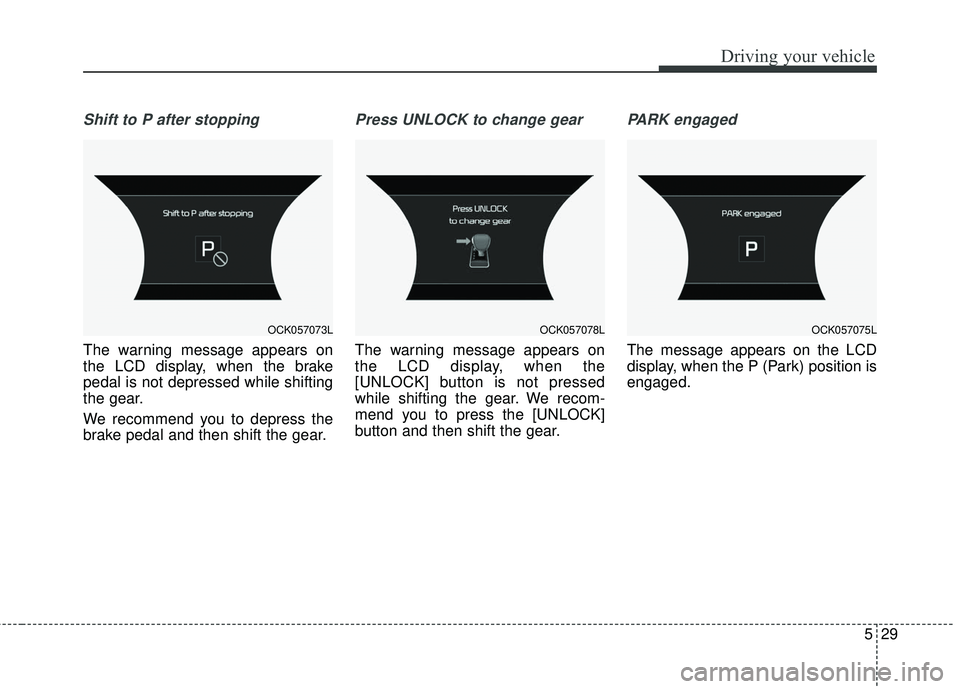
Shift to P after stopping
The warning message appears on
the LCD display, when the brake
pedal is not depressed while shifting
the gear.
We recommend you to depress the
brake pedal and then shift the gear.
Press UNLOCK to change gear
The warning message appears on
the LCD display, when the
[UNLOCK] button is not pressed
while shifting the gear. We recom-
mend you to press the [UNLOCK]
button and then shift the gear.
PARK engaged
The message appears on the LCD
display, when the P (Park) position is
engaged.
OCK057073LOCK057078LOCK057075L