Page 173 of 551

Features of your vehicle
86
4
Steering Easy Access (if
equipped)
- On (checked) : The steeringwheel will automatically move to
the top of Steering column when
leaving the vehicle and move to
the last saved position when
entering the vehicle for the driver
enter or exit the vehicle comfort-
ably.
- Off (unchecked) : The steering easy access function will be
deactivated.
❈ For more details, refer to “Driver
Position Memory System” in chap-
ter 3.
Welcome Mirror/Light (if equipped) : - If this item checked, the welcomeMirror/light function will be acti-
vated.
Wiper/Light Display (if equipped) : If this item checked, the
Wiper/Light Display will be activat-
ed. Gear Position Pop-up (if equipped)
: If this item checked, the gear posi-
tion pop-up display will be activat-
ed.
Icy road warning (if equipped) : If this item checked, the Icy road
warning display will be activated.
Service interval
Service Interval To activate or deactivate the serv-
ice interval function.
Adjust Interval To adjust the interval by mileage-
and period.
Reset To reset the service interval func-
tion. Other features
Fuel Economy Auto Reset
- Off : The average fuel economywill not reset automatically when-
ever refueling.
- After Ignition : The average fuel economy will reset automatically
whenever it has passed 4 hours
after turning OFF the engine.
- After Refueling : The average fuel economy will reset automatically
when refueling.
❈ For more details, refer to “Trip
Computer” in this chapter.
Fuel Economy Unit - Choose the fuel economy unit.(L/100km, US gallon, UK gallon)
Temperature Unit - Choose the temperature unit.(°C,°F)
Page 176 of 551
489
Features of your vehicle
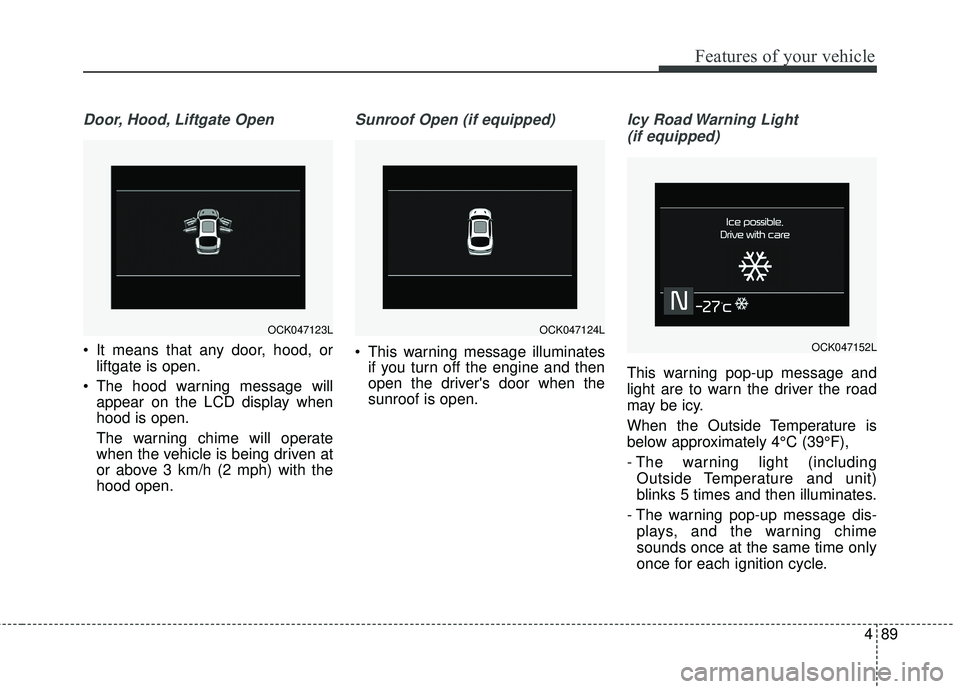
Door, Hood, Liftgate Open
It means that any door, hood, orliftgate is open.
The hood warning message will appear on the LCD display when
hood is open.
The warning chime will operate
when the vehicle is being driven at
or above 3 km/h (2 mph) with the
hood open.
Sunroof Open (if equipped)
This warning message illuminatesif you turn off the engine and then
open the driver's door when the
sunroof is open.
Icy Road Warning Light
(if equipped)
This warning pop-up message and
light are to warn the driver the road
may be icy.
When the Outside Temperature is
below approximately 4°C (39°F),
- The warning light (including Outside Temperature and unit)
blinks 5 times and then illuminates.
- The warning pop-up message dis- plays, and the warning chime
sounds once at the same time only
once for each ignition cycle.
OCK047124LOCK047123L
OCK047152L
Page 177 of 551

Features of your vehicle
90
4
If this item is checked in “User set-
tings”, this function will be activated.
- The temperature on the Outside
Temperature Gauge is below
approximately 4°C (39°F).
✽ ✽ NOTICE
If the icy road warning light appears
while driving, you should drive
more attentively and safely refrain-
ing from over-speeding, rapid accel-
eration, sudden braking or sharp
turning, etc.
Check headlight LED
This warning message illuminates if
LED headlamp is malfunction.
Check headlight cooling fan
This warning message illuminates if
LED headlamp cooling fan is mal-
function.
Check shift lever
If there is a problem with the main
function of the shift lever, this warn-
ing is displayed on the display.
Low Washer Fluid
This warning message illuminates
on the service reminder mode if
the washer fluid level in the reser-
voir is nearly empty.
It means that you should refill the washer fluid.
Turn on FUSE SWITCH
This warning message illuminatesif the fuse switch under the steer-
ing wheel is OFF.
It means that you should turn the fuse switch on.
❈ For more details, refer to “Fuses” in
chapter 7.
Page 178 of 551

491
Features of your vehicle
Check headlights (if equipped)
This warning message illuminates if
there is a malfunction (burned-out
bulb or circuit malfunction) with the
head lights (high and low beam). In
this case, have the vehicle inspected
by an authorized Kia dealer.
✽ ✽NOTICE
• When replacing the bulb, use the
same wattage bulb.
For more information, refer to
“BULB WATTAGE” in chapter 8.
• If the different wattage bulb is equipped with the vehicle, this
warning message is not displayed.
Low Fuel
This warning message illuminates
if the fuel tank is nearly empty.
- When the low fuel level warninglight is illuminates.
Add fuel as soon as possible.
Check Smart Phone Wireless Charger (if equipped)
If a smart phone is still left on the
wireless charging pad unattended,
even when the the Engine Start/Stop
Button is in the ACC or OFF position
and the instrument panel's one time
driving information mode has fin-
ished, a warning message will lit up
on the instrument panel.
❈ For more details, refer to “Smart
Phone Wireless Charger” in this
chapter.
Page 185 of 551

Features of your vehicle
98
4
Low Tire Pressure
Warning Light (if equipped)
This warning light illuminates:
Once you set the Engine Start/Stop Button to the ON position.
- It illuminates for approximately 3seconds and then goes off.
When one or more of your tires are significantly underinflated (The
location of the underinflated tires
are displayed on the LCD display).
❈ For more details, refer to “Tire
Pressure Monitoring System
(TPMS)” in chapter 6. This warning light remains on after
blinking for approximately 60 seconds
or repeats blinking and off at the
intervals of approximately 3 seconds:
When there is a malfunction with
the TPMS.
In this case, have the vehicle
inspected by an authorized Kia
dealer.
❈ For more details, refer to “Tire
Pressure Monitoring System
(TPMS)” in chapter 6.
LED Headlamp Warning
Light (if equipped)
This warning light illuminates:
Once you set the Engine Start/Stop Button to the ON position.
- It illuminates for approximately 3seconds and then goes off.
When there is a malfunction with the LED headlamp.
In this case, have the vehicle inspect-
ed by an authorized Kia dealer.
This warning light blinks:
When there is a malfunction with a LED headlamp related part.
In this case, have the vehicle inspect-
ed by an authorized Kia dealer.
✽ ✽ NOTICE
Continuous driving with the LED
Headlamp Warning Light on or
blinking can reduce LED headlamp
(low beam) life.
WARNING - Low tire
pressure
Significantly low tire pressure makes the vehicle unstable
and can contribute to loss of
vehicle control and increased
braking distances.
Continued driving or low pres- sure tires will cause the tires to
overheat and fail.
Page 192 of 551

4105
Features of your vehicle
Description
The head up display is a transparent
display which projects a shadow of
some information of the instrument
cluster and navigation on the wind-
shield glass. The head up display image on the
windshield glass may be invisible
when:
- Sitting posture is bad.
- Wearing a polarized sunglasses.
- There is an object on the cover ofthe head up display.
- Driving on a wet road.
- An inadequate lighting is turned on inside the vehicle.
- Any light comes from the outside.
- Wearing an inadequate glasses to your eyesight.
If the head up display image is not shown well, adjust the height, rota-
tion or illumination of the head up
display in the LCD window.
❈ For more details, refer to “LCD
window” in this chapter.
When the head up display needs inspection or repair, consult an
authorized Kia dealer.
Do not place any accessories on the clash pad or attach any objects
on the windshield glass.
✽ ✽ NOTICE
Installing window tint or any other
type of metallic coating on the wind-
shield can prevent the driver from
seeing the Head Up Display images.
✽ ✽NOTICE
When replacing the front wind-
shield glass of the vehicles equipped
with the head up display, replace it
with a windshield glass designed for
the head up display operation.
Otherwise, duplicated images may
be displayed on the windshield glass.
HEAD UP DISPLAY (HUD) (IF EQUIPPED)
OCK047467C
WARNING - Head up
display
The Head up display is a supple-
mental system. Do not solely
rely on the system, always drive
safely, and pay attention to the
driving conditions on the road.
Page 193 of 551
Features of your vehicle
106
4
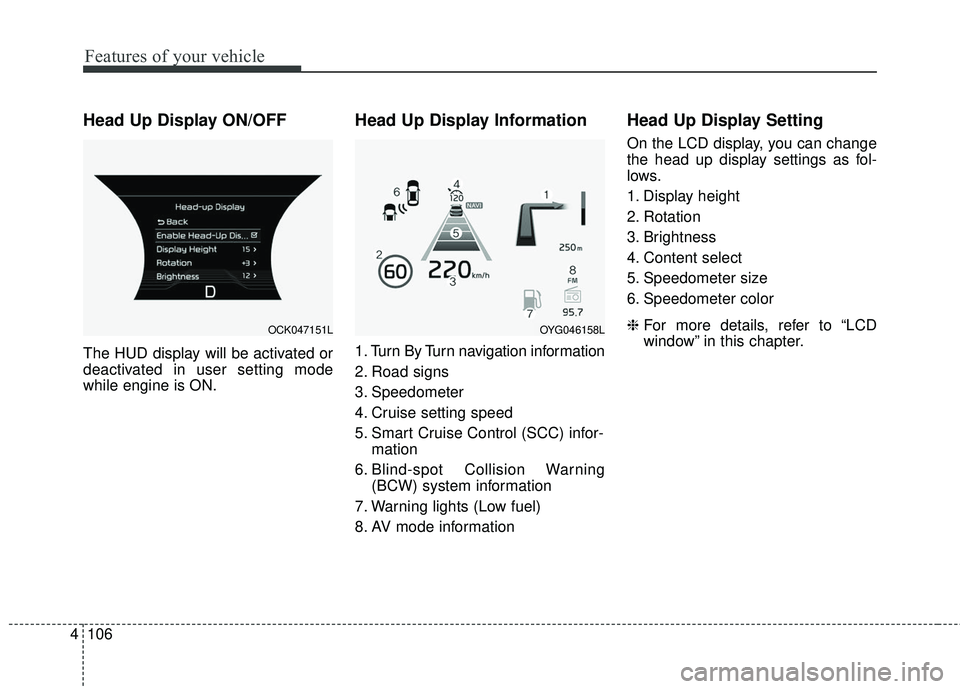
Head Up Display ON/OFF
The HUD display will be activated or
deactivated in user setting mode
while engine is ON.
Head Up Display Information
1. Turn By Turn navigation information
2. Road signs
3. Speedometer
4. Cruise setting speed
5. Smart Cruise Control (SCC) infor-
mation
6. Blind-spot Collision Warning (BCW) system information
7. Warning lights (Low fuel)
8. AV mode information
Head Up Display Setting
On the LCD display, you can change
the head up display settings as fol-
lows.
1. Display height
2. Rotation
3. Brightness
4. Content select
5. Speedometer size
6. Speedometer color
❈ For more details, refer to “LCD
window” in this chapter.
OCK047151LOYG046158L
Page 198 of 551

4111
Features of your vehicle
Pay close attention when the vehicle
is driven close to objects on the
road, particularly pedestrians, and
especially children. Be aware that
some objects may not be detected
by the sensors, due to the objects
distance, size or material, all of
which can limit the effectiveness of
the sensor. Always perform a visual
inspection to make sure the vehicle
is clear of all obstructions before
moving the vehicle in any direction.Self-diagnosis
When you shift the gear to the R
(Reverse) position and if one or more
of the below occurs you may have a
malfunction in the rear parking assist
system.
You don't hear an audible warningsound or if the buzzer sounds inter-
mittently.
If this occurs, we recommend that the
system be checked by an authorized
Kia dealer.
✽ ✽ NOTICE
Your new vehicle warranty does not
cover any accidents or damage to
the vehicle or injuries to its occu-
pants related to a parking assist sys-
tem. Always drive safely and cau-
tiously.
is displayed. (if equipped)
(blinks)