2018 KIA STINGER steering wheel
[x] Cancel search: steering wheelPage 14 of 551
Your vehicle at a glance
42
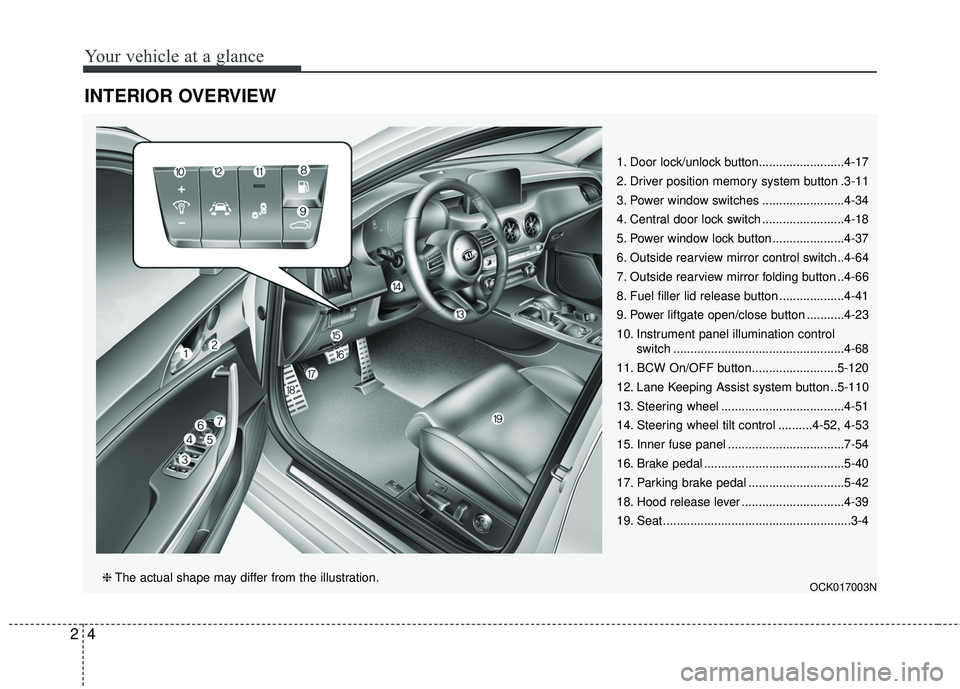
INTERIOR OVERVIEW
1. Door lock/unlock button.........................4-17
2. Driver position memory system button .3-11
3. Power window switches ........................4-34
4. Central door lock switch ........................4-18
5. Power window lock button .....................4-37
6. Outside rearview mirror control switch..4-64
7. Outside rearview mirror folding button ..4-66
8. Fuel filler lid release button ...................4-41
9. Power liftgate open/close button ...........4-23
10. Instrument panel illumination control switch ..................................................4-68
11. BCW On/OFF button.........................5-120
12. Lane Keeping Assist system button ..5-110
13. Steering wheel ....................................4-51
14. Steering wheel tilt control ..........4-52, 4-53
15. Inner fuse panel ..................................7-54
16. Brake pedal .........................................5-40
17. Parking brake pedal ............................5-42
18. Hood release lever ..............................4-39
19. Seat .......................................................3-4
OCK017003N❈ The actual shape may differ from the illustration.
Page 15 of 551

25
Your vehicle at a glance
INSTRUMENT PANEL OVERVIEW
1. Driver`s front air bag .............................3-60
2. Horn ......................................................4-54
3. Instrument cluster .................................4-67
4. Wiper/Washer .....................................4-122
5. Engine start/stop button .........................5-7
6. Cruise control .......................................5-78 Smart cruise control system .................5-82
7. Hazard warning flasher switch................6-2
8. Climate control system .......................4-132
9. Shift lever.....................................5-11, 5-20
10. Heated steering wheel button.............4-53
11. ISG (Idle stop and go) system button ................................................5-101
12. 360° camera monitoring system .......4-113
13. Seat warmer/ Air ventilation switch ..............4-153, 4-154
14. Electronic parking brake(EPB) switch... 5-44
15. AUTO HOLD control button ................5-50
16. Parking assist system button……….5-101
17. Center console box...........................4-150
18. USB charger .....................................4-157
19. Glove box ..........................................4-150
20. Passenger`s front air bag ...................3-60
21. Power outlet ......................................4-156
22. Drive mode control knob ..................5-105
23. Electronic stability control button ........5-56
OCK017004N❈ The actual shape may differ from the illustration.
Page 22 of 551
Safety features of your vehicle
63
WARNING - Rear seatbacks
Always lock the rear seatback
before driving. Failure to do so
could result in passengers or
objects being thrown forward
injuring vehicle occupants.
WARNING- Luggage and Cargo
Do not stack pile or stack lug-
gage or cargo higher than the
seatback in the cargo area. In an
accident the cargo could strike
and injury a passenger. If
objects are large, heavy or must
be piled, they must be secured
in the cargo area.
WARNING- Cargo Area
Do not allow passengers to ride
in the cargo area under any cir-
cumstance. The cargo area is
solely for the purpose of trans-
porting luggage or cargo.WARNING- Driver’s seat
Never attempt to adjust the seat while the vehicle is mov-
ing. This could result in loss
of control of your vehicle.
Do not allow anything to inter- fere with the normal position
of the seatback. Storing items
against the seatback could
result in serious or fatal injury
in a sudden stop or collision.
Sit as far back as possible from the steering wheel while still
maintaining comfortable con-
trol of the your vehicle. A dis-
tance of at least 25 cm (10 in.)
from your chest to the steering
wheel is recommended. Failure
to do so can result in air bag
inflation injuries to the driver.
Page 24 of 551

Safety features of your vehicle
83
Front seat adjustment - power
The front seat can be adjusted by
using the control switches located on
the outside of the seat cushion.
Before driving, adjust the seat to the
proper position so you can easily con-
trol the steering wheel, pedals and
switches on the instrument panel.When in operation, the power seat-
consumes a large amount of electri-
cal power. To prevent unnecessary
system drain, don’t adjust the power
seat longer than necessary while the
engine is not running.
Forward and backward
Push the control switch forward or
backward to move the seat to the
desired position. When the control
switch is operated forward, the seat
cushion is slightly raised, and the
seat cushion lowered when the
switch is operated backward.
Release the switch once the seat
reaches the desired position.
OCK037004
CAUTION- Power seatadjustments
The power seating controlsfunction by electronic motor.
Excessive operation may causedamage to the electrical equip-ment.
CAUTION- Power Seating
Do not operate two or morepower seat control switches atthe same time. Doing so maydamage the power seat motor orelectrical components.
WARNING- Unattended
children
Do not leave children unattend-
ed in the vehicle. Children might
operate features of the vehicle
that could injure them.
Page 27 of 551

311
Safety features of your vehicle
Seat back bolster control(For driver seat, if equipped)
1. Turn the adjustment switch clock- wise, the right/left seatback bol-
sters will be adjusted inward. Turn
the switch counterclockwise, the
seatback bolster will be adjusted
outward. 2. To adjust the bolster height to its
maximum in the default state,
operate the switch for 8 seconds.
After that, release the switch
because there is no change in
height even if you continue to
operate the switch.
3. Once adjustment is done, leave the switch in place.
Driver position memory system
(if equipped, for power seat)
Driving Position Memory System is
the facility that enables driver’s seat,
steering wheel, exterior mirrors, clus-
ter and head-up display (HUD) to be
controlled with a simple button oper-
ation, which allows a driver to recall
memorized driving positions and
automatically control them. Driver’s
seat/ Steering Wheel/ Exterior mir-
rors: location Cluster: Brightness of
lighting
Head up Display (HUD): height, rota-
tion and brightness.
OCK037008OCK037021
Page 29 of 551
313
Safety features of your vehicle
Easy access function (if equipped)
To provide easier entry to or exit from
the vehicle for a driver, the driver’s
seat will be adjusted backwards as
far as the distance set by User
Setting on the Instrument Panel. This
occurs when the driver’s door is
opened and the Engine start/stop
button is Off with the shift lever in the
P position. If, however, the distance
between the front seat and back
seats are too close, the driver’s seat
could fail to adjust itself backwards.
The steering wheel moves to the top.
With the steering wheel moving as far
as top and as far as forward to a driv-
er on a regular basis steering wheel
identifies and adjusts its location by
itself.The driver’s seat and steering wheel
will move back to its original position
when a driver closes a driver’s door
with a smart key in his pocket and
the engine start/stop button is in OFF
or in ACC.
You can activate or deactivate this
feature. Refer to “User settings” in
chapter 4.
Driver position memory system
reset
If the Driver position memory system
reset fails to work, initialize the sys-
tem as follows.
How to initialize:
1. Stop the car and open the driver’s door with the Engine start/stop
button in ON and the automatic
shift lever in P (parking) position.
2. Pull the driver’s seat forward as far as possible and have the seatback
upright as much as possible using
driver’s seat forward adjustment
and seatback angle (recline)
movement switches.
3. Push SET button and seat fore movement switch button for 2 sec-
onds simultaneously.
Page 62 of 551

Safety features of your vehicle
46
3
How does the air bag system
operate?
Air bags are activated (able to
inflate if necessary) only when the
Engine Start/Stop button is turned
to the ON or engine is running.
The appropriate air bags inflate instantly in the event of a serious
frontal collision or side collision in
order to help protect the occupants
from serious physical injury.
There is no single speed at which the air bags will inflate.
Generally, air bags are designed to
inflate based upon the severity of a
collision and its direction. These
two factors determine whether the
sensors produce an electronic
deployment/ inflation signal.
Air bag deployment depends on a number of factors including vehicle
speed, angles of impact, and, the
density and stiffness of the vehi-
cles or objects which your vehicle
hits in the collision. The determin-
ing factors are not limited to those
mentioned above. The front air bags will completely
inflate and deflate in an instant.
It is virtually impossible for you to
see the air bags inflate during an
accident.
It is much more likely that you will
simply see the deflated air bags
hanging out of their storage com-
partments after the collision.
In addition to inflating in serious side collisions, side and/or curtain
air bags will inflate if the sensing
system detects a rollover.
When a rollover is detected, side and/or curtain air bags will remain
inflated longer to help provide pro-
tection from ejection, especially
when used in conjunction with the
seat belts. In order to help provide protection,
the air bags must inflate rapidly.
The speed of the air bag inflation is
a consequence of extremely short
time in which to inflate the air bag
between the occupant and the
vehicle structures before the occu-
pant impacts those structures. This
speed of inflation reduces the risk
of serious or life-threatening
injuries and is thus a necessary
part of the air bag design.
However, air bag inflation can also
cause injuries which can include
facial abrasions, bruises and bro-
ken bones because the inflation
speed also causes the air bags to
expand with a great deal of force.
There are even circumstances under which contact with the
steering wheel or passenger air
bag can cause fatal injuries,
especially if the occupant is
positioned excessively close to
the steering wheel or passenger
air bag.
Page 63 of 551
347
Safety features of your vehicle
Noise and smoke
When inflated, the air bags make a
loud noise and leave smoke and
powder in the air inside the vehicle.
This is normal and is a result of the
ignition of the air bag inflator. After
the air bag inflates, you may feel sub-
stantial discomfort in breathing due
to the contact of your chest with both
the seat belt and the air bag, as well
as from breathing the smoke and
powder.Open your doors and/or
windows as soon as possible after
impact in order to reduce discom-
fort and prevent prolonged expo-
sure to the smoke and powder.
Though smoke and powder are non-
toxic, it may cause irritation to the
skin (eyes, nose and throat, etc). If
this is the case, wash and rinse with
cold water immediately and consult a
doctor if the symptom persists.WARNING- Hot compo-
nents
Do not touch the air bag storage
area's internal components
immediately after airbag infla-
tion. The air bag related parts in
the steering wheel, instrument
panel and the roof rails above
the front and rear doors are
very hot. Hot components can
result in burn injuries.WARNING- Airbag infla- tion
Sit as far back as possible from
the steering wheel while still
maintaining comfortable con-
trol of your vehicle. A distance
of at least 25 cm (10 in.) from
your chest to the steering wheel
is recommended. Failure to do
so can result in airbag inflation
injuries to the driver.
WARNING
Do not install or place any
accessories near air bag
deployment areas, such as the
instrument panel, windows, pil-
lars, and roof rails.