2018 KIA STINGER mirror
[x] Cancel search: mirrorPage 12 of 551
Your vehicle at a glance
22
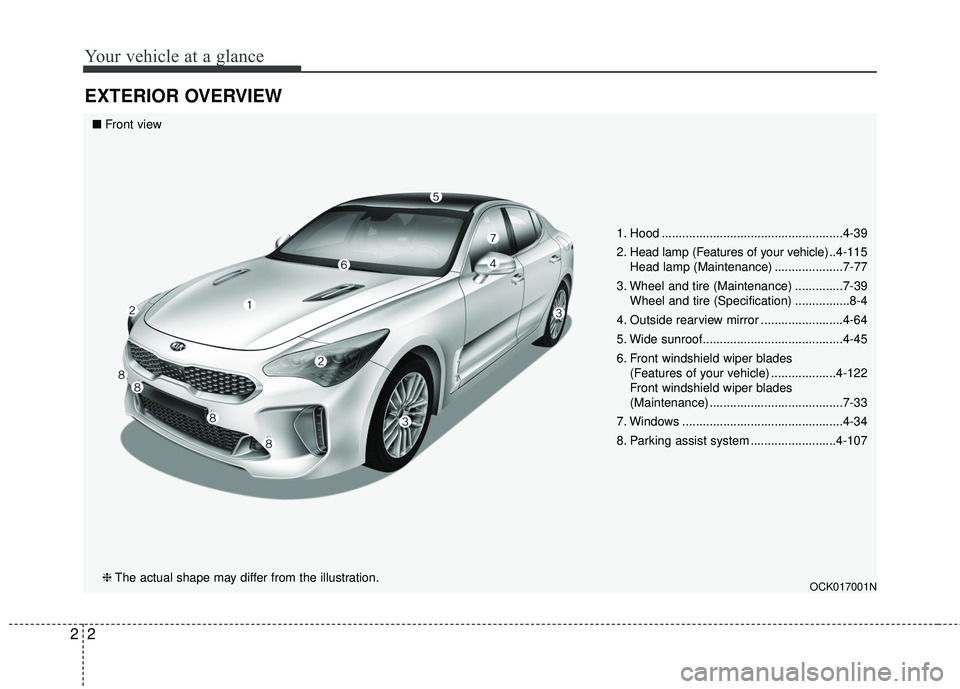
EXTERIOR OVERVIEW
1. Hood .....................................................4-39
2. Head lamp (Features of your vehicle) ..4-115Head lamp (Maintenance) ....................7-77
3. Wheel and tire (Maintenance) ..............7-39 Wheel and tire (Specification) ................8-4
4. Outside rearview mirror ........................4-64
5. Wide sunroof.........................................4-45
6. Front windshield wiper blades (Features of your vehicle) ...................4-122
Front windshield wiper blades
(Maintenance) .......................................7-33
7. Windows ...............................................4-34
8. Parking assist system .........................4-107
OCK017001N
■ Front view
❈ The actual shape may differ from the illustration.
Page 14 of 551
Your vehicle at a glance
42
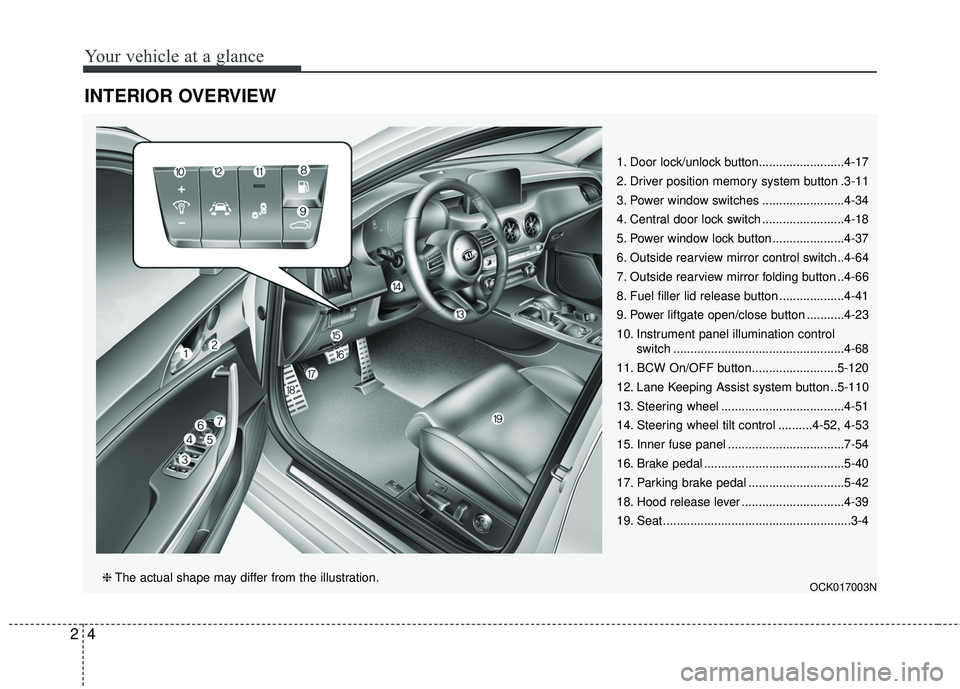
INTERIOR OVERVIEW
1. Door lock/unlock button.........................4-17
2. Driver position memory system button .3-11
3. Power window switches ........................4-34
4. Central door lock switch ........................4-18
5. Power window lock button .....................4-37
6. Outside rearview mirror control switch..4-64
7. Outside rearview mirror folding button ..4-66
8. Fuel filler lid release button ...................4-41
9. Power liftgate open/close button ...........4-23
10. Instrument panel illumination control switch ..................................................4-68
11. BCW On/OFF button.........................5-120
12. Lane Keeping Assist system button ..5-110
13. Steering wheel ....................................4-51
14. Steering wheel tilt control ..........4-52, 4-53
15. Inner fuse panel ..................................7-54
16. Brake pedal .........................................5-40
17. Parking brake pedal ............................5-42
18. Hood release lever ..............................4-39
19. Seat .......................................................3-4
OCK017003N❈ The actual shape may differ from the illustration.
Page 27 of 551

311
Safety features of your vehicle
Seat back bolster control(For driver seat, if equipped)
1. Turn the adjustment switch clock- wise, the right/left seatback bol-
sters will be adjusted inward. Turn
the switch counterclockwise, the
seatback bolster will be adjusted
outward. 2. To adjust the bolster height to its
maximum in the default state,
operate the switch for 8 seconds.
After that, release the switch
because there is no change in
height even if you continue to
operate the switch.
3. Once adjustment is done, leave the switch in place.
Driver position memory system
(if equipped, for power seat)
Driving Position Memory System is
the facility that enables driver’s seat,
steering wheel, exterior mirrors, clus-
ter and head-up display (HUD) to be
controlled with a simple button oper-
ation, which allows a driver to recall
memorized driving positions and
automatically control them. Driver’s
seat/ Steering Wheel/ Exterior mir-
rors: location Cluster: Brightness of
lighting
Head up Display (HUD): height, rota-
tion and brightness.
OCK037008OCK037021
Page 28 of 551

Safety features of your vehicle
12
3
Storing positions into memory
using the buttons on the door
Storing driver’s seat positions
1. Press the Parking button while the engine start/stop button is ON.
2. Adjust the driver’s seat and out- side rearview mirror and Head up
display comfortable for the driver.
3. Press SET button on the control panel. The system will beep once.
4. Press one of the memory buttons (1 or 2) within 4 seconds after
pressing the SET button. The sys-
tem will beep twice when memory
has been successfully stored.
When recalling an adjustment mem-
ory button while sitting in the vehicle,
you can be surprised by the setting
chosen if the memory has been
adjusted by someone else. If that
occurs, immediately push the seat
position control knob in the direction
of the desired position to stop further
undesired movement. Recalling positions from memory
1. Press the Parking button while the
engine start/stop button is ON.
2. To recall the position in the memo- ry, press the desired memory but-
ton (1 or 2). The system will beep
once, then the driver’s seat will
automatically adjust to the stored
position.
Adjusting the control switch for the
driver’s seat while the system is
recalling the stored position will
cause the movement to stop and
move in the direction that the control
switch is moved.
WARNING - Driver
Position Memory System
Never attempt to operate the
driver position memory system
while the vehicle is moving.
This could result in loss of con-
trol, and an accident causing
death or serious injury.
Page 89 of 551

Mirrors . . . . . . . . . . . . . . . . . . . . . . . . . . . . . . . . . . 4-55\
• Inside rearview mirror . . . . . . . . . . . . . . . . . . . . . . . . 4-55
• Automatic-dimming function . . . . . . . . . . . . . . . . . . . 4-57
• Compass function . . . . . . . . . . . . . . . . . . . . . . . . . . . . 4-57
• Programming HomeLink
®. . . . . . . . . . . . . . . . . . . . . 4-60
• Standard programming . . . . . . . . . . . . . . . . . . . . . . . 4-60
• Rolling code programming . . . . . . . . . . . . . . . . . . . . . 4-61
• Gate operator & Canadian programming . . . . . . . . 4-62
• Operating HomeLink
®. . . . . . . . . . . . . . . . . . . . . . . . 4-62
• Reprogramming a single HomeLink®button. . . . . . 4-62
• Erasing HomeLink®buttons . . . . . . . . . . . . . . . . . . . 4-63
• Outside rearview mirror. . . . . . . . . . . . . . . . . . . . . . . 4-64
Instrument cluster . . . . . . . . . . . . . . . . . . . . . . . . . 4-67
• Instrument cluster control . . . . . . . . . . . . . . . . . . . . . 4-68
• LCD display control . . . . . . . . . . . . . . . . . . . . . . . . . . 4-68
• Gauges . . . . . . . . . . . . . . . . . . . . . . . . . . . . . . . . . . . . \
. 4-69
• Transaxle Shift Indicator . . . . . . . . . . . . . . . . . . . . . . 4-72
LCD windows . . . . . . . . . . . . . . . . . . . . . . . . . . . . . 4-73
• Over view . . . . . . . . . . . . . . . . . . . . . . . . . . . . . . . . . . . 4-\
73
• Trip information (Trip computer) . . . . . . . . . . . . . . . 4-73
• LCD modes. . . . . . . . . . . . . . . . . . . . . . . . . . . . . . . . . .\
4-77
• Distance to empty . . . . . . . . . . . . . . . . . . . . . . . . . . . . 4-81
• User settings mode. . . . . . . . . . . . . . . . . . . . . . . . . . . . 4-82
• Warning message . . . . . . . . . . . . . . . . . . . . . . . . . . . . . 4-87
Warning and indicator lights . . . . . . . . . . . . . . . . 4-92
• Warning lights . . . . . . . . . . . . . . . . . . . . . . . . . . . . . . . 4-92
• Indicator lights. . . . . . . . . . . . . . . . . . . . . . . . . . . . . . 4-100
Head Up Display (HUD) . . . . . . . . . . . . . . . . . . . 4-105
• Description . . . . . . . . . . . . . . . . . . . . . . . . . . . . . . . . . 4-105
• Head up display ON/OFF . . . . . . . . . . . . . . . . . . . . . 4-106
• Head up display information . . . . . . . . . . . . . . . . . . 4-106
• Head up display setting. . . . . . . . . . . . . . . . . . . . . . . 4-106
Parking assist system . . . . . . . . . . . . . . . . . . . . . . 4-107
• Operation of the parking assist system . . . . . . . . . . 4-107
• Non-operational conditions of parking assist system . . . . . . . . . . . . . . . . . . . . . . . . . . . . . . . . . . . . \
4-109
• Self-diagnosis . . . . . . . . . . . . . . . . . . . . . . . . . . . . . . . 4-111
Rearview camera . . . . . . . . . . . . . . . . . . . . . . . . . 4-112
360° camera monitoring system . . . . . . . . . . . . . 4-113
Lighting . . . . . . . . . . . . . . . . . . . . . . . . . . . . . . . . . 4-114
• Battery saver function . . . . . . . . . . . . . . . . . . . . . . . . 4-114
• Daytime running light . . . . . . . . . . . . . . . . . . . . . . . . 4-114
• Lighting control . . . . . . . . . . . . . . . . . . . . . . . . . . . . . 4-114
• High beam operation . . . . . . . . . . . . . . . . . . . . . . . . . 4-116
• High beam assist . . . . . . . . . . . . . . . . . . . . . . . . . . . . 4-117
• Turn signals and lane change signals. . . . . . . . . . . . 4-119
• Check headlight . . . . . . . . . . . . . . . . . . . . . . . . . . . . . 4-120
4
Page 90 of 551

• Headlight leveling device . . . . . . . . . . . . . . . . . . . . . 4-120
• Dynamic Bending Light (DBL) . . . . . . . . . . . . . . . . 4-121
Wipers and washers . . . . . . . . . . . . . . . . . . . . . . . 4-122
• Windshield wipers . . . . . . . . . . . . . . . . . . . . . . . . . . . 4-122
• Front windshield washers . . . . . . . . . . . . . . . . . . . . . 4-124
Interior lights . . . . . . . . . . . . . . . . . . . . . . . . . . . . 4-126
• Automatic turn off function . . . . . . . . . . . . . . . . . . . 4-126
• Room lamp . . . . . . . . . . . . . . . . . . . . . . . . . . . . . . . . . 4-126
• Map lamp . . . . . . . . . . . . . . . . . . . . . . . . . . . . . . . . . . 4-12\
7
• Liftgate room lamp . . . . . . . . . . . . . . . . . . . . . . . . . . 4-128
• Vanity mirror lamp . . . . . . . . . . . . . . . . . . . . . . . . . . 4-128
• Glove box lamp . . . . . . . . . . . . . . . . . . . . . . . . . . . . . 4-128
• Door courtesy lamp . . . . . . . . . . . . . . . . . . . . . . . . . . 4-129
Welcome system . . . . . . . . . . . . . . . . . . . . . . . . . . 4-130
• Headlight (Headlamp) escort function . . . . . . . . . . 4-130
• Interior light. . . . . . . . . . . . . . . . . . . . . . . . . . . . . . . . 4-130
• Pocket lamp . . . . . . . . . . . . . . . . . . . . . . . . . . . . . . . . 4-130
Defroster . . . . . . . . . . . . . . . . . . . . . . . . . . . . . . . . 4-131
• Rear window defroster . . . . . . . . . . . . . . . . . . . . . . . 4-131
Automatic climate control system . . . . . . . . . . . 4-132
• Automatic heating and air conditioning . . . . . . . . . 4-133
• Manual heating and air conditioning . . . . . . . . . . . 4-135
• System operation . . . . . . . . . . . . . . . . . . . . . . . . . . . . 4-142
• Climate control air filter. . . . . . . . . . . . . . . . . . . . . . 4-144• Checking the amount of air conditioner refrigerant and
compressor lubricant . . . . . . . . . . . . . . . . . . . . . . . 4-144
Windshield defrosting and defogging . . . . . . . . . 4-146
• Automatic climate control system . . . . . . . . . . . . . . 4-146
• Defogging logic. . . . . . . . . . . . . . . . . . . . . . . . . . . . . . 4-147
• Automatic ventilation . . . . . . . . . . . . . . . . . . . . . . . . 4-149
• Smart ventilation . . . . . . . . . . . . . . . . . . . . . . . . . . . . 4-149
Storage compartments . . . . . . . . . . . . . . . . . . . . . 4-150
• Center console storage . . . . . . . . . . . . . . . . . . . . . . . 4-150
• Glove box . . . . . . . . . . . . . . . . . . . . . . . . . . . . . . . . . . 4-15\
0
• Sunglass holder . . . . . . . . . . . . . . . . . . . . . . . . . . . . . 4-151
Interior features . . . . . . . . . . . . . . . . . . . . . . . . . . 4-152
• Cup holder . . . . . . . . . . . . . . . . . . . . . . . . . . . . . . . . . 4-152
• Seat warmer . . . . . . . . . . . . . . . . . . . . . . . . . . . . . . . . 4-153
• Air ventilation seat . . . . . . . . . . . . . . . . . . . . . . . . . . 4-154
• Sunvisor . . . . . . . . . . . . . . . . . . . . . . . . . . . . . . . . . . . 4-\
155
• Power outlet . . . . . . . . . . . . . . . . . . . . . . . . . . . . . . . . 4-156
• USB charger . . . . . . . . . . . . . . . . . . . . . . . . . . . . . . . . 4-157
• Wireless smart phone charging system . . . . . . . . . . 4-157
• Coat hook . . . . . . . . . . . . . . . . . . . . . . . . . . . . . . . . . . 4-16\
1
• Floor mat anchor (s) . . . . . . . . . . . . . . . . . . . . . . . . . 4-162
• Luggage net (Holder) . . . . . . . . . . . . . . . . . . . . . . . . 4-162
4
Page 93 of 551

Features of your vehicle
64
Locking
Pressing the button of the front out-
side door handles with all doors
closed and any door unlocked, locks
all the doors. The hazard warning
lights will blink and the chime will
sound once to indicate that all doors
are locked. The button will only oper-
ate when the smart key is within 0.7
~ 1 m (28 ~ 40 in.) from the outside
door handle. If you want to make
sure that a door has locked or not,
you should check the door lock but-
ton inside the vehicle or pull the out-
side door handle.In some instances, when the outside
door button is selected, the doors will
not lock and an audible chime will
sound for 3 seconds if any of the fol-
lowing occurs:
• The smart key is in the vehicle.
The Engine Start/Stop button is in
the ACC or ON position.
Any door is opened.
Unlocking
Pressing the button of the driver's (or
front passenger’s) outside door han-
dle with all doors closed and locked,
unlocks the driver's door.
The hazard warning lights will blink
twice to indicate that the driver's door
is unlocked. Also, the outside
rearview mirrors will automatically
unfold if the outside rearview mirror
folding switch is in the AUTO posi-
tion.
The button will only operate when
the smart key is within 0.7 ~ 1 m (28
~ 40 in.) from the outside door han-
dle.
OCK047010
Page 142 of 551

455
Features of your vehicle
MIRRORS
Inside rearview mirror
Adjust the rearview mirror so that the
center view through the rear window
is seen. Make this adjustment before
you start driving.
Do not place objects in the rear seat
or cargo area which would interfere
with your vision through the rear win-
dow.
Electrochromic mirror (ECM)(if equipped)
The electric rearview mirror automat-
ically controls the glare from the
headlights of the vehicles behind you
in nighttime or low light driving condi-
tions. The sensor mounted in the mir-
ror senses the light level around the
vehicle, and automatically controls
the headlight glare from the vehicles
behind you.
When the engine is running, the glare
is automatically controlled by the sen-
sor mounted in the rearview mirror.
Whenever the shift lever is shifted
into reverse (R), the mirror will auto-
matically go to the brightest setting in
order to improve the drivers view
behind the vehicle. To operate the electric rearview mirror:
The mirror defaults to the ON posi-
tion whenever the Engine
Start/Stop Button is in the ON posi-
tion.
Press the ON/OFF button (1) to turn the automatic dimming func-
tion off. The mirror indicator light
(2) will turn off.
Press the ON/OFF button (1) to
turn the automatic dimming func-
tion on. The mirror indicator light
(2) will illuminate.
❈ (2) : Indicator, (3) : Sensor
WARNING- Mirror adjust-
ment
Do not adjust the rearview mir-
ror while the vehicle is moving.
This could result in loss of con-
trol.
WARNING
Do not modify the inside mirror
and don’t install a wide mirror. It
could result in injury during an
accident or deployment of the
air bag.CAUTION
When cleaning the mirror, use a paper towel or similar materialdampened with glass cleaner.Do not spray glass cleanerdirectly on the mirror. It maycause the liquid cleaner to enterthe mirror housing.
OCK047059L