Page 139 of 551

Features of your vehicle
52
4
(Continued)
• When the charging system warning
light comes on due to the low volt-
age (When the alternator or bat-
tery) does not operate normally or
malfunctions), the steering wheel
may require increased steering
effort.Tilt and telescopic steering
Tilt and telescopic steering allows
you to adjust the steering wheel
before you drive. You can also raise it
to give your legs more room when
you exit and enter the vehicle.
The steering wheel should be posi-
tioned so that it is comfortable for
you to drive, while permitting you to
see the instrument panel warning
lights and gauges.
Manual type
To change the steering wheel angle,
pull down the lock-release lever (1),
adjust the steering wheel to the
desired angle (2) and height (3) then
pull up the lock-release lever to lock
(4) the steering wheel in place. Be
sure to adjust the steering wheel to
the desired position before driving.
✽ ✽ NOTICE
After adjustment, sometimes the
lock release lever may not lock the
steering wheel. It is not a malfunc-
tion. This occurs when two gears are
not engaged correctly. In this case,
adjust the steering wheel again and
then lock the steering wheel.
▼
WARNING- Steering
wheel adjustment
Never adjust the angle and
height of the steering wheel
while driving. You may lose
steering control.
OCK047037N
Page 140 of 551
453
Features of your vehicle
Electric type (if equipped)
Adjust the steering wheel angle (2)
and position (3) with the switch (1) on
the steering column. Move the steer-
ing wheel, so it points toward your
chest, not toward your face. Make
sure you can see the instrument
panel warning lights and gauges.
After adjusting, push the steering
wheel both up and down to be cer-
tain it is locked in position. Always
adjust the position of the steering
wheel before driving.
✽ ✽ NOTICE
To prevent discharge of the battery,
do not operate when the engine is
stopped.
Heated steering wheel
With the Engine Start/Stop Button in
the ON position, pressing the heat-
ed steering wheel button warms the
steering wheel. The indicator on the
button will illuminate.
To turn the heated steering wheel off,
press the button once again. The
indicator on the button will turn off.
▼
OCK047038N
OCK047039N
Page 141 of 551
Features of your vehicle
54
4
✽ ✽
NOTICE
The heated steering wheel will turn
off automatically approximately 30
minutes after the heated steering
wheel is turned on.
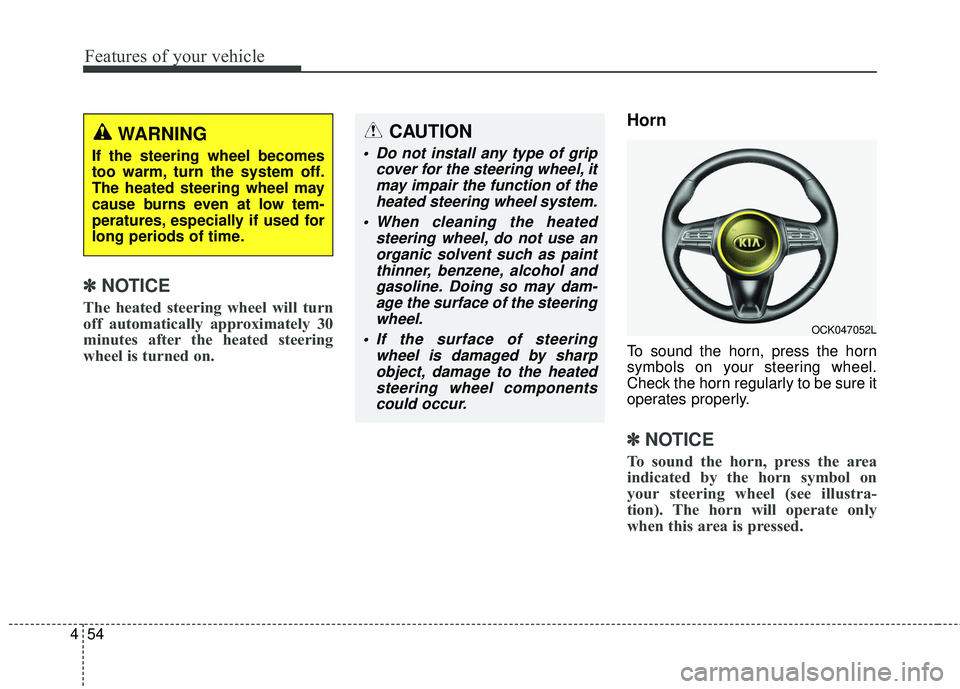
Horn
To sound the horn, press the horn
symbols on your steering wheel.
Check the horn regularly to be sure it
operates properly.
✽ ✽NOTICE
To sound the horn, press the area
indicated by the horn symbol on
your steering wheel (see illustra-
tion). The horn will operate only
when this area is pressed.
CAUTION
Do not install any type of grip
cover for the steering wheel, itmay impair the function of theheated steering wheel system.
When cleaning the heated steering wheel, do not use anorganic solvent such as paintthinner, benzene, alcohol andgasoline. Doing so may dam-age the surface of the steeringwheel.
If the surface of steering wheel is damaged by sharpobject, damage to the heatedsteering wheel componentscould occur.
WARNING
If the steering wheel becomes
too warm, turn the system off.
The heated steering wheel may
cause burns even at low tem-
peratures, especially if used for
long periods of time.
OCK047052L
Page 155 of 551
Features of your vehicle
68
4
Instrument Cluster Control
Adjusting Instrument Cluster
Illumination
The brightness of the instrument
panel illumination is changed by
pressing the illumination control button
(“+” or “-”) when the Engine Start/Stop
button is ON, or the taillights are
turned on. If you hold the illumination control
button (“+” or “-”), the brightness
will be changed continuously.
If the brightness reaches to the maximum or minimum level, an
alarm will sound.
LCD Display Control
The LCD display modes can be
changed by using the control buttons
on the steering wheel.
OCK047047L
OCK047138LOCK047048L
OCK047049L
■Type A
■Type B
Page 161 of 551
Features of your vehicle
74
4
Trip Modes Fuel Economy
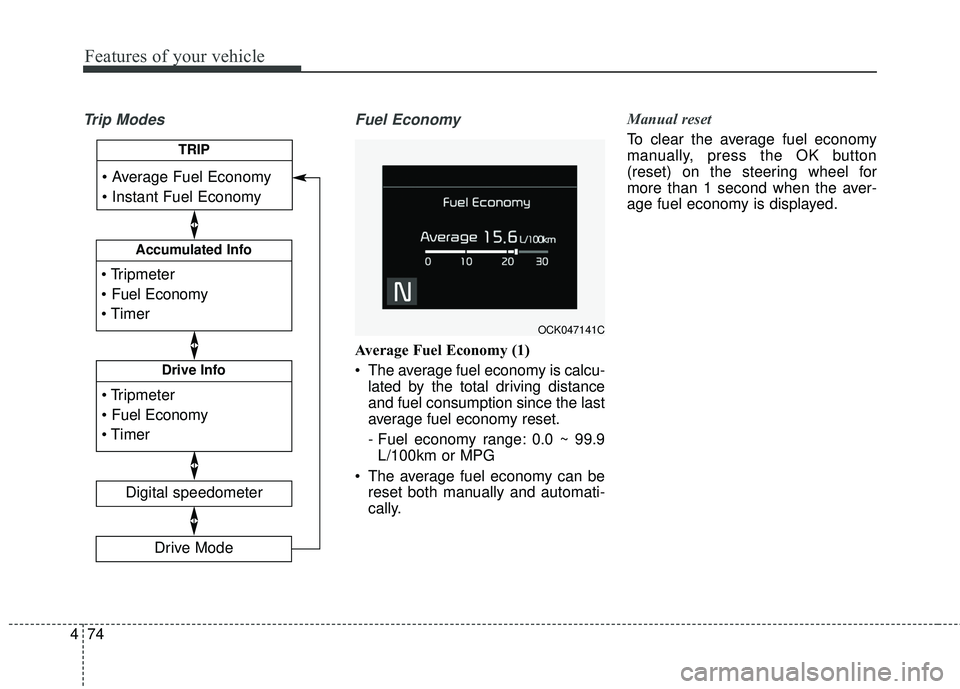
Average Fuel Economy (1)
The average fuel economy is calcu-
lated by the total driving distance
and fuel consumption since the last
average fuel economy reset.
- Fuel economy range: 0.0 ~ 99.9L/100km or MPG
The average fuel economy can be reset both manually and automati-
cally. Manual reset
To clear the average fuel economy
manually, press the OK button
(reset) on the steering wheel for
more than 1 second when the aver-
age fuel economy is displayed.
OCK047141C
Accumulated Info
Digital speedometer
Drive Info
TRIP
Drive Mode
Page 173 of 551

Features of your vehicle
86
4
Steering Easy Access (if
equipped)
- On (checked) : The steeringwheel will automatically move to
the top of Steering column when
leaving the vehicle and move to
the last saved position when
entering the vehicle for the driver
enter or exit the vehicle comfort-
ably.
- Off (unchecked) : The steering easy access function will be
deactivated.
❈ For more details, refer to “Driver
Position Memory System” in chap-
ter 3.
Welcome Mirror/Light (if equipped) : - If this item checked, the welcomeMirror/light function will be acti-
vated.
Wiper/Light Display (if equipped) : If this item checked, the
Wiper/Light Display will be activat-
ed. Gear Position Pop-up (if equipped)
: If this item checked, the gear posi-
tion pop-up display will be activat-
ed.
Icy road warning (if equipped) : If this item checked, the Icy road
warning display will be activated.
Service interval
Service Interval To activate or deactivate the serv-
ice interval function.
Adjust Interval To adjust the interval by mileage-
and period.
Reset To reset the service interval func-
tion. Other features
Fuel Economy Auto Reset
- Off : The average fuel economywill not reset automatically when-
ever refueling.
- After Ignition : The average fuel economy will reset automatically
whenever it has passed 4 hours
after turning OFF the engine.
- After Refueling : The average fuel economy will reset automatically
when refueling.
❈ For more details, refer to “Trip
Computer” in this chapter.
Fuel Economy Unit - Choose the fuel economy unit.(L/100km, US gallon, UK gallon)
Temperature Unit - Choose the temperature unit.(°C,°F)
Page 259 of 551
Driving your vehicle
65
WARNING- Check sur-roundings
Always check the surrounding
areas near your vehicle for peo-
ple, especially children, before
putting a vehicle into D (Drive)
or R (Reverse).
WARNING- Fire risk
When you intend to park or stop
the vehicle with the engine on,
be careful not to depress the
accelerator pedal for a long
period of time. It may overheat
the engine or exhaust system
and cause fire.WARNING- Loose objects
Securely store items in your
vehicle. When you make a sud-
den stop or turn the steering
wheel rapidly, loose objects
may drop on the floor and it
could interfere with the opera-
tion of the foot pedals, possibly
causing an accident.WARNING- Driving while intoxicated
Do not drive while intoxicated.
Drinking and driving is danger-
ous. Even a small amount of
alcohol will affect your reflexes,
perceptions and judgment.
Driving while under the influ-
ence of drugs is as dangerous
as or more dangerous than driv-
ing drunk.
Page 271 of 551

Driving your vehicle
18
5
Launch Control
Launch Control Operation
When using Launch Control with
an engine that is not warmed up
enough, a driver should always
make sure that the engine’s cool-
ing water is warmed up and reach-
es a recommended temperature.
To operate ESC Off state 2, Press and hold ESC button for more than
3 seconds in Sports mode. (Status
Display on Cluster Screen)
For launching, stop the vehicle and keep a steering wheel straight.
Footbrakes, EPB and Auto Hold must be released for smooth
launching. Press the brake firmly with your left
foot in transmission D mode, while
pressing the accelerator pedal
down fully with your right foot.
Then, the Launch Control Ready
(1) will be in place. To start a vehicle, with your right
foot pressing the accelerator pedal
down fully, remove your left foot
from the brake. (within 4 seconds)
(Launch Control Active (2) Status
Display on Cluster Screen)
If both the brakes and accelerater pedals were applied and the driver
removes his foot only from the
accelerater pedal, Launch Control
will be automatically deactivated.
Or, if the vehicle does not start
after 4 seconds with a driver’s feet
on both brake and accelerate ped-
als, Launch Control will automati-
cally deactivated as well
OCK047156LOCK047157L