2018 KIA STINGER power steering
[x] Cancel search: power steeringPage 14 of 551
Your vehicle at a glance
42
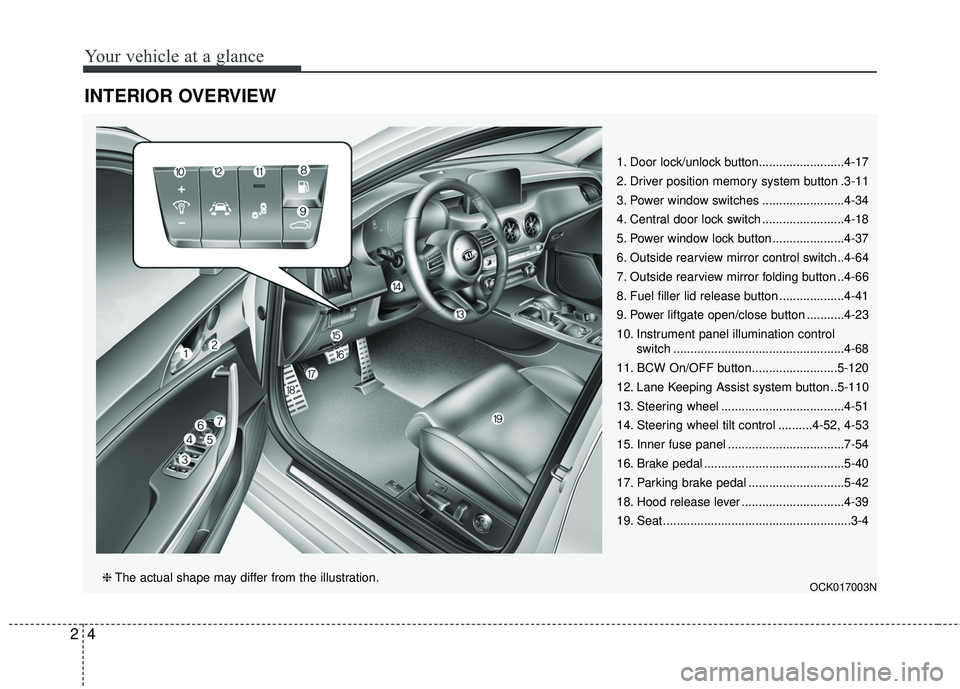
INTERIOR OVERVIEW
1. Door lock/unlock button.........................4-17
2. Driver position memory system button .3-11
3. Power window switches ........................4-34
4. Central door lock switch ........................4-18
5. Power window lock button .....................4-37
6. Outside rearview mirror control switch..4-64
7. Outside rearview mirror folding button ..4-66
8. Fuel filler lid release button ...................4-41
9. Power liftgate open/close button ...........4-23
10. Instrument panel illumination control switch ..................................................4-68
11. BCW On/OFF button.........................5-120
12. Lane Keeping Assist system button ..5-110
13. Steering wheel ....................................4-51
14. Steering wheel tilt control ..........4-52, 4-53
15. Inner fuse panel ..................................7-54
16. Brake pedal .........................................5-40
17. Parking brake pedal ............................5-42
18. Hood release lever ..............................4-39
19. Seat .......................................................3-4
OCK017003N❈ The actual shape may differ from the illustration.
Page 15 of 551

25
Your vehicle at a glance
INSTRUMENT PANEL OVERVIEW
1. Driver`s front air bag .............................3-60
2. Horn ......................................................4-54
3. Instrument cluster .................................4-67
4. Wiper/Washer .....................................4-122
5. Engine start/stop button .........................5-7
6. Cruise control .......................................5-78 Smart cruise control system .................5-82
7. Hazard warning flasher switch................6-2
8. Climate control system .......................4-132
9. Shift lever.....................................5-11, 5-20
10. Heated steering wheel button.............4-53
11. ISG (Idle stop and go) system button ................................................5-101
12. 360° camera monitoring system .......4-113
13. Seat warmer/ Air ventilation switch ..............4-153, 4-154
14. Electronic parking brake(EPB) switch... 5-44
15. AUTO HOLD control button ................5-50
16. Parking assist system button……….5-101
17. Center console box...........................4-150
18. USB charger .....................................4-157
19. Glove box ..........................................4-150
20. Passenger`s front air bag ...................3-60
21. Power outlet ......................................4-156
22. Drive mode control knob ..................5-105
23. Electronic stability control button ........5-56
OCK017004N❈ The actual shape may differ from the illustration.
Page 24 of 551

Safety features of your vehicle
83
Front seat adjustment - power
The front seat can be adjusted by
using the control switches located on
the outside of the seat cushion.
Before driving, adjust the seat to the
proper position so you can easily con-
trol the steering wheel, pedals and
switches on the instrument panel.When in operation, the power seat-
consumes a large amount of electri-
cal power. To prevent unnecessary
system drain, don’t adjust the power
seat longer than necessary while the
engine is not running.
Forward and backward
Push the control switch forward or
backward to move the seat to the
desired position. When the control
switch is operated forward, the seat
cushion is slightly raised, and the
seat cushion lowered when the
switch is operated backward.
Release the switch once the seat
reaches the desired position.
OCK037004
CAUTION- Power seatadjustments
The power seating controlsfunction by electronic motor.
Excessive operation may causedamage to the electrical equip-ment.
CAUTION- Power Seating
Do not operate two or morepower seat control switches atthe same time. Doing so maydamage the power seat motor orelectrical components.
WARNING- Unattended
children
Do not leave children unattend-
ed in the vehicle. Children might
operate features of the vehicle
that could injure them.
Page 27 of 551

311
Safety features of your vehicle
Seat back bolster control(For driver seat, if equipped)
1. Turn the adjustment switch clock- wise, the right/left seatback bol-
sters will be adjusted inward. Turn
the switch counterclockwise, the
seatback bolster will be adjusted
outward. 2. To adjust the bolster height to its
maximum in the default state,
operate the switch for 8 seconds.
After that, release the switch
because there is no change in
height even if you continue to
operate the switch.
3. Once adjustment is done, leave the switch in place.
Driver position memory system
(if equipped, for power seat)
Driving Position Memory System is
the facility that enables driver’s seat,
steering wheel, exterior mirrors, clus-
ter and head-up display (HUD) to be
controlled with a simple button oper-
ation, which allows a driver to recall
memorized driving positions and
automatically control them. Driver’s
seat/ Steering Wheel/ Exterior mir-
rors: location Cluster: Brightness of
lighting
Head up Display (HUD): height, rota-
tion and brightness.
OCK037008OCK037021
Page 88 of 551
Features of your vehicle
Smart key . . . . . . . . . . . . . . . . . . . . . . . . . . . . . . . . . 4-5
• Record your key number . . . . . . . . . . . . . . . . . . . . . . . 4-5
• Smart key functions . . . . . . . . . . . . . . . . . . . . . . . . . . . 4-5
• Remote keyless entry system operations . . . . . . . . . . . 4-8
• Transmitter precautions . . . . . . . . . . . . . . . . . . . . . . . 4-10
• This device complies with Industry Canada licence-exempt RSS standard (s) . . . . . . . . 4-10
• Battery replacement . . . . . . . . . . . . . . . . . . . . . . . . . . 4-11
• Mechanical key operations . . . . . . . . . . . . . . . . . . . . . 4-11
• Immobilizer system . . . . . . . . . . . . . . . . . . . . . . . . . . . 4-12
Theft-alarm system . . . . . . . . . . . . . . . . . . . . . . . . 4-14
• Armed stage . . . . . . . . . . . . . . . . . . . . . . . . . . . . . . . . . 4-14
• Theft-alarm stage . . . . . . . . . . . . . . . . . . . . . . . . . . . . 4-15
• Disarmed stage. . . . . . . . . . . . . . . . . . . . . . . . . . . . . . . 4-15
Door locks . . . . . . . . . . . . . . . . . . . . . . . . . . . . . . . . 4-16
• Operating door locks from outside the vehicle . . . . 4-16
• Operating door locks from inside the vehicle . . . . . . 4-17
• Door lock/unlock features. . . . . . . . . . . . . . . . . . . . . . 4-19
• Child-protector rear door lock. . . . . . . . . . . . . . . . . . 4-19
Liftgate . . . . . . . . . . . . . . . . . . . . . . . . . . . . . . . . . . 4-21\
• Non-Powered liftgate. . . . . . . . . . . . . . . . . . . . . . . . . . 4-21
• Power liftgate . . . . . . . . . . . . . . . . . . . . . . . . . . . . . . . . 4-23
• Emergency liftgate safety release. . . . . . . . . . . . . . . . 4-28
Smart liftgate . . . . . . . . . . . . . . . . . . . . . . . . . . . . . 4-30
Windows . . . . . . . . . . . . . . . . . . . . . . . . . . . . . . . . . 4-34
• Power windows . . . . . . . . . . . . . . . . . . . . . . . . . . . . . . 4-35
Hood. . . . . . . . . . . . . . . . . . . . . . . . . . . . . . . . . . . . \
. 4-39
• Opening the hood . . . . . . . . . . . . . . . . . . . . . . . . . . . . 4-39
• Closing the hood . . . . . . . . . . . . . . . . . . . . . . . . . . . . . 4-40
Fuel filler lid . . . . . . . . . . . . . . . . . . . . . . . . . . . . . . 4-41
• Opening the fuel filler lid . . . . . . . . . . . . . . . . . . . . . . 4-41
• Closing the fuel filler lid . . . . . . . . . . . . . . . . . . . . . . . 4-41
• Emergency fuel filler lid release . . . . . . . . . . . . . . . . 4-42
Wide sunroof. . . . . . . . . . . . . . . . . . . . . . . . . . . . . . 4-45
• Sunroof open warning. . . . . . . . . . . . . . . . . . . . . . . . . 4-46
• Sunshade . . . . . . . . . . . . . . . . . . . . . . . . . . . . . . . . . . . 4-\
47
• Sliding the sunroof . . . . . . . . . . . . . . . . . . . . . . . . . . . 4-47
• Tilting the sunroof . . . . . . . . . . . . . . . . . . . . . . . . . . . . 4-49
• Closing the sunroof . . . . . . . . . . . . . . . . . . . . . . . . . . . 4-49
• Resetting the sunroof . . . . . . . . . . . . . . . . . . . . . . . . . 4-50
Steering wheel . . . . . . . . . . . . . . . . . . . . . . . . . . . . . 4-51
• Electric Power Steering (EPS) . . . . . . . . . . . . . . . . . . 4-51
• Tilt and telescopic steering . . . . . . . . . . . . . . . . . . . . . 4-52
• Heated steering wheel . . . . . . . . . . . . . . . . . . . . . . . . . 4-53
• Horn . . . . . . . . . . . . . . . . . . . . . . . . . . . . . . . . . . . . \
. . . 4-54
4
Page 138 of 551

451
Features of your vehicle
Electric power steering (EPS)
The power steering uses a motor to
assist you in steering the vehicle. If
the engine is off or if the power steer-
ing system becomes inoperative, the
vehicle may still be steered, but it will
require increased steering effort.
The EPS is controlled by a power
steering control unit which senses
the steering wheel torque and vehi-
cle speed to command the motor.
The steering becomes heavier as the
vehicle’s speed increases and
becomes lighter as the vehicle’s
speed decreases for optimum steer-
ing control.
Should you notice any change in the
effort required to steer during normal
vehicle operation, have the power
steering checked by an authorized
Kia dealer. If the Electric Power Steering
System does not operate normally,
the warning light will illuminate on
the instrument cluster. The steering
wheel may require increased
steering effort. Take your vehicle to
an authorized Kia dealer and have
the vehicle checked as soon as
possible.
When you operate the steering wheel in low temperature, noise
may occur. If temperature rises, the
noise will likely disappear. This is a
normal condition.
When the vehicle is stationary, and the steering wheel is turned all the
way to the left or right continuous-
ly, the steering wheel becomes
harder to turn. The power assist is
limited to protect the motor from
overheating.
As time passes, the steering wheel
will return to its normal condition.
✽ ✽ NOTICE
The following symptoms may occur
during normal vehicle operation:
• The EPS warning light does not
illuminate.
• The steering gets heavy immedi- ately after turning the ignition
switch on. This happens as the sys-
tem performs the EPS system
diagnostics. When the diagnostics
are completed, the steering wheel
will return to its normal condition.
• A click noise may be heard from the EPS relay after the Engine
Start/Stop button is turned to the
ON or OFF position.
• A motor noise may be heard when the vehicle is at a stop or at a low
driving speed.
• If the Electric Power Steering System does not operate normally,
the warning light will illuminate on
the instrument cluster. The power
steering system will not operate
and steering effort can highly
increase. Take your vehicle to an
authorized Kia dealer and have the
vehicle checked as soon as possible. (Continued)
STEERING WHEEL
Page 169 of 551
Features of your vehicle
82
4
If the estimated distance is below
1 km (1 mi.), the trip computer will
display “---” as distance to empty.
✽ ✽ NOTICE
• If the vehicle is not on level ground
or the battery power has been
interrupted, the distance to empty
function may not operate correct-
ly.
• The distance to empty may differ from the actual driving distance as
it is an estimate of the available
driving distance.
• The trip computer may not regis- ter additional fuel if less than 6
liters (1.6 gallons) of fuel are
added to the vehicle.
• The fuel economy and distance to empty may vary significantly
based on driving conditions, driv-
ing habits, and condition of the
vehicle.
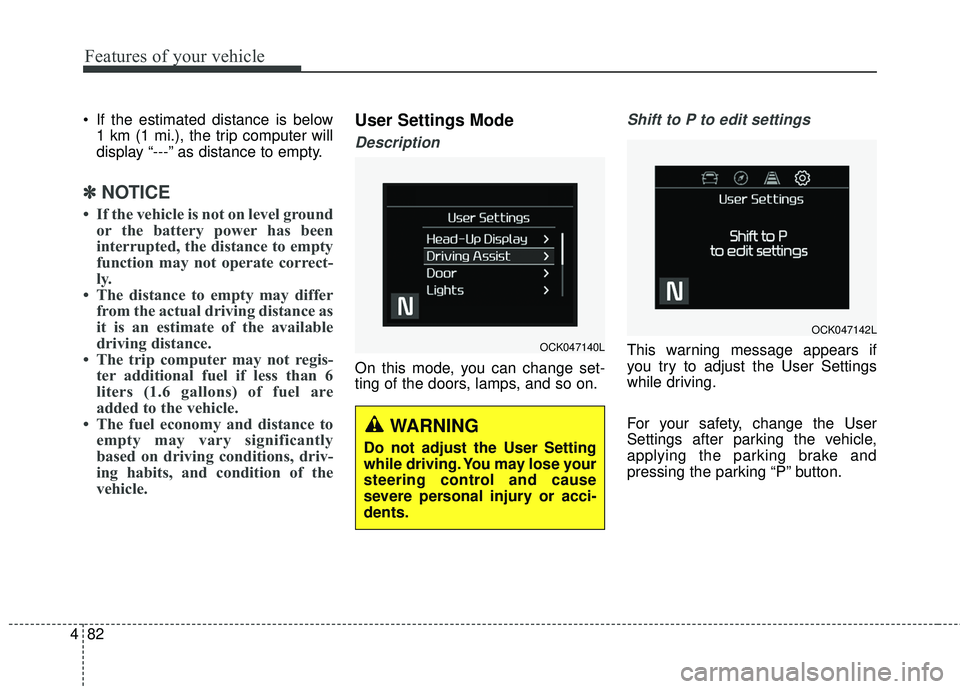
User Settings Mode
Description
On this mode, you can change set-
ting of the doors, lamps, and so on.
Shift to P to edit settings
This warning message appears if
you try to adjust the User Settings
while driving.
For your safety, change the User
Settings after parking the vehicle,
applying the parking brake and
pressing the parking “P” button.OCK047140L
WARNING
Do not adjust the User Setting
while driving. You may lose your
steering control and cause
severe personal injury or acci-
dents.
OCK047142L
Page 182 of 551

495
Features of your vehicle
✽ ✽NOTICE- Electronic Brake
force Distribution (EBD)
System Warning Light
When the ABS Warning Light is on
or both ABS and Parking Brake &
Brake Fluid Warning Lights are on,
the speedometer, odometer, or trip-
meter may not work. Also, the EPS
Warning Light may illuminate and
the steering effort may increase or
decrease.
In this case, have the vehicle inspect-
ed by an authorized Kia dealer.
Electronic Power Steering (EPS) WarningLight (if equipped)
This warning light illuminates:
Once you set the Engine Start/Stop Button to the ON position.
- It remains on until the engine isstarted.
When there is a malfunction with the EPS.
In this case, have the vehicle
inspected by an authorized Kia
dealer.
Malfunction Indicator
Lamp (MIL)
This warning light illuminates:
Once you set the Engine Start/Stop Button to the ON position.
- It remains on until the engine isstarted.
When there is a malfunction with the emission control system.
In this case, have the vehicle
inspected by an authorized Kia
dealer.