Page 51 of 614

WARNING!(Continued)
•Do not leave the key fob in or near the vehicle, or in
a location accessible to children, and do not leave the
ignition of a vehicle equipped with Keyless Enter-
N-Go in the RUN mode. A child could operate power
windows, other controls, or move the vehicle.
• Do not leave children or animals inside parked
vehicles in hot weather. Interior heat build-up may
cause serious injury or death.
CAUTION!
An unlocked vehicle is an invitation. Always remove
the key from the ignition and lock all the doors when
leaving the vehicle unattended.
NOTE: If the brake is pressed and the ignition is placed in
the RUN position with an EVSE connected to the vehicle,
the instrument cluster will not display the Ready state.
When the Electric Vehicle Supply Equipment (EVSE) is
unplugged from the vehicle, the vehicle will go into the
“Ready” state. If the vehicle is not shifted out of Park 30
minutes after being unplugged, the vehicle will disable the
“Ready” state. After an additional 30 minutes with no
change in Ignition status, the Ignition shall go to OFF and the vehicle shall power down. For further information,
refer to
�Starting The Engine� in�Starting And Operating�
for further information,
REMOTE STARTING SYSTEM — IF EQUIPPED
NOTE: Remote start on Hybrid while plugged in may
not always start the engine.
This system uses the key fob to start the vehicle
conveniently from outside the vehicle while still
maintaining security. The system has a range of
328 ft (100 m).
The Remote Starting System also activates the Climate
Control, vented seats (if equipped) in temperatures above
80° F (26.7° C), the optional heated seats, optional heated
steering wheel, optional heated mirrors and rear defroster
in temperatures below 40° F (4.4° C).
NOTE:
• Obstructions between the vehicle and key fob may
reduce this range.
• While plugged in the remote start feature for the vehicle
may not always start the engine.
3
GETTING TO KNOW YOUR VEHICLE 49
Page 161 of 614
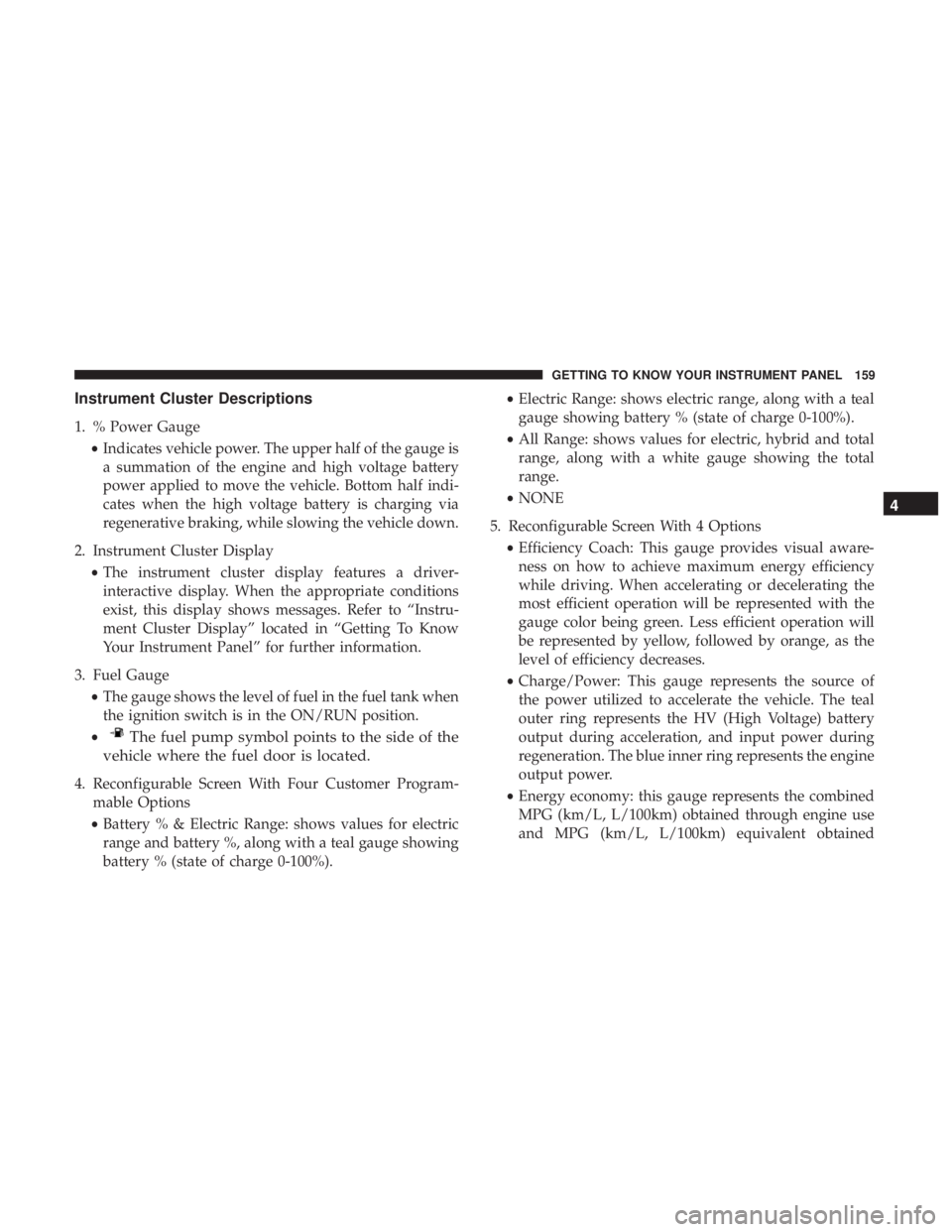
Instrument Cluster Descriptions
1. % Power Gauge•Indicates vehicle power. The upper half of the gauge is
a summation of the engine and high voltage battery
power applied to move the vehicle. Bottom half indi-
cates when the high voltage battery is charging via
regenerative braking, while slowing the vehicle down.
2. Instrument Cluster Display •The instrument cluster display features a driver-
interactive display. When the appropriate conditions
exist, this display shows messages. Refer to “Instru-
ment Cluster Display” located in “Getting To Know
Your Instrument Panel” for further information.
3. Fuel Gauge •The gauge shows the level of fuel in the fuel tank when
the ignition switch is in the ON/RUN position.
•
The fuel pump symbol points to the side of the
vehicle where the fuel door is located.
4. Reconfigurable Screen With Four Customer Program- mable Options
• Battery % & Electric Range: shows values for electric
range and battery %, along with a teal gauge showing
battery % (state of charge 0-100%). •
Electric Range: shows electric range, along with a teal
gauge showing battery % (state of charge 0-100%).
• All Range: shows values for electric, hybrid and total
range, along with a white gauge showing the total
range.
• NONE
5. Reconfigurable Screen With 4 Options •Efficiency Coach: This gauge provides visual aware-
ness on how to achieve maximum energy efficiency
while driving. When accelerating or decelerating the
most efficient operation will be represented with the
gauge color being green. Less efficient operation will
be represented by yellow, followed by orange, as the
level of efficiency decreases.
• Charge/Power: This gauge represents the source of
the power utilized to accelerate the vehicle. The teal
outer ring represents the HV (High Voltage) battery
output during acceleration, and input power during
regeneration. The blue inner ring represents the engine
output power.
• Energy economy: this gauge represents the combined
MPG (km/L, L/100km) obtained through engine use
and MPG (km/L, L/100km) equivalent obtained
4
GETTING TO KNOW YOUR INSTRUMENT PANEL 159
Page 162 of 614

through HV battery use. The outer ring represents
current energy economy. The white inner ring repre-
sents average energy economy.
• NONE
INSTRUMENT CLUSTER DISPLAY
Your vehicle is equipped with an instrument cluster dis-
play, which offers useful information to the driver. With the
ignition in the STOP/OFF mode, opening/closing of a
door will activate the display for viewing, and display the
total miles or kilometers in the odometer. Your instrument
cluster display is designed to display important informa-
tion about your vehicle’s systems and features. Using a
driver interactive display located on the instrument panel,
your instrument cluster display can show you how sys-
tems are working and give you warnings when they are
not. The steering wheel mounted controls allow you to
scroll through and enter the main menus and submenus.
You can access the specific information you want and make
selections and adjustments.
Instrument Cluster Display Location And Controls
The Instrument Cluster Display is located in the center of
the instrument cluster.
The Main Menu items consists of the following:
• Speedometer
• Vehicle Info
• Driver Assist
• Hybrid Info
• Trip (Trip A/Trip B)
• Audio
• Messages
• Screen Setup
• Speed Warning — If Equipped
160 GETTING TO KNOW YOUR INSTRUMENT PANEL
Page 168 of 614
•System Off
• ACC Proximity Warning
• ACC Unavailable Warning
For further information, refer to “Adaptive Cruise Control
(ACC) — If Equipped” in “Starting And Operating.”
LaneSense — If Equipped
The instrument cluster display displays the current Lane-
Sense system settings. The information displayed depends
on LaneSense system status and the conditions that need to
be met. For further information, refer to “LaneSense — If
Equipped” in “Starting And Operating.”
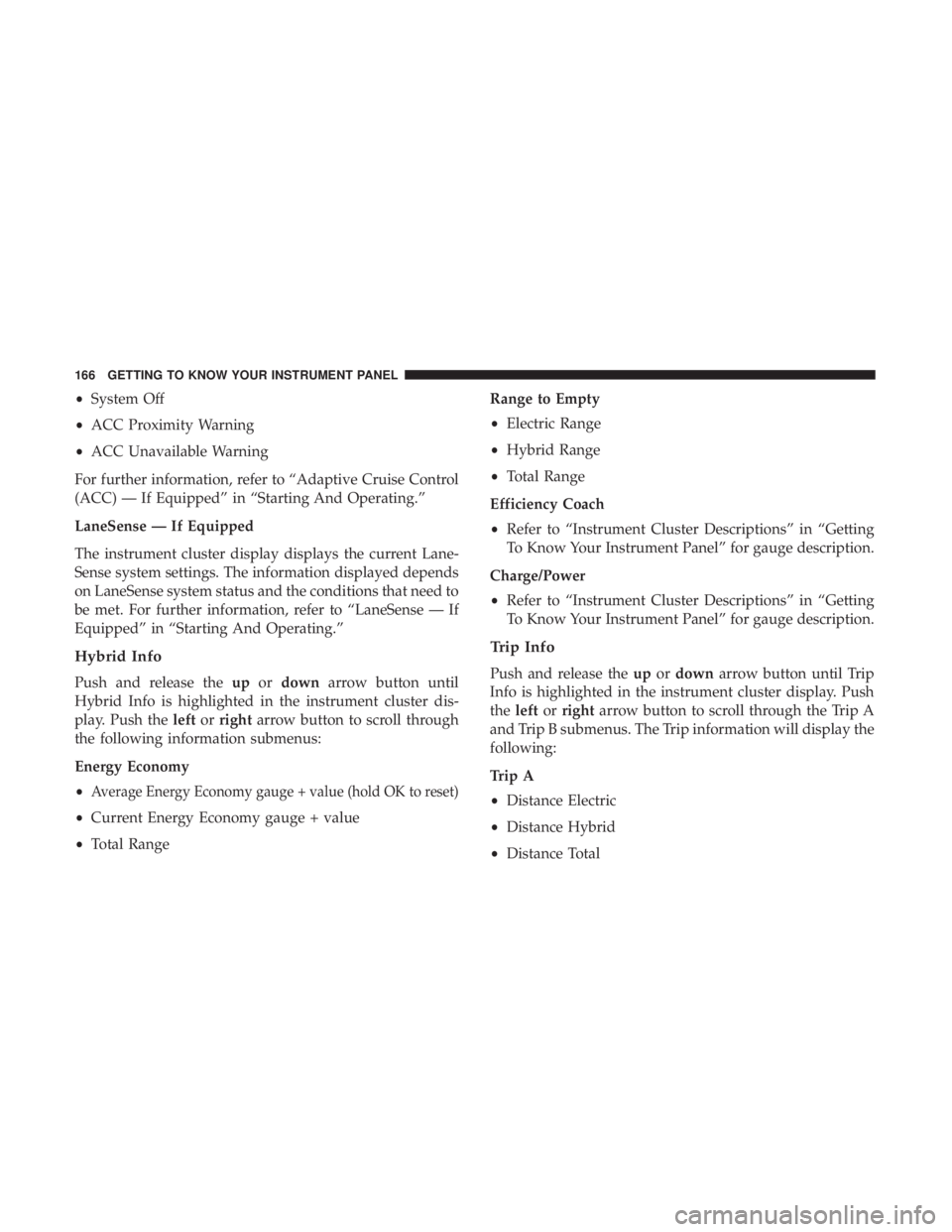
Hybrid Info
Push and release the upordown arrow button until
Hybrid Info is highlighted in the instrument cluster dis-
play. Push the leftorright arrow button to scroll through
the following information submenus:
Energy Economy
•
Average Energy Economy gauge + value (hold OK to reset)
• Current Energy Economy gauge + value
• Total Range Range to Empty
•
Electric Range
• Hybrid Range
• Total Range
Efficiency Coach
• Refer to “Instrument Cluster Descriptions” in “Getting
To Know Your Instrument Panel” for gauge description.
Charge/Power
• Refer to “Instrument Cluster Descriptions” in “Getting
To Know Your Instrument Panel” for gauge description.
Trip Info
Push and release the upordown arrow button until Trip
Info is highlighted in the instrument cluster display. Push
the left orright arrow button to scroll through the Trip A
and Trip B submenus. The Trip information will display the
following:
Trip A
• Distance Electric
• Distance Hybrid
• Distance Total
166 GETTING TO KNOW YOUR INSTRUMENT PANEL
Page 169 of 614
•Average Energy Economy
• Elapsed Time
Hold the OKbutton to reset feature information.
Trip B
• Distance Electric
• Distance Hybrid
• Distance Total
• Average Energy Economy
• Elapsed Time
Hold the OKbutton to reset feature information.
Audio
Push and release the upordown arrow button until Audio
is highlighted in the instrument cluster display.
• Current Media Source
• Song title
• Artist (if available)
• Phone status
Messages
Push and release the upordown arrow button until
Messages is highlighted in the instrument cluster display.
This feature shows the number of stored warning mes-
sages. Pushing the rightarrow button will allow you to see
what the stored messages are.
NOTE: The popup messages indicate the status of the
system and/or the conditions that need to be met. Mes-
sages remain in the stored stack until condition is cleared.
4
GETTING TO KNOW YOUR INSTRUMENT PANEL 167
Page 170 of 614
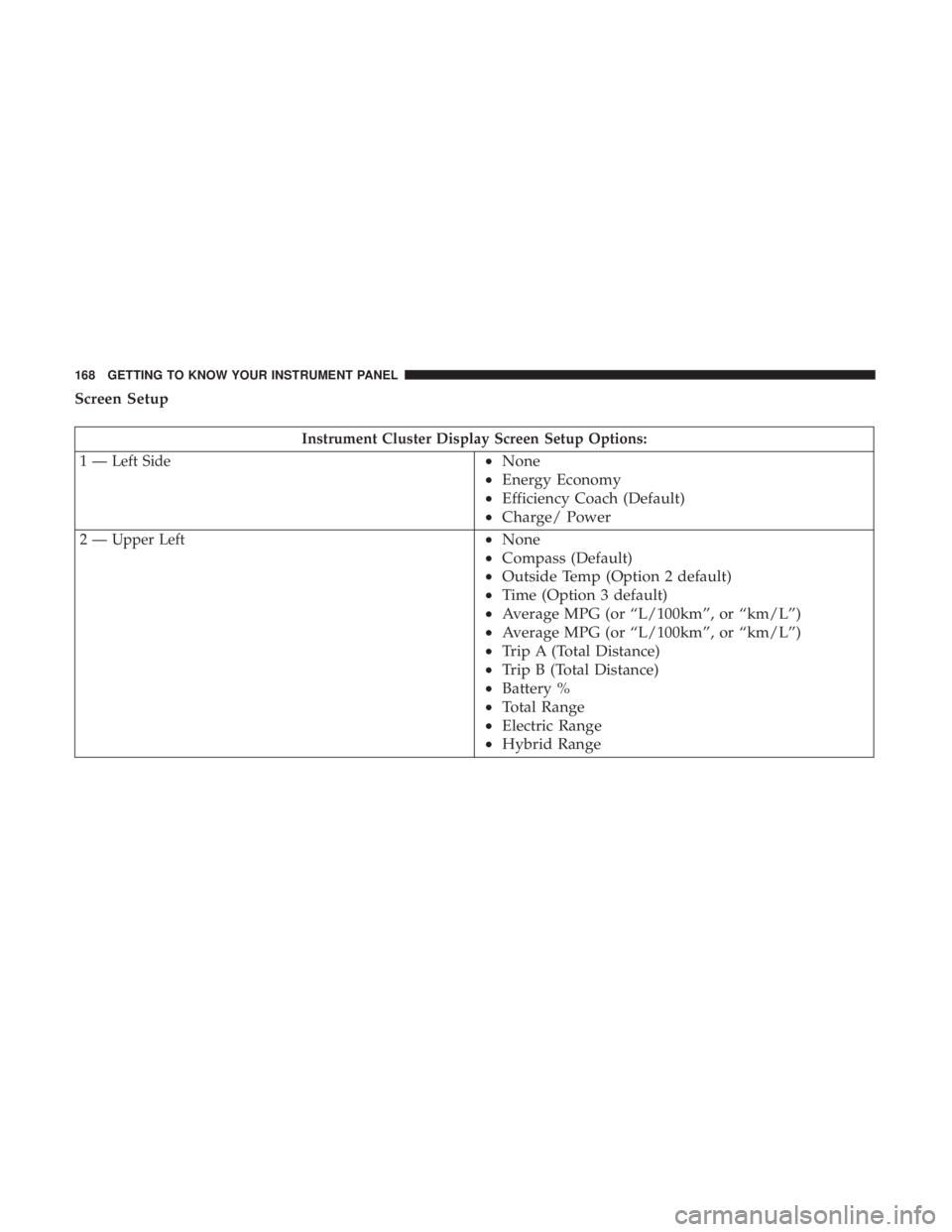
Screen Setup
Instrument Cluster Display Screen Setup Options:
1 — Left Side
• None
• Energy Economy
• Efficiency Coach (Default)
• Charge/ Power
2 — Upper Left•None
• Compass (Default)
• Outside Temp (Option 2 default)
• Time (Option 3 default)
• Average MPG (or “L/100km”, or “km/L”)
• Average MPG (or “L/100km”, or “km/L”)
• Trip A (Total Distance)
• Trip B (Total Distance)
• Battery %
• Total Range
• Electric Range
• Hybrid Range
168 GETTING TO KNOW YOUR INSTRUMENT PANEL
Page 171 of 614
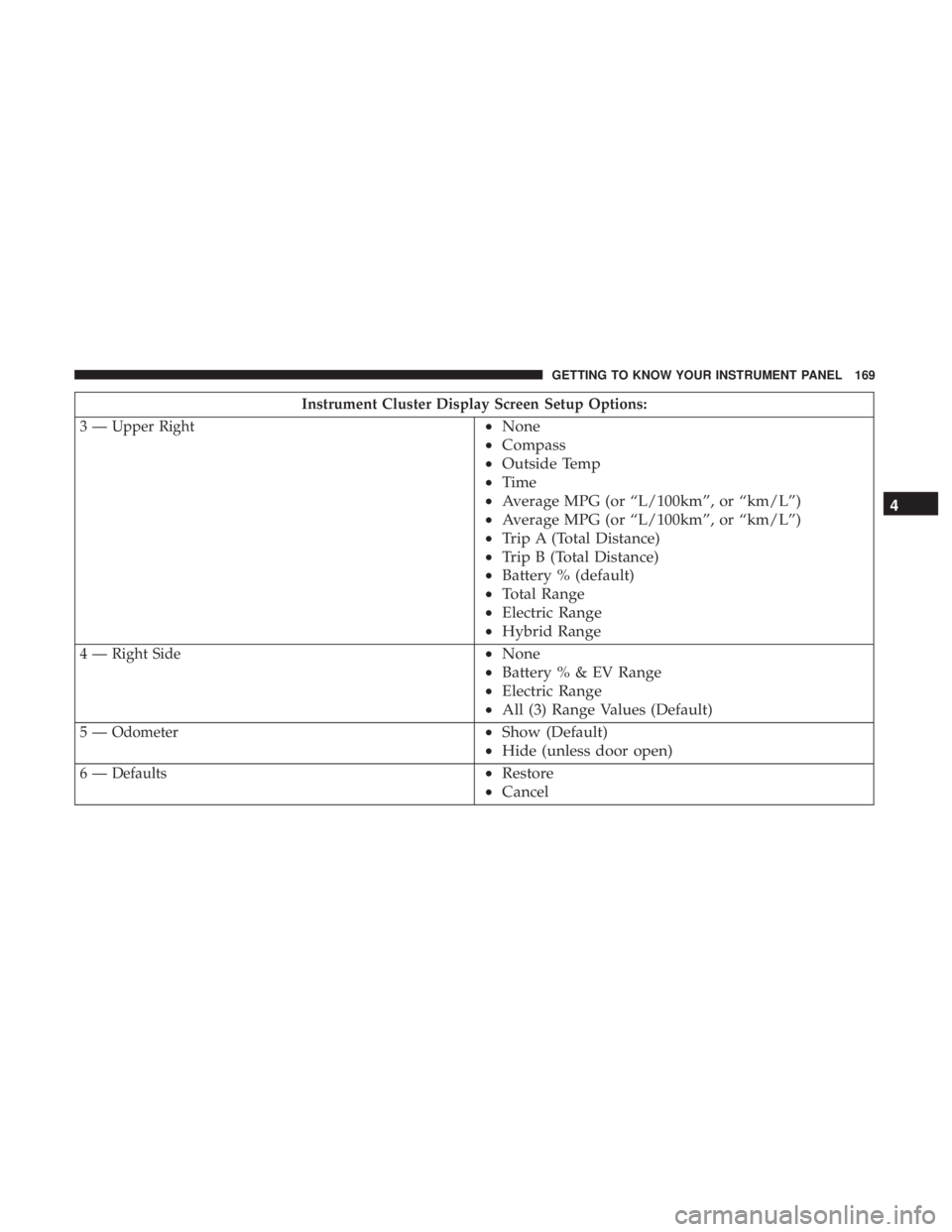
Instrument Cluster Display Screen Setup Options:
3 — Upper Right
• None
• Compass
• Outside Temp
• Time
• Average MPG (or “L/100km”, or “km/L”)
• Average MPG (or “L/100km”, or “km/L”)
• Trip A (Total Distance)
• Trip B (Total Distance)
• Battery % (default)
• Total Range
• Electric Range
• Hybrid Range
4 — Right Side•None
• Battery%&EVRange
• Electric Range
• All (3) Range Values (Default)
5 — Odometer•Show (Default)
• Hide (unless door open)
6 — Defaults•Restore
• Cancel 4
GETTING TO KNOW YOUR INSTRUMENT PANEL 169
Page 178 of 614
Do not operate the vehicle until the cause is corrected. This
light does not indicate how much oil is in the engine. The
engine oil level must be checked under the hood.
— Transmission Temperature Warning Light —
If Equipped
This light indicates high transmission fluid temperature.
This may occur with strenuous usage such as trailer
towing. If this light turns on, stop the vehicle and run the
engine at idle or slightly faster, with the transmission in
PARK or NEUTRAL, until the light turns off. Once the light
turns off, you may continue to drive normally.
WARNING!
If you continue operating the vehicle when the Trans-
mission Temperature Warning Light is illuminated you
could cause the fluid to boil over, come in contact with
hot engine or exhaust components and cause a fire.
CAUTION!
Continuous driving with the Transmission Tempera-
ture Warning Light illuminated will eventually cause
severe transmission damage or transmission failure.
— Vehicle Security Warning Light — If Equipped
This light will flash at a fast rate for approximately
15 seconds when the vehicle security alarm is arming, and
then will flash slowly until the vehicle is disarmed.
— Door Open Warning Light — If Equipped
This indicator will illuminate when a door is ajar/open and
not fully closed. This indicator will reflect which doors are
open.
NOTE: If the vehicle is moving, there will also be a single
chime.
— Liftgate Open Warning Light
This indicator will turn when the liftgate is open.
NOTE: If the vehicle is moving, there will also be a single
chime.
— Hybrid Electric Vehicle System Service Light
This indicator will illuminate when service to the hybrid
electric system is needed. It will be accompanied by a
�Service Hybrid Electric Vehicle System� message in the
cluster. If the telltale stays on or continues to come on,
contact an authorized dealer as soon as possible.
176 GETTING TO KNOW YOUR INSTRUMENT PANEL