2018 AUDI Q5 battery
[x] Cancel search: batteryPage 332 of 392

Wheels
Production options we igh t
means the combined weight of
those installed regular production
options weighing over 5 lbs.
(2.3 kg) in excess of those stand
ard items which they replace, not previously considered in curb
weight or accessory weight, in
cluding heavy duty brakes, ride levelers, roof rack, heavy duty
battery, and special trim.
Radial pl y tir e
means a pneumatic tire in which
the ply cords that extend to the beads are laid at substantially
90 degrees to the centerline of
the tread.
R ecomm ended in flation
pressure
see¢ page 328 , Cold tire infla
tion pressure.
R einforced tire
means a tire designed to operate
at higher loads and at higher in
flation pressures than the corre
sponding standard tire . Rein
forced tires may be identified as
"XL" "xl" "EXTRA LOAD" or "RF" , , ,
on the sidewall.
330
Rim
means a metal support for a tire
or a tire and tube assembly upon
which the tire beads are seated.
Rim diam eter
means nominal diameter of the
bead seat . If you change your
wheel size, you will have to pur
chase new tires to match the new rim diameter .
Rim size designation
means rim diameter and width.
Rim width
means nomina l distance between
r im
flanges .
Sidewall
means that portion of a tire be
tween the tread and bead .
Speed rating (letter code )
means the speed at which a tire is
designed to be driven for extend
ed periods of time. The ratings range from 93 mph (150 km/h)
to
186 mph (298 km/h) ¢ table
on page 326 .
You may not find
this information on all tires be
cause it is not required by law .
The speed rating letter code,
where applicable, is molded on
the tire sidewall and indicates the
...
Page 364 of 392
Fuses and bulb s
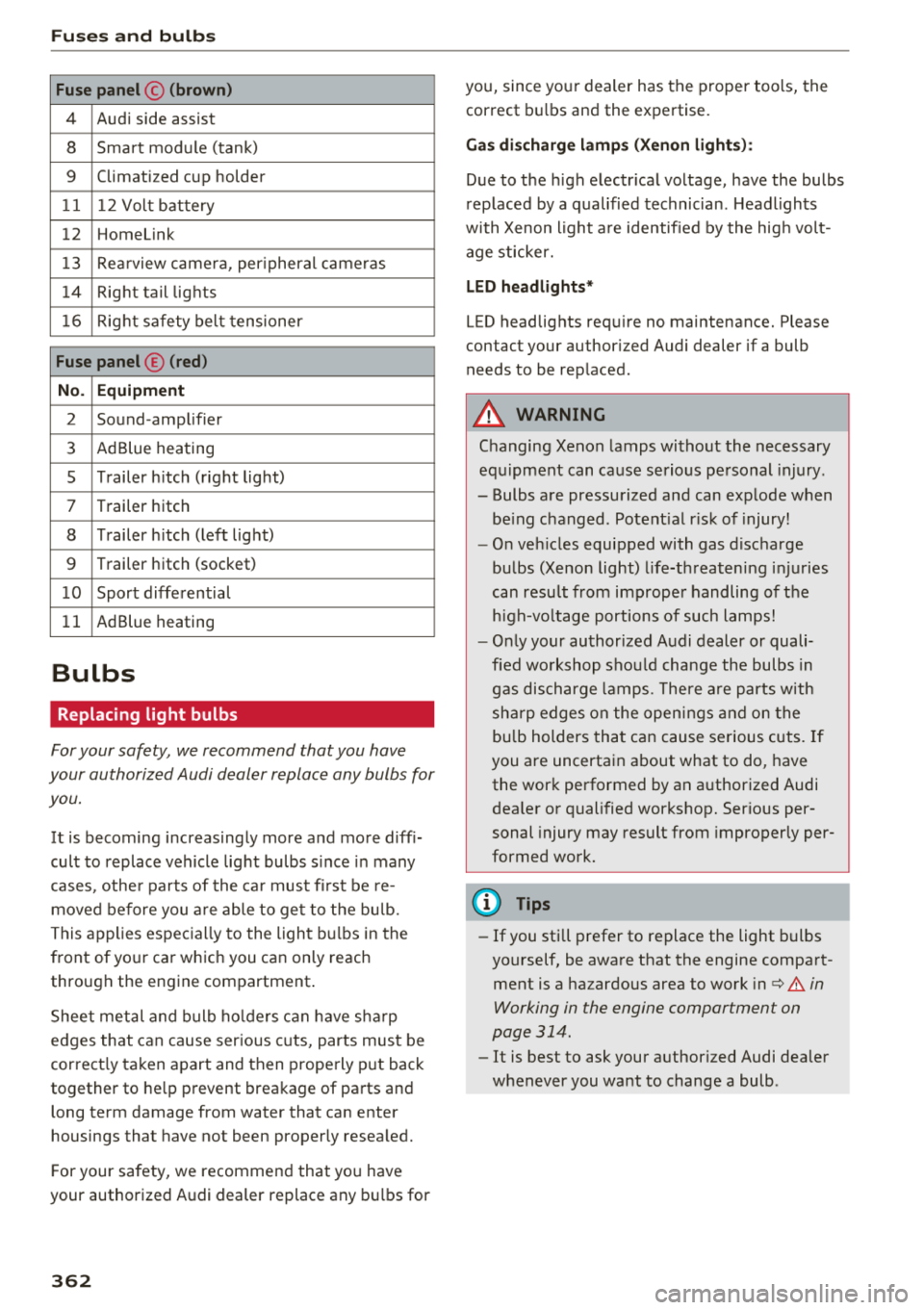
Fuse panel © (brown )
4 Audi side assist
8 Smart module (tank)
9 Climatized cup holder
11 12 Volt battery
12 Homelink
13 Rea rview camera, per ipheral cameras
14 Right tail lights
16 Right safety belt tensioner
Fu se panel ® (red )
No . Equipm ent
2 Sound-amplifier
3 AdBlue heating
s Trailer h itch (right light)
7 Trailer hitch
8 Trailer h itch (left lig ht)
9 Trailer hitch (socket)
1 0 Sport differential
11 AdBlue heating
Bulbs
Replacing light bulbs
For your safety, we recommend that you have
your authorized Audi dealer replace any bulbs for
you.
It is becoming increasingly more and more diff i
cult to replace vehicle light bulbs s ince in many
cases, other parts of the ca r must fi rst be re
moved before you a re able to get to the bu lb.
This applies espec ially to the light bu lbs in the
front of your car which you can only reach
through the engine compartment .
Sheet metal and bulb ho lde rs can have sha rp
edges that can cause ser ious cuts, parts must be
correct ly taken apart and then properly put back
together to he lp prevent breakage of parts and
long term damage from water that can enter
housings that have not been properly resea led.
F or your safety, we recommend that you have
your authorized Audi dealer replace any bu lbs for
3 6 2
you, since your dealer has the proper tools, the
correct bu lbs and the expertise.
Ga s di sc harg e lamp s (Xeno n ligh ts):
Due to the high electr ical voltage, have the bulbs
rep laced by a qualified technician . Headlights
with Xenon light a re identified by the hig h volt
age sticker.
L ED he adligh ts*
LED headlights requ ire no maintenance. Please
contact your author ized Audi dealer if a bulb
needs to be replaced .
A WARNING
Changing Xenon lamps without the necessary
equ ipment can cause serious personal injury.
-Bulbs are pressurized and can explode when
be ing changed. Potent ial r isk of injury!
-O n veh icles equipped with gas discharge
bulbs (Xenon light) l ife-threaten ing injuries
can resu lt from improper handling of the
h igh-vo ltage portions of such lamps!
-O nly your author ized Audi dealer or quali
fied wo rkshop shou ld change the bulbs in
gas discharge lamps. The re a re parts w ith
sha rp edges on the open ings and on the
bu lb holders that can cause serious cuts. If
you are uncertain about what to do, have the work performed by an authorized Audi
dea ler or qualified workshop. Serious per
sonal injury may result from improperly per
formed work.
(D Tips
-If you still prefer to replace the light bulbs
yourself, be aware that the engine compart ment is a hazardous area to work
i n c:> .&. in
Working in the engine compartment on
page 314.
-It is best to ask your authorized Audi dealer
whenever you want to change a bulb .
Page 365 of 392

u co .... N r--N .... 0 <( 0 00
Emergency situations
General
This chapter is intended for trained emergency
crews and working personnel who have the nec
essary tools and equipment to perform these
operations.
Starting by pushing or
towing
~ Note
Vehicles with an automatic transmission
cannot be started by pushing or towing.
Starting with jumper
cables
If necessary, the engine can be started by con
necting it to the battery of another vehicle.
If the engine should fail to start because of a dis
charged or weak battery, the battery can be con
nected to the battery of
another vehicle, using a
pair of jumper cables to start the engine.
Jumper cables
Use only jumper cables of sufficiently large cross
section
to carry the starter current safely. Refer
to the manufacturer's specifications.
Use only jumper cables with
insulated terminal
clamps which are distinctly marked:
plus(+) cable in most cases colored red
minus(-) cable
in most cases colored black.
A WARNING -
Batteries contain electricity, acid, and gas.
Any of these can cause very serious or fatal in
jury. Follow the instructions below for safe
handling of your vehicle's battery.
-Always shield your eyes and avoid leaning
over the battery whenever possible.
- A dead battery can freeze at temperatures
around 32 °F (0 °C). If the vehicle battery is
frozen, you must thaw it before connecting
the jump start cables. If you do not, this in-
Emergency situations
creases the risk of an explosion and chemi
cal burns. After jump starting the vehicle,
drive to an authorized Audi dealer or author
ized Audi Service Facility immediately to
have the vehicle battery checked.
- Do not allow battery acid to contact eyes or
skin. Flush any contacted area with water
immediately.
- Improper use of a booster battery to start a
vehicle may cause an explosion .
- Vehicle batteries generate explosive gases.
Keep sparks, flame and lighted cigarettes
away from batteries.
- Do not try to jump start any vehicle with a
low acid level in the battery .
- The voltage of the booster battery must also
have a 12-Volt rating. The capacity (Ah) of
the booster battery should not be lower
than that of the discharged battery. Use of
batteries of different voltage or substantial
ly different "Ah" rating may cause an explo
sion and personal injury.
- Never charge a frozen battery. Gas trapped
in the ice may cause an explosion.
- Never charge or use a battery that has been
frozen. The battery case may have be weak
ened.
- Use of batteries of different voltage or sub
stantially different capacity (Ah) rating may
cause an explosion and injury. The capacity
(Ah) of the booster battery should not be
lower than that of the discharged battery.
- Before you check anything in the engine
compartment, always read and heed all
WARNINGS
c>page 314.
@ Note
-Applying a higher voltage booster battery
will cause expensive damage to sensitive
electronic components, such as control
units, relays, radio, etc.
- There must be no electrical contact between
the vehicles as otherwise current could al
ready start to flow as soon as the positive
(+) terminals are connected.
363
Page 366 of 392

Emergency situations
@ Tips
The discharged battery must be properly con
nected to the vehicle's electrical system .
When jump starting or charging the battery,
never connect the negative ground cable to
the battery negative post because the battery
manager system must be able to detect the
battery's state of charge. Always connect the
negat ive g round cable to the negative ground
post of the battery manager control unit.
Using the jump start
cable
Both jump start cables must be connected in the
correct order!
Fig. 286 E ngin e compartme nt: co nn ectors for jump start
cables and a charger
Fig. 287 Jump starting with a battery in another vehicle:
@-pro vidi ng current, @-dra ined
The procedure described below for connecting
jumper cables is intended to provide a jump start
for your vehicle.
Vehicle with discharged battery
... Turn off lights and accessories, move automatic
transm ission lever to "N" (Neutral) or "P" (Pa rk)
and set parking bra ke.
364
Connecting the positive cable (red) to the
positive terminal
... Open the red cover on the positive terminal
c:::>fig. 286.
1. Secure one end of the pos itive cable (red) to
the jump start pin
c:::> fig. 287 (J) (pin under
the red cover = "pos itive") on the veh icle that
needs to be started @.
2. Secure the other end of the positive cable
(red) to the posit ive terminal @on the bat
tery provid ing the cur rent @.
Connecting the negative cable (black) to the
negative terminal
3. Secure one end of the negative cable (black)
to the negative terminal @ on the battery
that is providing the current @.
4. Secure the other end of the negative cable
(black) to the jump start
pin @ (hex head pin
= "negative") on the vehicle that needs to be
started @.
Starting the engine
... Sta rt the eng ine on the vehicle providing the
jump start @and let it run at idle .
... Now start the engine on the vehicle with the
drained battery @.
... If the engine does not start, stop the starting
procedure after 10 seconds and then repeat it
after approx imately 30 seconds.
"' Once the engine w it h the drained vehicle bat
tery has been started, remove the cables in the
reverse order from the way they were install ed.
"' Close the red cover on the positive terminal.
The battery is vented to the outside to prevent
gases from enter ing the vehicle inter ior. Make
sure th at the j umper clamps are well connected
with their
metal ports in full contact with the
battery terminals .
A WARNING
-To avoid serious personal injury and damage
to the vehicle, heed all warnings and instruc
tions of the jumper cable manufacturer. If in
doubt, call for road service .
-Jumper cables must be long enough so that
the vehicles do not touch.
..,.
Page 367 of 392

-When connecting jumper cables, make sure
that they cannot get ca ught in any mov ing
parts in the engine compartment.
- Do not bend over the batteries - danger of
chem ica l burns!
- The battery cell lock ing screws must be
t ightened sec ure ly.
- Be fore you check anything in the e ngine
compartment, a lways read and hee d all
WAR NINGS
q page 314 .
(D Note
Impro per hook -up of jum pe r cables can r uin
the gene rato r.
- Always connect POSITI VE (+ ) to POS ITIV E
( + ), and NEGATIVE( -) to NEGAT IVE( -)
g roun d post of t he battery mana ger contro l
u nit.
- Check that a ll sc rew p lugs on t he battery
cells are screwed in firmly. I f not, t ighten
plugs prior to connecting clamp on negative
batte ry terminal.
- P lease note that the procedure fo r con nect
i ng a jumper cab le as desc ribed above ap
p lies specifica lly to the case of yo ur vehicle
being jump starte d. When you are giv ing a
ju mp s ta rt to anothe r vehicle , d o
not con
n ect the neg ative (-) cab le to the neg ative
(-) t ermin al on the di sch arged b attery @
q fig. 287 . In ste ad , securely connec t the
nega tive ( -) cab le to either a solid me tal
com ponent that is f irm ly bolted to the e n
gine block o r to the engine bloc k itself. If
the battery that is be ing cha rge d does not
vent to the outs ide, escap ing battery gas
could ignite and exp lode!
Towing with a tow truck
General hints
Your Audi requires special handling for towi ng .
The fo llow ing information is to be used by com
mercia l tow tr uck operators who know how to op-
u e rate the ir equip ment safe ly. co .....
~ - Never tow your Audi, towing will cause dam-N
~ age to the engine and transmission .
0 co
Emergency situations
-Never wrap the safety chains or winch cables
around the brake lines .
- To prevent unnecessa ry damage , your Audi
must be transported with a flatbed truck.
- To load the vehicle on to the flatbed, use the
towing loop found in the vehicle tools and at
tach to the front or rear anchorage
¢ page 365 and ¢ page 366 .
A WARNING
-A veh icle being towed is not safe for passen-
ge rs . Neve r allow anyone to ride in a vehicle
b eing towed, fo r any r eason.
Front towing loop
Only install the front towing loop when it is
needed.
Fig . 288 Front bu mpe r: in sta lling the tow ing loop
T he threaded opening for the towing loo p is lo
cate d on t he righ t side of the front bum per.
.. Remove the towing loop from the vehicle too l
ki t
¢ pag e 350 .
.. Pull s harp ly o n the trim in the dire ct ion o f the
a rrow to remove
¢ fig . 288.
.,. T ig hten t he towi ng loop in the threade d open
in g until it stops and then tighten it with a
wheel wrenc h .
.,. After using, p lace the tow ing loop back in the
veh icle tool k it.
A WARNING
-If the tow ing loop is not tightened until it
stops whe n installing, t he threads may be
pull ed ou t wh en towing the vehicle and th at
could ca use a n accident.
365
Page 378 of 392
Index
Audio player Bluetooth audio player . . . . . . . . . . . . . . . 228
Wi-Fi audio player . . . . . . . . . . . . . . . . . . . 229
Aud io track . . . . . . . . . . . . . . . . . . . . . . . . . . 237
Aud i pre sense . . . . . . . . . . . . . . . . . . . . . . . 112
Messages . . . . . . . . . . . . . . . . . . . . . . . . . . 116
Sett ings . . . . . . . . . . . . . . . . . . . . . . . . . . . 116
Audi Service Repair Manuals and Literature 371
Aud i side assist . . . . . . . . . . . . . . . . . . . . . . . 120
Rear cross-traffic assist . . . . . . . . . . . . . . . 124
Audi smartphone interface . . . . . . . . . 243, 247
Audi virtua l cockpit
refer to Instrument cluster . . . . . . . . . . . . . 10
AUTO Automatic headlights . . . . . . . . . . . . . . . . . 45
Auto Lock (central locking system) . . . . . . . . 30
Automatic belt retractor . . . . . . . . . . . . . . . 264
Automatic climate control . . . . . . . . . . . . . . . 69
Operation . . . . . . . . . . . . . . . . . . . . . . . . . . . 70
Automatic climate control system Audi drive select . . . . . . . . . . . . . . . . . . . . . 125
Setup . . . . . . . . . . . . . . . . . . . . . . . . . . . . . . 72
Automatic transmission . . . . . . . . . . . . . . . . . 84
Emergency program . . . . . . . . . . . . . . . . . . 89
Hill descent control . . . . . . . . . . . . . . . . . . . 87
Kick-down . . . . . . . . . . . . . . . . . . . . . . . . . . . 88
La unch control program . . . . . . . . . . . . . . . 89
Manual shiftin g . . . . . . . . . . . . . . . . . . . . . . 88
Parking lock emergency re lease . . . . . . . . . 90
Selector lever positions . . . . . . . . . . . . . . . . 85
Automatic wipe/wash system . . . . . . . . . . . . 51
Auto Safety Hotline . . . . . . . . . . . . . . . . . . . 259
AUTO (button) Automatic climate control system . . . . . . . 71
Auxiliary heater (automatic climate control) 72
AUX input . . . . . . . . . . . . . . . . . . . . . . . . . . . 232
Average consumption . . . . . . . . . . . . . . . . . . . 16
Average speed . . . . . . . . . . . . . . . . . . . . . . . . 16
B
BACK button 147
Balance (sound) . . . . . . . . . . . . . . . . . . . . . . 249
Bass (sound) . . . . . . . . . . . . . . . . . . . . . . . . . 249
Battery Jump starting . . . . . . . . . . . . . . . . . . . . . . . 363
also refer to Vehicle battery . . . . . . . . . . . 321
376 Before
driving . . . . . . . . . . . . . . . . . . . . . . . . 252
Belt tensioners . . . . . . . . . . . . . . . . . . . . . . . 267
Blended gasoline . . . . . . . . . . . . . . . . . . . . . 310
Blower (automat ic climate control system) . 71
Bluetooth Audio player . . . . . . . . . . . . . . . . . . . . . . . . 228
Connecting a cell phone . . . . . . . . . . . . . . 17 4
Settings . . . . . . . . . . . . . . . . . . . . . . . . . . . 248
Boost...... .. .. .. .. .. ............. ... 17
Booster seats . . . . . . . . . . . . . . . . . . . . . . . . 301
Boost pressure indicator . . . . . . . . . . . . . . . . 17
Brake fluid Checking the brake fluid level . . . . . . . . . . 321
Brakes . . . . . . . . . . . . . . . . . . . . . . . . . . . . . . 142
Brake assist . . . . . . . . . . . . . . . . . . . . . . . . 140
Brake fluid . . . . . . . . . . . . . . . . . . . . . . . . . 321
E lectromechanical parking brake . . . . . . . . 80
Emergency braking function . . . . . . . . . . . . 81
New brake pads . . . . . . . . . . . . . . . . . . . . . 142
Worn brake pads . . . . . . . . . . . . . . . . . . . . . 26
Break-in security feature . . . . . . . . . . . . . . . . 36
Breaking in
New brake pads . . . . . . . . . . . . . . . . . . . . . 142
New engine . . . . . . . . . . . . . . . . . . . . . . . . . 73
New tires . . . . . . . . . . . . . . . . . . . . . . . . . . 332
Browser
refer to Media center . . . . . . . . . . . . . . . . . 235
Bulbs . . . . . . . . . . . . . . . . . . . . . . . . . . . . . . . 362
Buttons Control panel (MMI) . . . . . . . . . . . . . . . . . 148
Multifunction steering wheel . . . . . . . . 12, 15
Switching the Infotainment system display
on/off . . . . . . . . . . . . . . . . . . . . . . . . . . . . . 148
C
Cable (USB adapter/ AUX connector cable) 231
California Proposition 65 Warning . . . . . . . 315
Battery specific . . . . . . . . . . . . . . . . . . . . . 322
Call list . . . . . . . . . . . . . . . . . . . . . . . . . . . . . 177
Call options . . . . . . . . . . . . . . . . . . . . . . . . . . 185
Capacities Fuel tank. . . . . . . . . . . . . . . . . . . . . . . . . . . 369
Washer fluid reservoir . . . . . . . . . . . . . . . . 369
Cargo area
refer to Loading the luggage compart-
ment..... .... .. .. .. ............. .. 257
Page 379 of 392

u co ..... N r--N ..... 0 <( 0 00
Cargo floor . . . . . . . . . . . . . . . . . . . . . . . . . . . 66
Ca rgo mat . . . . . . . . . . . . . . . . . . . . . . . . . . . . 66
Cata lytic converter ............. .. .. .. . 313
C D dr ive ( medi a dr ives) . . . . . . . . . . . . . . . . 227
Cel l phone
refer to Te lephone ............. ... .. . 174
Cente r arm rest . . . . . . . . . . . . . . . . . . . . . . . . 57
Cent ral lock ing . . . . . . . . . . . . . . . . . . . . . . . . 30
Convenience key . . . . . . . . . . . . . . . . . . . . . . 33
M echanically lock ing . . . . . . . . . . . . . . . . . . 35
Power windows . . . . . . . . . . . . . . . . . . . . . . 41
Remote control key . . . . . . . . . . . . . . . . . . . 33
Sett ing . . . . . . . . . . . . . . . . . . . . . . . . . . . . . 35
Cent ral lock ing swi tch . . . . . . . . . . . . . . . . . . 34
Cert ificat ion . . . . . . . . . . . . . . . . . . . . . . . . . 3 7 4
C hanging engine oi l ....... ... .. .. .... . 3 19
C hanging the sca le . . . . . . . . . . . . . . . . . . . . . 13
C harging
refer to Power sources . . . . . . . . . . . . . . . . . 60
C ha rging the battery (mobi le devices) 232, 233
C hi ld rest raints
D anger of using c hild r estraints in the front
se at . . . . . . . . . . . . . . . . . . . . . . . . . . . . . . . 270
Where can I get additional in forma tion
about child restraints and their use? . . . . 309
C hi ld rest raint system ancho rs . . . . . . . . . . 305
C hi ld safety .. .. ............... .. .. .. . 291
Important safety instructions for using chi ld
safety seats . . . . . . . . . . . . . . . . . . . . . . . . 295
Install ing a chi ld restra int usi ng the LA TC H
sys tem . . . . . . . . . . . . . . . . . . . . . . . . . . . . 307
M ount ing and releasing the anchorage
h ook .. .. .. .. ............. .. .. .. .. . 307
Tether anchors . . . . . . . . . . . . . . . . . . . . . . 30 8
Tether straps . . . . . . . . . . . . . . . . . . . . . . . 308
C hi ld safety lock
P ower w indows . . . . . . . . . . . . . . . . . . . . . . 40
Rea r doo rs . . . . . . . . . . . . . . . . . . . . . . . . . . 40
C hi ld safety seats . . . . . . . . . . . . . . . . . . . . . 297
B ooster seats . . . . . . . . . . . . . . . . . . . . . . . 30 1
Conve rtible c hild seats . . . . . . . . . . . . . . . 299
D anger of using c hild rest raints in the fron t
se at . . . . . . . . . . . . . . . . . . . . . . . . . . . . . . . 270
H ow do I proper ly install a child safety seat
. h . l 7 295 in my ve ,c e . .... .. ..... ... .. .. .... .
Infant seats . . . . . . . . . . . . . . . . . . . . . . . . 29 7
LA TCH system . . . . . . . . . . . . . . . . . . . . . . 307
Index
Safety instr uctions . . . . . . . . . . . . . . . . . . . 2 9S
Securing . . . . . . . . . . . . . . . . . . . . . . . . . . . 302
U nused safety be lts on the rea r seat 297
Child seats Lower anchorages . . . . . . . . . . . . . . . . . . . 306
Class ic view . . . . . . . . . . . . . . . . . . . . . . . . . . . 14
Cleaning . . . . . . . . . . . . . . . . . . . . . . . . . . . . 344
Cleaning Alcantara . . . . . . . . . . . . . . . . . . . . 34 7
Cleaning art ific ial leather . . . . . . . . . . . . . . . 347
Cleaning carbon parts . . . . . . . . . . . . . 346, 34 7
Cleaning cont rols . . . . . . . . . . . . . . . . . . . . . 346
Cleaning decorative parts/trim . . . . . . . . . . 346
Cleaning exhaust tail p ipes . . . . . . . . . . . . . 346
Cleaning plastic parts . . . . . . . . . . . . . . . . . . 346
Cleaning textiles . . . . . . . . . . . . . . . . . . . . . . 347
Cl imate contro l system
refer to Automatic clima te con trol . . . . . . . 69
Clock . . . . . . . . . . . . . . . . . . . . . . . . . . . . 16, 24S
Closing Hood . . . . . . . . . . . . . . . . . . . . . . . . . . . . . . 315
Coc kp it (ove rview) . . . . . . . . . . . . . . . . . . . . . . 8
Co llaps ible spare t ire
Inflating . . . . . . . . . . . . . . . . . . . . . . . . . . . 356
Co llapsib le tire
refer to Collapsib le spare tire . . . . . . . . . . 356
Command (vo ice recog nition system) . . . . . 16 7
Compartments . . . . . . . . . . . . . . . . . . . . . . . . 60
Compass in the mirror . . . . . . . . . . . . . . . . . . 54
Compliance . . . . . . . . . . . . . . . . . . . . . . . . . . 374
Connect ion manager . . . . . . . . . . . . . . . . . . 246
Connect ions
refer to M edia . . . . . . . . . . . . . . . . . . 225, 23 4
Connect (ve hicle cont rol) . . . . . . . . . . . . . . . 197
Cons umer Info rmation ............. 259, 371
Cons umption (fuel) . . . . . . . . . . . . . . . . . . . . 16
Contacting NHTSA . . . . . . . . . . . . . . . . . . . . 259
Contacts . . . . . . . . . . . . . . . . . . . . . . . . . . . . 183
Additional directory . . . . . . . . . . . . . . . . . . 247
Importing/export ing . . . . . . . . . . . . . . . . . 184
Memory capac ity . . . . . . . . . . . . . . . . . . . . 185
Stor ing as destination . . . . . . . . . . . . . . . . 211
Control buttons (operating the MMI) . . . . . 150
Cont rol knob w ith joyst ick function ( MMI op
eration) . . . . . . . . . . . . . . . . . . . . . . . . . . . . . 153
377
Page 383 of 392

u co ..... N r--N ..... 0 <( 0 00
J
Jukebox . . . . . . . . . . . . . . . . . . . . . . . . . . . . . 227
Jump-starting . . . . . . . . . . . . . . . . . . . . . . . . 363
Jump start cable . . . . . . . . . . . . . . . . . . . . . . 364
K
Key.................................. 31
Key not recogni zed . . . . . . . . . . . . . . . . . . . 78
Key replacement . . . . . . . . . . . . . . . . . . . . . 31
Mechanical key ............... .. .. . 31, 32
Replacing the battery . . . . . . . . . . . . . . . . . 32
Unlocking/locking . . . . . . . . . . . . . . . . . 33, 35
Vehicle code . . . . . . . . . . . . . . . . . . . . . . . . . 31
Kick-down (automatic transmission) . . . . . . . 88
L
Lane assist
refer to Audi active lane assist . . . . . . . . . 117
La p timer . . . . . . . . . . . . . . . . . . . . . . . . . . . . . 98
Evaluating . . . . . . . . . . . . . . . . . . . . . . . . . . 99
Starting . . . . . . . . . . . . . . . . . . . . . . . . . . . . 99
L ATCH . . . . . . . . . . . . . . . . . . . . . . . . . . . . . . 305
Description . . . . . . . . . . . . . . . . . . . . . . . . . 306
Installing a child restraint . . . . . . . . . . . . . 307
L ocat ion . . . . . . . . . . . . . . . . . . . . . . . . . . . 306
Mounting and releasing the anchorage
hook .. .... .. ................ ..... . 307
Launch control program . . . . . . . . . . . . . . . . . 89
Leather care/cleaning . . . . . . . . . . . . . . . . . 347
L eft control button . . . . . . . . . . . . . . . . . . . . . 13
Licensing agreements (MMI) . . . . . . . . . . . . 250
Lifting points (vehicle jack) . . . . . . . . . . . . . 354
L ight/rain sensor
H eadlights . . . . . . . . . . . . . . . . . . . . . . . . . . 45
Interval mode (wipers) . . . . . . . . . . . . . . . . 51
L ight functions . . . . . . . . . . . . . . . . . . . . . . . . 45
High beam assistant . . . . . . . . . . . . . . . . . . 46
Instrument illumination . . . . . . . . . . . . . . . 49
I nter ior lighting . . . . . . . . . . . . . . . . . . . . . . 48
Lighting Exterior . . . . . . . . . . . . . . . . . . . . . . . . . . . . . 45
Interior . . . . . . . . . . . . . . . . . . . . . . . . . . . . . 48
Lights Headlight range control system . . . . . . . . . 45
Index
Listening to music
refer to Media . . . . . . . . . . . . . . . . . . 225, 234
Load....... .. .. .. .. ............... .. 370
Loading the luggage compartment . . . . . . . 257
Locking/unlocking By remote control . . . . . . . . . . . . . . . . . . . . 33
With the convenience key . . . . . . . . . . . . . . 33
With the lock cylinder . . . . . . . . . . . . . . . . . 35
Low beam headlights . . . . . . . . . . . . . . . . . . . 45
Lowering the rear of the vehicle . . . . . . . . . 128
Luggage compartment . . . . . . . . . . . . . . . . . . 62
Cover (manual) . . . . . . . . . . . . . . . . . . . . . . . 62
Power sources . . . . . . . . . . . . . . . . . . . . . . . 60
Storing cargo correctly . . . . . . . . . . . . . . . 257
Tie-downs . . . . . . . . . . . . . . . . . . . . . . . . . . . 65
also refer to Loading the luggage compart-
ment . . . . . . . . . . . . . . . . . . . . . . . . . . . . . . 257
Luggage compartment lid . . . . . . . . . . . . . . . 36
Emergency release . . . . . . . . . . . . . . . . . . . . 40
Lumbar support . . . . . . . . . . . . . . . . . . . . . . . 56
M
Maintenance . . . . . . . . . . . . . . . . . . . . . . . . . 371
Maintenance intervals . . . . . . . . . . . . . . . . . 324
Making an emergency call . . . . . . . . . . . . . . 179
Malfunction Indicator Lamp (MIL) . . . . . . . 313
Map Display . . . . . . . . . . . . . . . . . . . . . . . . . . . . 218
Operating . . . . . . . . . . . . . . . . . . . . . . . . . . 213
Settings . . . . . . . . . . . . . . . . . . . . . . . . . . . 214
Update . . . . . . . . . . . . . . . . . . . . . . . . . . . . 203
Map update . . . . . . . . . . . . . . . . . . . . . . . . . . 216
Mechan ical key .. .. .. ............... 31, 32
Mechanically locking the front passenger's
door . . . . . . . . . . . . . . . . . . . . . . . . . . . . . . . . . 35
Media . . . . . . . . . . . . . . . . . . . . . . . . . . 225, 234
Drives . . . . . . . . . . . . . . . . . . . . . . . . . . . . . 226
Supported formats . . . . . . . . . . . . . . . . . . 240
Media center . . . . . . . . . . . . . . . . . . . . . . . . . 235
Memory buttons
refer to Shortcut keys ............ 147, 155
Memory capacity Directory . . . . . . . . . . . . . . . . . . . . . . . . . . . 184
Jukebox . . . . . . . . . . . . . . . . . . . . . . . . . . . . 227
381