2018 AUDI A6 lock
[x] Cancel search: lockPage 28 of 266

Opening and clo sin g
(D Note
Protect the remote control key aga inst high
temperatures and d irect sunlight.
@ Tips
- The operation o f the remote co ntro l key can
b e temporarily disrupted by interference
from transmitters near the vehicle working i n the same frequency range (such as a cell
phone or radio equipment). Always check if
your vehicle is locked!
- Using the mechanical key, you can:
- Lock/unlock the g love compartment.
- Man ually lock/unlock the vehicle
r:::> page 29.
- Mechanically lock the doors
c::> page 29.
- For an explanation on conformity with the
FCC regulations in the United States and the
Industry Canada regu lations, see
<::;>page 250.
Removing the integrated mechanical key
F ig . 15 Re mote cont ro l master key: removing the mechan i
cal key
.. Press the release button @ c::> fig. 1 S.
.. Pu ll the mecha nica l key @ out of the remote
contro l key.
26
LED and batteries in the remote control key
Fig. 16 Remote contro l key: remov ing t he batte ry holder
LED on the remote control key
The LED @ informs you about the function of the
remote control key.
.. If you press a button briefly, the LED blinks
once.
.. If you press and hold a button longer (conven
ience opening), the LED blinks several t imes.
.. If the LED does not blink, the remote control
key battery is dead . The
Ill ind icator light and
the message
Please change key battery ap
pea r. Replace the battery in the remote contro l
key .
Replacing the remote control key battery
.. Remove the mechanical key c::> page 26 .
.. Press the release button @ on the battery
holder and p ull the battery ho lde r out of the re
mote co ntro l key in the direct ion of the a rrow
a t the same time .
.. Insert the new battery with the"+" facing
down .
.. Slide the battery holder carefully into the re
mote contro l key .
.. Insert the mechanical key .
@ For the sake of the environment
Discharged batter ies m ust be disposed of us
i ng methods that will not harm the environ
ment. Do not dispose of them in household
trash.
Page 29 of 266
a co ,...,
N
" N ,...,
0 0 \,;J '
The replacement battery must meet the same
specifications as the original battery in the re
mote control key .
Unlocking/locking by remote control
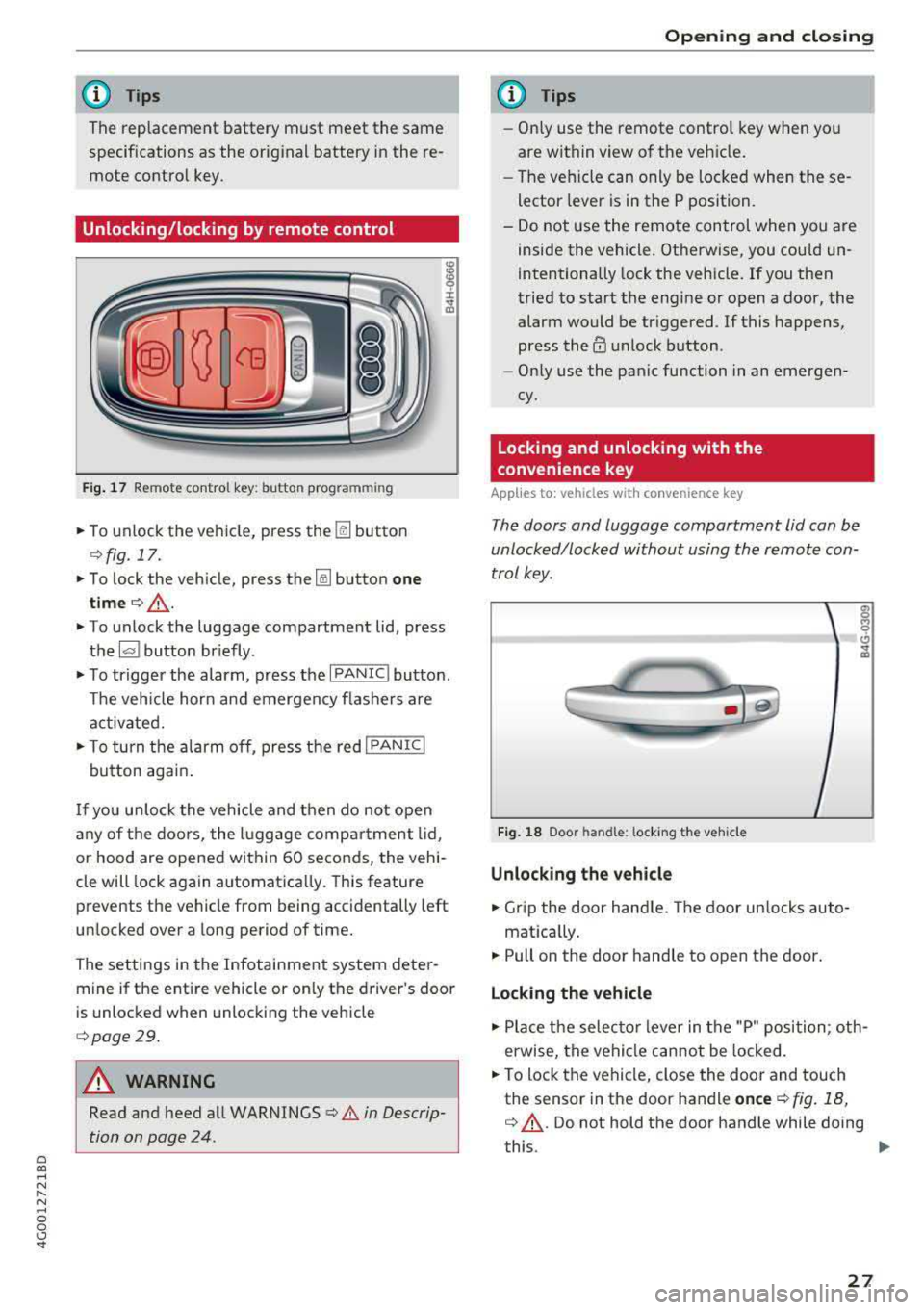
Fig. 17 Remote control key: button programming
.,. To unlock the vehicle, press the~ button
¢fig. 17.
.,. To lock the vehicle, press the~ button one
time ¢_& .
.,. To unlock the luggage compartment lid, press
the~ button briefly .
.,. To trigger the alarm, press the I PANIC ! button.
The vehicle horn and emergency flashers are
activated .
.,. To turn the alarm off, press the red I PANIC!
button again.
If you unlock the vehicle and then do not open
any of the doors, the lu ggage compartment lid ,
or hood are opened within 60 seconds, the vehi
cle will lock again automatically. This feature
prevents the vehicle from being accidentally left
unlocked over a long period of time.
The settings in the Infotainment system deter
mine if the entire vehicle or on ly the driver's door
is unlocked when unlocking the vehicle
¢page 29.
A WARNING
Read and heed all WARNINGS ¢.&. in Descrip
tion on page 24 .
Opening and closing
(D Tips
-Only use the remote control key when you
are within view of the vehicle.
- The vehicle can only be locked when these
lector lever is in the P position .
- Do not use the remote control when you are
inside the vehicle. Otherwise, you could un
intentionally lock the vehicle. If you then
tried to start the engine or open a door, the
alarm would be triggered . If this happens,
press
the @ unlock button.
- Only use the panic function in an emergen
cy.
Locking and unlocking with the
convenience key
Applies to: vehicles with convenience key
The doors and luggage compartment lid can be
unlocked/locked without using the remote con
trol key .
Fig. 18 Door han d le : l ocking t he veh icle
Unlocking the vehicle
.,. Grip the door handle. The door unlocks auto-
matica lly .
.,. Pull on the door handle to op en th e door.
Locking the vehicle
g M 0 (!)
"' m
.,. Place the selector lever in the "P" position ; oth
erwise, the vehicle cannot be locked .
.,. To lock the vehicle, close the door and touch
the sensor in the door handle
once ¢ fig. 18,
q _&. . Do not hold the door handle while doing
this .
..,.
27
Page 30 of 266

Opening and clo sin g
You can unlock/lock the vehicle at every door .
The remote control key cannot be more than
ap
proximately 4 ft (1.5 m) away from the door han
d le. It ma kes no difference whether the master
key is in your jacket pocket or in your briefcase,
for example.
The door cannot be opened for a br ief period di
rectly after locking it. This way you have the
op
portun ity to check if the doors locked correctly.
The settings in the Infotainment system deter
mine if the entire vehicle or only one of the doors
is unlocked when unlocking the vehicle
¢page 29.
A WARNING
Read and heed all WARNINGS ¢ & in Descrip
tion on page 24 .
(D Tips
If your vehicle is left standing for a long peri
od of time, note the following:
- The proximity sensor switches off after a few days to save energy. You then have to
pull once on the door handle to unlock the
vehicle a nd a second t ime to open it.
- The energy management system gradually
turns off unnecessary convenience functions
to prevent the vehicle battery from draining
and to mainta in the vehicle's ab ility to sta rt
fo r as long as possib le. You may not be able
to unlock yo ur vehicle usi ng the convenie nce
key .
Central locking switch
Fig . 19 D river's doo r: central locking switch
28
Fig. 20 Rear doo r: centra l locking sw itch
.,. To lock the vehicle, press the ~ button ¢,& .
.,. To unlo ck the vehicle, p ress the Im bu tton.
When locki ng the vehicle with t he central lock ing
switch, the following app lies:
- Opening the door and the luggage compart
ment lid from the
outside is not possible (for
security reasons, such as when stopped at a
light) .
- The LED in the centra l locking sw itch turns on
when all doors are closed and locked .
- Applies to: front doors: you can open the doors
ind ividually from the inside by pull ing the door
handle.
- Rear doors: to un lock the doors, pull on the
door handle
one time . To open the doors, pull
on the door handle
again .
-In the event of a crash with a irbag deployment,
the doors unlock a utomat ically to allow access
to the vehicle .
A WARNING
-The ce ntral locking swi tch a lso wor ks when
the ignition is switched off and automatical
ly locks the entire vehi cle when
the ~ but
ton is pressed.
- The central lock ing switch is inope ra ti ve
when the vehicle is locked from the ou tside.
- L ocked doors ma ke it more diffic ult for
emergency workers to get in to the vehicle,
which p uts lives at r isk. Do not leave anyone
behind in the veh icle, especially children .
(D Tips
Your vehi cle lo cks au tom atically when it
r eaches a speed of 9 mph ( 15 km/h) (A uto
Page 31 of 266

a co ,...,
N
" N ,...,
0 0 <..:l '
aga in using the
crl button i n the centra l lock
ing sw itch .
Setting the central locking system
You can set which functions are controlled by the
central locking system .
.,. Se lect : the ICARI fu nct ion bu tton > ( Car)* Sys
tems
control button > Vehicle settings > (Cen
tral locking)* .
Door unlocking
-yo u can decide if All doors or
only the
Driver door should unlock. The l uggage
compa rtme nt lid a lso unloc ks w hen
All is select
ed . If you select
Driver in a vehicle wit h a conven
ience key*, only the door whose handle you pull
will unlock.
I f yo u select
Driver , all the doors and l uggage
compartme nt lid will unlock if you press
the [@]
button on the remote cont rol key twice .
Disable tailgate handle -if you select On , the
l uggage compartment lid hand le is locked . In
this case, the l uggage compa rtment lid ca n be
ope ned with the
l.:::
k ey or with the
l.:::< l button* in the driver's door. In
ve hicles w ith a convenience key*, yo u can st ill
ope n the l uggage compa rtment lid usi ng the
handle if an authorized remote con trol key is
n ea r th e pr ox imi ty se nsor* .
Fold mirrors when locking * -if you select On ,
the exterior rearview mirro rs fo ld in automatical
l y when you press the
l@J bu tton on the remote
con trol key or to uch t he sen so r* i n t he h and le.
Tone when locking ll -if you se lect On , a tone
will sound when you lock t he veh icle .
l) Thi s fun ctio n is not a vailab le in all c oun tries.
Opening and closing
Mechanically unlocking and locking the
doors
I f the central locki ng fails, you must unlock/Lock
t he doo rs separ ately.
Fig. 2 1 Driver 's doo r: door lock cy li nder
Fig. 22 Door: e merge ncy lock ing
Unlocking/locking the driver's door with the
mechanical key
.. Remove the integrated mechan ica l key
¢ page 26 or use the sepa rate mechan ica l key .
.,. To unloc k the dr ive r's door, t urn the key to the
unlo ck
position @¢ fig. 21.
.,. To l ock th e dr iver 's doo r, move t he se lec to r lev
er t o the " P" posi tion ( auto mati c trans mi ssion )
a nd tu rn the key
one time to the lock pos iti on
@ ¢.&_ .
Locking the front passenger's door/rear
doors with the mechanical key
T he emergen cy lo ck is loca ted o n the rea r sid e of
t h e front passenger's door a nd the rear doors. It
is only visible when the doo r is open .
.,. Remove the in teg ra ted mech anical key
¢
page 26 o r use the sep arate mechan ic al k ey.
.. Remove the cap from the o peni ng ¢ fig . 22. ..,.
29
Page 32 of 266

Opening and clo sin g
,.. Inse rt the key in the inside slot and turn it all
the way to th e right (right door) or left (left
door).
A WARNING
Read and heed all WARNINGS c> .&. in Descrip
tion on page 24 .
Anti-theft alarm system
Appl ies to: ve hicles w ith a nti-t heft alarm system
If the anti-theft alarm system detects a vehicle
break-in, a udio and v isua l warning signals are
tr iggered . The anti-theft alarm system is sw itch
ed on o r off when loc king/u nlocking yo ur vehicle.
I f the a larm is tr iggered, it w ill shut off automat
ically after a certain amount of time .
Switching the alarm off manually
,.. To switch the alarm off, press the al button on
the remote contro l key or switch the ignition
on.
Break-in security feature
The alarm will sound if there is a break- in at the
doors, hood , and/or luggage compartment lid .
Luggage compartment
lid
Opening/closing the luggage compartment
lid
F ig. 23 Drive r's door : opening the lugg age co mpart ment
li d
30
F ig. 2 4 Handle in the l uggage compartmen t lid
Opening the luggage compartment lid
,.. Press and hold the la l button on the remote
cont rol key for at least one second . Or
,.. Pull the ~ button in t he driver's doo r c> fig. 23.
Or
,.. Press the hand le in the luggage compartment
lid
¢ fig . 24.
Closing the luggage compartment lid
,.. Use the inside grip to pull the luggage com
partment lid a nd a llow it to drop gently to
close
it c> ,&. .
The sett ings i n the Infota inment system deter
mine if the l uggage compartment lid can be
opened using the handle
¢ page 29 .
A WARNING
-After clos ing the luggage compartmen t lid,
make sure that it is latched . Otherwise the
luggage compartment lid cou ld open sud
denly when dr iv ing , which increases the risk
of an acc ident.
- Never drive with the luggage compartment
lid ajar or open, because poisono us gases
can enter the vehicle interior and create the
risk of asphyxiat ion.
- Never leave your veh icle unattended when
the luggage compartment lid is open. A
child cou ld cl imb into the veh icle through
the l uggage compartment .
If the luggage
compa rtment lid was then closed, the chi ld
wou ld be t rapped in the ve hicle and unab le
to escape. To red uce the risk of injury, do
no t allow children to play in or a ro und the
.
Page 33 of 266

vehicle. Always keep the luggage compart
ment lid and the doors closed when the ve
hicle is not in use.
- Always make sure no one is in the luggage
compartment lid's range of motion when it
is closing, especially near the hinges. Fin
gers or hands could be pinched .
@ Tips
When the vehicle is locked, the luggage com
partment lid can be unlocked separately by
pressing the
l a! button on the remote contro l
key . The Luggage compartment Lid locks auto
mat ically when it is closed again.
Automatic luggage compartment lid
Applies to: vehicles with automatic luggage compartment lid
The luggage compar tment lid can be opened and
closed electrically .
Fig. 25 Drive r's door : op ening /clos ing th e lug gage com
par tment l id
-
• c:::s Iii
--- -
Fig. 26 lu gg age compartment lid :@ clos ing button ,®
lock b utton (vehicl es with co nvenienc e
key•)
Opening the luggage compartment lid
~ • Press and hold the l=I button on the remote ...,
~ control key for at least one second. Or N ...,
0 0 <..:l '
• Pull the~ button in the driver's door briefly
¢fig. 25. Or
• Press the handle in the luggage compartment
lid .
Closing the luggage compartment lid
• Pull the button l=I i n the d river's door until the
luggage compartment lid is closed
c:> .&_ . Or
• Press the l= I button in the Luggage compart
ment
Lid ¢ fig. 26. The Luggage compartment
lid will automatically Lower and close
c:> .&_ . Or
• Press and hold the button l= I on the remote
control key until the luggage compartment Lid
is closed (vehicles with convenience key*)
c:> ,&.
Make sure there is enough distance between
you and the luggage compartment lid . Th ere
should be a maximum
9 feet (3 m) of distance .
Or
• Press the ~ button c:> fig. 26 in the luggage
compartment lid (vehicles with convenience
key*). The remote control key must not be
more than approximately 4 ft (1.5 m) away
from the luggage compartment and it must not
be inside the vehicle . The luggage compart
ment Lid w ill automatically lower and close . The
veh icle locks
c:> ,& . Or
.,. Press the hand le in the luggage compartment
lid . T he luggage compartment lid will automat
ically lower and close
q .&_.
The opening/clos ing process will stop immedi
a te ly if:
- You pull/release the
l= I button in the driver's
door, or
- You press/release the
la l button on the remote
control key (vehicles with convenience key*), or
- You press the
la! or ~ button (veh icles with
convenience key*) in the luggage compartment
Lid, or
- You push the handle in the luggage compart
ment lid, or
- You press against the luggage compartment lid
aga inst the direction it is moving , or
- When someth ing blocks the luggage compart
ment Lid or makes it d ifficult for the lid to
move .
If you press the handle or one of
the~ or~ but-
tons (vehicles with convenience key*) now, the
.,..
31
Page 34 of 266

Opening and closing
luggage compartment lid will either open or
close, depending on what angle it is at.
A WARNING
- Read and follow all WARNINGS
Q .&. in De
scription on page 24.
- After closing the luggage compartment lid ,
always pull up on it to make sure that it is
properly closed . Otherwise it could open
suddenly when the vehicle is moving.
- To help prevent poisonous exhaust gas from being drawn into the vehicle, always keep
the luggage compartment lid closed while
driving . Never transport objects larger than
those which fit completely into the luggage
area, because then the luggage compart
ment lid cannot be fully closed .
- Never leave your vehicle unattended espe
cially with the luggage compartment lid left
open . A child could crawl into the car
through the luggage compartment and pull
the lid shut, becoming trapped and unable
to get out. To reduce the risk of personal in
jury, never let children play in or around
your vehicle. Always keep the luggage com
partment lid as well as the vehicle doors
closed when not in use.
- Never close the luggage compartment lid
inattentively or without checking first . Al
though the closing force of the luggage
compartment lid is limited, you can still se
riously injure yourself or others.
-Always ensure that no one is within range of
the luggage compartment lid when it is
moving, in particular close to the hinges and
the upper and lower edges
-fingers or
hands can be pinched.
- Never try to interfere with the luggage com
partment lid or help it when it is being
opened or closed automatically.
(D Note
The luggage compartment lid can bump into
objects such as the garage ceiling when open
ing and become damaged.
32
@ Tips
- The settings in the Infotainment system de
termine if the luggage compartment lid can be opened using the handle
c:, page 29.
- There are audio signals when closing the
luggage compartment lid with the remote
control key (vehicles with convenience key*)
or with the
l a ! button in the driver's door .
- When the vehicle is locked, the luggage compartment lid can be unlocked separately
by pressing the
! a l button on the remote
control key . The luggage compartment lid
locks automatically when it is closed again.
- You can close the luggage compartment lid using the remote control key (vehicles with
convenience key*) up to a distance of ap
proximately 9 feet (3 m).
- The luggage compartment lid can be oper
ated manually if the vehicle battery is low.
It is necessary to use more force when doing
this. Move the lid slowly to reduce the
amount of force needed.
Luggage compartment with movement
activated opening
Applies to : vehicles with convenience key and se nsor-co ntrol
led luggage compartment lid
Fig. 27 Rear of the vehicle : foo t movem ent
Requirements: you must be carrying your conven
ience key* with you. You must be standing at the
center behind the luggage compartment lid. The
ignition must be switched off. Make sure you
have firm footing.
.,. Move your foot back and forth under the bump
er one time
c:> fig. 2 7. Do not touch the bumper.
The luggage compartment lid will open/close
once the syst em detects the movement.
.,.
Page 35 of 266

a co ,...,
N
" N ,...,
0 0 <..:l '
you make the movement as described. This pre
vents the luggage compartment lid from opening
due to similar movements, such as when you
walk between the rear of the vehicle and your ga
rage door.
G eneral informati on
In some situations , the function may be limited
or temporari ly unavai lable. This may happen if:
- the luggage compartment lid was closed imme
diately before.
- you park close to a hedge and the branches
move back and forth under the vehicle for a
l ong period of time
- yo u clean your vehicle, fo r example with a pres
s u re washer or in a car wash
- there is heavy rain
- the bumper is very dirty, for example afte r driv -
ing on salt-covered roads
- the re is interfe rence to the radio signa l from
the veh icle key, such as from cell phones or re
mo te controls
Luggage compartment lid emergency
release
Fi g. 28 Inner luggage compartment lid: access to the
emergency release
~ Pry the cover off using a screwdriver or the me
chanical key
c> fig. 28. Remove the mechan ical
key
c> page 26 .
"'Press the leve r in the direct ion of the arrow to
re lease the luggage compartment lid.
Op eni ng and clos ing
Opening the luggage compartment lid
from the inside in an emergency
Fig. 29 Inner luggage compartment l id: leve r
"'Pull the lever downward c> fig . 29 .
(D Tips
Never close the luggage compartment lid us
i ng the emergency handle .
Child safety lock
The child safety lock prevents the rear doors
from being opened from the inside and the rear
power windows from be operated.
Fi g. 30 Sect ion o f driver's door: child safety lock buttons
"'To act ivate/deactivate the inner door handle
and the power window switch for the respective
rear door, press the left/r ight
l±l button in the
driver's door
c> fig. 30. The indicator light in the
button turns on/blinks.
"' To act ivate/deactivate the ch ild safety lock on
bo th s ides , you mus t press the
I±] but tons one
after the other.
8_ WARNING
If you leave the vehicle, switch the ignition off
and take the vehicle key with you. This applies
.,..
33