2018 AUDI A6 lock
[x] Cancel search: lockPage 36 of 266
Opening and clo sin g
particularly when children remain in the vehi
cle. Otherw ise children could start the eng ine
or operate electrical equipment (such as pow
er windows), wh ich increases the risk of an ac
cident .
Power windows
Controls
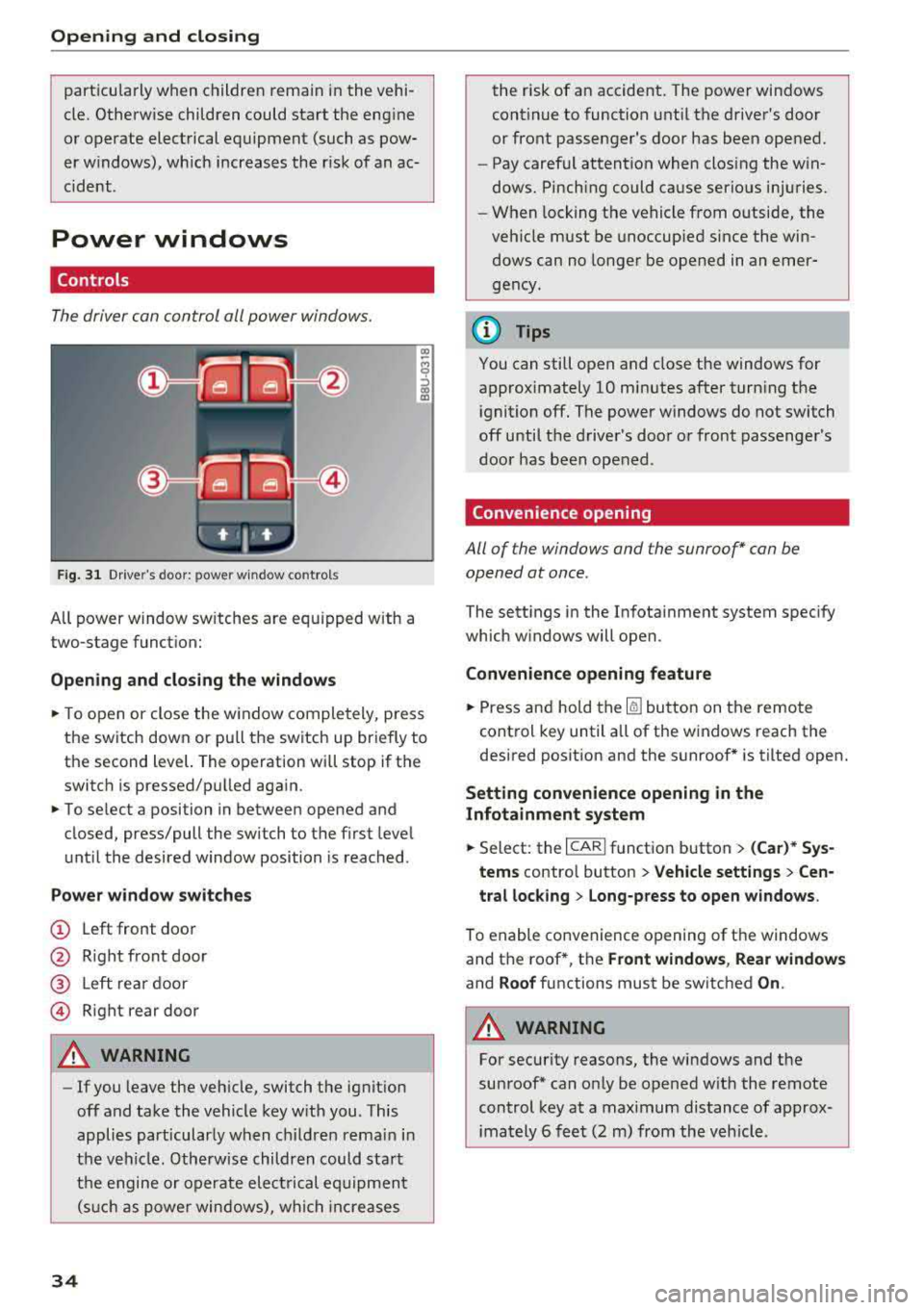
The driver can control all power windows.
Fig . 31 Dr ive r's door : power w indow co ntro ls
All power window sw itches are equ ipped with a
two-stage function:
Op en ing and closing the window s
.. To open or close the w indow completely, p ress
the switch down or pu ll the switch up briefly to
th e second level. The operation will stop if the
switch is p ressed/pu lled again.
.. To se lect a position in between opened and
closed, press/pull the switch to the first level
until the desired window position is reached .
Power wind ow switch es
@ Left front door
@ R ight front door
@ L eft rear door
© Right rear door
A WARNING
- If you leave the veh icle, switch the ignition
off and take the vehicle key with you . This
applies particularly when children remain in
the vehicle . Otherwise children could start
the engine or operate electrical equipment (suc h as power windows), wh ich increases
34
the risk of an accident. The power windows
continue to function until the driver's door
or front passenger's door has been opened.
- Pay careful attention when closing the win
dows. Pinching could cause serious injuries .
- When locking the vehicle from outside, the
vehicle must be unoccup ied since the win
dows can no longer be opened in an emer
gency.
(D Tips
You can still open and close the windows for
approximately 10 minutes after turn ing the
ignition off. The power windows do not switch
off until the driver's door or front passenger's
door has been opened .
Convenience opening
All of the window s and the sunroof* can be
opened at once.
The sett ings in the Infota inment system spec ify
which w indows will open.
Convenience opening feature
.. Press and hold the Iii button on the remote
control key until a ll of the windows reach the
desired posit ion and the sunroof* is tilted open.
Setting convenience opening in the
Infotainment system
.. Select: the I CAR I function button > (Car )* Sys
tem s contro l button > Vehicle settings > Cen
tral loc king > Long-p ress to open wi ndows .
To enable convenience opening of the windows
and the roof *, the
Front window s, Rear windo ws
and Roof functions must be switched On .
A WARNING
-
For security reasons, the windows and the
sunroof* can on ly be opened w it h the remote
control key at a maximum distance of approx
imately 6 feet (2 m) from the veh icle .
Page 38 of 266

Opening and closing
Valet parking function
Applies to: vehicles w ith valet parking function
The valet parking function protects the luggage
comportment from unauthorized access .
Fig. 33 Glove compartment: valet parking function button
You can switch the valet parking function on, for
example when someone else is parking your vehi
cle
l }_ When the function is switched on, the ve
hicle can be driven, locked and unlocked using
the master key, but access to the luggage com
partment is not permitted .
... Remove the integrated mechanical key
¢page 26.
... Open the glove compartment.
... Press the I VALET I button to switch the va let
parking function on. The LED in the button
turns on.
... lock the glove compartment with the mechani
cal key .
... Applies to vehicles with lockable backrests in
the rear: to also secure the luggage compart
ment from the vehicle interior, lock the backr
ests using the mechanical key ¢
page 55.
... Only give the remote control key to the service
personnel parking your car and keep the re
moved mechanical key with you.
The following buttons are deactivated when the
valet parking function is switched on:
-1""' 1 button in the driver's door
-I a I button on the remote control key
- Handle in the luggage compartment lid
When the valet parking function is switched on,
the message
Valet parking activated appears in
ll This fun ctio n is not availa ble in all c oun tries.
36
the instrument cluster display when yo u switch
the ignition on.
(D Tips
Please note that the luggage compartment
can still be accessed from the vehicle interior
in vehicles w ith a pass-through, even when
the valet parking function is switched on.
Garage door opener
(Homelink)
Description
Applies to: vehicles with garage door opener (Home Link}
Fig. 34 Garage door opener: exa mples of usage fo r d iffer ·
ent syste ms
With the garage door opener (Homelink), you
can activa te systems such as the garage doors ,
security systems or house lights from inside your
vehicle. Three buttons a re integrated in the head
liner that can be prog rammed to up to three re
mote controls.
To be able to operate systems using the garage
door opener, the buttons in the headliner must
first be programmed .
A WARNING
When operating or programming the garage
door opener, make sure that no people or ob
jects are in the area immediately s urrounding
the equipment . People can be injured or prop -
erty can be damaged if struck when closing.
~
Page 42 of 266

Lights and Vision
Messages in the instrument cluster display
Headlight a ssis t: System fault
D rive to an authorized Aud i dealer or a uthorized
Aud i Serv ice Facility immediately to have the
malfunct io n corre cted. You can still switch the
h igh beams on or off manually.
Headlight as sist: Unavailable No camera view
The camera view is blocked, for example by a
sticker or debris.
The senso r is located between the interior rear
view mirror and the windshield. Do not place any stickers in th is area on the windshield.
A WARNING
H igh beam assistant is only i ntended to assist
the driver . The dr iver is still responsible for
cont ro ll ing the head ligh ts a nd switch ing
t hem manually depend ing o n light and v isibil
i t y condition s.
It may be necessary to operate
th em ma nually i n sit uations such as:
- In adve rse weathe r condit ions such as fog,
heavy ra in, b low ing snow or sp raying wate r.
- On roads whe re oncoming traffi c may be
pa rtiall y o bscu red, s uch as ex pressways.
- W hen there are road users t hat do not have
s ufficient ligh ting, s uch as bicy clers o r
vehicles wi th dirty ta il la mps.
- In tight cu rves and o n steep hills.
- In poorly lit areas .
- With stro ng reflectors, such as signs.
- If the area of the windshield near the senso r
is fogged over, dirty, icy or covered with a
sticker.
Adjusting the exterior lighting
The functions are adjusted in the Infotainment
sys tem.
~ Se lect : I CAR I functio n button> (Car)* Systems
contro l button > Vehicle settings > Exterior
light ing .
Automatic headlights
You can adju st the fo ll ow ing settings in the Au
tomatic headlights
menu:
40
Headlights activation time -you can adjust if the
headlights switch on
Early , Medium or Late ac
cording to the sensit ivity of the light sensor.
Auto-dimming high beams * -yo u can switch t he
high beam assistant *
On and Off .
Daytime running lights*
USA models :
the daytime running lights can be
swi tched on/off. Sele ct
On or Off .
Canada models:
this function cannot be sw itched
off . They act ivate automatically each time the ig
nit ion is switched on .
Coming home, Leaving home
The coming home function illuminates the area
outside the vehicle when you turn the ig nit ion off
and open the d river's doo r. To turn the function
o n, select
Light s when leaving car > On .
The leaving home illum inates the area outside
the vehicle when you unlock the vehicle . To turn
t h e f unction on, se lect
Lights when unlocking
car > On .
The coming home and leav ing home functions
on ly operate when it is dark and the l ight switch
i s in the
AUTO pos ition .
Emergency flashers
------
Fig. 3 8 Cente r conso le : emergency f las her bu tton
The eme rgency flashe rs makes other d rivers
aware of your veh icle in dangerous situations.
~ Press the ~ button to switch the emergency
flashers on or of f.
You can indicate a lane cha nge or a turn w hen the
eme rgency flashers are switched o n by using the
..,.
Page 44 of 266

Lights and Vision
Vision
Adjusting the exterior mirrors
Fig. 42 Driver"s door: knob for the exter ior mirro rs
Turn the knob to the desired position:
Q/ P -adjusts the left/right exterior mirror.
Mov e the knob in the desired direction.
®-Heat the mirror glass depend ing on the out
side temperature.
.9 -Folds the exterior mirrors* . In the Infotain
ment system, you can select if the mirrors fold in
automatically when you lock the vehicle
c::>page29.
Front passenger's exterior mirror tilt
function*
To help you see the curb when back ing into a
parking space, the surface of the mirror tilts
slightly. For this to happen, the knob must be in
the posit ion for the front passenger's exterior
mirror .
You can adjust the tilted mirror surface by turn
ing the knob in the desired direction. When you
move out of reverse and into another gear, the
new mirror position is stored and assigned to the
key you are using.
The mirror goes back into its original position
once you drive forward faster than 9 mph
(15 km/h) or turn the ignition off.
A WARNING
Curved mirror surfaces (convex or aspheric*)
enlarge the field of vision. However, they
make objects in the mirror appear smaller
and farther away. You may estimate incor-
42
rectly when you use these mirrors to gauge
your distance from the vehicles behind you
when changing lanes, which increases the risk
of an accident.
(D Note
- If the mirror housing was moved by force
(for example, by running into an object
when maneuvering the vehicle), the mirror must be folded all the way in using the pow
er folding function. The mirror hous ing
must not be moved back into place by hand
because this would impair the function of
the mirror mechanism.
- If you wash the vehicle in an automatic car
wash, you must fold the exter ior mirrors in
to reduce the risk of damage to the mirrors.
Never fold power fold ing exterior mirrors *
by hand. Only fold them in and out using
the power controls .
(D Tips
-If the power adjusting function malfunc
tions, the glass in both mirrors can be ad
justed by pressing on the edge of it by hand.
- The exterior mirror settings are stored with
the memory function*
c::> page 49.
Dimming the mirrors
Your vehicle is equipped with a manual or auto
matic* dimming rearview mirror.
Fig. 43 Automatic dimming rearview mirror*
Manual dimming rearview mirror
.,. Pull the lever on the bottom of the mirror back . ..,.
Page 48 of 266

Lights and Vi sion
Removing th e wip er bl ad e
.,. Fo ld the w indshield wipe r arm away from the
windshield .
.,. Press the locking knob (D ¢ fig. 48 on the wiper
blade . Hold the wiper b lade firmly .
.,. Remove the wiper blade in the direction of the
arrow .
Install ing th e wiper blad e
.,. Insert the new wiper b lade into the mount on
the wiper arm @unti l it clicks into place .
.,. Place the wiper arm back on the windshie ld .
.,. Turn the serv ice position off.
A WARNING -
For safety reasons, the windsh ield w iper
blades should be replaced once or tw ice each
year.
@ Note
- Only fo ld the windshield wipers away when
they are in the serv ice position. Otherwise,
you r isk damaging the paint on the hood or
the w indshield w iper moto r.
- You should not move your vehicle or operate
the w indshield w iper lever when the wiper
a rms are fo lded away from the w indshield .
The w indshield wipe rs would move bac k in
to t heir orig inal position and cou ld damage
the hood and win dshield .
(0 Tips
- You can also use the serv ice position, fo r ex
ample, if yo u want to p ro tect the windsh ie ld
from icing by us ing a cover .
- You canno t activate t he se rvice pos ition
whe n the hood is open.
46
Page 50 of 266

Seats and storage
Massage function*
-select the massage type
Wave , Pulse , Stretch , Lumbar , Shoulder or Off.
You can adjust the intensity of each massage
from 1 through 5 . You can switch the selected
massage on/off using the
button @¢ page 47,
fig .
49 .
Lumbar support -you can adjust the lumbar sup
port up/down and to be stronger/weaker.
Side section seat* -you can increase/decrease
the lateral support in the seat using the side bol
sters at the seat surface and the backrest.
Upper thigh support* -you can increase/de
crease the upper thigh support.
(D Tips
- The massage function switches off auto
matically after approximately 10 minutes.
- The air in the side bolsters* is released as
soon as the driver's door opens. This makes
is possible to enter and exit the vehicle
more comfortab ly . As soon as you start driv
ing the veh icle, the s ide bolsters fill.
Front center armrest
There is a storage compartment under the arm
rest.
F ig. 51 Cente r armrest between the driver's/front pas ·
senger 's seats.
Adjusting the center armrest
.,. T o adjust the angle, raise the arm rest from the
starting position .
.,. To bring the armrest back into the starting po
sition, raise it out of the top notch and fold it
back down.
48
Opening the storage compartment
.,. Press the button -arrow- upward.
Head restraints
Front head restraints
Applies to: vehicles with adjustable head restra ints
Fig. 52 Front seat: ad justing t he head rest ra in t
Adjust the head restraints so the upper edge is as
even as possible with the top of your head. If that
is not possib le, try to adjust as close to this posi
tion as possib le. Push the head restraint as close
as possible to the back of the head.
.,. To move the head restra int up or forward
¢ fig. 52, sli de it until it locks into place .
.,. To move the head restra int down or back, press
the button on the side -arrow- and slide the
head restraint until it locks into place.
A WARNING
Always read and follow the applicable warn
ings¢ & in Proper adjustment of head re
straints on page 128.
.
Page 52 of 266

Seats and storage
Remote Memory button
control key
Driver Driver
Front
passen-
ger
Seat X X X
Steering wheel* X X
Both exterior X X
mirrors*
Remote control key
Applies to: vehicles with memory function
The driver 's seat profile can be assigned to the
remo te control key when the vehicle is locked.
.,.. Se lect : the ICARI function button > (Car)* Sys
tems
control button > Vehicle settings > Driv
er 's seat
> Remote control key > On.
(D Tips
If you do not wish to have the seat profile for
another driver assigned to the remote contro l
key, switch the memory function off in the In
fotainment system or using the
IOFFI button
r::::;, page 50 .
Memory buttons
App lies to: vehicles with memory function
F ig. 55 Drive r's door : m em ory functio n bu ttons
The memory buttons are located in the driver's/
front passenger 's* door.
Switching the memory function on/off
.,.. Press the IO FF I button to switch the memory
functio n on/off. The LED in the button turns on
50
when the memory function is off . Seat profiles
are neither stored nor recalled.
Storing a seat profile
.,.. Press the ISET I button . When the word SET
lights up, the memory is ready to store set
tings.
.,.. Now press a memo ry button briefly. A tone
confirms that th e settings were stor ed.
Accessing a seat profile
.,.. If the driver's door is open and the ignition is
sw itched off, press the memory button.
.,.. If the driver's door is closed or the ignition is
switched on, press and hold the memory but
ton until the seat adjustment is complete .
A WARNING
-For safety reasons, the seat setting can only
be recalled when the vehicle is stationary,
otherwise there is a risk of an accident .
-If necessary, you can stop the recall process
by press ing the
IOF FI butto n or any memory
button .
Adjusting the front passenger's seat in the
Infotainment system
Applies to: vehicles with memory function
The driver can move the front passenger's seat
into various positions .
Adjusting the front passenger's seat from
the driver's seat
.,. Select: the I CARI function button > (Car)* Sys
tems
control butto n > Vehicle settings > Seats
> Front passenger's seat > Adjust seat posi
tion .
.,.. You can now adjust the front passenger's seat
using the driver's seat buttons
r:::;, page 47,
fig. 49.
Align with driver's seat
.,. To trans fer the settings from the dr iver's seat
to the front passenge r's seat, select: the
I CAR I
function button > (Car)* Systems control but
ton
> Vehicle settings > Seats > Front passeng-
er 's seat
> Align with driver 's seat. .,..
Page 53 of 266

a co ,...,
N
" N ,...,
0 0 <..:l '
justing proc ess is complete.
(D T ips
The lumbar support and upper thigh support
settings are not transferred when aligning
the front passenger's seat with the driver's
seat .
Ashtray
Applies to: veh icles with ashtray
Fig. 56 Center console: fro nt as htray
Fig . 57 Door trim: rear ashtray
Opening /closing
• To open the front ashtray, slide the cover up.
• To close the fron t ashtray, p ress down on the
c over .
• To open the rear ashtray, tap the cover on the
rim .
Emptying
• To empty the front ashtray, p ull it upward and
out .
• To empty the rear ashtray, press the cover
downward when it is
open ~ fig. 57. The ash
tray will lift up out of its mount.
• To insert the ashtray again, press it down into
the mount until it locks into place. S
eats and storag e
A WARNING
Never use the ashtray to hold paper, because
this increases the risk of a fire.
Cigarette lighter
Applies to: vehicles wi th a cigarette lighter
Fig. 58 Front center conso le: ciga rette ligh te r
• Press the cigarette lighter in.
• Remove the cigarette lighter when it pops out.
A WARNING ~
The c igarette lighter only works when the ig-
nition is switched on. Incorrect usage can Lead
to serious injuries or burns. To reduce the risk
of injuries, never leave children unattended in
the veh icle with the vehicle key .
51