2017 VOLVO V90 brake light
[x] Cancel search: brake lightPage 173 of 594

INSTRUMENTS AND CONTROLS
}}
* Option/accessory.171
Subcategories Settings
Drive Mode/Individual Drive
Mode* Mixed
Lights and LightingMixed
Mirrors and Easy EntryPersonal
LockingMixed
Parking Brake and SuspensionMixed
SeatsMixed
WipersMixed
SuspensionGlobal
Sound
Subcategories
Settings
Sound Experience*Personal
TonePersonal
BalancePersonal
System VolumesMixed
Navigation
Subcategories
Settings
MapPersonal
Route and GuidancePersonal
SubcategoriesSettings
TrafficPersonal
GuidancePersonal
SystemPersonal
Media
SubcategoriesSettings
AM/FM radioPersonal
DABPersonal
Gracenote®Personal
VideoPersonal
Communication
Subcategories Settings
Phone–
Text Messages–
Bluetooth Devices–
Wi-FiGlobal
Car Wi-Fi HotspotGlobal
Car Modem InternetGlobal
SubcategoriesSettings
Volvo On Call–
Volvo Service NetworksGlobal
ClimateThe main category Climate has no subcatego-
ries.
System
Subcategories Settings
Driver ProfilePersonal
Date and Time–
System LanguagePersonal
Keyboard LayoutsGlobal
Voice ControlPersonal
UnitsPersonal
Storage–
Software Updates–
Factory reset–
Services–
Page 274 of 594

DRIVER SUPPORT
* Option/accessory.
272
Speed-dependent steering force Speed related power steering causes the steer- ing wheel force to increase with the speed of thecar in order to give the driver enhanced sensitiv-ity.
On motorways the steering feels firmer. When parking and at low speed steering is light andrequires only a slight effort.
NOTE
In certain situations the power steering may become too hot and then needs to be tempo-rarily cooled - during this time the powersteering operates with reduced power andturning the steering wheel may then be per-ceived to be slightly heavier. In parallel with the temporarily reduced steer- ing assistance, the driver display shows amessage.
Change the steering force level *To select the steering force level, go to the "Drive modes" section and see the description at thealternative INDIVIDUAL under the heading"Selectable drive modes". For the car models without a drive mode control with its INDIVIDUAL option, the selection ofsteering force is instead made via the centre dis-play's top view and the following search path:
SettingsMy CarDrive ModesSteering force
Selection of steering force is not accessible while turning is in progress.
Related information
•Drive modes
* (p. 400)
Roll Stability Control Roll Stability Control (RSC) is a stabiliser sys- tem that minimises the risk of overturning, forexample during sudden evasive manoeuvres or ifthe car skids.
The RSC system registers if and how much the car's lateral inclination changes. This informationis used to calculate the risk of the car overturn-ing. If the car is at risk, its electronic stability con-trol system engages, the engine torque isreduced and one or more wheels are braked untilthe car has regained its stability.
WARNING
Under normal driving conditions, the RSC sys- tem improves the car's road safety, but thismust not be taken as a reason to increasespeed. Always follow the normal precautionsfor safe driving.
Related information
• Electronic stability control (p. 273)
• Safety (p. 56)
Page 277 of 594

DRIVER SUPPORT
}}
275
Symbols and messages for electronic stability control
A number of symbols and messages regarding electronic stability control (Electronic Stability Control -ESC) can be shown on the driver dis-play.
The following table shows some examples.
Symbol
Message Specification
Constant glow for approx. 2 seconds. System check when the engine is started.
Flashing light. ESC system is being activated.
Constant glow. Sport mode is selected.
NOTE: The ESC system is not deactivated in this mode — it is partly reduced.
ESC Temporarily offESC system has been temporarily reduced due to excessive brake temperature - the function is reactiva- ted automatically when the brakes have cooled.
ESC Service requiredESC system disengaged.
• Stop the car in a safe place, switch off the engine and start it again.
• Visit a workshop if the message remains - an authorised Volvo workshop is recommended.
Page 301 of 594
DRIVER SUPPORT
}}
* Option/accessory.299
–Activate the direction indicator. Use the left direction indicator in a car with the steering wheel on the left, or the rightdirection indicator in a car with the steeringwheel on the right.
> Overtaking assistance is started.
LimitationsWhen using Overtaking Assistance the driver should be prepared for sudden changes in condi-tions. In some conditions Overtaking Assistancecan cause unwanted acceleration. Some situations should be avoided for this rea- son. Examples of such situations are:
• the car is approaching an exit road in orderto turn off in the same direction that is nor-mally used for overtaking
• the vehicle in front slows before your car hasentered the overtaking lane
• traffic in the overtaking lane is slowing
• a car designed for right-hand traffic is beingdriven in a country with left-hand traffic (orvice versa).
Situations of this kind can be avoided by tempo-rarily setting ACC or Pilot Assist in standby mode.
Related information
• Pilot Assist
* (p. 304)
• Adaptive cruise control
* (p. 290)
Change of target and automatic braking with the Adaptive CruiseControl
In combination with automatic gearbox, the adaptive cruise control (Adaptive Cruise Control- ACC ) has functionality for change of targetand braking at certain speeds.
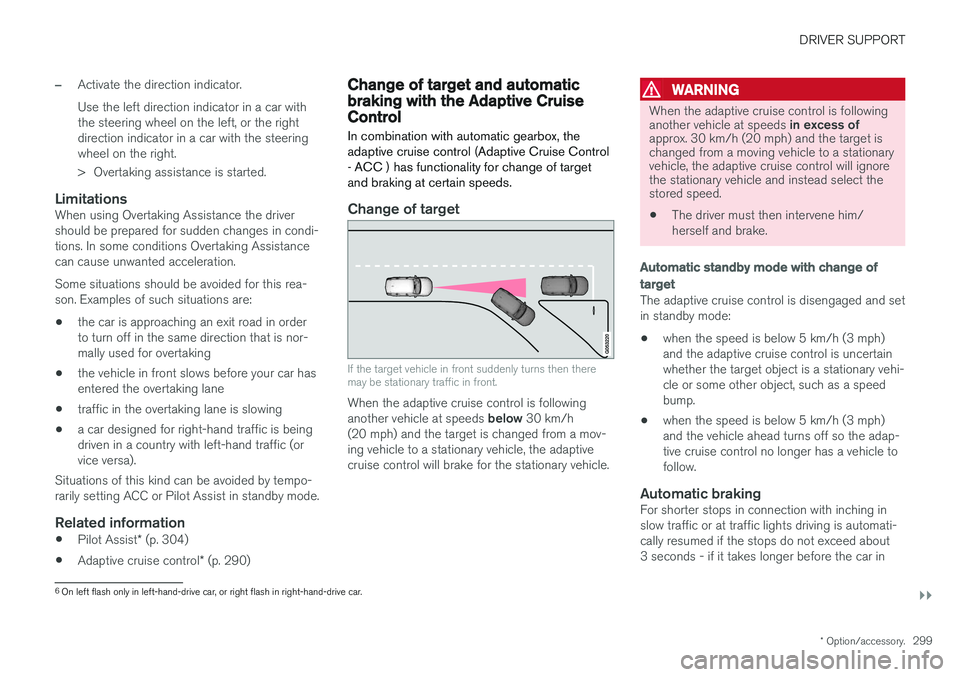
Change of target
If the target vehicle in front suddenly turns then there may be stationary traffic in front.
When the adaptive cruise control is following another vehicle at speeds below 30 km/h
(20 mph) and the target is changed from a mov- ing vehicle to a stationary vehicle, the adaptivecruise control will brake for the stationary vehicle.
WARNING
When the adaptive cruise control is following another vehicle at speeds in excess of
approx. 30 km/h (20 mph) and the target is changed from a moving vehicle to a stationaryvehicle, the adaptive cruise control will ignorethe stationary vehicle and instead select thestored speed.
• The driver must then intervene him/ herself and brake.
Automatic standby mode with change of target
The adaptive cruise control is disengaged and set in standby mode: • when the speed is below 5 km/h (3 mph) and the adaptive cruise control is uncertainwhether the target object is a stationary vehi-cle or some other object, such as a speedbump.
• when the speed is below 5 km/h (3 mph)and the vehicle ahead turns off so the adap-tive cruise control no longer has a vehicle tofollow.
Automatic brakingFor shorter stops in connection with inching inslow traffic or at traffic lights driving is automati-cally resumed if the stops do not exceed about3 seconds - if it takes longer before the car in
6
On left flash only in left-hand-drive car, or right flash in right-hand-drive car.
Page 315 of 594

DRIVER SUPPORT
}}
* Option/accessory.313
Change of target and automatic braking with Pilot Assist *
In combination with automatic gearbox, Pilot Assist has functionality for change of target and braking at certain speeds.
Change of target
If the target vehicle in front suddenly turns then there may be stationary traffic in front.
When Pilot Assist is following another vehicle at speeds below 30 km/h (20 mph) and changes
target from a moving to a stationary vehicle, Pilot Assist will slow down for the stationary vehicle.
WARNING
When Pilot Assist is following another vehicle at speeds in excess of approx. 30 km/h
(20 mph) and the target is changed from a moving vehicle to a stationary vehicle, PilotAssist will ignore the stationary vehicle andinstead select the stored speed.
• The driver must then intervene him/ herself and brake.
Automatic standby mode with change of target
Pilot Assist is disengaged and set in standby mode: •when the speed is below 5 km/h (3 mph) and Pilot Assist is uncertain whether the tar-get object is a stationary vehicle or someother object, e.g. a speed bump.
• when the speed is below 5 km/h (3 mph)and the vehicle in front turns off so the PilotAssist no longer has a vehicle to follow.
Automatic brakingFor shorter stops in connection with inching for-ward in slow traffic or at traffic lights, driving isautomatically resumed if the stops do not exceedabout 3 seconds - if it takes longer before thecar in front starts moving again then the PilotAssist is set in standby mode with automaticbraking.
–Pilot Assist is reactivated in the following way:
• Press the steering wheel button
.
• Depress the accelerator pedal.
> Pilot Assist resumes following the vehicle ahead if it starts moving forward within 6 seconds.
NOTE
Pilot Assist can hold the car stationary for a maximum of 5 minutes - then the parkingbrake is applied and the function is disen-gaged. Before Pilot Assist can be reactivated, the parking brake must be released.
Page 317 of 594

DRIVER SUPPORT
}}
* Option/accessory.315
IMPORTANT
In certain situations, Pilot Assist steering assistance may have difficulty helping thedriver in the right way or it may be automati-cally deactivated - in which case, the use ofPilot Assist is not recommended. Examples ofsuch situations may be that: •the lane markings are worn, missing or cross each other.
• lane division is unclear, for example, whenthe lanes divide or merge or at exits or inthe event of multiple sets of markings.
• edges or other lines than lane markingsare present on or near the road, e.g.curbs, joints or repairs to the road sur-face, edges of barriers, roadside edges orstrong shadows.
• the lane is narrow or winding.
• the lane contains ridges or holes.
• weather conditions are poor, e.g. rain,snow or fog or slush or impaired viewwith poor light conditions, back-lighting,wet road surface etc.
The driver should also note that Pilot Assisthas the following limitations: • High kerbs, roadside barriers, temporary obstacles (traffic cones, safety barriers,etc.) are not detected. Alternatively, theymay be detected incorrectly as lane
markings, with a subsequent risk of con- tact between the car and such obstacles.The driver must ensure him/herself thatthe car is at a suitable distance from suchobstacles.
• The camera and radar sensor does nothave the capacity to detect all oncomingobjects and obstacles in traffic environ-ments, e.g. potholes, stationary obstaclesor objects which completely or partiallyblock the route.
• Pilot Assist does not "see" pedestrians,animals, etc.
• The recommended steering input is forcelimited, which means that it cannotalways help the driver to steer and keepthe car within the lane.
The driver always has the possibility of correcting or adjusting a steering intervention imposed byPilot Assist and can turn the steering wheel tothe desired position.
Steep roads and/or heavy loadBear in mind that Pilot Assist is primarilyintended for use when driving on level road surfa-ces. The function may have difficulty in keepingthe correct distance from the vehicle ahead whendriving on steep downhill slopes - in which case,be extra attentive and ready to brake. Do not usePilot Assist with a heavy load or with a trailer con-nected to the car.
Miscellaneous
•Off Road drive mode cannot be selected
when Pilot Assist is activated.
NOTE
The function uses the car's camera unit, which has some general limitations, see the"Limitations for camera unit" section.
NOTE
The function uses the car's radar unit, which has some general limitations, see the "Limita-tions for radar unit" section.
Related information
• Pilot Assist
* (p. 304)
• Activating and starting the Pilot Assist
*
(p. 307)
• Managing the speed for Pilot Assist
* (p. 309)
• Setting the time interval for Pilot Assist
*
(p. 310)
• Change of target and automatic braking with Pilot Assist
* (p. 313)
• Deactivating/activating the Pilot Assist
*
(p. 311)
• Overtaking assistance with the adaptivecruise control
* or Pilot Assist * (p. 298)
Page 334 of 594

||
DRIVER SUPPORT
332
Auto Brake
The automatic brake function is activated last. If in this situation the driver has not yet started to take evasive action and the risk of collision isimminent then the automatic braking function isdeployed - this takes place irrespective ofwhether or not the driver brakes. Braking thentakes place with full brake force in order toreduce collision speed, or with limited brake forceif it is sufficient to avoid a collision. In connection with automatic braking the seatbelt tensioner may also be activated. For more infor-mation see the "Seatbelt tensioner" section. In some situations, the action of Auto-brake may begin with light braking and then progress to fullbrake action. When City Safety has prevented a collision with a stationary object, the car remains stationary inanticipation of positive action by the driver. If thecar has been braked to avoid collision with aslower vehicle in front, its speed is reduced tomatch that of the vehicle in front.
NOTE
On cars with manual gearbox, the engine stops when the Auto-brake function has stop-ped the car, unless the driver has managed todepress the clutch pedal beforehand.
The driver can always interrupt a braking inter- vention by firmly depressing the acceleratorpedal.
NOTE
When City Safety™ brakes, the brake lights
come on.
When City Safety is activated and brakes the vehicle, the driver display shows a text messageto the effect that the function is/has been active.
WARNING
City Safety must not be used as an excuse for the driver to change his/her driving style. Ifthe driver relies solely on City Safety to do thebraking, there might be a risk of a collisionsooner or later.
Related information
• Setting the warning distance for City Safety (p. 332)
• Detection of obstacles with City Safety
™
(p. 333)
• City Safety when evasive manoeuvres areprevented (p. 336)
• City Safety in cross traffic (p. 335)
• Limitations of City Safety (p. 337)
• Messages for City Safety (p. 339)
• Seatbelt tensioner (p. 59)
Setting the warning distance for City Safety
City Safety is always activated, but it is possible to select the warning distance for the function.
NOTE
The City Safety function cannot be deacti- vated. It is activated automatically when theengine/electric operation is started andremains switched on until the engine/electricoperation is switched off.
The warning distance determines the sensitivity of the system and regulates the distance atwhich the visual, acoustic and haptic warningsshall be triggered. 1. Tap on
Settings in top view in the centre
display.
2. Press
My CarIntelliSafe.
3. Under
City Safety Warning, select Late,Normal or Early to set the desired warning
distance.
If the
Early setting produces too many warnings,
which could be perceived as irritating in certain situations, then use the
Normal or Late warning
distance. If warnings are perceived as being too frequent or disturbing then the warning distance can bereduced. This would lead to the system warning
Page 339 of 594

DRIVER SUPPORT
}}
337
has the opportunity to avoid a collision via a steering manoeuvre. However, if City Safety anticipates that an evasive manoeuvre is not possible due to traffic in anadjacent lane, the function can assist the driverby automatically starting to brake at an earlierstage.
WARNING
City Safety's ability to anticipate a certain sit- uation is an aid, and does not work in all driv-ing situations or traffic, weather and road con-ditions. The driver always bears ultimate responsibility for ensuring that the vehicle is driven safelyand that applicable laws and road traffic regu-lations are followed.
Related information
•
City Safety (p. 330)
• Limitations of City Safety (p. 337)
Limitations of City Safety
The City Safety function may have limitations in certain situations.
Surroundings
Low objects
Low-hanging objects, e.g. a flag/pennant for pro- jecting load, or accessories such as auxiliarylamps and bull bars that are higher than the bon-net limit the function.
Skidding
On slippery road surfaces the braking distance is extended, which may reduce the capacity of CitySafety to avoid a collision. In such situations, theanti-lock brakes and the stability control ESC willgive the best possible braking force with main-tained stability.
Oncoming light
The visual warning signal in the windscreen may be difficult to notice in the event of strong sun-light, reflections, when sunglasses are beingworn or if the driver is not looking straight ahead.
Heat
In the event of high passenger compartment temperature caused by e.g. strong sunlight, thevisual warning signal in the windscreen may betemporarily disengaged.
The camera and radar unit's field of view
The camera's field of vision is limited, which is why pedestrians, large animals, cyclists and vehi- cles in some situations cannot be detected, orthey are detected later than anticipated. Dirty vehicles may be detected later than others and if it is dark, motorcycles may be detected lateor not at all. If a text message in the driver display indicates that the camera and radar unit is obstructed, CitySafety may be unable to detect pedestrians, largeanimals, cyclists, vehicles or road lines ahead ofthe car. This means that the functionality of CitySafety may be reduced. However, an error message is not shown in all situations where the windscreen sensors areobstructed. The driver must therefore take care tokeep the area of windscreen in front of the cam-era and radar unit clear.
IMPORTANT
Maintenance and replacement of City Safety components must only be performed by aworkshop - an authorised Volvo workshop isrecommended.
Driver intervention
Reversing
When your own car is reversing, City Safety is temporarily deactivated.