2017 VOLVO V90 brake light
[x] Cancel search: brake lightPage 410 of 594

STARTING AND DRIVING
408
Emergency brake lightsEmergency brake lights are activated to alert vehicles behind about heavy braking. The func-tion means that the brake light flashes instead of- as in normal braking - shining with a constantglow.
The emergency brake lights are activated during heavy braking or if the ABS system is activated athigh speeds. After emergency braking to a lowspeed, the brake lights return from flashing to thenormal constant glow. The car's hazard warningflashers are activated at the same time. Theseflash until the driver accelerates the car to ahigher speed again or switches off the hazardwarning flashers.
Related information
• Foot brake (p. 406)
• Hazard warning flashers (p. 143)
• Brake lights (p. 143)
Brake assistance
The brake assist system, BAS (Brake Assist System), helps to increase brake force duringbraking, thereby shortening the braking distance.
The system detects the way in which the driver brakes and increases brake force where neces-sary. The brake force can be boosted up to thelevel when the ABS system is engaged. Thefunction is suspended when the pressure on thebrake pedal decreases.
NOTE
When BAS is activated the brake pedal low- ers slightly more than usual, depress (hold)the brake pedal as long as necessary. When the brake pedal is released, all braking ceases.
Related information
• Foot brake (p. 406)
Auto braking after a collision In the event of a collision in which the activation level is reached for the pyrotechnic seatbelt ten-sioners or airbags, or if a collision with a largeanimal is detected, the car's brakes are automat-ically applied. This function is to prevent orreduce the effects of any subsequent collision.
After a serious collision there is a risk that it is no longer possible to control and steer the car. Inorder to avoid or mitigate a possible further colli-sion with a vehicle or an object in the vehicle'spath, the auto braking system is activated auto-matically and brakes the car in a safe manner. Brake lights and hazard warning lights are acti- vated during braking. When the car has stopped,the hazard warning lights continue to flash andthe parking brake is applied. If braking is not appropriate, e.g. if there is a risk of being hit by following traffic, the system can beoverridden by the driver depressing the accelera-tor pedal. The function assumes that the brake system is intact after the collision. See also the sections "Rear Collision Warning" and "Blind Spot Information".
Related information
• Brake functions (p. 406)
• Seatbelt tensioner (p. 59)
• Airbags (p. 63)
Page 414 of 594

||
STARTING AND DRIVING
412
Symbols in the driver display
SymbolSpecification
If the symbol flashes, it indicates a fault has occurred. See the mes-sage in the driver display.
Fault in brake system. See the message in the driver display.
Information message in driver dis- play.
Message examples:
•
Parking brake Service required
•Parking brake System overheated
•Parking brake Temporarily unavailable
Related information
• Brake functions (p. 406)
• Using the parking brake (p. 410)
• Parking brake (p. 409)
• Using jump starting with another battery (p. 388)
Hill start assist
Hill start assist, Hill Start Assist (HSA), prevents the car from rolling backwards when starting onan uphill gradient. When reversing uphill, it pre-vents the car from rolling forwards.
The function means that the pedal pressure in the brake system remains for several secondswhile the driver's foot is moved from brake pedalto accelerator pedal. The temporary braking effect releases after sev- eral seconds or when the driver accelerates. Hill start assist is available even if the function for automatic braking when stationary (Auto hold) isdeactivated.
Related information
• Brake functions (p. 406)
• Automatic braking when stationary (p. 412)
Automatic braking when stationary
Automatic braking when stationary (Auto Hold) means that the driver can release the brakepedal while maintaining braking effect when thecar has stopped at traffic lights or a junction.
FunctionWhen the car has stopped, the brakes are acti- vated automatically. The function can use eitherfoot brake or parking brake to hold the car sta-tionary and it works on all gradients. When theaccelerator pedal is depressed again, the brakesare released. When braking to a stop on a downhill or uphill gradient - depress the brake pedal a bit harderbefore releasing to ensure that the car does notroll at all. If the driver switches off the engine when the car is stationary, the parking brake is applied.
Automatic deactivation
The function is deactivated automatically: • when the driver's door is open and the driv- er's seatbelt is unfastened.
• in gear position
N13
.
13 Applies to automatic gearbox.
Page 415 of 594

STARTING AND DRIVING
}}
413
Switch for automatic brake
An indicator in the button illuminates when the function is activated.
Activate or deactivate Auto Hold with the switch in the tunnel console. The function remains deac-tivated until it is reactivated.If the function is active and holds thecar with the foot brake (A-symbol illu-minated) then the brake pedal must bedepressed at the same time as the
button is depressed in order to deactivate.
When the function is deactivated, hill start assist (HSA) remains active to prevent the car from roll-ing backwards when starting on an uphill gradi-ent.
Symbols in the driver display
Symbol Specification
The symbol is illuminated when the function uses the foot brake tokeep the car stationary.
The symbol is illuminated when the function uses the parking brake tokeep the car stationary.
Related information
•Brake functions (p. 406)
• Hill start assist (p. 412)
Driving in water Driving in water means that the car is driven through deep water on a water-covered road-way. Driving in water must be carried out withgreat caution.
The car can be driven through water at a maxi- mum depth of 25 cm at a maximum speed ofwalking pace. Extra caution should be exercisedwhen passing through flowing water. During driving in water, maintain a low speed and do not stop the car. When the water has beenpassed, depress the brake pedal lightly andcheck that full brake function is achieved. Waterand mud for example can make the brake liningswet resulting in delayed brake function.
• If necessary, clean the contacts for the elec-tric heater and trailer coupling after driving inwater and mud.
• Do not let the car stand with water over thesills for any long period of time - this couldcause electrical malfunctions.
Page 428 of 594

STARTING AND DRIVING
426
Driving with a trailer
When driving with a trailer, there are a number of points that are important to think about regar-ding the towing bracket, the trailer and how theload is positioned in the trailer.
Payload depends on the car's kerb weight. The total of the weight of the passengers and allaccessories, e.g. towbar, reduces the car's pay-load by a corresponding weight. The car is supplied with the necessary equipment for towing a trailer.
• The car's towing bracket must be of anapproved type.
• Distribute the load on the trailer so that theweight on the towing bracket complies withthe specified maximum towball load. Towballload is calculated as part of the car's payload.
• Increase the tyre pressure to the recom-mended pressure for a full load. For moreinformation on tyre pressure, see the section"Approved tyre pressures".
• The engine is loaded more heavily than usualwhen driving with a trailer.
• Do not tow a heavy trailer when the car isbrand new. Wait until it has been driven atleast 1000 km.
• The brakes are loaded much more than usualon long and steep downhill slopes. Downshiftto a lower gear and adjust your speed. •
Follow the regulations in force for the permit-ted speeds and weights.
• Maintain a low speed when driving with atrailer up long, steep ascents.
• The maximum trailer weights given only applyto altitudes up to 1000 metres above sealevel. At higher altitudes, engine power andthus the car's climbing ability is decreaseddue to the reduced air density, and the maxi-mum trailer weight must therefore bereduced. The weight of the car and trailermust be decreased by 10 % for each addi-tional 1000 m (or part thereof).
• Avoid driving with a trailer on inclines of morethan 12%.
NOTE
Extreme weather conditions, driving with a trailer or driving at high altitudes in combina-tion with fuel quality are factors that consider-ably increase the car's fuel consumption.
Trailer connectorAn adapter is required if the car's towing bracket has a 13 pin connector and the trailer has a 7 pinconnector. Use an adapter approved by Volvo.Make sure the cable does not drag on theground.
IMPORTANT
When the engine is switched off, the constant battery voltage to the trailer connector can beswitched off automatically so as not to drainthe starter battery.
Trailer weightsInformation about Volvo's permitted trailer weights is available in the article "Towingcapacity and towball load".
WARNING
Follow the stated recommendations for trailer weights. Otherwise, the car and trailer may bedifficult to control in the event of suddenmovement and braking.
NOTE
The stated maximum permitted trailer weights are those permitted by Volvo. National vehicleregulations can further limit trailer weightsand speeds. Towbars can be certified forhigher towing weights than the car canactually tow.
Direction indicators and brake lights on the trailer
If one or more of the trailer's direction indicators or brake light bulbs is broken, the driver display
Page 429 of 594

STARTING AND DRIVING
* Option/accessory.427
shows a symbol and a message. Other lamps on the trailer must be checked manually by thedriver before departure, see the heading "Check-ing trailer lamps".
Symbol
Message
•Trailer turn indicator Right
turn indicator malfunction
•Trailer turn indicator Left
turn indicator malfunction
•Trailer brake light Malfunc-
tion
If any lamp for the trailer's direction indicators is broken, the driver display symbol for directionindicators will also flash more quickly than nor-mal.
Checking trailer lamps *
Automatic checking
After a trailer is connected electrically, it is possi- ble to check that the trailer lamps are working viaan automatic lamp activation. The function helpsthe driver check that the trailer lamps are workingbefore starting off. The engine must be switched off to perform thecheck.
1. When a trailer is connected to the towing
bracket, the
Automatic Trailer Lamp
Check message is shown in the driver dis-
play.
2. Confirm the message by pressing the right- hand steering wheel keypad's O button.
> The lamp check starts.
3. Exit the car to check lamp functionality. > All trailer lamps start to flash - then thelamps are switched on one at a time.
4. Visually check that all lamps available on the trailer are operational.
5. After a moment, all lamps on the trailer flash again.
> The check is complete.
Switching off automatic checking
The automatic checking function can be switched off in the centre display. 1.Press
Settings in the top view.
2. Press
My CarLights and Lighting.
3. Deselect
Automatic Trailer Lamp Check.
Manual checking
If the automatic checking is switched off then it is possible to start the check manually. 1.Press
Settings in the top view. 2.
Press
My CarLights and Lighting.
3. Select
Manual Trailer Lamp Check.
> The lamp check starts. Exit the car to check lamp functionality.
Level control *The car's system for level control endeavours to maintain a constant height regardless of load (upto the maximum permissible weight). When thecar is stationary the rear of the car lowers slightly,which is normal.
Related information
•Driving with a trailer under special conditions(p. 428)
• Towing capacity and towball load (p. 564)
• Trailer Stability Assist
* (p. 428)
• Approved tyre pressures (p. 574)
• Towing bracket
* (p. 422)
Page 497 of 594

WHEELS AND TYRES
}}
* Option/accessory.495
IMPORTANT
Risk of overheating. The compressor must not run for more than 10 minutes.
5. Inflate the tyre to the pressure specified on
the tyre pressure label on the driver side door pillar. (Release air using the pressure reduc-ing valve if the tyre pressure is too high.)
6. Switch off the compressor. Detach the airhose and cable.
7. Refit the dust cap.
Related information
• Emergency puncture repair kit (p. 490)
• Approved tyre pressures (p. 574)
When changing wheels
The car's wheels can be changed, e.g. to winter wheels or a spare wheel.
Follow the relevant instructions for removing and fitting wheels.
When changing to another tyre
dimension
Check that the tyre dimension is approved foruse on the car. Contact an authorised Volvo workshop for updat- ing the software at each change of tyre dimen-sion. A software download may be necessaryboth when changing to larger and smaller dimen-sions, and also when switching between summerand winter wheels.
Related information
• Removing a wheel (p. 495)
• Fitting the wheels (p. 497)
• Tool kit (p. 500)
• Winter wheels (p. 499)
• Spare wheel
* (p. 498)
• Wheel bolts (p. 498)
Removing a wheel
Instructions for removing a wheel when chang- ing wheels.
1. Set up the warning triangle and activate the hazard warning lights if a tyre is being changed in a trafficked location.
2. Apply the parking brake and engage gear position P, or engage first gear if the car has
a manual gearbox. Applies to cars with
Leveling Control* : If
the car is equipped with air suspension, this must be disabled before the car is raised with a jack *.
Deactivate the function via the top view of the centre display by pressing
Settings
My CarSuspension and selectingDisable Leveling Control.
Page 524 of 594

||
MAINTENANCE AND SERVICE
522
Lamps, rear
Position lamps (LED)
Position lamps (LED)
Fog lamp
Reversing lamp
Indicator11
Brake light (LED)
Brake light - central, high-level (LED)
Related information
•
Replacing the dipped beam bulb (p. 522)
• Replacing the main beam lamp (p. 523) •
Replacing daytime running light bulb/posi- tion lamp bulb, front (p. 524)
• Replacing the front direction indicator bulb(p. 524)
• Replacing the reversing lamp bulb (p. 525)
• Replacing the rear fog lamp bulb (p. 526)
• Bulb specifications (p. 526)
• Ignition positions (p. 385)
Replacing the dipped beam bulb
The dipped beam bulb in halogen headlamps can be replaced by the driver.
Before the bulb can be replaced, the plastic cover over the headlamp must be removed; seethe section "Bulb replacement".
IMPORTANT
Never touch the glass part of the bulbs with your fingers. Grease from your fingers isvaporised by the heat, coating the reflectorand then causing damage.
Left-hand headlamp.
1. Detach the headlamp's rubber cover for the dipped beam bulb.
11Contact a workshop for replacement - an authorised Volvo workshop is recommended.
Page 546 of 594
||
MAINTENANCE AND SERVICE
* Option/accessory.
544
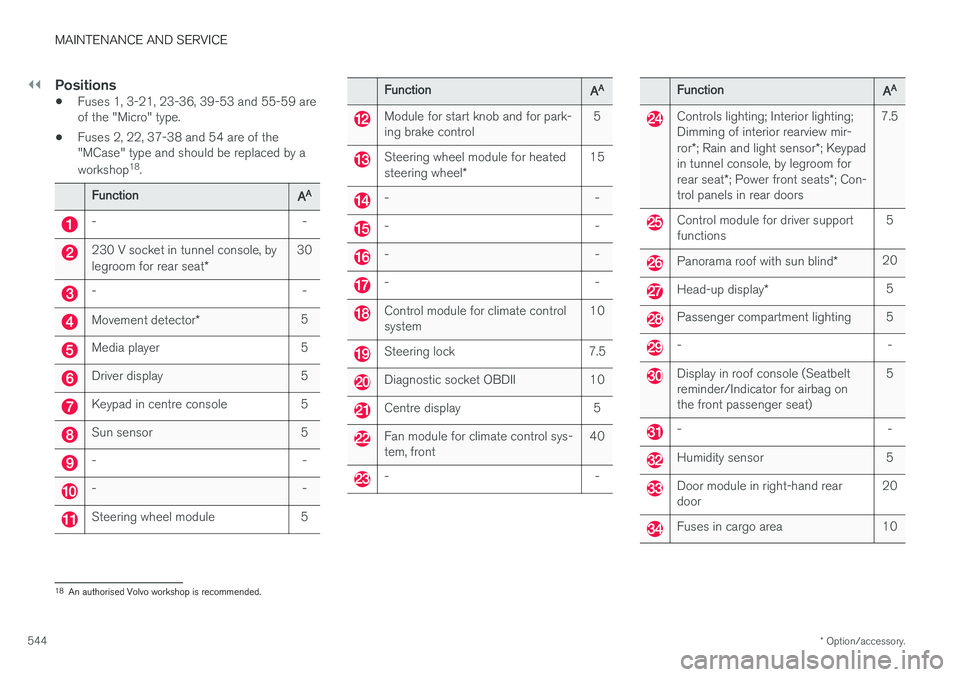
Positions
• Fuses 1, 3-21, 23-36, 39-53 and 55-59 are of the "Micro" type.
• Fuses 2, 22, 37-38 and 54 are of the"MCase" type and should be replaced by a workshop 18
.
Function AA
- -
230 V socket in tunnel console, by legroom for rear seat
*30
- -
Movement detector
* 5
Media player 5
Driver display 5
Keypad in centre console 5
Sun sensor 5
- -
- -
Steering wheel module 5
Function
AA
Module for start knob and for park- ing brake control 5
Steering wheel module for heated steering wheel
* 15
- -
- -
- -
- -
Control module for climate control system
10
Steering lock 7.5
Diagnostic socket OBDII 10
Centre display 5
Fan module for climate control sys- tem, front40
- -
Function
AA
Controls lighting; Interior lighting; Dimming of interior rearview mir- ror
*; Rain and light sensor *; Keypad
in tunnel console, by legroom forrear seat *; Power front seats *; Con-
trol panels in rear doors 7.5
Control module for driver support functions
5
Panorama roof with sun blind
*20
Head-up display
* 5
Passenger compartment lighting 5
- -
Display in roof console (Seatbelt reminder/Indicator for airbag onthe front passenger seat) 5
- -
Humidity sensor 5
Door module in right-hand rear door
20
Fuses in cargo area 10
18
An authorised Volvo workshop is recommended.