Page 267 of 672
SIENNA_OM_OM08007U_(U)
2674-5. Using the driving support systems
4
Driving
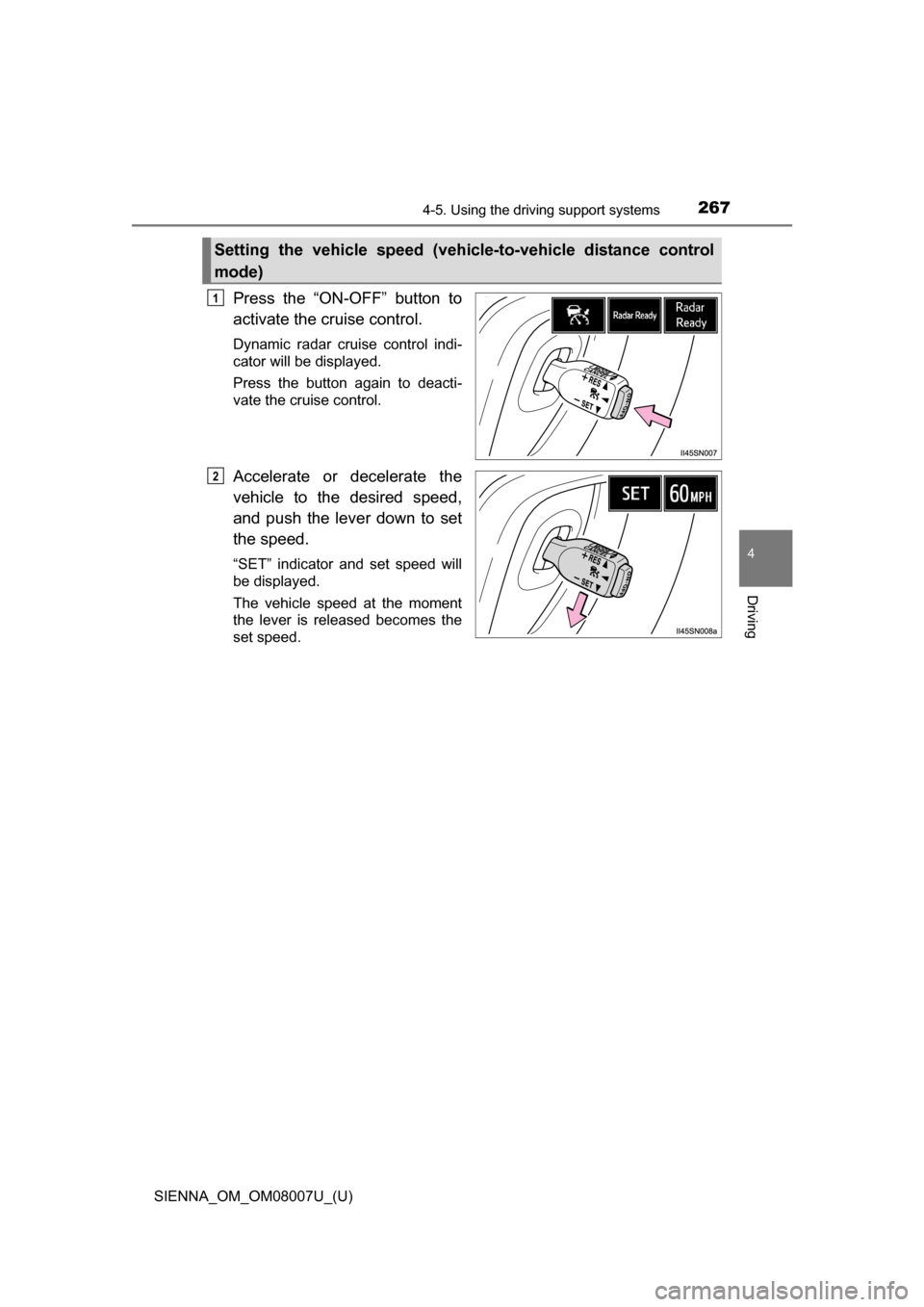
Press the “ON-OFF” button to
activate the cruise control.
Dynamic radar cruise control indi-
cator will be displayed.
Press the button again to deacti-
vate the cruise control.
Accelerate or decelerate the
vehicle to the desired speed,
and push the lever down to set
the speed.
“SET” indicator and set speed will
be displayed.
The vehicle speed at the moment
the lever is released becomes the
set speed.
Setting the vehicle speed (vehicle-to-vehicle distance control
mode)
1
2
Page 268 of 672
268
SIENNA_OM_OM08007U_(U)
4-5. Using the driving support systems
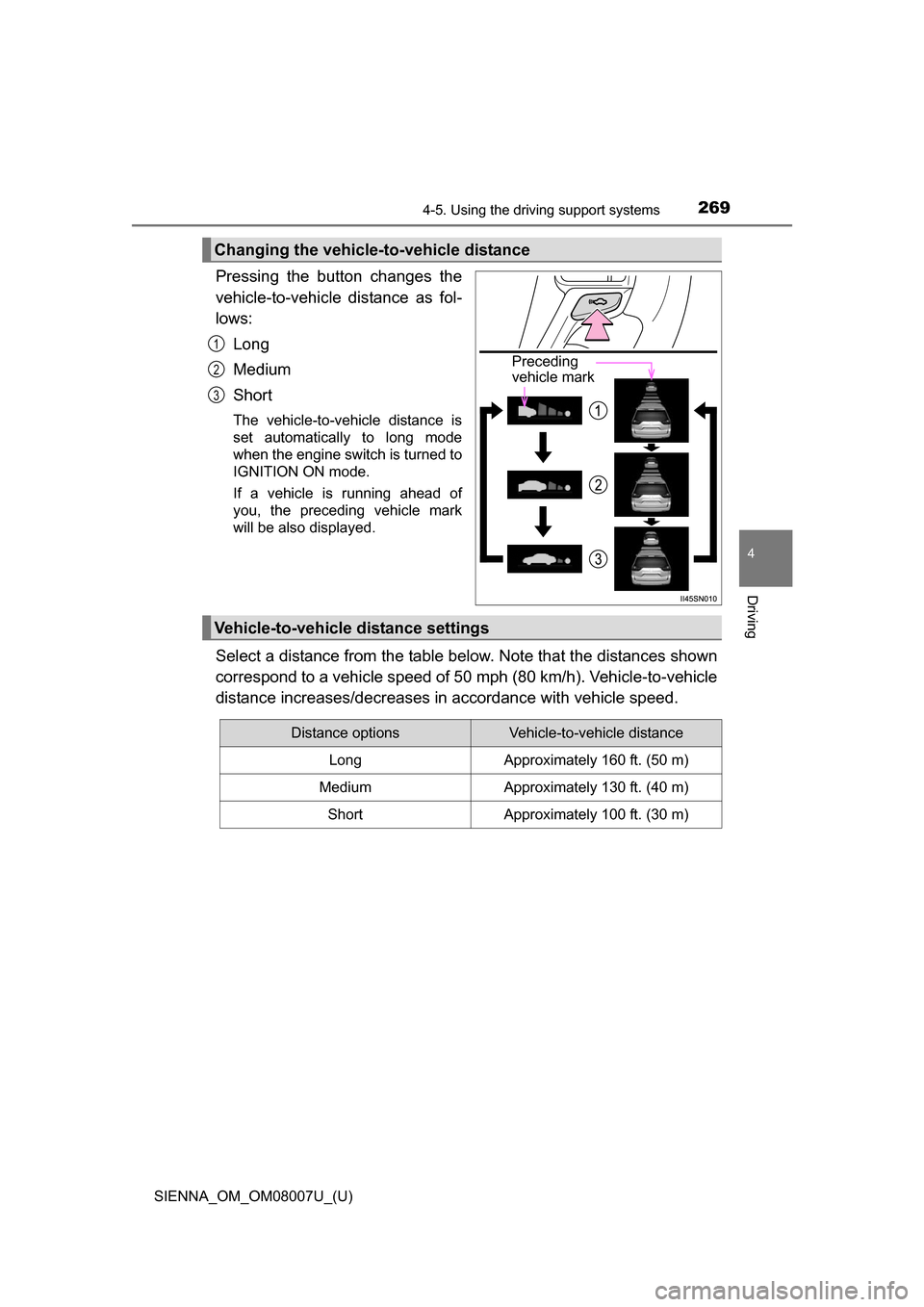
To change the set speed, operate the lever until the desired set speed
is displayed.
Increases the speed
Decreases the speed
Fine adjustment: Momentarily
move the lever in the desired direc-
tion.
Large adjustment: Hold the lever in
the desired direction.
In the vehicle-to-vehicle distance co ntrol mode, the set speed will be
increased or decreased as follows: • When the set speed is shown in “MPH”
Fine adjustment: By approximately 1 mph (1.6 km/h) each time the
lever is operated
Large adjustment: By approximately 5 mph (8 km/h) for each 0.6
seconds the lever is held
• When the set speed is shown in “km/h” Fine adjustment: By approximately 0.6 mph (1 km/h) each time the
lever is operated
Large adjustment: By approximately 3.1 mph (5 km/h) for each 0.6
seconds the lever is held
In the constant speed control mode ( P. 272), the set speed will be
increased or decreased as follows:
Fine adjustment: By approximately 1 mph (1.6 km/h) each time the
lever is operated
Large adjustment: The set speed can be increased or decreased con-
tinually until the lever is released.
Adjusting the set speed
1
2
Page 269 of 672
SIENNA_OM_OM08007U_(U)
2694-5. Using the driving support systems
4
Driving
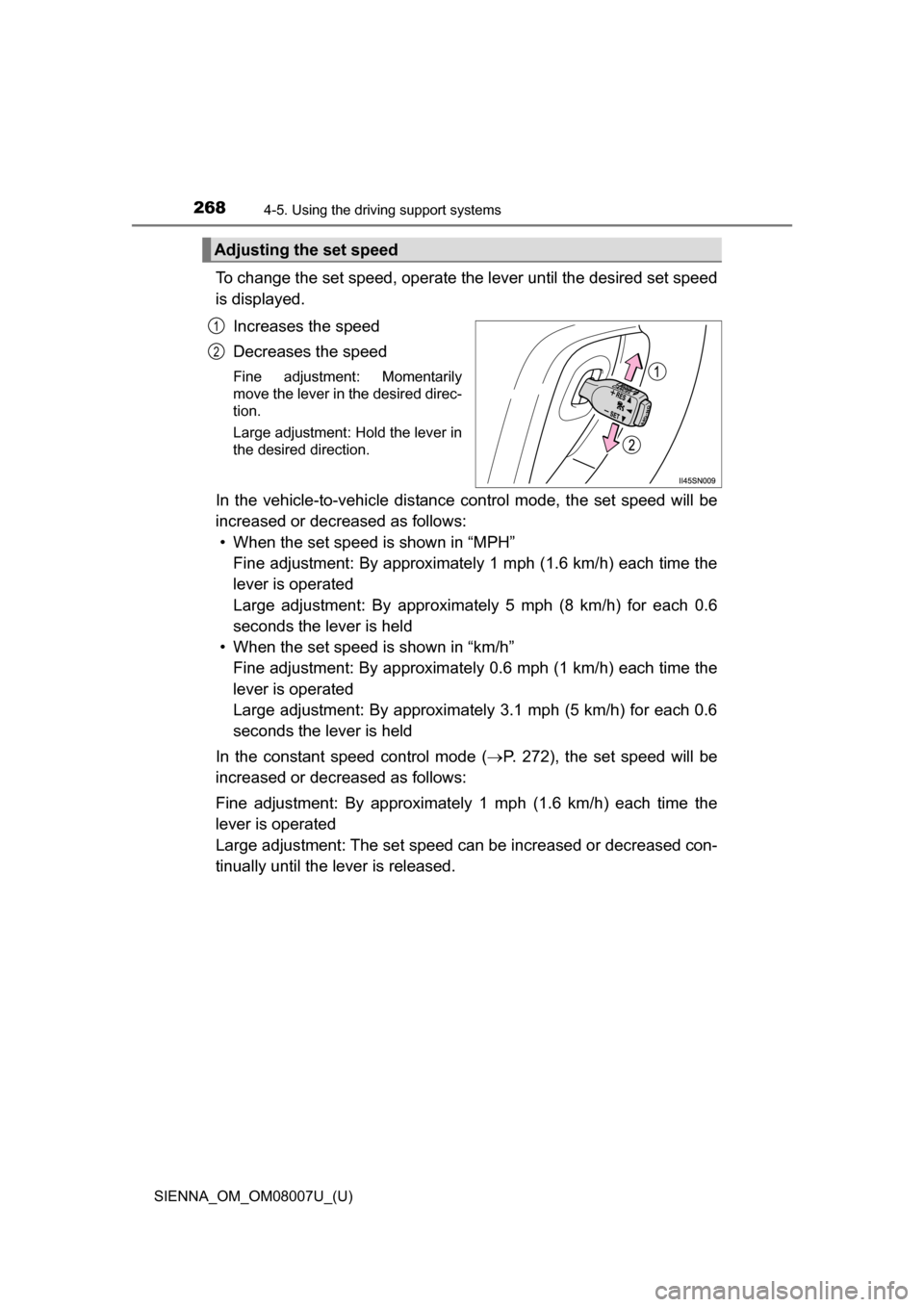
Pressing the button changes the
vehicle-to-vehicle distance as fol-
lows:
Long
Medium
Short
The vehicle-to-vehicle distance is
set automatically to long mode
when the engine switch is turned to
IGNITION ON mode.
If a vehicle is running ahead of
you, the preceding vehicle mark
will be also displayed.
Select a distance from the table below. Note that the distances shown
correspond to a vehicle speed of 50 mph (80 km/h). Vehicle-to-vehicle
distance increases/decreases in accordance with vehicle speed.
Changing the vehicle-to-vehicle distance
Preceding
vehicle mark
1
2
3
Vehicle-to-vehicle distance settings
Distance optionsVehicle-to-vehicle distance
LongApproximately 160 ft. (50 m)
MediumApproximately 130 ft. (40 m)
ShortApproximately 100 ft. (30 m)
Page 271 of 672
SIENNA_OM_OM08007U_(U)
2714-5. Using the driving support systems
4
Driving
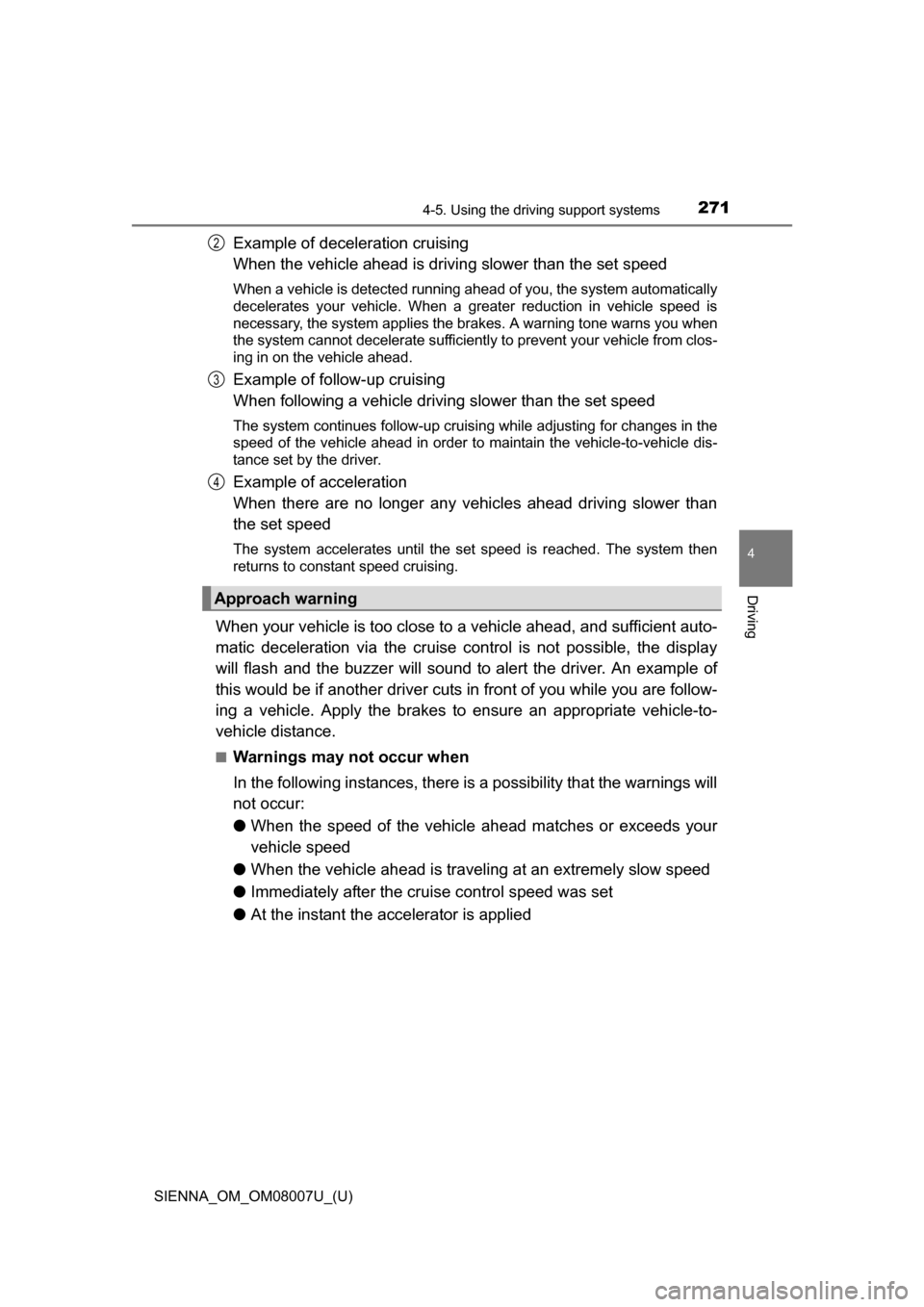
Example of deceleration cruising
When the vehicle ahead is drivi ng slower than the set speed
When a vehicle is detected running ahead of you, the system automatically
decelerates your vehicle. When a greater reduction in vehicle speed is
necessary, the system applies the brakes. A warning tone warns you when
the system cannot decelerate sufficiently to prevent your vehicle from clos-
ing in on the vehicle ahead.
Example of follow-up cruising
When following a vehicle driving slower than the set speed
The system continues follow-up cruising while adjusting for changes in the
speed of the vehicle ahead in order to maintain the vehicle-to-vehicle dis-
tance set by the driver.
Example of acceleration
When there are no longer any vehi cles ahead driving slower than
the set speed
The system accelerates until the set speed is reached. The system then
returns to constant speed cruising.
When your vehicle is too close to a vehicle ahead, and sufficient auto-
matic deceleration via the cruise control is not possible, the display
will flash and the buzzer will sound to alert the driver. An example of
this would be if another driver cuts in front of you while you are follow-
ing a vehicle. Apply the brakes to ensure an appropriate vehicle-to-
vehicle distance.
■Warnings may not occur when
In the following instances, there is a possibility that the warnings will
not occur:
● When the speed of the vehicle ahead matches or exceeds your
vehicle speed
● When the vehicle ahead is traveling at an extremely slow speed
● Immediately after the crui se control speed was set
● At the instant the accelerator is applied
Approach warning
2
3
4
Page 272 of 672

272
SIENNA_OM_OM08007U_(U)
4-5. Using the driving support systems
When constant speed cont rol mode is selected, your vehicle will main-
tain a set speed without controlling the vehicle-to-vehicle distance.
Select this mode only when vehicl e-to-vehicle distance control mode
does not function co rrectly due to a dirty radar sensor, etc.
Press the “ON-OFF” button to
activate the cruise control.
Press the button again to deacti-
vate the cruise control.
Switch to constant speed con-
trol mode.
(Push the lever forward and
hold for approximately one sec-
ond)
Constant speed control mode indicator will be displayed.
When in constant speed control mode, to return to vehicle-to-vehicle dis-
tance control mode, push the leve r forward again and hold for approxi-
mately 1 second.
After the desired speed has been set, it is not possible to return to vehicle-
to-vehicle distance control mode.
If the engine switch is turned off and then turned to IGNITION ON mode
again, the vehicle will automatically return to vehicle-to-vehicle distance
control mode.
Adjusting the speed setting: P. 268
Canceling and resuming the speed setting: P. 270
Selecting conventional cons tant speed control mode
1
2
Page 274 of 672
274
SIENNA_OM_OM08007U_(U)
4-5. Using the driving support systems
■Operation guide display
●When the dynamic radar cruise control switch is operated, a guidance dis-
play is shown on the multi-information display for a few seconds as to how
to operate the dynamic radar cruise control switch or distance switch.
(P. 98)
● When selecting or tab on the multi-information display:
P. 9 4
■ Warning messages and buzzers for dynamic radar cruise control
Warning messages and buzzers are used to indicate a system malfunction or
to inform the driver of the need for caution while driving. ( P. 559, 560)
■ Certification
For vehicles sold in the U.S.A.
FCC ID: HYQDNMWR004
This device complies with part 15 of the FCC Rules. Operation is subject to
the following two conditions: (1) This device may not cause harmful interfer-
ence, and (2) this device must accept any interference received, including
interference that may cause undesired operation.
FCC WARNING
Changes or modifications not expressly approved by the party responsible for
compliance could void the user’s authority to operate the equipment.
Radiofrequency radiation exposure Information:
This equipment complies with FCC radiation exposure limits set forth for an
uncontrolled environment.
This equipment should be installed and operated with minimum distance of
20 cm between the radiator (antenna) and your body.
This transmitter must not be co-located or operating in conjunction with any
other antenna or transmitter.
For vehicles sold in Canada
This device complies with Industry Canada licence-exempt RSS standards.
Operation is subject to the following two conditions: (1) this device may not
cause interference, and (2) this device must accept any interference, includ-
ing interference that may cause undesired operation of the device.
Page 279 of 672
279
SIENNA_OM_OM08007U_(U)
4-5. Using the driving support systems
4
Driving
Intuitive parking assist
Front corner sensors
(if equipped)
Rear corner sensors
Rear center sensors
Turns the intuitive parking assist
on/off
When on, the indicator light comes
on and the buzzer sounds to inform
the driver that the system is opera-
tional.
: If equipped
The distance from your vehicle to nearby obstacles when paral-
lel parking or maneuvering into a garage is measured by the
sensors and communicated via the multi-information display,
the audio system screen and a buzzer. Always check the sur-
rounding area when using this system.
Types of sensors
1
2
3
Intuitive parking assist switch
Page 280 of 672
280
SIENNA_OM_OM08007U_(U)
4-5. Using the driving support systems
When the sensors detect an obstacle, the following displays inform
the driver of the position an d distance to the obstacle.
■Multi-information display
Front corner sensor opera-
tion
Rear corner sensor operation
Rear center sensor operation
■Audio system screenIntuitive parking assist dis-
play
When the rear view monitor sys-
tem is not displayed.
A graphic is automatically dis-
played when an obstacle is
detected. The screen can be set
so that the graphic is not dis-
played. ( P. 283)
Insert display
When the rear view monitor sys-
tem is displayed.
A simplified image is displayed
on the right upper corner of the
audio system screen when an
obstacle is detected.
Display
1
2
3
1
2