Page 231 of 672
SIENNA_OM_OM08007U_(U)
2314-2. Driving procedures
4
Driving
■Steering lock
After turning the engine switch off and opening and closing the doors, the
steering wheel will be locked due to the steering lock function.
Operating the engine switch again automatically cancels the steering lock.
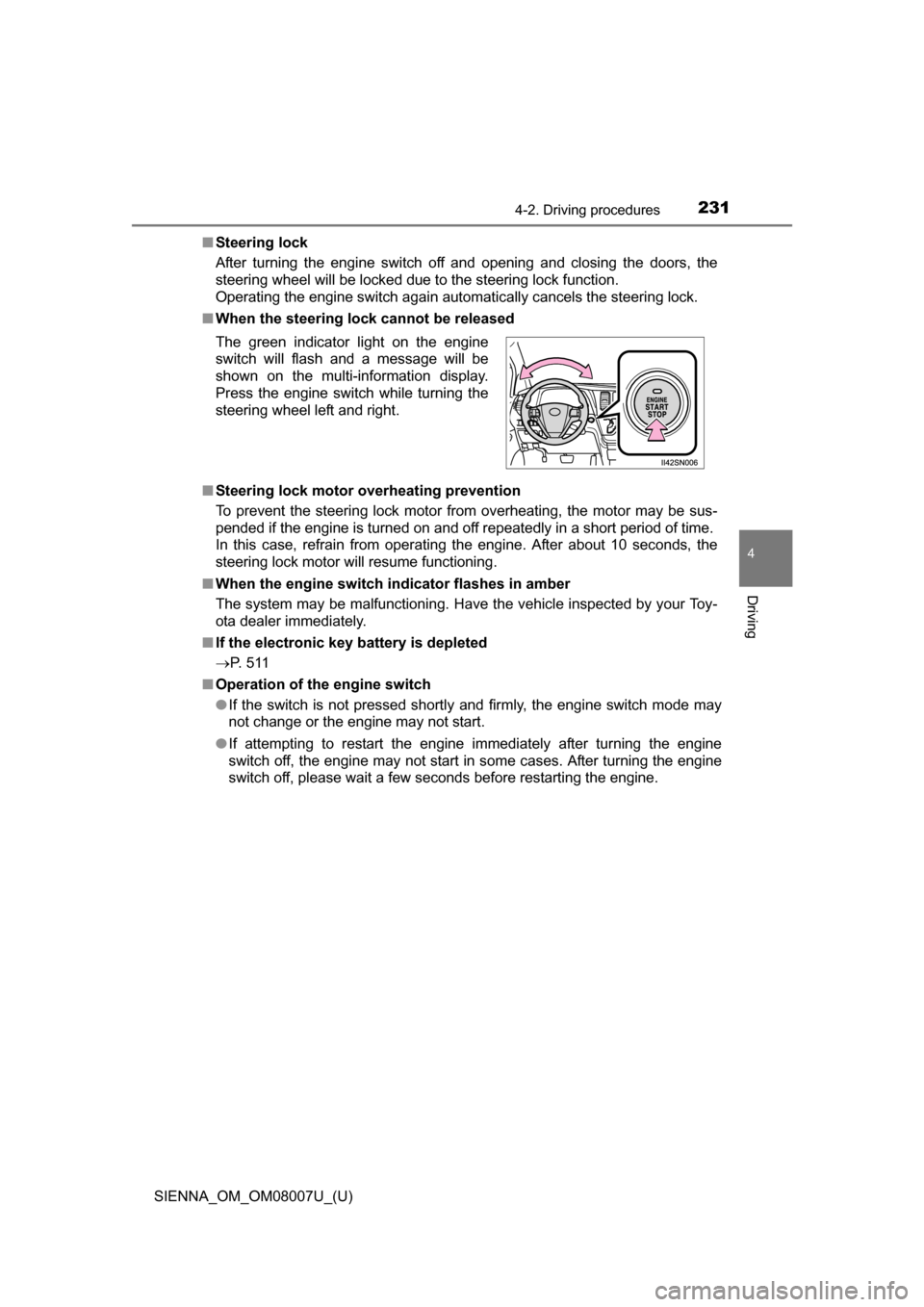
■ When the steering lock cannot be released
■ Steering lock motor overheating prevention
To prevent the steering lock motor from overheating, the motor may be sus-
pended if the engine is turned on and off repeatedly in a short period of time.
In this case, refrain from operating the engine. After about 10 seconds, the
steering lock motor will resume functioning.
■ When the engine switch indicator flashes in amber
The system may be malfunctioning. Have the vehicle inspected by your Toy-
ota dealer immediately.
■ If the electronic key battery is depleted
P. 5 1 1
■ Operation of the engine switch
●If the switch is not pressed shortly and firmly, the engine switch mode may
not change or the engine may not start.
● If attempting to restart the engine immediately after turning the engine
switch off, the engine may not start in some cases. After turning the engine
switch off, please wait a few seconds before restarting the engine.
The green indicator light on the engine
switch will flash and a message will be
shown on the multi-information display.
Press the engine switch while turning the
steering wheel left and right.
Page 234 of 672
234
SIENNA_OM_OM08007U_(U)
4-2. Driving procedures
*1: Shifting to the D position allows the system to select a gear suitable forthe driving conditions. Setting the shift lever to the D position is recom-
mended for normal driving.
*2: Selecting shift ranges using S mode restricts the upper limit of the possi-ble gear ranges, controls engine braking forces, and prevents unneces-
sary upshifting.
Use when high levels of response and feeling are desirable, such as
when driving in mountainous regions or when overtaking.
Vehicles with monochrome display
Press the “DISP” switch to display
the “ECT PWR” and press and
hold the “DISP” switch.
When power mode is on, the “ECT
PWR” indicator will come on.
Shift position purpose
Shift positionFunction
PParking the vehicle/starting the engine
RReversing
NNeutral
DNormal driving*1
SS mode driving*2 ( P. 236)
Selecting power mode
Page 235 of 672
SIENNA_OM_OM08007U_(U)
2354-2. Driving procedures
4
Driving
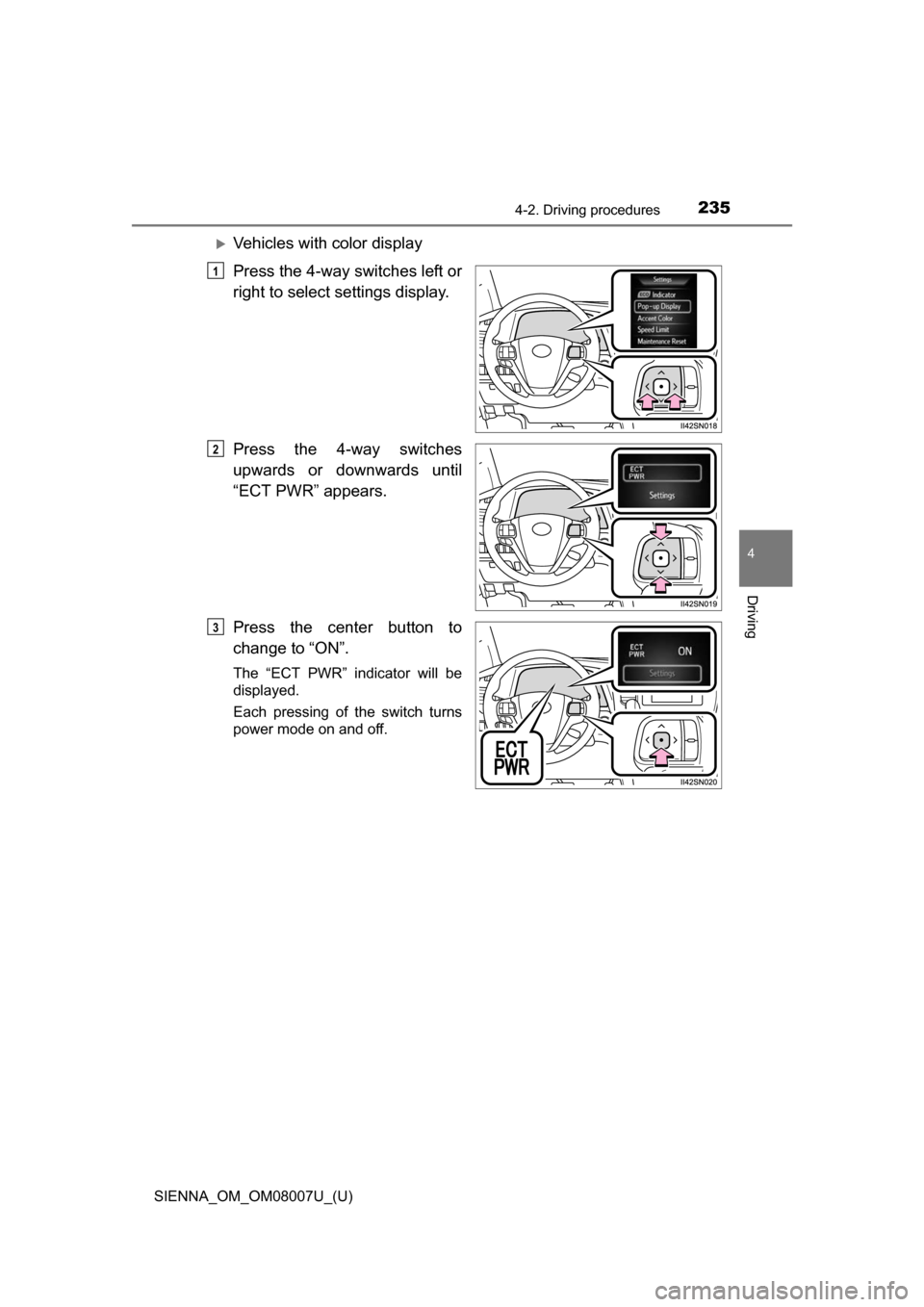
Vehicles with color display
Press the 4-way switches left or
right to select settings display.
Press the 4-way switches
upwards or downwards until
“ECT PWR” appears.
Press the center button to
change to “ON”.
The “ECT PWR” indicator will be
displayed.
Each pressing of the switch turns
power mode on and off.
1
2
3
Page 236 of 672
236
SIENNA_OM_OM08007U_(U)
4-2. Driving procedures
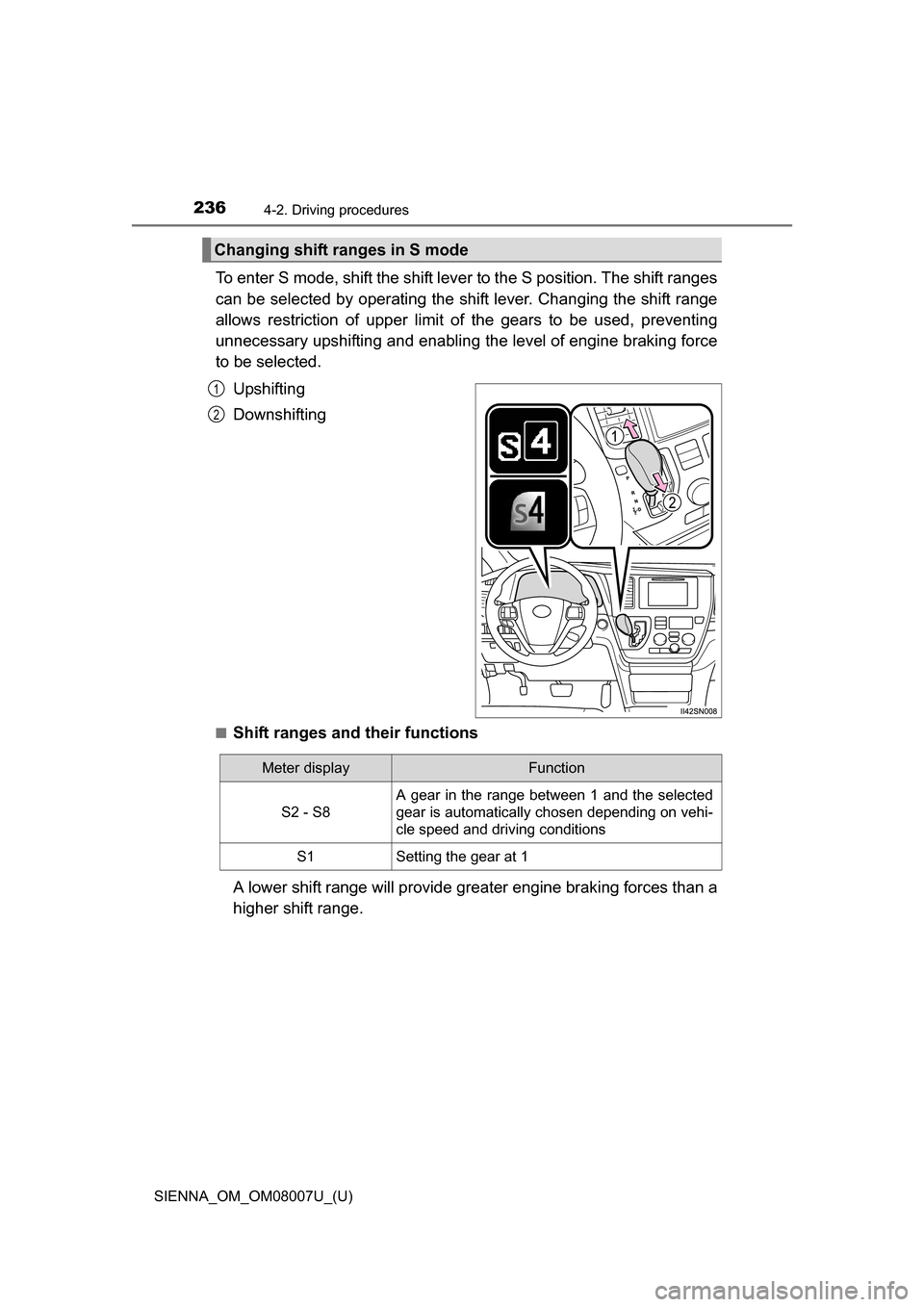
To enter S mode, shift the shift lever to the S position. The shift ranges
can be selected by operating the shift lever. Changing the shift range
allows restriction of upper limit of the gears to be used, preventing
unnecessary upshifting and enabling the level of engine braking force
to be selected.
Upshifting
Downshifting
■Shift ranges and their functions
A lower shift range will provide grea ter engine braking forces than a
higher shift range.
Changing shift ranges in S mode
1
2
Meter displayFunction
S2 - S8
A gear in the range between 1 and the selected
gear is automatically chosen depending on vehi-
cle speed and driving conditions
S1Setting the gear at 1
Page 250 of 672

250
SIENNA_OM_OM08007U_(U)
4-3. Operating the lights and wipers
●In the situations below, the system may not be able to correctly detect the
surrounding brightness levels, and may flash or expose nearby pedestrians
to the high beam. Therefore, you should consider turning the high beam on
or off manually rather than relying on the Automatic High Beam system.
• In bad weather (rain, snow, fog, sandstorms etc.)
• The windshield is obscured by fog, mist, ice, dirt etc.
• The windshield is cracked or damaged.
• The camera sensor is deformed or dirty.
• Surrounding brightness levels are equal to those of headlights, tail lights
or fog lights.
• Vehicles ahead have headlights that are either switched off, dirty, are changing color, or are not aimed properly.
• When driving through an area of in termittently changing brightness and
darkness
• When frequently and repeatedly driving ascending/descending roads, or roads with rough, bumpy or uneven surfaces (such as stone-paved
roads, gravel tracks etc.)
• When frequently and repeatedly taking curves or driving on a winding road
• There is a highly reflective object ahead of the vehicle, such as a sign or a mirror.
• The vehicle’s headlights are damaged or dirty.
• The vehicle is lifting or tilting, due to a flat tire, a trailer being towed etc.
• The high beam and low beam are repeatedly being switched between in an abnormal manner.
• The driver believes that the high beam may be causing problems or dis- tress to other drivers or pedestrians nearby.
■ When the warning message is shown on the multi-information display
P. 562
■ Temporary lowering sensor sensitivity
The sensitivity of the sensor can be temporarily lowered.
To lower the sensitivity, push and hold on the inside rear view mirror for
15 to 20 seconds, and release. The indicator light on the inside rear view mir-
ror will flash to indicate that the sensitivity has been lowered.
When the engine switch is turned to the “LOCK” position (vehicles without a
smart key system) or turned off (vehicles with a smart key system), the sensi-
tivity will be returned to its normal level.
■ Customization
The Automatic High Beam can be turned off.
(Customizable features: P. 631)
Page 262 of 672
262
SIENNA_OM_OM08007U_(U)
4-5. Using the driving support systems
Cruise control
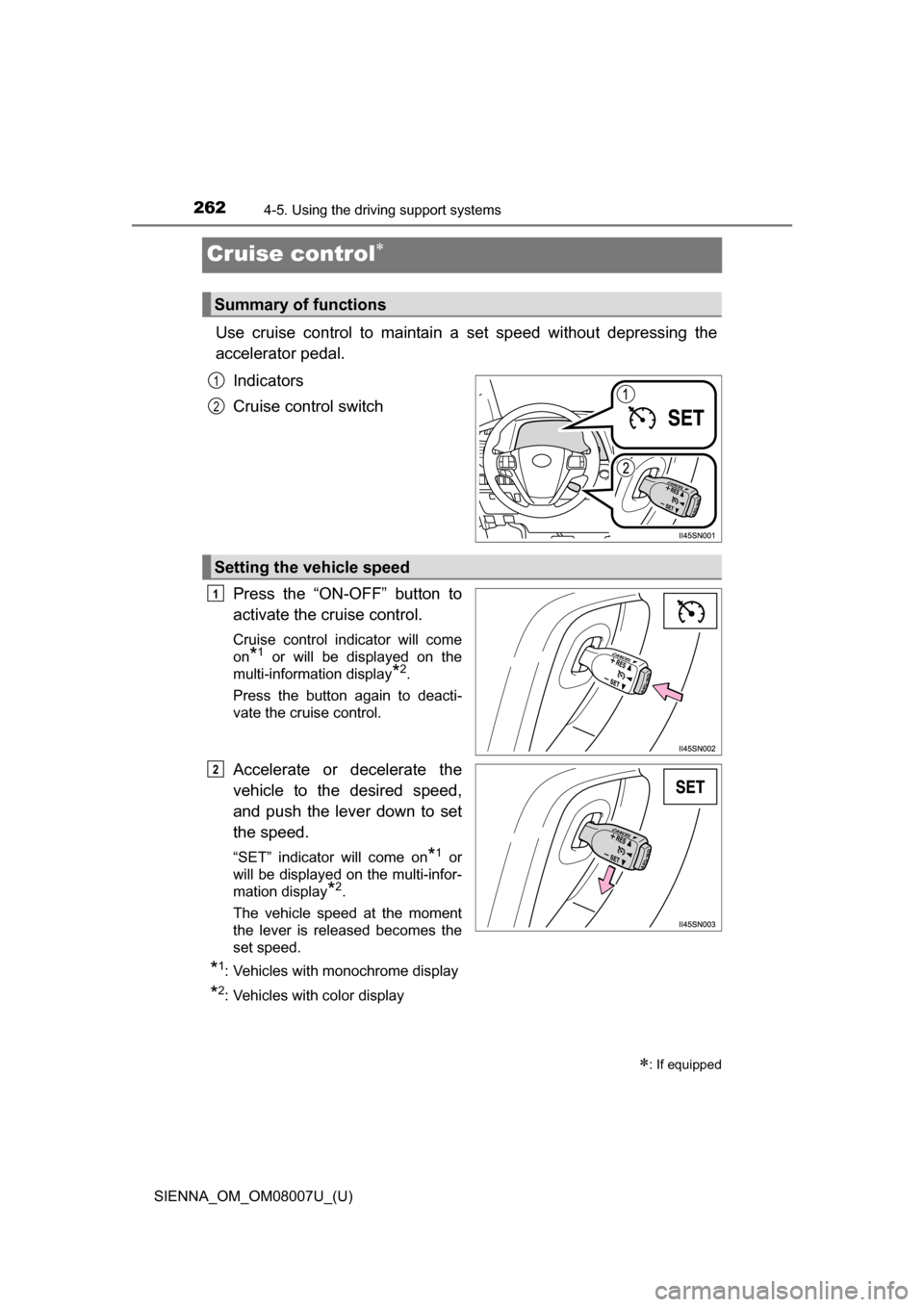
Use cruise control to maintain a set speed without depressing the
accelerator pedal.
Indicators
Cruise control switch
Press the “ON-OFF” button to
activate the cruise control.
Cruise control indicator will come
on
*1 or will be displayed on the
multi-information display
*2.
Press the button again to deacti-
vate the cruise control.
Accelerate or decelerate the
vehicle to the desired speed,
and push the lever down to set
the speed.
“SET” indicator will come on*1 or
will be displayed on the multi-infor-
mation display
*2.
The vehicle speed at the moment
the lever is released becomes the
set speed.
*1: Vehicles with monochrome display
*2: Vehicles with color display
: If equipped
Summary of functions
1
2
Setting the vehicle speed
1
2
Page 264 of 672
264
SIENNA_OM_OM08007U_(U)
4-5. Using the driving support systems
■Cruise control can be set when
●The shift lever is in D or the range 4 or higher of S has been selected.
● Vehicle speed is above approximately 25 mph (40 km/h).
■ Accelerating after setting the vehicle speed
●The vehicle can be accelerated normally. After acceleration, the set speed
resumes.
● Even without canceling the cruise control, the set speed can be increased
by first accelerating the vehicle to the desired speed and then pushing the
lever down to set the new speed.
■ Automatic cruise co ntrol cancelation
Cruise control will stop maintaining the vehicle speed in any of the following
situations.
● Actual vehicle speed falls more than approximately 10 mph (16 km/h) below
the preset vehicle speed.
At this time, the memorized set speed is not retained.
● Actual vehicle speed is below approximately 25 mph (40 km/h).
● VSC is activated.
■ Operation guide display (vehicles wi th a multi-information display [with
color display])
● When the cruise control switch is operated, a guidance display is shown on
the multi-information display for a few seconds as to how to operate the
cruise control switch. ( P. 98)
● When selecting tab on the multi-information display: P. 9 3
■ If the warning message for the crui se control is shown on the multi-
information display
Press the “ON-OFF” button once to deactivate the system, and then press
the button again to reactivate the system.
If the cruise control speed cannot be set or if the cruise control cancels imme-
diately after being activated, there may be a malfunction in the cruise control
system. Have the vehicle inspected by your Toyota dealer.
Page 266 of 672
266
SIENNA_OM_OM08007U_(U)
4-5. Using the driving support systems
Dynamic radar cruise control
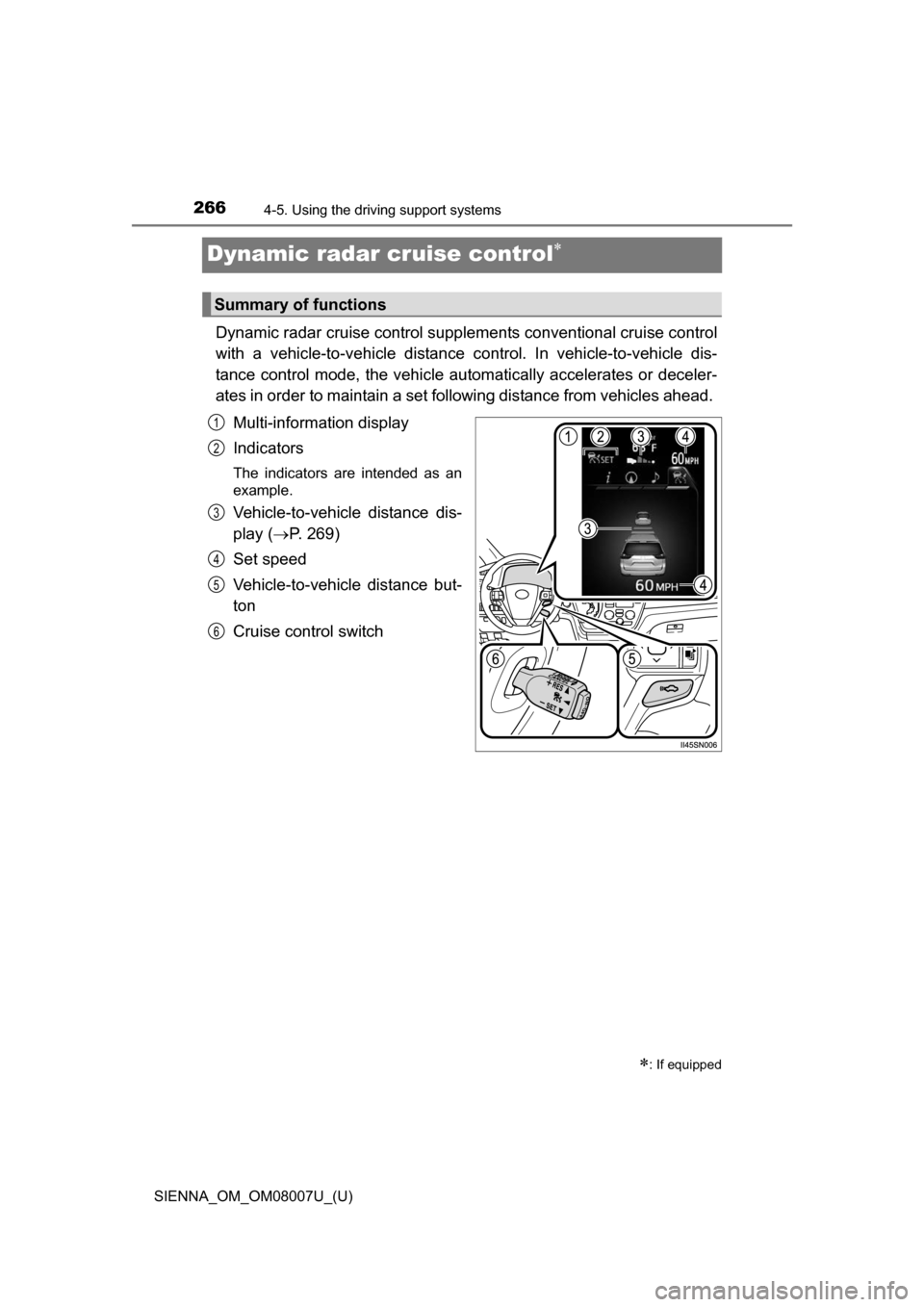
Dynamic radar cruise control supple ments conventional cruise control
with a vehicle-to-vehicle distance control. In vehicle-to-vehicle dis-
tance control mode, the vehicle automatically accelerates or deceler-
ates in order to maintain a set fo llowing distance from vehicles ahead.
Multi-information display
Indicators
The indicators are intended as an
example.
Vehicle-to-vehicle distance dis-
play ( P. 269)
Set speed
Vehicle-to-vehicle distance but-
ton
Cruise control switch
: If equipped
Summary of functions
1
2
3
4
5
6