Page 269 of 464
2696-2. Using the interior lights
6
Interior features
MIRAI_OM_USA_OM62023U
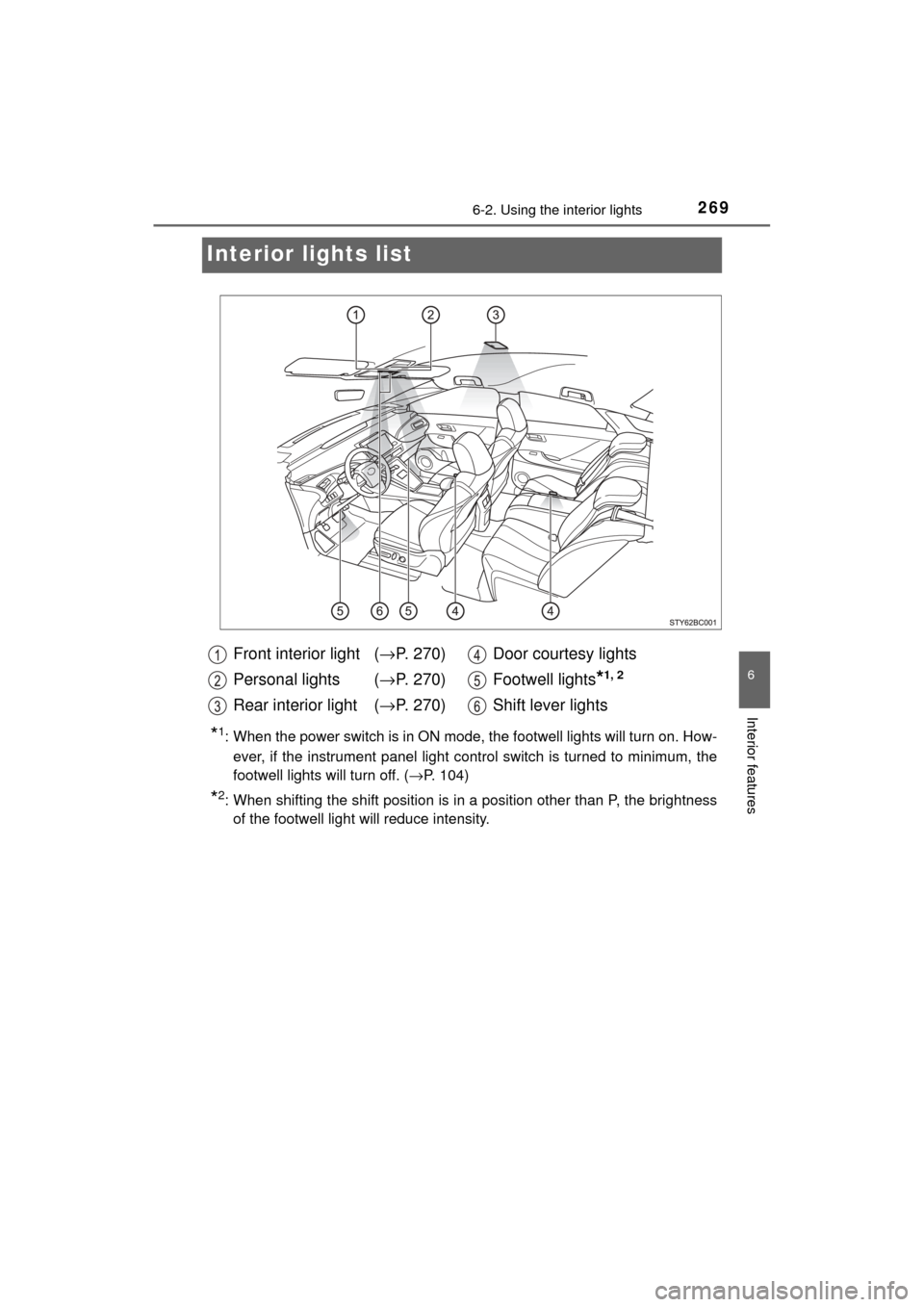
Interior lights list
*1: When the power switch is in ON mode, the footwell lights will turn on. How-
ever, if the instrument panel light control switch is turned to minimum, the
footwell lights will turn off. ( →P. 104)
*2: When shifting the shift position is in a position other than P, the brightness
of the footwell light will reduce intensity.
Front interior light ( →P. 270)
Personal lights ( →P. 270)
Rear interior light ( →P. 270) Door courtesy lights
Footwell lights
*1, 2
Shift lever lights
Page 270 of 464
2706-2. Using the interior lights
MIRAI_OM_USA_OM62023U
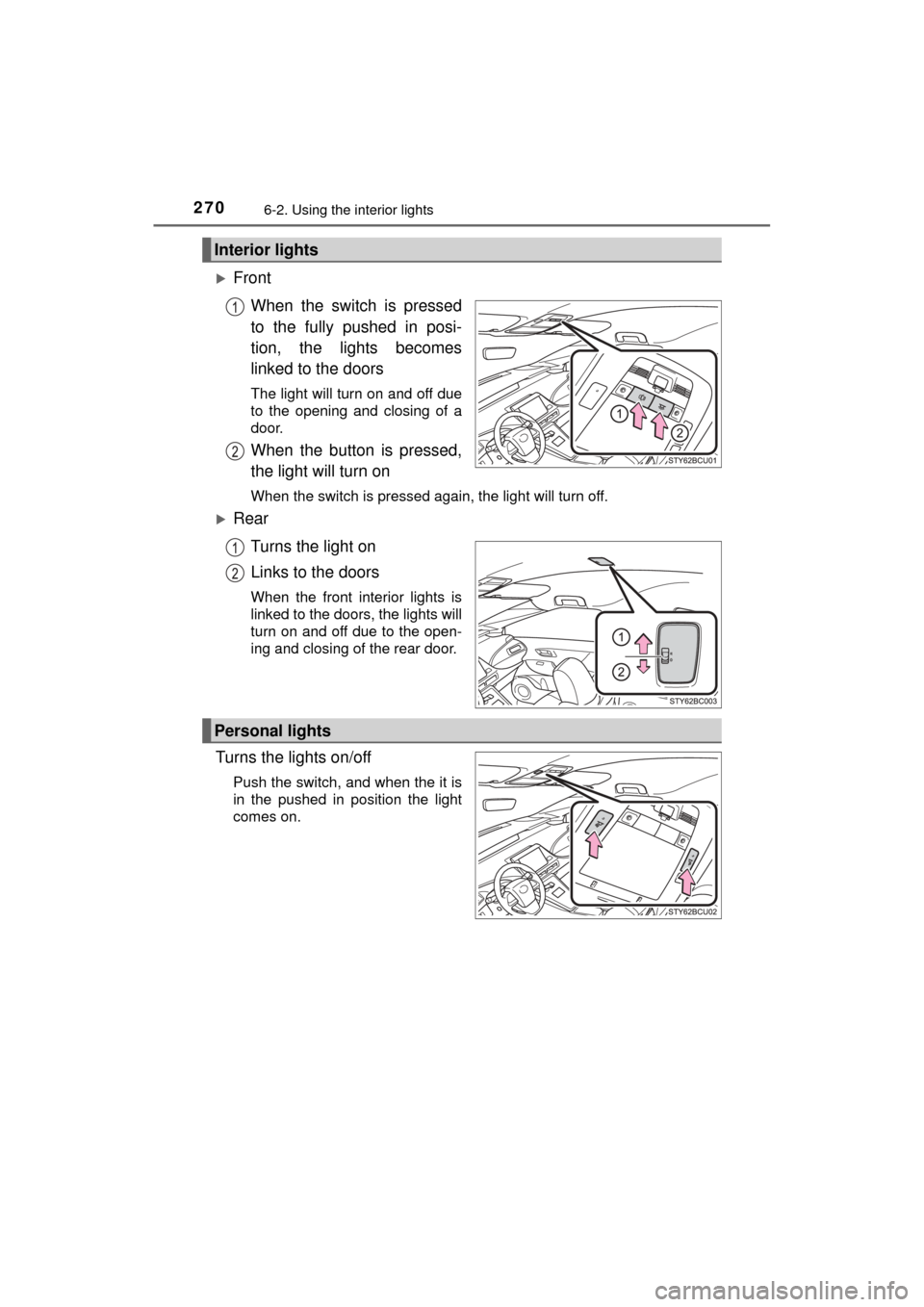
FrontWhen the switch is pressed
to the fully pushed in posi-
tion, the lights becomes
linked to the doors
The light will turn on and off due
to the opening and closing of a
door.
When the button is pressed,
the light will turn on
When the switch is pressed again, the light will turn off.
RearTurns the light on
Links to the doors
When the front interior lights is
linked to the doors, the lights will
turn on and off due to the open-
ing and closing of the rear door.
Turns the lights on/off
Push the switch, and when the it is
in the pushed in position the light
comes on.
Interior lights
Personal lights
Page 271 of 464
2716-2. Using the interior lights
6
Interior features
MIRAI_OM_USA_OM62023U
■Illuminated entry system
The lights automatically turn on/off according to power switch mode, the pres-
ence of the electronic key, whether the doors are locked/unlocked, and
whether the doors are opened/closed.
■ To prevent 12-volt battery discharge
If the following lights remain on when the power switch is turned off, the lights
will go off automatically after 20 minutes:
●Front interior lights
● Rear interior lights
● Personal lights
● Door courtesy lights
● Vanity lights
● Trunk light
■ Customization
Setting (e.g. the time elapsed before lights turn off) can be changed.
(Customizable features: →P. 438)
NOTICE
■ To prevent 12-volt battery discharge
Do not leave the lights on longer than necessary when the fuel cell system
is off.
Page 273 of 464
2736-3. Using the storage features
6
Interior features
MIRAI_OM_USA_OM62023U
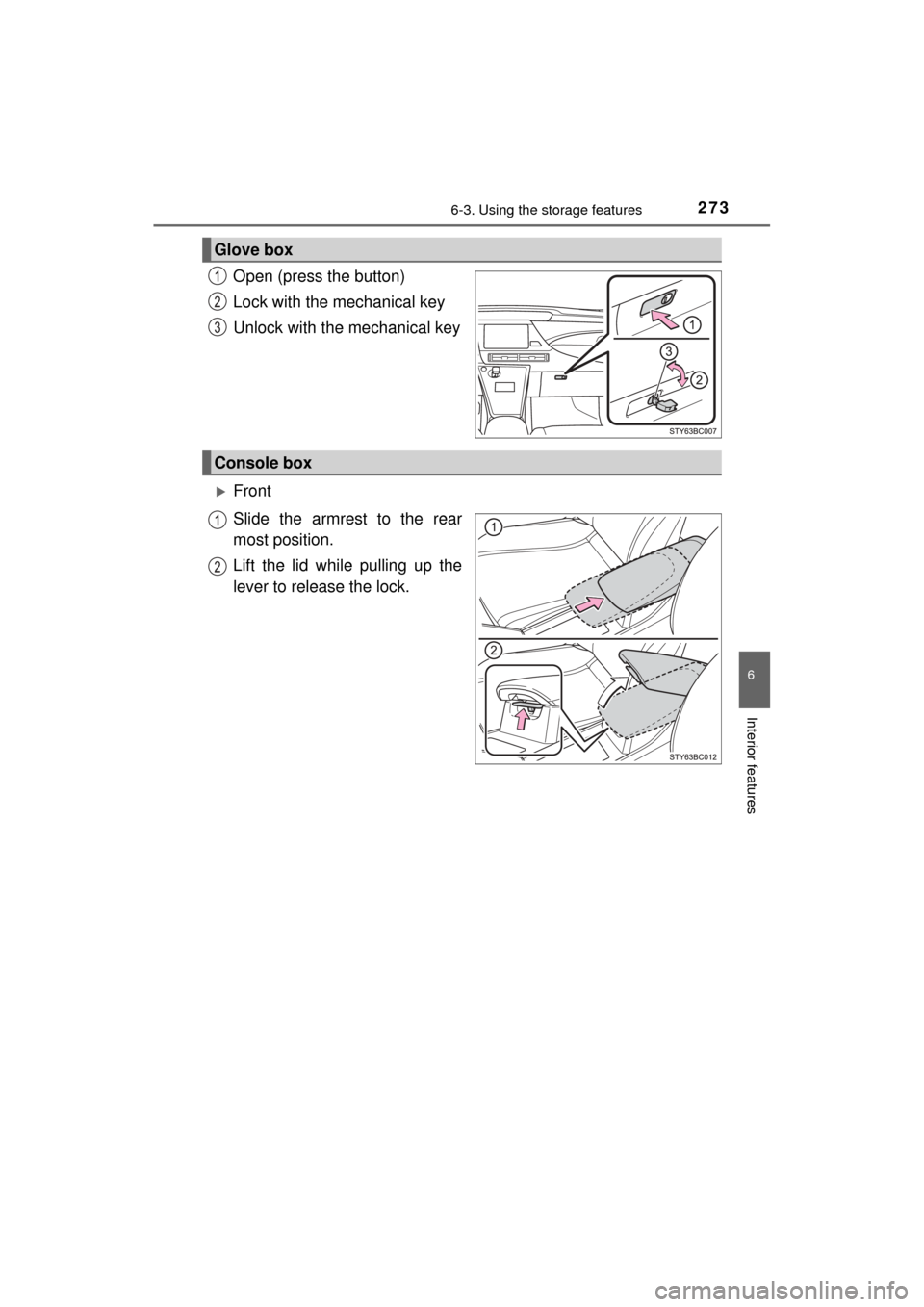
Open (press the button)
Lock with the mechanical key
Unlock with the mechanical key
Front
Slide the armrest to the rear
most position.
Lift the lid while pulling up the
lever to release the lock.
Glove box
Console box
Page 279 of 464
2796-4. Other interior features
6
Interior features
MIRAI_OM_USA_OM62023U
Other interior features
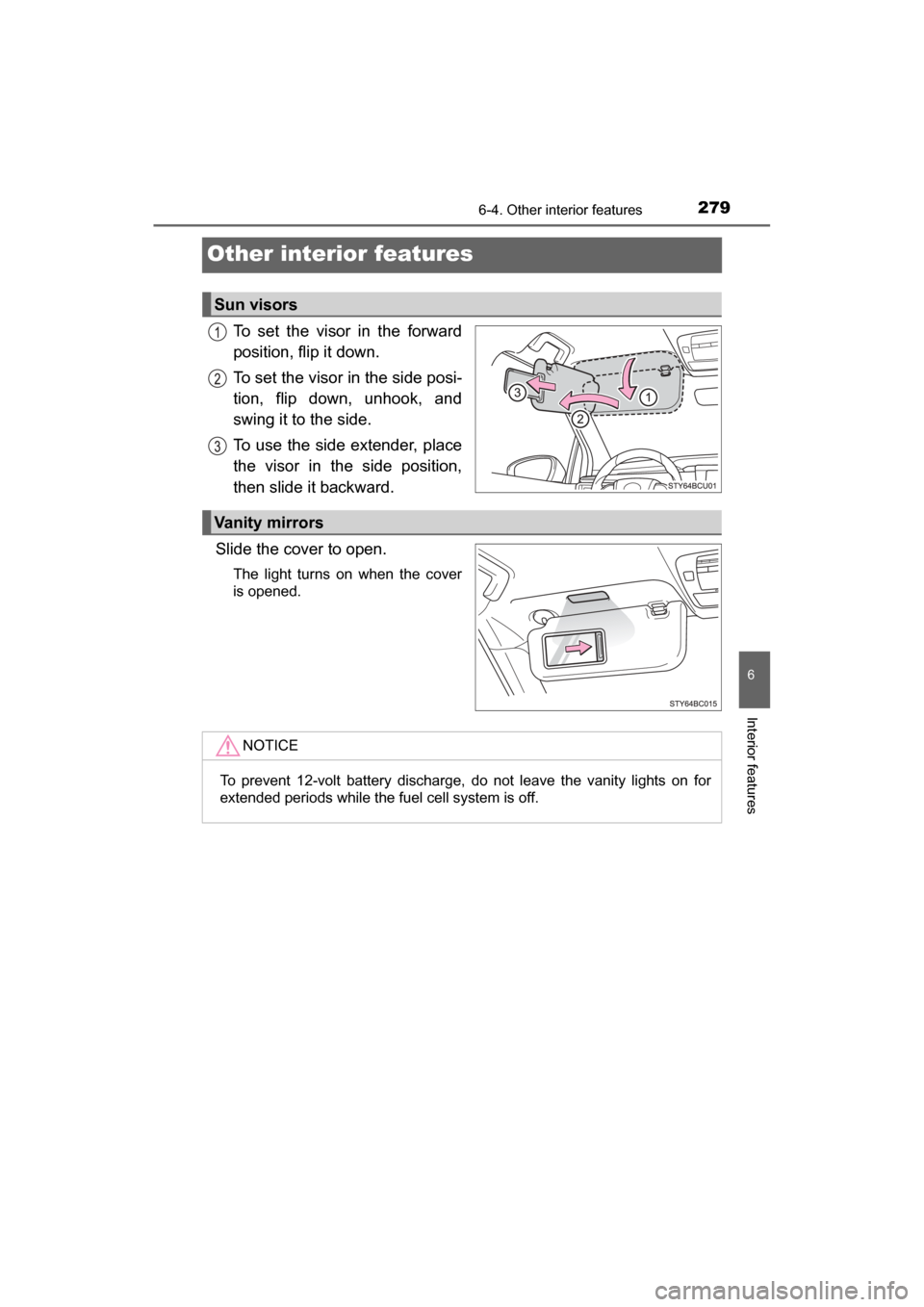
To set the visor in the forward
position, flip it down.
To set the visor in the side posi-
tion, flip down, unhook, and
swing it to the side.
To use the side extender, place
the visor in the side position,
then slide it backward.
Slide the cover to open.
The light turns on when the cover
is opened.
Sun visors
Vanity mirrors
NOTICE
To prevent 12-volt battery discharge, do not leave the vanity lights on for
extended periods while the fuel cell system is off.
Page 280 of 464
2806-4. Other interior features
MIRAI_OM_USA_OM62023U
The time can be adjusted through the [settings display] for the
multi-information display (→P. 107)
◆Round to the nearest hour
Press or of the meter control switches ( →P. 108), select
and press .
The minute section of the clock goes to 00.*
*
: e.g.1:00 to 1:29 → 1:00
1:30 to 1:59 → 2:00
◆Time adjustment
Press or of the meter control switches ( →P. 108), select
and press .
Press or on the meter control switches, select hours, min-
utes, or 12/24-hour clock, pres s or of the meter operation
switches to adjust.
When the adjustments are finished, press and check the time.
The clock is displayed when the power switch is in ON mode.
Clock
1
2
3
Page 283 of 464
2836-4. Other interior features
6
Interior features
MIRAI_OM_USA_OM62023U
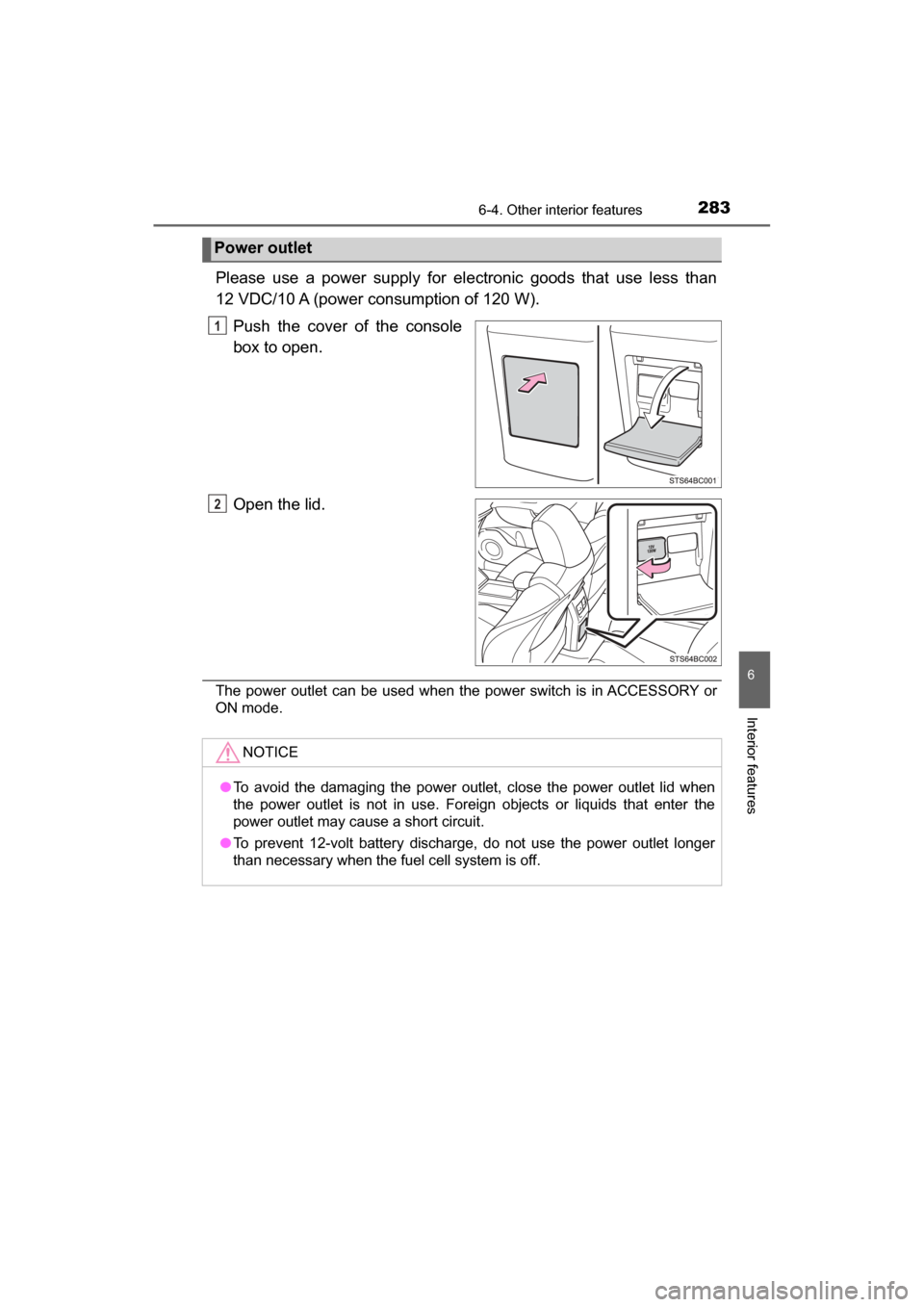
Please use a power supply for electronic goods that use less than
12 VDC/10 A (power consumption of 120 W).Push the cover of the console
box to open.
Open the lid.
The power outlet can be used when the power switch is in ACCESSORY or
ON mode.
Power outlet
1
2
NOTICE
●To avoid the damaging the power outlet, close the power outlet lid when
the power outlet is not in use. Foreign objects or liquids that enter the
power outlet may cause a short circuit.
● To prevent 12-volt battery discharge, do not use the power outlet longer
than necessary when the fuel cell system is off.
Page 284 of 464
2846-4. Other interior features
MIRAI_OM_USA_OM62023U
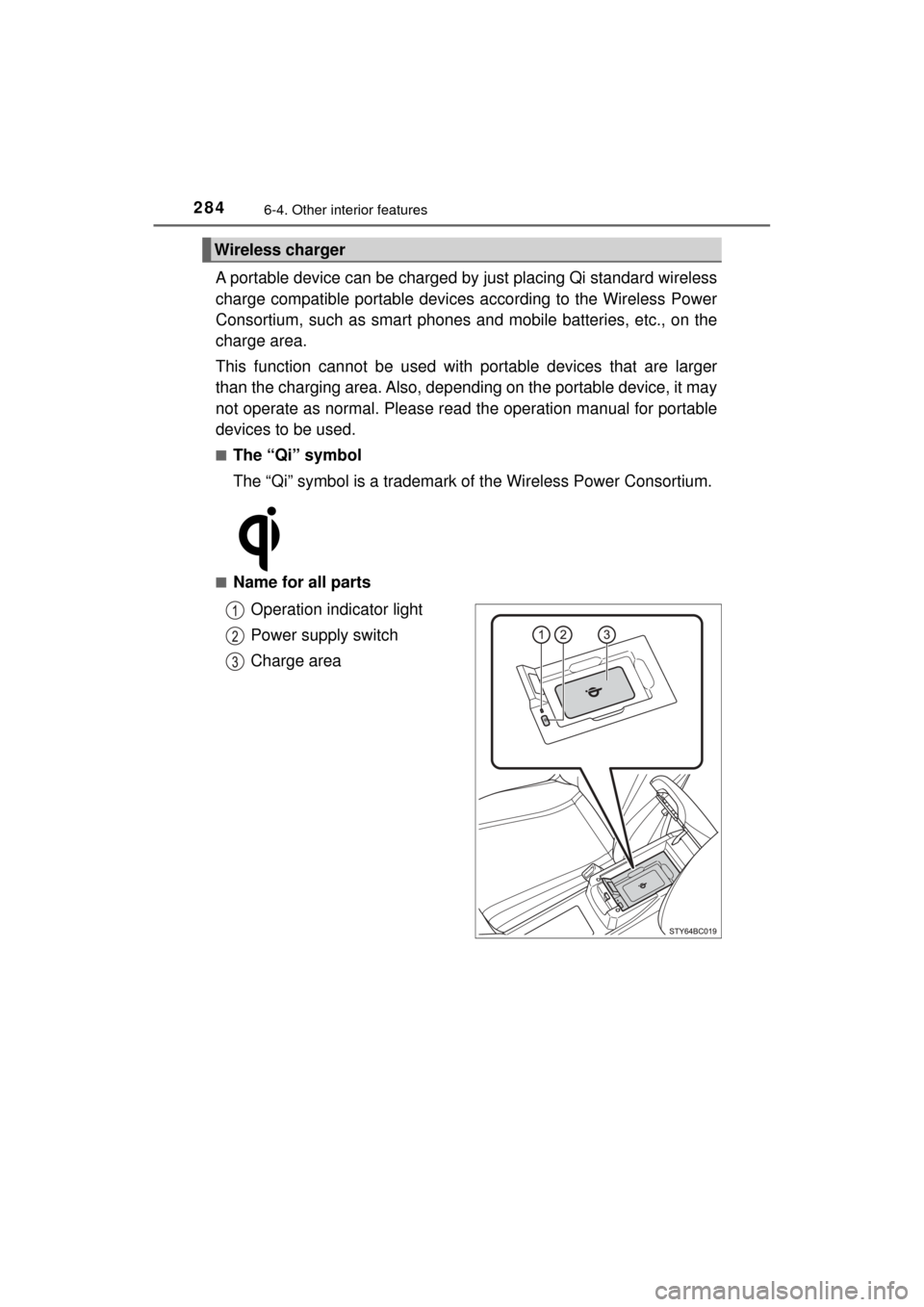
A portable device can be charged by just placing Qi standard wireless
charge compatible portable devices according to the Wireless Power
Consortium, such as smart phones an d mobile batteries, etc., on the
charge area.
This function cannot be used with portable devices that are larger
than the charging area. Also, depend ing on the portable device, it may
not operate as normal. Please read the operation manual for portable
devices to be used.
■The “Qi” symbol
The “Qi” symbol is a trademark of the Wireless Power Consortium.
■Name for all parts
Operation indicator light
Power supply switch
Charge area
Wireless charger
![TOYOTA MIRAI 2017 1.G Owners Manual 2806-4. Other interior features
MIRAI_OM_USA_OM62023U
The time can be adjusted through the [settings display] for the
multi-information display (→P. 107)
◆Round to the nearest hour
Press or](/manual-img/14/6553/w960_6553-279.png "TOYOTA MIRAI 2017 1.G Owners Manual 2806-4. Other interior features
MIRAI_OM_USA_OM62023U
The time can be adjusted through the [settings display] for the
multi-information display (→P. 107)
◆Round to the nearest hour
Press or")