Page 285 of 464
2856-4. Other interior features
6
Interior features
MIRAI_OM_USA_OM62023U■
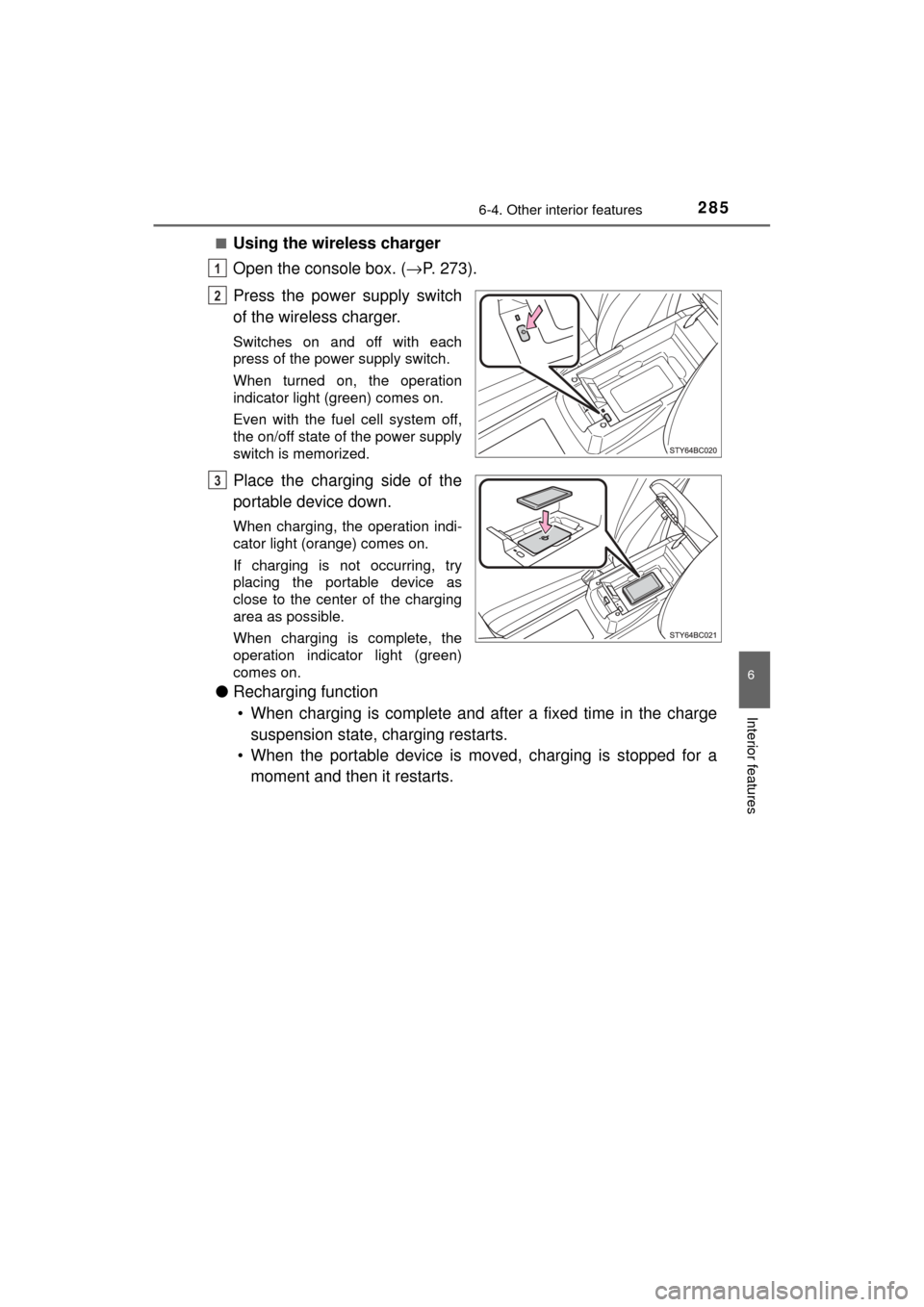
Using the wireless charger
Open the console box. (→
P. 273).
Press the power supply switch
of the wireless charger.
Switches on and off with each
press of the power supply switch.
When turned on, the operation
indicator light (green) comes on.
Even with the fuel cell system off,
the on/off state of the power supply
switch is memorized.
Place the charging side of the
portable device down.
When charging, the operation indi-
cator light (orange) comes on.
If charging is not occurring, try
placing the portable device as
close to the center of the charging
area as possible.
When charging is complete, the
operation indicator light (green)
comes on.
● Recharging function
• When charging is complete and after a fixed time in the charge suspension state, charging restarts.
• When the portable device is mo ved, charging is stopped for a
moment and then it restarts.
1
2
3
Page 286 of 464
2866-4. Other interior features
MIRAI_OM_USA_OM62023U■
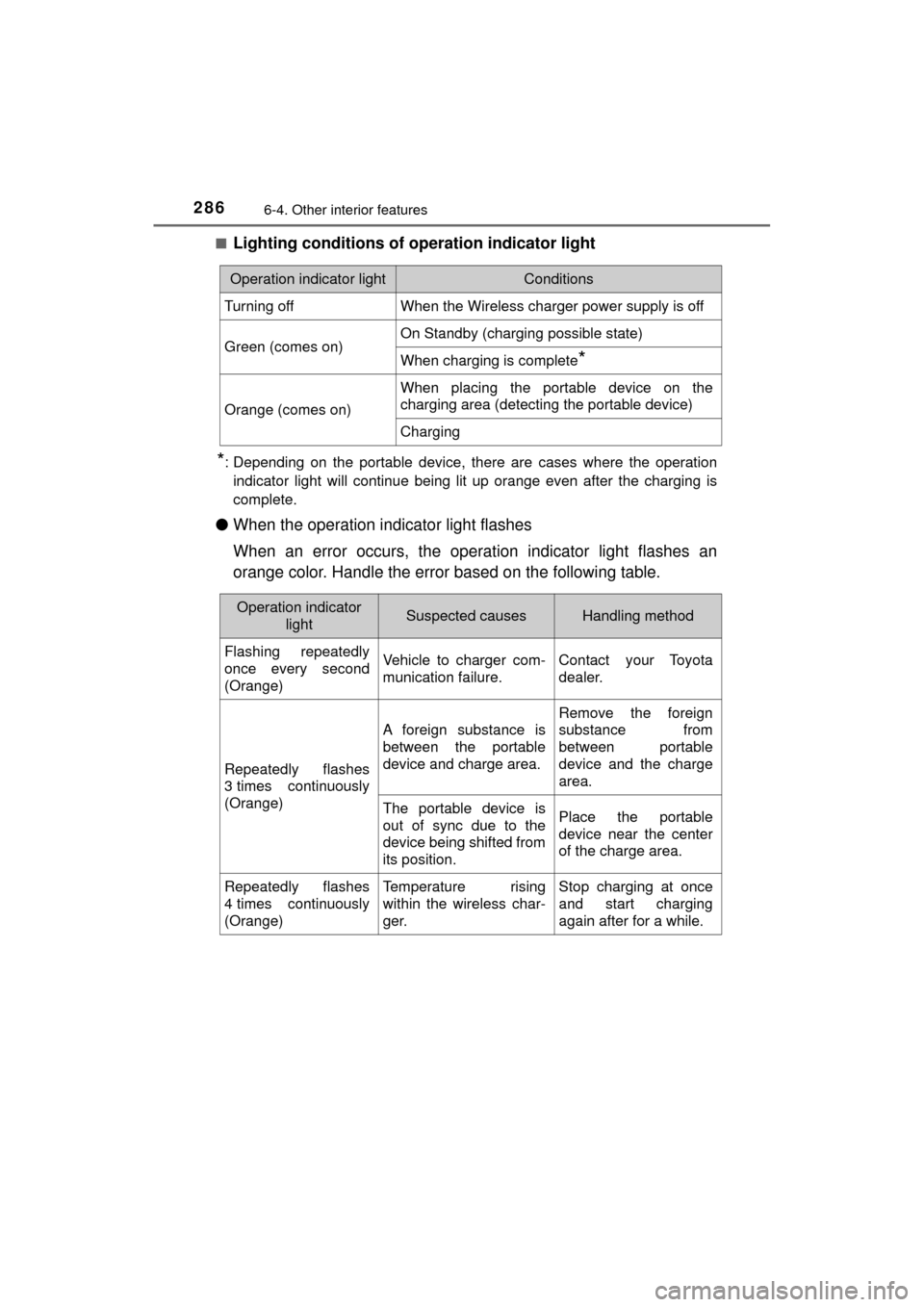
Lighting conditions of operation indicator light
*: Depending on the portable device, there are cases where the operation
indicator light will continue being lit up orange even after the chargin\
g is
complete.
● When the operation indicator light flashes
When an error occurs, the operat ion indicator light flashes an
orange color. Handle the error based on the following table.
Operation indicator lightConditions
Turning offWhen the Wireless charger power supply is off
Green (comes on)On Standby (charging possible state)
When charging is complete*
Orange (comes on)
When placing the portable device on the
charging area (detecting the portable device)
Charging
Operation indicator lightSuspected causesHandling method
Flashing repeatedly
once every second
(Orange)Vehicle to charger com-
munication failure.Contact your Toyota
dealer.
Repeatedly flashes
3 times continuously
(Orange)
A foreign substance is
between the portable
device and charge area.
Remove the foreign
substance from
between portable
device and the charge
area.
The portable device is
out of sync due to the
device being shifted from
its position.Place the portable
device near the center
of the charge area.
Repeatedly flashes
4 times continuously
(Orange)Temperature rising
within the wireless char-
ger.Stop charging at once
and start charging
again after for a while.
Page 287 of 464
2876-4. Other interior features
6
Interior features
MIRAI_OM_USA_OM62023U
■The wireless charger can be operated when
The power switch is in ACCESSORY or ON mode.
■ Usable portable devices
Qi standard wireless charge standard can be used on compatible devices.
However, not all Qi standard devices and compatibility are guaranteed.
Starting with mobile phones and smart phones , it is aimed for low power elec-
trically supplied portable devices of no more than 5 W.
■ When covers and accessories are attached to portable devices
Do not charge in situations where cover and accessories not able to handle
Qi are attached to the portable device. Depending on the type of cover and
accessory, it may not be possible to charge. When charging is not performed
even with the portable device placed on the charge area, remove the cover
and accessories.
■ While charging, noise enters the AM radio
Turn off the wireless charger and confirm that the noise has decreased. If the
noise decreases, continuously pushing the power supply switch of the wire-
less charger for 2 seconds, the frequency of the charger can be changed and
the noise can be reduced.
Also, on that occasion, the operation indicator light will flash orange 2 times.
■ Important points of the wireless charger
●If the electronic key cannot be detected within the vehicle interior, charging
cannot be done. When the door is opened and closed, charging may be
temporarily suspended.
● When charging, the wireless charging device and portable device will get
warmer, however this is not a malfunction.
When a portable device gets warm while charging, charging may stop due
to the protection function on the portable device side. In this case, when the
temperature of the portable device drops significantly, charge again.
■ Operation sounds
When the power supply is turned on, while searching for the portable device a
sound will be produced, however this is not a malfunction.
■ Cleaning
→P. 3 1 1
Page 288 of 464
2886-4. Other interior features
MIRAI_OM_USA_OM62023U■
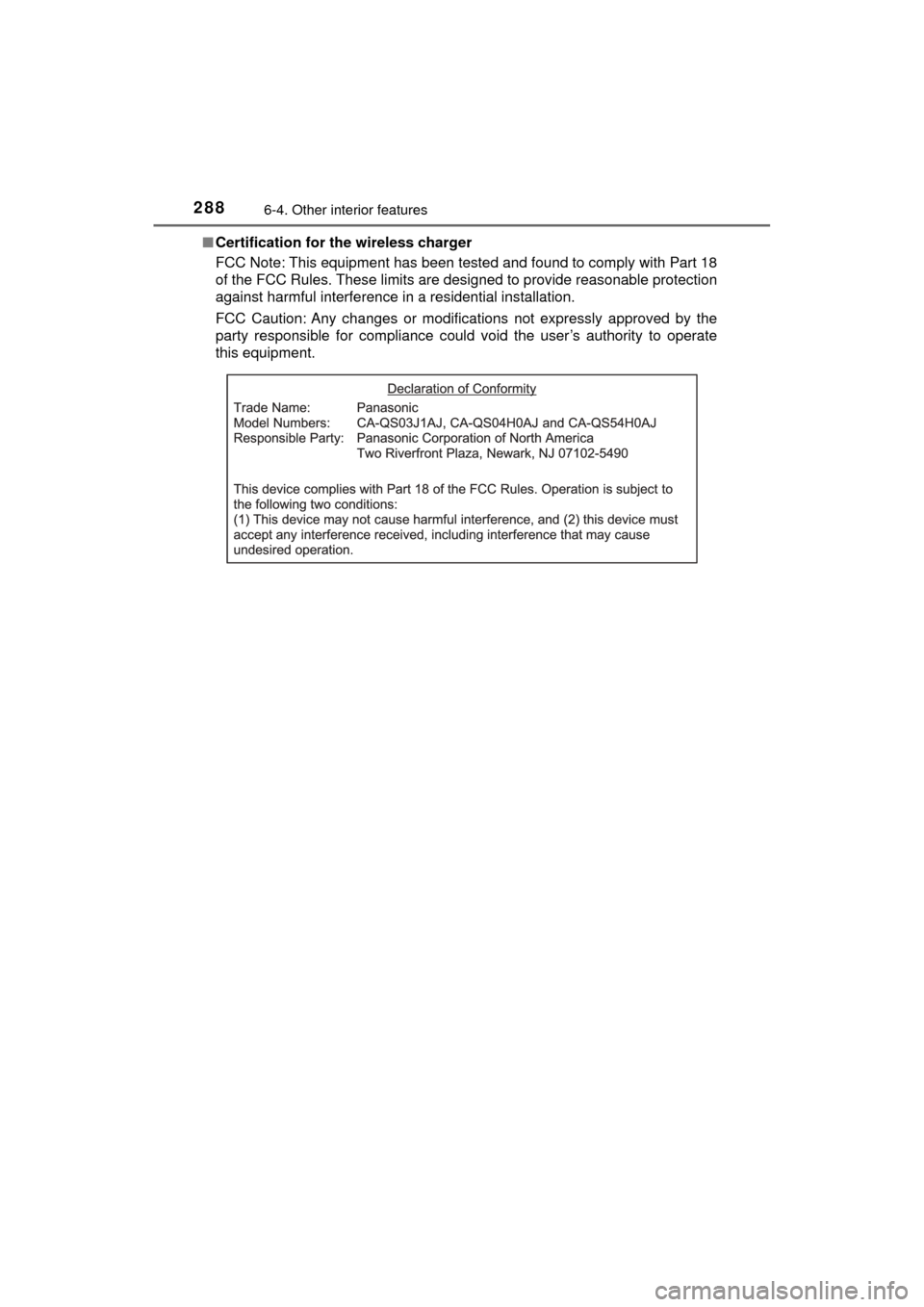
Certification for the wireless charger
FCC Note: This equipment has been tested and found to comply with Part 18
of the FCC Rules. These limits are designed to provide reasonable protection
against harmful interference in a residential installation.
FCC Caution: Any changes or modifications not expressly approved by the
party responsible for compliance could void the user’s authority to operate
this equipment.
Page 290 of 464
2906-4. Other interior features
MIRAI_OM_USA_OM62023U
WARNING
■Caution while driving
● When charging a portable device, for safety reasons, the driver should not
operate the main part of the portable device while driving.
● Make sure to close the console box lid while driving. When sudden brak-
ing, etc., occurs, the open lid could hit body parts, the portable device
could go flying, leading to an unexpected accident.
■ Caution regarding interfer ence with electronic devices
People with implantable cardiac pacemakers, cardiac resynchronization
therapy-pacemakers or implantable cardioverter defibrillators, as well as
any other electrical medical device, should consult their physician about the
usage of the wireless charger. The operations of the wireless charger may
have an affect on medical devices.
■ To prevent damage or burns
Observe the following precautions.
Failure to do so may result in a possibility of equipment failure and damage,
catch fire, burns due to overheat.
● Do not insert any metallic objects between the charging area and the por-
table device while charging
● Do not attach stickers, metallic objects, etc., to the charger area or porta-
ble device
● Do not cover with cloth, etc., and charge
● Do not charge portable devices other than designated
● Do not bring magnetized items nearby
● Do not charge items with the charging area covered in dust.
● When not in use close the console box lid in order to keep foreign sub-
stances from getting in the wireless charging area as well as drinks, etc.,
from being spilled on it.
● Do not attempt to dismantle for disassembly or modifications
● Do not hit or apply a strong force
Page 291 of 464
2916-4. Other interior features
6
Interior features
MIRAI_OM_USA_OM62023U
NOTICE
■Conditions in which the function may not operate correctly
In the following conditions, it may not operate correctly
● The portable device is fully charged
● There is foreign matter between the charge area and portable device
● The temperature of the portable device gets higher from charging
● The charging surface of the portable device is facing up
● The placement of the portable device is out of alignment with the charge
area
● Near a TV tower, electric power plant, gas station, radio station, large dis-
play, airport or other facility that generates strong radio waves or electrical
noise
● When the electronic key is in contact with, or is covered by the following
metallic objects
• Cards to which aluminum foil is attached
• Cigarette boxes that have aluminum foil inside
• Metallic wallets or bags
• Coins
• Hand warmers made of metal
• Media such as CDs and DVDs
● When other wireless keys (that emit radio waves) are being used nearby
In addition, excluding the above-mentioned, when the charger does not per-
form normally or the operation display lamp is flashing continuously, it is
considered that the wireless charger is malfunctioning. Contact your Toyota
dealer.
■ To prevent failure or damage to data
● Do not bring magnetic cards, such as credit cards, or magnetic recording
media, etc., close to the charger while charging, otherwise, data may dis-
appear under the influence of magnetism. Also, do not bring precision
instruments such as wrist watches, etc., close to the charger, as such
objects may break.
● Do not leave portable devices in the cabin. The temperature inside the
cabin may become high, when under the sun, and cause damage to the
device.
■ To prevent 12-volt battery discharge
When the fuel cell system is stopped, do not use the wireless charger for a
long time.
Page 292 of 464
2926-4. Other interior features
MIRAI_OM_USA_OM62023U
Garage door opener
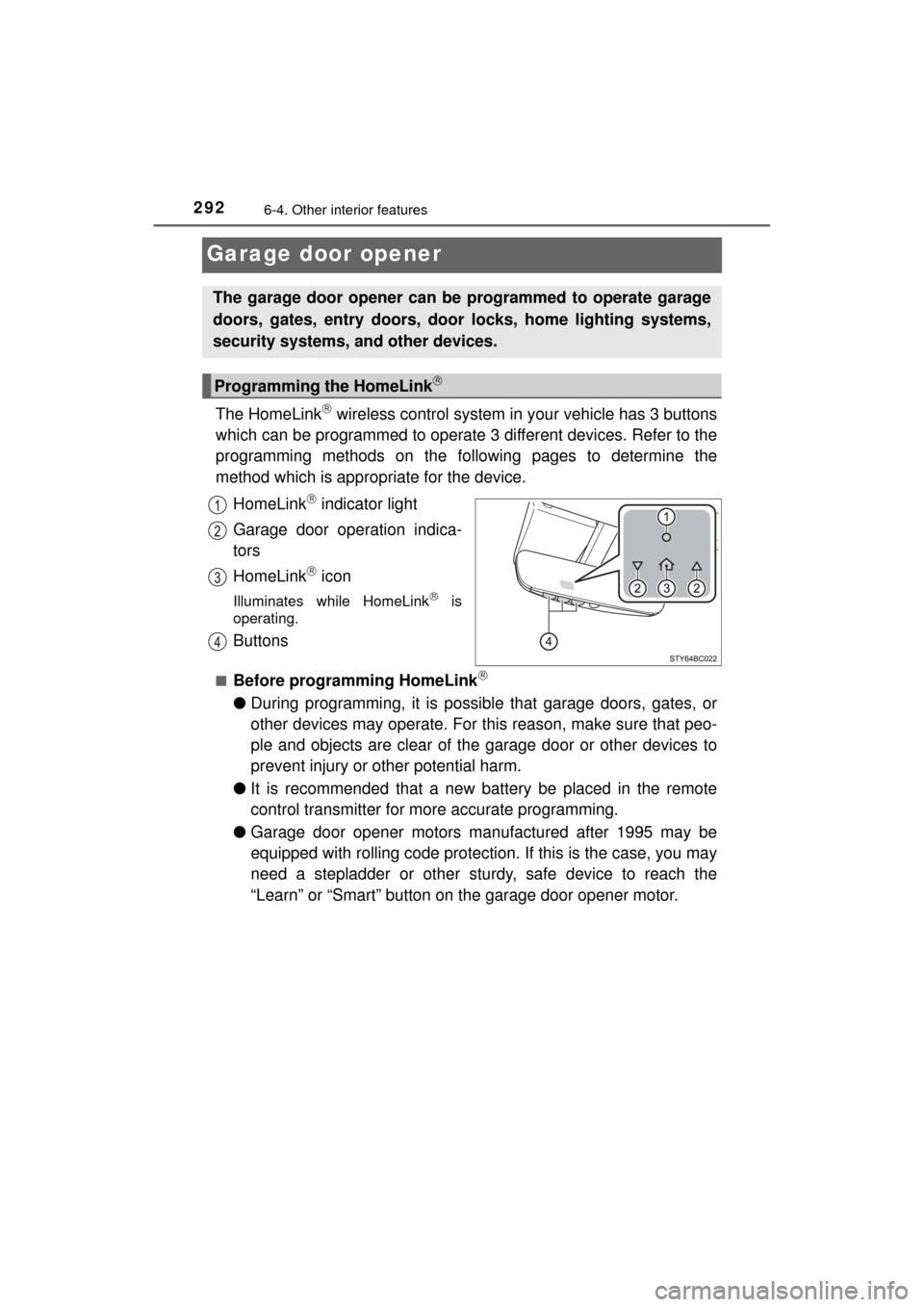
The HomeLink wireless control system in your vehicle has 3 buttons
which can be programmed to operate 3 different devices. Refer to the
programming methods on the foll owing pages to determine the
method which is appr opriate for the device.
HomeLink
indicator light
Garage door operation indica-
tors
HomeLink
icon
Illuminates while HomeLink is
operating.
Buttons
■Before programming HomeLink
● During programming, it is possible that garage doors, gates, or
other devices may operate. For this reason, make sure that peo-
ple and objects are clear of the garage door or other devices to
prevent injury or other potential harm.
● It is recommended that a new battery be placed in the remote
control transmitter for more accurate programming.
● Garage door opener motors manufactured after 1995 may be
equipped with rolling code protection. If this is the case, you may
need a stepladder or other sturdy, safe device to reach the
“Learn” or “Smart” button on the garage door opener motor.
The garage door opener can be programmed to operate garage
doors, gates, entry doors, door locks, home lighting systems,
security systems, and other devices.
Programming the HomeLink
Page 294 of 464
2946-4. Other interior features
MIRAI_OM_USA_OM62023U
Test the HomeLink operation by pressing the newly pro-
grammed button and observing the indicator light:
● Device with fixed code: If the in dicator light is solid/continuous,
programming has been completed and your garage door or
other device should operate when the HomeLink
button is
pressed and released.
● Device with rolling code: If the indicator light flashes rapidly,
your garage door opener motor (or other device) is equipped
with a rolling code. Complete the programming process by
firmly pressing and holding the programmed HomeLink
but-
ton for 2 seconds and then release the button.
● If the garage door or other device does not operate, proceed
to “Programming a rolling code system”.
Repeat the steps above to program another device for any of the
remaining HomeLink
buttons.
■Programming a rolling code system
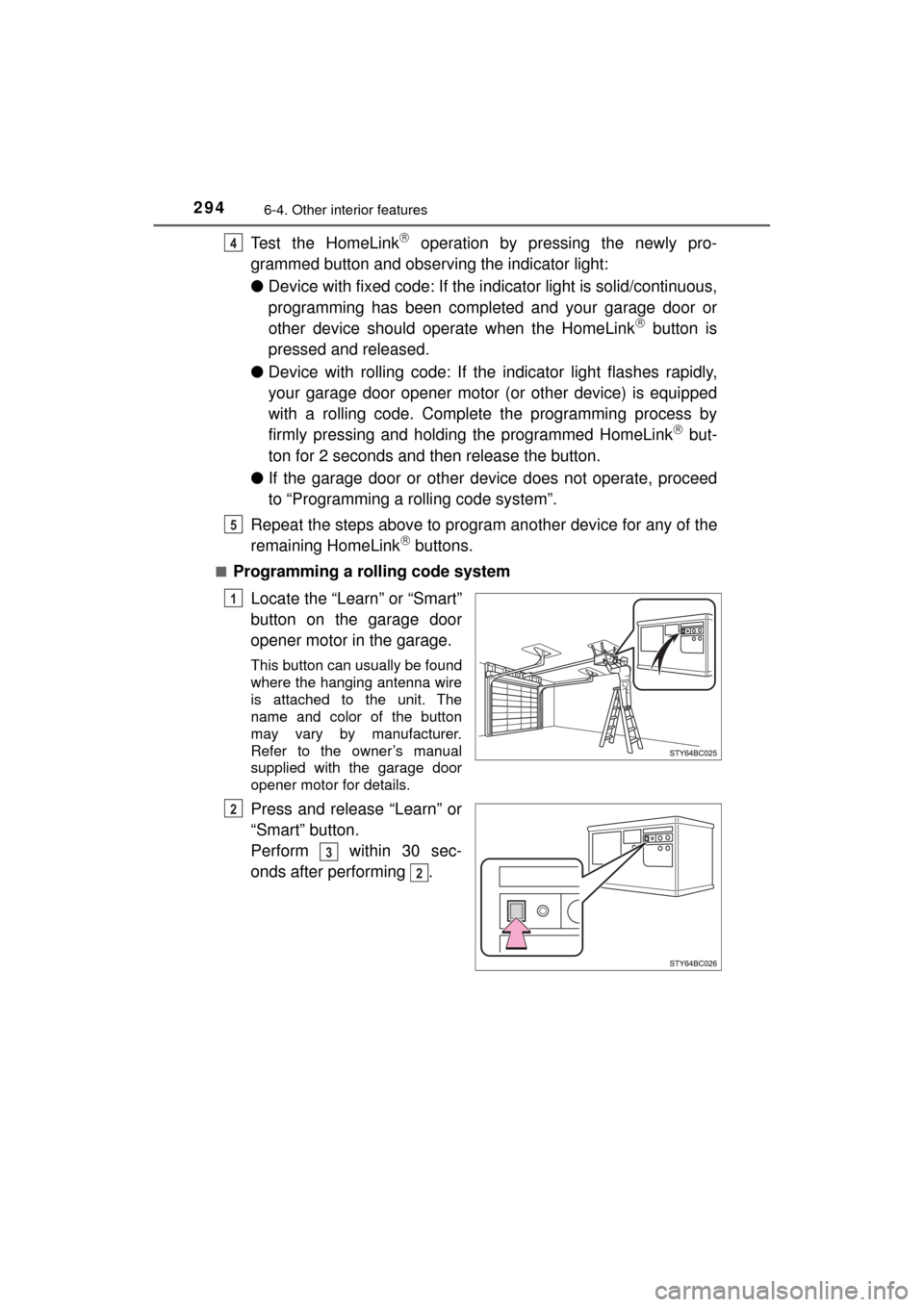
Locate the “Learn” or “Smart”
button on the garage door
opener motor in the garage.
This button can usually be found
where the hanging antenna wire
is attached to the unit. The
name and color of the button
may vary by manufacturer.
Refer to the owner’s manual
supplied with the garage door
opener motor for details.
Press and release “Learn” or
“Smart” button.
Perform within 30 sec-
onds after performing .
4
5
1
2
3
2