2017 TOYOTA MIRAI Ion
[x] Cancel search: IonPage 244 of 464
2445-5. Using the driving support systems
MIRAI_OM_USA_OM62023U
WARNING
■Cautions regarding the assist contents of the system
By means of alarms and brake control, the pre-collision system is intended
to assist the driver in avoiding collisions through the process of LOOK-
JUDGE-ACT. There are limits to the degree of assistance the system can
provide, so please keep in mind the following important points.
● Assisting the driver in watching the road
The pre-collision system is only able to detect obstacles directly in front of
the vehicle, and only within a limited range. It is not a mechanism that
allows careless or inattentive driving, and it is not a system that can assist
the driver in low-visibility conditions. It is still necessary for the driver to
pay close attention to the vehicle’s surroundings.
● Assisting the driver in making correct judgement
When attempting to estimate the possibility of a collision, the only data
available to the pre-collision system is that from obstacles it has detected
directly in front of the vehicle. Therefore, it is absolutely necessary for the
driver to remain vigilant and to determine whether or not there is a possi-
bility of collision in any given situation.
● Assisting the driver in taking action
The pre-collision system’s braking assist feature is designed to help
reduce the severity of a collision, and so only acts when the system has
judged that a collision is unavoidable. This system is not capable of auto-
matically avoiding a collision or bringing the vehicle to a stop safely with-
out appropriate operations performed by the driver. For this reason, when
encountering a dangerous situation the driver must take direct and imme-
diate action in order to ensure the safety of all involved.
Page 245 of 464

2455-5. Using the driving support systems
5
Driving
MIRAI_OM_USA_OM62023U
BSM (Blind Spot Monitor)
The Blind Spot Monitor is a system that has 2 functions;
● The Blind Spot Monitor function
Assists the driver in making t he decision when changing lanes
● The Rear Cross Traffic Alert function
Assists the driver when backing up
These functions use same sensors.
Summary of the Blind Spot Monitor
BSM outside rear view mirror indicators
Blind Spot Monitor function:
When a vehicle is detected in the blind spot, the BSM outside rear view
mirror indicator on the detected side illuminates. If the turn signal lever is
operated when a vehicle is in the blind spot, the BSM outside rear view
mirror indicator flashes.
Rear Cross Traffic Alert function:
When a vehicle approaching from the right or left rear of the vehicle is
detected, the BSM outside rear view mirror indicators flash.
Rear Cross Traffic Alert buzzer (Rear Cross Traffic Alert function
only)
When a vehicle approaching from the right or left rear of the vehicle is
detected, a buzzer sounds from behind the rear seat.
Page 246 of 464
![TOYOTA MIRAI 2017 1.G Owners Manual 2465-5. Using the driving support systems
MIRAI_OM_USA_OM62023U
ON (activate)/OFF (deactivate) can be changed by the [set-
tings display] for the Mu lti-information Display (→P. 107)
Press either](/manual-img/14/6553/w960_6553-245.png "TOYOTA MIRAI 2017 1.G Owners Manual 2465-5. Using the driving support systems
MIRAI_OM_USA_OM62023U
ON (activate)/OFF (deactivate) can be changed by the [set-
tings display] for the Mu lti-information Display (→P. 107)
Press either")
2465-5. Using the driving support systems
MIRAI_OM_USA_OM62023U
ON (activate)/OFF (deactivate) can be changed by the [set-
tings display] for the Mu lti-information Display (→P. 107)
Press either or on the
meter control switches ( →P. 108)
and select
Each press of of the meter control switches, changes ON and
OFF. When ON is selected, the BSM indicator turns on.
■ The BSM outside rear view mirror indicators visibility
When under strong sunlight, the BSM outsi de rear view mirror indicator may
be difficult to see.
■ Rear Cross Traffic Alert buzzer hearing
Rear Cross Traffic Alert function may be difficult to hear over loud noises
such as high audio volume.
■ When “Blind Spot Monitor Unavailabl e” is displayed on the multi-infor-
mation display
Water, snow mud, etc., may be built up in the vicinity of the sensor area of
bumper.( →P. 247) Removing the water, snow, mud, etc., from the vicinity of
the sensor area bumper should return it to normal. Also, the sensor may not
function normally when used in extremely hot or cold weather.
■ When “Blind Spot Monitor System Malf unction Visit Your Dealer” is dis-
played on the multi-information display
There may be a sensor malfunction or voltage abnormality. Have the vehicle
inspected at your Toyota dealer.
Turning the Blind Spot Monitor system on
1
2
Page 247 of 464

2475-5. Using the driving support systems
5
Driving
MIRAI_OM_USA_OM62023U■
Certification for the Blind Spot Monitor system
FCC ID: OAYSRR2A
This device complies with part 15 of the FCC Rules. Operation is subject to
the following two conditions:
(1) This device may not cause harmful interference, and
(2) this device must accept any interference received, including interference
that may cause undesired operation.
FCC Warning
Changes or modifications not expressly approved by the party responsible for
compliance could void the user’s authority to operate the equipment.
The Blind Spot Monitor function uses radar sensors to detect vehicles
that are traveling in an adjacent lane in the area that is not reflected in
the outside rear view mirror (the b lind spot), and advises the driver of
the vehicles existence via the BSM outside rear view mirror indicator.
WARNING
■ Handling the radar sensor
One Blind Spot Monitor sensor is installed inside the left and right side of
the vehicle rear bumper respectively. Observe the following to ensure the
Blind Spot Monitor system can function correctly.
● Do not subject the sensor or surrounding area on the bumper to a strong
impact. If the sensor moves even slightly off position, the system may mal-
function and vehicles that enter the detection area may not be detected. If
the sensor or surrounding area is subject to a strong impact, always have
the area inspected by your Toyota dealer.
● Do not disassemble the sensor.
● Do not attach accessories or stickers to the sensor or surrounding area on
the bumper.
● Do not modify the sensor or surrounding area on the bumper.
● Do not paint the rear bumper any color other than an official Toyota color.
The Blind Spot Monitor function
●Keep the sensor and its surrounding
area on the bumper clean at all times.
Page 248 of 464
2485-5. Using the driving support systems
MIRAI_OM_USA_OM62023U
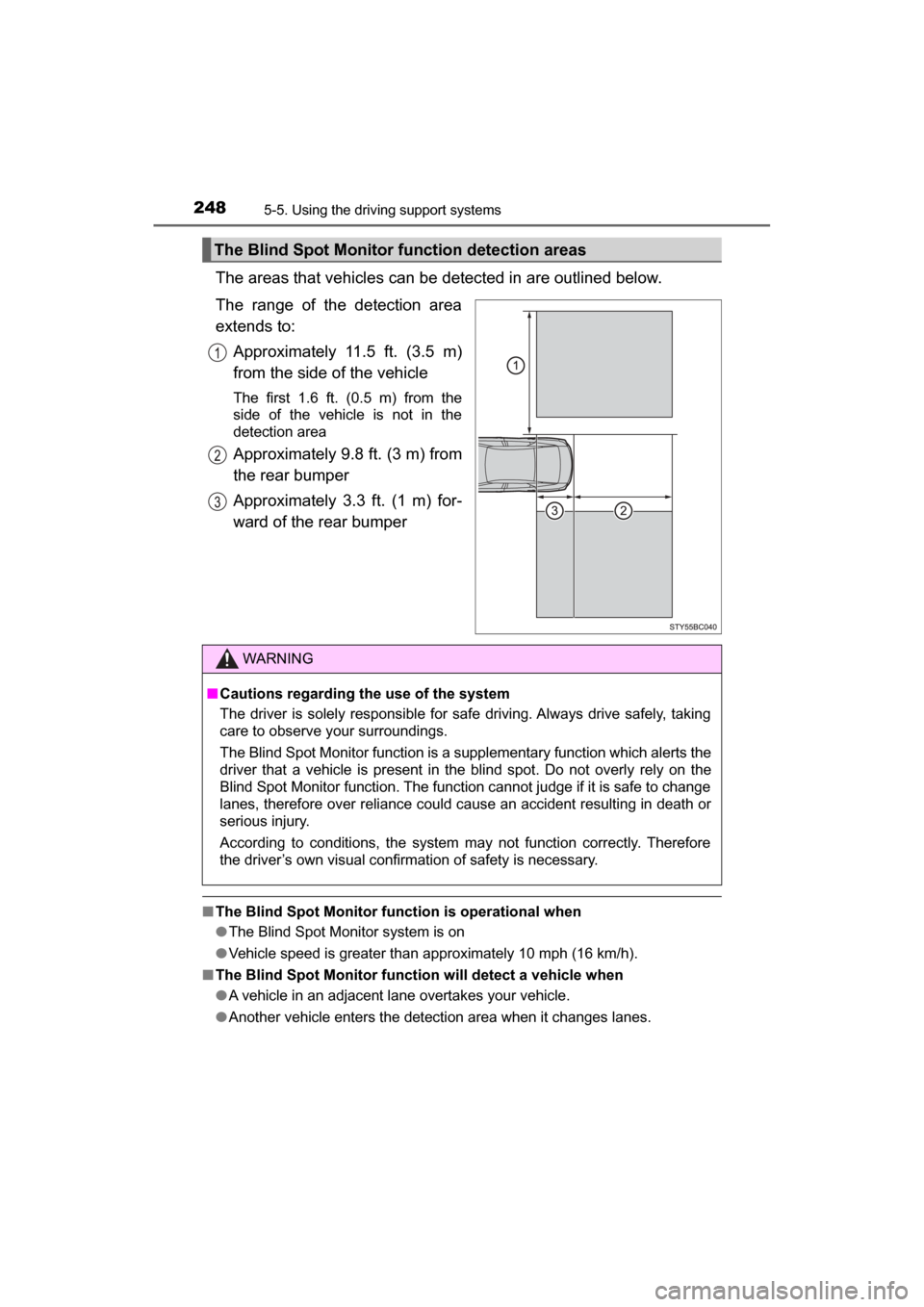
The areas that vehicles can be detected in are outlined below.
The range of the detection area
extends to: Approximately 11.5 ft. (3.5 m)
from the side of the vehicle
The first 1.6 ft. (0.5 m) from the
side of the vehicle is not in the
detection area
Approximately 9.8 ft. (3 m) from
the rear bumper
Approximately 3.3 ft. (1 m) for-
ward of the rear bumper
■The Blind Spot Monitor function is operational when
●The Blind Spot Monitor system is on
● Vehicle speed is greater than approximately 10 mph (16 km/h).
■ The Blind Spot Monitor function will detect a vehicle when
●A vehicle in an adjacent lane overtakes your vehicle.
● Another vehicle enters the detection area when it changes lanes.
The Blind Spot Monitor function detection areas
WARNING
■Cautions regarding the use of the system
The driver is solely responsible for safe driving. Always drive safely, taking
care to observe your surroundings.
The Blind Spot Monitor function is a supplementary function which alerts the
driver that a vehicle is present in the blind spot. Do not overly rely on the
Blind Spot Monitor function. The function cannot judge if it is safe to change
lanes, therefore over reliance could cause an accident resulting in death or
serious injury.
According to conditions, the system may not function correctly. Therefore
the driver’s own visual confirmation of safety is necessary.
Page 249 of 464
2495-5. Using the driving support systems
5
Driving
MIRAI_OM_USA_OM62023U■
Conditions under which the Blind Spot Monitor function will not detect a
vehicle
The Blind Spot Monitor function is not designed to detect the following types
of vehicles and/or objects:
● Small motorcycles, bicycles, pedestrians, etc.
*
●Vehicles traveling in the opposite direction
● Guardrails, walls, signs, parked vehi cles and similar stationary objects
*
●Following vehicles that are in the same lane*
●Vehicles driving 2 lanes across from your vehicle*
*
: Depending on conditions, detection of a vehicle and/or object may occur.
■ Conditions under which the Blind Spot Monitor function may not func-
tion correctly
●The Blind Spot Monitor function may not detect vehicles correctly in the fol-
lowing conditions:
• During bad weather such as heavy rain, fog, snow, etc.
• When ice or mud, etc., is attached to the rear bumper
• When driving on a road surface that is wet due to rain, standing water,
etc.
• When there is a significant difference in speed between your vehicle and the vehicle that enters the detection area
• When a vehicle is in the detection area from a stop and remains in the detection area as your vehicle accelerates
• When driving up or down consecutive steep inclines, such as hills, a dip
in the road, etc.
• When multiple vehicles approach with only a small gap between each
vehicle
• When vehicle lanes are wide, and the vehicle in the next lane is too far away from your vehicle
• When the vehicle that enters the detection area is traveling at about the same speed as your vehicle
• When there is a significant difference in height between your vehicle and
the vehicle that enters the detection area
• Directly after the Blind Spot Monitor system is on
● Instances of the Blind Spot Monitor function unnecessarily detecting a vehi-
cle and/or object may increase under the following conditions:
• When there is only a short distance between your vehicle and a guardrail,
wall, etc.
• When there is only a short distance between your vehicle and a following
vehicle
• When vehicle lanes are narrow and a vehicle driving 2 lanes across from your vehicle enters the detection area
• When items such as a bicycle carrier are installed on the rear of the vehi- cle
Page 250 of 464
2505-5. Using the driving support systems
MIRAI_OM_USA_OM62023U
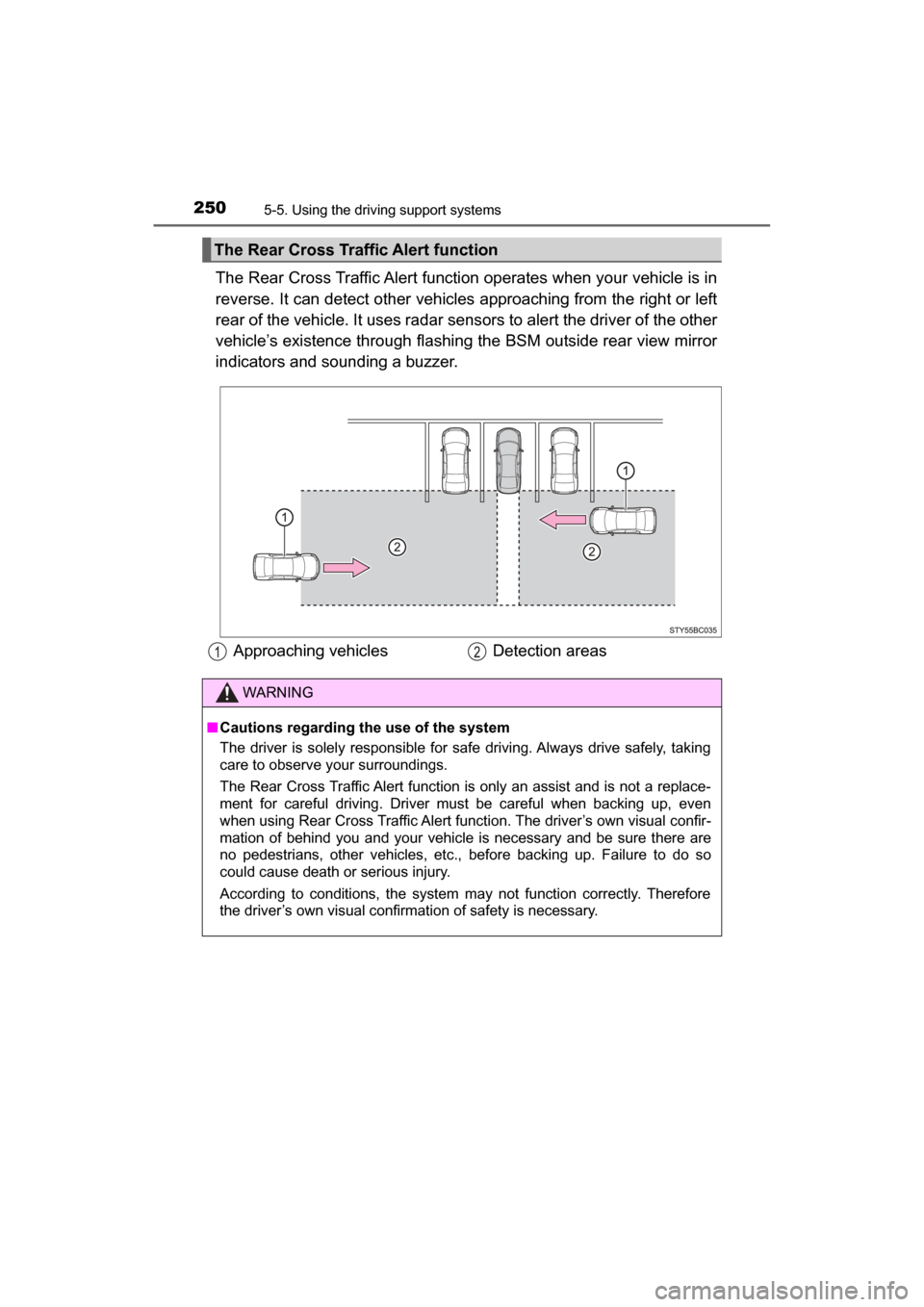
The Rear Cross Traffic Alert function operates when your vehicle is in
reverse. It can detect other vehicles approaching from the right or left
rear of the vehicle. It uses radar sens ors to alert the driver of the other
vehicle’s existence through flashing the BSM outside rear view mirror
indicators and sounding a buzzer.
The Rear Cross Traffic Alert function
Approaching vehicles Detection areas
WARNING
■Cautions regarding the use of the system
The driver is solely responsible for safe driving. Always drive safely, taking
care to observe your surroundings.
The Rear Cross Traffic Alert function is only an assist and is not a replace-
ment for careful driving. Driver must be careful when backing up, even
when using Rear Cross Traffic Alert function. The driver’s own visual confir-
mation of behind you and your vehicle is necessary and be sure there are
no pedestrians, other vehicles, etc., before backing up. Failure to do so
could cause death or serious injury.
According to conditions, the system may not function correctly. Therefore
the driver’s own visual confirmation of safety is necessary.
Page 251 of 464
2515-5. Using the driving support systems
5
Driving
MIRAI_OM_USA_OM62023U
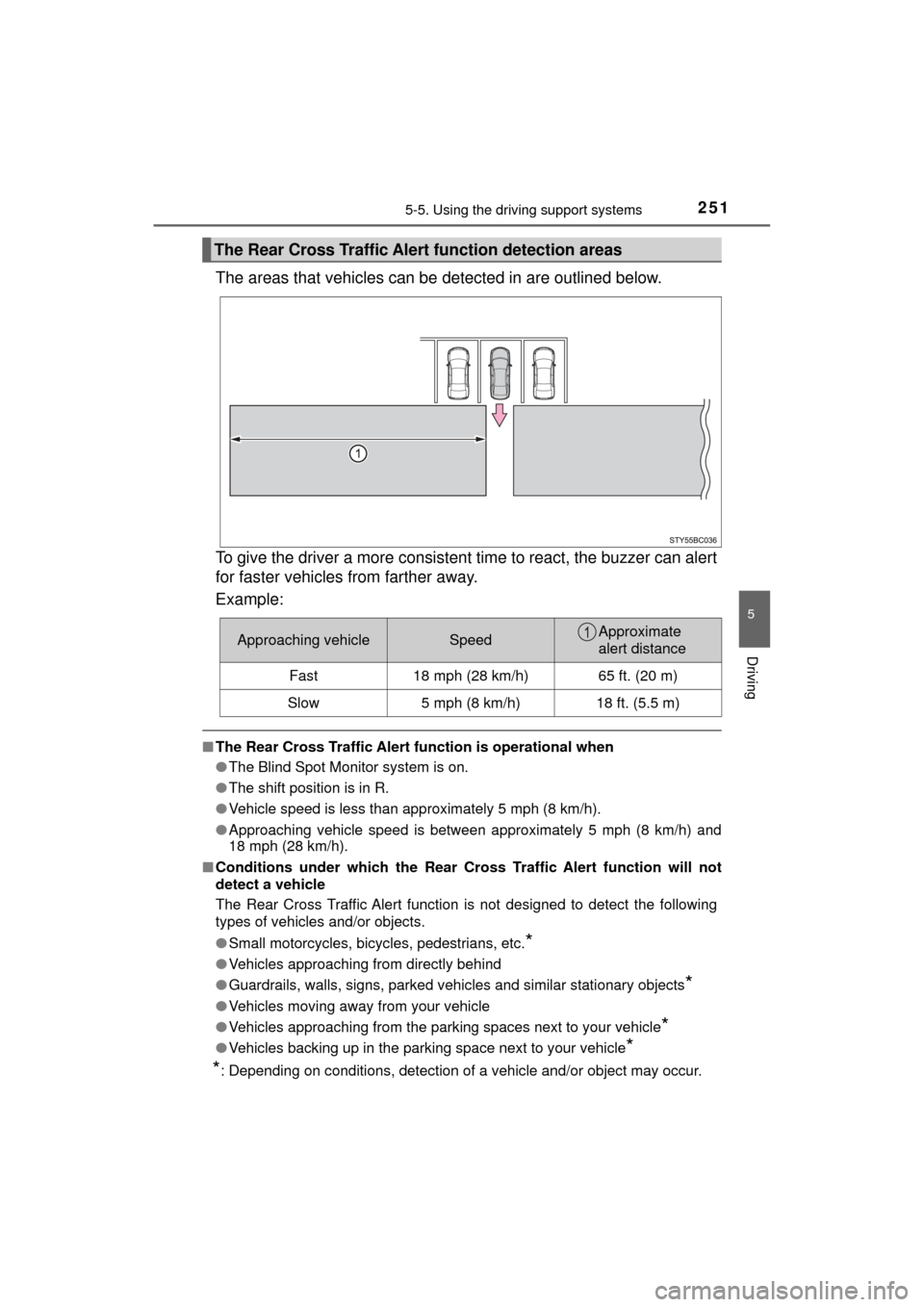
The areas that vehicles can be detected in are outlined below.
To give the driver a more consistent time to react, the buzzer can alert
for faster vehicles from farther away.
Example:
■ The Rear Cross Traffic Alert function is operational when
● The Blind Spot Monitor system is on.
● The shift position is in R.
● Vehicle speed is less than approximately 5 mph (8 km/h).
● Approaching vehicle speed is between approximately 5 mph (8 km/h) and
18 mph (28 km/h).
■ Conditions under which the Rear Cr oss Traffic Alert function will not
detect a vehicle
The Rear Cross Traffic Alert function is not designed to detect the following
types of vehicles and/or objects.
● Small motorcycles, bicycles, pedestrians, etc.
*
●Vehicles approaching from directly behind
● Guardrails, walls, signs, parked vehi cles and similar stationary objects
*
●Vehicles moving away from your vehicle
● Vehicles approaching from the parking spaces next to your vehicle
*
●Vehicles backing up in the parking space next to your vehicle*
*
: Depending on conditions, detection of a vehicle and/or object may occur.
The Rear Cross Traffic Aler t function detection areas
Approaching vehicleSpeedApproximate
alert distance
Fast18 mph (28 km/h)65 ft. (20 m)
Slow5 mph (8 km/h)18 ft. (5.5 m)