2017 TOYOTA HIGHLANDER ESP
[x] Cancel search: ESPPage 263 of 732
2634-5. Using the driving support systems
4
Driving
HIGHLANDER_U (OM0E017U)
WARNING
■Limitations of the pre-collision system
● The driver is solely responsible for safe driving. Always drive safely, taking
care to observe your surroundings.
Do not use the pre-collision system instead of normal braking operations
under any circumstances. This system will not prevent collisions or lessen
collision damage or injury in every situation. Do not overly rely on this sys-
tem. Failure to do so may lead to an accident, resulting in death or serious
injury.
● Although this system is designed to help avoid a collision or help reduce
the impact of the collision, its effectiveness may change according to vari-
ous conditions, therefore the system may not always be able to achieve
the same level of performance.
Read the following conditions carefully. Do not overly rely on this system
and always drive carefully.
• Conditions under which the system may operate even if there is no pos-
sibility of a collision: →P. 268
• Conditions under which the system may not operate properly: →P. 271
● Do not attempt to test the operation of the pre-collision system yourself, as
the system may not operate properly, possibly leading to an accident.
■ Pre-collision braking
● When the pre-collision braking function is operating, a large amount of
braking force will be applied.
● If the vehicle is stopped by the operation of the pre-collision braking func-
tion, the pre-collision braking func tion operation will be canceled after
approximately 2 seconds. Depress the brake pedal as necessary.
● The pre-collision braking function may not operate if certain operations are
performed by the driver. If the accelerator pedal is being depressed
strongly or the steering wheel is being turned, the system may determine
that the driver is taking evasive action and possibly prevent the pre-colli-
sion braking function from operating.
● In some situations, while the pre-collision braking function is operating,
operation of the function may be canceled if the accelerator pedal is
depressed strongly or the steering wheel is turned and the system deter-
mines that the driver is taking evasive action.
● If the brake pedal is being depressed, the system may determine that the
driver is taking evasive action and possibly delay the operation timing of
the pre-collision braking function.
Page 277 of 732
2774-5. Using the driving support systems
4
Driving
HIGHLANDER_U (OM0E017U)
WARNING
■Before using LDA system
Do not rely solely upon the LDA system. LDA is not a system which auto-
matically drives the vehicle or reduces the amount of attention that must be
paid to the area in front of the vehicle. The driver must always assume full
responsibility for driving safely by always paying careful attention to the sur-
rounding conditions and operate the steering wheel to correct the path of
the vehicle. Also, make sure to take adequate breaks when fatigued, such
as from driving for a long period of time.
Failure to perform appropriate driving operations and pay careful attention
may lead to an accident, resulting in death or serious injury.
■ To avoid operating LDA system by mistake
When not using the LDA system, use the LDA switch to turn the system off.
■ Situations unsuitable for LDA system
Do not use the LDA system in the following situations.
The system may not operate properly and lead to an accident, resulting in
death or serious injury.
● A spare tire, tire chains, etc., are equipped.
● When the tires have been excessively worn, or when the tire inflation pres-
sure is low.
● Tires which differ by structure, manufacturer, brand or tread pattern are
used.
● Objects or patterns that could be mistaken for white (yellow) lines are
present on the side of the road (guardrails, curbs, reflective poles, etc.).
● Vehicle is driven on a snow-covered road.
● White (yellow) lines are difficult to see due to rain, snow, fog, dust, etc.
● Asphalt repair marks, white (yellow) line marks, etc., are present due to
road repair.
● Vehicle is driven in a temporary lane or restricted lane due to construction
work.
● Vehicle is driven on a road surface which is slippery due to rainy weather,
fallen snow, freezing, etc.
● Vehicle is driven in traffic lanes other than on highways and freeways.
● Vehicle is driven in a construction zone.
● Vehicle is towing a trailer or another vehicle.
Page 286 of 732
2864-5. Using the driving support systems
HIGHLANDER_U (OM0E017U)
WARNING
■Before using dynamic radar cruise control
Driving safely is the sole responsibility of the driver. Do not rely solely on the
system, and drive safely by always paying careful attention to your sur-
roundings.
The dynamic radar cruise control provides driving assistance to reduce the
driver's burden. However, there are limitations to the assistance provided.
Even when the system is functioning normally, the condition of the preced-
ing vehicle as detected by the system may differ from the condition
observed by the driver. Therefore, th e driver must always remain alert,
assess the danger of each situation and drive safely. Relying on this system
or assuming the system ensures safety while driving can lead to an acci-
dent, resulting in death or serious injury.
■ Cautions regarding the driving assist systems
Observe the following precautions, as there are limitations to the assistance
provided by the system.
Failure to do so may cause an accident resulting in death or serious injury.
● Assisting the driver to measure following distance
The dynamic radar cruise control is only intended to help the driver in
determining the following distance between the driver’s own vehicle and a
designated vehicle traveling ahead. It is not a mechanism that allows care-
less or inattentive driving, and it is not a system that can assist the driver in
low-visibility conditions. It is still necessary for driver to pay close attention
to the vehicle’s surroundings.
● Assisting the driver to judge proper following distance
The dynamic radar cruise control determines whether the following dis-
tance between the driver’s own vehicle and a designated vehicle traveling
ahead is within a set range. It is not capable of making any other type of
judgement. Therefore, it is absolutely necessary for the driver to remain
vigilant and to determine whether or not there is a possibility of danger in
any given situation.
● Assisting the driver to operate the vehicle
The dynamic radar cruise control has limited capability to prevent or avoid
a collision with a vehicle traveling ahead. Therefore, if there is ever any
danger, the driver must take immediate and direct control of the vehicle
and act appropriately in order to ensure the safety of all involved.
■ To avoid inadvertent dynamic radar cruise control activation
Switch the dynamic radar cruise control off using the “ON-OFF” button
when not in use.
Page 288 of 732

2884-5. Using the driving support systems
HIGHLANDER_U (OM0E017U)
This mode employs a radar sensor to detect the presence of vehicles
up to approximately 320 ft. (100 m) ahead, determines the current
vehicle-to-vehicle following distance, and operates to maintain a suit-
able following distance from the vehicle ahead.
Note that vehicle-to-vehicle distance will close in when traveling on long
downhill slopes.
Example of constant speed cruising
When there are no vehicles ahead
The vehicle travels at the speed set by the driver. The desired vehicle-to-
vehicle distance can also be set by operating the vehicle-to-vehicle dis-
tance switch.
Example of deceleration cruising and follow-up cruising
When a preceding vehicle driving slower than the set speed
appears
When a vehicle is detected running ahead of you, the system automatically
decelerates your vehicle. When a greater reduction in vehicle speed is
necessary, the system applies the brakes (the stop lights will come on at
this time). The system will respond to changes in the speed of the vehicle
ahead in order to maintain the vehicle-to-vehicle distance set by the driver.
Approach warning warns you when the system cannot decelerate suffi-
ciently to prevent your vehicle from closing in on the vehicle ahead.
Example of acceleration
When there are no longer any preceding vehicles driving slower
than the set speed
The system accelerates until the set speed is reached. The system then
returns to constant speed cruising.
Driving in vehicle-to-vehicle distance control mode
1
2
3
Page 291 of 732
2914-5. Using the driving support systems
4
Driving
HIGHLANDER_U (OM0E017U)
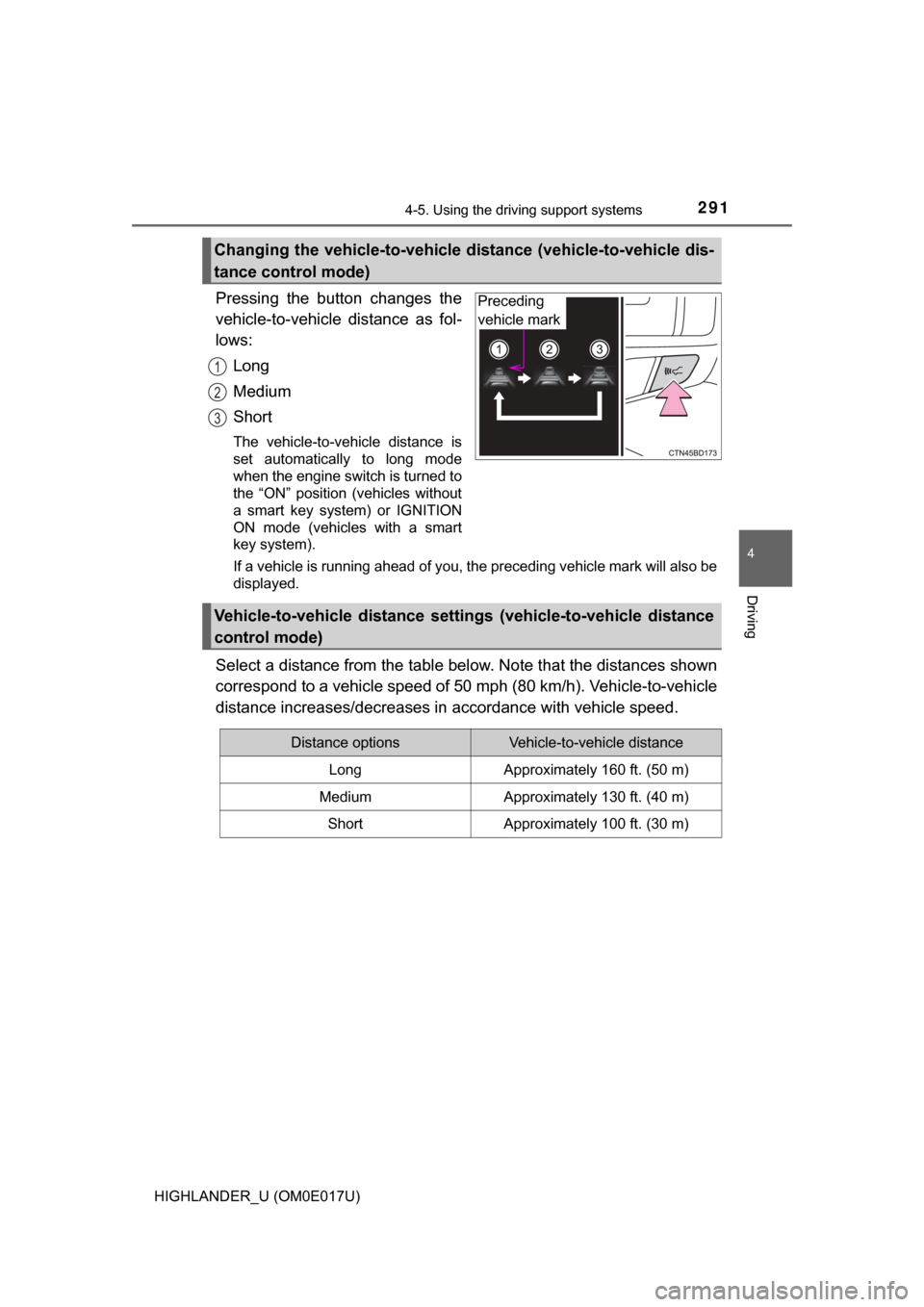
Pressing the button changes the
vehicle-to-vehicle distance as fol-
lows:Long
Medium
Short
The vehicle-to-vehicle distance is
set automatically to long mode
when the engine switch is turned to
the “ON” position (vehicles without
a smart key system) or IGNITION
ON mode (vehicles with a smart
key system).
If a vehicle is running ahead of you, the preceding vehicle mark will also be
displayed.
Select a distance from the table bel ow. Note that the distances shown
correspond to a vehicle speed of 50 mph (80 km/h). Vehicle-to-vehicle
distance increases/decreases in accordance with vehicle speed.
Changing the vehicle-to-vehicle di stance (vehicle-to-vehicle dis-
tance control mode)
Preceding
vehicle mark
1
2
3
Vehicle-to-vehicle distance settings (vehicle-to-vehicle distance
control mode)
Distance optionsVehicle-to-vehicle distance
LongApproximately 160 ft. (50 m)
MediumApproximately 130 ft. (40 m)
ShortApproximately 100 ft. (30 m)
Page 298 of 732
2984-5. Using the driving support systems
HIGHLANDER_U (OM0E017U)
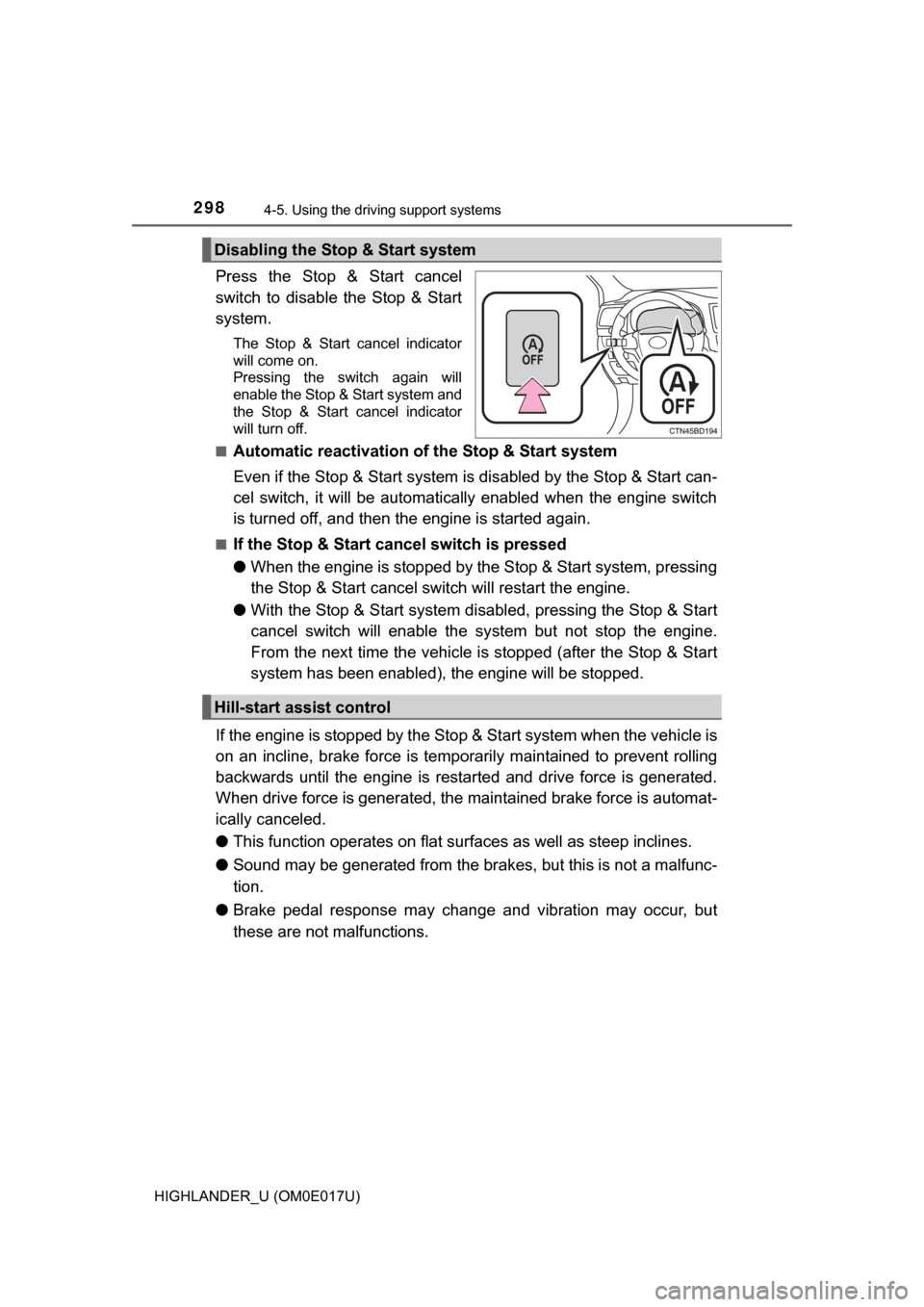
Press the Stop & Start cancel
switch to disable the Stop & Start
system.
The Stop & Start cancel indicator
will come on.
Pressing the switch again will
enable the Stop & Start system and
the Stop & Start cancel indicator
will turn off.
■
Automatic reactivation of the Stop & Start system
Even if the Stop & Start system is disabled by the Stop & Start can-
cel switch, it will be automatically enabled when the engine switch
is turned off, and then t he engine is started again.
■If the Stop & Start cancel switch is pressed
●When the engine is stopped by the Stop & Start system, pressing
the Stop & Start cancel sw itch will restart the engine.
● With the Stop & Start system di sabled, pressing the Stop & Start
cancel switch will enable the sy stem but not stop the engine.
From the next time the vehicle is stopped (after the Stop & Start
system has been enabled), the engine will be stopped.
If the engine is stopped by the Stop & Start system when the vehicle is
on an incline, brake force is tem porarily maintained to prevent rolling
backwards until the engine is restar ted and drive force is generated.
When drive force is generated, the ma intained brake force is automat-
ically canceled.
● This function operates on flat surfaces as well as steep inclines.
● Sound may be generated from the br akes, but this is not a malfunc-
tion.
● Brake pedal response may change and vibration may occur, but
these are not malfunctions.
Disabling the Stop & Start system
Hill-start assist control
Page 319 of 732
3194-5. Using the driving support systems
4
Driving
HIGHLANDER_U (OM0E017U)■
Certification for the Blind Spot Monitor
For vehicles sold in the U.S.A.
FCC ID : OAYSRR3A
This device complies with part 15 of the FCC Rules. Operation is subject to
the following two conditions:
(1)This device may not cause harmful interference, and
(2)this device must accept any interference received, including interference
that may cause undesired operation.
FCC Warning
Changes or modifications not expressly approved by the party responsible for
compliance could void the user's authority to operate the equipment.
For vehicles sold in Canada
Applicable law : Canada 310
This device complies with Industry Canada licence-exempt RSS standard(s).
Operation is subject to the following two conditions: (1) this device may not
cause interference, and (2) this device must accept any interference, includ-
ing interference that may cause undesired operation of the device.
Frequency bands : 24.05 - 24.25GHz
Output power : less than 20 milliwatts
Droit applicable : Canada 310
Le présent appareil est conforme aux CNR d’Industrie Canada applic\
ables
aux appareils radio exempts de licenc e. L’exploitation est autorisée aux deux
conditions suivantes : (1) l’appareil ne doit pas produire de brouillage, et (2)
l’utilisateur de l’appareil doit accepter tout brouillage radioélectrique subi,
même si le brouillage est susceptible d’en compromettre le fonctionnement.
Bandes de fréquences : 24.05 - 24.25GHz
Puissance émise : Moins de 20 milliwatts
Page 320 of 732

3204-5. Using the driving support systems
HIGHLANDER_U (OM0E017U)
WARNING
■Handling the radar sensor
Blind Spot Monitor sensors are installed behind the left and right sides of the
rear bumper respectively. Observe the following to ensure the Blind Spot
Monitor can function correctly.
● Do not subject a sensor or its surrounding area on the rear bumper to a
strong impact.
If a sensor is moved even slightly off position, the system may malfunction
and vehicles may not be detected correctly.
In the following situations, have your vehicle inspected by your Toyota
dealer.
• A sensor or its surrounding area is subject to a strong impact.
• If the surrounding area of a sensor is scratched or dented, or part of
them has become disconnected.
● Do not disassemble the sensor.
● Do not attach stickers to the sensor or surrounding area on the rear
bumper.
● Do not modify the sensor or surrounding area on the rear bumper.
● Do not paint the rear bumper any color other than an official Toyota color.
●Keep the sensors and the surrounding
areas on the rear bumper clean at all
times.
If a sensor or its surrounding area on
the rear bumper is dirty or covered with
snow, the Blind Spot Monitor may not
operate and a warning message ( →P.
591) will be displayed. In this situation,
clear off the dirt or snow and drive the
vehicle with the operation conditions of
the BSM function ( →P. 322) satisfied for
approximately 10 minutes. If the warn-
ing message does not disappear, have
the vehicle inspected by your Toyota
dealer.