2017 TOYOTA HIGHLANDER ESP
[x] Cancel search: ESPPage 352 of 732

3525-1. Basic Operations
HIGHLANDER_U (OM0E017U)
By touching the screen with your finger, you can control Entune Audio,
etc.
■Drag*
Touch the screen with your finger, and move the screen to the
desired position.
● Scrolling the lists
■Flick*
Touch the screen with your finger and quickly move the screen by
flicking your finger.
●Scrolling the main screen page
*: The above operations may not be performed on all screens.
■Capacitive touch switches
The control panel uses capacitive touch sensors.
●In the following cases, incorrect operation or non-response may occur.
• If the operating section is dirty or has liquid attached to it, incorrect opera-
tion or non-response may occur.
• If the operating section receives electromagnetic waves, incorrect opera-
tion or non-response may occur.
• If wearing gloves during operation, non-response may occur.
• If fingernails are used to operate the system, non-response may occur.
• If a touch pen is used to operate the system, non-response may occur.
• If the palm of your hand touches the operating section during operation, incorrect operation may occur.
• If the palm of your hand touches the operating section, incorrect opera- tion may occur.
• If operations are performed quickly, non-response may occur.
● Please do not reach your hand to the part of button when Entune Audio turn
on. Because the button may become unresponsive for a while. But it will be
back to normal for a given time even if Entune Audio turned on under the
condition.
Operating the touch screen
Page 359 of 732

3595-2. Setup
5
Audio system
HIGHLANDER_U (OM0E017U)
Press the “SETUP” button.
Select “General” on the “Setup”
screen.“English”, “Français” or
“Español” can be selected.
On/off can be selected to
sound beeps.
Select to change the screen
color.
Select to change the key-
board layout.
Select to change the capaci-
tive touch button sensor sen-
sitivity.
The animation effect for the screen can be set to on/off.
Select to delete personal data ( →P. 359)
Select to update program versions. For details, contact your
Toyota dealer.
Select to display the software info rmation. Notices related to third
party software used in this produc t are enlisted. (This includes
instructions for obta ining such software, where applicable.)
■To return to the default volume settings
Select “Default”, and then “Yes”.
Select “Delete Personal Data” on the “General Settings” screen.
Select “Delete”.
Check carefully beforehand, as data cannot be retrieved once deleted.
A confirmation screen will be displayed. Select “Yes”.
The following personal data will be deleted or changed to its default
settings.
• General settings
• Audio settings
• Phone settings
General settings
Settings are available for adjusting the operation sounds,
screen animation, etc.
Screen for general settings
1
2
1
2
3
4
5
Delete personal data
6
7
8
9
1
2
3
Page 376 of 732

■About iPod
●“Made for iPod”, “Made for iPhone” and “Made for iPad”\
mean that an elec-
tronic accessory has been designed to")
3765-6. Using an external device
HIGHLANDER_U (OM0E017U)
■About iPod
●“Made for iPod”, “Made for iPhone” and “Made for iPad”\
mean that an elec-
tronic accessory has been designed to connect specifically to iPod or
iPhone, or iPad, respectively, and has been certified by the developer to
meet Apple performance standards.
● Apple is not responsible for the operation of this device or its compliance
with safety and regulatory standards. Please note that the use of this acces-
sory with iPod, iPhone or iPad may affect wireless performance.
● iPad, iPhone, iPod, iPod classic, iPod nano, and iPod touch are trademarks
of Apple Inc., registered in the U.S. and other countries. Lightning is a trade-
mark of Apple Inc.
■ iPod cover art
●Depending on the iPod and songs in the iPod, iPod cover art may be dis-
played.
● This function can be changed to on/off. ( →P. 360)
● It may take time to display iPod cover art, and the iPod may not be operated
while the cover art display is in process.
● Only iPod cover art that is saved in JPEG format can be displayed.
■ iPod functions
●When an iPod is connected and the audio source is changed to iPod mode,
the iPod will resume play from the same point in which it was last used.
● Depending on the iPod that is connected to the system, certain functions
may not be available. If a function is unavailable due to a malfunction (as
opposed to a system specification), disconnecting the device and recon-
necting it may resolve the problem.
● While connected to the system, the iPod cannot be operated with its own
controls. It is necessary to use the controls of the vehicle's Entune Audio
instead.
● When the battery level of an iPod is very low, the iPod may not operate. If
so, charge the iPod before use.
● Compatible models ( →P. 378)
Page 380 of 732

3805-6. Using an external device
HIGHLANDER_U (OM0E017U)
■USB memory functions
●Depending on the USB memory device that is connected to the system, the
device itself may not be operable and certain functions may not be avail-
able. If the device is inoperable or a function is unavailable due to a mal-
function (as opposed to a system specification), disconnecting the device
and reconnecting it may resolve the problem.
● If the USB memory device still does not begin operation after being discon-
nected and reconnected, format the memory.
■ Error messages for USB memory
■ USB memory
●Compatible devices
USB memory device that can be used for MP3, WMA and AAC playback.
● Compatible device formats
The following device format can be used:
• USB communication format: USB2.0 HS (480Mbps) and FS (12 Mbps)
• File system format: FAT16/32 (Windows)
• Correspondence class: Mass storage class
MP3, WMA and AAC files written to a device with any format other than
those listed above may not play correctly, and their file names and folder
names may not be displayed correctly.
Items related to standards and limitations are as follows:
• Maximum directory hierarchy: 8 levels
• Maximum number of folders in a device: 3000 (including the root)
• Maximum number of files in a device: 9999
• Maximum number of files per folder: 255
● MP3, WMA and AAC files
MP3 (MPEG Audio LAYER 3) is a standard audio compression format.
Files can be compressed to approximately 1/10 of their original size usi\
ng
MP3 compression.
WMA (Windows Media Audio) is a Microsoft audio compression format. This
format compresses audio data to a size smaller than that of the MP3 format.
AAC is short for Advanced Audio Coding and refers to an audio compression
technology standard used with MPEG2 and MPEG4.
MP3, WMA and AAC file and media/fo rmats compatibility are limited.
MessageCause/Correction procedures
“Connection error. Please
consult your Owner’s Man-
ual for instructions on how
to connect the USB device.”
This indicates a problem with the USB mem-
ory device or its connection.
No music files found.This indicates that no MP3/WMA/AAC files
are included on the USB memory device.
Page 384 of 732
384
HIGHLANDER_U (OM0E017U)
5-7. Connecting Bluetooth®
■About Bluetooth®
Preparations to use wireless communica-
tion
The following can be performed using Bluetooth® wireless com-
munication:
■A portable audio player can be operated and listened to via
Entune Audio
■Hands-free phone calls can be made via a cellular phone
In order to use wireless communication, register and connect a
Bluetooth
® device by performing the following procedures.
The Bluetooth® word mark and logos are
registered trademarks owned Bluetooth
SIG, Inc. and any use of such marks by
PIONEER CORPORATION is under
license. Other trademarks and trade
names are those of their respective own-
ers.
Page 385 of 732

3855-7. Connecting Bluetooth®
5
Audio system
HIGHLANDER_U (OM0E017U)■
Certifications for the Bluetooth
(caution)
FCC ID: AJDK068
• This device complies with Part 15 of FCC Rules and Industry Canadalicence-exempt RSS standard(s). Operation is subject to the following
two conditions: (1) this device may not cause interference, and (2) this
device must accept any interference, including interference that may
cause undesired operation of this device.
• RF Exposure Compliance: This equipment complies with FCC/IC radia- tion exposure limits set forth for an uncontrolled environment and meets\
the FCC radio frequency (RF) Exposure Guidelines and RSS-102 of the
IC radio frequency (RF) Exposure rules. This equipment has very low lev-
els of RF energy that it deemed to comply without maximum permissive
exposure evaluation (MPE). But it is desirable that it should be installed
and operated keeping the radiator at least 20 cm or more away from per-
son's body.
• Co-location: This transmitter must not be co-located or operated in con- junction with any other antenna or transmitter.
• Information to User - Alteration or modifications carried out without appro-
priate authorization may invalidate the user's right to operate the equip-
ment.
IC ID: 775E-K068
• This device complies with Part 15 of FCC Rules and Industry Canada’s licence-exempt RSSs. Operation is subject to the following two condi-
tions: (1) This device may not cause interference; and (2) This device
must accept any interference, including interference that may cause
undesired operation of the device.
Le présent appareil est conforme aux la partie 15 des règles de la\
FCC et
CNR d'lndustrie Canada applicables aux appareils radio exempts de
licence. L'exploitation est autorisée aux deux conditions suivantes: (1)
l'appareil ne doit pas produire de brouill age; (2) l'utilisateur de l'appareil
doit accepter tout brouillage radioél ectrique subi, même si le brouillage
est susceptible d'en compromettre le fonctionnement.
• This equipment complies with FCC/IC radiation exposure limits set forth for an uncontrolled environment and meets the FCC radio frequency (RF)
Exposure Guidelines and RSS-102 of the IC radio frequency (RF) Expo-
sure rules. This equipment has very low levels of RF energy that it
deemed to comply without maximum permissive exposure evaluation
(MPE). But it is desirable that it should be installed and operated keeping
the radiator at least 20 cm or more away from person's body.
Cet équipement est conforme aux limites d'exposition aux rayonnements
énoncées pour un environnement non contrôlé et respecte les règles les
radioélectriques (RF) de la FCC lignes directrices d'exposition et d'expo-
sition aux fréquences radioélectriques (RF) CNR-102 de I'IC. Cet équipe-
ment émet une énergie RF très faible qui est considérée conforme sans
évaluation de l’exposition maximale autorisée. Cependant, cet équipe-
ment doit être installé et utilisé en gardant une distance de 2\
0 cm ou plus
entre le dispositif rayonnant et le corps.
Page 390 of 732
3905-7. Connecting Bluetooth®
HIGHLANDER_U (OM0E017U)
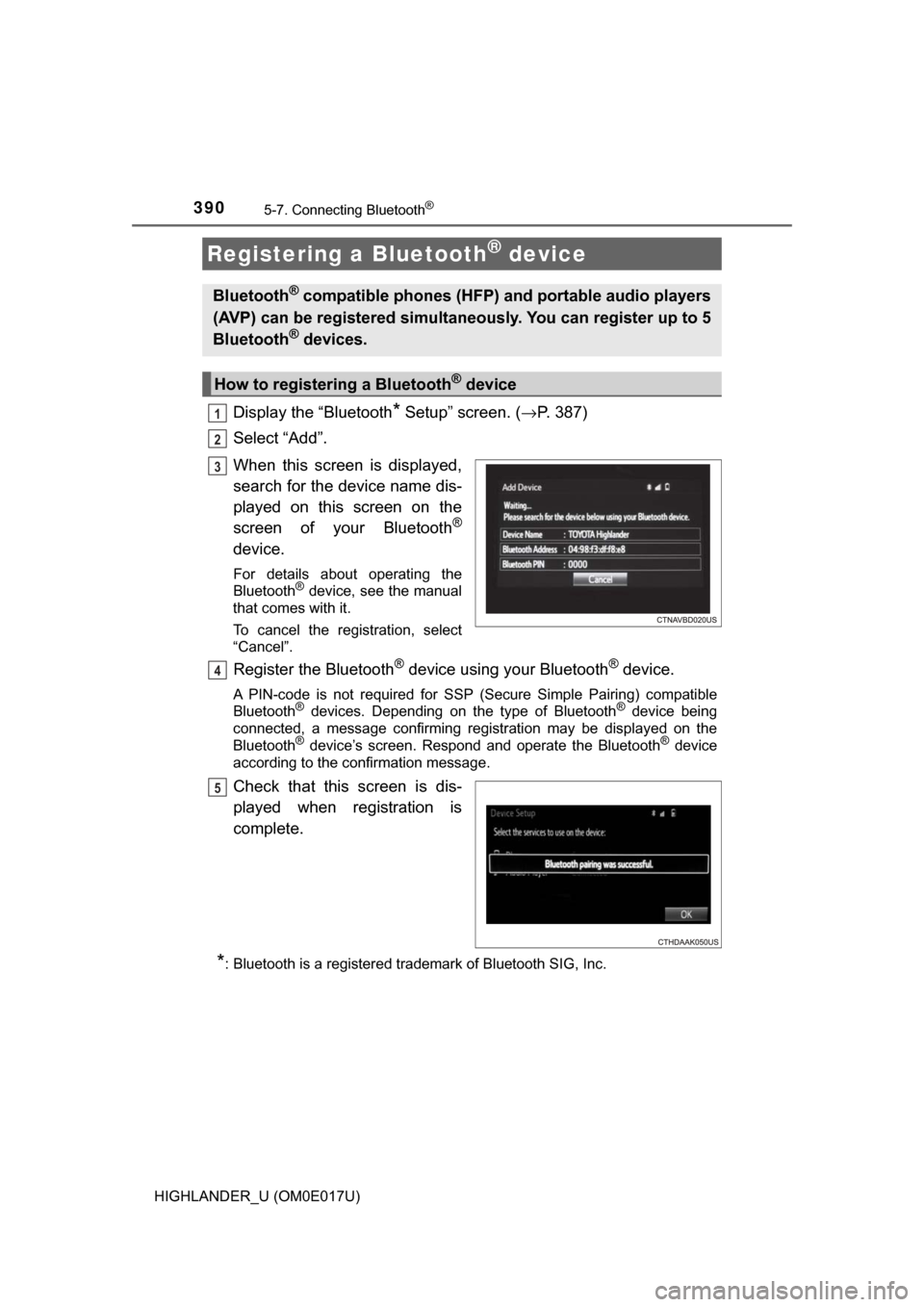
Display the “Bluetooth* Setup” screen. (→P. 387)
Select “Add”.
When this screen is displayed,
search for the device name dis-
played on this screen on the
screen of your Bluetooth
®
device.
For details about operating the
Bluetooth® device, see the manual
that comes with it.
To cancel the registration, select
“Cancel”.
Register the Bluetooth® device using your Bluetooth® device.
A PIN-code is not required for SSP (Secure Simple Pairing) compatible
Bluetooth® devices. Depending on the type of Bluetooth® device being
connected, a message confirming registration may be displayed on the
Bluetooth
® device’s screen. Respond and operate the Bluetooth® device
according to the confirmation message.
Check that this screen is dis-
played when registration is
complete.
*: Bluetooth is a registered trademark of Bluetooth SIG, Inc.
Registering a Bluetooth® device
Bluetooth® compatible phones (HFP) and portable audio players
(AVP) can be registered simultaneously. You can register up to 5
Bluetooth
® devices.
How to registering a Bluetooth® device
1
2
3
4
5
Page 409 of 732
4095-9. Bluetooth® phone
5
Audio system
HIGHLANDER_U (OM0E017U)
Display the message inbox screen. (→P. 406)
Select the desired message from the list.
Select “Quick Message”.
Select the desired message.
Select “Send”.
■Editing quick reply message Select “Quick Message”.
Select corresponding to the desired message to edit.
Select “OK” when editing is completed.
Calls can be made to an e-mail/SMS/MMS message sender's phone
number. Display the message inbox screen. (→ P. 406)
Select the desired message.
Select .
Check that the “Call” screen is displayed.
■Calling from a number within a message
Calls can be made to a number identified in a message's text area.
Display the message inbox screen. (→ P. 406)
Select the desired message.
Select the text area.
Select corresponding to the desired number.
Check that the “Call” screen is displayed.
■Calling from the incoming message screen → P. 405
Replying to a message
Calling the message sender
1
2
3
4
5
1
2
3
1
2
3
4
1
2
3
4
5